Deno: Stdout doesn't handle accents with TextEncoder
When running:
import { red } from "https://deno.land/[email protected]/fmt/colors.ts";

const text = "accents: é è à ç";

console.log(text);
console.log(red(text))

Deno.writeAllSync(Deno.stdout, new TextEncoder().encode(text));
I get:
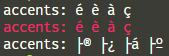
Seems like the TextEncoder doesn't handle non ASCII characters, how can I change the encoding?
 oganexon
All 7 comments
your example works for me. What OS are you using?
 crowlKats
on 5 Jun 2020
crowlKats
on 5 Jun 2020
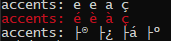
I use Windows.
The screenshot was on Git bash and here on cmd:
oganexon
on 5 Jun 2020
Your example works for me also; is this old school _cmd.exe_ or the new fancy one?
 caspervonb
on 5 Jun 2020
caspervonb
on 5 Jun 2020
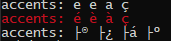
It's the same on every terminal:
Classic cmd:
cmd on Windows Terminal:
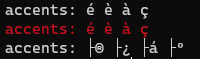
Powershell on Windows Terminal:
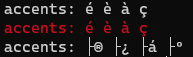
Git Bash on Hyper:
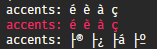
Btw it seems to be an issue with stdout:
const text = "accents: é è à ç";
const file = await Deno.open("file.txt", { write: true });
Deno.writeAllSync(file, new TextEncoder().encode(text));
is fine, I get "accents: é è à ç" in the file.
oganexon
on 5 Jun 2020
This is probably not a very satisfying answer, but this does make sense, and Deno is doing the right thing here although it might be kind of annoying. Let me explain:
TextEncoder().encode() encodes to UTF-8 because that is the web standard encoding for text. Windows uses Windows-1252 encoding for many parts of the OS* (although they are working on better UTF-8) support. The reason this works with the console.log is, is because it uses the Deno.core.print() function which is aware of the encoding that your terminal supports and correctly outputs Windows-1252. When encoding and writing to stdout, you are taking UTF-8 codepoints and giving them to a terminal that is expecting Windows-1252, which messes up the text. The reason this works on macOS and Linux is because they use UTF-8 for everything by default. The reason it works correctly when saving to a text file and then opening it, is that the text editor you are using to view the file probably has support for UTF-8 encoding and recognized it as such automatically (for example VS Code does this). If you try to cat the saved file in your terminal you will probably get the garbled text again.
There is this blog post which has some instructions on how to get UTF-8 working in the new Windows Terminal (haven't tested it so I am not sure this will work, but it's worth a try).
This is really a issue with Windows' use of Windows-1252 & UTF-16LE. It can become better in the future if Windows gets better UTF-8 support. UTF-8 is the industry standard encoding, and Microsoft is slowly taking steps in the right direction, but its slow.
* For anything in the OS that supports Unicode they use UTF-16LE which has the same compat issues with UTF-8.
FYI: Node has the same issue and it is documented here: https://nodejs.org/docs/latest-v13.x/api/fs.html#fs_fs_write_fd_string_position_encoding_callback
On Windows, if the file descriptor is connected to the console (e.g. fd == 1 or stdout) a string containing non-ASCII characters will not be rendered properly by default, regardless of the encoding used. It is possible to configure the console to render UTF-8 properly by changing the active codepage with the chcp 65001 command. See the chcp docs for more details.
 lucacasonato
on 6 Jun 2020
lucacasonato
on 6 Jun 2020
Found a solution on StackOverflow.
Run intl.cpl
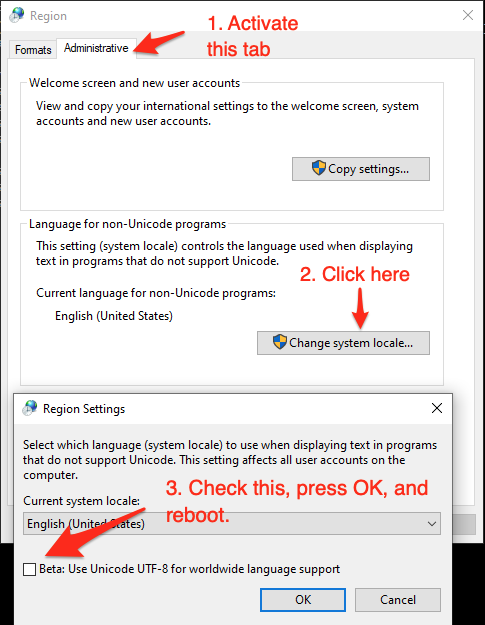
Everything worked then for me.
I wish it was activated by default.
oganexon
on 6 Jun 2020
6001
oganexon
on 7 Jun 2020
Related issues
 doutchnugget
·
3Comments
doutchnugget
·
3Comments
 davidbarratt
·
3Comments
davidbarratt
·
3Comments
 motss
·
3Comments
motss
·
3Comments
 JosephAkayesi
·
3Comments
JosephAkayesi
·
3Comments
 benjamingr
·
3Comments
benjamingr
·
3Comments
Most helpful comment
This is probably not a very satisfying answer, but this does make sense, and Deno is doing the right thing here although it might be kind of annoying. Let me explain:
TextEncoder().encode()encodes to UTF-8 because that is the web standard encoding for text. Windows uses Windows-1252 encoding for many parts of the OS* (although they are working on better UTF-8) support. The reason this works with the console.log is, is because it uses theDeno.core.print()function which is aware of the encoding that your terminal supports and correctly outputs Windows-1252. When encoding and writing to stdout, you are taking UTF-8 codepoints and giving them to a terminal that is expecting Windows-1252, which messes up the text. The reason this works on macOS and Linux is because they use UTF-8 for everything by default. The reason it works correctly when saving to a text file and then opening it, is that the text editor you are using to view the file probably has support for UTF-8 encoding and recognized it as such automatically (for example VS Code does this). If you try tocatthe saved file in your terminal you will probably get the garbled text again.There is this blog post which has some instructions on how to get UTF-8 working in the new Windows Terminal (haven't tested it so I am not sure this will work, but it's worth a try).
This is really a issue with Windows' use of Windows-1252 & UTF-16LE. It can become better in the future if Windows gets better UTF-8 support. UTF-8 is the industry standard encoding, and Microsoft is slowly taking steps in the right direction, but its slow.
* For anything in the OS that supports Unicode they use UTF-16LE which has the same compat issues with UTF-8.
FYI: Node has the same issue and it is documented here: https://nodejs.org/docs/latest-v13.x/api/fs.html#fs_fs_write_fd_string_position_encoding_callback