Deno: Cannot work on Azure Web Apps (Windows Server 2016)
I tried to execute deno on Azure Web Apps (Windows Server 2016, build 10.0.14393.0).
But when executing deno, following error is shown.
Could you please let me know any hints in order to execute deno on Azure Web Apps if there is?
D:\home>D:\home\.deno\bin\deno.exe
thread 'main' panicked at 'Could not get home directory.', src\libcore\option.rs:1190:5
stack backtrace:
   0:     0x7ff7780e3ad9 - <unknown>
   1:     0x7ff77810510b - <unknown>
   2:     0x7ff7780dbac4 - <unknown>
   3:     0x7ff7780e68e0 - <unknown>
   4:     0x7ff7780e650a - <unknown>
   5:     0x7ff7780e7138 - <unknown>
   6:     0x7ff7780e6ca4 - <unknown>
   7:     0x7ff7780e6b89 - <unknown>
   8:     0x7ff7781018f9 - <unknown>
   9:     0x7ff778101966 - <unknown>
  10:     0x7ff777c14494 - <unknown>
  11:     0x7ff777c3eca3 - <unknown>

  12:     0x7ff777b336e7 - <unknown>
  13:     0x7ff777b35349 - <unknown>
  14:     0x7ff777af1046 - <unknown>
  15:     0x7ff7780e6ae7 - <unknown>
  16:     0x7ff7780f4232 - <unknown>
  17:     0x7ff7780e7472 - <unknown>
  18:     0x7ff777af1037 - <unknown>
  19:     0x7ff778a08938 - CrashForExceptionInNonABICompliantCodeRange
  20:     0x7fffd85b84d4 - BaseThreadInitThunk
  21:     0x7fffdacae851 - RtlUserThreadStart
I would appreciate your help.
FYI.
In order to install deno, I fix the script as following before executing install.ps1.
17 "D:\Home\.deno\bin"
94 # [Environment]::SetEnvironmentVariable('Path', "$Path;$BinDir", $User)
 horihiro
All 9 comments
It reads like Azure Web Apps doesn't have a FOLDERID_Profile.
https://docs.rs/dirs/2.0.2/dirs/fn.home_dir.html
Can that be set?
Unfortunately this is used/needed even if you pass an explicit DENO_DIR.
https://github.com/denoland/deno/blob/2e1ab8232156a23afd22834c1e707fb3403c0db6/cli/deno_dir.rs#L22
 hayd
on 9 Dec 2019
hayd
on 9 Dec 2019
Thanks @hayd
Hmm...
I don't know what I should try in order to fix it.
Could you please let me know how to set FOLDERID_Profile if you have any information?
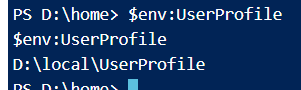
I confirmed that UserProfile already has been set.
horihiro
on 9 Dec 2019
Hmm even FOLDERID_Profile isn't set Deno shouldn't panic.
 ry
on 9 Dec 2019
ry
on 9 Dec 2019
Azure App Service does not load User Profile by default, so FOLDERID_Profile path resolution fails. This is a problem that can be avoided by setting App Service.
Actually, I'm using the option to load the User Profile (WEBSITE_LOAD_USER_PROFILE), it started without causing a panic.
 shibayan
on 17 Dec 2019
shibayan
on 17 Dec 2019
Thanks @shibayan !
I confirmed that deno works fine with WEBSITE_LOAD_USER_PROFILE setting, though single core problem (#3466) remains
horihiro
on 17 Dec 2019
shibayan's workaround is very useful.
But it cannot be used for free/shared tier (see https://github.com/projectkudu/kudu/wiki/Configurable-settings#add-user-profile-support-for-a-site).
I think that it needs to be fix about user profile access.
horihiro
on 3 Jan 2020
I'm taking a look at this one
 Spoonbender
on 14 Jul 2020
Spoonbender
on 14 Jul 2020
It seems this issue no longer reproduces on Deno 1.2.0, perhaps due to fix #6728
It does reproduce on 1.1.3
@horihiro please check and confirm if we can close the issue.
Regarding the repro itself and possibility of testing in integration test:
Theoretically, we should be able to reproduce the issue using the Windows runas command, which allows us to run a process without loading the user profile, for example:
runas /noprofile /user:%USERNAME% "deno.exe run -A test.ts"
However, I failed to reproduce it this way on my machine - further investigation may yield better results.
I did manage to reproduce it on a real Azure Web App, and I can provide my code if that helps.
Spoonbender
on 14 Jul 2020
I confirmed that [email protected] runs on Azure Web App (win) without WEBSITE_LOAD_USER_PROFILE , including Free SKU.
Many thanks @Spoonbender !
horihiro
on 15 Jul 2020
Related issues
 metakeule
·
3Comments
metakeule
·
3Comments
 watilde
·
3Comments
watilde
·
3Comments
 somombo
·
3Comments
somombo
·
3Comments
 kyeotic
·
3Comments
kyeotic
·
3Comments
 xueqingxiao
·
3Comments
xueqingxiao
·
3Comments
Most helpful comment
I confirmed that [email protected] runs on Azure Web App (win) without
WEBSITE_LOAD_USER_PROFILE, including Free SKU.Many thanks @Spoonbender !