This isn't a request, just looking for some feedback and discussion.
Right now, when writing deno code in VSCode, you can create a tsconfig.json with
{
  "compilerOptions": { "types": ["./deno.d.ts"] }
}
and run deno --types > deno.d.ts and you the editor understands what's going on.
I'd like to create a VSCode extension that does this automatically in the background and maybe eventually could provide functionality similar to the Node Debug extension.
Any thoughts on what would be valuable to have in a VSCode extension or whether this is even a good idea?
 smith
smith
All 14 comments
Sounds great!
I think I really need:
- Automatically download the import module declaration file when I save.
- Remove the error message when I import the module with the ts suffix.
For the first one, maybe we can find the source file from the deno cache, then use the tsc --emitDeclarationOnly option to get the declaration file and copy it to the project directory.
 zhmushan
on 12 Dec 2018
zhmushan
on 12 Dec 2018
Using the types compiler option isn't, I am afraid, the best way to author something in VSCode. That is because of the way that the language services will resolve some other things. You really need something more like the tsconfig.json in this deno_example repo. That example also configures the language services to behave as much like Deno does.
Also, I recently realised that if you utilise a baseUrl and paths options, that you can leverage the local cache of files in Deno, so any remote modules are available and you get code completion (and you can actually use .ts without TypeScript complaining, but a plugin could resolve the $DENO_DIR/deps automatically for you, which would be handy.
Couple with that that extracts the --types from Deno, caches it, and injects it into the language services...
@zhmushan the deno --types is the supported way of getting a hold of that file. Doing it any other way is going to cause problems. There is no need to run tsc --emitDeclarationOnly.
A plugin could replace the module resolution logic wholesale for the language services.
So I do think a plugin could certainly help.
 kitsonk
on 12 Dec 2018
kitsonk
on 12 Dec 2018
Hi, @kitsonk
Before that, I thought that deno --types can only output deno.d.ts.
Can it output a declaration file of any .ts file?
zhmushan
on 12 Dec 2018
No, but you don't need declarations with Deno. Because Deno reads .ts files perfectly fine. Why would you need a .d.ts for anything else? As I mentioned above, you can use baseUrl and paths to find any remote modules. All you need to do is have the remote modules loaded once, and then Deno will find them and provide intellisense from that point onwards. You can even pre-populate your $DENO_DIR/deps if you really wanted to.
The plugin could go ahead and make it easy to fetch remote modules for you, so Deno downloads them and caches them, but there is no need to generate any .d.ts files, ever.
kitsonk
on 12 Dec 2018
Thx, I understand.
We should get IntelliSense from $DENO_DIR/deps instead of generating a d.ts file
zhmushan
on 12 Dec 2018
@kitsonk
No, but you don't need declarations with Deno. Because Deno reads .ts files perfectly fine. Why would you need a .d.ts for anything else?
Is there any mechanism to get type definitions for a .js import? Like in node you install the \@types for something. Can you import a .d.ts? (This isn't related to the extension, but just curious.)
smith
on 12 Dec 2018
Is there any mechanism to get type definitions for a .js import?
Deno performs "CheckJS" on all JavaScript. That means any JavaScript imported in the project is given a type structure and when imported, including respecting all the appropriate JSDoc information and types. That information is available for other modules, be they TypeScript or JavaScript in the project. Configured properly, you would have access to all this in VSCode. For example:
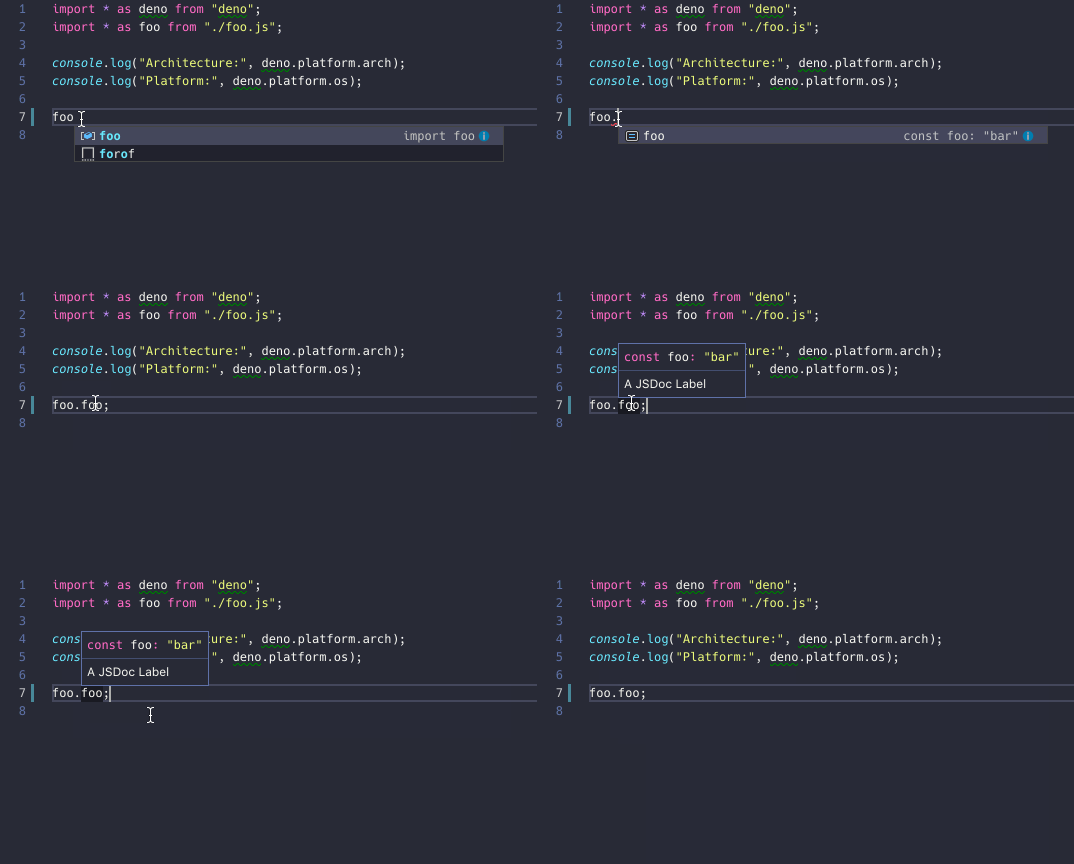
If there is some JavaScript code that you want to try to use under Deno that comes with a .d.ts file, no currently there isn't a way. Deno is going to type check that JavaScript file, unless you use `// @ts-nocheck in the file and it is going to ignore the .d.ts files. I think we would need to find a valid use case of why the functionality above isn't suitable before exploring resolving and importing .d.ts files for Deno, since it is a bit tricky.
kitsonk
on 12 Dec 2018
Ok that's some great info so thanks everybody. I think I have enough info to get started noodling on something so I can close this. If I publish something I'll put a comment here and maybe open a PR pointing to it in the docs.
smith
on 12 Dec 2018
@smith @kitsonk @zhmushan I have created a vscode extension which serves this purpose please do check it out here https://marketplace.visualstudio.com/items?itemName=ameerthehacker.deno-vscode
 ameerthehacker
on 4 Feb 2019
ameerthehacker
on 4 Feb 2019
@ameerthehacker I used your plugin and deno.d.ts does not create.
So, "deno --types" probably doesn't work too:
➜  deno-test deno --types > deno.d.ts
error: Found argument '--types' which wasn't expected, or isn't valid in this context

USAGE:
    deno [FLAGS] [OPTIONS] [SUBCOMMAND]

For more information try --help
 ekifox
on 20 Aug 2019
ekifox
on 20 Aug 2019
@ekifox I will check this out, I believe the deno cli should have changed
ameerthehacker
on 20 Aug 2019
@ekifox I have published a new version fixing this issue, it might take some to reflect bt once it does please do try and let me know
ameerthehacker
on 20 Aug 2019
@ameerthehacker I used your plugin and deno.d.ts does not create.
So, "deno --types" probably doesn't work too:➜ deno-test deno --types > deno.d.ts error: Found argument '--types' which wasn't expected, or isn't valid in this context USAGE: deno [FLAGS] [OPTIONS] [SUBCOMMAND] For more information try --help
Use "deno types > deno.d.ts"
 bishalstha
on 7 Jun 2020
bishalstha
on 7 Jun 2020
@bishalstha this is already fixed in latest version
ameerthehacker
on 7 Jun 2020
Related issues
 ry
·
3Comments
ry
·
3Comments
 sh7dm
·
3Comments
sh7dm
·
3Comments
 doutchnugget
·
3Comments
doutchnugget
·
3Comments
 benjamingr
·
3Comments
benjamingr
·
3Comments
 davidbarratt
·
3Comments
davidbarratt
·
3Comments
Most helpful comment
@smith @kitsonk @zhmushan I have created a vscode extension which serves this purpose please do check it out here https://marketplace.visualstudio.com/items?itemName=ameerthehacker.deno-vscode