Delve: could not launch process: stub exited while waiting for connection: exit status 0
In interlliJ IDE, I can't launch the debug mode, the error just like title said
- What version of Delve are you using (
dlv version)?
1.0.0-rc.1 - What version of Go are you using? (
go version)?
go1.9 darwin/amd64 - What operating system and processor architecture are you using?
Mac OS 10.11.6 - What did you do?
Just debug a file - What did you expect to see?
can launch the debug mode - What did you see instead?
 yangliCypressTest
All 18 comments
Run it with --log --log-output=lldbout,gdbwire so that we can figure out why.
 aarzilli
on 7 Aug 2018
aarzilli
on 7 Aug 2018
I can debug by delve in command line, but not in IntelliJ IDEA, so where to add above configuration when launch debug in IntelliJ?
yangliCypressTest
on 7 Aug 2018
IDEA will tell you what it runs in the section at the beginning named "go setup. Expand it and you'll see the command line used. Then you can change as needed.
 dlsniper
on 7 Aug 2018
dlsniper
on 7 Aug 2018
I can debug by delve in command line, but not in IntelliJ IDEA
Then you are probably hit by an old bug and you should update the copy of dlv that IDEA uses. I imagine it's the bug with the 'g' packet that newer versions of delve work around.
aarzilli
on 7 Aug 2018
It is strange that the debug mode is out of work suddenly without any change of IDEA on version and configuration
yangliCypressTest
on 7 Aug 2018
You probably updated XCode.
aarzilli
on 7 Aug 2018
If this is the root cause, how can I fix it? which is the correct version of XCode, I can double check it.
yangliCypressTest
on 7 Aug 2018
If you tell me the plugin version I can check if it's the latest or not. We keep track of delve progress/bug fixes and ship the latest we can whenever we release the IDE/plugin.
dlsniper
on 7 Aug 2018
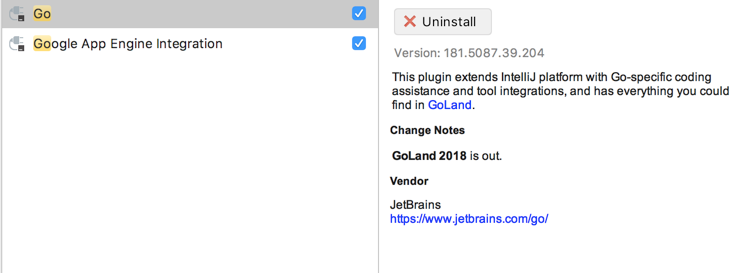
yangliCypressTest
on 7 Aug 2018
Is this info enough for you to dig the rc? @dlsniper
yangliCypressTest
on 7 Aug 2018
@yangliCypressTest what version of XCode do you use?
dlsniper
on 7 Aug 2018
7.3.1
yangliCypressTest
on 7 Aug 2018
Latest stable is 9.4.1, please upgrade to that. Also, this is pretty similar to https://youtrack.jetbrains.com/issue/GO-4733#focus=streamItem-27-3004631-0-0 so I would recommend continuing the discussion there.
dlsniper
on 7 Aug 2018
The versions of Xcode and OS are managed and controlled by IT, and I also confirmed with my colleague, we have the same version of OS, Xcode, golang, and IntelliJ IDEA, and debug mode can be launched successfully, and I didn't upgrade any of softwares before my debug env out of work.
yangliCypressTest
on 8 Aug 2018
OSX 10.13.6 Xcode 9.4.1
With $dlv debug, I ran into the same problem. But I can launch the debug mode, if change to the Native backend.
$ dlv debug --backend native
 envoak
on 23 Aug 2018
envoak
on 23 Aug 2018
In case this helps someone else, I found that having a missing/botched 127.0.0.1 localhost entry in /etc/hosts will also cause this error.
 csquire
on 22 Oct 2018
csquire
on 22 Oct 2018
Likely not a problem with delve.
aarzilli
on 14 Nov 2018
In case this helps someone else, I found that having a missing/botched
127.0.0.1 localhostentry in /etc/hosts will also cause this error.
Just removed some hosts add the end of the line commented using # and it works, many thanks !
 Thommil
on 5 Feb 2019
Thommil
on 5 Feb 2019
Related issues
 NanXiao
·
3Comments
NanXiao
·
3Comments
 devtoro
·
6Comments
devtoro
·
6Comments
 wusendong
·
5Comments
wusendong
·
5Comments
 sub-mod
·
6Comments
sub-mod
·
6Comments
 derekparker
·
6Comments
derekparker
·
6Comments
Most helpful comment
In case this helps someone else, I found that having a missing/botched
127.0.0.1 localhostentry in /etc/hosts will also cause this error.