Delve: Stub exited while attempting to connect: Segmentation Fault Error
Please answer the following before submitting your issue:
Note: Please include any substantial examples (debug session output,
stacktraces, etc) as linked gists.
- What version of Delve are you using (
dlv version)?
Delve Debugger
Version: 1.0.0-rc.1
Build:
- What version of Go are you using? (
go version)?
go version go1.8.3 darwin/amd64 - What operating system and processor architecture are you using?
macOS Sierra 10.12.5, Intel Core i7 - What did you do?
Installed dev with brew and also manually. Ran vscode with debugging. - What did you expect to see?
Expected the debugging to work. - What did you see instead?
2017/06/09 13:01:42 debugger.go:97: launching process with args: [/Users/alan.chua/Projects/GoWorkspace/src/github.com/alan-chua/strservice/main/debug]
could not launch process: stub exited while attempting to connect: signal: segmentation fault
Process exiting with code: 1
 alanpadillachua
All 22 comments
What's the output of:
stat /Library/Developer/CommandLineTools/Library/PrivateFrameworks/LLDB.framework/Versions/A/Resources/debugserver
which lldb-server
lldb-server --version
 aarzilli
on 9 Jun 2017
aarzilli
on 9 Jun 2017
Forstat/Library/Developer/CommandLineTools/Library/PrivateFrameworks/LLDB.framework/Versions/A/Resources/debugserver
I get stat: No such file or directory
For which lldb-server
I get/usr/local/bin/lldb-server
For lldb-server v
I get lldb-370.0.42
Swift-3.1
alanpadillachua
on 9 Jun 2017
Try this.
Go to /Users/alan.chua/Projects/GoWorkspace/src/github.com/alan-chua/strservice/main/ and compile your program with go build -gcflags '-N -l'. Then run:
lldb-server g :1234 -- ./yourexecutablefile
If you get a segmentation fault this is a bug with lldb and you should report it to LLVM.
Once you have done that install xcode with:
xcode-select --install
and see if delve works.
aarzilli
on 9 Jun 2017
Yea it must be a bug with LLVM
after running lldb-server g :1234 -- ./main
I got Segmentation fault: 11
When I install xcode it states: Can't install the software because it is not currently available from the Software Update server.
alanpadillachua
on 9 Jun 2017
xcode-select -p?
aarzilli
on 9 Jun 2017
/Applications/Xcode.app/Contents/Developer
alanpadillachua
on 9 Jun 2017
stat /Applications/Xcode.app/Contents/Developer/Library/PrivateFrameworks/LLDB.framework/Versions/A/Resources/debugserver
stat: No such file or directory
alanpadillachua
on 9 Jun 2017
can you find the debugserver executable anywhere inside /Applications/Xcode.app/Contents/Developer?
aarzilli
on 9 Jun 2017
Nope its not in there. There isn't even a LLDB.framework directory in Private frameworks.
alanpadillachua
on 9 Jun 2017
You need to figure out how to install xcode's command line tools, I'm not sure why xcode-select --install isn't working for you.
aarzilli
on 9 Jun 2017
I have the latest version of command line tools. I think thats why it will not let me download it.
alanpadillachua
on 12 Jun 2017
But where are they installed?
aarzilli
on 13 Jun 2017
xcode-select -p
/Applications/Xcode.app/Contents/Developer
It says it is installed here.
alanpadillachua
on 13 Jun 2017
Okay so I pulled the command line tools from developer.apple.com. Once I installed it from there it finally works thank you!
alanpadillachua
on 13 Jun 2017
You're welcome.
aarzilli
on 13 Jun 2017
i got this error too....
 chiuan
on 7 Jul 2017
chiuan
on 7 Jul 2017
Install command line tools from developer.apple.com. That should fix it.
alanpadillachua
on 7 Jul 2017
could not launch process: fork/exec /Library/Developer/CommandLineTools/Library/PrivateFrameworks/LLDB.framework/Versions/A/Resources/debugserver: no such file or directory
i have download from developer.apple.com,and install... even use xcode-select --install...tell me i have already installed..
but i always got the error again and again....TAT
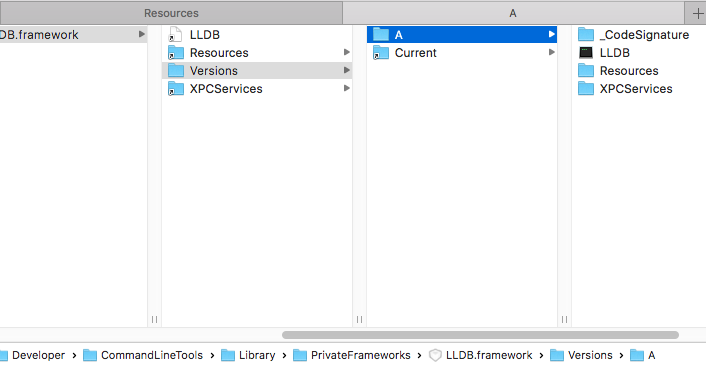
by the way, i go to the folder,,i see that file!! but why ??? and i have restart vscode...not working..
chiuan
on 7 Jul 2017
$ lldb-server v
zsh: command not found: lldb-server
how to make sure lldb-server is ok??
chiuan
on 7 Jul 2017
$ lldb -version
lldb-370.0.42
  Swift-3.1
chiuan
on 7 Jul 2017
If xcode-select --install is not working for you, try the method given at https://stackoverflow.com/a/44234214
Which works for me.
 nikunjbadjatya
on 27 Sep 2017
nikunjbadjatya
on 27 Sep 2017
Related issues
 luminacious
·
5Comments
luminacious
·
5Comments
 ramya-rao-a
·
3Comments
ramya-rao-a
·
3Comments
 ankur0101
·
4Comments
ankur0101
·
4Comments
 delaneyj
·
4Comments
delaneyj
·
4Comments
 goen
·
5Comments
goen
·
5Comments
Most helpful comment
Okay so I pulled the command line tools from developer.apple.com. Once I installed it from there it finally works thank you!