Deltachat-desktop: 'White Screen' chat window issue if Zoom not 1.0

- Platform (linux/mac/windows): Arch Linux
- Delta Chat Desktop Version: 1.2.0 (reported by app) from AUR deltachat-desktop-git r1.1.0.r1.g8602c727-1
- Expected behavior: Deltachat displays normally
- Actual behavior: White Screen except for menu bar
- Steps to reproduce the problem:
Noticed this 'white screen' issue after starting to use the 'zoom' option to reduce the text size. I used Zoom 0.8.
When in a chat, action in the UI such as using backspace key to correct previously-typed text before sending seems to trigger a 'white screen' where the content of the entire chat window disappears. Not every time, however, just occasionally. Sometimes just typing a message before sending can trigger the issue.
After that, re-launch of DC always produces a white chat window after the initial 'select a chat or create a new chat' appears, presumably when moving to the chat that was last used. Menus still operate.
However, unless the 'zoom' setting is changed back to 1.0, the white screen is permanent on every launch.
After changing back to zoom 1.0 via menus and relaunch, the problem disappears.
Have not been able to reproduce the issue with zoom set to 1.0, so that's a workaround for now.
 emulti
All 13 comments
Could you send us the logfile?
I can't image that the zoomlevel is related to this, this seems unlikely to me. :thinking:
 Simon-Laux
on 31 Mar 2020
Simon-Laux
on 31 Mar 2020
Sorry for the delay- yes 'correlation does not imply cause'.
But I can confirm that setting zoom back to 1.0 restores normal operation, and the issue only appeared when zoom was set to 0.8
With zoom set to 0.8, typing a message (a full sentence not just a few characters as in initial testing) and the screen went blank.
It is reproducible:
Set zoom to 0.8, restart deltachat.
Select session used for testing to an alternate email I have.
Start typing message to contact:
"Now is the time for all good men to come to the aid of the party"
The screen goes white at a variable point 20-30 characters into the sentence.
Log: see attached file.
dclogs-whitescreen.log
I have replaced personal identifying information.
Sorry, it's very verbose with --log-debug
Restart with zoom=0.8 still gives white screen.
Reset zoom to 1.0 using menus and restart restores normal display.
Start typing message to contact:
"Now is the time for all good men to come to the aid of the party"
Message displays normally while typing and is sent.
Strange!
emulti
on 1 Apr 2020
@emulti Ahahaa, that's a good one, great!! I have been able to reproduce it by reducing the width of the main window after typing the sentence and before pressing backspace!
Platform: Windows 8.1 Pro.
 gerryfrancis
on 2 Apr 2020
gerryfrancis
on 2 Apr 2020
It has something to do with (re)arranging the line break of the message bar.
gerryfrancis
on 2 Apr 2020
Thanks to @gerryfrancis I was able to reproduce this and I got this error:
react-dom.development.js:25671 Uncaught Error: Maximum update depth exceeded. This can happen when a component repeatedly calls setState inside componentWillUpdate or componentDidUpdate. React limits the number of nested updates to prevent infinite loops.
    at checkForNestedUpdates (react-dom.development.js:25671)
    at scheduleUpdateOnFiber (react-dom.development.js:23674)
    at dispatchAction (react-dom.development.js:17076)
    at setComposerSize (MessageListAndComposer.tsx:24)
    at ComposerMessageInput.setComposerSize (ComposerMessageInput.tsx:63)
    at ComposerMessageInput.resizeTextareaAndComposer (ComposerMessageInput.tsx:155)
    at ComposerMessageInput.componentDidUpdate (ComposerMessageInput.tsx:93)
    at commitLifeCycles (react-dom.development.js:22117)
    at commitLayoutEffects (react-dom.development.js:25344)
    at HTMLUnknownElement.callCallback (react-dom.development.js:336)
we could debounce the setComposerSize function, but then it feels like the interface is glitching around, so I believe we need to rethink the composer resizing.
But on the other hand visual glitching is better than white-screen-crashing.
Simon-Laux
on 3 Apr 2020
was fixed by #1544
Simon-Laux
on 11 May 2020
Can someone tell me in which version it was fixed? I had exactly the same issue, because of highdpi on Linux. So I had 0.8 set. But out of the nowhere the screen went full white while typing a message in DeltaChat. After changing the setting back to 1 and restarting DeltaChat, everything was normal again.
I am using DeltaChat from Flathub (Version 1.3.1)
 therealmaxmoon
on 16 May 2020
therealmaxmoon
on 16 May 2020
So this appears again? Can you check your dev console under View->Developer-Developer Tools and sent me a screenshot of last console messages there after the white-screen occurred?
Simon-Laux
on 16 May 2020
I cannot reproduce this issue anymore with version 1.3.3.
gerryfrancis
on 16 May 2020
So this appears again? Can you check your dev console under
View->Developer-Developer Toolsand sent me a screenshot of last console messages there after the white-screen occurred?
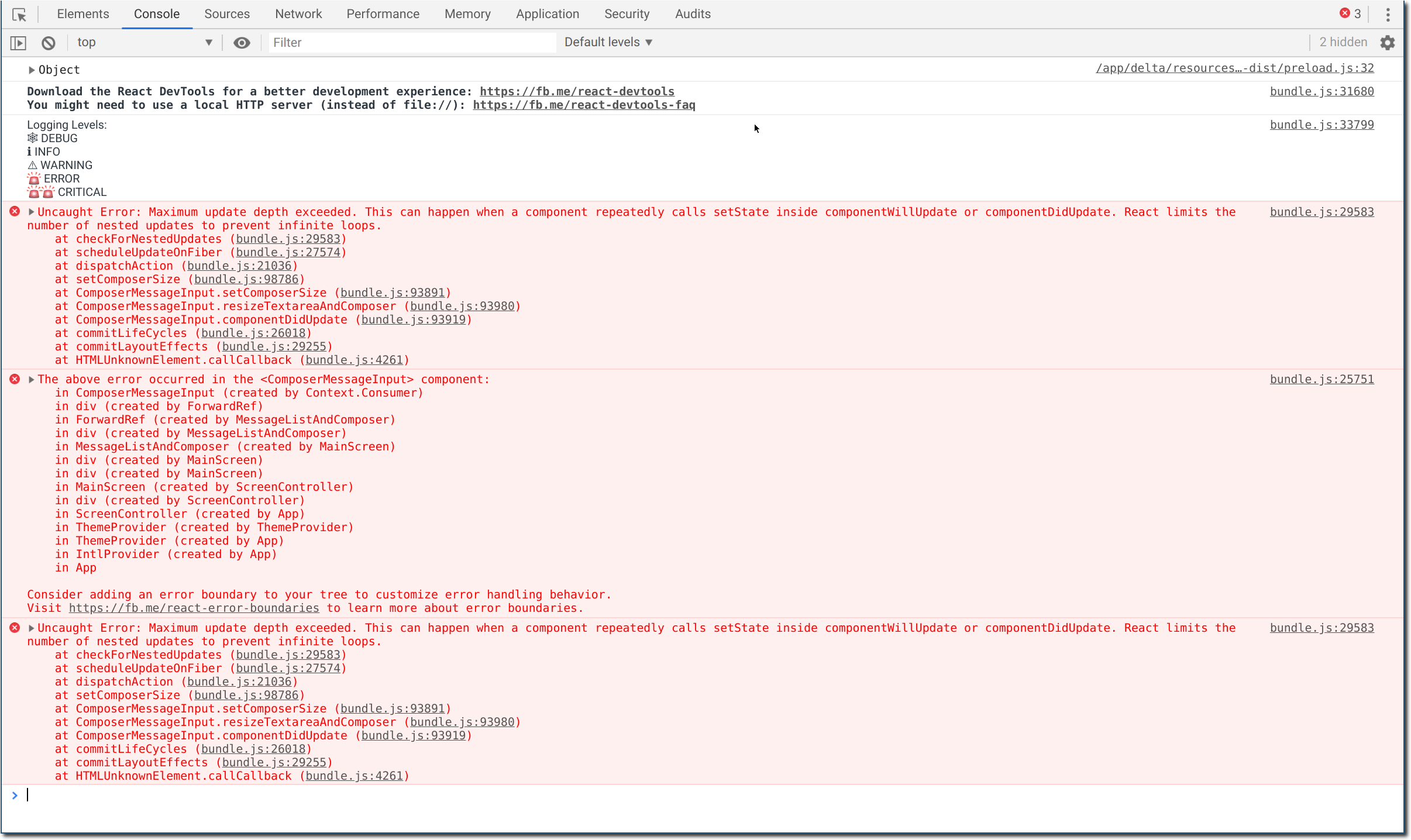
I don't know if I am a good example, because I am using Flatpak. This could be an issue too.
therealmaxmoon
on 16 May 2020
We should aim for pure css zoom levels, this electron thing is basically a hack that breaks many things (like the composer which we had to fix in a not sooo nice way)
 Jikstra
on 16 May 2020
Jikstra
on 16 May 2020
please reopen this issue when it re-apears
Simon-Laux
on 13 Oct 2020
Related issues
 prokopiy
·
4Comments
prokopiy
·
4Comments
 r10s
·
6Comments
Simon-Laux
·
3Comments
gerryfrancis
·
4Comments
r10s
·
6Comments
Simon-Laux
·
3Comments
gerryfrancis
·
4Comments
 viisauksena
·
7Comments
viisauksena
·
7Comments
Most helpful comment
We should aim for pure css zoom levels, this electron thing is basically a hack that breaks many things (like the composer which we had to fix in a not sooo nice way)