Deltachat-desktop: Builds for mac aren't signed
OS X wants that the .dmg files are signed with a developer code or something. Otherwise people have to change so security settings.
 Jikstra
All 14 comments
Maybe @dignifiedquire or @jonasreinsch can shed light on how one
can pass the OS X verification?
On Sun, Jan 20, 2019 at 11:13 -0800, Jikstra wrote:
OS X wants that the .dmg files are signed with a developer code or something. Otherwise people have to change so security settings.
--
You are receiving this because you are subscribed to this thread.
Reply to this email directly or view it on GitHub:
https://github.com/deltachat/deltachat-desktop/issues/603
 hpk42
on 20 Jan 2019
hpk42
on 20 Jan 2019
it will depend on what you are using to create the dmgs
 dignifiedquire
on 21 Jan 2019
dignifiedquire
on 21 Jan 2019
 ralphtheninja
on 21 Jan 2019
ralphtheninja
on 21 Jan 2019
have you tried the things described here: https://www.electron.build/code-signing ?
dignifiedquire
on 21 Jan 2019
I guess the main problem is that we need a apple developer account and somehow get the certificate. What's the current situation on iOS for this @dignifiedquire ? Is there a delta.chat account/certificate which we can reuse?
Jikstra
on 21 Jan 2019
On Mon, Jan 21, 2019 at 08:04 -0800, Jikstra wrote:
I guess the main problem is that we need a apple developer account and somehow get the certificate. What's the current situation on iOS for this @dignifiedquire ? Is there a delta.chat account/certificate which we can reuse?
i have an apple id but not a developer account it think.
Not sure how one can create "organizational" apple developer accounts TBH
hpk42
on 21 Jan 2019
[...] What's the current situation on iOS [...] Is there a delta.chat account/certificate which we can reuse?
@Jikstra atm, for the iOS TestFlight builds we use my personal developer account, but I think we should move that to a shared Delta Chat organization developer account.
 jonasreinsch
on 22 Jan 2019
jonasreinsch
on 22 Jan 2019
i have an apple id but not a developer account it think. Not sure how one can create "organizational" apple developer accounts TBH
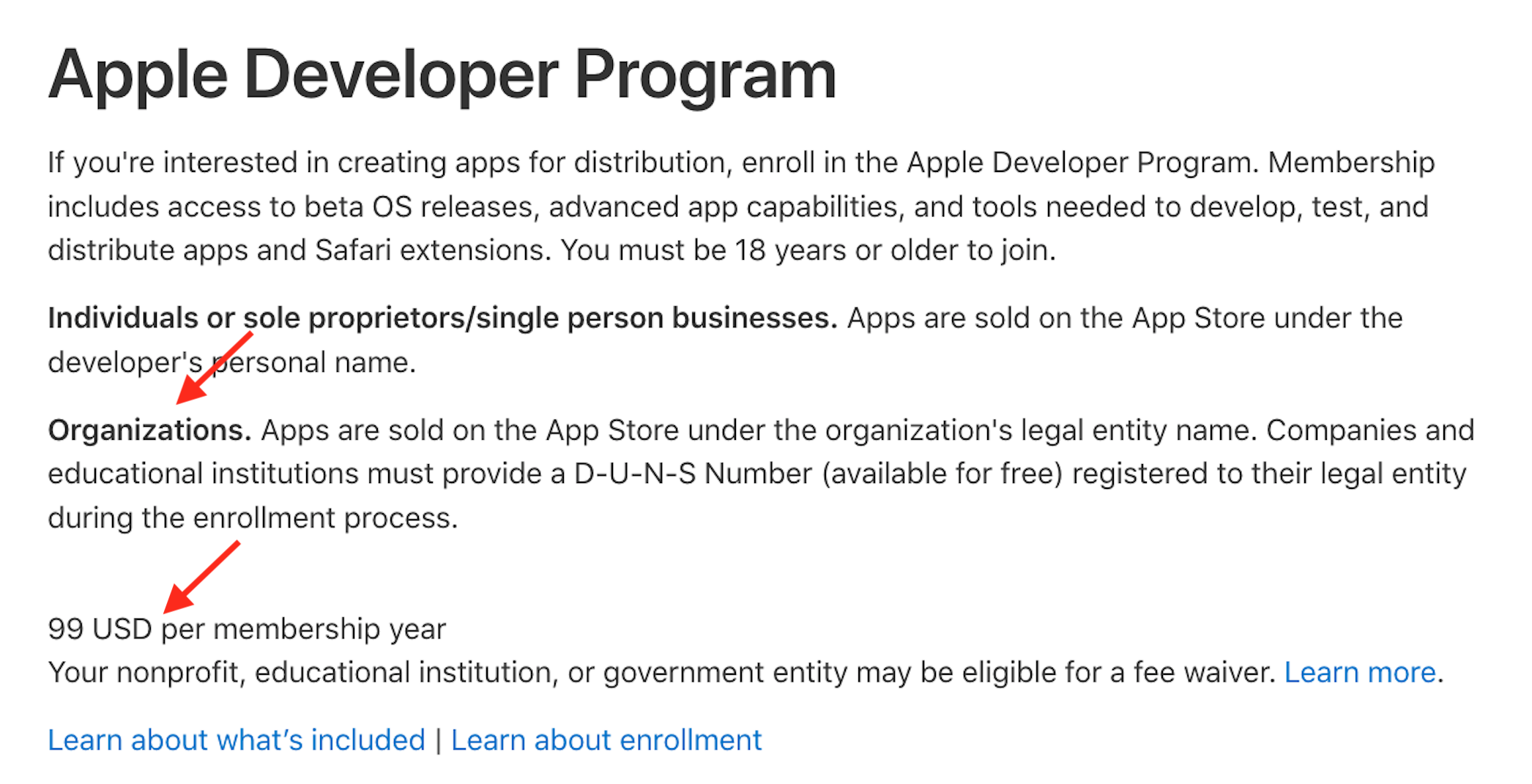
@hpk42 here it is explained https://developer.apple.com/programs/enroll/ that is, you would sign in with your Apple ID (just tried, but I think the pw I have for the id is not current), then enter your orga data (should be fairly straightforward since you already have the required data including DUNS number). Then add a credit card to be charged the yearly amount (for nonprofits there is also a fee waiver, but atm Merlinux / Delta Chat doesn't qualify / would require more paperwork I guess).
jonasreinsch
on 22 Jan 2019
https://github.com/ipfs-shipyard/ipfs-desktop/issues/66#issuecomment-456384158 has some details from someone who just walked this path
dignifiedquire
on 22 Jan 2019
👋 I've updated that issue with more details, hope it helps https://github.com/ipfs-shipyard/ipfs-desktop/issues/66#issuecomment-456384158
 olizilla
on 23 Jan 2019
olizilla
on 23 Jan 2019
@olizilla thank you so much!
dignifiedquire
on 23 Jan 2019
Thanks to @Simon-Laux there now is a signed Mac release, built on the "bbmac" machine accessible to some devs here via ssh. You can find and try the build from here currently: https://merlinux.eu/delta/DeltaChat-0.101.0.dmg
What is missing is integrating the current script/building into the CI/Release flow somhow. Probably needs some advise, help from @ralphtheninja or others ...
hpk42
on 14 Feb 2019
This will also apply to windows builds, On newer windows versions(win10) the windows defender/smart screen or other antivirus programs will block the start of unsigned applications.
 Simon-Laux
on 26 May 2019
Simon-Laux
on 26 May 2019
This is done, at least for building on the brombi mac.
Jikstra
on 27 May 2019
Related issues
 IHateMicroSoft
·
4Comments
Jikstra
·
6Comments
IHateMicroSoft
·
4Comments
Jikstra
·
6Comments
 webratte
·
7Comments
webratte
·
7Comments
 Gozala
·
4Comments
ralphtheninja
·
6Comments
Gozala
·
4Comments
ralphtheninja
·
6Comments