Deltachat-android: image rotation not working sometimes
deltachat-log-20200812-091030.txt
[deltachat-log-20200812-091030.txt]
Seen in Android 9 phone with the Google keyboard and Delta Chat 1.12.1 on redmi note 8 in MIUI 11 on the last patch, maybe it are the Android 9
How do the bug:
- open Delta Chat on landscape mode
- go to chat with a Image(in my case .png)
- put the keyboard in fullscreen likewise you are trying to do a message
- rotate to portrait again
 RubenDavidPerezJimenez
All 12 comments
@RubenDavidPerezJimenez I cannot reproduce that in version 1.12.2, neither with a JPEG nor a PNG image. Please update to the latest version, try again, and report back. Thanks!
 gerryfrancis
on 12 Aug 2020
gerryfrancis
on 12 Aug 2020
I have updated and got the same error maybe be MIUI
RubenDavidPerezJimenez
on 13 Aug 2020
@RubenDavidPerezJimenez I have tried again, but I still cannot reproduce your issue. Please post a screenshot, maybe I do not understand you correctly. Thanks!
gerryfrancis
on 13 Aug 2020
@RubenDavidPerezJimenez does it happen to all images for you? or only for specific images? there is the error java.lang.IllegalArgumentException: y + height must be <= bitmap.height() in the log, so it might be specific to a concrete image, it that is related at all.
and yes, some screenshots would be helpful, i also have no good imagination what to do on trying to reproduce the issue :)
 r10s
on 13 Aug 2020
r10s
on 13 Aug 2020
@r10s Have you tried with a PNG image as well?
gerryfrancis
on 13 Aug 2020
I thought at first that they were the pictures but it seems to me that is the background
to do it you must open a chat in this way
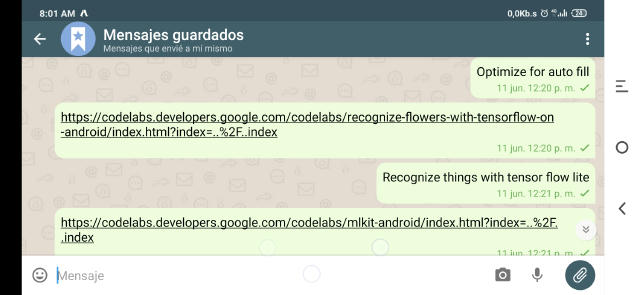
Later go to click on the message writing view and let the keyboard open in fullscreen like these
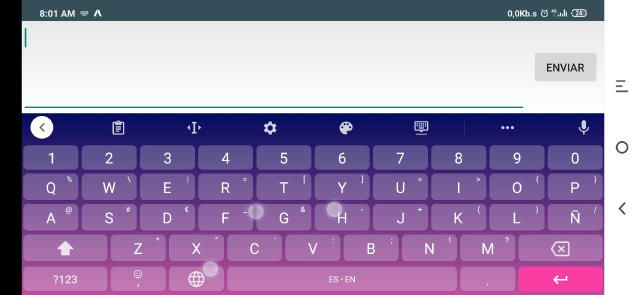
And now rotate the Chat and will close the app
RubenDavidPerezJimenez
on 13 Aug 2020
@Hocuri Could you reproduce the issue? Try as I might, I cannot.
I tried with a 1x1 px jpg and png, switched keyboard variants. All working as expected.
(same for 1000x1 px and 1x1000 px)
 angelo-fuchs
on 15 Aug 2020
angelo-fuchs
on 15 Aug 2020
@RubenDavidPerezJimenez When did you last set the image?
If you set it to default and then to your pictune in 1.12.1 does the error still appear?
angelo-fuchs
on 15 Aug 2020
I have reset the image, i have changed it and i put the default image back, and it persist, the only shape that it doesn't crashed is when i put the keyboard in floating mode
RubenDavidPerezJimenez
on 16 Aug 2020
@angelo-fuchs yes. DC crashed when I followed these instructions. It has nothing to do with your selected background image (it happened with the default DC background on my phone).
java.lang.IllegalArgumentException: y + height must be <= bitmap.height() was also in my log.
 Hocuri
on 16 Aug 2020
Hocuri
on 16 Aug 2020
i believe the problem is in the measureViewSize method, my phone have notch and i think it changes 2 times the size and the method changes the size only 1 time
RubenDavidPerezJimenez
on 16 Aug 2020
@RubenDavidPerezJimenez You are correct.
I could reproduce the issue on a Android 9 emulator.
measureViewSize gets called twice for portrait in this scenario and the first one has a smaller size than the second one.
So when we tell the app to crop the smaller size to the larger it fails.
angelo-fuchs
on 17 Aug 2020
Related issues
gerryfrancis
·
4Comments
 adbenitez
·
4Comments
angelo-fuchs
·
4Comments
adbenitez
·
4Comments
angelo-fuchs
·
4Comments
 gitkald
·
5Comments
gitkald
·
5Comments
 escoand
·
4Comments
escoand
·
4Comments
Most helpful comment
@angelo-fuchs yes. DC crashed when I followed these instructions. It has nothing to do with your selected background image (it happened with the default DC background on my phone).
java.lang.IllegalArgumentException: y + height must be <= bitmap.height() was also in my log.