Deltachat-android: Allow for customized Background image
Old UI allowed for customized background image. We need that in the new as well.
 angelo-fuchs
All 49 comments
to get some contrast, to unequal backgrounds, we may add a drop shadow to the bubbles, eg. by the old telegram background images or by the following code in message_bubble_background*.xml
<?xml version="1.0" encoding="utf-8"?>
<layer-list
    xmlns:android="http://schemas.android.com/apk/res/android">
    <item
        android:top="2px"
        android:left="2px">

        <shape android:shape="rectangle">
            <corners
                android:topLeftRadius="@dimen/message_corner_radius"
                android:topRightRadius="@dimen/message_corner_radius"
                android:bottomRightRadius="@dimen/message_corner_collapse_radius"
                android:bottomLeftRadius="@dimen/message_corner_radius" />
            <solid android:color="@color/black" />
        </shape>
    </item>

    <item
        android:bottom="2px"
        android:right="2px">

        <shape android:shape="rectangle">
            <corners
                android:topLeftRadius="@dimen/message_corner_radius"
                android:topRightRadius="@dimen/message_corner_radius"
                android:bottomRightRadius="@dimen/message_corner_collapse_radius"
                android:bottomLeftRadius="@dimen/message_corner_radius" />
            <solid android:color="@color/white" />
        </shape>
    </item>
</layer-list>
EDIT: i would suggest to postpone this a bit, see https://github.com/deltachat/deltachat-android-ii/issues/50#issuecomment-431308906
 r10s
on 2 Oct 2018
r10s
on 2 Oct 2018
Will tackle that one this week.
 Boehrsi
on 8 Oct 2018
Boehrsi
on 8 Oct 2018
We added some stuff the to proguard config to avoid crashes.
We should decide about how the user can reset / unset the background. We could add just another option to unset the background. We haven't added a preview for the background, as the user can see it on the chat screen anyway.
Boehrsi
on 12 Oct 2018
The feature itself is implemented and working now.
Boehrsi
on 12 Oct 2018
We could also add a preview screen which allows the user to set / unset the background, similar to the old app.
Boehrsi
on 12 Oct 2018
We haven't added a preview for the background, as the user can see it on the chat screen anyway.
i also think that is not really important.
but maybe we should use a non-white default background if we change the colors of the bubbles.
maybe just the one from the old app, at least until we find sth. better (otoh there have never been any complains and it contrasts very good with the white/light-green bubbles, also because the left side is lighter than the right side :)
EDIT: i would suggest to postpone this a bit, see https://github.com/deltachat/deltachat-android-ii/issues/50#issuecomment-431308906
r10s
on 12 Oct 2018
shall the selected background already be shown?
i cannot see it :)
wrt. preview: yes, sort of preview would be helpful, however, maybe a mini-preview in the "Appearance" overview is sufficient? right place in the "Chat-preview" row, analog under the name of the Theme and the name of the Language?
this way. the user would get immediate feedback that sth. is selected without the need of additional activities and so on (we can improve things later, but for now this seems sufficient)
wrt. reset: clicking on the entry may open a menu first (similar to "Theme" or "language" with the options "Reset to default" and "Select from gallery")
r10s
on 12 Oct 2018
Good ideas and yes it should be already shown. Worked on the test phone, but also not working on mine, potentially something got lost during commit / push stuff. @florianhaar and I will adjust that on Monday, including some preview / reset adjustments.
Boehrsi
on 12 Oct 2018
We found the problem and fixed it. Now we adjust the UI. We will add:
- Some sort of preview
- The possibility to set an image or reset to the default one
- We will add some elevation to the chat bubbles
- We will add a grey / white shade to the chat input text field, so the written text is also readable on dark backgrounds
- We will add an info to the preference category summary which type (default vs. custom) of dialog currently is set
Boehrsi
on 15 Oct 2018
great :)
- wrt preview: i think a mini-preview as mentioned above would be sufficient
- wrt chat bubbles: no need to do sth. there, they will change completely the next days.
- wrt input field: the input field should just be not transparent, it should stay white
r10s
on 15 Oct 2018
I would leave the default to just white or black as it is now... otherwise changing to the dark theme would present a strange combination with the backgroundimage of the "old deltachat"
 violoncelloCH
on 15 Oct 2018
violoncelloCH
on 15 Oct 2018
the bubbles will turn to white/lightGreen instead of colored, so a white background is no good idea.
for the dark theme, the bubbles could turn to black/darkGreen, so everything is fine.
we will see, how the background above works with a dark theme, maybe we could just darken it a bit, maybe we can do this even for user-defined backgrounds then. however, the dark theme is not the main problem here, this can be adapted later.
r10s
on 15 Oct 2018
in general: we can refine things later, for now, it's more to "get things done".
and as we got good feedback for the layout of the old ui, there is no need to change "everything" there. of course, these layout questions can be discussed in the forum at https://support.delta.chat :)
r10s
on 15 Oct 2018
I just found the design of the actual dev version much better than the "old" one...
violoncelloCH
on 15 Oct 2018
did not want to close this, sorry :)
r10s
on 15 Oct 2018
@violoncelloch yes, design questions are hard :)
as said above, for now, we'll change the background and see how things evolve from that :)
r10s
on 15 Oct 2018
Of course...
I just think the design is better with a plain background. Of course the user should have the option to set an other background...
I would go for plain background as default and propose the background from the "old deltachat" as first option
violoncelloCH
on 15 Oct 2018
Added a "Custom" or "Default" summary in the preferences
 florianhaar
on 19 Oct 2018
florianhaar
on 19 Oct 2018
@florianhaar great job, looks very good.
wrt to a non-white default background as mentioned above and also to changing the bubble layout:
i would not do the changes now.
it looks better as i have expected, so, i would like to close this issue now and just work with the current options for a while and start the next iteration after that.
r10s
on 19 Oct 2018
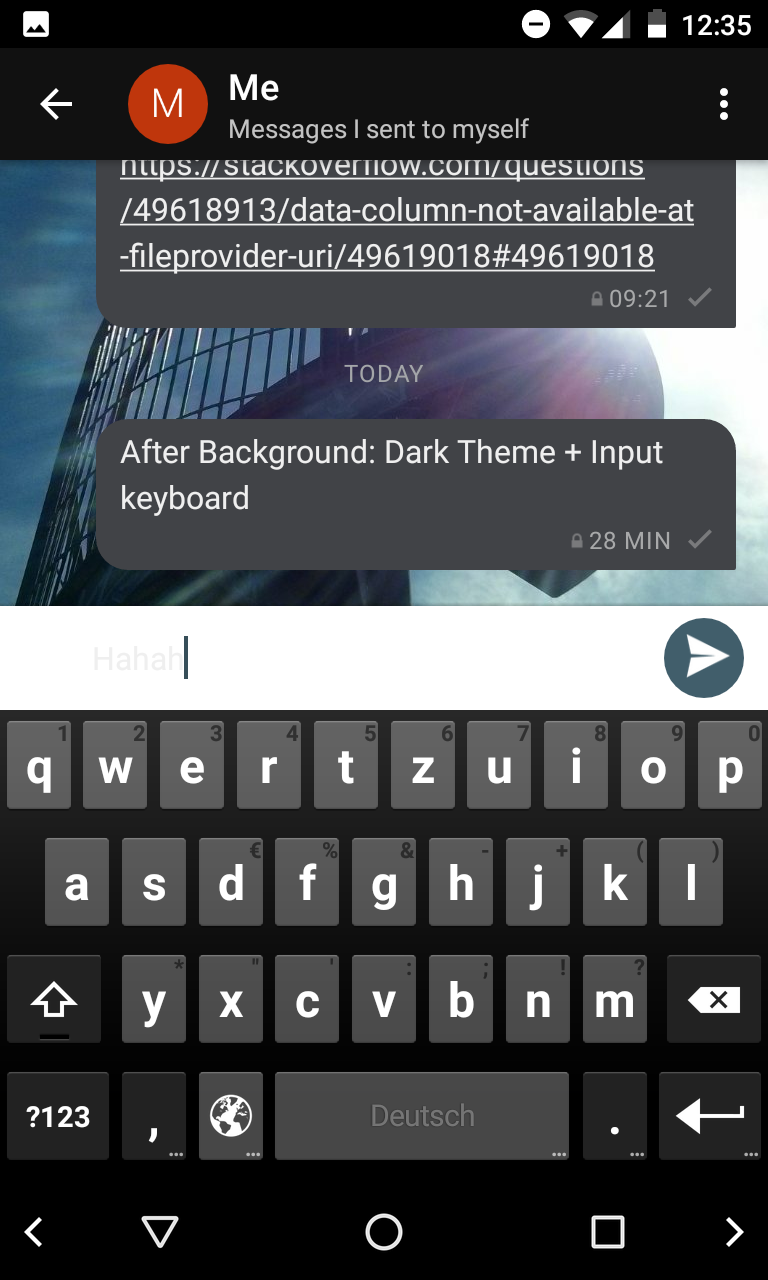
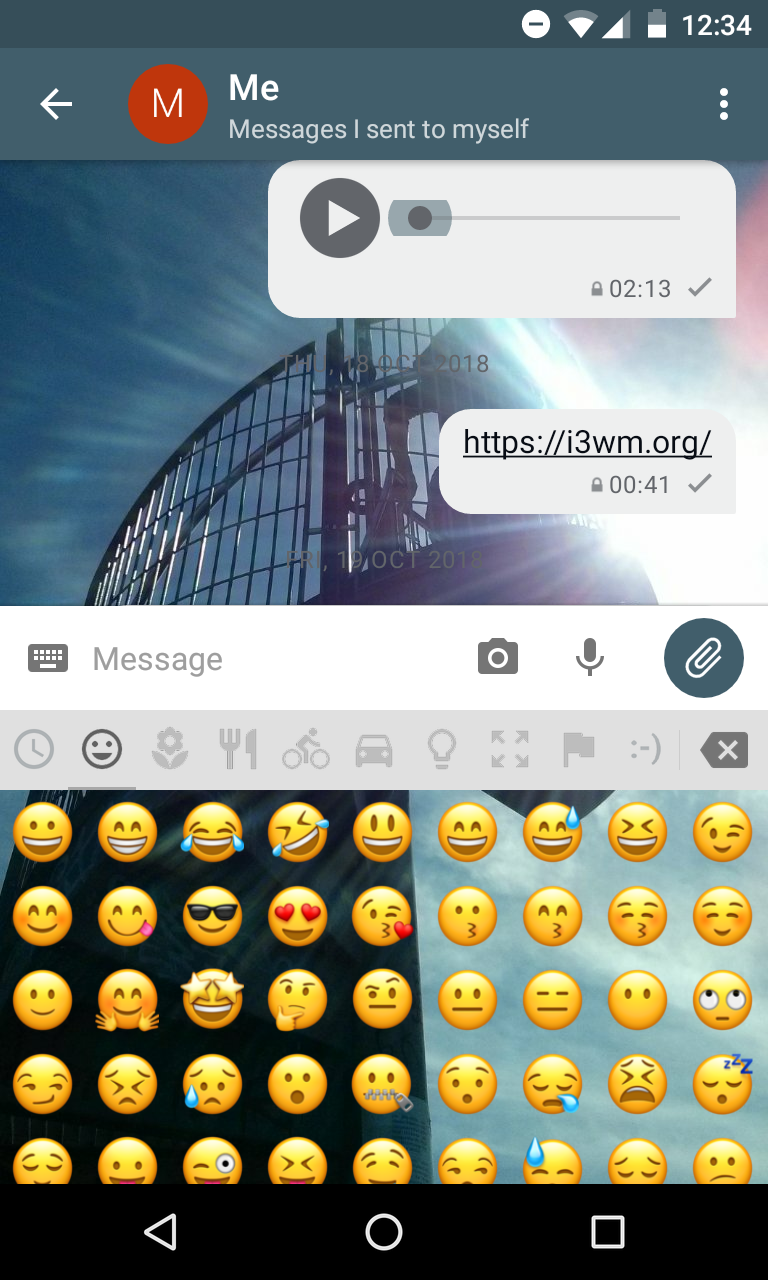
two issue i encountered:
- when the theme is set to "dark mode", the input field text+controls do not contrast to the background, it's more or less "white on white"
- the the emoticons drawer is opened, the background is the custom background instead of back/white
i think, both issues come from setting the background of the input entry just to "white". before we introduced custom backgrounds, i assume it was "transparent" which was fine as the background was white or black - this also automatically set the background for the emoticons drawer.
to fix this, the background of the input line as well as of the emoticons-drawer should be set to white (or sth. light) in light-mode and to black (or sth. dark) in dark mode.
the control-colors are already fine, it's just the background that was switched from "transparent" to just always "white" and was forgotten to adjust for the emoticons-drawer.
r10s
on 21 Oct 2018
will tackle that now
florianhaar
on 2 Nov 2018
implemented the requested changes
florianhaar
on 2 Nov 2018
great :)
r10s
on 2 Nov 2018
@florianhaar great, this is much better now.
some nitpicking when a background image is set:
- when the attachment view or the emotiocons are opened, they are just overlayed and the background stays in place
- when the virtual keyboard is opened, the background is _moved up_
as the overlays of 1. and 2. are of different sizes, i think it would be better to go for 1. in both cases - otherwise the background jumps up and down eg. when switching between the keyboard and the emoticons list - which is a quite normal operation.
@florianhaar can you please check, if this is (easily) possible? it is probably not the most important issue, however, i think it is worth at least _checking_ if we can fix this (without breaking any android rules and without hacking -i know, that this keyboard overlay-thingie can be tricky)
r10s
on 2 Nov 2018
@r10s I talked with my colleague about this problem and we both think that it is no easy task. The keyboard is handled by the system and the emoji viewer is a control from the app. It is indeed tricky and should be handled in a seperate issue.
florianhaar
on 5 Nov 2018
@florianhaar currently the background image seems to be anchored to the bottom. wouldn't it help to anchor it to the top center?
this way, the height should not make a difference.
@angelo-fuchs maybe you have an idea on this?
but i agree, if this gets too hacky, we should just file a new issue and target this at a later point.
r10s
on 6 Nov 2018
@florianhaar also noticed, that the background of the input-field is not gray instead of white (in the light theme) - is there a specific reason for this?
r10s
on 8 Nov 2018
@r10s there is no specific reason for the grey color. I used the same background as in the emoji view. I will change this to white today and will have a look at the background problem :)
florianhaar
on 9 Nov 2018
@r10s now the input-field is white and the background is fix and will not get crunched
florianhaar
on 9 Nov 2018
@florianhaar great, thank you, we're getting closer :)
however, there is one bug left: if _no_ background image is set, the background seems not to be redrawn and scrolling results in smearing the content over the screen:
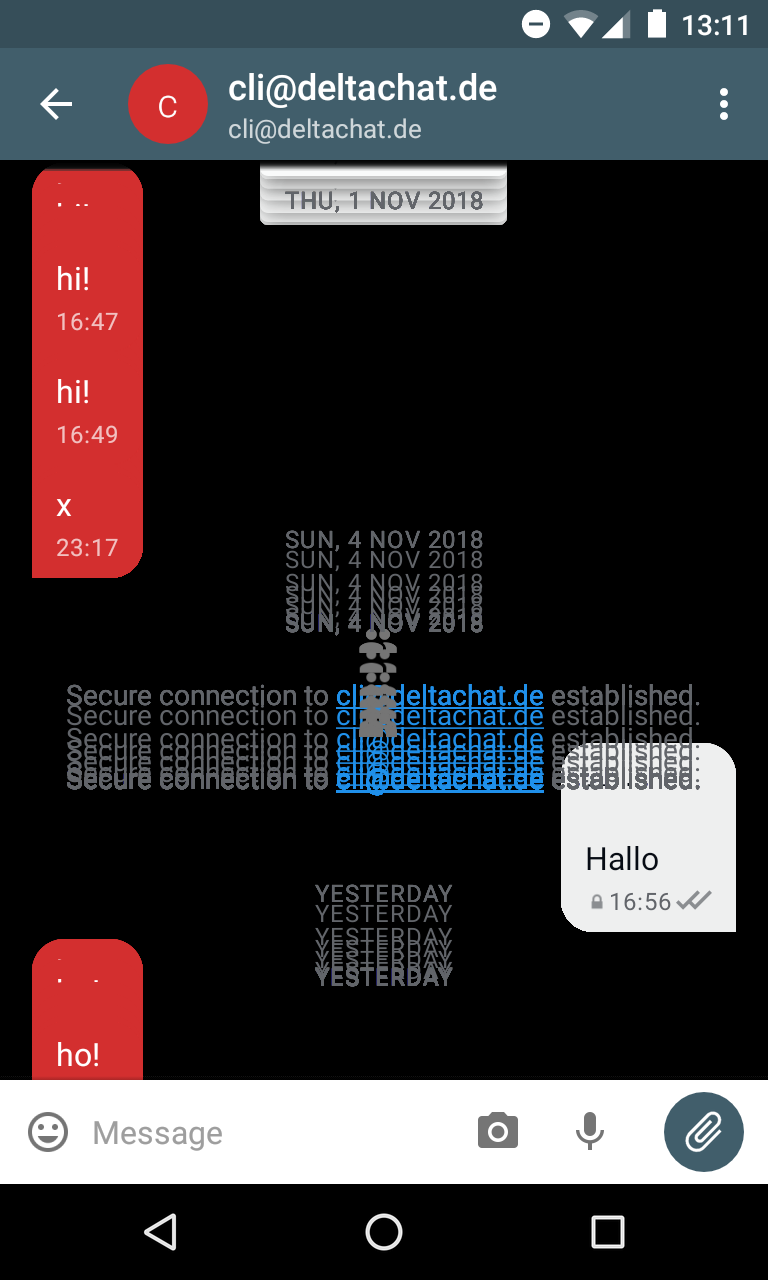
(screenshot from the _light_ theme, i think the white background is just not drawn and therefore back. the dark theme background looks the same)
EDIT: another thing i noticed: the background images are stretched to the width/height of the view which seems to result in _and_ aspect ratio.
if there are persons on it, they are either very slim or very fat :)
i think, we should try to keep the original aspect ration. if this is not easily possible with the view/layout flags (i think so ... they are probably needed to keep the image in position and solve the problems from some comments above), i would suggest to create a new image "just in time" that fits to the view. then we also have the control, which part of the image we show (i would vote for the center)
r10s
on 9 Nov 2018
Trying to set a background image results in Exception:
E/AndroidRuntime: FATAL EXCEPTION: main
    android.content.ActivityNotFoundException: No Activity found to handle Intent { act=android.intent.action.OPEN_DOCUMENT cat=[android.intent.category.OPENABLE] typ=image/* }
        at android.app.Instrumentation.checkStartActivityResult(Instrumentation.java:1628)
        at android.app.Instrumentation.execStartActivity(Instrumentation.java:1423)
        at android.app.Activity.startActivityForResult(Activity.java:3388)
        at android.support.v4.app.BaseFragmentActivityApi16.startActivityForResult(BaseFragmentActivityApi16.java:54)
        at android.support.v4.app.FragmentActivity.startActivityForResult(FragmentActivity.java:67)
        at android.app.Activity.startActivityForResult(Activity.java:3349)
        at android.support.v4.app.FragmentActivity.startActivityForResult(FragmentActivity.java:732)
        at org.thoughtcrime.securesms.preferences.ChatBackgroundActivity$GalleryClickListener.onClick(ChatBackgroundActivity.java:191)
        at android.view.View.performClick(View.java:4211)
        at android.view.View$PerformClick.run(View.java:17446)
        at android.os.Handler.handleCallback(Handler.java:725)
        at android.os.Handler.dispatchMessage(Handler.java:92)
        at android.os.Looper.loop(Looper.java:153)
        at android.app.ActivityThread.main(ActivityThread.java:5299)
        at java.lang.reflect.Method.invokeNative(Native Method)
        at java.lang.reflect.Method.invoke(Method.java:511)
        at com.android.internal.os.ZygoteInit$MethodAndArgsCaller.run(ZygoteInit.java:833)
        at com.android.internal.os.ZygoteInit.main(ZygoteInit.java:600)
        at dalvik.system.NativeStart.main(Native Method)
Settings -> Display -> Chack-Background -> From Gallery -> Exception.
Together with #122 this makes DC currently unusable, please fix with priority.
angelo-fuchs
on 15 Nov 2018
@angelo-fuchs interesting, maybe this came from the cleanup yesterday. i do not get the this Exception on my phone (nexus 4), however. can you try to debug this on your machine?
(however, will also try it on the other testphone around)
wrt inital redraw error: maybe @florianhaar is around tomorrow (friday) to have a loot at this.
r10s
on 15 Nov 2018
also not reproducible on my other test device (moto g4)
r10s
on 15 Nov 2018
I will take a look at the problems today
florianhaar
on 16 Nov 2018
@r10s The problem with the not redrawn image is fixed and should be now white again in the light theme. I can't reproduce the scrolling problem and the crash.
florianhaar
on 16 Nov 2018
The problem with the not redrawn image is fixed and should be now white again in the light theme.
@florianhaar great :)
have you also tested the dark theme? with the black default background?
I can't reproduce the scrolling problem and the crash.
do you mean the issue reported by @angelo-fuchs ? asking because there is no scrolling involved :)
r10s
on 16 Nov 2018
have you also tested the dark theme? with the black default background?
@r10s yes. Dark theme works :)
I can't reproduce the scrolling problem and the crash.
With crash I mean the exception that @angelo-fuchs mentioned
Trying to set a background image results in Exception:
E/AndroidRuntime: FATAL EXCEPTION: main
android.content.ActivityNotFoundException: No Activity found to handle Intent { act=android.intent.action.OPEN_DOCUMENT cat=[android.intent.category.OPENABLE] typ=image/* }
at android.app.Instrumentation.checkStartActivityResult(Instrumentation.java:1628)
at android.app.Instrumentation.execStartActivity(Instrumentation.java:1423)
at android.app.Activity.startActivityForResult(Activity.java:3388)
at android.support.v4.app.BaseFragmentActivityApi16.startActivityForResult(BaseFragmentActivityApi16.java:54)
at android.support.v4.app.FragmentActivity.startActivityForResult(FragmentActivity.java:67)
at android.app.Activity.startActivityForResult(Activity.java:3349)
at android.support.v4.app.FragmentActivity.startActivityForResult(FragmentActivity.java:732)
at org.thoughtcrime.securesms.preferences.ChatBackgroundActivity$GalleryClickListener.onClick(ChatBackgroundActivity.java:191)
at android.view.View.performClick(View.java:4211)
at android.view.View$PerformClick.run(View.java:17446)
at android.os.Handler.handleCallback(Handler.java:725)
at android.os.Handler.dispatchMessage(Handler.java:92)
at android.os.Looper.loop(Looper.java:153)
at android.app.ActivityThread.main(ActivityThread.java:5299)
at java.lang.reflect.Method.invokeNative(Native Method)
at java.lang.reflect.Method.invoke(Method.java:511)
at com.android.internal.os.ZygoteInit$MethodAndArgsCaller.run(ZygoteInit.java:833)
at com.android.internal.os.ZygoteInit.main(ZygoteInit.java:600)
at dalvik.system.NativeStart.main(Native Method)Settings -> Display -> Chack-Background -> From Gallery -> Exception.
and with the scrolling problem I mean the problem described in #122
florianhaar
on 16 Nov 2018
With crash I mean the exception that @angelo-fuchs mentioned
okay :)
and with the scrolling problem I mean the problem described in #122
ahh, i see, but isn't this just a duplicate of the one above? **confused** :)
r10s
on 16 Nov 2018
@r10s yes i think so, but I never saw this weird conversation view. And I cannot reproduce it :)
florianhaar
on 16 Nov 2018
@florianhaar tested, #122 and the https://github.com/deltachat/deltachat-android-ii/commit/7a5f3823150720976aa044ac56b8f7c8de65e5be is fixed for me. that it did no happen for you may come from different behaviors of different android versions on "bad images" - some seems to paint white, others nothing. i've seen similar behaviors also on windows ...
@florianhaar any chance to target this remaining background-issue:
another thing i noticed: the background images are stretched to the width/height of the view which seems to result in and aspect ratio.
if there are persons on it, they are either very slim or very fat :)
i think, we should try to keep the original aspect ration. if this is not easily possible with the view/layout flags (i think so ... they are probably needed to keep the image in position and solve the problems from some comments above), i would suggest to create a new image "just in time" that fits to the view. then we also have the control, which part of the image we show (i would vote for the center)
however, we should be careful not to break the things that are already fixed again :) esp. avoid "jumping" the background image on toggling keyboard/emoticons :)
@angelo-fuchs can you re-test the crash with the new changes
r10s
on 16 Nov 2018
any chance to target this remaining background-issue:
@r10s I will take a look at it :-)
florianhaar
on 16 Nov 2018
@florianhaar great :) it's just because ppl on background images are either way too tall or too wide otherwise - this, however, may cause other, probably more personal, issues :)
of course, keeping the aspect ratio will require to cut things from the image top&bottom or left&right, however, this is probably the better solution.
r10s
on 16 Nov 2018
@r10s I cannot reproduce this problem. What we do is
Bitmap scaledBitmap = GlideApp.with(context).asBitmap().load(imageUri).centerCrop().skipMemoryCache(true).diskCacheStrategy(DiskCacheStrategy.NONE).submit(size.x, size.y).get();
we centerCrop the image and it is scaled to the windows size. And I can't see that the images are stretched. It worked with horizontal and vertical images. Tested it on different devices with higher and lower resolution.
florianhaar
on 16 Nov 2018
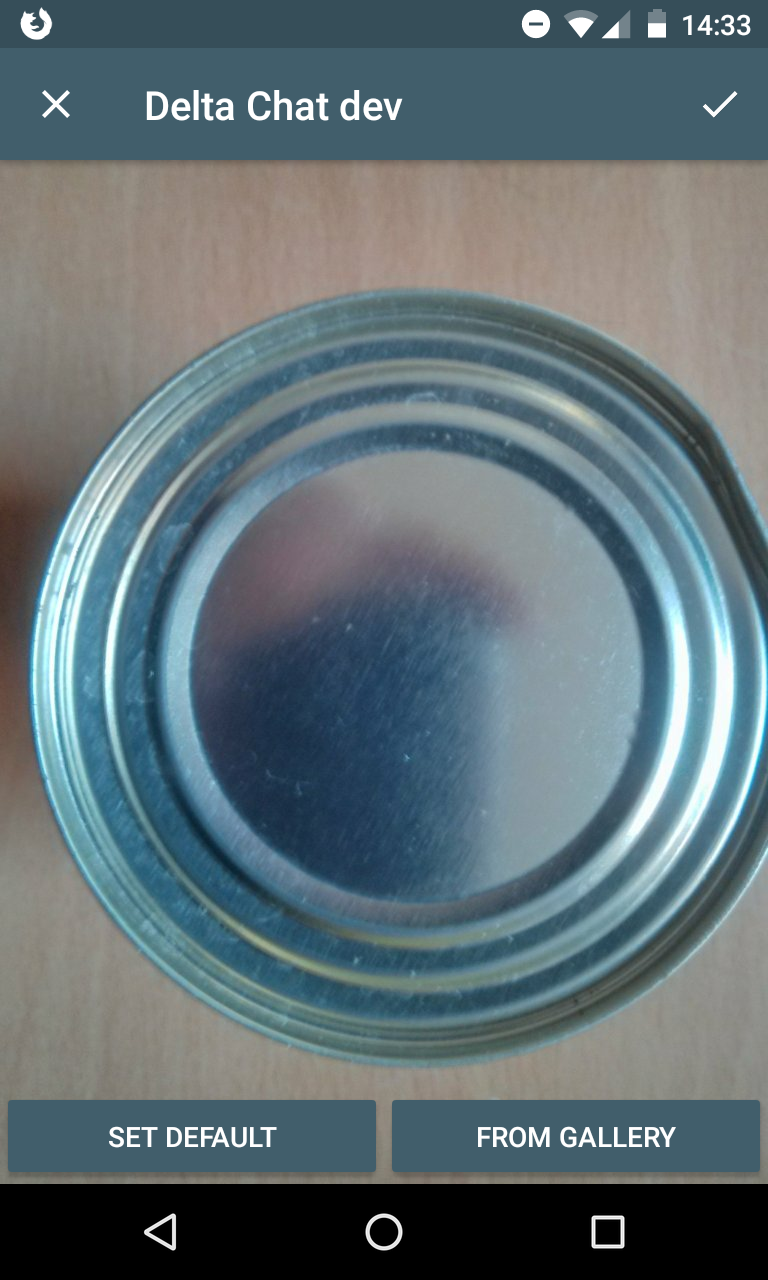
@florianhaar the following images show how it looks to me on my nexus 4 with a "circle" image:
- the first image is correct - shown in the preview of the background selection.
- the second image is the landscape view - obvious too wide
- the third image is in portait view - a bit too small, but still recognizable elliptic instead of round
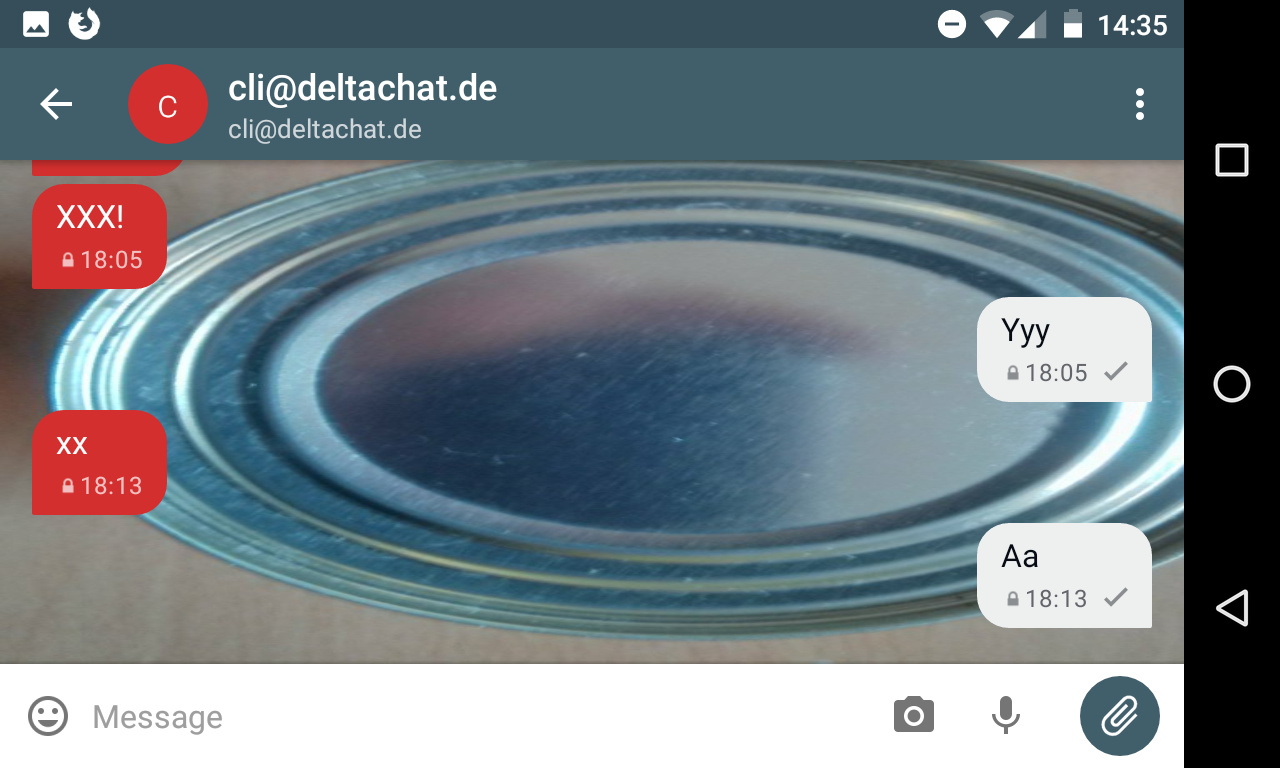
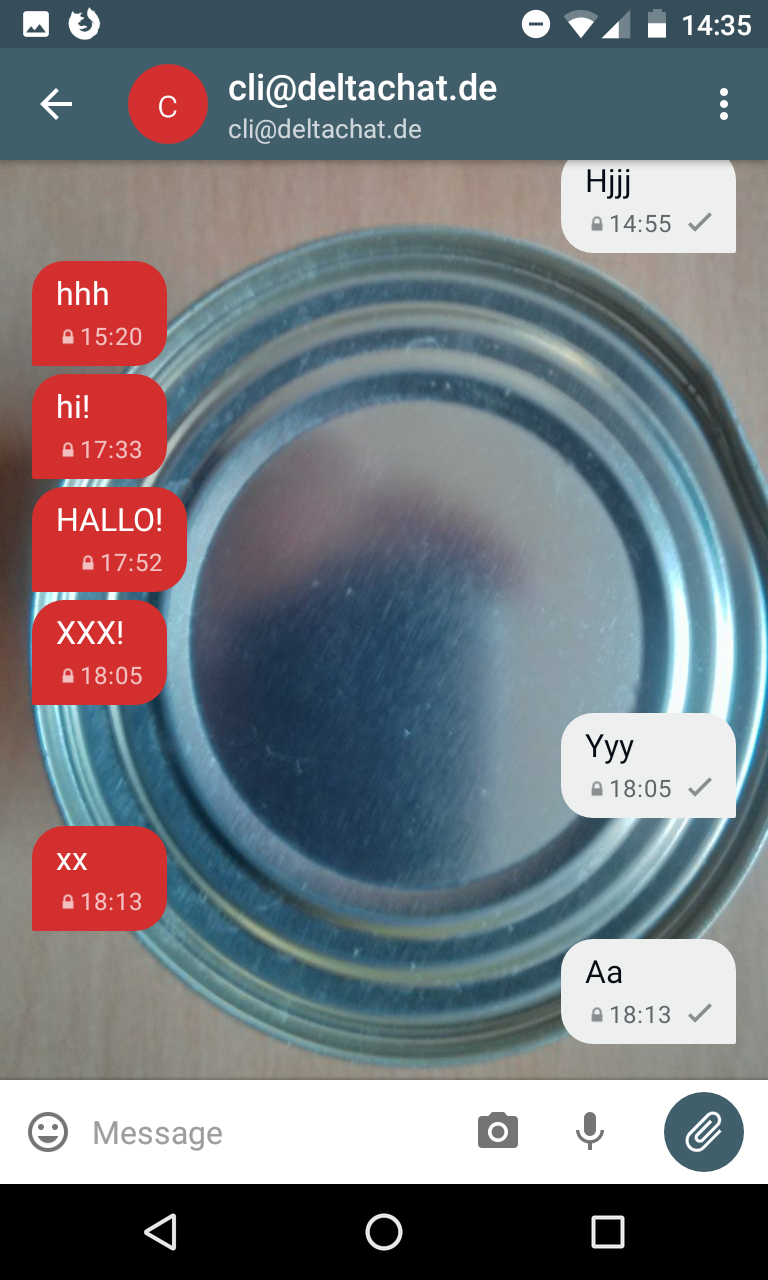
EDIT: if this is hard to fix, maybe we can leave it "as is" for now, there are obviously more important things, however if would be great if it works anyway.
EDIT: also tested this on the moto g4, same result.
r10s
on 16 Nov 2018
@florianhaar I figured out why the app crashed on selecting an image: My Phone uses an SDK Version < 19. So the Intent.ACTION_OPEN_DOCUMENT was not available.
My IDE also had a warning on that segment informing me about the incompatibility with lower SDK Versions. I added code that I think should work (and does work for my phone). Please review it.
angelo-fuchs
on 19 Nov 2018
@angelo-fuchs your code looks good and it still works on my phone
@r10s I will take a look at your problem today
florianhaar
on 7 Dec 2018
@r10s It is hard to fix and I would say that we close this ticket and open a new with this specific problem :)
florianhaar
on 7 Dec 2018
@florianhaar thanks for checking :)
however, i'd like to give it a try as well, so i would like to keep this ticket open at least the next days (i'm currently playing around with lots of these ui thingies :)
r10s
on 7 Dec 2018
closing this as the initial issue is done, the remaining aspect-ratio-thingie is in https://github.com/deltachat/deltachat-android/issues/466
r10s
on 21 Jan 2019
Related issues
 BoFFire
·
4Comments
BoFFire
·
4Comments
 AndreasLattmann
·
4Comments
angelo-fuchs
·
3Comments
AndreasLattmann
·
4Comments
angelo-fuchs
·
3Comments
 Almtesh
·
4Comments
Almtesh
·
4Comments
 adbenitez
·
4Comments
adbenitez
·
4Comments