Defold: IDE is very slow when there are many collections

Created on 4 Jan 2021  路  3Comments  路  Source: defold/defold

Expected behaviour

I鈥檓 developing a physics game, and I make levels in Defold IDE. Each level is a collection with many pre-made game objects (obstacles, enemies, bonuses, walls). It鈥檚 a very convenient way to make levels because I can preview my levels right in the IDE and I don鈥檛 have to spend my time to make a special level editor.

How it looks:
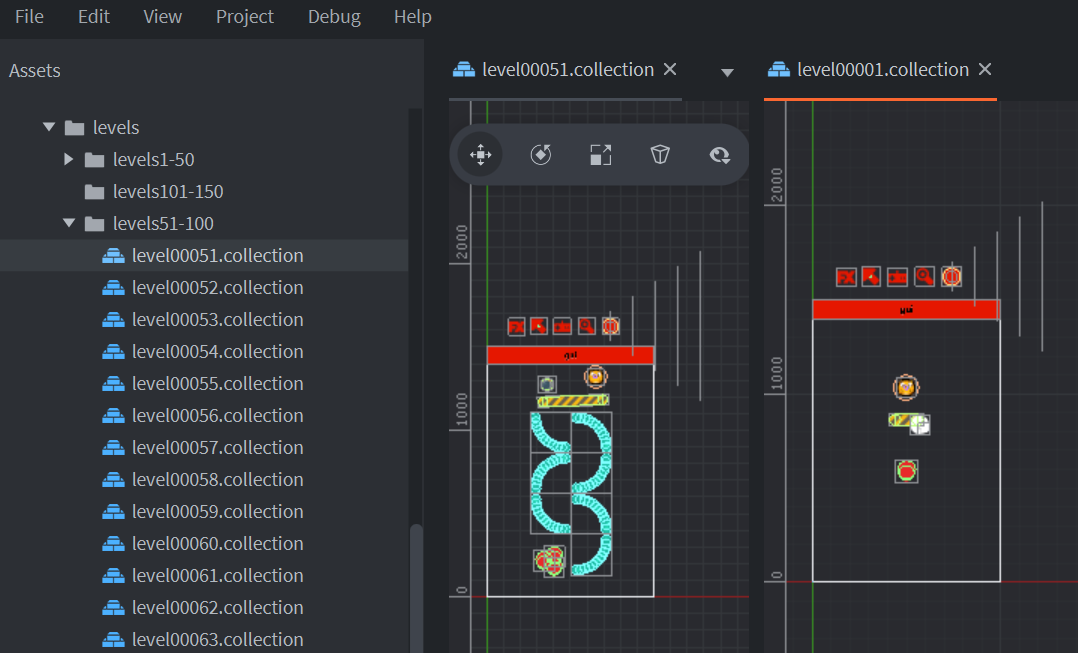
0bb150f22a0953e1ab65390010df5e031311d097

My game will have 250+ levels. I made 60 levels, and it鈥檚 a pain to make more.

Actual behaviour

IDE is very slow when there are many collections

Steps to reproduce

For example, you can try to change something or to edit the main.script, i.e. even entering new text is lagging on my PC for 0.5-1 sec. PC has 8 core Ryzen 2700X.

Demo project:
lot_of_collections1.zip

+1
https://twitter.com/deulamco/status/1345740345900900352


Build time2020-12-18T20:28:49.967999
Defold channeleditor-alpha
Defold editor sha15990df1280c63c1744849d6456237c6411f593e
Defold engine shaf7778a8f59ef2a8dda5d445f471368e8bd1cb1ac
Defold version1.2.177
GPUGeForce GTX 1080 Ti/PCIe/SSE2
GPU Driver4.6.0 NVIDIA 460.89
Java version11.0.1+13
OS archamd64
OS nameWindows 10
OS version10.0

bug community vote editor

Most helpful comment

I've bumped into this issue too. In layman's terms, the slowdown happens when the file edited is used in many other places. In my case, object.script exists in every object in the game, and the game has 100 levels. Editing object.script in Defold is very slow, so I have started editing it in an external editor, then coming back to Defold and wait for the changes to propagate.

All 3 comments

I think this is part of a problem of non-localized state. Maybe a change in how the overall state of the project is handled could improve it. I've seen slowdowns in my big projects too while small projects are speedy.

It would be nice to get someone on a newer macOS computer to confirm if it's slow too. Maybe it's a Windows problem.

For your project, unfortunately I'd recommend making an in engine level editor. We make / use them too, but for more reasons. It makes testing specific levels faster too. Maybe a general purpose in engine level editor would be a good community project.

From @matgis

There is a concept called successors in the graph, which is the recursive set of outputs that are upstream of an output. For example, the build-targets output of a Script node is a successor of its own lines output, as is every output in all other nodes that are affected by the build-targets output, and so on.

For a script that is referenced a lot, there will be a lot of successors for the lines output. When it slows down, it seems we鈥檙e spending a lot of time just evicting all the potentially cached values for the successors from the cache.

I think the way forward is to be smarter about how we evict values from the cache. Instead of always evicting the full set of recursive successors every time an output is invalidated, we could perhaps do it in a recursive manner that could early-out if we know that no upstream value that pulls from a higher-level successor has entered the cache.

I've bumped into this issue too. In layman's terms, the slowdown happens when the file edited is used in many other places. In my case, object.script exists in every object in the game, and the game has 100 levels. Editing object.script in Defold is very slow, so I have started editing it in an external editor, then coming back to Defold and wait for the changes to propagate.

Was this page helpful?
0 / 5 - 0 ratings