Definitelytyped: Error in PouchDB
I get many errors in @types/puchdb-core
ERROR in /home/yamid/development/ng-web/node_modules/@types/pouchdb-core/index.d.ts (470,32): ',' expected.)
    /home/yamid/development/ng-web/node_modules/@types/pouchdb-core/index.d.ts (470,34): '>' expected.)
    /home/yamid/development/ng-web/node_modules/@types/pouchdb-core/index.d.ts (470,36): Expression expected.)
    /home/yamid/development/ng-web/node_modules/@types/pouchdb-core/index.d.ts (470,43): Expression expected.)
    /home/yamid/development/ng-web/node_modules/@types/pouchdb-core/index.d.ts (471,46): Expression expected.)
    /home/yamid/development/ng-web/node_modules/@types/pouchdb-core/index.d.ts (471,84): ';' expected.)
    /home/yamid/development/ng-web/node_modules/@types/pouchdb-core/index.d.ts (471,103): '(' expected.)
    /home/yamid/development/ng-web/node_modules/@types/pouchdb-core/index.d.ts (477,25): ',' expected.)
    /home/yamid/development/ng-web/node_modules/@types/pouchdb-core/index.d.ts (477,63): ';' expected.)
    /home/yamid/development/ng-web/node_modules/@types/pouchdb-core/index.d.ts (478,16): Expression expected.)
    /home/yamid/development/ng-web/node_modules/@types/pouchdb-core/index.d.ts (478,25): ';' expected.)
    /home/yamid/development/ng-web/node_modules/@types/pouchdb-core/index.d.ts (478,36): Declaration or statement expected.)
    /home/yamid/development/ng-web/node_modules/@types/pouchdb-core/index.d.ts (478,40): Expression expected.)
    /home/yamid/development/ng-web/node_modules/@types/pouchdb-core/index.d.ts (478,47): Expression expected.)
    /home/yamid/development/ng-web/node_modules/@types/pouchdb-core/index.d.ts (479,50): Expression expected.)
    /home/yamid/development/ng-web/node_modules/@types/pouchdb-core/index.d.ts (479,88): ';' expected.)
    /home/yamid/development/ng-web/node_modules/@types/pouchdb-core/index.d.ts (479,107): '(' expected.)
    /home/yamid/development/ng-web/node_modules/@types/pouchdb-core/index.d.ts (483,43): ',' expected.)
    /home/yamid/development/ng-web/node_modules/@types/pouchdb-core/index.d.ts (483,45): '>' expected.)
    /home/yamid/development/ng-web/node_modules/@types/pouchdb-core/index.d.ts (483,47): Expression expected.)
    /home/yamid/development/ng-web/node_modules/@types/pouchdb-core/index.d.ts (495,9): ',' expected.)
    /home/yamid/development/ng-web/node_modules/@types/pouchdb-core/index.d.ts (506,9): ',' expected.)
    /home/yamid/development/ng-web/node_modules/@types/pouchdb-core/index.d.ts (510,9): ',' expected.)
    /home/yamid/development/ng-web/node_modules/@types/pouchdb-core/index.d.ts (513,9): ',' expected.)
    /home/yamid/development/ng-web/node_modules/@types/pouchdb-core/index.d.ts (517,9): ',' expected.)
    /home/yamid/development/ng-web/node_modules/@types/pouchdb-core/index.d.ts (521,9): ',' expected.)
    /home/yamid/development/ng-web/node_modules/@types/pouchdb-core/index.d.ts (524,9): ',' expected.)
 yamidvo
All 15 comments
Had the same issue, upgrading typescript fixed it, tsc version 2.3.4 does not give any errors
 acristu
on 16 Jun 2017
acristu
on 16 Jun 2017
Also, it seems some of the sub-modules didn't get updated to use the new generic syntax.
I had to pull
@typespouchdb-adapter-websql
@typespouchdb-adapter-idb
from my configuration. (I didn't need them anyhow)
@WorldMaker FYI
 jefbarn
on 16 Jun 2017
jefbarn
on 16 Jun 2017
Yes, the latest versions require Typescript 2.3 (because of the usage of a generic default parameter Database<Content extends {} = {}>, which is invalid syntax for Typescript < 2.3, hence the , expected style errors you see).
Yes, you have to npm install updates to @types/pouch-* and upgrade them all as a suite, because there are sweeping changes that impact all of them together (as a suite). So far as I know, DT doesn't have a good/clear mechanism to force npm to do that for you and it is a manual process to make sure everything updates to the latest version.
 WorldMaker
on 16 Jun 2017
WorldMaker
on 16 Jun 2017
Sorry about the big backward compatibility hump, but I hope the somewhat cleaner types and the additional features (generics at the operation level such as db.get<MyDocumentModel>(id)) make up for the brief hiccup here. (FYI, I highly recommend the latest npm version because it is shrinkwraps by default and project-lock.json is definitely your friend on a compatibility hump like this, because DT doesn't/can't support it's own semver scheme to help avoid npm picking up incompatible versions.)
WorldMaker
on 16 Jun 2017
No worries.
Looking a little closer showed that the sub-modules I had referenced were just cruft left over in my node_modules. Everything is working now after cleaning up the old versions.
jefbarn
on 16 Jun 2017
I'm currently facing the same issue when I tried to npm update my package.json. Here is the current version I use :
"dependencies": {
"@angular/common": "2.4.8",
"@angular/compiler": "2.4.8",
"@angular/compiler-cli": "2.4.8",
"@angular/core": "2.4.8",
"@angular/forms": "2.4.8",
"@angular/http": "2.4.8",
"@angular/platform-browser": "2.4.8",
"@angular/platform-browser-dynamic": "2.4.8",
"@angular/platform-server": "2.4.8",
"@ionic-native/core": "3.6.0",
"@ionic-native/file": "3.10.3",
"@ionic/app-scripts": "1.1.4",
"@ionic/cloud-angular": "0.9.1",
"@ionic/storage": "2.0.0",
"@types/leaflet": "1.0.60",
"@types/pouchdb": "6.1.1",
"angular2-jwt": "0.1.28",
"ionic-angular": "2.2.0",
"ionic-native": "2.4.1",
"pouchdb": "6.2.0",
"pouchdb-upsert": "2.2.0",
"rxjs": "5.0.1",
"typescript": "~2.3.0",
"typescript-collections": "1.2.3",
"zone.js": "0.7.2"
}
And even though I upgraded tsc to 2.3.x I still got the same errors as the OP got
node_modules/@types/pouchdb-core/index.d.ts, line: 545 ',' expected.
Maybe I'm missing something ? I'm using an old version of npm but I don't think it's related :
{ npm: '3.10.10',
node: '6.10.0' }
Any idea @WorldMaker @jefbarn ?
Edit Source
TypeScript 2.1 and 2.2 compatibility: Finally We can [with Angular 4] use typescript 2.1 or more earlier only upto typescript 1.8 was supported.
It seems I won't be able to use TypeScript 2.3.x if I stay on Angular 2.x (which is the case), my problem consists now mostly on achieving a retro compatibility then :
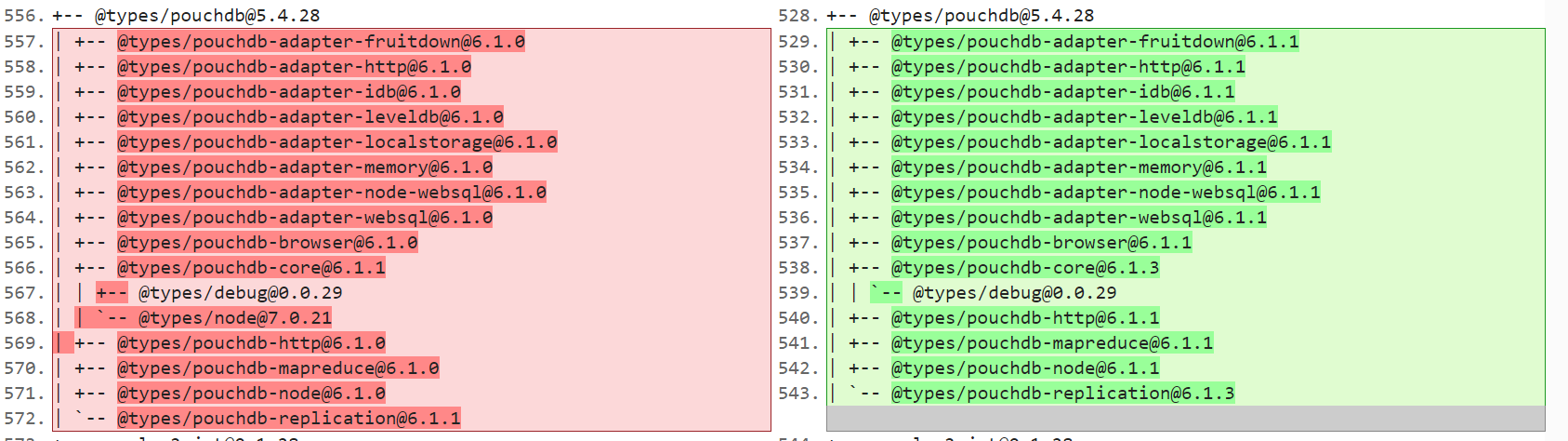
I used @types/pouchdb": "5.4.28" and typescript": "2.0.9 but when I execute npm install, the dependencies @types/pouchdb-* are set to 6.1.1, which is the latest version.
Then I have to add first those dependencies in a former version (it worked with 6.1.0) before executing npm install ?
 Iwerzhon
on 22 Jun 2017
Iwerzhon
on 22 Jun 2017
@lwerzhon Your best bet at this point might be to upgrade npm to latest because it supports and uses shrinkwrapping by default. With the shrinkwrap package-lock.json checked in, npm installs should be less likely to update things once you've got everything to a version that works together.
For what it is worth, I've heard the upgrade from Angular 2.x to 4.x is rather easy and a good idea, but I'm not working in Angular myself, so have no direct experience on the subject.
WorldMaker
on 22 Jun 2017
@Iwerzhon I'd suggest
- delete your node_modules directory
- npm cache clear
- npm install
That will clean up any out of sync modules
jefbarn
on 22 Jun 2017
Hi guys,
I have the same error message. Any other suggestions that might work ?
Thanks
 datzash2003
on 22 Jun 2017
datzash2003
on 22 Jun 2017
@datzash2003 The syntax error is from Typescript versions less than 2.3. It's important to note that if you are using Visual Studio 2017, while there is an installer for Typescript 2.3, it doesn't actually work unless you have VS 2017 Update 15.3 installed, which is still in preview and not officially released yet.
WorldMaker
on 22 Jun 2017
using npm-update-all worked for me.
 turnono
on 27 Jun 2017
turnono
on 27 Jun 2017
@WorldMaker Considering TS 2.3+ is not available with Angular 2, is there a way to use a former version of pouchdb that does not use the latest sub-dependencies 6.1.1 (6.1.0 was working) ? Or do I need to include all thoses sub-dependencies first before npm install my project ?
I would greatly appreciate the use of package-lock.json but I first need to have a clean tree before saving it.
(I mean, something cleaner than expliciting all the sub dependencies in the package.json in a former version like this :
    "@types/pouchdb": "5.4.28",
    "@types/pouchdb-adapter-fruitdown" : "6.1.0",
    "@types/pouchdb-adapter-http" : "6.1.0",
    "@types/pouchdb-adapter-idb" : "6.1.0",
    "@types/pouchdb-adapter-leveldb" : "6.1.0",
    "@types/pouchdb-adapter-localstorage" : "6.1.0",
    "@types/pouchdb-adapter-memory" : "6.1.0",
    "@types/pouchdb-adapter-node-websql" : "6.1.0",
    "@types/pouchdb-adapter-websql" : "6.1.0",
    "@types/pouchdb-browser" : "6.1.0",
    "@types/pouchdb-core" : "6.1.1",
    "@types/debug" : "0.0.29",
    "@types/node" : "7.0.21",
    "@types/pouchdb-http" : "6.1.0",
    "@types/pouchdb-mapreduce" : "6.1.0",
    "@types/pouchdb-node" : "6.1.0",
    "@types/pouchdb-replication" : "6.1.1",
)
Iwerzhon
on 1 Aug 2017
@Iwerzhon Are you sure you can't use TS 2.3+ with Angular 2? That seems an odd restriction I've not heard of. I'm curious, do you mean literally Angular 2 and you aren't bothering to follow along to Angular 4+? Because what little I know of Angular 2+, it's support of TS has usually been strong.
Anyway, I'm sorry but I don't know of a better way to get a specific point-in-time @types other than individually. If it helps, maybe you want to focus on a smaller subset like pouchdb-browser which will allow you to ignore most of the pouchdb-adapter-* family at least?
ETA: Also, once you npm install with a npm >= 5 you should have a package.lock.json file at that point and could clean up the package.json if you like.
WorldMaker
on 1 Aug 2017
Hi Guys,
I having the same problem as well. I am using below:
Ionic Framework: 2.2.0
Ionic Native: 2.4.1
Ionic App Scripts: 1.1.4
Angular Core: 2.4.8
Angular Compiler CLI: 2.4.8
Node: 6.12.0
Typescript version : 2.0.9
What should i do if i don't want to upgrade the npm?
 YukikoLim
on 17 Nov 2017
YukikoLim
on 17 Nov 2017
@YukikoLim Do whatever you want to do. Plenty of options: Upgrade Typescript. Upgrade npm and get a working package-lock.json. Use stricter version numbers in package.json. Use the older buggier npm shrinkwrap tool. Switch to yarn. Upgrade Node to the latest LTS and get a free npm upgrade. Some combination of any of the previous options.
WorldMaker
on 18 Nov 2017
Related issues
 stevermeister
·
3Comments
stevermeister
·
3Comments
 jamespero
·
3Comments
jamespero
·
3Comments
 alisabzevari
·
3Comments
alisabzevari
·
3Comments
 svipas
·
3Comments
svipas
·
3Comments
 victor-guoyu
·
3Comments
victor-guoyu
·
3Comments
Most helpful comment
@WorldMaker Considering TS 2.3+ is not available with Angular 2, is there a way to use a former version of pouchdb that does not use the latest sub-dependencies 6.1.1 (6.1.0 was working) ? Or do I need to include all thoses sub-dependencies first before npm install my project ?
I would greatly appreciate the use of
package-lock.jsonbut I first need to have a clean tree before saving it.(I mean, something cleaner than expliciting all the sub dependencies in the package.json in a former version like this :
)