On my attempt of starting the native client, I encountered the following error
$ ./deepspeech -h
./deepspeech: error while loading shared libraries: libsox.so.2: cannot open shared object file: No such file or directory
At least for Arch Linux, libsox 3 seems to be the current version. It would be very convenient to have pre-built binaries for this version as well, if it does not cause any major issues in the build process.
Comment for Arch Linux users: If you don't have any packages depending on the current version of sox, you can install libsox 2 directly from the Arch Linux Archive:
# pacman -U https://archive.archlinux.org/packages/s/sox/sox-14.4.1-4-x86_64.pkg.tar.xz
 stes
stes
All 19 comments
Creating a symlink to libsox 3 seems to be working for me:
cd /usr/lib
sudo ln -s libsox.so.3 libsox.so.2
 thiru
on 6 Dec 2017
thiru
on 6 Dec 2017
@stes @thiru
In the meantime, it is also simple to rebuild just the deepspeech binary:
- download
native_client.tar.xzfollowing the docs, and extract e.g. to~/tmp/deepspeech/ - create directories:
mkdir -p ~/tmp/deepspeech/tf/bazel-bin/{tensorflow,native_client}/ - git clone https://github.com/mozilla/DeepSpeech to get the code
- build
deepspeechusing:make TFDIR=~/tmp/deepspeech/tf/ -C native_client/ deepspeech
This should work, just ensure you have proper sox installed and pkg-config is good.
 lissyx
on 20 Dec 2017
lissyx
on 20 Dec 2017
We could also rely on patchelf to switch dependency from SONAME-based libsox.so.X to just libsox, but this bumps deepspeech binary from 14KiB to 2.1MiB for me (with a warning about creating a whole to workaround a kernel bug). cc @reuben
lissyx
on 22 Dec 2017
@lissyx ,
I'm trying your way,
after installing pkg-config and sox I'm running the command make TFDIR=~/tmp/deepspeech/tf/ -C native_client/ deepspeech and get the next error:
make: Entering directory '/root/tmp/deepspeech/DeepSpeech-master/native_client'
c++ -o deepspeech   `pkg-config --cflags sox` client.cc  -Wl,--no-as-needed -Wl,-rpath,\$ORIGIN -
L/root/tmp/deepspeech/tf//bazel-bin/tensorflow -L/root/tmp/deepspeech/tf//bazel-bin/native_client  -ldeepspeech -ldeepspeech_utils -ltensorflow_cc -ltensorflow_framework  `pkg-config --libs sox`
Package sox was not found in the pkg-config search path.
Perhaps you should add the directory containing `sox.pc' to the PKG_CONFIG_PATH environment variable
No package 'sox' found
Package sox was not found in the pkg-config search path.
Perhaps you should add the directory containing `sox.pc' to the PKG_CONFIG_PATH environment variable
No package 'sox' found
client.cc:6:17: fatal error: sox.h: No such file or directory
compilation terminated.
Makefile:22: recipe for target 'deepspeech' failed
make: *** [deepspeech] Error 1
make: Leaving directory '/root/tmp/deepspeech/DeepSpeech-master/native_client'
I searched in the web for a correct sox installation... Can you assist here?
 d2sys
on 25 Dec 2017
d2sys
on 25 Dec 2017
You need to install the sox dev package as we have that documented as a dependency. More details on that are dependent on your precise system, we cannot help more.
lissyx
on 25 Dec 2017
Great! the installation of sox-dev worked! Thanx!
d2sys
on 25 Dec 2017
FTR: https://github.com/mozilla/DeepSpeech/blob/master/native_client/README.md#required-dependencies
lissyx
on 25 Dec 2017
hello,i install the libraries according the readme, pip install -r requirement.txt,but when i process the data,the sox have @d2sys
,sh: 1: sox: not found
SoX could not be found!
If you do not have SoX, proceed here:
 - - - http://sox.sourceforge.net/ - - -

If you do (or think that you should) have SoX, double-check your
path variables.
Found archive "/home/cww/deepspeechdataset/cv_corpus_v1.tar.gz" - not downloading.
Found directory "/home/cww/deepspeechdataset/cv_corpus_v1.tar.gz" - not extracting it from archive.
No CSV file "/home/cww/deepspeechdataset/cv-other-test.csv" - importing "/home/cww/deepspeechdataset/cv_corpus_v1/cv-other-test.csv"...
Importing mp3 files...
This install of SoX cannot process .mp3 files.
This install of SoX cannot process .wav files.
This install of SoX cannot process .mp3 files.
This install of SoX cannot process .mp3 files.
This install of SoX cannot process .wav files.
This install of SoX cannot process .wav files.
This install of SoX cannot process .mp3 files.
This install of SoX cannot process .wav files.
This install of SoX cannot process .mp3 files.
Traceback (most recent call last):
File "import_cv.py", line 143, in
_download_and_preprocess_data(sys.argv[1])
This install of SoX cannot process .wav files.
File "import_cv.py", line 37, in _download_and_preprocess_data
_maybe_convert_sets(target_dir, ARCHIVE_DIR_NAME)
File "import_cv.py", line 72, in _maybe_convert_sets
_maybe_convert_set(extracted_dir, source_csv, path.join(target_dir, os.path.split(source_csv)[-1]))
This install of SoX cannot process .mp3 files.
File "import_cv.py", line 115, in _maybe_convert_set
This install of SoX cannot process .wav files.
pool.map(one_sample, samples)
File "/home/cww/anaconda2/lib/python2.7/multiprocessing/pool.py", line 251, in map
This install of SoX cannot process .mp3 files.
return self.map_async(func, iterable, chunksize).get()
This install of SoX cannot process .mp3 files.
File "/home/cww/anaconda2/lib/python2.7/multiprocessing/pool.py", line 567, in get
raise self._value
sox.coreThis install of SoX cannot process .wav files.
.SoxError: Stdout:
Stderr: /bin/sh: 1: sox: not found
This install of SoX cannot process .wav files.
 crazygirl1992
on 2 Jan 2018
crazygirl1992
on 2 Jan 2018
@lissyx I am having similar issue here and I have tried installing sox-14.4.2 from source using the following tutorials,
I have successfully been able to run sox command.
However, I still get following error when running command make deepspeech
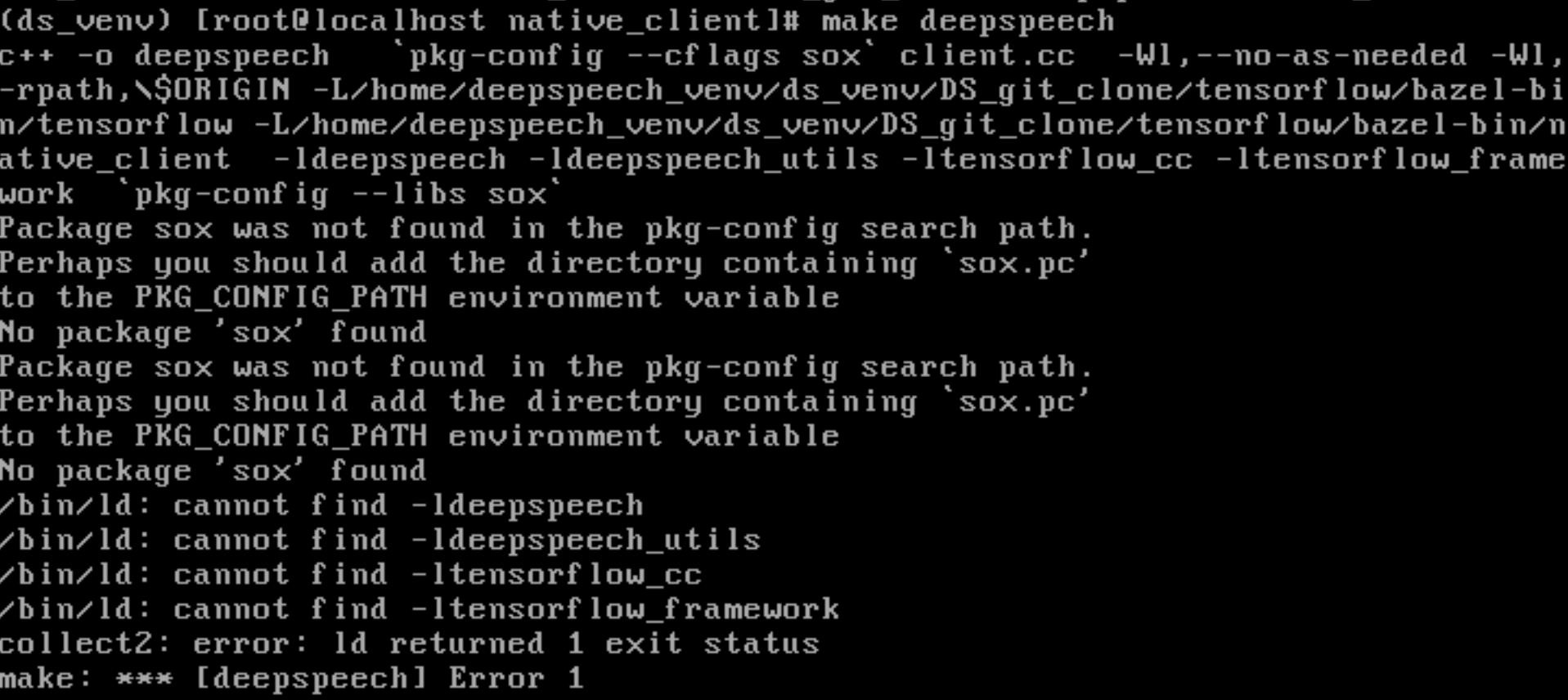
I found libsox rpm file, but not sure how it is different than following above steps to install sox. I would appreciate any direction at this time.
Thank you
Rishabh
 rishabh-shah
on 3 Jan 2018
rishabh-shah
on 3 Jan 2018
@crazygirl1992 This is unrelated to the current issue. Please go to discourse for that kind of discussion: https://discourse.mozilla.org/c/deep-speech
lissyx
on 3 Jan 2018
@rishabh-shah This is also not an issue with DeepSpeech itself, you are obviously not properly installing your build dependencies, since pkg-config is not finding sox. This is depending on your system, we cannot help you more. Please have that kind of discussion on discourse: https://discourse.mozilla.org/c/deep-speech
lissyx
on 3 Jan 2018
I met this error in ubuntu 14.04. I solved it by executed command 'sudo apt-get install libsox-dev'
 lusan8887
on 10 Jan 2018
lusan8887
on 10 Jan 2018
In my case, in ubuntu 18.04 was solved with the following commands:
1 - 'sudo apt-get install libsox-dev'
2 - cd /usr/lib/x86_64-linux-gnu/
3 - sudo ln -s libsox.so.3 libsox.so.2
 xaviliz
on 8 Oct 2018
xaviliz
on 8 Oct 2018
The same for Ubuntu 16.04
sudo apt-get install libsox-dev
helped
 tarasevich-dmitry
on 18 Feb 2019
tarasevich-dmitry
on 18 Feb 2019
I met this error in ubuntu 14.04. I solved it by executed command 'sudo apt-get install libsox-dev'
Work in Ubuntu 18.04 too
 eboujlal
on 17 May 2019
eboujlal
on 17 May 2019
The same for Ubuntu 16.04
sudo apt-get install libsox-dev
helped
That's not the proper solution, you don't require -dev package, just the library itself.
lissyx
on 30 May 2019
In my case, in ubuntu 18.04 was solved with the following commands:
1 - 'sudo apt-get install libsox-dev'
2 - cd /usr/lib/x86_64-linux-gnu/
3 - sudo ln -s libsox.so.3 libsox.so.2
Yes, we do link against libsox.so.2 because we only build on Ubuntu 14.04. Building libsox statically is much more of a mess for a low improvement. It also does not looks like we can trick ld into accepting that libsox.so.3 is okay for libsox.so.2, the number is explicitely here to notify major ABI changes ...
lissyx
on 30 May 2019
I have a PR #2313 that will ensure we statically link against libsox.
lissyx
on 21 Aug 2019
This thread has been automatically locked since there has not been any recent activity after it was closed. Please open a new issue for related bugs.
![lock[bot] picture](https://avatars1.githubusercontent.com/in/6672?v=4&s=40) lock[bot]
on 20 Sep 2019
lock[bot]
on 20 Sep 2019
Related issues
 erksch
·
38Comments
erksch
·
38Comments
 SirZontax
·
59Comments
SirZontax
·
59Comments
 yoann1995
·
49Comments
yoann1995
·
49Comments
 beriberikix
·
36Comments
beriberikix
·
36Comments
 shyamalschandra
·
25Comments
shyamalschandra
·
25Comments
Most helpful comment
I met this error in ubuntu 14.04. I solved it by executed command 'sudo apt-get install libsox-dev'