Deeplabcut: Windows 7: The Labeling GUI does not work properly after **zoom** and **pan**
Windows 7, DLC2.0.0. dev4
a) The GUI does not work properly after zoom and pan
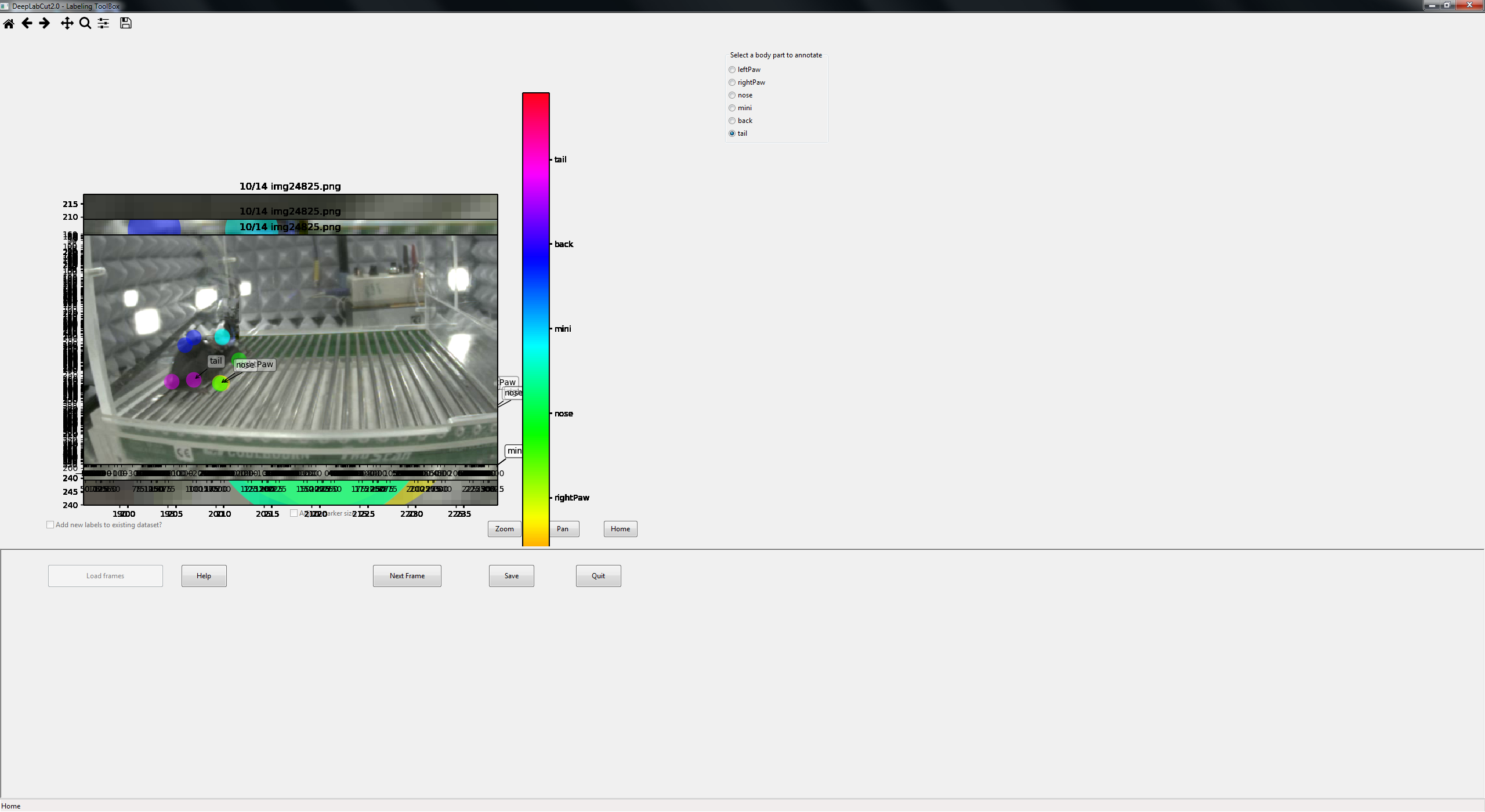
1) label one bodypart
2) zoom in to label the other bodyparts
3) home to zoom out again
3) now the zoomed pic is overlaying the original pic - should it be like this?
4) pan the zoomed pic - axes get messed up etc.
5) in addition: you can re-select the already used labels and label them a second time i.e. there are now two labeling points for nose
b) The checkbox for the markersize is unresponsive
After finalizing the first label, I wanted to change the markersize - as described in the help window - but the checkbox is not responding on left-click.
 WernTanj
All 21 comments
On Linux I don't get this.
@FedeClaudi have you ever seen this on Windows?
Previously I also never had the 6. issue? > Perhaps we should remove the auto advance?
b) Perhaps the problem is the layout. Clearly it is suboptimally spaced out, and "disappears under the image? This is related to https://github.com/AlexEMG/DeepLabCut/issues/110
 AlexEMG
on 15 Nov 2018
AlexEMG
on 15 Nov 2018
I'm not sure the newest version was tested on windows 7... but maybe you can try this version of the GUI?https://github.com/MMathisLab/DeepLabCut
 MMathisLab
on 15 Nov 2018
MMathisLab
on 15 Nov 2018
on windows 10 I didn't have issues 1 to 5.
Issue 6 happened only if you right click a label. This leads to the dialog window asking if the user wants to keep the label, if you click in yes then it might lead to the label being re-assigned.
I'm not familiar enough with wx based GUIs to suggest an easy fix unfortunately.
 FedeClaudi
on 15 Nov 2018
FedeClaudi
on 15 Nov 2018
Please check the latest version.
AlexEMG
on 16 Nov 2018
I upgraded to DLC2.0.0. dev5
windows 7
the problem persits
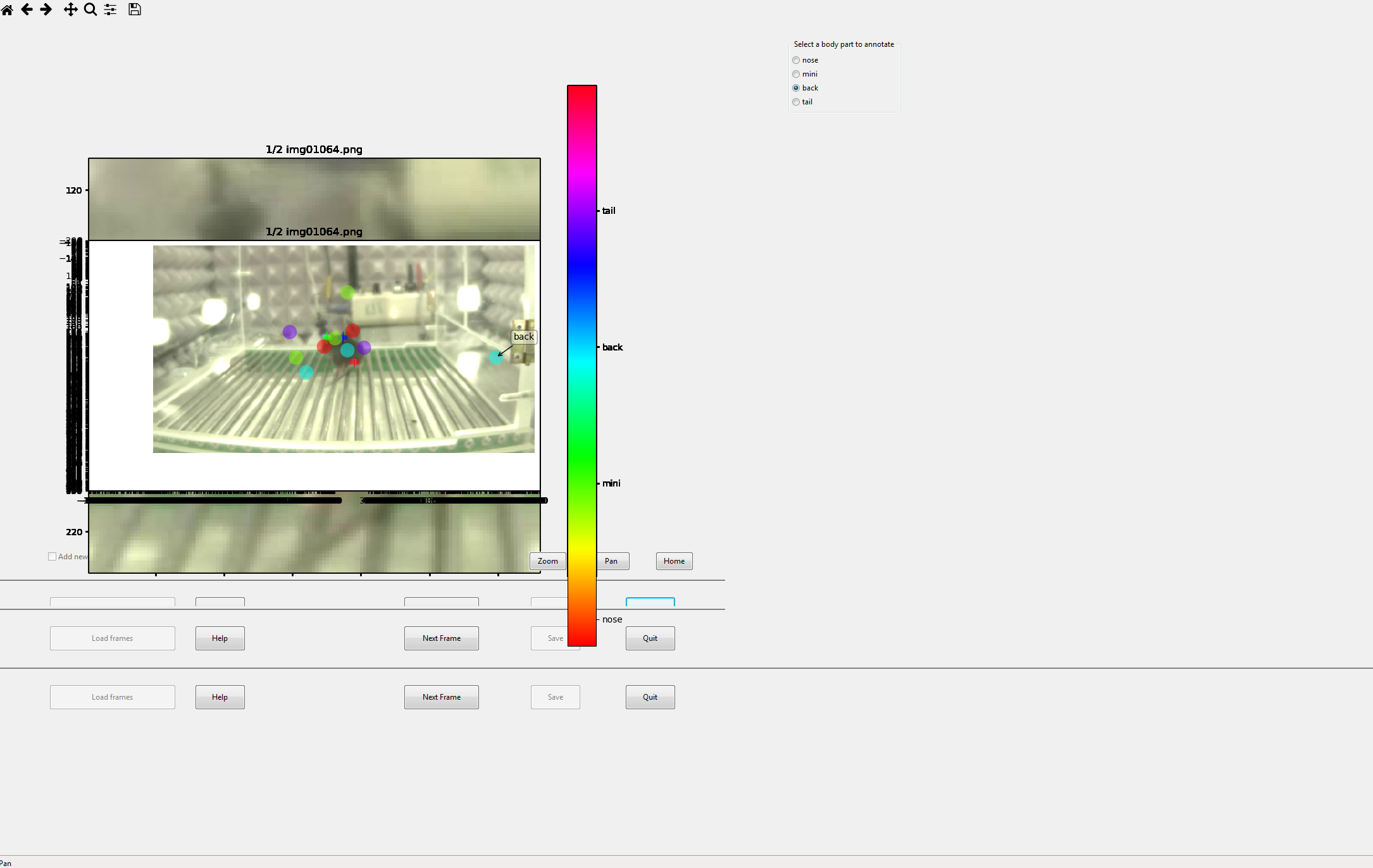
1) open from jupyter notbook the GUI
2) label first bodypart
3) zoom in to continue labeling
4) home to zoom out - zoomed pic overlays the original one
5) pan - axes get messed up
6) re-select already labelled bodypart and appply additional labels for the same bodypart
7) main buttons duplicate if you try to enlarge the view
...probably the adjust label size also does not work
WernTanj
on 16 Nov 2018
Seems it might be a Windows 7 issue then, can you change to Windows 10? And, can you try from outside Jupyter, just in case? Ie use cmd to run that step
MMathisLab
on 16 Nov 2018
I'll try next week.
WernTanj
on 16 Nov 2018
Seems a quick search shows there are some wxPython issues for Windows 7: https://stackoverflow.com/questions/51250709/wxpython-not-working-with-python-3-7-on-windows-7-64bit
You might need to optimize your python and wx build.
MMathisLab
on 16 Nov 2018
ok, thanks for the tip!
WernTanj
on 16 Nov 2018
Hi @WernTanj - okay, I can reproduce your error; basically, zoom and pan and home work, but not if you adjust the label size... so this needs fixed. For now, either (1) just don't adjust the size of the label, and see if that works otherwise properly for you... or, (2) if you do adjust the size, do so only after the first frame is labeled, then adjust size, which sets it back to "home" and you cannot zoom until you go to the next image!). Also, the GUI was updated today, to fix issues #110, so it's worth updating again (sorry, heavy beta development!)
Here is a short demo to show you what I mean: i.e. adjust the size only once, then you can use zoom/pan just fine :) https://youtu.be/i8P5y0vO5Q0 ( --but, @AlexEMG + @meet10may we should fix this in a future release, i.e. always be able to adjust the size)
The part about labeling twice, well we expect people not to do that, and we want them to be able to select the label from the radio button panel (i.e. if you want to skip a label because you cannot see it, you can just skip ahead to the next body part).
MMathisLab
on 19 Nov 2018
@MMathisLab wrote:
Seems a quick search shows there are some wxPython issues for Windows 7
The post you linked mentions that the issue is specific to Python 3.7.
AFAICT, @WernTanj was using Python 3.6 in her environment, as defined in the conda .yml file mentioned here: https://github.com/AlexEMG/DeepLabCut/issues/20#issuecomment-438661814, so the linked StackOverflow question isn't applicable here.
 imagejan
on 19 Nov 2018
imagejan
on 19 Nov 2018
I guess my point was it seems like a wxPython issue possibly on Windows 7; I have no Windows 7 machines so unfortunately I cannot test anything here. As I said, we updated the code, so she is welcome to try it, but it's hard for us to support win7.... so she might need to just look around to see if there are others that report issues with wxPython on Win7. Or consider upgrading to Ubuntu ;) where everything is easier... (PS - @imagejan I cannot open the link to your form on Ubuntu machines)
MMathisLab
on 19 Nov 2018
Yes, I agree it looks like a wxPython issue, unfortunately. Using Ubuntu on these machines is not an option at the moment, as we need to support Zeiss ZEN and other Windows-based applications, all within a multi-user "Active Directory" setup... but thanks for suggesting :slightly_smiling_face: An update to Windows 10 is planned in the immediate future.
@MMathisLab wrote:
I cannot open the link to your form on Ubuntu machines
Sorry, which form are you referring to now?
imagejan
on 19 Nov 2018
awe sorry for my typo, I meant forum (#68) .. it just tries to load but is always a blank screen.
MMathisLab
on 19 Nov 2018
it just tries to load but is always a blank screen.
Oh, that's disturbing. Are you able to access any of these?
https://forum.image.sc/
http://forum.image.sc/
http://image.sc
They should all redirect to HTTPS, maybe it's an issue with the certificate, or some blocked Javascript (it's a discourse backend)? Which browser are you using? I'll mention @ctrueden here, maybe he can suggest more...
(And sorry that this is now completely off-topic for this issue)
imagejan
on 19 Nov 2018
Neither of them open for me in Firefox or Chrome.
AlexEMG
on 19 Nov 2018
@WernTanj I added some code to erase the backend after zoom and pan, so hopefully that may help your issue. I will close the issue for now since the bulk of the issues seem fixed, but please let me know how it goes for you.... pip install deeplabcut==2.0.0.dev7
MMathisLab
on 19 Nov 2018
@imagejan @MMathisLab @AlexEMG More information would be helpful:
Does it happen with Firefox & Chrome browsers on Ubuntu machines outside your local network? E.g. if you have a laptop, does it work in a coffee shop?
What do you get from
curl? Fromcurl -I?Do MacOS and/or Windows machines work on your local network?
Do other browsers (
elinks, Opera, Safari, Edge, Internet Explorer) work?
FWIW, I tested on my Ubuntu system with elinks and firefox and both load the content successfully.
 ctrueden
on 20 Nov 2018
ctrueden
on 20 Nov 2018
@WernTanj I added some code to erase the backend after zoom and pan, so hopefully that may help your issue. I will close the issue for now since the bulk of the issues seem fixed, but please let me know how it goes for you.... pip install deeplabcut==2.0.0.dev7
I tested the new DLC 2.0.0 on windows 10. The GUI is still a bit buggy
1) label one body part
2) zoom
3) label another body part
4) pan and label another part
5) home
This is the screenshot
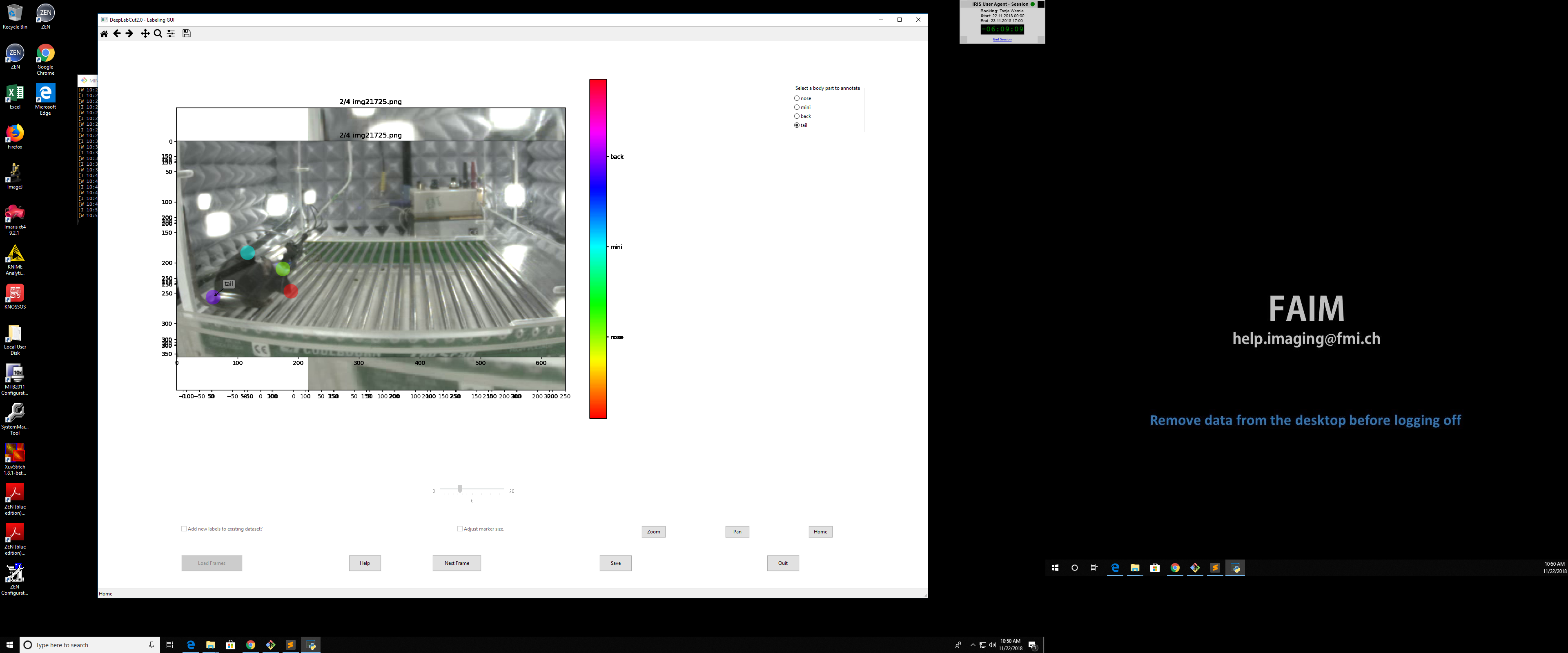
The double -labeling seems to be fixed. The adjust marker size works only in the first folder with frames. When I open the next folder with frames for labeling the tick box is not enables. Not sure if this is related to #129.
WernTanj
on 22 Nov 2018
hi @WernTanj - I agree it's not the most beautiful, but the next frame is clear, i.e. it's only once within the frame on Windows (only), and I'm not sure how to troubleshoot it future. Since it's mainly cosmetic it's on my "too look at list," but not urgent :) thanks for testing!
MMathisLab
on 23 Nov 2018
@ctrueden and @imagejan: we investigated and apparently this site was locally blocked (for unclear reasons)
AlexEMG
on 27 Nov 2018
Related issues
 cathy-liu23
·
3Comments
cathy-liu23
·
3Comments
 phcao101
·
4Comments
phcao101
·
4Comments
 guyts
·
3Comments
guyts
·
3Comments
 Jonathan-Oehley
·
4Comments
Jonathan-Oehley
·
4Comments
 jennymsmith94
·
3Comments
jennymsmith94
·
3Comments
Most helpful comment
@ctrueden and @imagejan: we investigated and apparently this site was locally blocked (for unclear reasons)