Deeplabcut: DLC2: Black frames extracted and errors with labeling GUI (MoviePy codec incompatibility)
Windows 10, 64-bit
Anaconda env with python 3.6.7, deeplabcut 2.0, and tensorflow-gpu 1.8
CUDA 9.0
CUDNN 7.3
NVIDIA-SMI 385.54. Not sure when this changed, I downloaded 384.76 yesterday
Driver Version: 385.54
GPU: GeForce GTX 1060
When I run the extract frames command, 20 frames are extracted but only the first one has an image. The other frames are all black, as seen below in the second picture.
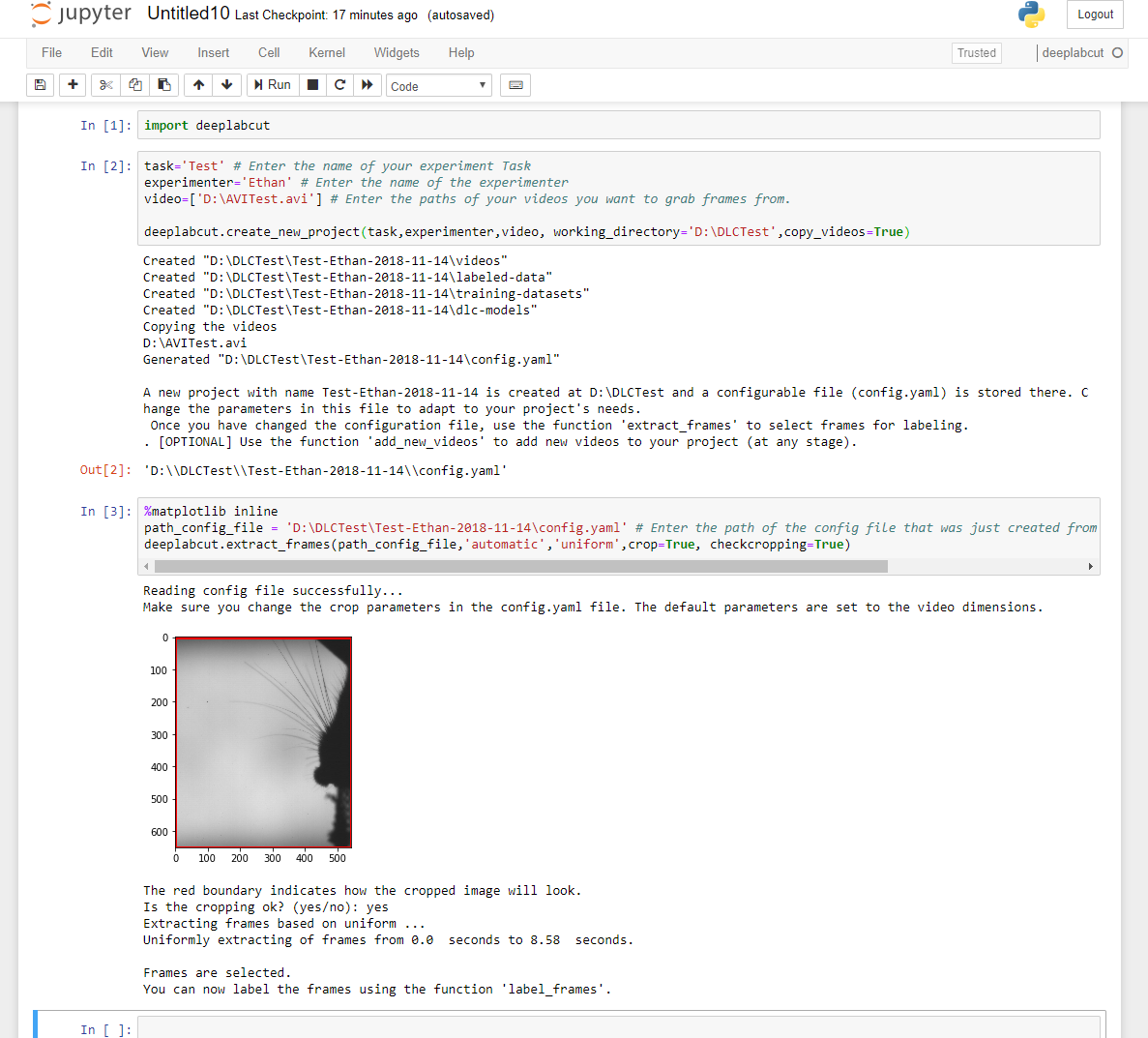

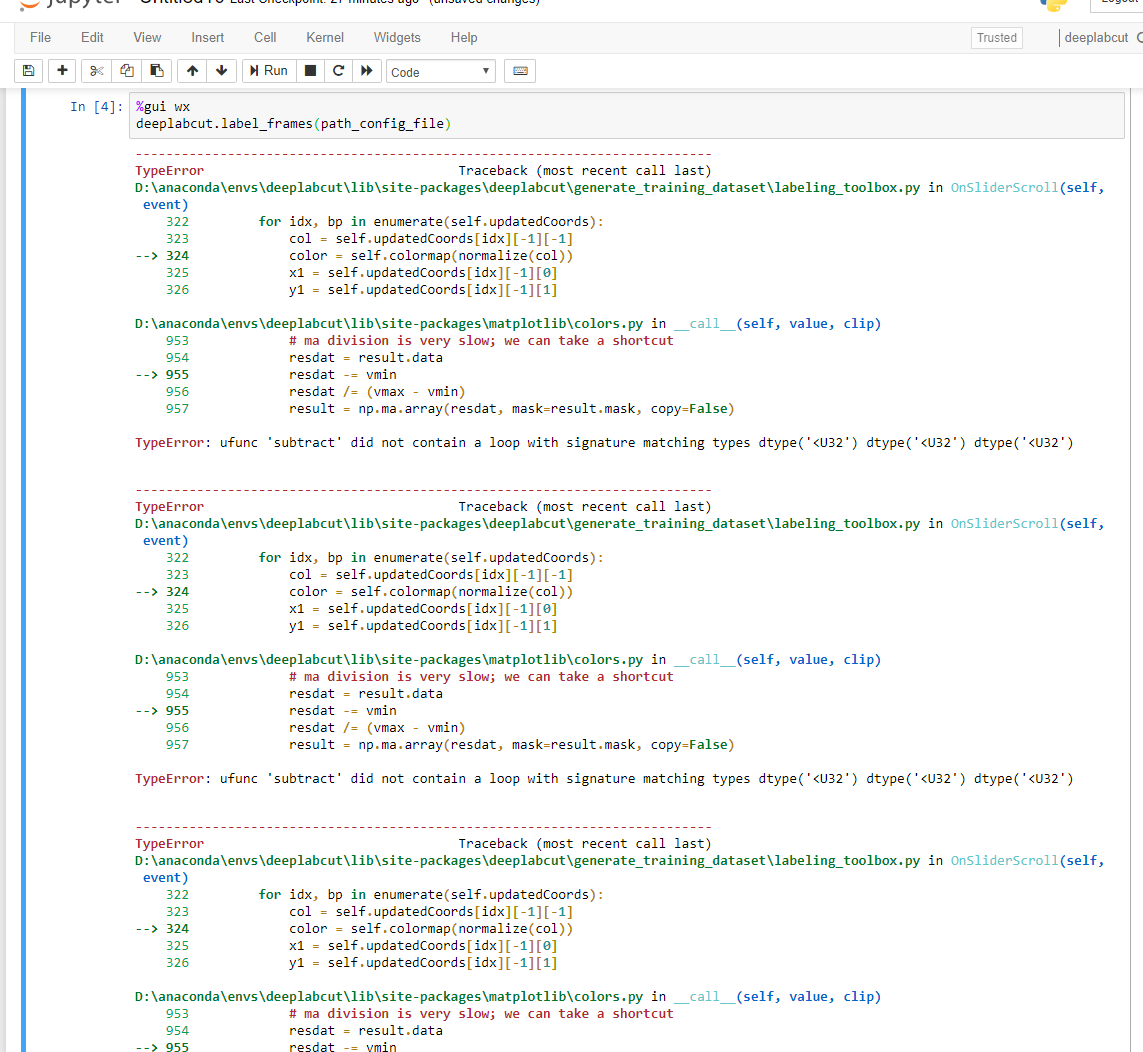
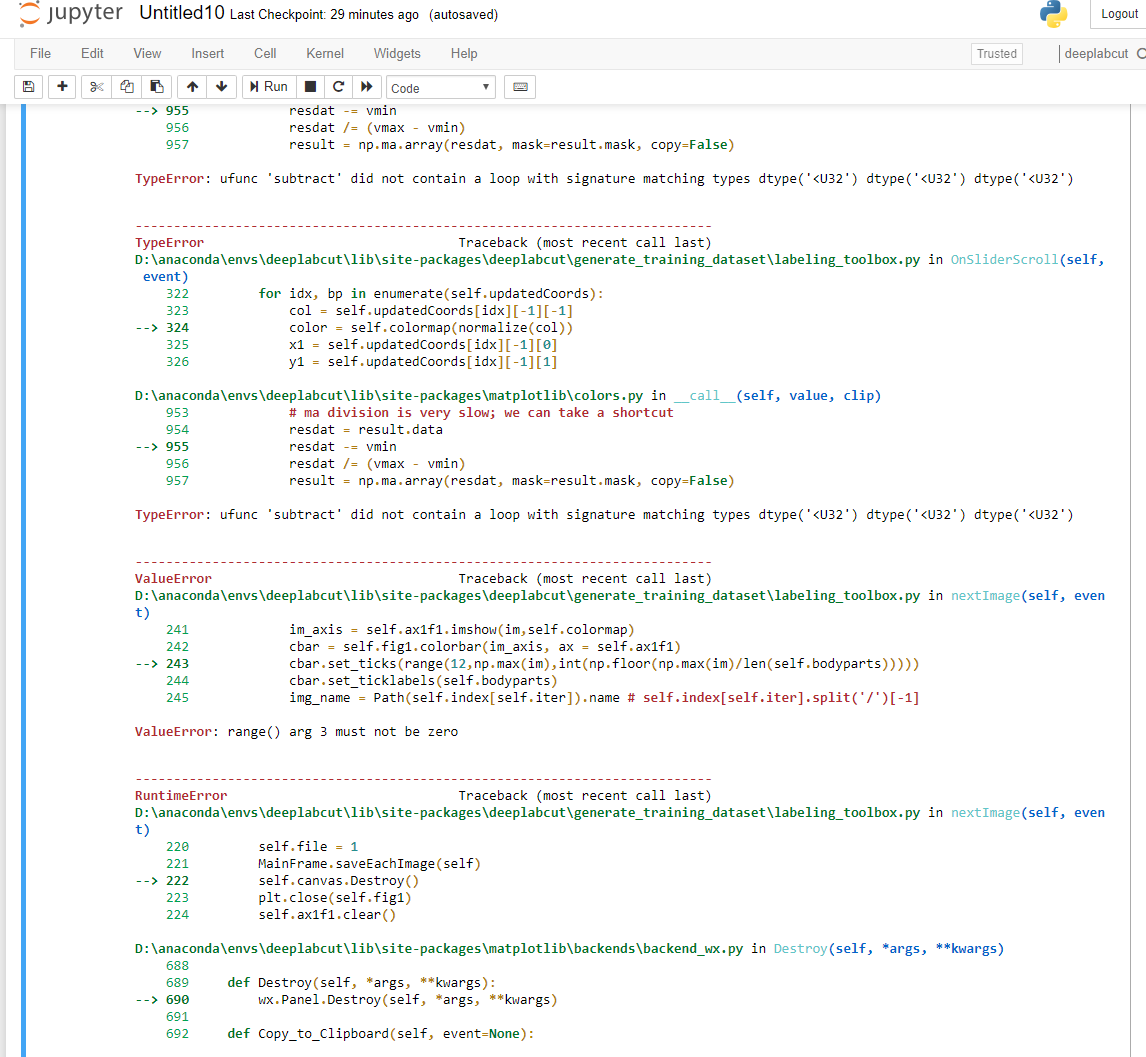
In the last two pictures, I tried to run the labeling gui. I was able to load the frames, place my first label, and then I checked the "adjust label size" box. After that, the label I had placed disappeared and I was not able to place a label for that or any other body part. I believe that is when the errors started to show up. I included both of these problems, but I wouldn't be surprised if the extracting problem affects the labeling feature.
Thank you for any help.
 E-Edwards
All 15 comments
- This might be a problem with your video, as it is not loaded correctly by moviepy. Can you check that? Does the manual frame extraction work?
- The second problem is indeed related to the fact that the images are black (as it says, because the 3rd argument is zero). [just delete the black frames before starting the GUI and it should be fine.]
 AlexEMG
on 14 Nov 2018
AlexEMG
on 14 Nov 2018
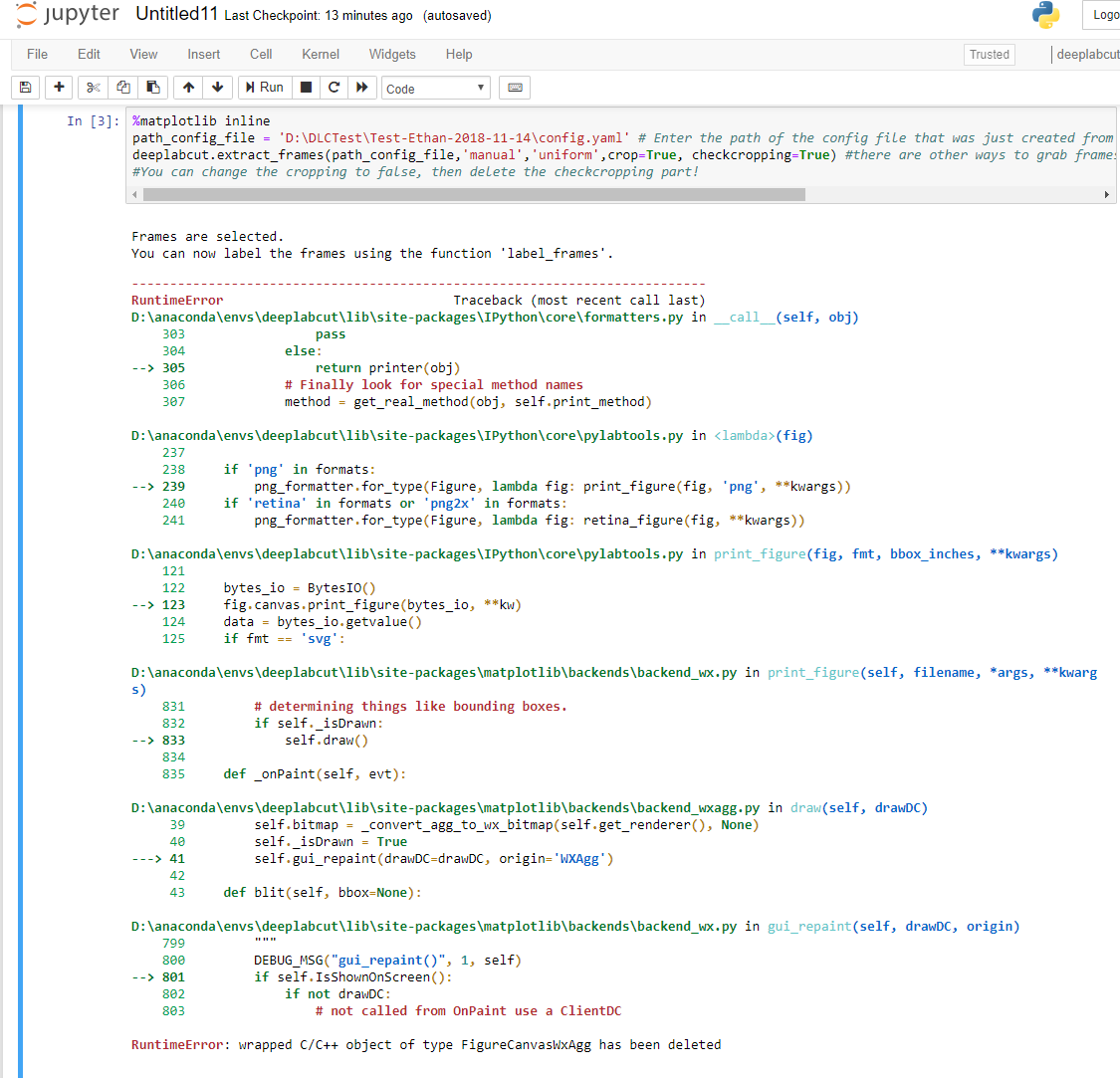
I'm able to view the whole video in Windows Media Player. I have tried the manual extraction and it does show all 12 frames that I grabbed in the folder. However, I then get ~27 iterations of the following error.
E-Edwards
on 14 Nov 2018
I'm able to view the whole video in Windows Media Player
Fine, but apparently https://zulko.github.io/moviepy/ cannot load it (which is what we use for automatic frame extraction); this is rare but happens. The fact that the manual frame extraction can load it, shows that openCV can load it. One day I will upgrade the automatic extraction to OpenCV. For now you could just convert it.
I have tried the manual extraction and it does show all 12 frames that I grabbed in the folder. However, I then get ~27 iterations of the following error.
Don't know what that means - how does manual extraction show frames in a folder?
AlexEMG
on 15 Nov 2018
I'm not sure what you mean by convert it. Am I converting the video file type to something that moviepy can load better?
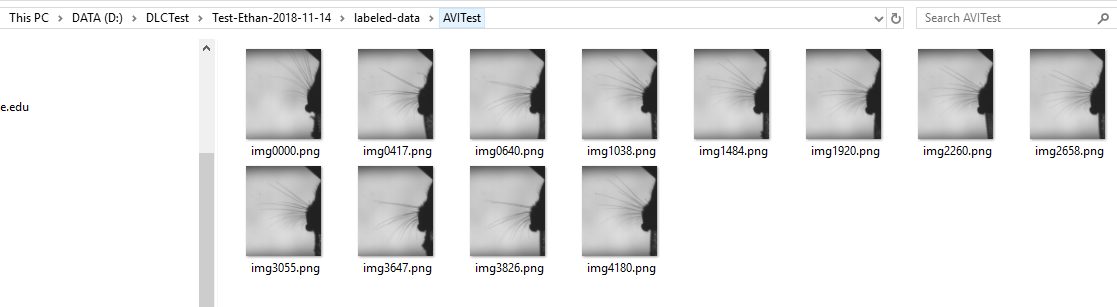
I just meant that instead of black images, I have actual frames when using the manual extraction (pic below).
E-Edwards
on 15 Nov 2018
(meaning covert your video to a mp4 type before loading) > I am not sure this is necessary.
I think there is something very strange happening here. Perhaps you are cropping wrongly? Because moviepy can load your video correctly, as evidenced by the first stored frame (in your original post). Can you perhaps delete the folder and try it again, with carefully testing the cropping parameters? Perhaps don't crop as a first test.
 MMathisLab
on 15 Nov 2018
MMathisLab
on 15 Nov 2018
I've now gone through several combinations changing cropping=True/False, checkcropping=True/False, and changing the cropping parameters in the config.yaml file. Before each test I always delete the working folder and create a new one from the 'Create New Project' step.
Basically not cropping at all OR cropping=True and checkcropping=False gives all black images.
Cropping=True and checkcropping=True gives the first actual frame and then all black frames, as originally posted, no matter how I change the cropping parameters.
I am still working on converting the video to mp4, so I will test that as soon as I can.
E-Edwards
on 15 Nov 2018
Cropping=True and checkcropping=True gives the first actual frame and then all black frames, as originally posted, no matter how I change the cropping parameters.
Just to clarify, but the first "actual" frame is not black?
AlexEMG
on 15 Nov 2018
Correct, in that scenario the first frame has an image of the mouse.
E-Edwards
on 15 Nov 2018
Here is some info on converting quickly with ffmeg :) https://opensource.com/article/17/6/ffmpeg-convert-media-file-formats
MMathisLab
on 15 Nov 2018
What is your codec?
AlexEMG
on 15 Nov 2018
also for cropping=True and checkcropping=False the expected behavior is not clear - if you are cropping and don't want to see all of them again, just leave off checkcropping=False
MMathisLab
on 15 Nov 2018
I was able to use the FFmpeg, and as an mp4 file the automatic extraction worked properly for both cropping and not cropping. I got correct images in every test. I cannot find the codec that was used for this video, it came from Streampix7 software if that's relevant.
This might now be a different issue, but I hit another error in the labeling gui. After placing a label, checking the "adjust marker size" box and moving the cursor to be one tic smaller, I get the following error and my labels disappear.
TypeError Traceback (most recent call last)
D:\anaconda\envs\deeplabcut\lib\site-packages\deeplabcut\generate_training_dataset\labeling_toolbox.py in OnSliderScroll(self, event)
322 for idx, bp in enumerate(self.updatedCoords):
323 col = self.updatedCoords[idx][-1][-1]
--> 324 color = self.colormap(normalize(col))
325 x1 = self.updatedCoords[idx][-1][0]
326 y1 = self.updatedCoords[idx][-1][1]
D:\anaconda\envs\deeplabcut\lib\site-packages\matplotlib\colors.py in __call__(self, value, clip)
953 # ma division is very slow; we can take a shortcut
954 resdat = result.data
--> 955 resdat -= vmin
956 resdat /= (vmax - vmin)
957 result = np.ma.array(resdat, mask=result.mask, copy=False)
TypeError: ufunc 'subtract' did not contain a loop with signature matching types dtype(' If I then continue to the next frame, place labels, and adjust the marker size it works correctly. If this is a separate issue though, then I would say that the extraction issue is settled. Thank you both very much for your help!
E-Edwards
on 16 Nov 2018
Great to hear! One day I will update the frame extraction to openCV, which will allow more codecs. However, it is rare that moviepy doesn't work...
With regard to the labeling, I believe this is a separate issue.
AlexEMG
on 16 Nov 2018
the GUI was just updated! I made some edits that should fix this, although there is one less-than-desirable behavior that needs addressed, namely, you should adjust the labels once, after you have labeled the first frame (if you zoomed in), and/or after the first label is placed, if not zoomed. See this post that should clarify the behavior/ how to use it! https://github.com/AlexEMG/DeepLabCut/issues/115#issuecomment-439746813
MMathisLab
on 19 Nov 2018
Just had this error trying to extract frames for an avi video (installed deeplabcut yesterday via pip). It's definitely got something to do with codecs because I can only watch my video using VLC but not Videos (the default video player in Ubuntu). Converting it to mp4 fixed it.
 ecobost
on 11 Dec 2018
ecobost
on 11 Dec 2018
Related issues
 guyts
·
3Comments
guyts
·
3Comments
 cvKDean
·
4Comments
cvKDean
·
4Comments
 phcao101
·
4Comments
phcao101
·
4Comments
 Xieyuanting
·
3Comments
Xieyuanting
·
3Comments
 Jonathan-Oehley
·
4Comments
Jonathan-Oehley
·
4Comments