Deeplabcut: Using fiji with DLC2; corner size for occluded feature
Hello,
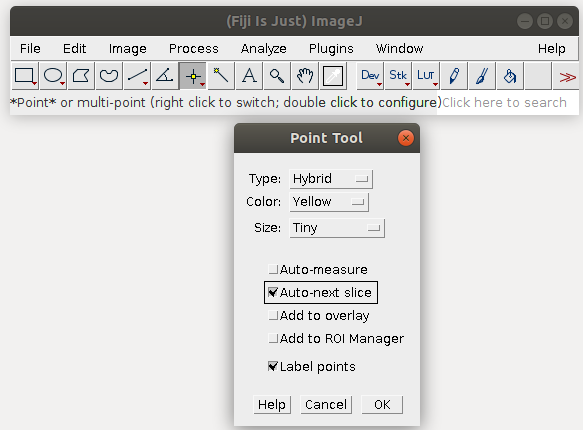
I think single point labelling with auto-advance frame in fiji is substantially faster than the GUI of DLC2. Once I labelled all single points and save their locations as separate cvs files (as in DLC1), how can I integrate them to DLC2?
Also, where can I set the size of the upper left box in each frame, where one clicked to ignore that frame for training, say for occluded features (again, as was done in DLC1)?
Many thanks!
 mschart
All 7 comments
You’ll have to use the step1/step2 code from DLC1 as of now.
In the DLC2 GUI you don’t have to click in the top left corner, you just skip that item now, so that’s faster at least ;).
 MMathisLab
on 9 Nov 2018
MMathisLab
on 9 Nov 2018
Yeah, now you only need to click on identified body parts (much simpler!). Will try to put the DLC1_to_2 code online soon!
 AlexEMG
on 9 Nov 2018
AlexEMG
on 9 Nov 2018
Excellent, thanks! I like dlc2, I'm just missing the single body part labelling option with fiji, as it had the auto-next-frame option that very much sped things up :)
mschart
on 9 Nov 2018
Finally some example conversion code here: https://github.com/AlexEMG/DLCutils Hope it makes sense. Perhaps you could write a import function for the xls files from Fiji, if you like it so much?
AlexEMG
on 12 Nov 2018
Thanks Alex, That's great. Yea, the auto-next slice option of fiji for the single body part labelling (which advances the frame at each measurement click, i.e. one kills two birds with one stone) is clearly the fastest method to create a training set. I'll try your conversion script and see how that all works in practice. I'll also contribute an import script to put the cvs location files of the single body parts - created with fiji - in the format DLC2 likes and add it to the DLCutils scripts. Cheers
mschart
on 12 Nov 2018
Also, check out the edits by @FedeClaudi to the labeling toolbox, now it "auto-advances" and there are hot keys.... [a few more hot keys could be added]
AlexEMG
on 12 Nov 2018
Finally some example conversion code here: https://github.com/AlexEMG/DLCutils Hope it makes sense. Perhaps you could write a import function for the xls files from Fiji, if you like it so much?
I just used your convertDLC1TO2.py to convert fiji-labeled points to DLC2, works well! Also, no need to write any more function, just having the .csv with the labels, then applying step 1,2,3,4 of DLC1 and following your instructions in convertDLC1TO2.py made me able to train using DLC2 syntax.
I'll try the GUI labeling soon (although I have 400 images and 27 features, so maybe I need that single feature labeling in order not to go crazy).
Cheers
mschart
on 12 Dec 2018
Related issues
 ForgottenOneNyx
·
4Comments
ForgottenOneNyx
·
4Comments
 vvolhejn
·
4Comments
vvolhejn
·
4Comments
 Jonathan-Oehley
·
4Comments
Jonathan-Oehley
·
4Comments
 guyts
·
3Comments
guyts
·
3Comments
 haofanglee
·
3Comments
haofanglee
·
3Comments