Deconz-rest-plugin: deCONZ to 2.05.88 failing to recognize Raspbee
Describe the bug
After updating Deconz HomeAssistant Add On from 6.4.1(2.05.84) to 6.5.0 (2.05.88), Deconz fails to recognize the RaspBee, even though the configuration has not changed.
device: /dev/ttyS0
Steps to reproduce the behavior
Upgrading the Hassio AddOn as described above, reproduces the error.
Expected behavior
Deconz will connect to RaspBee and start the Zigbee Network
Screenshots
Environment
- Host system: Raspberry Pi 4
- Running method: Home Assistent deCONZ Add-on
- Firmware version: (26xxyy00)
- deCONZ version: (2.05.88)
- Device: RaspBee I
- Do you use an USB extension cable: no
- Is there any other USB or serial devices connected to the host system? If so: Which? USB SSD (USB 3.0), USB ZWave Device
deCONZ Logs
device state timeout ignored in state 2
Additional context
 nilsmau
All 44 comments
Please provide logs. Also, check the hardware page of the addon and report back.
Logs can be found in deconz under help>Debug view
 Mimiix
on 16 Nov 2020
Mimiix
on 16 Nov 2020
I'm seeing the same issue. These are the debug logs:
20:30:26:837 COM: /dev/ttyS0 : (0x0000/0x0000)
20:30:26:884 COM: /dev/ttyAMA0 : (0x0000/0x0000)
20:30:26:884 dev /dev/ttyAMA0
20:30:26:885 COM: /dev/ttyS0 : (0x0000/0x0000)
20:30:26:885 auto connect com /dev/ttyAMA0
20:30:26:935 COM check bootloader
20:30:27:793 failed to reconnect to network try=3
20:30:28:943 COM timout query bootloader, assume application
20:30:28:946 Serial com connected
20:30:29:794 Daylight now: nightStart, status: 230, daylight: 0, dark: 1
20:30:29:889 COM: /dev/ttyAMA0 : (0x0000/0x0000)
20:30:29:890 dev /dev/ttyAMA0
20:30:29:890 COM: /dev/ttyS0 : (0x0000/0x0000)
20:30:29:897 GW update firmware not found:
20:30:30:376 void zmMaster::handleStateStatus(zmMaster::MasterEvent) EVENT_TIMEOUT
20:30:30:376 device state timeout ignored in state 2
20:30:32:793 try to reconnect to network try=4
20:30:33:293 void zmMaster::handleStateStatus(zmMaster::MasterEvent) EVENT_TIMEOUT
20:30:33:295 device state timeout ignored in state 2
20:30:36:293 void zmMaster::handleStateStatus(zmMaster::MasterEvent) EVENT_TIMEOUT
20:30:36:293 device state timeout ignored in state 2
20:30:37:793 try to reconnect to network try=5
20:30:39:293 command queue EVENT_TIMEOUT, cmd: CMD_CHANGE_NET_STATE, seq: 97
20:30:39:793 Daylight now: nightStart, status: 230, daylight: 0, dark: 1
20:30:39:889 COM: /dev/ttyAMA0 : (0x0000/0x0000)
20:30:39:890 dev /dev/ttyAMA0
20:30:39:890 COM: /dev/ttyS0 : (0x0000/0x0000)
20:30:39:898 GW update firmware not found:
20:30:42:293 void zmMaster::handleStateStatus(zmMaster::MasterEvent) EVENT_TIMEOUT
20:30:42:294 device state timeout ignored in state 2
20:30:42:793 try to reconnect to network try=6
20:30:44:293 command queue EVENT_TIMEOUT, cmd: CMD_CHANGE_NET_STATE, seq: 97
20:30:47:293 void zmMaster::handleStateStatus(zmMaster::MasterEvent) EVENT_TIMEOUT
20:30:47:294 device state timeout ignored in state 2
20:30:47:793 try to reconnect to network try=7
20:30:49:293 command queue EVENT_TIMEOUT, cmd: CMD_CHANGE_NET_STATE, seq: 97
20:30:49:793 Daylight now: nightStart, status: 230, daylight: 0, dark: 1
20:30:49:893 COM: /dev/ttyAMA0 : (0x0000/0x0000)
20:30:49:894 dev /dev/ttyAMA0
20:30:49:894 COM: /dev/ttyS0 : (0x0000/0x0000)
20:30:49:901 GW update firmware not found:
20:30:52:293 void zmMaster::handleStateStatus(zmMaster::MasterEvent) EVENT_TIMEOUT
20:30:52:293 device state timeout ignored in state 2
20:30:52:793 try to reconnect to network try=8
20:30:54:293 command queue EVENT_TIMEOUT, cmd: CMD_CHANGE_NET_STATE, seq: 97
20:30:54:294 MASTER kill cmd 0x08 (TIMEOUT)
20:30:57:293 void zmMaster::handleStateStatus(zmMaster::MasterEvent) EVENT_TIMEOUT
20:30:57:294 device state timeout ignored in state 2
20:30:57:793 try to reconnect to network try=9
20:30:59:293 command queue EVENT_TIMEOUT, cmd: CMD_CHANGE_NET_STATE, seq: 99
20:30:59:793 Daylight now: nightStart, status: 230, daylight: 0, dark: 1
20:30:59:845 COM: /dev/ttyAMA0 : (0x0000/0x0000)
20:30:59:845 dev /dev/ttyAMA0
20:30:59:846 COM: /dev/ttyS0 : (0x0000/0x0000)
20:30:59:853 GW update firmware not found:
20:31:02:293 void zmMaster::handleStateStatus(zmMaster::MasterEvent) EVENT_TIMEOUT
20:31:02:295 device state timeout ignored in state 2
20:31:02:794 try to reconnect to network try=10
20:31:04:293 command queue EVENT_TIMEOUT, cmd: CMD_CHANGE_NET_STATE, seq: 99
20:31:07:293 void zmMaster::handleStateStatus(zmMaster::MasterEvent) EVENT_TIMEOUT
20:31:07:294 device state timeout ignored in state 2
20:31:07:793 reconnect network failed, try later
20:31:07:794 networkState: CC_ReconnectNetwork
20:31:07:794 start reconnect to network
20:31:09:793 Daylight now: nightStart, status: 230, daylight: 0, dark: 1
20:31:09:882 COM: /dev/ttyAMA0 : (0x0000/0x0000)
20:31:09:885 dev /dev/ttyAMA0
20:31:09:886 COM: /dev/ttyS0 : (0x0000/0x0000)
20:31:09:895 GW update firmware not found:
20:31:10:293 void zmMaster::handleStateStatus(zmMaster::MasterEvent) EVENT_TIMEOUT
20:31:10:294 device state timeout ignored in state 2
20:31:12:793 try to reconnect to network try=1
20:31:13:293 void zmMaster::handleStateStatus(zmMaster::MasterEvent) EVENT_TIMEOUT
 stuart-c
on 16 Nov 2020
stuart-c
on 16 Nov 2020
It can't see it.
What is on the HA Hardware page?
Mimiix
on 16 Nov 2020
my logs look like:
[19:37:16] INFO: Running the OSRAM LEdvance OTA updater...
[19:37:16] INFO: Starting udevd...
[19:37:16] INFO: Running the IKEA OTA updater...
[20:37:17] WARNING: Your direct VNC access is not protected!
[20:37:17] INFO: Starting VNC server (local/no)...
[20:37:17] INFO: Starting websockify...
WebSocket server settings:
- Listen on 127.0.0.1:5901
- Flash security policy server
- Web server. Web root: /usr/share/novnc
- No SSL/TLS support (no cert file)
- proxying from 127.0.0.1:5901 to 127.0.0.1:5900
[20:37:20] INFO: deCONZ waiting for VNC to start
[20:37:21] INFO: Starting the deCONZ gateway...
QCoreApplication::arguments: Please instantiate the QApplication object first
libpng warning: iCCP: known incorrect sRGB profile
libpng warning: iCCP: known incorrect sRGB profile
20:37:23:022 HTTP Server listen on address 0.0.0.0, port: 40850, root: /usr/share/deCONZ/webapp/
20:37:23:036 CTRL. 3.27.220:37:23:138 dev /dev/ttyAMA0
20:37:23:178 dev /dev/ttyAMA0
20:37:23:179 ZCLDB init file /data/.local/share/dresden-elektronik/deCONZ/zcldb.txt
20:37:23:304 parent process s6-supervise
20:37:23:306 gw run mode: docker/hassio
20:37:23:306 GW sd-card image version file does not exist: /data/.local/share/dresden-elektronik/deCONZ/gw-version
20:37:23:308 DB sqlite version 3.27.2
20:37:23:310 DB PRAGMA page_count: 141
20:37:23:311 DB PRAGMA page_size: 1024
20:37:23:312 DB PRAGMA freelist_count: 24
20:37:23:313 DB file size 144384 bytes, free pages 24
20:37:23:315 DB PRAGMA user_version: 7
20:37:23:316 DB cleanup
20:37:23:319 DB create temporary views
21:37:23:337 started websocket server at port 8081
21:37:23:341 [INFO] - Found file containing button maps. Parsing data...
21:37:23:344 [ERROR] - Button map 'sunricherCCTMap' in JSON file has no assigned ModelIDs. Skip loading button map...
21:37:23:355 [INFO] - Button maps loaded.
21:37:23:357 dlg action: Read binding table
21:37:23:358 found node plugin: libde_rest_plugin.so - REST API Plugin
21:37:23:362 found node plugin: libde_signal_plugin.so - Signal Monitor Plugin
[19:37:23] INFO: Starting Nginx...
2020/11/16 19:37:23 [notice] 321#321: using the "epoll" event method
2020/11/16 19:37:23 [notice] 321#321: nginx/1.14.2
2020/11/16 19:37:23 [notice] 321#321: OS: Linux 4.19.127-v8
2020/11/16 19:37:23 [notice] 321#321: getrlimit(RLIMIT_NOFILE): 1048576:1048576
2020/11/16 19:37:23 [notice] 321#321: start worker processes
2020/11/16 19:37:23 [notice] 321#321: start worker process 1515
21:37:27:984 OTAU: create 1189-008B-02036550.zigbee
21:37:28:508 found node plugin: libstd_otau_plugin.so - STD OTAU Plugin
21:37:28:551 dev /dev/ttyAMA0
21:37:28:590 dev /dev/ttyAMA0
21:37:28:899 dev /dev/ttyAMA0
21:37:29:636 dev /dev/ttyAMA0
21:37:29:679 dev /dev/ttyAMA0
21:37:29:694 device disconnected reason: 4, index: 0
21:37:29:752 Announced to internet http://dresden-light.appspot.com/discover
21:37:29:753 discovery server date: Mon, 16 Nov 2020 19:37:29 GMT
21:37:29:754 local time seems to be ok
21:37:29:754 discovery found version 2.04.35 for update channel stable
21:37:30:574 wait reconnect 15 seconds
21:37:30:618 dev /dev/ttyAMA0
21:37:30:658 dev /dev/ttyAMA0
21:37:31:578 wait reconnect 14 seconds
21:37:32:574 wait reconnect 13 seconds
[20:37:33] INFO: Successfully send discovery information to Home Assistant.
21:37:33:574 wait reconnect 12 seconds
21:37:34:573 wait reconnect 11 seconds
21:37:35:573 wait reconnect 10 seconds
21:37:36:573 wait reconnect 9 seconds
21:37:37:522 New websocket 172.30.32.1:39824 (state: 3)
21:37:37:573 wait reconnect 8 seconds
21:37:38:573 wait reconnect 7 seconds
21:37:39:120 dev /dev/ttyAMA0
21:37:39:574 wait reconnect 6 seconds
21:37:40:574 wait reconnect 5 seconds
21:37:41:574 wait reconnect 4 seconds
21:37:42:574 wait reconnect 3 seconds
21:37:43:573 wait reconnect 2 seconds
21:37:44:573 wait reconnect 1 seconds
21:37:44:618 dev /dev/ttyAMA0
21:37:44:657 dev /dev/ttyAMA0
21:37:44:672 device disconnected reason: 4, index: 0
21:37:45:574 wait reconnect 15 seconds
21:37:45:619 dev /dev/ttyAMA0
21:37:45:659 dev /dev/ttyAMA0
21:37:46:574 wait reconnect 14 seconds
21:37:47:574 wait reconnect 13 seconds
21:37:47:575 start reconnect to network
21:37:48:574 wait reconnect 12 seconds
21:37:49:114 dev /dev/ttyAMA0
21:37:49:574 wait reconnect 11 seconds
21:37:50:574 wait reconnect 10 seconds
21:37:51:574 wait reconnect 9 seconds
21:37:52:573 wait reconnect 8 seconds
21:37:52:826 failed to reconnect to network try=1
21:37:53:574 wait reconnect 7 seconds
21:37:54:573 wait reconnect 6 seconds
21:37:55:574 wait reconnect 5 seconds
21:37:56:574 wait reconnect 4 seconds
does not change if I use either
/dev/ttyAMA0
or
/dev/ttyACM0
nilsmau
on 16 Nov 2020
I had the same issue where my RaspBee (also on /dev/ttyS0) was suddenly no longer recognised. I have a suspicion that /dev/ttyS0 is no longer checked since 2.05.87.
I was able to resolve the issue by making the RaspBee available at /dev/ttyAMA0 by switching UARTs (config.txt changes, see here and here). Once the RaspBee is mapped to /dev/ttyAMA0, deCONZ will recognise it again.
config.txt that should work with Raspberry Pi 4 and RaspBee 1:
# Put RaspBee on UART0, Bluetooth on UART1 (mini UART)
# Force turbo is required for mini UART to work.
enable_uart=1
dtoverlay=pi3-miniuart-bt
force_turbo=1
 mkai
on 16 Nov 2020
mkai
on 16 Nov 2020
I currently have
enable_uart=1
dtoverlay=pi3-miniuart-bt
but not
force_turbo
would that make a difference?
nilsmau
on 16 Nov 2020
I asked specifically for the Hardware page of HA because of the full serial device link. You should put that in the Addon.
Mimiix
on 16 Nov 2020
@mkai that's worked for me thanks!
stuart-c
on 16 Nov 2020
It can't see it.
What is on the HA Hardware page?
I asked specifically for the Hardware page of HA because of the full serial device link. You should put that in the Addon.
@Mimiix, sorry I missed that comment...
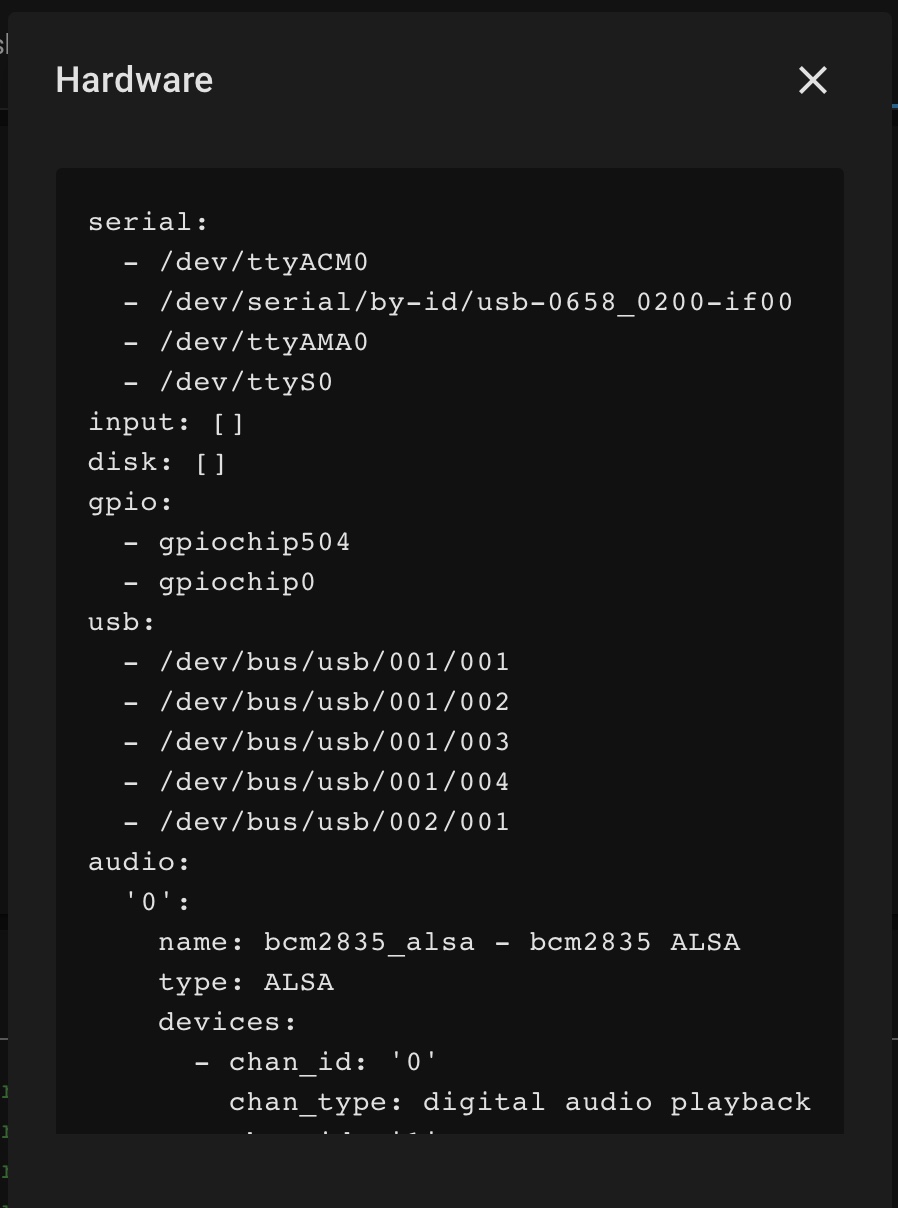
nilsmau
on 16 Nov 2020
I currently have
enable_uart=1
dtoverlay=pi3-miniuart-bt
but not
force_turbowould that make a difference?
@nilsmau According to https://www.raspberrypi.org/documentation/configuration/uart.md:
Using dtoverlay=pi3-miniuart-bt will put Bluetooth on the mini UART which is /dev/ttyS0. But the mini UART is disabled unless either core_freq=<mhz> or force_turbo=1 is set. So if you are not using Bluetooth then you do not need force_turbo.
But if you are using dtoverlay=pi3-miniuart-bt then your RaspBee should be on /dev/ttyAMA0 (and not ttyS0) on the Raspberry Pi 4.
mkai
on 16 Nov 2020
@mkai weird thing is: it works with 2.05.84 and /dev/ttyS0... and the same config.txt and device: config.
And I used to have it on /dev/ttyAMA0 before switching to the Pi 4.
So, i am lost and don't really know which way forward.
nilsmau
on 16 Nov 2020
Can you try with /dev/ttyAMA0 my HA setup is also Raspberry Pi 4 with RaspBee and it works with that.
 manup
on 16 Nov 2020
manup
on 16 Nov 2020
2.05.84 with /dev/ttyAMA0 shows following logs:
[21:09:34] INFO: Starting the deCONZ gateway...
QCoreApplication::arguments: Please instantiate the QApplication object first
libpng warning: iCCP: known incorrect sRGB profile
21:09:36:212 HTTP Server listen on address 0.0.0.0, port: 40850, root: /usr/share/deCONZ/webapp/
21:09:36:226 CTRL. 3.27.221:09:36:337 dev /dev/ttyAMA0
21:09:36:337 COM: /dev/ttyAMA0 / serialno:
21:09:36:338 COM: --dev: /dev/ttyAMA0 (RaspBee)
21:09:36:339 ZCLDB init file /data/.local/share/dresden-elektronik/deCONZ/zcldb.txt
21:09:36:446 parent process s6-supervise
21:09:36:446 gw run mode: docker/hassio
21:09:36:446 GW sd-card image version file does not exist: /data/.local/share/dresden-elektronik/deCONZ/gw-version
21:09:36:447 DB sqlite version 3.27.2
21:09:36:448 DB PRAGMA page_count: 141
21:09:36:448 DB PRAGMA page_size: 1024
21:09:36:448 DB PRAGMA freelist_count: 23
21:09:36:448 DB file size 144384 bytes, free pages 23
21:09:36:449 DB PRAGMA user_version: 7
21:09:36:449 DB cleanup
21:09:36:449 DB create temporary views
22:09:36:463 started websocket server at port 8081
22:09:36:465 [INFO] - Found file containing button maps. Parsing data...
22:09:36:472 [INFO] - Button maps loaded.
22:09:36:474 dlg action: Read binding table
22:09:36:474 found node plugin: libde_rest_plugin.so - REST API Plugin
22:09:36:477 found node plugin: libde_signal_plugin.so - Signal Monitor Plugin
[20:09:36] INFO: Starting Nginx...
2020/11/16 20:09:36 [notice] 323#323: using the "epoll" event method
2020/11/16 20:09:36 [notice] 323#323: nginx/1.14.2
2020/11/16 20:09:36 [notice] 323#323: OS: Linux 4.19.127-v8
2020/11/16 20:09:36 [notice] 323#323: getrlimit(RLIMIT_NOFILE): 1048576:1048576
2020/11/16 20:09:36 [notice] 323#323: start worker processes
2020/11/16 20:09:36 [notice] 323#323: start worker process 1514
22:09:40:556 OTAU: create 1189-008B-02036550.zigbee
22:09:41:030 found node plugin: libstd_otau_plugin.so - STD OTAU Plugin
22:09:41:068 dev /dev/ttyAMA0
22:09:41:068 COM: /dev/ttyAMA0 / serialno:
22:09:41:068 COM: --dev: /dev/ttyAMA0 (RaspBee)
22:09:41:319 dev /dev/ttyAMA0
22:09:41:366 New websocket 172.30.32.1:43592 (state: 3)
22:09:42:114 dev /dev/ttyAMA0
22:09:42:114 COM: /dev/ttyAMA0 / serialno:
22:09:42:114 COM: --dev: /dev/ttyAMA0 (RaspBee)
22:09:42:135 device disconnected reason: 4, index: 0
22:09:42:165 Announced to internet http://dresden-light.appspot.com/discover
22:09:42:166 discovery server date: Mon, 16 Nov 2020 20:09:42 GMT
22:09:42:166     local time seems to be ok
22:09:42:167 discovery found version 2.04.35 for update channel stable
22:09:43:074 wait reconnect 15 seconds
22:09:43:118 dev /dev/ttyAMA0
22:09:43:118 COM: /dev/ttyAMA0 / serialno:
22:09:43:118 COM: --dev: /dev/ttyAMA0 (RaspBee)
22:09:44:074 wait reconnect 14 seconds
22:09:45:074 wait reconnect 13 seconds
22:09:46:074 wait reconnect 12 seconds
[21:09:46] INFO: Successfully send discovery information to Home Assistant.
22:09:47:075 wait reconnect 11 seconds
Did you, by any chance, click the "update firmware" button in phoscon?
Mimiix
on 16 Nov 2020
2.05.88 with /dev/ttyAMA0 shows this (same as for /dev/ttyS0:
[21:12:54] INFO: Starting the deCONZ gateway...
QCoreApplication::arguments: Please instantiate the QApplication object first
libpng warning: iCCP: known incorrect sRGB profile
libpng warning: iCCP: known incorrect sRGB profile
21:12:56:107 HTTP Server listen on address 0.0.0.0, port: 40850, root: /usr/share/deCONZ/webapp/
21:12:56:138 CTRL. 3.27.221:12:56:242 dev /dev/ttyAMA0
21:12:56:243 COM: /dev/ttyAMA0 / serialno: , RaspBee
21:12:56:244 ZCLDB init file /data/.local/share/dresden-elektronik/deCONZ/zcldb.txt
21:12:56:353 parent process s6-supervise
21:12:56:354 gw run mode: docker/hassio
21:12:56:355 GW sd-card image version file does not exist: /data/.local/share/dresden-elektronik/deCONZ/gw-version
21:12:56:357 DB sqlite version 3.27.2
21:12:56:358 DB PRAGMA page_count: 141
21:12:56:359 DB PRAGMA page_size: 1024
21:12:56:359 DB PRAGMA freelist_count: 22
21:12:56:359 DB file size 144384 bytes, free pages 22
21:12:56:360 DB PRAGMA user_version: 7
21:12:56:360 DB cleanup
21:12:56:361 DB create temporary views
22:12:56:377 started websocket server at port 8081
22:12:56:380 [INFO] - Found file containing button maps. Parsing data...
22:12:56:382 [ERROR] - Button map 'sunricherCCTMap' in JSON file has no assigned ModelIDs. Skip loading button map...
22:12:56:389 [INFO] - Button maps loaded.
22:12:56:391 dlg action: Read binding table
22:12:56:391 found node plugin: libde_rest_plugin.so - REST API Plugin
22:12:56:394 found node plugin: libde_signal_plugin.so - Signal Monitor Plugin
[20:12:56] INFO: Starting Nginx...
2020/11/16 20:12:56 [notice] 328#328: using the "epoll" event method
2020/11/16 20:12:56 [notice] 328#328: nginx/1.14.2
2020/11/16 20:12:56 [notice] 328#328: OS: Linux 4.19.127-v8
2020/11/16 20:12:56 [notice] 328#328: getrlimit(RLIMIT_NOFILE): 1048576:1048576
2020/11/16 20:12:56 [notice] 328#328: start worker processes
2020/11/16 20:12:56 [notice] 328#328: start worker process 1513
22:13:00:923 found node plugin: libstd_otau_plugin.so - STD OTAU Plugin
22:13:00:962 dev /dev/ttyAMA0
22:13:00:962 COM: /dev/ttyAMA0 / serialno: , RaspBee
22:13:01:242 dev /dev/ttyAMA0
22:13:01:251 New websocket 172.30.32.1:44278 (state: 3)
22:13:02:013 dev /dev/ttyAMA0
22:13:02:014 COM: /dev/ttyAMA0 / serialno: , RaspBee
22:13:02:027 device disconnected reason: 4, index: 0
22:13:02:145 Announced to internet http://dresden-light.appspot.com/discover
22:13:02:146 discovery server date: Mon, 16 Nov 2020 20:13:02 GMT
22:13:02:146     local time seems to be ok
22:13:02:147 discovery found version 2.04.35 for update channel stable
22:13:03:014 wait reconnect 15 seconds
22:13:03:061 dev /dev/ttyAMA0
22:13:03:062 COM: /dev/ttyAMA0 / serialno: , RaspBee
22:13:04:064 wait reconnect 14 seconds
22:13:05:077 wait reconnect 13 seconds
Did you, by any chance, click the "update firmware" button in phoscon?
no, only through HomeAssistant
nilsmau
on 16 Nov 2020
You updated the Raspbee's firmware trough the addon?
Mimiix
on 16 Nov 2020
@mimiix, yes!
You updated the Raspbee's firmware trough the addon?
nilsmau
on 16 Nov 2020
There we go.
The HA addon ducks up firmware updates now and then. _read: Always_
I suggest putting a SD with raspbian, then put the firmware back manually:
https://github.com/dresden-elektronik/deconz-rest-plugin/wiki/Update-deCONZ-manually
@manup Case closed.
Mimiix
on 16 Nov 2020
@mimiix, and all, thanks your your quick assistance, I'll try that "manual" FW update on the coming weekend, will report back.
nilsmau
on 16 Nov 2020
The HA addon fucks up firmware updates now and then. read: Always
When is that bug going to be fixed on this end? As there is nothing in the Docker image of HA that influences this behavior.
Can we track that somewhere?
 frenck
on 16 Nov 2020
frenck
on 16 Nov 2020
The HA addon fucks up firmware updates now and then. read: Always
When is that bug going to be fixed on this end? As there is nothing in the Docker image of HA that influences this behavior.
Can we track that somewhere?
Didnt you say the functionality wasn't broken? So now you do agree that it's broken?
Wasn't it my suggestion that you opened a issue on our git with related information on how to fix? Ah yes, I did before but you didn't want to. You wanted to email.
Don't worry, you don't have to do anything. We got this covered. Should be included in next beta. Need you to fix something on your end then. But that's fine right?
Mimiix
on 16 Nov 2020
As for the main issue in this topic, I feel like the instructions given are more of a workaround.
The interesting part / real question here is: Why are these device now no longer recognized by deconz? As the only change in the add-on version that works and the latest that does not work; it the upgrade of deconz itself. Hence, it is most likely introduced in deconz.
frenck
on 16 Nov 2020
Didnt you say the functionality wasn't broken? So now you do agree that it's broken?
No, you say that (and I quoted you), hence I want to track it.
frenck
on 16 Nov 2020
As for the main issue in this topic, I feel like the instructions given are more of a workaround.
The interesting part / real question here is: Why are these device now no longer recognized by deconz? As the only change in the add-on version that works and the latest that does not work; it the upgrade of deconz itself. Hence, it is most likely introduced in deconz.
That's what I was thinking as well. But then again, I don't know about what's under the hood in the FW and the HA add-on.
nilsmau
on 16 Nov 2020
As for the main issue in this topic, I feel like the instructions given are more of a workaround.
The interesting part / real question here is: Why are these device now no longer recognized by deconz? As the only change in the add-on version that works and the latest that does not work; it the upgrade of deconz itself. Hence, it is most likely introduced in deconz.
The addon firmware update has been broken for ages. Even the first time when I contacted you about it. Now it got your attention. Quit the hypocrisy and start being real.
As I said, it's fixed later this month. No need to worry.
Mimiix
on 16 Nov 2020
Quit the hypocrisy and start being real.
Wut? That doesn't sound polite at all.
As I said, it's fixed later this month. No need to worry.
So it isn't the add-ons fault? Yet, you stated otherwise above?
Can I still track it somewhere?
frenck
on 16 Nov 2020
As for the main issue in this topic, I feel like the instructions given are more of a workaround.
The interesting part / real question here is: Why are these device now no longer recognized by deconz? As the only change in the add-on version that works and the latest that does not work; it the upgrade of deconz itself. Hence, it is most likely introduced in deconz.That's what I was thinking as well. But then again, I don't know about what's under the hood in the FW and the HA add-on.
Yes, this interests me as well. There is nothing "special" going on there. The only thing it does (extra), is checking if the device specified is available, before starting deCONZ. However, the logs show deCONZ started, so that check passes.
Yet, nothing changed, besides deconz. So I wonder what this serial device path behavior causes. Feel like a bug.
frenck
on 16 Nov 2020
Hi please let keep it civil here.
For RaspBee there shouldn't be re-enumeration issues like for example we see for USB devices.
I'm not sure what is happening here, or if it is an configuration problem.
On Raspbian we have seen that sometimes after an system update the serial configuration was reverted.
In that case the steps to reconfigure it via raspi-config helped.
manup
on 16 Nov 2020
For RaspBee there shouldn't be re-enumeration issues like for example we see for USB devices.
I'm not sure what is happening here, or if it is an configuration problem.
Anything we or people in here can do to find the root cause or determine the issue, other than the logs already provided?
PS: I'm still interested in tracking the mentioned update issues above. Is there a reference to where it was fixed? Or an issue it was tracked in?
frenck
on 16 Nov 2020
Hard to tell I did two tests in my setup to get a more detailed picture.
- deCONZ v2.5.88
- RaspBee I
- Raspberry Pi 4
- USB 3 SSD flash drive (no sd-card)
- deCONZ Add-on 6.5.0
- HassOS 4.16
Update from older firmware version
- Logged in via SSH root shell →
login - Attached to the Docker container
docker exec -it addon_core_deconz bash - Via VNC disconnected deCONZ from RaspBee → deCONZ disconnect button under "File" menu item
- In the SSH shell flashed old firmware
root@core-deconz:/# GCFFlasher_internal -f /usr/share/deCONZ/firmware/deCONZ_Rpi_0x26350500.bin.GCF
GCFFlasher V3_16 (c) dresden elektronik ingenieurtechnik gmbh
Reboot device RaspBee (RaspBee)
deCONZ firmware version 26390500
RaspBee Bootloader premium
Vers. 1.02
build 201
3/08/01
 (4734 ms)
flashing 125732 bytes: |=============================|
verify: ....
SUCCESS
- deCONZ reconnects automatically
- In the Phoscon App → Menu → Settings → Gateway clicked the update firmware button (to version 0x26390500)
- This worked fine and after the update deCONZ reconnected and the new firmware version was shown
Note: RaspBee I and ConBee I are more easy to handle as both use a FTDI chip which stays always up, even if the MCU reboots for the firmware update. So I think that the above issue is a different as other common USB re-enumeration issues. Related https://github.com/marthoc/docker-deconz/issues/298
Update when no firmware is installed
This state can be simulated by repeating above step 4) but aborting via Ctrl-C during the update:
root@core-deconz:/# GCFFlasher_internal -f /usr/share/deCONZ/firmware/deCONZ_Rpi_0x26350500.bin.GCF
GCFFlasher V3_16 (c) dresden elektronik ingenieurtechnik gmbh
Reboot device RaspBee (RaspBee)
deCONZ firmware version 26390500
RaspBee Bootloader premium
Vers. 1.02
build 2013/08/01
flashing 125732 bytes: |====^C
Phoscon App shows now "Firmware not connected".
In VNC deCONZ is also disconnected but shows the "Update Firmware" button.
This exectues
/usr/bin/GCFFlasher_internal.bin -d RaspBee -t 60 -f /usr/share/deCONZ/firmware/deCONZ_Rpi_0x26390500.bin.GCF
But this doesn't seem to work anymore.
I repeated the firmware update with some more logging in the SSH shell.
GCFFlasher_internal -x 3 -d RaspBee -f /usr/share/deCONZ/firmware/deCONZ_Rpi_0x26350500.bin.GCF
GCFFlasher V3_16 (c) dresden elektronik ingenieurtechnik gmbh
00:47:01:649 using firmware file: /usr/share/deCONZ/firmware/deCONZ_Rpi_0x26350500.bin.GCF
00:47:01:765 ls dev: /dev/ttyAMA0 (0x0000/0x0000) sn:
00:47:01:765 dev /dev/ttyAMA0
Reboot device RaspBee (RaspBee)
00:47:02:181 query bootloader v1 ID after 0 ms
00:47:03:683 query bootloader v1 ID after 1502 ms
00:47:04:184 query deCONZ firmware version
00:47:06:187 uart reset failed, try RaspBee reset
action: reset device RaspBee
wiringPi 2.60 initialized
00:47:06:457 query bootloader v1 ID after 62 ms
00:47:06:613 RX 48 bytes ASCII
RaspBee Bootloader premium
Vers. 1.02
build 201 after 218 ms
00:47:06:613 bootloader start after 218 ms
RaspBee Bootloader premium
Vers. 1.02
build 201
00:47:06:616 GCF_ResetDeviceDone
00:47:06:619 bootloader v1 update firmware
3/08/01
 (54 ms)
3/08/01
STARTING (289 ms)
3/08/01
STARTING APP
 (292 ms)
could not sync with bootloader
root@core-deconz:/#
Even after 10 attempts I always get the same error message could not sync with bootloader.
Notice the communication does work as there are messages received from the bootloader, but there appears to be a timing problem here.
Curious about this I switched the same RaspBee I module onto another Raspberry Pi with a native Raspbian.
pi@raspberrypi:~ $ GCFFlasher_internal.bin -r -f /usr/share/deCONZ/firmware/deCONZ_Rpi_0x26350500.bin.GCF
GCFFlasher V3_16 (c) dresden elektronik ingenieurtechnik gmbh
Reboot device RaspBee (RaspBee)
action: reset device RaspBee
wiringPi 2.50 initialized
RaspBee Bootloader premium
Vers. 1.02
uild 2013/ (52 ms)
uild 2013/08/01
 (52 ms)
uild 2013/08/01
R (390 ms)
uild 2013/08/01
RE (391 ms)
uild 2013/08/01
REA (391 ms)
uild 2013/08/01
READ (391 ms)
flashing 125732 bytes: |=============================|
verify: ....
SUCCESS
Here the firmware update went through fine in the first attempt.
So this might indeed be a timing issue, once the RaspBee I is in a state when there is no firmware installed (or a firmware update doesn't succeed on the first try. Normally GCFFlasher recovers from that automatically due the -t 60 parameter (try for a minute).
I'm not sure if the different timing is caused by the virtualization or simply because my HassOS is under heavier load compared to the plain Pi with nothing really running on it.
The GCFFlasher internal state machine is already very fast, but perhaps the critical phase at 00:47:06:619 bootloader v1 update firmware can be tweaked a bit.
manup
on 17 Nov 2020
How's firmware flashing relevant here when reverting to a hassio-deconz-plugin < 6.5.0 (and thus older deconz) makes things work immediately again, without any re-flashing or the like?
(yes, I'm affected as well, exactly same symptoms as described by others already)
 HenningGithub
on 17 Nov 2020
HenningGithub
on 17 Nov 2020
The same situation here too.
After updating hassio-deconz-plugin to 6.5.0 version suddenly got my Raspbee II not working.
i even updated firmware manually to latest release.
But i've found some interesting thing. It seems that after plugin starts first it trying to update my Raspbee device
[s6-init] ensuring user provided files have correct perms...exited 0.
[fix-attrs.d] applying ownership & permissions fixes...
[fix-attrs.d] done.
[cont-init.d] executing container initialization scripts...
[cont-init.d] firmware.sh: executing...
[13:24:37] INFO: GCFFlasher V3_16 (c) dresden elektronik ingenieurtechnik gmbh
Path             | Vendor | Product | Serial     | Type
-----------------+--------+---------+------------+-------
/dev/ttyACM0     | 0x1CF1 | 0x0030  |            | ConBee II
[cont-init.d] firmware.sh: exited 0.
[cont-init.d] nginx.sh: executing...
[cont-init.d] nginx.sh: exited 0.
[cont-init.d] novnc.sh: executing...
[cont-init.d] novnc.sh: exited 0.
[cont-init.d] done.
[services.d] starting services
[10:24:37] INFO: Starting udevd...
[10:24:37] INFO: Running the IKEA OTA updater...
[10:24:37] INFO: Running the OSRAM LEdvance OTA updater...
[13:24:37] INFO: Websockify waiting for VNC to start
[services.d] done.
[10:24:37] INFO: Running the deCONZ OTA updater...
[13:24:38] INFO: Starting VNC server (local/yes)...
[13:24:38] INFO: Starting websockify...
WebSocket server settings:
  - Listen on 127.0.0.1:5901
  - Flash security policy server
  - Web server. Web root: /usr/share/novnc
  - No SSL/TLS support (no cert file)
  - proxying from 127.0.0.1:5901 to 127.0.0.1:5900
[13:24:41] INFO: deCONZ waiting for VNC to start
[13:24:41] INFO: Starting the deCONZ gateway...
QCoreApplication::arguments: Please instantiate the QApplication object first
libpng warning: iCCP: known incorrect sRGB profile
libpng warning: iCCP: known incorrect sRGB profile
13:24:43:036 HTTP Server listen on address 0.0.0.0, port: 40850, root: /usr/share/deCONZ/webapp/
13:24:43:042 CTRL. 3.27.213:24:43:139 ZCLDB init file /data/.local/share/dresden-elektronik/deCONZ/zcldb.txt
13:24:43:204 parent process s6-supervise
13:24:43:205 gw run mode: docker/hassio
13:24:43:205 GW sd-card image version file does not exist: /data/.local/share/dresden-elektronik/deCONZ/gw-version
13:24:43:206 DB sqlite version 3.27.2
13:24:43:207 DB PRAGMA page_count: 33
13:24:43:208 DB PRAGMA page_size: 4096
13:24:43:208 DB PRAGMA freelist_count: 0
13:24:43:208 DB file size 135168 bytes, free pages 0
13:24:43:208 DB PRAGMA user_version: 7
13:24:43:208 DB cleanup
13:24:43:209 DB create temporary views
13:24:43:212 started websocket server at port 8081
13:24:43:213 [INFO] - Found file containing button maps. Parsing data...
13:24:43:215 [ERROR] - Button map 'sunricherCCTMap' in JSON file has no assigned ModelIDs. Skip loading button map...
13:24:43:217 [INFO] - Button maps loaded.
13:24:43:218 dlg action: Read binding table
13:24:43:219 found node plugin: libde_rest_plugin.so - REST API Plugin
13:24:43:221 found node plugin: libde_signal_plugin.so - Signal Monitor Plugin
[10:24:43] INFO: Starting Nginx...
2020/11/17 10:24:43 [notice] 330#330: using the "epoll" event method
2020/11/17 10:24:43 [notice] 330#330: nginx/1.14.2
2020/11/17 10:24:43 [notice] 330#330: OS: Linux 5.8.0-0.bpo.2-amd64
2020/11/17 10:24:43 [notice] 330#330: getrlimit(RLIMIT_NOFILE): 1048576:1048576
2020/11/17 10:24:43 [notice] 330#330: start worker processes
2020/11/17 10:24:43 [notice] 330#330: start worker process 1073
/dev/ttyACM0
But my devices is /dev/ttyS0, and also firmware is up to dated already. And path in plugin configuration also /dev/ttyS0
and after this script trying to connect to so host:
`
2020/11/17 10:24:43 [notice] 330#330: start worker process 1073
13:24:45:728 found node plugin: libstd_otau_plugin.so - STD OTAU Plugin
13:24:46:019 created username: 8FE2467DF1, devicetype: Home Assistant
13:24:48:051 New websocket 172.30.32.1:42324 (state: 3)
13:24:48:681 Announced to internet https://phoscon.de/discover
13:25:05:245 start reconnect to network
13:25:10:245 failed to reconnect to network try=1
13:25:15:244 failed to reconnect to network try=2
13:25:20:244 failed to reconnect to network try=3
13:25:25:245 failed to reconnect to network try=4
13:25:30:244 failed to reconnect to network try=5
13:25:35:244 failed to reconnect to network try=6
13:25:40:244 failed to reconnect to network try=7
13:25:45:244 failed to reconnect to network try=8
13:25:50:245 failed to reconnect to network try=9
13:25:55:245 failed to reconnect to network try=10
13:26:00:245 reconnect network failed, try later
13:26:00:246 start reconnect to network
Maybe it's possible somehow to change devices path in this firmware.sh script (there is no any text with device path in firmware.sh file)?
Or how can i downgrade deconz plugin to previous version?
 cheese202
on 17 Nov 2020
cheese202
on 17 Nov 2020
How's firmware flashing relevant here when reverting to a hassio-deconz-plugin < 6.5.0 (and thus older deconz) makes things work immediately again, without any re-flashing or the like?
Ah sorry my test were referring to the update problems mentioned above, think it's best to move that to a separate issue.
Meanwhile I checked what's going on with /dev/ttyS0 on my native Raspbian /dev/ttyS0 is working with all deCONZ versions up to v2.6.0. In the Docker environment I can confirm it isn't working starting with v2.5.88, the reason is that the device enumeration in deCONZ is stricter (in this case too strict) and assumed the same setup as been found on native Raspbian.
The difference is that on native Raspbian symlinks are created by the OS to point to the primary UART, in the Docker image these are missing. For /dev/ttyAMA0 this is handled a bit different but for /dev/ttyS0 following symlink is expected:
/dev/serial0 --> /dev/ttyS0
See: https://www.raspberrypi.org/documentation/configuration/uart.md
I've changed that now for the next version so that RaspBee works without the symlinks again.
@pvizeli would it be possible to add the symlink in the Docker image as quick fix before the new version arrives?
manup
on 17 Nov 2020
Hey folks, I don't know if this information is helpful or not, but I'm encountering the same problem. The wife is quite annoyed that the buttons stopped working.
When it worked:
The deCONZ add-on was configured to /dev/ttyAMA0, had no problem adding in Tradfri switches, etc.
Now:
From deCONZ log:
10:22:36:371 channel 20 does not match channel mask 0x00000800 (TODO)
From system log:
20-11-17 17:04:20 INFO (MainThread) [supervisor.homeassistant.core] Detect a running Home Assistant instance
20-11-17 17:04:21 INFO (MainThread) [supervisor.api.proxy] Home Assistant WebSocket API request initialize
20-11-17 17:04:21 INFO (MainThread) [supervisor.api.proxy] WebSocket access from a0d7b954_appdaemon
20-11-17 17:04:21 INFO (MainThread) [supervisor.api.proxy] Home Assistant WebSocket API request running
20-11-17 17:04:48 ERROR (MainThread) [supervisor.api.ingress] Ingress error: Server disconnected
20-11-17 17:07:44 ERROR (MainThread) [supervisor.api.ingress] Ingress error: Server disconnected
20-11-17 17:10:04 ERROR (MainThread) [supervisor.api.ingress] Ingress error: Server disconnected
20-11-17 17:10:13 INFO (SyncWorker_2) [supervisor.docker.interface] Stopping addon_core_deconz application
20-11-17 17:10:15 ERROR (MainThread) [supervisor.api.ingress] Ingress error: Cannot connect to host 172.30.33.1:8099 ssl:default [Connect call failed ('172.30.33.1', 8099)]
I tried switching the deCONZ config to /dev/ttyS0 because I have no idea what I'm doing, and the error remains the same.
Am I understanding correctly that the work-around right now is to re-flash the SD card in my RaspPi to the previous firmware version?
 lucasjfriesen
on 17 Nov 2020
lucasjfriesen
on 17 Nov 2020
/dev/ttyAMA0 does work but the Raspberry Pi UART needs to be configured properly.
manup
on 17 Nov 2020
From deCONZ log:
10:22:36:371 channel 20 does not match channel mask 0x00000800 (TODO)
That's a bit misleading debug print, need to change that. If everything is working ignore it.
If indeed a unwanted channel change happened you can view previous configurations and revert to them in the Zigbee configuration page: https://github.com/dresden-elektronik/deconz-rest-plugin/wiki/Network-lost-issues
manup
on 17 Nov 2020
/dev/ttyAMA0does work but the Raspberry Pi UART needs to be configured properly.
If you're referring to
enable_uart=1
dtoverlay=pi3-miniuart-bt
I've got that covered.
If indeed a unwanted channel change happened
I tried changing the channel and actually discovered that I can't. It reverts back to 20 and throws the same error. Nonetheless, it was working before the updates so I assume that's not the problem.
lucasjfriesen
on 17 Nov 2020
Is the firmware shown as connected? The channel change is only possible if the firmware connection works.
manup
on 17 Nov 2020
Is the firmware shown as connected? The channel change is only possible if the firmware connection works.
I'm uncertain - Fairly new to the HA world.
This indicates that it _something_ isn't connected. System log:
20-11-17 18:13:09 INFO (SyncWorker_6) [supervisor.docker.addon] Starting Docker add-on homeassistant/aarch64-addon-deconz with version 6.5.0
20-11-17 18:13:13 ERROR (MainThread) [supervisor.api.ingress] Ingress error: Cannot connect to host 172.30.33.1:8099 ssl:default [Connect call failed ('172.30.33.1', 8099)]
The deCONZ log is mostly filled with spam:
172.30.32.2 - - [17/Nov/2020:18:34:37 +0000] "GET /websocket HTTP/1.1" 101 349 "-" "Mozilla/5.0 (Windows NT 10.0; Win64; x64) AppleWebKit/537.36 (KHTML, like Gecko) Chrome/86.0.4240.193 Safari/537.36"
10:34:37:558 Remove websocket 127.0.0.1:42802 after error Unknown error, close-code: 1000, reason:
10:34:41:406 dev /dev/ttyAMA0
10:34:41:408 GW firmware version: 0x26520700
10:34:46:370 channel 20 does not match channel mask 0x00000800 (TODO)
10:34:51:406 dev /dev/ttyAMA0
10:34:51:407 GW firmware version: 0x26520700
10:34:56:370 channel 20 does not match channel mask 0x00000800 (TODO)
10:35:01:407 dev /dev/ttyAMA0
10:35:01:408 GW firmware version: 0x26520700
10:35:06:371 channel 20 does not match channel mask 0x00000800 (TODO)
10:35:11:407 dev /dev/ttyAMA0
10:35:11:409 GW firmware version: 0x26520700
10:35:16:371 channel 20 does not match channel mask 0x00000800 (TODO)
10:35:16:417 Current channel 20
10:35:16:438 Device TTL 1255 s flags: 0x7
10:35:21:407 dev /dev/ttyAMA0
10:35:21:408 GW firmware version: 0x26520700
10:35:26:371 channel 20 does not match channel mask 0x00000800 (TODO)
10:35:31:407 dev /dev/ttyAMA0
10:35:31:409 GW firmware version: 0x26520700
10:35:36:370 channel 20 does not match channel mask 0x00000800 (TODO)
10:35:41:406 dev /dev/ttyAMA0
10:35:41:407 GW firmware version: 0x26520700
10:35:46:370 channel 20 does not match channel mask 0x00000800 (TODO)
10:35:51:407 dev /dev/ttyAMA0
10:35:51:408 GW firmware version: 0x26520700
10:35:56:371 channel 20 does not match channel mask 0x00000800 (TODO)
10:36:01:407 dev /dev/ttyAMA0
10:36:01:408 GW firmware version: 0x26520700
10:36:06:370 channel 20 does not match channel mask 0x00000800 (TODO)
10:36:11:408 dev /dev/ttyAMA0
10:36:11:409 GW firmware version: 0x26520700
10:36:16:370 channel 20 does not match channel mask 0x00000800 (TODO)
10:36:16:416 Current channel 20
10:36:16:437 Device TTL 1195 s flags: 0x7
10:36:21:406 dev /dev/ttyAMA0
10:36:21:408 GW firmware version: 0x26520700
10:36:26:370 channel 20 does not match channel mask 0x00000800 (TODO)
10:36:31:406 dev /dev/ttyAMA0
10:36:31:407 GW firmware version: 0x26520700
10:36:36:370 channel 20 does not match channel mask 0x00000800 (TODO)
10:36:41:406 dev /dev/ttyAMA0
10:36:41:408 GW firmware version: 0x26520700
10:36:46:370 channel 20 does not match channel mask 0x00000800 (TODO)
10:36:51:409 dev /dev/ttyAMA0
10:36:51:411 GW firmware version: 0x26520700
10:36:56:371 channel 20 does not match channel mask 0x00000800 (TODO)
10:37:01:434 dev /dev/ttyAMA0
10:37:01:435 GW firmware version: 0x26520700
10:37:06:371 channel 20 does not match channel mask 0x00000800 (TODO)
10:37:11:406 dev /dev/ttyAMA0
10:37:11:407 GW firmware version: 0x26520700
10:37:16:370 channel 20 does not match channel mask 0x00000800 (TODO)
10:37:16:415 Current channel 20
10:37:16:438 Device TTL 1135 s flags: 0x7
10:37:21:406 dev /dev/ttyAMA0
10:37:21:407 GW firmware version: 0x26520700
10:37:26:371 channel 20 does not match channel mask 0x00000800 (TODO)
10:37:31:406 dev /dev/ttyAMA0
10:37:31:407 GW firmware version: 0x26520700
10:37:36:370 channel 20 does not match channel mask 0x00000800 (TODO)
10:37:41:406 dev /dev/ttyAMA0
10:37:41:408 GW firmware version: 0x26520700
10:37:46:370 channel 20 does not match channel mask 0x00000800 (TODO)
10:37:51:406 dev /dev/ttyAMA0
10:37:51:407 GW firmware version: 0x26520700
10:37:56:370 channel 20 does not match channel mask 0x00000800 (TODO)
10:38:01:419 dev /dev/ttyAMA0
10:38:01:422 GW firmware version: 0x26520700
10:38:06:370 channel 20 does not match channel mask 0x00000800 (TODO)
@manup, this was exactly my issue, reverting back to an older version of the deconz-plugin (<6.5.0, thus deconz <2.05.88), and voila, everything works again.
> > How's firmware flashing relevant here when reverting to a hassio-deconz-plugin < 6.5.0 (and thus older deconz) makes things work immediately again, without any re-flashing or the like?
Ah sorry my test were referring to the update problems mentioned above, think it's best to move that to a separate issue.
Meanwhile I checked what's going on with
/dev/ttyS0on my native Raspbian/dev/ttyS0is working with all deCONZ versions up to v2.6.0. In the Docker environment I can confirm it isn't working starting with v2.5.88, the reason is that the device enumeration in deCONZ is stricter (in this case too strict) and assumed the same setup as been found on native Raspbian.The difference is that on native Raspbian symlinks are created by the OS to point to the _primary UART_, in the Docker image these are missing. For
/dev/ttyAMA0this is handled a bit different but for/dev/ttyS0following symlink is expected:
/dev/serial0 --> /dev/ttyS0See: https://www.raspberrypi.org/documentation/configuration/uart.md
I've changed that now for the next version so that RaspBee works without the symlinks again.
@pvizeli would it be possible to add the symlink in the Docker image as quick fix before the new version arrives?
@manup, does that mean the problem will be solved in >2.05.88? @frenck, I would assume that this will then fix also the issue https://github.com/home-assistant/hassio-addons/issues/1682 for deconz version >6.5.0? then I will wait with the tinkering of manual FW update and the likes...
nilsmau
on 17 Nov 2020
@manup, does that mean the problem will be solved in >2.05.88?
Yes it's part of all the upcoming releases.
manup
on 17 Nov 2020
20-11-17 18:13:09 INFO (SyncWorker_6) [supervisor.docker.addon] Starting Docker add-on homeassistant/aarch64-addon-deconz with version 6.5.0
20-11-17 18:13:13 ERROR (MainThread) [supervisor.api.ingress] Ingress error: Cannot connect to host 172.30.33.1:8099 ssl:default [Connect call failed ('172.30.33.1', 8099)]
I don't know what these mean.
10:34:41:408 GW firmware version: 0x26520700
This is only printed if the firmware connection does work. However 0x26520700 is a rather old version with quite some bugs, might explain the channel issues. Currently RaspBee II update isn't available via Phoscon App (on the plan for the next version in December). I'd recommend to update the firmware to the latest version as described in https://github.com/dresden-elektronik/deconz-rest-plugin/wiki/Update-deCONZ-manually this requires a native system. It's also possible to do that directly in the Docker container as I did in my tests, but here you'll need to login via root SSH.
manup
on 17 Nov 2020
Thanks for the help. I'm currently running on RaspPi 4, no docker. As near as I can tell, this means that I'll just have to wait for December because I have no root through the HA terminal without running HA in a Raspbian docker. Is that right?
lucasjfriesen
on 17 Nov 2020
Related issues
 7wells
·
4Comments
7wells
·
4Comments
 joggs
·
3Comments
joggs
·
3Comments
 qm3ster
·
3Comments
qm3ster
·
3Comments
 tenholde
·
3Comments
tenholde
·
3Comments
 horchi
·
5Comments
horchi
·
5Comments
Most helpful comment
How's firmware flashing relevant here when reverting to a hassio-deconz-plugin < 6.5.0 (and thus older deconz) makes things work immediately again, without any re-flashing or the like?
(yes, I'm affected as well, exactly same symptoms as described by others already)