Deconz-rest-plugin: Firmware 26660700 makes lights uncontrollable.
Describe the bug
After Update to the latest deconz and firmware version nothing works anymore. All lamps are still there and I can switch them in the UI, but the lamps do not switch on. Nothing reacts, but everything's looks fine in the UI.
Steps to reproduce the behavior
If the problem is reproducable, list the steps here:
- Go to the UI and switch lamps on/off
- Nothing works
Expected behavior
The lamps should work.
Screenshots
Lamps in the UI turned off:
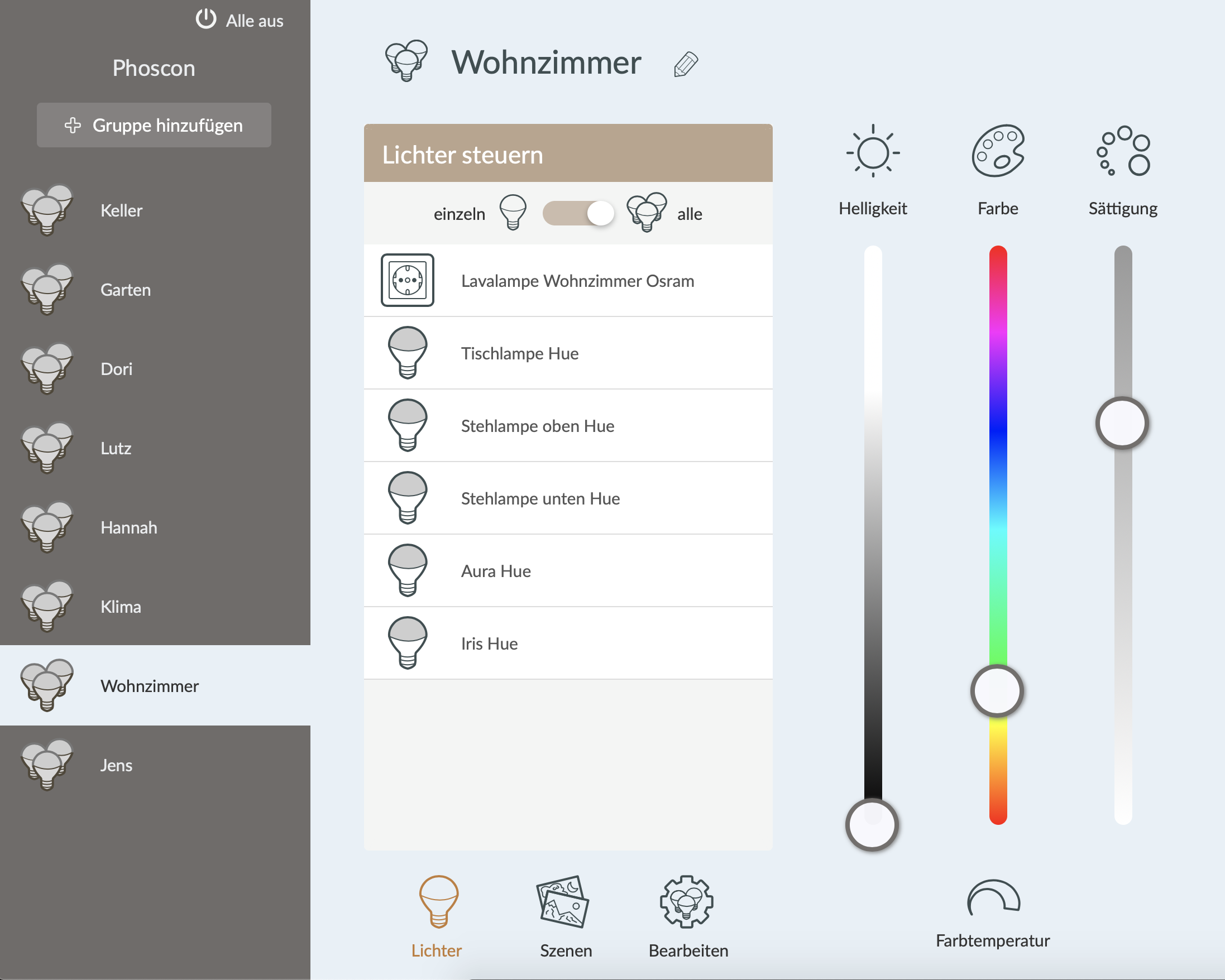
Lamps in UI turned on, but no Lamp reacts:

Environment
- Host system: Raspberry Pi 4B
- Running method: Raspbian
- Firmware version: 26660700
- deCONZ version: 2.05.84
- Device: ConBee II)
- Do you use an USB extension cable: no
deCONZ Logs
Additional context
I already tried:
- restart deconz service and also raspberry
- import a backup
- reset bridge and import backup
- update the firmware manually
 waywit
All 69 comments
Today I also tried to setup a full fresh install on an external USB drive and boot from there. Everything works as it should, but I cannot connect any Zigbee device anymore. And I connected the Conbee II Stick with an 1,2m extension cable... nothing helped?

Everything worked before updating to 2.05.84 and firmware 26660700 :-( Where can I find the log files when using the headless installation?
I only find some startup log messages in /var/log/daemon.log:
Oct 10 06:18:14 ihome systemd[1]: Started deCONZ: ZigBee gateway -- WIFI Service.
Oct 10 06:18:14 ihome systemd[1]: Started deCONZ: ZigBee gateway -- Update Service.
Oct 10 06:18:14 ihome systemd[1]: Started deCONZ: ZigBee gateway -- REST API.
Oct 10 06:18:14 ihome systemd[1]: Starting deCONZ: ZigBee gateway -- Initialisation...
Oct 10 06:18:14 ihome deCONZ-init.sh[418]: cat: /sys/block/mmcblk0/device/cid: No such file or directory
Oct 10 06:18:14 ihome systemd[1]: Started deCONZ: ZigBee gateway -- Initialisation.
Oct 10 06:18:14 ihome deCONZ[371]: QStandardPaths: XDG_RUNTIME_DIR not set, defaulting to '/tmp/runtime-pi'
Oct 10 06:18:14 ihome deCONZ[371]: libpng warning: iCCP: known incorrect sRGB profile
Oct 10 06:18:15 ihome deCONZ[371]: This plugin does not support propagateSizeHints()
Oct 10 06:18:15 ihome deCONZ[371]: This plugin does not support propagateSizeHints()
Oct 10 06:18:16 ihome deCONZ[371]: This plugin does not support propagateSizeHints()
Oct 10 06:18:24 ihome deCONZ-update2.sh[366]: found deCONZ port 80
Oct 10 06:18:24 ihome deCONZ-update2.sh[366]: use database file /home/pi/.local/share/dresden-elektronik/deCONZ/zll.db
Oct 10 06:18:25 ihome deCONZ-update2.sh[366]: process update state noupdates
waywit
on 10 Oct 2020
So, next I tried but did not work ist to downgrade the Firmware to 26580700...
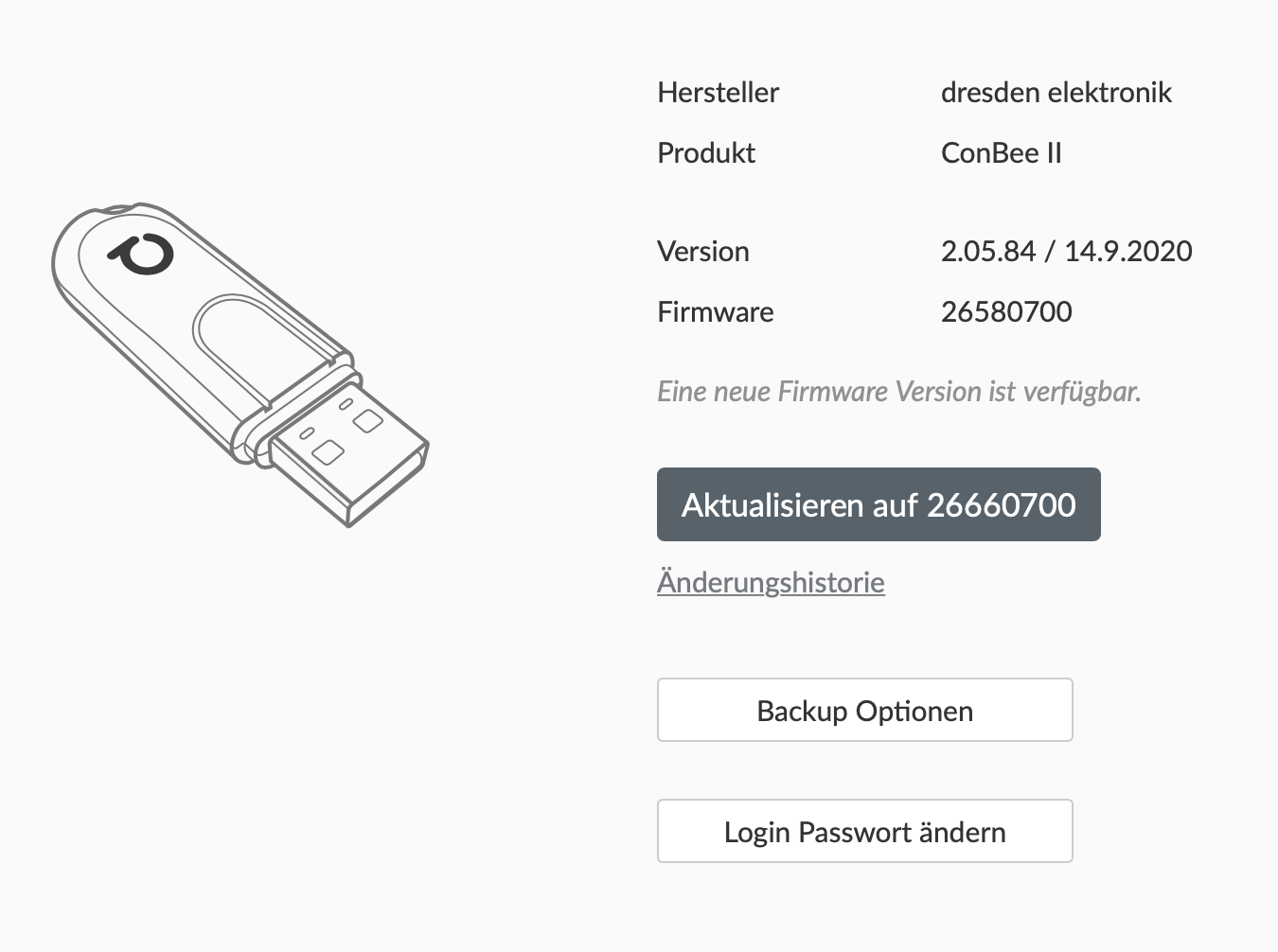
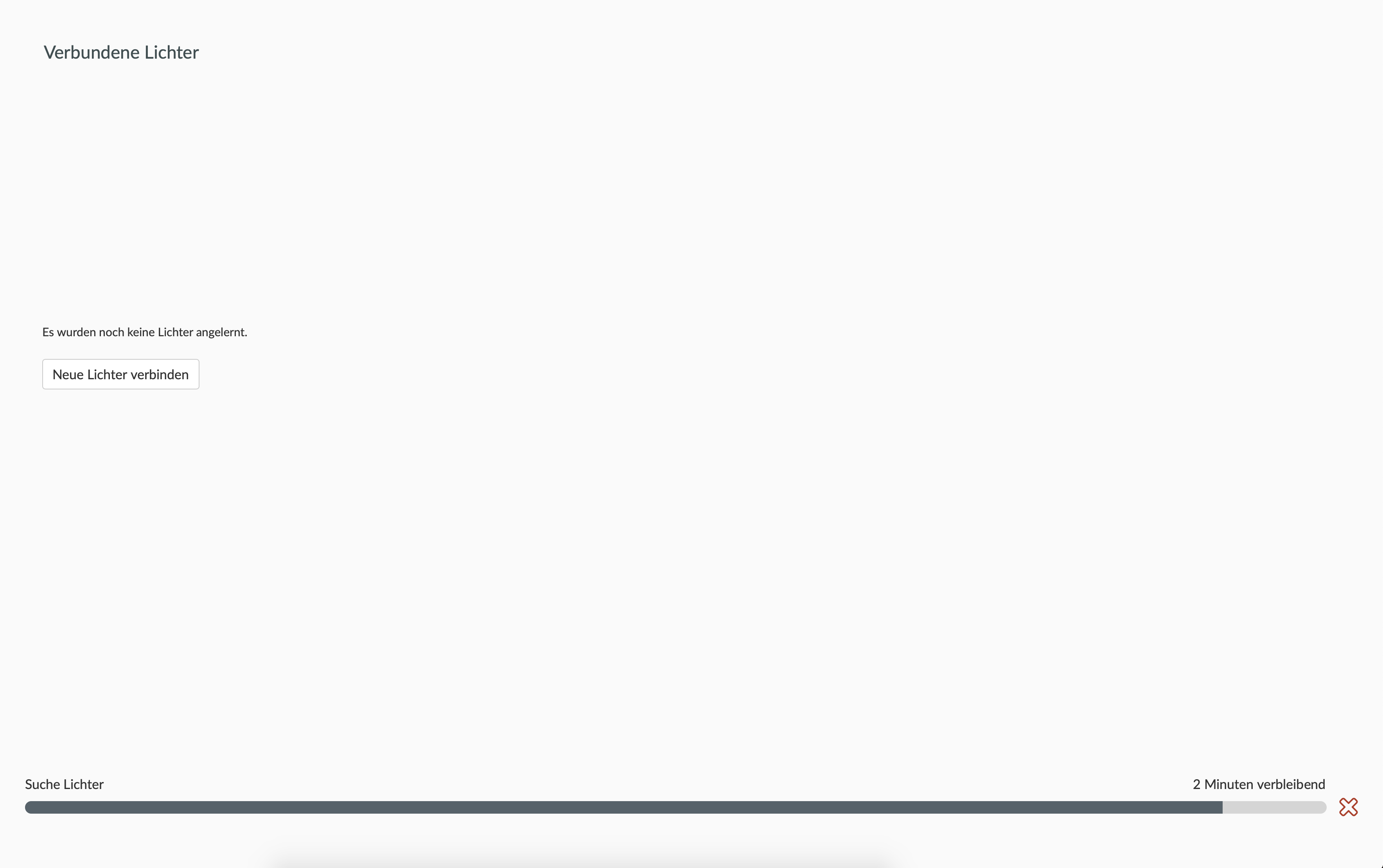
Now it asks in the UI to upgrade Firmware, but does not find any new lights nor sensors nor switches... nothing. But everything looks okay...
waywit
on 10 Oct 2020
Hello, to run deconz in debug mode, close it and run it again using command line
deCONZ --dbg-error=2 --dbg-info=2 --dbg-ota=0 --dbg-zdp=0 --dbg-zcl=0 --db-aps=0 --dbg-http=0
add " -platform minimal" for headless.
You can take a look in the hidden config to check for unwanted change > https://github.com/dresden-elektronik/deconz-rest-plugin/wiki/Network-lost-issues
A fast and usefull test is installaling deconz on another machine like a windows or Ubuntu one, it take 10 mn and permit to test hardware and can use the GUI to check setting.
 Smanar
on 10 Oct 2020
Smanar
on 10 Oct 2020
I have the same problem with a RaspBee 2 - all lights and groups are still present in the web app, but don't react to any changes I trigger.
Weird thing - in the deconz app I see all nodes but not a single connection between them. Restarting the raspbee 2 does not change anything.. That is not what I call a smooth update (i waited long for an update, my version I updated from was from early 2020). Really hoping to find a workaround and not have to re-set everything from scratch :(
 mgrn0
on 11 Oct 2020
mgrn0
on 11 Oct 2020
Have you a backup ?
Ahve you take a look on the hidden config, to check if you haven't an unwanted one > https://github.com/dresden-elektronik/deconz-rest-plugin/wiki/Network-lost-issues
You have updated firmware, deconz or both ? Have tried the last firwmare https://github.com/dresden-elektronik/deconz-rest-plugin/issues/3377
Fix frame counter not fresh enough after reboot or power-loss. This issue happened in some setups caused the network to be not reachable for a while (mostly 5–10 minutes sometimes hours).
Smanar
on 11 Oct 2020
I did create a backup, and I updated firmware _and_ deconz:
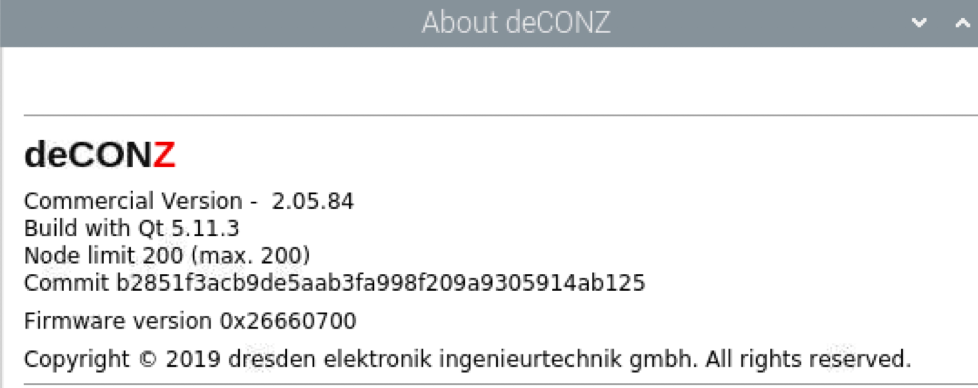
I am just very uncertain WHY I still see my zigbee devices but no nodes / connections in deconz. Does this mean they are really still present or just in the configuration and I should re-add them?
There is no unwanted hidden config, already checked that.
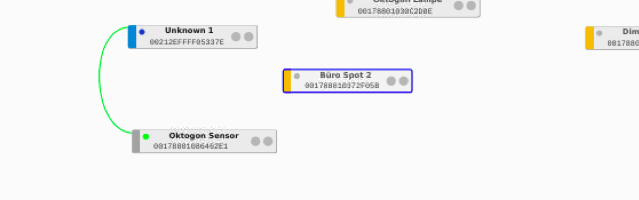
In deconz my situation looks something like this:

mgrn0
on 11 Oct 2020
ah, weird enough - one of my sensors started connecting out of the blue by itself, but that is the only device so far (out of ~30). will wait, hopefully they all will connect after some time ;)
mgrn0
on 11 Oct 2020
Grayed name are not realy good, nothing special on hidden config ? (a channel change ?) And miss all other devices (only 6 visibles) ?
As you have the GUI, can you compare your setting with this one https://github.com/dresden-elektronik/deconz-rest-plugin/wiki/Network-lost-and-configuration-restore-does-not-help
Smanar
on 11 Oct 2020
thanks for your feedback, besides the tickmark for the last item "NWK Update id" (where mine is 0) and of course for different keys, I can see nothing completely off.
However I managed to get all devices working again by resetting them one by one and at the same time having phoscon search for them - they re-appeared with their old name and group settings, just switch bindings and scenes had to be re-created, too.
mgrn0
on 11 Oct 2020
I can confirm this. I have downgraded the firmware to deCONZ_ConBeeII_0x26650700.bin.GCF and I am using the docker image marthoc/deconz:amd64-2.05.83 again. I am using deconz in conjunction with openHAB.
The lights are all there and are recognized, but I cannot address them. Log in openHAB:
==> /opt/docker/smarthome/openhab/openhab_userdata/logs/events.log <==
2020-10-17 11:07:19.364 [ome.event.ItemCommandEvent] - Item 'LeselampeBrightness' received command 10
2020-10-17 11:07:19.397 [vent.ItemStateChangedEvent] - LeselampeBrightness changed from 0 to UNDEF
 MrksHfmn
on 17 Oct 2020
MrksHfmn
on 17 Oct 2020
Same here but with a RaspBee II. After updating firmware / deConz-package, every light went to "unreachable" except for one switch. Downgrading, restoring backup, leaving/joing network didn't help.
Will try to pair every device again now :-(
Update: After pairing every device again, it seems to work. I hope, that won't appear again in future releases.
 kopierschnitte
on 24 Oct 2020
kopierschnitte
on 24 Oct 2020
Just updated my ConBee.. now on level 2.05.84 / 14-9-2020 FW 26660700. Never had any issues... now, all of the sudden I'm losing connection to sensors at random. Any idea? Restore to previous version? Anyone ideas about restore? Can it be done?
 FreekBos
on 26 Oct 2020
FreekBos
on 26 Oct 2020
@FreekBos Best to open a own user question template :)
 Mimiix
on 27 Oct 2020
Mimiix
on 27 Oct 2020
Just updated my ConBee.. now on level 2.05.84 / 14-9-2020 FW 26660700. Never had any issues... now, all of the sudden I'm losing connection to sensors at random. Any idea? Restore to previous version? Anyone ideas about restore? Can it be done?
It looks like I'm having the same issues! Same versions. Did you open an issue already?
 timovos
on 27 Oct 2020
timovos
on 27 Oct 2020
Hi
Same for me. Upgraded to FW 26660700, tried deconZ 2.05.84 and beta 2.05.86. Impossible to communicate with devices.
I decided to buy a new conbee2 thinking it was an HW problem. Received, updated to FW 26660700 (why !!! I'm crazy) restored my config... and same behavior. Impossible to add a device or control a another one.
I will try a downgrade
 reglisse69
on 31 Oct 2020
reglisse69
on 31 Oct 2020
Ok I can confirm that downgrading from 26660700 to 26650700 solve the problem for me.
I need to try to restore my backup but adding a device is now possible.
If (like me) your Conbee2 connected to an USB port on Windows is always in connection/deconnnection, use :
To identify the COM port when Windows do an sound to inform that USB is connected (retry if deconnection is done before you can read the COM port)
GCFFlasher -l
Then to upgrade/downgrade or reflash the same FW (even if windows is always in connection/deconnnection), use -t 60 to wait for the device to be UP :
GCFFlasher -d COM5 -t 60 -f deCONZ_ConBeeII_0x26650700.bin.GCF
GCFFlasher V3_10 (c) dresden elektronik ingenieurtechnik gmbh
Reboot device COM5 (ConBee II)
deCONZ firmware version 26660700
action: update firmware after 6897 ms
flashing 164090 bytes: |==============================|
verify: .
SUCCESS
Wait 10 seconds until application starts
reglisse69
on 31 Oct 2020
@reglisse69 Are you using the HA addon?
Mimiix
on 2 Nov 2020
@Mimiix If by HA you mean Home Assistant, no I'm not using it. I'm using Conbee mainly with Jeedom, but for flashing I use connect my conbee on Windows.
reglisse69
on 2 Nov 2020
Did anyone try to "just" re-find the lights with the newer firmware?
Doing so restored all my lights and devices and I did not have to downgrade; however rules, scenes and motion bindings had to be re-created.
mgrn0
on 2 Nov 2020
Did anyone try to re-find the lights with the newer firmware?
Yes, of course. But I had to remove the lights first (using either GUI or webpage) and put them into pairing mode. Then my Raspbee II found them again without any issues. As you said, the bindings became invalid and the IDs changed. Therefore, iobroker was also messed up.
But now everything works (again) after about two hours of work.
kopierschnitte
on 2 Nov 2020
I was able to re-pair them without removing them at all - maybe my device IDs did not change this way (e.g. name of the lights stayed, too). At least it worked - I spent around 2 hours being not really amused, too :)
mgrn0
on 2 Nov 2020
https://github.com/dresden-elektronik/deconz-rest-plugin/issues/3570
Same issue as this one.
Mimiix
on 3 Nov 2020
Raised a internal ticket: https://github.com/dresden-elektronik/issuetracker/issues/10
I'll keep you posted.
Mimiix
on 3 Nov 2020
Hi, some clarifications and insights what likely happened in the error case.
The 0x26660700 version has some important fixes for the NWK Tx security frame counter which is very likely the issue here. All versions prior to this version could potentially in some cases fail to save the most recent frame counter on power-loss or reboot, ending in reusing an older frame counter after startup:
This could happen after:
- Reboot
- Firmware update (which includes rebooting)
What happens if the frame counter is too low?
You see the scenario above devices appear to be disconnected. The reason is that the gateway tries to contact the devices with an older frame counter which is ignored by these devices.
How to fix
Note since version 0x26660700 storing the frame counter has been fixed so that the issue should not reappear in future updates or after reboot or power-loss, but it can still occur as in this issue after updating from a previous version.
So if after an firmware update the above scenario appears and importantly the firmware version is shown in the Phoscon App, not "not connected" → wait. The reason is that with each command the gateway sends out the frame counter is increased, as soon as it reaches the previous working one everything goes back to normal and devices respond to the coordinator again.
In some cases this took 5 minutes in others an hour.
If that still doesn't work it means the problem is a different one, please report this back here and we check that the configuration is valid. Please don't reset all devices, this isn't needed in almost all cases. All devices have their configuration stored in NVRAM if problems like this occur the specific problem needs to be solved, like in this case the frame counter.
 manup
on 3 Nov 2020
manup
on 3 Nov 2020
Hi, some clarifications and insights what likely happened in the error case.
The 0x26660700 version has some important fixes for the NWK Tx security frame counter which is very likely the issue here. All versions prior to this version could potentially in some cases fail to save the most recent frame counter on power-loss or reboot, ending in reusing an older frame counter after startup:
This could happen after:
- Reboot
- Firmware update (which includes rebooting)
What happens if the frame counter is too low?
You see the scenario above devices appear to be disconnected. The reason is that the gateway tries to contact the devices with an older frame counter which is ignored by these devices.
How to fix
Note since version 0x26660700 storing the frame counter has been fixed so that the issue should not reappear in future updates or after reboot or power-loss, but it can still occur as in this issue after updating from a previous version.
So if after an firmware update the above scenario appears _and_ importantly the firmware version is shown in the Phoscon App, not "not connected" → wait. The reason is that with each command the gateway sends out the frame counter is increased, as soon as it reaches the previous working one everything goes back to normal and devices respond to the coordinator again.
In some cases this took 5 minutes in others an hour.
If that still doesn't work it means the problem is a different one, please report this back here and we check that the configuration is valid. Please don't reset all devices, this isn't needed in almost all cases. All devices have their configuration stored in NVRAM if problems like this occur the specific problem needs to be solved, like in this case the frame counter.
Hi @manup , I don't known the details but what is the "frame counter"? What is the scope?
I have the situation reported in the #3570
I have already downgraded the firmware (from 0x26660700 to 0x26650700), the device resume the communication but after 1 day the phoscon app clear all devices connected.
After the reboot of conbee resume the device communication again. This is a randomic behavior.
Why waiting 5 minutes or hour to responde the coordinator a firmware "not connected"?
This problem is releated to the last firmware and downgrade/upgrade? will it is solved to the next upgrade?
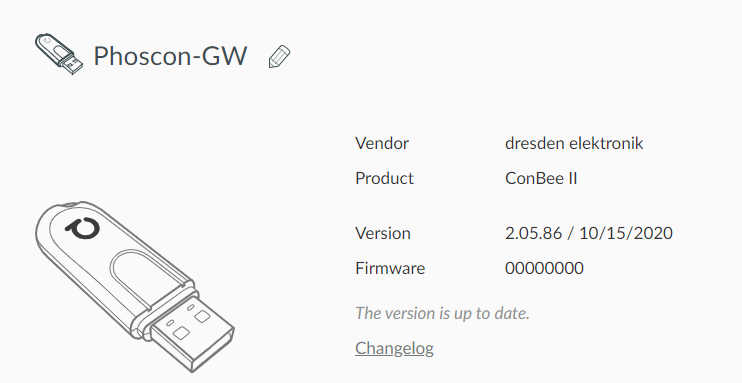
Today this is my situation:
Regards
 baldus88
on 4 Nov 2020
baldus88
on 4 Nov 2020
@baldus88 That firmware being 0000 is odd. This seems unrelated to our issue here. Can you try to reflash the stick/?
Mimiix
on 4 Nov 2020
After waiting have this:
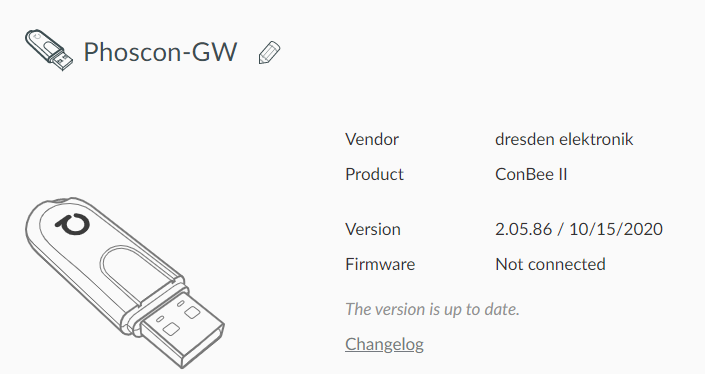
Too randomic... I have already flashed back to the firmware 0x26650700...
baldus88
on 4 Nov 2020
For those wondering: I reopened @baldus88 his issue https://github.com/dresden-elektronik/deconz-rest-plugin/issues/3570#issuecomment-721747753 . Follow there if interested on his case.
Mimiix
on 4 Nov 2020
Hello! I Think I have the same issue.
My Setup: Raspbee II on Raspbian Buster / RPI 4b, using the marthoc/deconz-Container. Wanted to update the FW, got some flashing errors, shutted down all containers and flashed the fw from 26520700 to 26660700 with the local deconz installation. Removed local installation, started the latest container.
Looks fine:
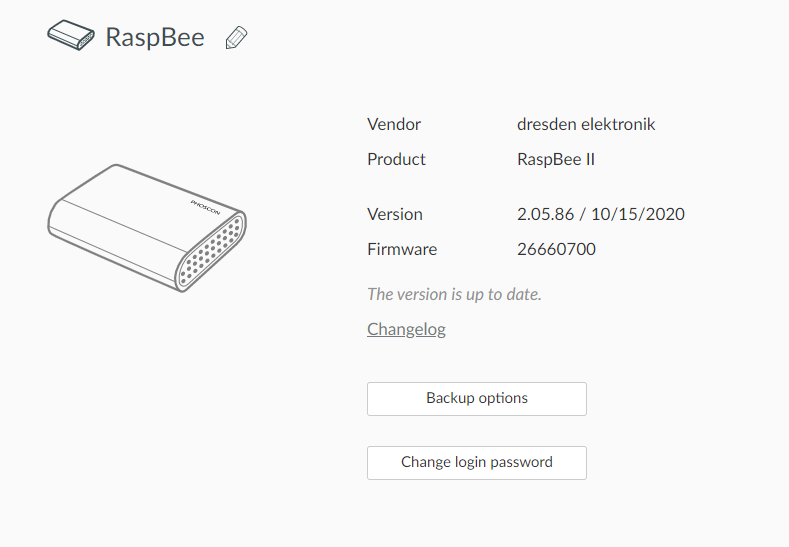
But my lights were lost ... Installed Backups and downgraded to 26650700 (because my previous FW was not available anymore) but nope, nothing happens. Then I readed the post from @manup - makes sense to me, started waiting .. and waiting... Started to setup the VNC from the container, to inspect the nodes.
First, no nodes are connected. Meanwhile I write this post, one connection started:
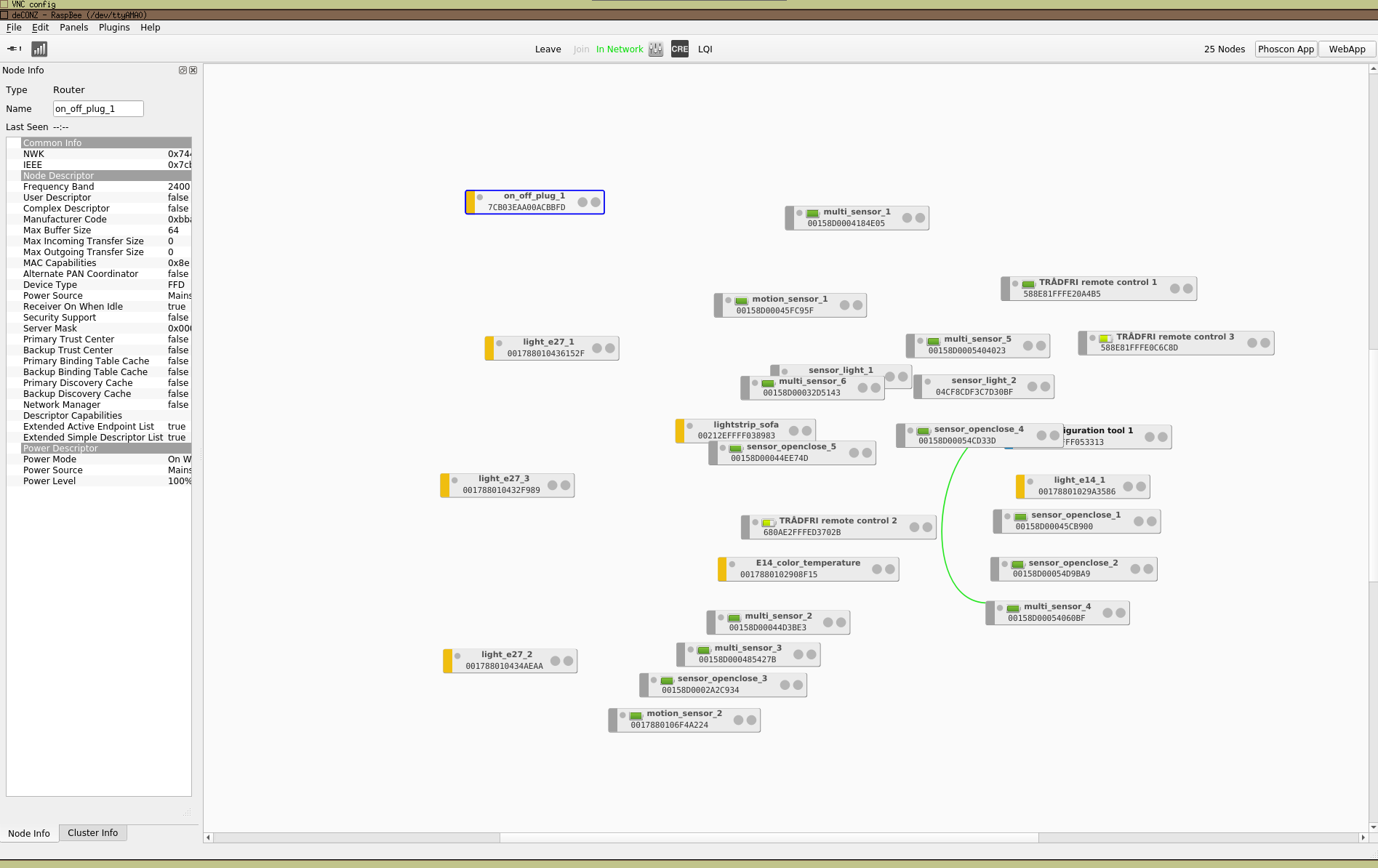
EDIT: After one hour ...
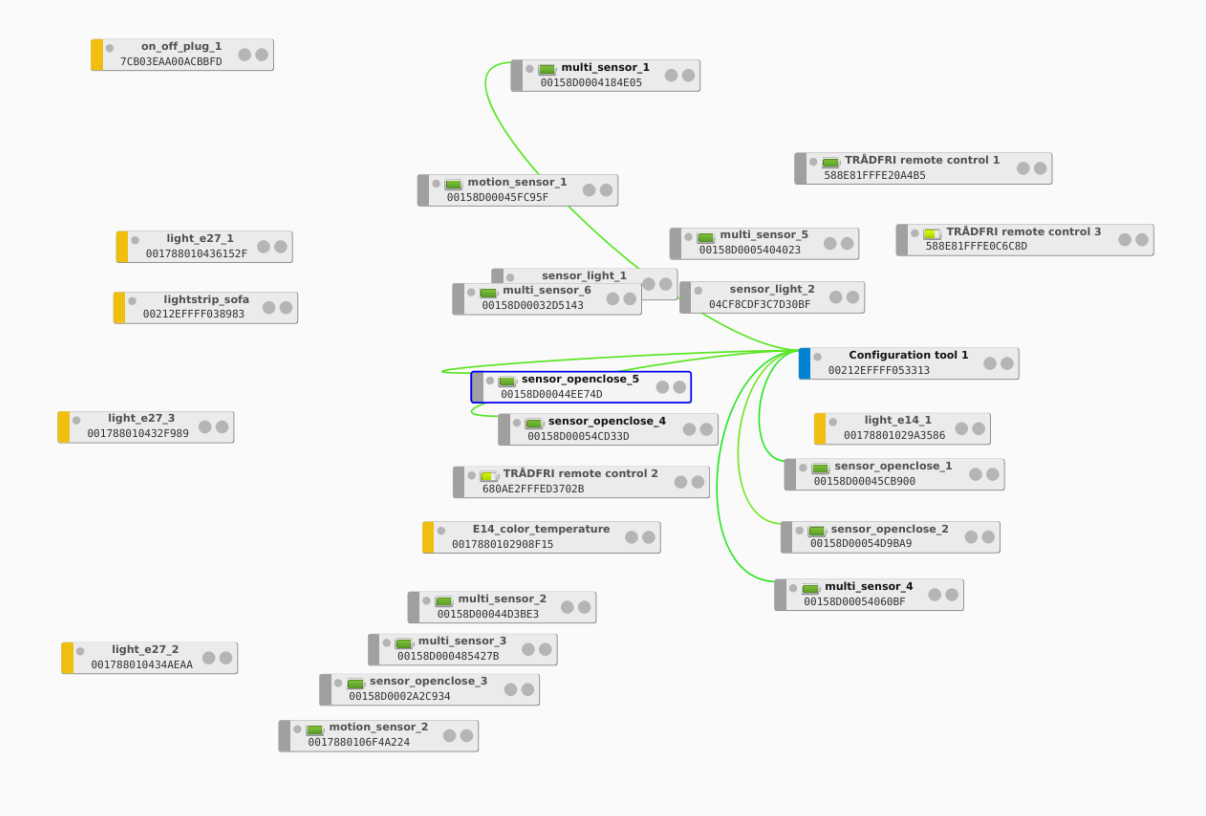
Hope my light get also connected in the morning ...
 Fruchuxs
on 8 Nov 2020
Fruchuxs
on 8 Nov 2020
After 9hours:
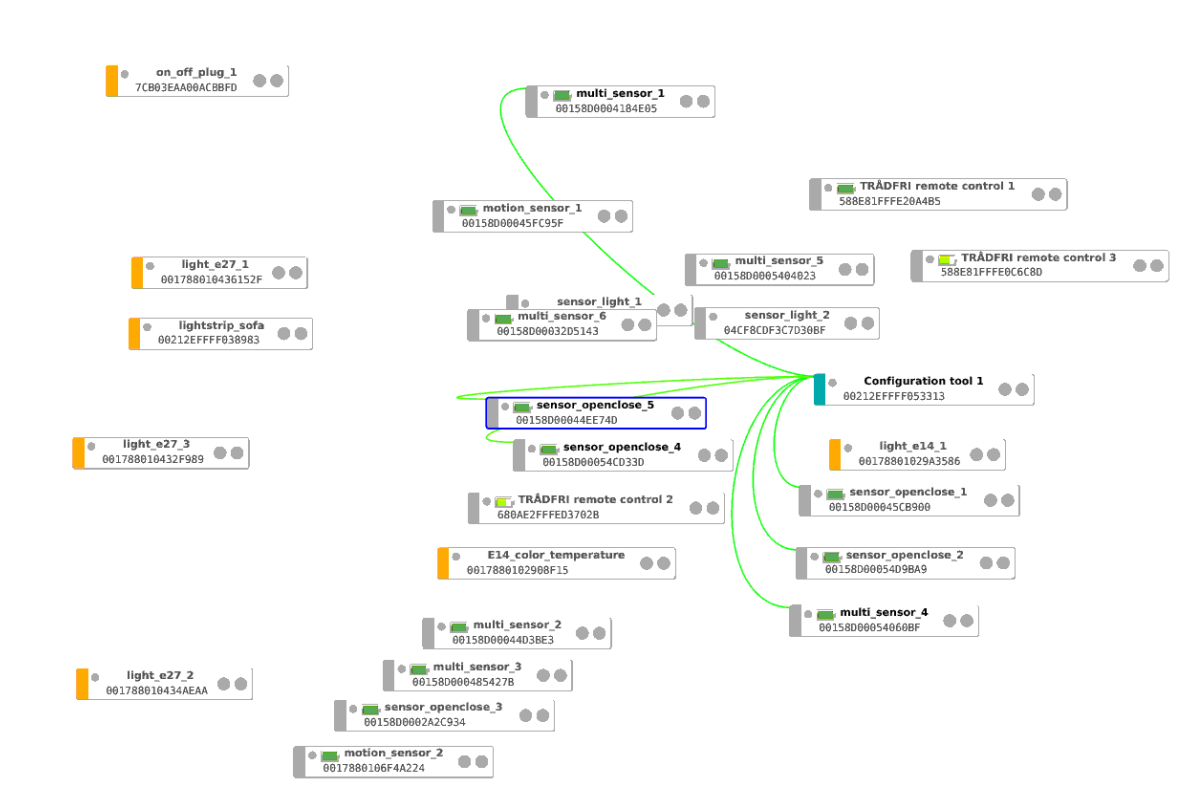
But the sensor states are not correct in the web gui, still death. I'm very sad about this and I have no idead what to do. Most of the sensors are shored, took me hours if I need to re couple them again. :(
Here my Logs:
deconz.txt
Edit: Tried to restore previous ZigBee Network Cnfiguration in the hidden config page. Nothing changed.
Logs after this:
after_restart.txt
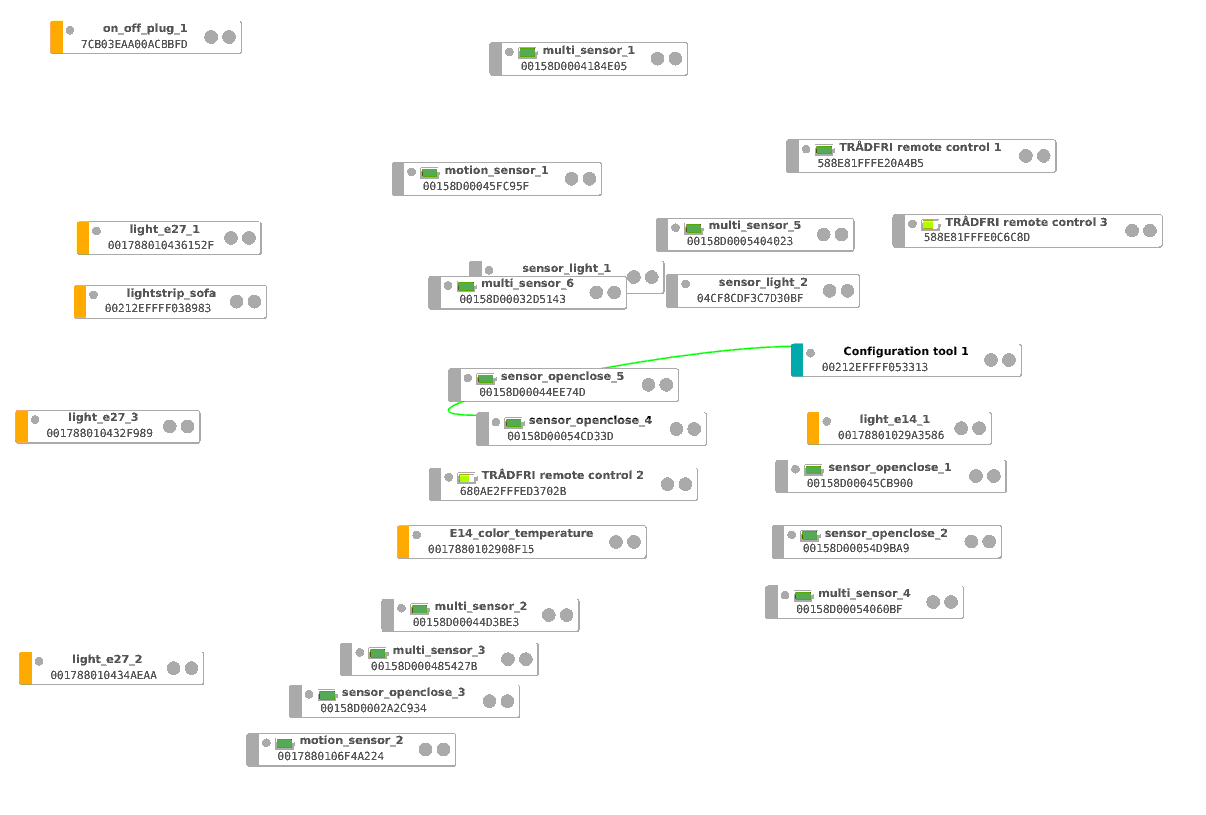
Fruchuxs
on 8 Nov 2020
I also can't add new lights. Given up. Can I get my old firmeware? I never again do an update.
Some Debug Logs:
10:37:30:515 dev /dev/ttyAMA0
10:37:30:515 GW firmware version: 0x26660700
10:37:31:008 aps request id: 87 prf: 0x0000 cl: 0x0000 timeout (confirmed: 1) to 0x001788010436152F (0xFFFD)
10:37:31:088 aps request id: 87 finished, erase from queue
10:37:40:504 dev /dev/ttyAMA0
10:37:40:504 GW firmware version: 0x26660700
10:37:43:248 Mgmt_Lqi_req zdpSeq: 125 to 0x00212EFFFF053313 start index 0
10:37:43:248 APS-DATA.request id: 129, addrmode: 0x03, addr: 0x00212effff053313, profile: 0x0000, cluster: 0x0031, ep: 0x00 -> 0x00 queue: 1 len: 2 tx.options 0x00
10:37:43:284 APS-DATA.confirm id: 129, status: 0x00 SUCCESS
10:37:43:284 APS-DATA.confirm request id: 129 -> confirmed, timeout 22897888
10:37:43:307 APS-DATA.indication srcAddr: 0x0000, srcEp: 0x00 dstAddrMode: 2, profile: 0x0000, cluster: 0x8031, lqi: 117, rssi: 32
10:37:43:307 APS-DATA.indication request id: 129 -> finished
10:37:43:307 APS-DATA.request id: 129 erase from queue
10:37:43:307 ZDP status = 0x00 -> SUCCESS
10:37:43:307 ZDP Mgmt_Lqi_rsp zdpSeq: 125 from 0x00212EFFFF053313 total: 1, startIndex: 0, listCount: 1
10:37:43:307     * neighbor: 0x00158D00054CD33D (0x316B), LQI: 255, relation: 0x01 rxOnWHenIdle: 0
10:37:45:458 Current channel 25
10:37:45:480 Device TTL 5745 s flags: 0x7
10:37:50:461 dev /dev/ttyAMA0
10:37:50:461 GW firmware version: 0x26660700
10:37:58:608 Mgmt_Lqi_req zdpSeq: 126 to 0x00212EFFFF053313 start index 0
10:37:58:608 APS-DATA.request id: 192, addrmode: 0x03, addr: 0x00212effff053313, profile: 0x0000, cluster: 0x0031, ep: 0x00 -> 0x00 queue: 1 len: 2 tx.options 0x00
10:37:58:654 APS-DATA.confirm id: 192, status: 0x00 SUCCESS
10:37:58:654 APS-DATA.confirm request id: 192 -> confirmed, timeout 22918936
10:37:58:674 APS-DATA.indication srcAddr: 0x0000, srcEp: 0x00 dstAddrMode: 2, profile: 0x0000, cluster: 0x8031, lqi: 117, rssi: 32
10:37:58:674 APS-DATA.indication request id: 192 -> finished
10:37:58:674 APS-DATA.request id: 192 erase from queue
10:37:58:674 ZDP status = 0x00 -> SUCCESS
10:37:58:674 ZDP Mgmt_Lqi_rsp zdpSeq: 126 from 0x00212EFFFF053313 total: 0, startIndex: 0, listCount: 0
10:38:00:467 dev /dev/ttyAMA0
10:38:00:467 GW firmware version: 0x26660700
10:38:04:430 saved node state in 2 ms
10:38:04:444 sync() in 14 ms
10:38:10:513 dev /dev/ttyAMA0
10:38:10:514 GW firmware version: 0x26660700
10:38:13:488 APS-DATA.request id: 254, addrmode: 0x02, addr: 0xfffd, profile: 0x0000, cluster: 0x0000, ep: 0x00 -> 0x00 queue: 1 len: 11 tx.options 0x00
10:38:13:488 send NWK_addr_req to 0x00212EFFFF038983, last seen 0 s, last seen by neighbors 0 s
10:38:13:968 Mgmt_Lqi_req zdpSeq: 128 to 0x00212EFFFF053313 start index 0
10:38:13:969 APS-DATA.request id: 1, addrmode: 0x03, addr: 0x00212effff053313, profile: 0x0000, cluster: 0x0031, ep: 0x00 -> 0x00 queue: 2 len: 2 tx.options 0x00
10:38:14:011 APS-DATA.confirm id: 1, status: 0x00 SUCCESS
10:38:14:011 APS-DATA.confirm request id: 1 -> confirmed, timeout 22789824
10:38:14:030 APS-DATA.indication srcAddr: 0x0000, srcEp: 0x00 dstAddrMode: 2, profile: 0x0000, cluster: 0x8031, lqi: 117, rssi: 32
10:38:14:031 APS-DATA.indication request id: 1 -> finished
10:38:14:031 APS-DATA.request id: 1 erase from queue
10:38:14:031 ZDP status = 0x00 -> SUCCESS
10:38:14:031 ZDP Mgmt_Lqi_rsp zdpSeq: 128 from 0x00212EFFFF053313 total: 0, startIndex: 0, listCount: 0
10:38:14:176 APS-DATA.confirm id: 254, status: 0x00 SUCCESS
10:38:14:825 Active_EP_req zdpSeq: 129 to 0x001788010436152F
10:38:14:825 APS-DATA.request id: 6, addrmode: 0x02, addr: 0x16ec, profile: 0x0000, cluster: 0x0005, ep: 0x00 -> 0x00 queue: 2 len: 3 tx.options 0x04
10:38:19:008 aps request id: 32 prf: 0x0000 cl: 0x0000 timeout (confirmed: 1) to 0x0017880102908F15 (0xFFFD)
10:38:19:088 aps request id: 32 finished, erase from queue
10:38:20:506 dev /dev/ttyAMA0
10:38:20:507 GW firmware version: 0x26660700
10:38:20:927 0x0CAA seems to be a zombie recv errors 6
10:38:20:927 LightNode removed 0x0017880102908f15
10:38:20:927 Node zombie state changed 0x0017880102908f15
10:38:25:007 APS-DATA.confirm id: 6, status: 0xD0
10:38:25:007 max transmit errors for node 0x001788010436152F, last seen by neighbors 1100 s
10:38:25:248 0x16EC seems to be a zombie recv errors 6
10:38:25:248 LightNode removed 0x001788010436152f
10:38:25:248 Node zombie state changed 0x001788010436152f
10:38:29:328 Mgmt_Lqi_req zdpSeq: 130 to 0x00212EFFFF053313 start index 0
I also can't add new lights. Given up. Can I get my old firmeware? I never again do an update.
can you remove the lights in phoscon? i had to reset and relearn my osram lights. then it went back to the way it was before. the lights also get their old ids back.
All firmware versions can be found here: http://deconz.dresden-elektronik.de/deconz-firmware/
MrksHfmn
on 8 Nov 2020
Don't want to try this, because I can't add new lights. Have some HUE Bulbs in the cupboard. Deconz can't find it (the bulb is near the raspbee, 15cm distance). Paired the bulb with the hue bridge - worked. Removed it in hue, try to repair, no luck. I think here is a general error which need to be fixed, before I remove some lights or sensors from my deconz.
I also see red flashing the lights via VNC in the deconz app in the upper left corner. I assume the raspbee is working, but the communication is just wrong.
And no, my previous firmeware is not available there.
10:53:00:524 GW firmware version: 0x26660700
10:53:05:256 Mgmt_Lqi_req zdpSeq: 203 to 0x00212EFFFF053313 start index 0
10:53:05:256 APS-DATA.request id: 115, addrmode: 0x03, addr: 0x00212effff053313, profile: 0x0000, cluster: 0x0031, ep: 0x00 -> 0x00 queue: 1 len: 2 tx.options 0x00
10:53:05:300 APS-DATA.confirm id: 115, status: 0x00 SUCCESS
10:53:05:300 APS-DATA.confirm request id: 115 -> confirmed, timeout 22909504
10:53:05:320 APS-DATA.indication srcAddr: 0x0000, srcEp: 0x00 dstAddrMode: 2, profile: 0x0000, cluster: 0x8031, lqi: 117, rssi: 32
10:53:05:320 APS-DATA.indication request id: 115 -> finished
10:53:05:320 APS-DATA.request id: 115 erase from queue
10:53:05:320 ZDP status = 0x00 -> SUCCESS
10:53:05:320 ZDP Mgmt_Lqi_rsp zdpSeq: 203 from 0x00212EFFFF053313 total: 0, startIndex: 0, listCount: 0
10:53:10:056 aps request id: 143 prf: 0x0000 cl: 0x0000 timeout (confirmed: 1) to 0x001788010432F989 (0xFFFD)
10:53:10:136 aps request id: 143 finished, erase from queue
10:53:10:505 dev /dev/ttyAMA0
10:53:10:505 GW firmware version: 0x26660700
10:53:14:856 APS-DATA.request id: 155, addrmode: 0x02, addr: 0xfffd, profile: 0x0000, cluster: 0x0000, ep: 0x00 -> 0x00 queue: 0 len: 11 tx.options 0x00
10:53:14:856 send NWK_addr_req to 0x001788010432F989, last seen 0 s, last seen by neighbors 0 s
10:53:15:542 APS-DATA.confirm id: 155, status: 0x00 SUCCESS
10:53:20:460 dev /dev/ttyAMA0
10:53:20:461 GW firmware version: 0x26660700
10:53:20:616 Mgmt_Lqi_req zdpSeq: 205 to 0x00212EFFFF053313 start index 0
Tried to reflash the fw and rolled back to deconz 2.05.82 / 9/14/2020 but still nothing work.
GCFFlasher_internal -d /dev/ttyAMA0 -t 60 -f download/deCONZ_RaspBeeII_0x26660700.bin.GCF
GCFFlasher V3_15 (c) dresden elektronik ingenieurtechnik gmbh
Reboot device /dev/ttyAMA0 (RaspBee)
deCONZ firmware version 26660700
Bootloader version 0x00030003, app crc: 0x5CBFD214
Reboot device /dev/ttyAMA0 (RaspBee)
action: reset device RaspBee
wiringPi 2.52 initialized
Bootloader version 0x00030003, app crc: 0x5CBFD214
Reboot device /dev/ttyAMA0 (RaspBee)
action: reset device RaspBee
Bootloader version 0x00030003, app crc: 0x5CBFD214
Reboot device /dev/ttyAMA0 (RaspBee)
action: reset device RaspBee
Bootloader version 0x00030003, app crc: 0x5CBFD214
Reboot device /dev/ttyAMA0 (RaspBee)
action: reset device RaspBee
Bootloader version 0x00030003, app crc: 0x5CBFD214
flashing 164106 bytes: |================|r
Tried deCONZ_RaspBeeII_0x26610700.bin.GCF - still death. I think something is bricked. Must buy a new Raspbee? ._.
Fruchuxs
on 8 Nov 2020
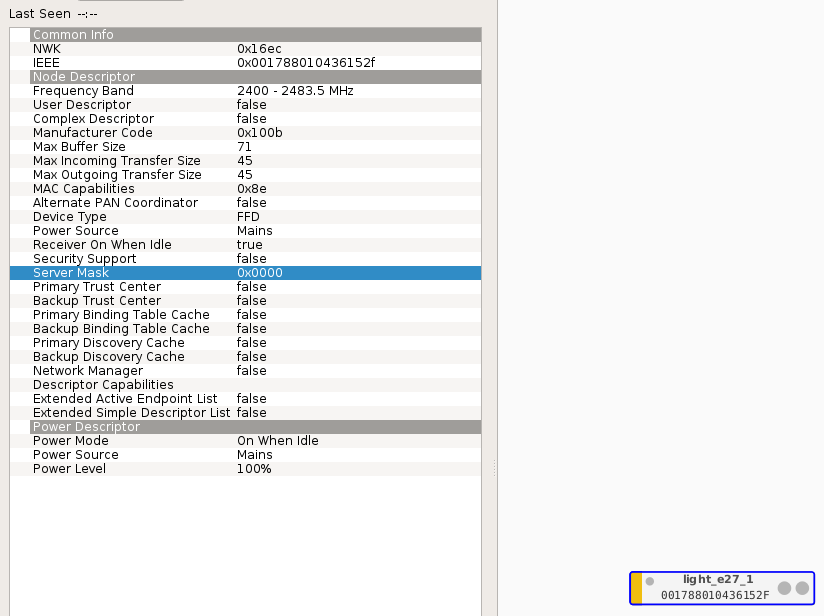
What does the Server Mask 0x0000 mean?
Fruchuxs
on 8 Nov 2020
Hello! I Think I have the same issue.
My Setup: Raspbee II on Raspbian Buster / RPI 4b, using the marthoc/deconz-Container. Wanted to update the FW, got some flashing errors, shutted down all containers and flashed the fw from 26520700 to 26660700 with the local deconz installation. Removed local installation, started the latest container.Looks fine:
But my lights were lost ... Installed Backups and downgraded to 26650700 (because my previous FW was not available anymore) but nope, nothing happens. Then I readed the post from @manup - makes sense to me, started waiting .. and waiting... Started to setup the VNC from the container, to inspect the nodes.
First, no nodes are connected. Meanwhile I write this post, one connection started:
EDIT: After one hour ...
Hope my light get also connected in the morning ...
Hi.
I have the same problem with the osram bubls and sensor temperature of xiaomi. I have a conbee II instead raspbee, I have already upgrade and downgrade the firmware but the situation remain the same.
The device view the new firmware but go to "not connected" or "00000" version.
This is my issue: https://github.com/dresden-elektronik/deconz-rest-plugin/issues/3570
Today I don't have a solution.
baldus88
on 8 Nov 2020
Nope, we have different issues. My FW is connected and it always shows the correct version, also after downgrades. I reseted deconz and opened a new hue bulb which was never paired before, this worked!
I rolled back to my config, and try it again:
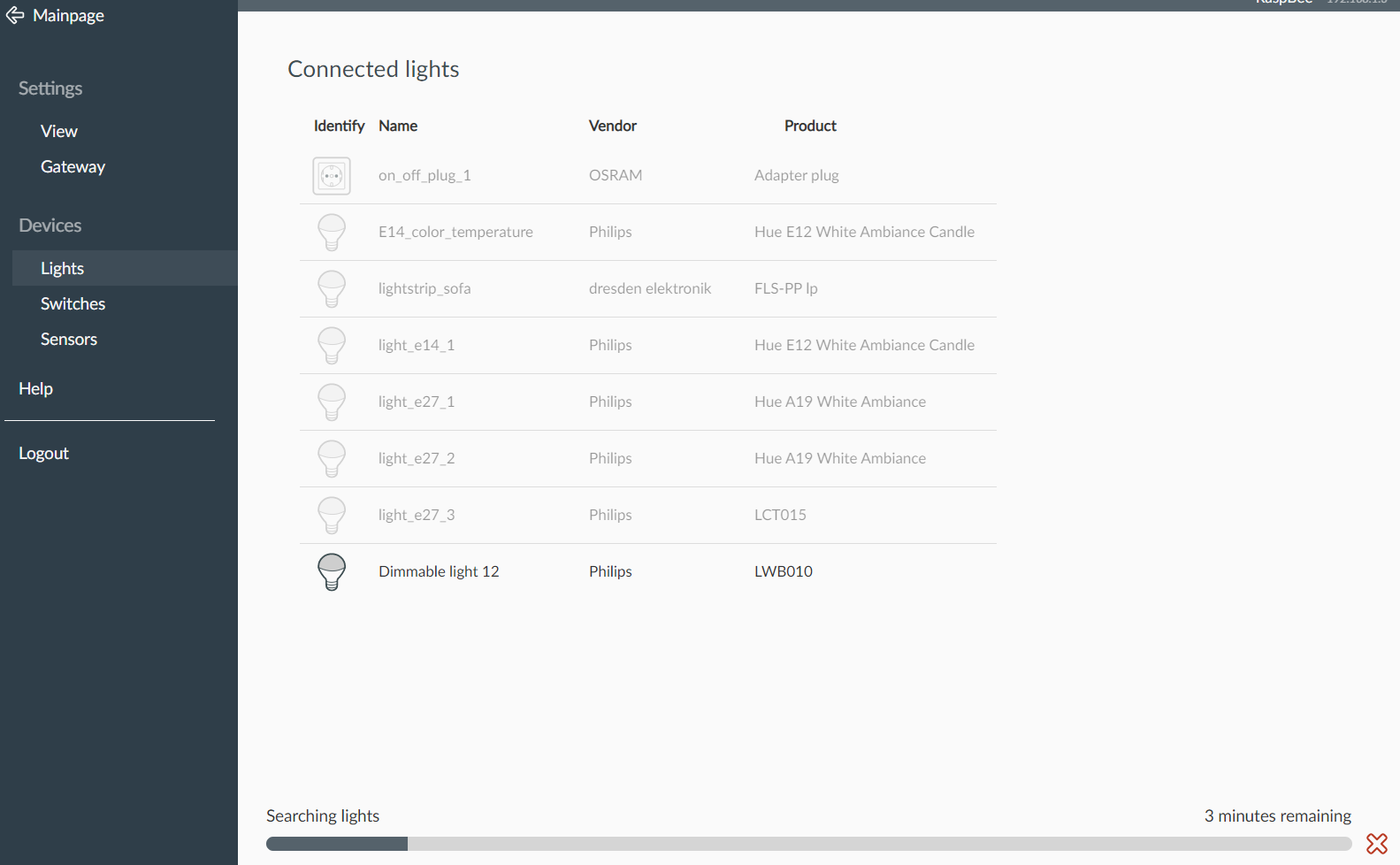
The raspbee works! Now I need help to recover my zigbee network.
Fruchuxs
on 8 Nov 2020
Okay, I have isolted a Debug Log, if I say "Read binding Table" on one of the nodes:
````
12:06:19:655 read binding table for 0x7cb03eaa00acbbfd (0x744f)
12:06:20:605 APS-DATA.request id: 134, addrmode: 0x03, addr: 0x7cb03eaa00acbbfd, profile: 0x0000, cluster: 0x0033, ep: 0x00 -> 0x00 queue: 1 len: 2 tx.options 0x00
12:06:20:605 Mgmt_Bind_req id: 134 to 0x7CB03EAA00ACBBFD send
12:06:22:095 dev /dev/ttyAMA0
12:06:22:096 GW firmware version: 0x26660700
12:06:24:580 Node_Descriptor_req zdpSeq: 75 to 0x7CB03EAA00ACBBFD
12:06:24:580 APS-DATA.request id: 155, addrmode: 0x02, addr: 0x744f, profile: 0x0000, cluster: 0x0002, ep: 0x00 -> 0x00 queue: 2 len: 3 tx.options 0x00
12:06:24:624 APS-DATA.confirm id: 155, status: 0xD0
12:06:26:559 Mgmt_Lqi_req zdpSeq: 76 to 0x00212EFFFF053313 start index 0
12:06:26:559 APS-DATA.request id: 164, addrmode: 0x03, addr: 0x00212effff053313, profile: 0x0000, cluster: 0x0031, ep: 0x00 -> 0x00 queue: 2 len: 2 tx.options 0x00
12:06:26:602 APS-DATA.confirm id: 164, status: 0x00 SUCCESS
12:06:26:602 APS-DATA.confirm request id: 164 -> confirmed, timeout 39364608
12:06:26:627 APS-DATA.indication srcAddr: 0x0000, srcEp: 0x00 dstAddrMode: 2, profile: 0x0000, cluster: 0x8031, lqi: 117, rssi: 32
12:06:26:627 APS-DATA.indication request id: 164 -> finished
12:06:26:627 APS-DATA.request id: 164 erase from queue
12:06:26:627 ZDP status = 0x00 -> SUCCESS
12:06:26:627 ZDP Mgmt_Lqi_rsp zdpSeq: 76 from 0x00212EFFFF053313 total: 1, startIndex: 0, listCount: 1
12:06:26:627 * neighbor: 0x0017880106F4A224 (0x4D24), LQI: 252, relation: 0x01 rxOnWHenIdle: 0
12:06:30:784 APS-DATA.confirm id: 134, status: 0xD0
12:06:30:784 max transmit errors for node 0x7CB03EAA00ACBBFD, last seen by neighbors 446 s
12:06:32:089 dev /dev/ttyAMA0
12:06:32:089 GW firmware version: 0x26660700
12:06:32:319 APS-DATA.request id: 189, addrmode: 0x02, addr: 0xfffd, profile: 0x0000, cluster: 0x0000, ep: 0x00 -> 0x00 queue: 1 len: 11 tx.options 0x00
12:06:32:319 send NWK_addr_req to 0x7CB03EAA00ACBBFD, last seen 0 s, last seen by neighbors 0 s
12:06:32:558 0x744F seems to be a zombie recv errors 6
12:06:32:558 LightNode removed 0x7cb03eaa00acbbfd
12:06:32:558 Node zombie state changed 0x7cb03eaa00acbbfd
12:06:33:016 APS-DATA.confirm id: 189, status: 0x00 SUCCESS
12:06:41:535 timeout for response to Mgmt_Bind_req id 134 to 0x7CB03EAA00ACBBFD
12:06:42:063 dev /dev/ttyAMA0
````
Maybe it's interesting. 0x7CB03EAA00ACBBFD / 0x744f is my on_off_plug_1.
Btw. sorry for spam, but I dont want to edit every post from me, because of the history.
EDIT: My Philips Hue Motion Sensor started working and responded. Two other sensors are connected, but doesnt answer and doesnt send changes.
Fruchuxs
on 8 Nov 2020
Nope, we have different issues. My FW is connected and it always shows the correct version, also after downgrades. I reseted deconz and opened a new hue bulb which was never paired before, this worked!
I rolled back to my config, and try it again:
The raspbee works! Now I need help to recover my zigbee network.
Probably the source of the problem is the same. In my situation have error fw version but if i will waiting 1hour the device refound in the section sensors and the fw showned with correct version number....
This is probably the fw bug...
baldus88
on 8 Nov 2020
I started up to reset all and build up my zigbee network from scratch... Using it for cleaning up some mistakes, e. g. naming things.
Fruchuxs
on 8 Nov 2020
In the logs the outgoing communication looks right, but since no responses are received this can have various reason now since so much was changed in between.
I think we need to look at the following to get a clearer picture:
- In case of ConBee, do you use an extension cable (highly recommend)?
- Are there any other attached USB devices like SSD drives?
- Please share a screenshot of Zigbee configuration page and deCONZ > Edit > Network Settings. Here we need to check that all parameters like channel and PanID are valid.
If not already done you may try to power-cycle the lights.
Please don't downgrade from 0x26660700, the version isn't the problem here.
manup
on 8 Nov 2020
As previously described, I now started from scratch and re-paired all devices. However I hope I can help others with more informations and prevent such ... inconvenient in further releases. I understand, that not all problems can cleared before a release, so I'm cool with this error and happy to clear my smarthome setup.
But I have compared the Network Settings from Backups with a SQLite DB Tool.
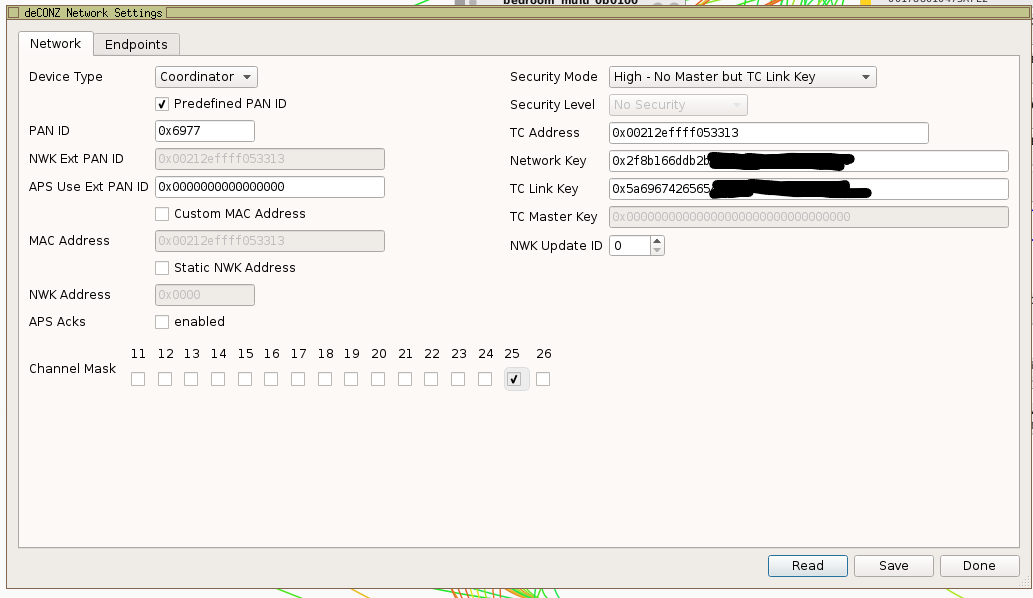
Here is the Screenshot.
In my case there are no USB 3.0 devices near, expect of a Homeatic IP Stick with extension cable.
Fruchuxs
on 8 Nov 2020
I have the same issue. Lights have become uncontrollable but it happened a few days after the update of the firmware.
In general I could open a few bug reports every week, but I have a very demanding job and not much time to document them as necessary. Stability of the network is bad and it doesn’t improve over the course of the 9 months I am using it.
We are currently planning to build a house and I would never consider Zigbee (at least controlled by Deconz) as a driver for home automation.
 Larsn1
on 13 Nov 2020
Larsn1
on 13 Nov 2020
@Larsn1 We all have stuff that has to be done in life.Priorities is where it's at. If you experience issues, it is very lickely they are because of your setup somehow. We need logs for that to help you. Saying that "stuff becomes uncontrollable" is way to generic to fix anything.
So please open a separate issue with some logs and screens/descriptions of your setup.
Mimiix
on 13 Nov 2020
@Larsn1 We all have stuff that has to be done in life.Priorities is where it's at. If you experience issues, it is very lickely they are because of your setup somehow. We need logs for that to help you. Saying that "stuff becomes uncontrollable" is way to generic to fix anything.
So please open a separate issue with some logs and screens/descriptions of your setup.
Let’s see what I can do. My setup has been unreliable since months, but I can only alot some hours per week to this and other stuff. Of course I would like to help. But seeing that bugs have been marked as questions just to become stale after some weeks isn’t very much of a motivation.
Larsn1
on 13 Nov 2020
Absolutely ridiculous! I've lost ALL my devices (34). I'm running on VM Oracle Box. Tried all the things, restarting etc... no effect. Now I have to reconnect all the devices again! It's such a shame because Conbee II is so buggy. End are the days with the "german reliability". I have Chinese products that are more reliable than this.
 sanebg
on 13 Nov 2020
sanebg
on 13 Nov 2020
No lights don't have to be repaired, ConBee as well as lights store the network configuration in NVRAM. If the network seems lost the setup needs to be checked what happens.
Does you network show joined in deCONZ?
manup
on 13 Nov 2020
Please people keep this discussion civil and helpful for others. At least we are getting a free software made by skilled guys doing a great job while maintaining life struggles and a family like everyone else. Your input and help has been much appreciated.
Larsn1
on 13 Nov 2020
I have the same issue. Lights have become uncontrollable but it happened a few days after the update of the firmware.
In general I could open a few bug reports every week, but I have a very demanding job and not much time to document them as necessary. Stability of the network is bad and it doesn’t improve over the course of the 9 months I am using it.
We are currently planning to build a house and I would never consider Zigbee (at least controlled by Deconz) as a driver for home automation.
It also depends a lot on which lamps you use. I only have problems with Osram lamps. On the other hand, other devices in the network are extremely stable and never fail. For example, I have never had problems with my heating thermostats, they have worked since the beginning. Other gateways are not better, you will find many similar problems with propietary gateways.
MrksHfmn
on 14 Nov 2020
Is anyone even working on this issue or is the conbee stick as useful as a trash can nowadays?
 rasssta
on 14 Nov 2020
rasssta
on 14 Nov 2020
@sanebg Id like to ask you to be more respectful and constructive. I do not allow any insults on this git.
@rasssta afaik there's not a issue, is there? Manuel provided what you should do and that seems to fix it for people.
Mimiix
on 14 Nov 2020
@sanebg Id like to ask you to be more respectful and constructive. I do not allow any insults on this git.
@rasssta afaik there's not a issue, is there? Manuel provided what you should do and that seems to fix it for people.
Where did Manuel provide what to do? I've tried multiple firmwares and versions of deCONZ and my stick is only getting in contact with 2 out of 60 devices no matter what I do.
rasssta
on 14 Nov 2020
And just to be clear. I will happily help out debugging this, but I need to know what do to then :)
rasssta
on 14 Nov 2020
@rasssta I suggest opening a own issue, as this seems unrelated to this one.
Mimiix
on 14 Nov 2020
I doubt it. It started out as the same issue as this. I changed the light status via the API and they would, for example, turn off in deCONZ but the actual lights would not change status.
rasssta
on 14 Nov 2020
@rasssta afaik there's not a issue, is there? Manuel provided what you should do and that seems to fix it for people.
But it didn't work, I needed to re-pair all devices... I mean, it's fine, some spring clean up, but I think there is still a bug
Fruchuxs
on 14 Nov 2020
Imo it's not fine if you need to re-pair all devices, that's not gonna work in the long run.
However, I can't even re-pair them :[
rasssta
on 14 Nov 2020
@Mimiix as you have closed previous issue as duplicate of this one, has 2.05.88 fixed issue with new firmware 0x26660700 on Home Assistant?
 VivantSenior
on 15 Nov 2020
VivantSenior
on 15 Nov 2020
@Mimiix Where exactly did I insulted anyone? Can we stop being so sensitive? A person cannot even express anger towards software nowadays, without being chased by LGBT, anti-racist groups, feminists or whatever. Man up, I'm talking about the Deconz stick, which since I've bought I have only issues with.
Going back to SmartThings, this thing is a total waste of money. As a German myself, I'm offended by its quality. Bye.
sanebg
on 15 Nov 2020
After I installed the latest firmware update, I could no longer operate my 5 HUE lamps. Neither via the FHEM integration, nor via the HUE app and also not in the Phoscon interface. Here the lamps could still be seen but also not operated. Even a complete reset on my debian-linux-server with reinstallation of Phoscon (factory settings) and deConz reinstallation did not find any more lamps. The following searches were also unsuccessful: a) all HUE lights were reset with the remote control b) deleted in the Phoscon software c) deConz uninstalled in Windows 10 all remnants removed and deConz reloaded after restarting. d) tried the Phoscon reset frequency e) started the light search in Phoscon according to the instructions, switched the light on and off once, reset via the remote control, which was confirmed by the lamp lighting up briefly and brought it close to the receiver. Neither in Windows nor in the debian-linux-server the lights are recognized.
The lights can be found and operated via the Hue app in Bluetooth mode (which does not help me and was therefore deleted again). Nothing helps. What else can I do?
 SebastianStorb
on 15 Nov 2020
SebastianStorb
on 15 Nov 2020
@VivantSenior I have no clue. As i have to follow @manup on this. He suggested to wait and that fixed it for users. Other then that, i have no clue.
@sanebg There is no need to bring insults in a github issue. We are here to work together to solve things. Any emotional stuff only makes stuff harder. We are mostly all volunteers, I'm happy to invite you over to help and solve the issues. I understand you might be frustrated, but this is not the place.
@rasssta https://github.com/dresden-elektronik/deconz-rest-plugin/issues/3387#issuecomment-721090514 That one!
Mimiix
on 16 Nov 2020
The same issue is happening to me as well, lights are generally not responding or if they do it's random, they have been fine for months
 fuomag9
on 16 Nov 2020
fuomag9
on 16 Nov 2020
@Fruchuxs After going to 26660700?
Mimiix
on 16 Nov 2020
+1
Same issue here :
Lost devices control after months without problems.
NO FW upgrade, NO deconz update.
Sometimes ghost power device appear (just power commands of switch).
Somestimes Web UI is working and jeedom not , sometimes both not working.
Now conbee not working more than 2 days without issue..
 rvitch
on 16 Nov 2020
rvitch
on 16 Nov 2020
@rvitch If you didnt update the firmware, this is unrelated.
Mimiix
on 16 Nov 2020
I tried to handle it wiht a backup: Now the devices are "found" out of the backup - but they are still passiv. You can not do anything with the backup lamps and devices. What would you do normaly to re-pair them?
SebastianStorb
on 17 Nov 2020
I tried to handle it wiht a backup: Now the devices are "found" out of the backup - but they are still passiv. You can not do anything with the backup lamps and devices. What would you do normaly to re-pair them?
I don't know if this is the right way to solve it but I'd just repair them from scratch to avoid misconfigs and similar stuff
fuomag9
on 17 Nov 2020
@Mimiix Yes. I upgraded from 26520700 to 26660700. I need to say, that I first tried to update with the marthoc/deconz Container, but I got flashing errors.
I also used an old deconz Version. I don't know the version of deconz anymore, the container short-hash was f0d5b44e5960 because of bugs in a newer version of the marthoc container.
Maybe my fw version was just too old?
Fruchuxs
on 17 Nov 2020
Related issues
 flex-0
·
4Comments
flex-0
·
4Comments
 lynix
·
4Comments
lynix
·
4Comments
 qm3ster
·
3Comments
qm3ster
·
3Comments
 salopette
·
4Comments
salopette
·
4Comments
 marthoc
·
6Comments
marthoc
·
6Comments
Most helpful comment
No lights don't have to be repaired, ConBee as well as lights store the network configuration in NVRAM. If the network seems lost the setup needs to be checked what happens.
Does you network show joined in deCONZ?