Deconz-rest-plugin: Stopped working after update to Hyper Worm
Describe the bug
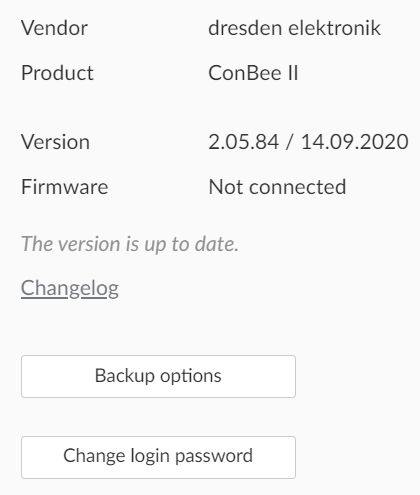
After updating to Hyper Worm (2.05.84) and updating firmware to 26660700, deCONZ stopped working with following error in log:
device disconnected reason: 5, index: 0
Steps to reproduce the behavior
Expected behavior
Screenshots
Environment
- Host system: PC
- Running method: Ubuntu / Marthoc Docker container
- Firmware version: (26660700)
- deCONZ version: (2.05.84)
- Device: ConBee II
- Do you use an USB extension cable: yes
deCONZ Logs
atropos@server:~$ sudo deCONZ --dbg-error=2 --dbg-info=1 -platform minimal
QStandardPaths: XDG_RUNTIME_DIR not set, defaulting to '/tmp/runtime-root'
libpng warning: iCCP: known incorrect sRGB profile
13:14:41:403 HTTP Server listen on address 0.0.0.0, port: 8080 error: The bound address is already in use
13:14:41:403 HTTP Server listen on address 0.0.0.0, port: 80 error: The bound address is already in use
13:14:41:403 HTTP Server listen on address 0.0.0.0, port: 8080 error: The bound address is already in use
13:14:41:403 HTTP Server listen on address 0.0.0.0, port: 8090, root: /usr/share/deCONZ/webapp/
13:14:41:435 CTRL. 3.31.113:14:41:486 ZCLDB init file /root/.local/share/dresden-elektronik/deCONZ/zcldb.txt
13:14:41:560 parent process sudo
13:14:41:560 gw run mode: normal
13:14:41:561 GW sd-card image version file does not exist: /root/.local/share/dresden-elektronik/deCONZ/gw-version
13:14:41:562 DB sqlite version 3.31.1
13:14:41:563 DB PRAGMA page_count: 33
13:14:41:563 DB PRAGMA page_size: 4096
13:14:41:563 DB PRAGMA freelist_count: 0
13:14:41:563 DB file size 135168 bytes, free pages 0
13:14:41:563 DB PRAGMA user_version: 7
13:14:41:563 DB cleanup
13:14:41:564 DB create temporary views
13:14:41:570 started websocket server at port 20877
13:14:41:572 [INFO] - Found file containing button maps. Parsing data...
13:14:41:576 [INFO] - Button maps loaded.
13:14:41:577 dlg action: Read binding table
13:14:41:577 found node plugin: libde_rest_plugin.so - REST API Plugin
13:14:41:578 found node plugin: libde_signal_plugin.so - Signal Monitor Plugin
13:14:41:578 Otau image path does not exist: /root/otau
13:14:41:583 found node plugin: libstd_otau_plugin.so - STD OTAU Plugin
This plugin does not support propagateSizeHints()
This plugin does not support propagateSizeHints()
13:14:42:633 UPNP socket not bound, state: 0
13:14:42:638 COM check bootloader
13:14:42:648
R21B18 Bootloader
13:14:44:647 COM check bootloader
13:14:44:657 Vers: 2.07
13:14:44:657 build: Jun 17 2019
13:14:44:657 , 08:48:53
13:14:44:678
R21B18 Bootloader
13:14:44:679 Vers: 2.07
13:14:44:679 build: Jun 17 2019
13:14:44:679 , 08:48:53
13:14:46:656 COM check bootloader
13:14:46:667
R21B18 Bootloader
13:14:46:667 Vers: 2.07
13:14:46:668 build: Jun 17 2019
13:14:46:668 , 08:48:53
13:14:46:732 GW update firmware not found:
13:14:47:204 Announced to internet https://phoscon.de/discover
13:14:48:663 COM check bootloader
13:14:48:674
R21B18 Bootloader
13:14:48:675 Vers: 2.07
13:14:48:675 build: Jun 17 2019
13:14:50:671 COM check bootloader
13:14:50:682 , 08:48:53
13:14:50:703
R21B18 Bootloader
13:14:50:703 Vers: 2.07
13:14:50:703 build: Jun 17 2019
13:14:50:703 , 08:48:53
13:14:52:679 COM check bootloader
13:14:52:689
R21B18 Bootloader
13:14:54:686 COM check bootloader
13:14:54:696 Vers: 2.07
13:14:54:697 build: Jun 17 2019
13:14:54:697 , 08:48:53
13:14:54:738
R21B18 Bootloader
13:14:54:738 Vers: 2.07
13:14:54:738 build: Jun 17 2019
13:14:54:738 , 08:48:53
13:14:54:765 device disconnected reason: 5, index: 0
13:14:55:695 wait reconnect 15 seconds
13:14:56:695 wait reconnect 14 seconds
13:14:56:722 GW update firmware found: /usr/share/deCONZ/firmware/deCONZ_ConBeeII_0x26660700.bin.GCF
13:14:57:695 wait reconnect 13 seconds
13:14:58:695 wait reconnect 12 seconds
13:14:59:695 wait reconnect 11 seconds
13:15:00:695 wait reconnect 10 seconds
13:15:01:695 wait reconnect 9 seconds
13:15:01:695 start reconnect to network
13:15:02:696 wait reconnect 8 seconds
13:15:03:695 wait reconnect 7 seconds
13:15:04:695 wait reconnect 6 seconds
13:15:05:695 wait reconnect 5 seconds
^C13:15:05:820 shutdown after signal(2)
13:15:05:852 saved node state in 0 ms
13:15:05:875 sync() in 23 ms
13:15:05:876 REST API plugin shutting down
13:15:05:920 sync() in 19 ms
Additional context
Updated firmware to 26660700 using update script from marthoc/deconz documentation
Updated deconz container to latest marthoc/deconz
Downgrading firmware/software doesn't help (also tried manual upgrade)
Unplugging and replugging stick doesn't help
 atroposua
All 16 comments
Have you another machine (windows or ubuntu) to test the hardware ?
 Smanar
on 9 Oct 2020
Smanar
on 9 Oct 2020
It looks like the update didn't went through somehow (only bootloader messages).
Can you please load the firmware again via GCFFlasher, as suggested on another machine it might be easier to do that as described in https://github.com/dresden-elektronik/deconz-rest-plugin/wiki/Update-deCONZ-manually
 manup
on 11 Oct 2020
manup
on 11 Oct 2020
After switching different usb ports and reflashing firmware about 5 times it seems to work now.
Thank you!
atroposua
on 11 Oct 2020
I'm facing the same error.
Setup:
RPi, HA, deCONZ add-on (2.05.84 / 14.09.2020), ConBee II. I've updated to the newest firmware deCONZ_ConBeeII_0x26660700.bin.GCF using Windows machine. But was unable to connect to Conbee II via deCONZ on Windows and RPi (event after multiple tries). Only once I was able to connect to Conbee on Windows but wasn't working on RPi. Then after another firmware update it's not working till now.
I tried to downgrade to deCONZ_ConBeeII_0x26650700.bin.GCF but no change.
Loading backup file didn't downgrade to the previously working firmware.
R21B18 Bootloader
23:23:07:311 Vers: 2.07
23:23:07:311 build: Jun 17 2019
23:23:07:311 , 08:48:53
23:23:07:314 device disconnected reason: 5, index: 0
23:23:08:200 failed to reconnect to network try=9
23:23:08:200 wait reconnect 15 seconds
23:23:08:296 dev /dev/ttyAMA0
23:23:08:296 COM: /dev/ttyACM0 / serialno: XXX
23:23:08:296 COM: --dev: /dev/ttyACM0 (ConBee II)
23:23:09:195 wait reconnect 14 seconds
23:23:10:195 wait reconnect 13 seconds
23:23:11:195 wait reconnect 12 seconds
23:23:12:195 wait reconnect 11 seconds
23:23:13:195 failed to reconnect to network try=10
23:23:13:195 wait reconnect 10 seconds
23:23:14:195 wait reconnect 9 seconds
23:23:15:195 wait reconnect 8 seconds
23:23:15:243 dev /dev/ttyAMA0
23:23:16:195 wait reconnect 7 seconds
23:23:17:195 wait reconnect 6 seconds
23:23:18:195 reconnect network failed, try later
23:23:18:195 wait reconnect 5 seconds
23:23:18:195 start reconnect to network
23:23:19:195 wait reconnect 4 seconds
23:23:20:195 wait reconnect 3 seconds
23:23:21:195 wait reconnect 2 seconds
23:23:22:195 wait reconnect 1 seconds
23:23:22:241 dev /dev/ttyAMA0
23:23:22:241 COM: /dev/ttyACM0 / serialno: XXX
23:23:22:241 COM: --dev: /dev/ttyACM0 (ConBee II)
23:23:22:256 COM check bootloader
23:23:22:268
R21B18 Bootloader
23:23:22:268 Vers: 2.07
23:23:22:268 build: Jun 17 2019
23:23:22:268 , 08:48:53
23:23:22:316 dev /dev/ttyAMA0
23:23:23:195 failed to reconnect to network try=1
23:23:24:258 COM check bootloader
23:23:24:269
R21B18 Bootloader
23:23:24:269 Vers: 2.07
23:23:24:270 build: Jun 17 2019
23:23:24:270 , 08:48:53
23:23:25:242 dev /dev/ttyAMA0
23:23:26:263 COM check bootloader
23:23:26:276
R21B18 Bootloader
23:23:26:276 Vers: 2.07
23:23:26:276 build: Jun 17 2019
23:23:26:276 , 08:48:53
23:23:28:195 failed to reconnect to network try=2
23:23:28:274 COM check bootloader
23:23:28:287
R21B18 Bootloader
23:23:28:287 Vers: 2.07
23:23:28:287 build: Jun 17 2019
9 hours later update:
I've downgraded firmware to deCONZ_ConBeeII_0x26580700.bin.GCF and it works properly. So broken firmware versions are:
- ConBeeII_0x26650700
- ConBeeII_0x26660700
 VivantSenior
on 21 Oct 2020
VivantSenior
on 21 Oct 2020
So it does work on windows, but not on the HA addon?
 Mimiix
on 22 Oct 2020
Mimiix
on 22 Oct 2020
No. Only one time ConBeeII_0x26660700 worked on Windows (checked using deCONZ app), but when I move the stick to RPi it stopped. Then after few tries to update it on Windows to newest firmware I gave up and I have connected Conbee2 to RPi and downgraded via RPi to ConBeeII_0x26580700.
VivantSenior
on 22 Oct 2020
I don't think it's the firmware version since it doesn't seem that deCONZ is connected to it, it appears the update didn't work and the bootloader is rotating.
sudo GCFFlasher_internal -x 3 -t 60 -d /dev/ttyACM0 -f deCONZ_ConBeeII_0x26660700.bin.GCF
Can you please try to update the firmware with this command and the -x 3 parameter, it should verify and print the new firmware version at the end.
Note on Windows the command is slightly different as described here: https://github.com/dresden-elektronik/deconz-rest-plugin/wiki/Update-deCONZ-manually
manup
on 22 Oct 2020
GCFFlasher V3_15 (c) dresden elektronik ingenieurtechnik gmbh
07:16:59:299 using firmware file: deCONZ_ConBeeII_0x26660700.bin.GCF
07:16:59:358 ls dev: /dev/ttyAMA0 (0x0000/0x0000) sn:
07:16:59:358 ls dev: /dev/ttyACM0 (0x1CF1/0x0030) sn: DExxxxxxxx
Reboot device /dev/ttyACM0 (ConBee II)
07:16:59:366 query bootloader v1 ID after 5 ms
07:16:59:379 RX 60 bytes ASCII
R21B18 Bootloader
Vers: 2.07
build: Jun 17 2019
, 08:48:53
 after 18 ms
07:16:59:379 bootloader start after 18 ms
R21B18 Bootloader
Vers: 2.07
build: Jun 17 2019
07:16:59:381 GCF_ResetDeviceDone
07:16:59:382 bootloader v1 update firmware
flashing 164106 bytes: |==============================|
verify: .
SUCCESS
Wait 10 seconds until application starts
07:17:18:205 verify application is running
07:17:18:208 query deCONZ firmware version
07:17:18:221 SLIP RX frame length: 7
07:17:18:221 ignore command: 0x0E, length: 55834574855 (expected command: 0x76DC1A20)
07:17:18:223 SLIP RX frame length: 9
deCONZ firmware version 26660700
07:17:18:223 ok, application is running
VivantSenior
on 23 Oct 2020
I've asked around a bit. This seems to be, so far, only hapening in the HA addon users. I've had it tested by Swoop on Docker with a Conbee II.
Mimiix
on 23 Oct 2020
I'm not sure because I had this issue on Windows 10 (deCONZ app was unable to connect to the stick).
VivantSenior
on 23 Oct 2020
I'm also in the same predicament, updated firmware through deconz add-on via HA, and now getting not connected and same logs above.....
and can also confirm downgrading to deCONZ_ConBeeII_0x26580700.bin.GCF resolved all issues, and I have been taken off life support
 warwickofthegh
on 25 Oct 2020
warwickofthegh
on 25 Oct 2020
I can confirm this issue. I have updated over my Ubuntu PC and connected the Conbee stick back to my NAS but deconz in Docker could not connect to the stick. Downgrading to 26580700 solved the problem.
 DenisLug
on 1 Nov 2020
DenisLug
on 1 Nov 2020
One more case here. Updated to 26660700 from deCONZ (Home Assistant plugin). Now I get the same output as @VivantSenior. Will try to downgrade this afternoon.
Edit: I can confirm, downgrading to deCONZ_ConBeeII_0x26580700 works perfectly!
 patrickhilker
on 2 Nov 2020
patrickhilker
on 2 Nov 2020
Identical trying to reconnect error. QNAP/X86 docker
Played with UDEV and privileged to no avail (as mentioned in some other bug report), now removed and downgraded to deCONZ_ConBeeII_0x26580700.bin.GCF, and it started working again
 Lovely-Maisonette
on 3 Nov 2020
Lovely-Maisonette
on 3 Nov 2020
Hi all,
I just installed Home Assistant and Marthoc Docker container on a Synology NAS and had issues making deCONZ work.
I can confirm that with the current firmware version of deCONZ (26660700) the system does NOT work.
Downgraded to 26580700 firmware version and it works!
I didn't have a running system, so it would be very difficult to isolate and solve the issues if I hadn't seen the thread.
Thank you all!
 lcfgr
on 6 Nov 2020
lcfgr
on 6 Nov 2020
Closing this issue as its a duplicate of #3387 !
Any updates continue in that issue.
Mimiix
on 6 Nov 2020
Related issues
 ScharV
·
5Comments
ScharV
·
5Comments
 qm3ster
·
3Comments
qm3ster
·
3Comments
 stevenwfoley
·
3Comments
stevenwfoley
·
3Comments
 horchi
·
5Comments
horchi
·
5Comments
 g0dsCookie
·
3Comments
g0dsCookie
·
3Comments
Most helpful comment
I'm facing the same error.
Setup:
RPi, HA, deCONZ add-on (2.05.84 / 14.09.2020), ConBee II. I've updated to the newest firmware deCONZ_ConBeeII_0x26660700.bin.GCF using Windows machine. But was unable to connect to Conbee II via deCONZ on Windows and RPi (event after multiple tries). Only once I was able to connect to Conbee on Windows but wasn't working on RPi. Then after another firmware update it's not working till now.
I tried to downgrade to deCONZ_ConBeeII_0x26650700.bin.GCF but no change.
Loading backup file didn't downgrade to the previously working firmware.
9 hours later update:
I've downgraded firmware to deCONZ_ConBeeII_0x26580700.bin.GCF and it works properly. So broken firmware versions are: