Deconz-rest-plugin: Tuya Window covering DT82LEMA-1.2N
Device
- Product name: DT82LEMA-1.2N
- Manufacturer: _TYST11_xu1rkty3
- Model identifier: u1rkty3
- Device type :
- Other: Window Covering - rail track motor
Following is the debug message from zigbee2mqtt
Zigbee2MQTT:debug 2020-09-02 17:18:41: Received Zigbee message from '0xec1bbdfffe688015', type 'commandGetData', cluster 'manuSpecificTuyaDimmer', data '{"status":0,"transid":16,"dp":261,"fn":0,"data":{"type":"Buffer","data":[0]}}' from endpoint 1 with groupID null
,Zigbee2MQTT:debug 2020-09-02 17:22:59: Received Zigbee message from '0xec1bbdfffe688015', type 'attributeReport', cluster 'genBasic', data '{"appVersion":73}' from endpoint 1 with groupID null
,Zigbee2MQTT:debug 2020-09-02 17:18:39: Received Zigbee message from '0xec1bbdfffe688015', type 'commandGetData', cluster 'manuSpecificTuyaDimmer', data '{"status":0,"transid":15,"dp":261,"fn":0,"data":{"type":"Buffer","data":[0]}}' from endpoint 1 with groupID null
,Zigbee2MQTT:info  2020-09-02 17:16:34: 0xec1bbdfffe688015 (0xec1bbdfffe688015): Not supported (EndDevice)
Screenshots
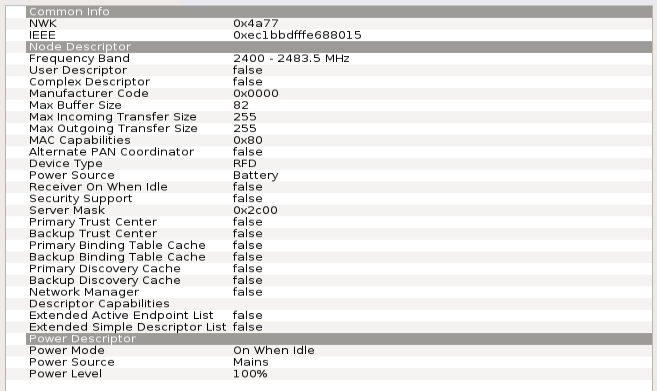
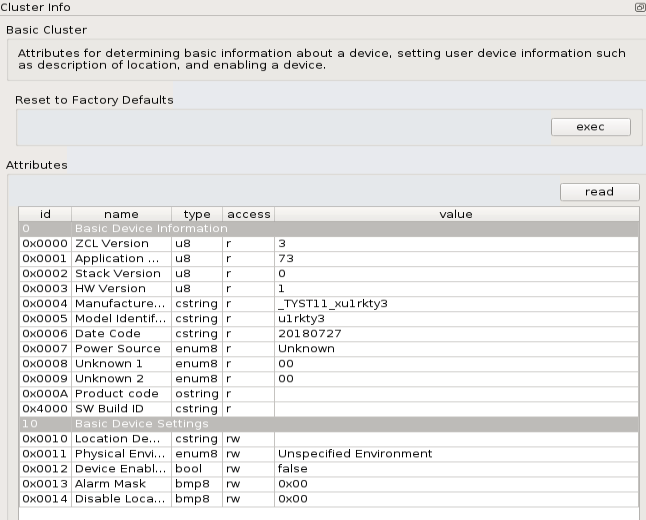
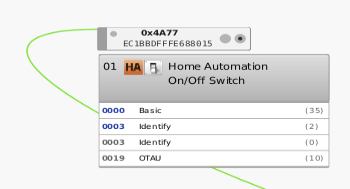
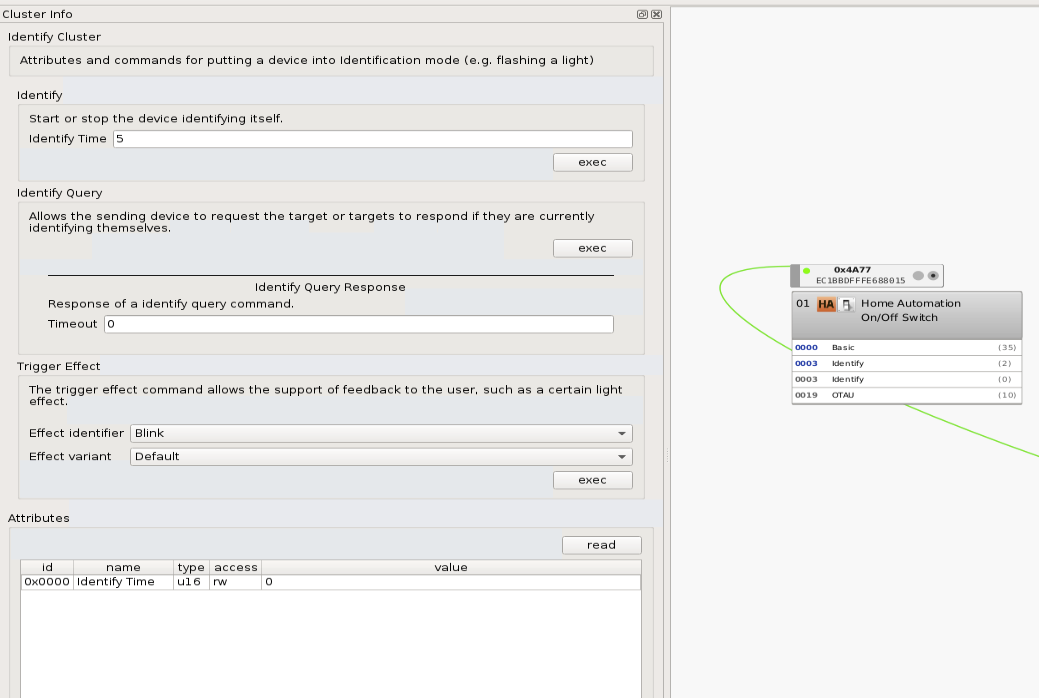
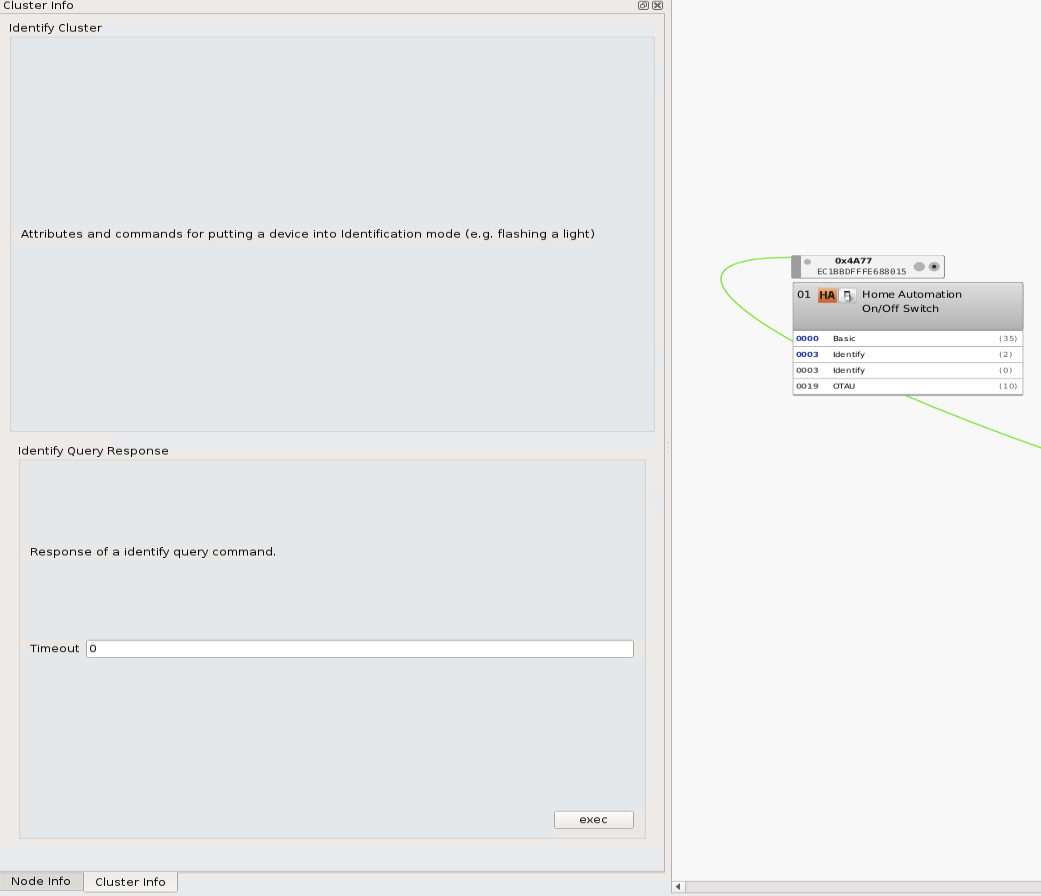
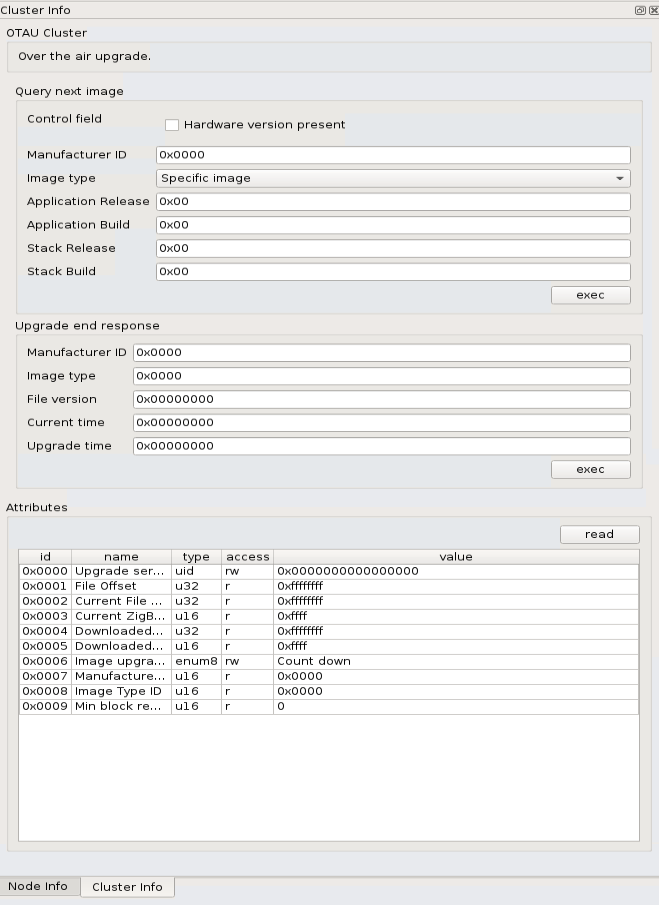

 czm97176
All 82 comments
Update: By adding this model into same model as 'owvfni3' on zigbee2mqtt. i am able to play with this motor. Please take a look.
https://github.com/Koenkk/zigbee-herdsman-converters/pull/1163/files
However, i don't have curtain rail on hand so i don't know what is means of 'position' or 'calibration` and seems the state is always showing 'running' even i pressed stop. i know it might zigbee2mqtt issue, so please ignore if you feel don't applicable to deconz.
https://github.com/Koenkk/zigbee-herdsman-converters/issues/1159
czm97176
on 2 Sep 2020
I m ATM on tuya covering > https://github.com/dresden-elektronik/deconz-rest-plugin/issues/3161
I have just added your device on the code, so you can test it (open/close/stop is working) but there is a problem yet for device detection so you need to edit the file de_web_plugin.cpp to force detection
        //Disabled for this deconz version
        //if (node->nodeDescriptor().manufacturerCode() == VENDOR_NONE)
        //{
        //    lightNode.addItem(DataTypeBool, RStateOpen);
        //    lightNode.addItem(DataTypeUInt8, RStateLift);
        //    lightNode.addItem(DataTypeUInt8, RStateBri);
        //}
just remove all "//"
For setLevel, the code is ready but untested yet.
 Smanar
on 2 Sep 2020
Smanar
on 2 Sep 2020
Sorry, i just figure out that i should use
git clone --branch tuya2 https://github.com/Smanar/deconz-rest-plugin.git
let me rebuild everything and try.
Thanks
czm97176
on 3 Sep 2020
Update:
i did the same in branch tuya2 and replace the libde_rest_plugin.so.
No luck. it doesn't appear in my home assistant.
i tried following things
Remove / Re-add in deCONZ
Re-read basic attribute in deCONZ
Add as light in Phoscon APP
Reboot
Restart deCONZ & Home Assistant
and also tried to edit the file de_web_plugin.cpp as you mentioned and recompile
//Disabled for this deconz version
        if (node->nodeDescriptor().manufacturerCode() == VENDOR_NONE)
         {
             lightNode.addItem(DataTypeBool, RStateOpen);
             lightNode.addItem(DataTypeUInt8, RStateLift);
             lightNode.addItem(DataTypeUInt8, RStateBri);
         }
May i know how do i expose this device to Home Assistant ? Thanks
Mimixx: Smanar's email removed.
czm97176
on 3 Sep 2020
@czm97176 It should be in the rest api.
 Mimiix
on 3 Sep 2020
Mimiix
on 3 Sep 2020
@czm97176 It should be in the rest api.
Hi @Mimiix , Sorry i don't get it.
i would like to expose this motor to home assistant. Would you please give me more hints? Thank you
btw, @Smanar , the issue you mentioned https://github.com/dresden-elektronik/deconz-rest-plugin/issues/3161 is a Tobular Motor and mine one is rail track motor, do they the same in program level?
czm97176
on 3 Sep 2020
Update
@Mimiix , got your point , just figure out how to look into the api. However, the devices doesn't appear at the api.
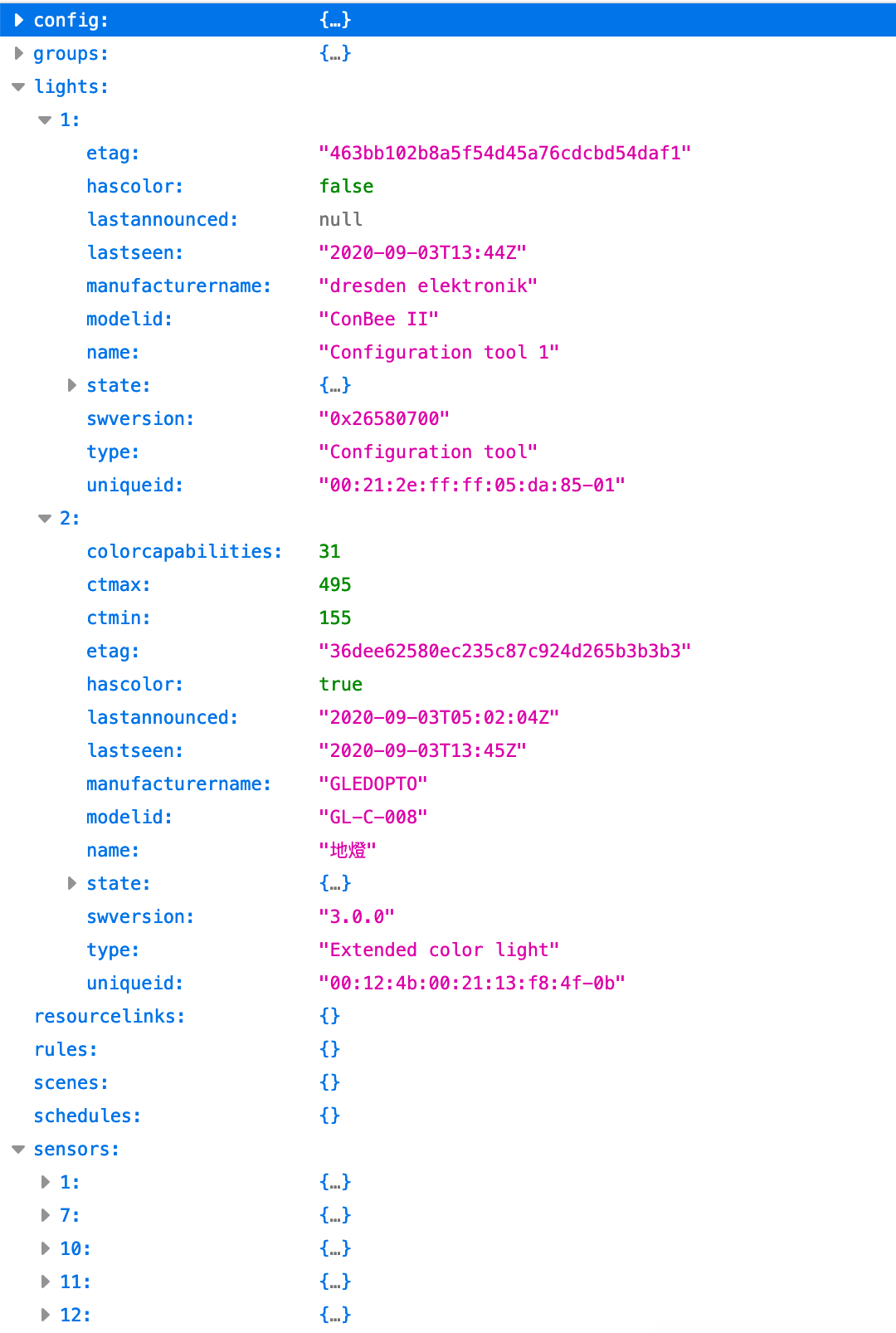
czm97176
on 3 Sep 2020
Oups, sorry my bad, haven't see your device is battery one, the code work only for powered one, I will update the code tonight.
BTW, I have edited yout post sorry (there is my email inside, on the capture)
Smanar
on 3 Sep 2020
@Smanar Next time tag me, because you need to delete the revisions. Also: always add a note in the edit ;)
Mimiix
on 3 Sep 2020
Ok so long story, there is a problem n deconz ATM, it don't ask for model id before creating a lightnode.
So need to reconize the device only with few information, and it's not possible for tuya, so need to improve the code, but we can force the code to make the motor react (good for spirit having something working first ^^)
BTW I have updated the code on the fork to test your device first, so the new code to enable, to force the detection is on de_web_plugin.cpp line 1796
        //if (node->nodeDescriptor().manufacturerCode() == VENDOR_NONE)
        //{
        //    hasServerOnOff = true;
        //}
With this code you will have your device in light section in phoscon (and surely visible on phoscon), like before just remove the "//"
Smanar
on 3 Sep 2020
@Smanar Thanks! it's my bad i didn't highlight that is a battery one and it's a rail track type.
i have tested your latest changes ! it works and appear as lightnode and i am able to start the motor in home assistant but there are two things i am aware of ... not sure it's expected during the test. Please take a look
- a Dummy light node is created when i am adding the motor, it seems belongs to my light strip. i tried to delete this dummy one, it will delete the actual one together.
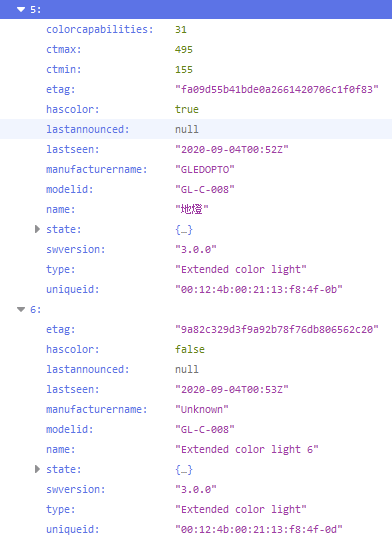
- The motor is showing as on/off light in Home Assistant, i am only able to kick on the motor , but not stop it. i expect there should have 3 buttons or actions for a curtain motor ? - open / close / stop ?
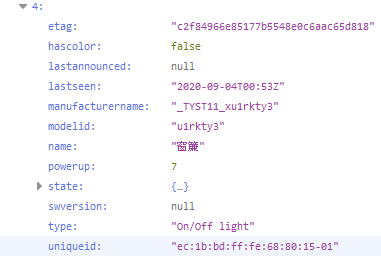
Thank you so much!
Gordon
czm97176
on 4 Sep 2020
I don't think it s a dummy node, one unique id is finishing by 0B and the other by 0D, I think your device realy have 2 endpoint but have "basic" cluster only on the 0B one.
What does mean "kick" the motor ?
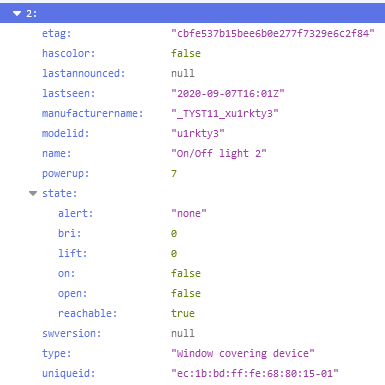
Can you expend the state field ? it s the more important one, you need to have inside "lift" "open" or more.
And you can't use it with deconz or badly, better to use direclty the api or an home automation application (the one you want deconz is supported by all)
Smanar
on 4 Sep 2020
HI @Smanar ,
i just tried to revert back to the normal branch - it will only show 1 light instead of two in phoscon app
i am not sure why it shows additional dummy light for this branch .
Attached is the jsons file of the API from this two branch
please take a look
Tuya2 Branch
Normal Branch
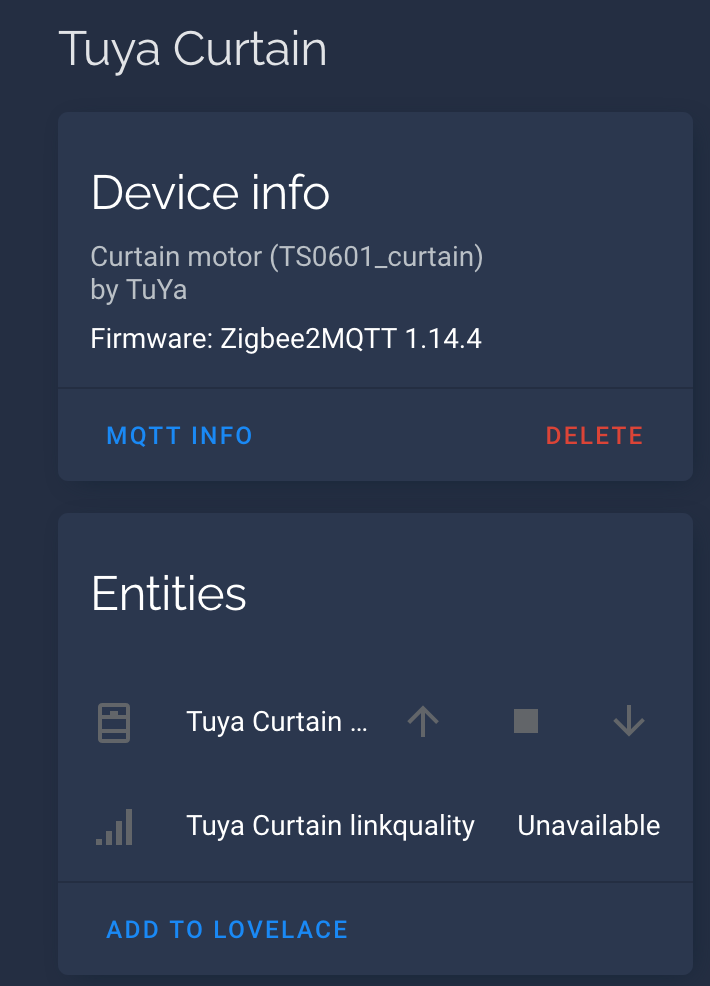
Regarding the window conver, there is no way to control the motor like "open" "close" "stop" in HA.,
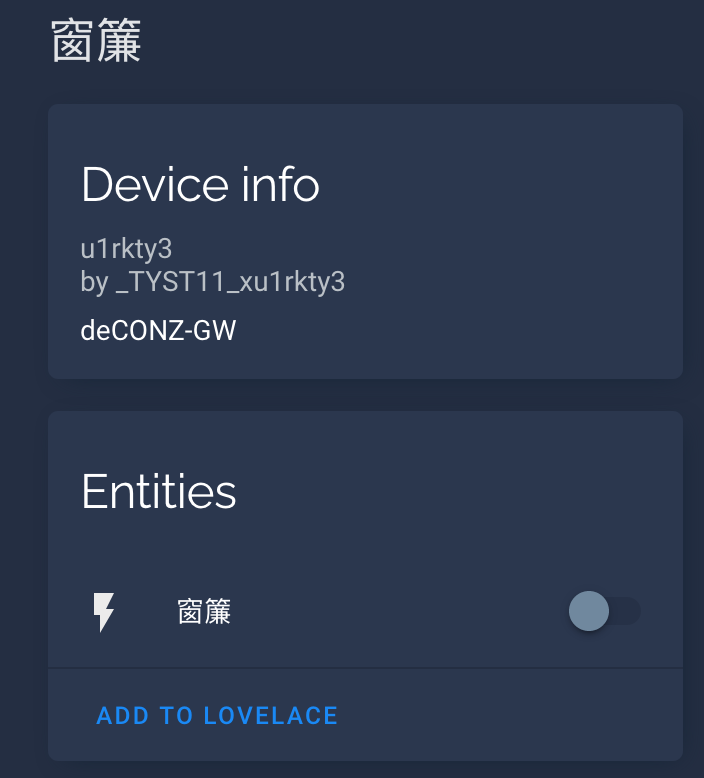
However, in the zigbee2mqtt , it will allow me to do this and treat it as "cover" object not switch
is it related to the API ?
i am not sure how to make HA threat it as cover like zigbee2mqtt does.
this cover state is attached in Tuya2 API file above.
czm97176
on 6 Sep 2020
Take a look in deconz to check the device "00:12:4b:00:21:13:f8:4f" to count the endpoint.
BTW for the moment it works fine, the device is not detected on old code but you have all needed field on the tuya2.
"etag":"b1e09f7de02fdd4c399e7acafad47ac6","hascolor":false,"lastannounced":"2020-09-06T08:57:01Z","lastseen":"2020-09-06T09:23Z","manufacturername":"_TYST11_xu1rkty3","modelid":"u1rkty3","name":"窗簾","powerup":7,"state":{"alert":"none","bri":0,"lift":0,"on":false,"open":false,"reachable":true},"swversion":null,"type":"On/Off light","uniqueid":"ec:1b:bd:ff:fe:68:80:15-01"}
To test the device you need to use directly the API, because tuya have make this device as "on/off light" instead of "covering type"
curl -H 'Content-Type: application/json' -X PUT -d '{"open": true}' http://IP:PORT/api/API_KEY/lights/2/state
curl -H 'Content-Type: application/json' -X PUT -d '{"open": false}' http://IP:PORT/api/API_KEY/lights/2/state
Set level is working too now
I can try to force the "type" but not sure others devs will be happy with that.
Smanar
on 6 Sep 2020
Hi @Smanar ,
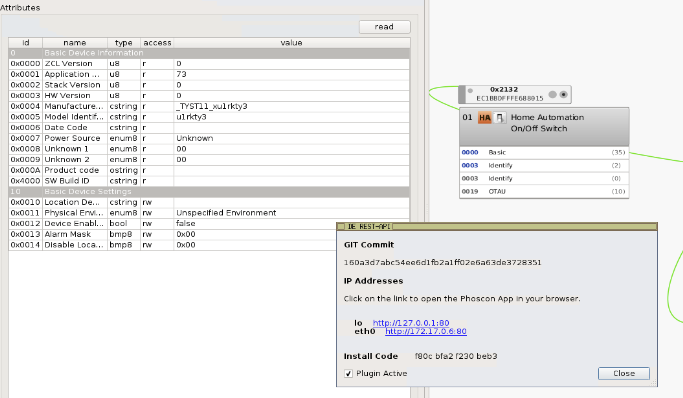
i just updated your code to the last commit version - 160a3d7. The cover devices is missed in phoscon, the api as well.
but it's still visible in deCONZ. i tried to reset / re-join / delete node so many time but no luck.
Would you please check ? Please let me know if i need to provide any information
Gordon
czm97176
on 6 Sep 2020
Ok, sorry was my fault, I m on another covering in same time, and have removed all hacks, so there is missing the one for your device now (remember the line you have edited)
So new version to test, with your version re-added and without hack.
Smanar
on 6 Sep 2020
@Smanar
Sorry for the back and forth, i just updated to e9aaee0. it's still not able to show in phoscon as light.
czm97176
on 6 Sep 2020
Can you make tries without deleting the device.
Or using the deconz trick
- set phoscon in permit join (add new light)
- go on basic clustaer 0x0000
- read attributes (need perhaps wake up the device in same time)
Smanar
on 6 Sep 2020
@Smanar
WOW. it just refreshed by clicking the white box on "READ SIMPLE DESCRIPTOR / READ NODE DESCRIPTOR"
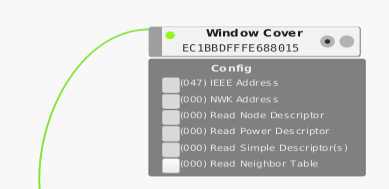
Thanks a lot !!!.
so by asking to change the device type, How can i ask for other Dev opinion? i google and see there has a attribute call "resourcelinks" , can it help ? i am not very sure .
czm97176
on 6 Sep 2020
WOW. it just refreshed by clicking the white box on "READ SIMPLE DESCRIPTOR / READ NODE DESCRIPTOR"
And phoscon was in permit join at this moment ?
For the type, it s a long story, it s easy to do on my side, but it result fake information in the API, and some other devs realy don't like that, it s not something clean.
The problem is without this "hacks" the device can't work natively in third application.
I have updated the code with the hack, so you will be able to test the device with HA (the device type will be "Window covering device")
But
- I can remove the hack if someone is against. (I m using so much hack for tuya ...)
- I have updated the code 10 mn ago with removing a hack that have an impact on inclusion, it works fine on router, but idk for battery device, you probably need to use the same method than previously.
And on previous issue, you say it s working, but you can see the device on phoscon ? And you still haven't tried the command ?
Smanar
on 6 Sep 2020
WOW. it just refreshed by clicking the white box on "READ SIMPLE DESCRIPTOR / READ NODE DESCRIPTOR"
And phoscon was in permit join at this moment ?
Yes, actually i press "add light" as the same time, not sure which of the command are the key of success.
For the type, it s a long story, it s easy to do on my side, but it result fake information in the API, and some other devs realy don't like that, it s not something clean.
The problem is without this "hacks" the device can't work natively in third application.I have updated the code with the hack, so you will be able to test the device with HA (the device type will be "Window covering device")
But
* I can remove the hack if someone is against. (I m using so much hack for tuya ...)

* I have updated the code 10 mn ago with removing a hack that have an impact on inclusion, it works fine on router, but idk for battery device, you probably need to use the same method than previously.
And on previous issue, you say it s working, but you can see the device on phoscon ? And you still haven't tried the command ?
i see the device on phoscon, i didn't tried the command. i just try to toggle the cover by script in HA (even in wrong type)
i don't have the track and remote on hand, so i don't have the motion in full picture but motor can spin on both direction. However, i am still not able to stop the cover.
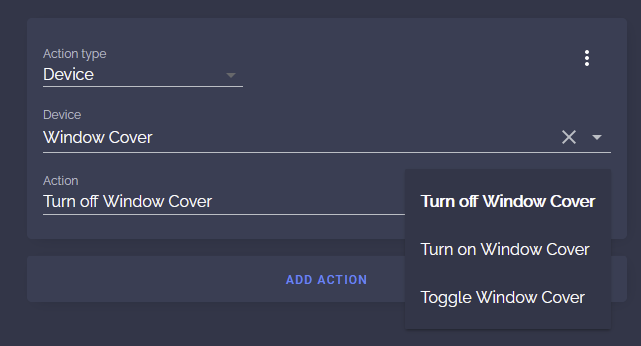
i will try your updated code very soon. Will let you know once it done.
czm97176
on 6 Sep 2020
@Smanar
Quick update, i can't compile the program in latest version.
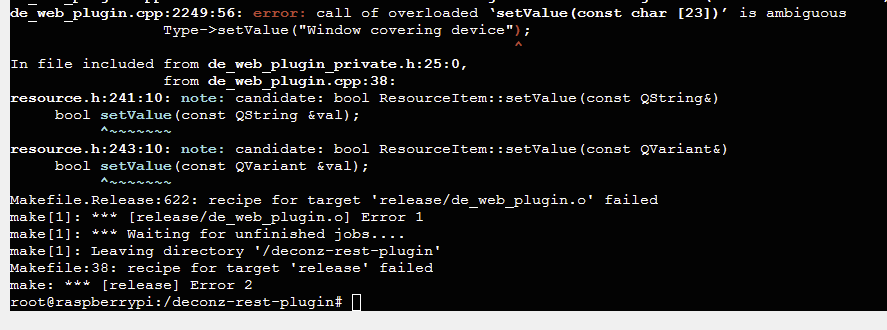
czm97176
on 6 Sep 2020
Corrected.
But you can add this device to HA even the type is not "window covering" ? So you don't need the hack ?
Yeah for stop command, try directly the api command
curl -H 'Content-Type: application/json' -X PUT -d '{"stop": true}' http://IP:PORT/api/KEY/lights/ID/state
From my memory I have already see this problem for HA.
Smanar
on 6 Sep 2020
Corrected.
But you can add this device to HA even the type is not "window covering" ? So you don't need the hack ?
Yeah for stop command, try directly the api command
curl -H 'Content-Type: application/json' -X PUT -d '{"stop": true}' http://IP:PORT/api/KEY/lights/ID/stateFrom my memory I have already see this problem for HA.
As i hosted HA and Home Bridge ( with homebridge-hue plugin )...
i don't know how to "override" the device type in both platform and it should support "position" as well.
i need this hack because deCONZ is expose it as "switch" , i don't have proper user interface to open close and stop the motor.
as it works on zigbee2mqtt+HA out of the box ( just add device code into the device.js manually ),
so i really don't know how to do with deconz.
i want it in deCONZ because it's should more reliable.
https://www.zigbee2mqtt.io/devices/TS0601_curtain.html
Anyway, thanks for your great work !! i try will the new code ! thanks a lot ~
czm97176
on 6 Sep 2020
@Smanar , Sorry , i got failure in compiling source code again .

czm97176
on 6 Sep 2020
Corrected and tested this time, it compile.
Tell me if it s better. and I think position is working too (it work on another device) but need calibration, and idk for your device.
Smanar
on 6 Sep 2020
@Smanar
Yeah. it's working now. Thank you so much! i would like to ask three more questions.
- Does this devices has battery information in the payload ? is it possible to get such information ?
- The API does not reflect the status to close (open: false) or open (open: true)
after i executed comment and wait the motor spinning has finished. it's always showing open = false.
curl -H 'Content-Type: application/json' -X PUT -d '{"open": true}' http://IP:PORT/api/API_KEY/lights/2/state
this is my first time i bought this curtain motor.
Is it require the rail/tracker installed and calibrated by remote to get the open/close status ?
- As you said this hack may not up forever, may i know will this change merge to the official branch and how do i know they will drop the override hack if they are not happy with it ? Can i have work around ?
Thanks
Gordon
czm97176
on 6 Sep 2020
1- It possible yes, but will be in another entry, we can't use battery for "light", will take a look tomorrow if I can find the magic tuya command on the net (it s the first battery powered covering I m seing), else if it exists, it will be visible using debug mode.
2- Yep I think it s probably because of the missing calibration, because I m using the same command for another device without problem, and setlevel command too need calibration.
3 - I will ask tommorow to have more opinions, the next version will be out in less than 10 days, so I will try to make something the more clean I can in the next days.
Smanar
on 6 Sep 2020
it s the first battery powered covering I m seing
Check out the IKEA blinds and the Xiaomi B1. I create ZHABattery for these as new sensor resource type.
 ebaauw
on 6 Sep 2020
ebaauw
on 6 Sep 2020
2- Yep I think it s probably because of the missing calibration, because I m using the same command for another device without problem, and setlevel command too need calibration.
Thanks. i will report once it installed on track and calibration.
btw, i see the lift is changing from 0 to 100 or from 100 to 0 when i execute the open:true/false command.
Maybe it use the "lift" to determine it's open/close state instead ? Not sure
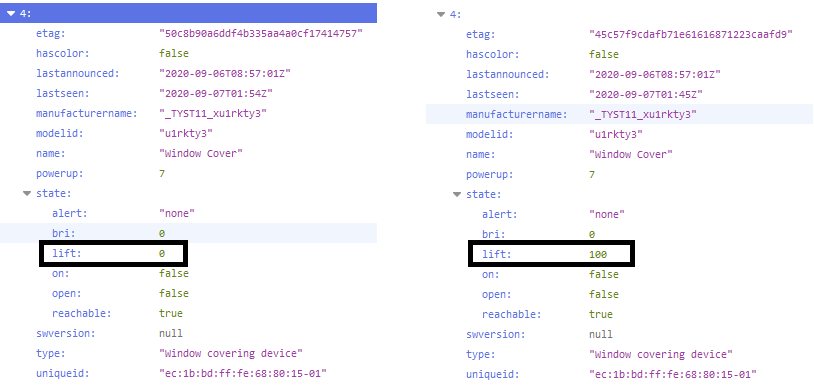
On the other hand, i see there has a command to allow "reverse_direction" on similar tuya curtain in zigbee2mqtt,
Can we have the same options as well ?
Thank you so much
czm97176
on 7 Sep 2020
Ha ?
Good catch, there is a problem here, yes lift can be used and it is from my memory, need to take a look. Will have a new version today.
But as "lift" is updated and not "bri" I think the problem is from tuya code.
For the reverse command, I can use it as hidden command
Using for exemple.
PUT, PATCH /api/<apikey>/lights/<id>
But it s something usefull ? you have 2 mounting possible ?
For the battery, I haven't find information on internet, so I will use the same tuya value than for thermostat device, if it don't work, we will need to use the debug mode to find the tuya value.
BTW ebaawn have find a probable critic bug with my inclusion system, so need to make some test on my side first with random stuff, no problem yet, but need some days to have a final version.
Smanar
on 7 Sep 2020
Ha ?
Good catch, there is a problem here, yes lift can be used and it is from my memory, need to take a look. Will have a new version today.
But as "lift" is updated and not "bri" I think the problem is from tuya code.For the reverse command, I can use it as hidden command
Using for exemple.
PUT, PATCH /api/<apikey>/lights/<id>But it s something usefull ? you have 2 mounting possible ?
For the battery, I haven't find information on internet, so I will use the same tuya value than for thermostat device, if it don't work, we will need to use the debug mode to find the tuya value.
BTW ebaawn have find a probable critic bug with my inclusion system, so need to make some test on my side first with random stuff, no problem yet, but need some days to have a final version.
Thanks, No worry, take your time,
FYI i notice that the "lift" is changed immediately after command is execute even the motor is still spinning
In addition, when i tried to adjust "open 45%" in homekit, it will change the "lift" to 45 immediately as well.
BTW, i apologize if i gave false information on "open" state checking idea.
because you maybe right. it can report accurate after calibration.
anyway, i need to buy a curtain track ASAP and get it installed
so i can give you more solid finding.
czm97176
on 7 Sep 2020
Np the "open" field is aready corrected, bug was from me
The reverse command too
But I have problem for the battery, because all information are on the same cluster, the easier way will be using the ZHAtuya sensor, but this device is not implemented in third application.
Smanar
on 7 Sep 2020
Ok done it complile, a warning but don't block the compilation.
The "open" is corrected
To change direction use PUT /api/<apikey>/lights/<id> with {"reverse":true}
The device will have a new zhabattery device, but not sure it will work, I m using the same one than for thermostat sensor.
As I don't find information on the net, the only solution is running deconz in debug mode, --dbg-error=2, all other ==0.
And you will see in log
Tuya debug 5 ........................................
Need to wait for the one used for battery. Take a look on the tuya app, some device haven't battery level but just an alarm for low battery (not the same)
Smanar
on 7 Sep 2020
Ok done it complile, a warning but don't block the compilation.
The "open" is corrected
i just updated to the latest version. the open is working now , thanks
so by the current information , this devices has no "Current Position" status but only "Target position" ?
To change direction use PUT
/api/<apikey>/lights/<id>with {"reverse":true}
The device will have a new zhabattery device, but not sure it will work, I m using the same one than for thermostat sensor.
Regarding the battery status, there is no obvious change in the API. Please take a look.
6F18D4EFD6.json.txt
As I don't find information on the net, the only solution is running deconz in debug mode, --dbg-error=2, all other ==0.
And you will see in logTuya debug 5 ........................................
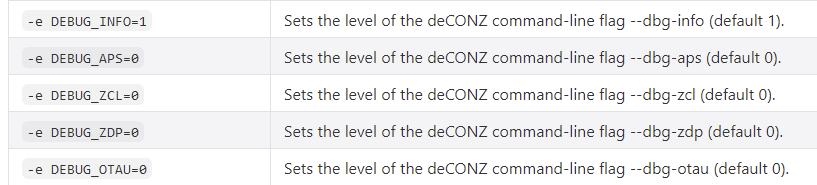
As i am running deCONZ on docker ... it don't provide dbg-error option
(i tried DEBUG_ERROR = 2 which is not listed but no luck) ...
not sure how can i activate debug in docker mode ....ahhhhh
Need to wait for the one used for battery. Take a look on the tuya app, some device haven't battery level but just an alarm for low battery (not the same)
i don't get it in this part, What is mean of "Need to wait for the one used for battery. Take a look on the tuya app" ?
you mean someone has tuya gateway?
czm97176
on 7 Sep 2020
so by the current information , this devices has no "Current Position" status but only "Target position" ?
Yep I think the target is more usefull than the current, but in reality I think "bri" is updated during the move.
You need to re-include the device for the battery device creation.
Don't worry, if you haven't the tuya app or docker ^^, it will be just harder.
Just enable logging by defaut, and hoping to see the good value, you can try to power cycle the device too (if it s possible without removing battery). The problem is we don't now when the device will send the report, can be 1 time every hour or every week (or never)
Smanar
on 7 Sep 2020
so by the current information , this devices has no "Current Position" status but only "Target position" ?
Yep I think the target is more usefull than the current, but in reality I think "bri" is updated during the move.
You need to re-include the device for the battery device creation.
i tried to delete/rejoin/reset/read descriptor/read cluster. i did what i have learn above.
May i know what is the process of re-include? Please and Thanks
Don't worry, if you haven't the tuya app or docker ^^, it will be just harder.
Just enable logging by defaut, and hoping to see the good value, you can try to power cycle the device too (if it s possible without removing battery). The problem is we don't now when the device will send the report, can be 1 time every hour or every week (or never)
By looking the log information , What kind of wording that might relevant to it ?
czm97176
on 7 Sep 2020
The device for battery will be in "sensor" API section, and I have just corrected something 5mn ago, I think it will be fine now.
On log you will see
Tuya debug 5 : Status: ...................................
It s all the informations send by the tuya device, you will have them when you use the device and during periodic report. and if the device send battery it will use this way too.
Smanar
on 7 Sep 2020
The device for battery will be in "sensor" API section, and I have just corrected something 5mn ago, I think it will be fine now.
On log you will see
Tuya debug 5 : Status: ...................................
It s all the informations send by the tuya device, you will have them when you use the device and during periodic report. and if the device send battery it will use this way too.
Thanks you, Sorry i got this error in compile program

czm97176
on 7 Sep 2020
oups sorry, I m making dinner in same time.
Updated.
Smanar
on 7 Sep 2020
oups sorry, I m making dinner in same time.
Updated.
Opps. Sorry to disturbing you.....
i just updated to 1d93f36 and tried to re-include the device .... but i still can't find any thing mention battery
Attached is the API file
6F18D4EFD6.json.txt
btw, by modifying the start.sh inside the docker, i am able to setup --dbg-error=2 right now,
but there is no Tuya debug 5 message come out... take keep looking on it
please take your time, no hurry , take care & stay healthy
czm97176
on 7 Sep 2020
Lol, np, it s just I have done the modification without testing.
But BTW I don't understand why it s not working, I have the same issue on another tuya device ATM, device is not created.
I have made some change to test, but if with them it s still not working, can you enable log during inclusion ? Only --dbg-info=2, you can set other = 0.
Smanar
on 7 Sep 2020
Lol, np, it s just I have done the modification without testing.
But BTW I don't understand why it s not working, I have the same issue on another tuya device ATM, device is not created.
I have made some change to test, but if with them it s still not working, can you enable log during inclusion ? Only --dbg-info=2, you can set other = 0.
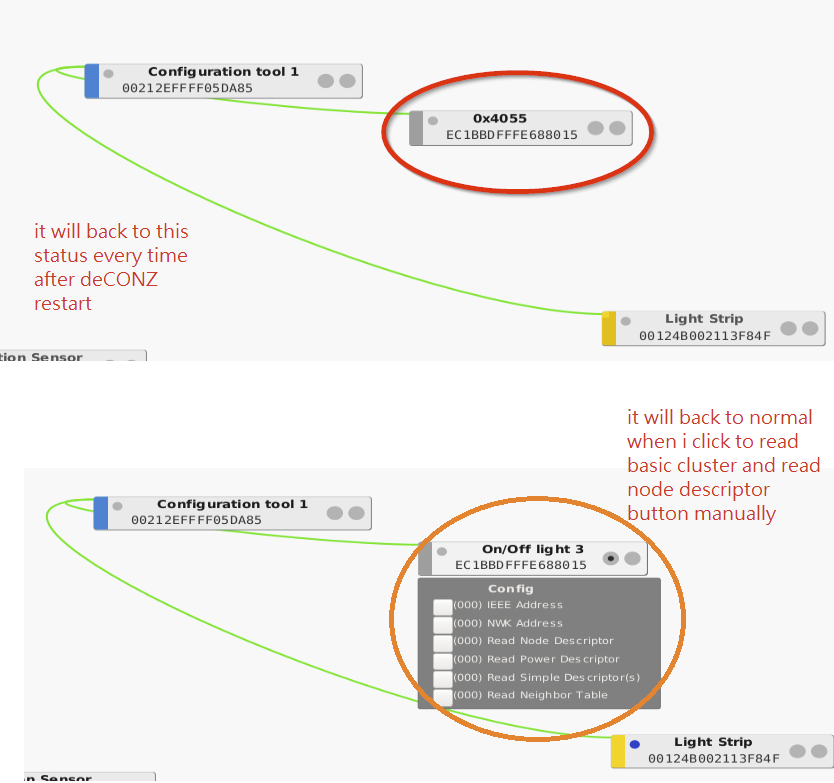
i have 1 thing i am quite aware of .... this device will disappear in the API and phoscon every time i restart the deconz
in fact, this device is changed as a "unknown device".
i don't need to re-pairing this but i have to click the "read cluster/read node descriptor" to make it back to normal
i don't have this issue on my light strip and those 4 sensor.
Would you please take a look?
czm97176
on 8 Sep 2020
What is this device ? It s a tuya switch/remote ? You have the basic attribute ?
You don't need to set phoscon in permit join in same time ? to make it appear ? (To know if the api can include new device).
this device will disappear in the API and phoscon every time i restart the deconz
You mean the name disapear, not the node ? It can be just the device is badly included in the API. Or not included at all.
BTW the battry sensor is still invisible in the API ?
Smanar
on 8 Sep 2020
What is this device ? It s a tuya switch/remote ? You have the basic attribute ?
i mean the Tuya window cover.
You don't need to set phoscon in permit join in same time ? to make it appear ? (To know if the api can include new device).
Every time i restarted the deCONZ :
Tuya window cover appear as a hex code device in deCONZ
but disappeared in the API and Phoscon.
Once i press "read cluster" and "read node descriptor" ,
the name will change to On/Off light OR the name i have set in phoscon before. finally it will show on API and phoscon.
basically , i have to re-read the cluster to make the Tuya appear in API/phoscon manually every time i have restarted the deCONZ.
this device will disappear in the API and phoscon every time i restart the deconz
You mean the name disapear, not the node ? It can be just the device is badly included in the API. Or not included at all.
this issue only happen on the Tuya window cover, but no the sensor and light script
BTW the battry sensor is still invisible in the API ?
Sorry... No
czm97176
on 8 Sep 2020
Arf, sorry haven't reconized it, I realy have problem with battery covering.
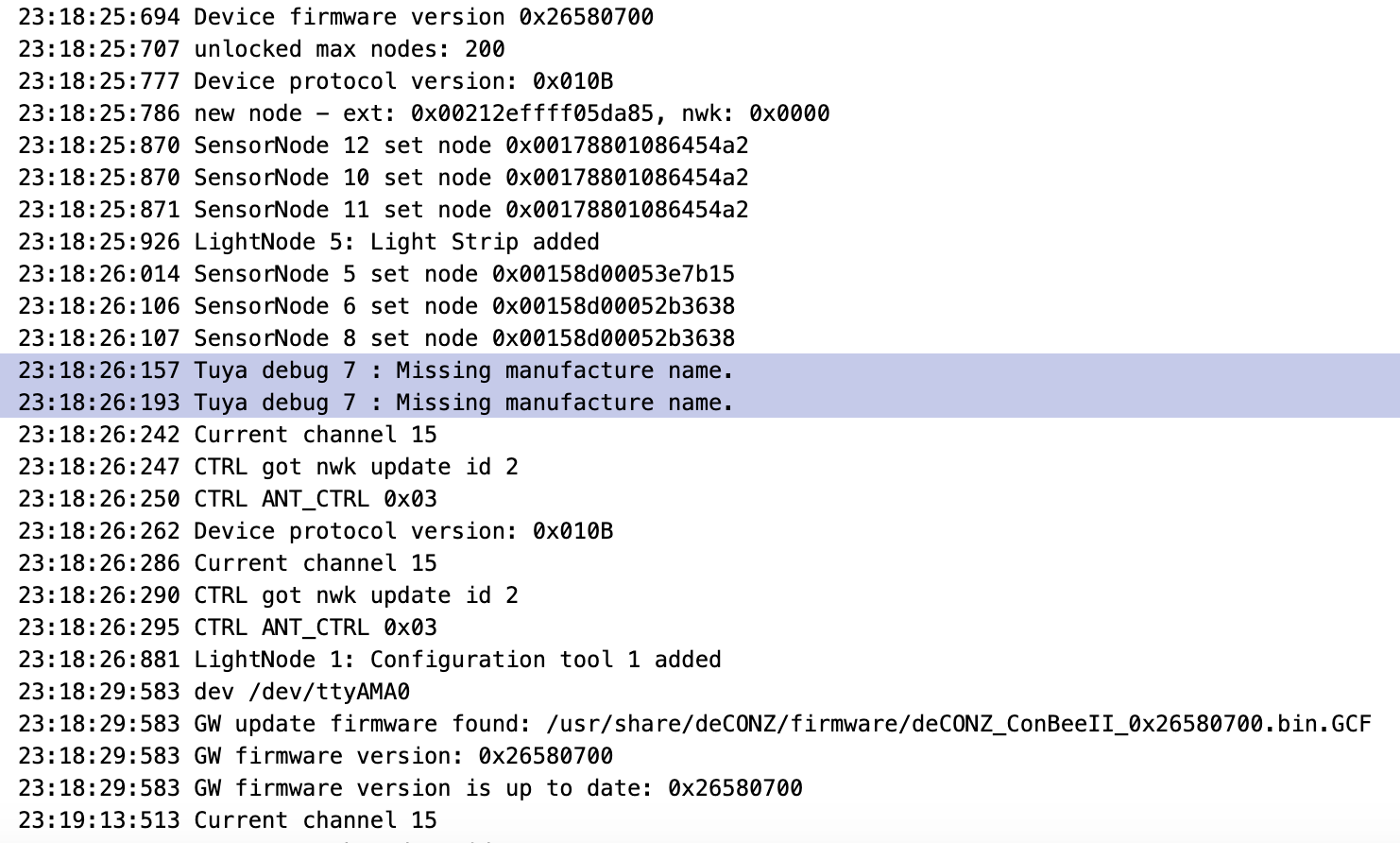
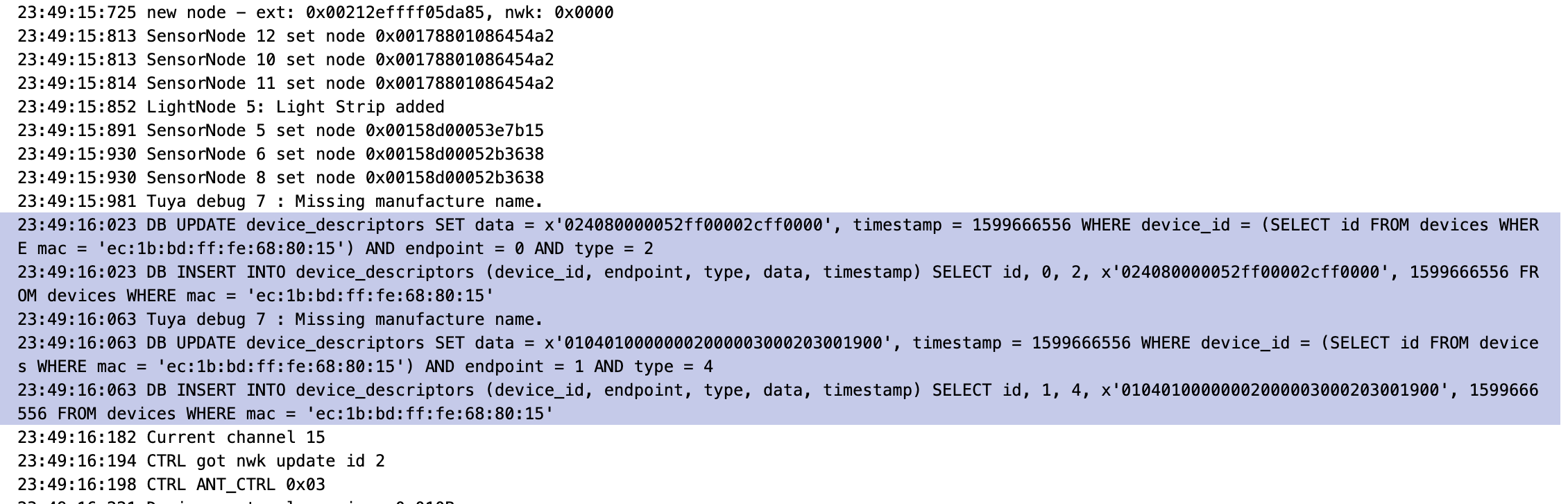
I think I have found the problem, you can see "Tuya debug 7 : Missing manufacture name" in loop in log after the restart ?
I will make a new code today, but if you can send me your log during inclusion will be usefull for the battery ?
Smanar
on 8 Sep 2020
Arf, sorry haven't reconized it, I realy have problem with battery covering.
I think I have found the problem, you can see "Tuya debug 7 : Missing manufacture name" in loop in log after the restart ?
I will make a new code today, but if you can send me your log during inclusion will be usefull for the battery ?
i can't see it in "Tuya debug 7" on my log , please find attached log file
Btw, As i said tuya window cover is disapear evertime i restarted so it is not possible to make it work out VNC to control deCONZ (as i am using docker & raspberry OS without GUI ) ...it mean that i can't use startup command -platform minimal ....
i am not sure the -dbg_error=2 can work without startup command -platform minimal , hope this log file can help
czm97176
on 8 Sep 2020
There is nothing realy usefull inside ^^
I think you can edit Environment Variables, but by defaut DEBUG_INFO=1, so I don't understand why you don't have more usefull lines. For exemple you miss all lines from deconz initialisation.
Btw, As i said tuya window cover is disapear evertime i restarted so it is not possible to make it work out VNC to control deCONZ (as i am using docker & raspberry OS without GUI ) ...it mean that i can't use startup command -platform minimal ....
Yep I think the code is blocked, waiting for manufacture name, I trigger myself this request, but the "blocking code" is in "discovery" part, so I don't understand why this part is blocking after a restart.
Smanar
on 8 Sep 2020
There is nothing realy usefull inside ^^
I think you can edit Environment Variables, but by defaut DEBUG_INFO=1, so I don't understand why you don't have more usefull lines. For exemple you miss all lines from deconz initialisation.
Btw, As i said tuya window cover is disapear evertime i restarted so it is not possible to make it work out VNC to control deCONZ (as i am using docker & raspberry OS without GUI ) ...it mean that i can't use startup command -platform minimal ....
Yep I think the code is blocked, waiting for manufacture name, I trigger myself this request, but the "blocking code" is in "discovery" part, so I don't understand why this part is blocking after a restart.
@Smanar i got the debug message by setting debug_info=1
attached is the full log
czm97176
on 8 Sep 2020
Ok I can reproduce the problem here too.
But still searching a solution.
Smanar
on 8 Sep 2020
Ok I can reproduce the problem here too.
But still searching a solution.
Thank you ! Regarding the tuya missing issue , i put a video on youtube to demonstrate how it looks and how i include it back manually (clicking the "read simple descriptor box after read cluster is necessary) . please take a look
czm97176
on 8 Sep 2020
@Smanar i know you may still working on it. i have updated to the latest version and this is the debug message .
Unfortunely, the tuya is still disapear after restart and no battery information is shown.
This log contains the step how i reinclude the tuya manually and restart once for testing
log.txt
Anyway, thank you so much
czm97176
on 9 Sep 2020
Yep, I m on the code atm it s moving a lot ^^, but not succed.
I can retreive data from the database, so if you have already included the device, no more problem, but I have problem for the first inclusion, not possibe without deconz still.
Smanar
on 9 Sep 2020
Yep, I m on the code atm it s moving a lot ^^, but not succed.
I can retreive data from the database, so if you have already included the device, no more problem, but I have problem for the first inclusion, not possibe without deconz still.
Sorry, no offsense.
Just to make sure we are on the same page.
the device still disapear every time i restart deCONZ , is this mean first inclusion ?
btw, i guess the battery function is not possible at this moment yet ?
Thanks
Gordon
czm97176
on 9 Sep 2020
Ok so i have found a "compromise"
Tuya devices will now need 2 inclusions.
The first inclusion will be bad, idk what you can have as entries. But after this one deconz store all informations in the db.
But now for tuya device, the code make a search in the database with the mac adress to find a manufacture code, and if he found one, after that the inclusion will be nice.
If you have deconz with GUI, you can triger the inclusion using it, it will work directly.
So for you, it will be fine, because you device is already in the database after a reboot.
Problem idk with wich one frequency deconz store data.
So now you will have in your log during restart
18:56:00:364 Tuya debug 7 : Missing manufacture name for 0x00212effff029e9d
18:56:00:364 sql exec SELECT manufacturername FROM nodes WHERE mac LIKE '00:21:2e:ff:ff:02:9e:9d%' COLLATE NOCASE
18:56:00:364 DB SELECT manufacturername FROM nodes WHERE mac LIKE '00:21:2e:ff:ff:02:9e:9d%' COLLATE NOCASE: dresden elektronik
I m testing it on my side, I think it will be fine. So for the battery I need log starting with
Tuya debug 5 : Status: %d Transid:
And for information I know already DP for value 0x0104 0x0202 0x0203
edit:
The code is online, and will not move tonight.
Smanar
on 9 Sep 2020
HI,
i search the log and i got this from yesterday (the date before i updated to d8cea3f )

btw, the device missing issue is fixed ! Thank you !
czm97176
on 10 Sep 2020
This log was taken at startup ?
Because it s strange you have so much "missing manufacture name".
I don't find information about this one,
1025 > 0x04 0x01 mean an enum value, like for a "table state", so it can't be a battery level but can be a lowbattery state.
Smanar
on 10 Sep 2020
This log was taken at startup ?
Because it s strange you have so much "missing manufacture name".
Sorry i may misleading you, i filter out the log by "tuya", so the log entry is not display at all in sequence.
The "tuya debug 4" and "tuya debug 5" happened on 18:26 and 18:30 but the startup time is 13:04.
and it only happened once from these couple days
I don't find information about this one,
1025 > 0x04 0x01 mean an enum value, like for a "table state", so it can't be a battery level but can be a lowbattery state.
Maybe i try to charge the battery and see if there any things comes out
czm97176
on 10 Sep 2020
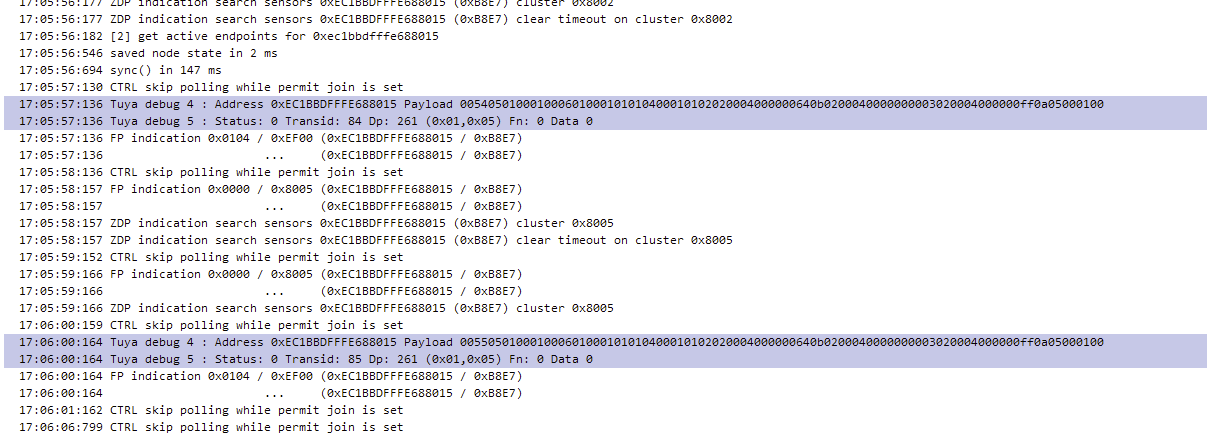
@Smanar i got another "Tuya log"
czm97176
on 10 Sep 2020
Ok so here I realy don't have idea.
0x01 0x05 why not, but nothing in data, and the payload is longer than the part we are using, there is some data I m not using.
I m sorry but I think you will need some time before having the battery visible in deconz ...
Smanar
on 10 Sep 2020
Sure. Will do. Thanks a lot !
czm97176
on 10 Sep 2020
@Smanar Regarding the open status , is it will now depends on the lift or something else? Why i am asking this because when i use homebridge to control the curtain, the open / on / lift will change together. However, when i use HA to control the cutain, only lift will change from 0 to 100 or 100 to 0 and the open state is never changed. Do you know what makes the different ?
czm97176
on 10 Sep 2020
You are using the same deconz ?
It s a bug corrected fews days ago.
From the code if lift = 100 then open = false, else it is true.
It can bug if "open" is used in same time than "lift" but ebaauw have rewrited all the code, so I think it s good too now.
you haven't the command line used by homebridge and HA ?
Smanar
on 10 Sep 2020
You are using the same deconz ?
Yes, i only got 1 deCONZ
It s a bug corrected fews days ago.
From the code if lift = 100 then open = false, else it is true.It can bug if "open" is used in same time than "lift" but ebaauw have rewrited all the code, so I think it s good too now.
you haven't the command line used by homebridge and HA ?
Yes, i remember you had resolved this issue and this issue is only happened on HA for now. so i am not sure how HA call the command to make the "open" state in fail.
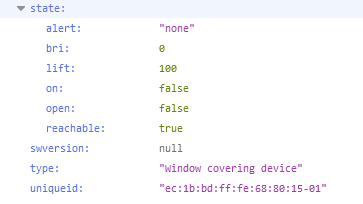
BTW, i got another debug message . please take a look. Maybe those message are generated when i am testing the "open" status.
Please ignore if it's nothing to do the battery.
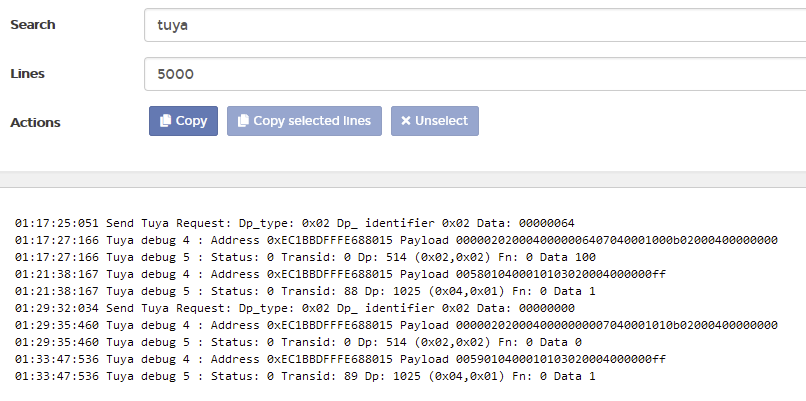
czm97176
on 11 Sep 2020
0x02 0x02 is the command used for "set position", it s the lift value.
0x04 0x01 still no idea , but this one is just a 0/1
I have checked the ebaauwn code again, and I m almost sure it s perfect, the problem can be from the tuya fonction handleTuyaClusterIndication()
Edit:
Found it ( I think) and I have found a battery error too.
BTW, I have put the modification on the tuya branch (There is soon new version, so I have finalized the version), so to test the enw code use
cd deconz-rest-plugin
git checkout tuya
git pull
qmake && make -j2
sudo cp ../libde_rest_plugin.so /usr/share/deCONZ/plugins
There is a probability if you use the command "open" or "on" the device don't send update command for "lift" "bri" but if it s that, you will have the problem on all third applications.
Smanar
on 12 Sep 2020
0x02 0x02 is the command used for "set position", it s the lift value.
0x04 0x01 still no idea , but this one is just a 0/1I have checked the ebaauwn code again, and I m almost sure it s perfect, the problem can be from the tuya fonction handleTuyaClusterIndication()
Edit:
Found it ( I think) and I have found a battery error too.BTW, I have put the modification on the tuya branch (There is soon new version, so I have finalized the version), so to test the enw code use
cd deconz-rest-plugin
git checkout tuya
git pull
qmake && make -j2
sudo cp ../libde_rest_plugin.so /usr/share/deCONZ/plugins
thanks ! i will update and try when i back to home.
There is a probability if you use the command "open" or "on" the device don't send update command for "lift" "bri" but if it s that, you will have the problem on all third applications.
maybe this is becuase homebridge is seting lift instead of using "open/close" command ? why i am saying this becuase i see homebridge is setting "0 to 100 or 100 from the log while i hit open/close in home app from my iphone. if its the case, can we fix the open/close command ?
thank you !
czm97176
on 12 Sep 2020
Here you can see the last modifications https://github.com/Smanar/deconz-rest-plugin/commit/f06ac48eb13e35a55fb32359b89441bf22c9fd98
I have added the field "bri" not used yet
And reverse the "on" accordinf the "open"
Smanar
on 12 Sep 2020
Here you can see the last modifications Smanar@f06ac48
I have added the field "bri" not used yet
And reverse the "on" accordinf the "open"
WOW! i just updated to the latest "tuya". The status is working on both platform now ! Thank you so much !!!
Regarding the error of the battery you mention above. Will it include soon ?
BTW, i found that either i choose open and close command the motor is spinning the same direction.....
is it normal ? As i still don't have the track yet , but i think it should spinning different direction ?
UPDATE:
i try to control the cover by '{"open": true}' and '{"open": false}' . it run well ! . the problem is about how the HA / Home Bridge to command the cover , ( i can't found it from their log ).
HA: i am able to change it from Open to Close , but it never can change from Close to Open
Home Bridge: i am able to change from Open to Close / Close to Open, but the spinning direction are the same !
i think both HA/Home Bridge are not using '{"open": true}' and '{"open": false}' , maybe they use bri / lift to do it
czm97176
on 12 Sep 2020
lol, ok so was working better before ?
For the battery, don't hurry, It will create the sensor, but as I m not sure about the tuya value to take, we can't be sure it will work.
i try to control the cover by '{"open": false}' and '{"open": false}' . it run well !
You mean with'{"open": false}' and '{"open": true}' ?
Have you try using "bri" or "lift" and the API ?
I m checking the code, and It take in priority "liftt" and "bri" so if you are using both, "open" and "on" are not used.
You can't enable logging somewhere ? Will be easier in HA or Homebridge I think.
Smanar
on 12 Sep 2020
lol, ok so was working better before ?
For the battery, don't hurry, It will create the sensor, but as I m not sure about the tuya value to take, we can't be sure it will work.i try to control the cover by '{"open": false}' and '{"open": false}' . it run well !
You mean with'{"open": false}' and '{"open": true}'?
Sorry. Yes
Have you try using "bri" or "lift" and the API ?
Not yet
I m checking the code, and It take in priority "liftt" and "bri" so if you are using both, "open" and "on" are not used.
Oh. So you mean HA/HB are using "lift" and "bri" to control the motor and it also use "lift" and "bri" to determine the status as
well ? so what is the paramter to control the spin direction ? i will try to figurare it out in running "bri and lift command
You can't enable logging somewhere ? Will be easier in HA or Homebridge I think.
No problem, will try to do it tomorrow
Thanks a lot !
czm97176
on 12 Sep 2020
Oh. So you mean HA/HB are using "lift" and "bri" to control the motor and it also use "lift" and "bri" to determine the status as
well ? so what is the paramter to control the spin direction ? i will try to figurare it out in running "bri and lift command
Before the ebaauwn modification, there was some problem because third application can send for exemple "on":true,"bri":0 or "on":true,"bri":100. So the code was messed up.
But now no more problem, "lift":100, "on":true will have same result than "lift":100,"on":false.
And I realy think they don't use "on" and "open" in the same request (or "lift" and "bri").
To make short, it s realy a mystery for me ^^.
For the spin direction, the problem can be a bad "lift"/"bri" traduction, your device support Set Position Command, so you can send mutliple command for the same side, but not during the same duration.
Take care if you haven't a command to reverse device logicaly.
but I am worried because it seemed to work before my last modifications
Smanar
on 12 Sep 2020
Oh. So you mean HA/HB are using "lift" and "bri" to control the motor and it also use "lift" and "bri" to determine the status as
well ? so what is the paramter to control the spin direction ? i will try to figurare it out in running "bri and lift commandBefore the ebaauwn modification, there was some problem because third application can send for exemple "on":true,"bri":0 or "on":true,"bri":100. So the code was messed up.
But now no more problem, "lift":100, "on":true will have same result than "lift":100,"on":false.
And I realy think they don't use "on" and "open" in the same request (or "lift" and "bri").To make short, it s realy a mystery for me ^^.
For the spin direction, the problem can be a bad "lift"/"bri" traduction, your device support Set Position Command, so you can send mutliple command for the same side, but not during the same duration.
Take care if you haven't a command to reverse device logicaly.but I am worried because it seemed to work before my last modifications
i just turn on the deCONZ plugin from Homebridge and Home Assistant. the debug message shows below
From open to close
[9/13/2020, 12:32:35 PM] [deCONZ] Window Cover: homekit target position changed from 100% to 0%,
[9/13/2020, 12:32:35 PM] [deCONZ] deCONZ-GW: gateway request 924: put /lights/3/state {"lift":100},
[9/13/2020, 12:32:35 PM] [deCONZ] deCONZ-GW: gateway request 924: ok,
[9/13/2020, 12:32:40 PM] [deCONZ] Window Cover: state changed event: {"alert":null,"bri":254,"lift":100,"on":true,"open":false,"reachable":true},
[9/13/2020, 12:32:40 PM] [deCONZ] Window Cover: light lift changed from 0 to 100,
[9/13/2020, 12:32:40 PM] [deCONZ] Window Cover: set homekit current position from 100% to 0%
From close to open
[9/13/2020, 12:27:39 PM] [deCONZ] Window Cover: homekit target position changed from 0% to 100%
[9/13/2020, 12:27:39 PM] [deCONZ] deCONZ-GW: gateway request 805: put /lights/3/state {"lift":0},
[9/13/2020, 12:27:39 PM] [deCONZ] deCONZ-GW: gateway request 805: ok,
[9/13/2020, 12:27:44 PM] [deCONZ] Window Cover: state changed event: {"alert":null,"bri":0,"lift":0,"on":false,"open":true,"reachable":true},
[9/13/2020, 12:27:44 PM] [deCONZ] Window Cover: light lift changed from 100 to 0,
[9/13/2020, 12:27:44 PM] [deCONZ] Window Cover: set homekit current position from 0% to 100%
On the other hand, The following message is from Home Assisatant with deCONZ intergration
From open to close
2020-09-13 12:04:35 DEBUG (MainThread) [pydeconz.gateway] Sending "put" "{'on': True, 'bri': 254}" to "192.168.1.25 /lights/3/state",
2020-09-13 12:04:35 DEBUG (MainThread) [pydeconz.gateway] HTTP request response: [{'success': {'/lights/3/state/lift': 100}}],
2020-09-13 12:04:41 DEBUG (MainThread) [pydeconz.websocket] {"e":"changed","id":"3","r":"lights","state":{"alert":null,"bri":254,"lift":100,"on":true,"open":false,"reachable":true},"t":"event","uniqueid":"ec:1b:bd:ff:fe:68:80:15-01"}
From close to open
2020-09-13 12:10:13 DEBUG (MainThread) [pydeconz.gateway] Sending "put" "{'on': False}" to "192.168.1.25 /lights/3/state",
2020-09-13 12:10:13 DEBUG (MainThread) [pydeconz.gateway] HTTP request response: [{'success': {'/lights/3/state/open': True}}],
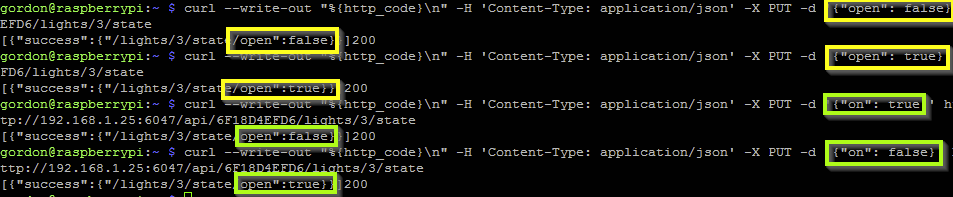
From what i observe from log:
if the command has including
{'bri': X}it will ignore{'on': X }parameter and it's actually setting the{'lift': X}in API behindThe motor behavior differently compare other command with
{'open': True}or{'open': False}. In setting{'open': True} or {'open': False}incurl, motor will spin in different direction, which is i expected. However, By setting{'lift': X}or{'bri': X}or{'on': TRUE_OR_FALSE }motor will spin the same direction.if it's setting
{'lift': X}, there has a changed event but i can't see in{'on': False}if it's setting {'on': False} the response is
[{'success': {'/lights/3/state/open': True}}]. it's look very weird to me , suppose it's[{'success': {'/lights/3/state/open': False}}]?
i am able replicate this in curl
czm97176
on 13 Sep 2020
Nice thx.
1- ok, this is perfect.
2 - if you set the device in a special position, for exemple at lift=50, for lift = 100 and lift = 0 it don't use use different direction ?
3 - It have worked on your first test ?
4 - no, "on" is the "open" reverse ^^
on= true
bri = 255
open = false
lift = 100%
shutter closed
All the log seem good .
Have you done the calibration ?
Homebridge use the better command, only lift = 100 and lift = 0. If this one don't work it mean the calibration is not perfect or there is a problem in the set position command.
HA is using for from open to close, bri = 254 and for close to open on = false.
I have a doubt, the open and lift are not reversed in my code ?
open = false need to have the same direction than lift = 100, I think it s the problem .
Smanar
on 13 Sep 2020
2 - if you set the device in a special position, for exemple at lift=50, for lift = 100 and lift = 0 it don't use use different direction ?
No, it didn't. Only open command has different direction. it's mean only open command is expected to me.
Unfortunately, no platform is using open command to control the cover.
so if the bri or lift is increasing or decreasing . Suppose it should change to different direction?
3 - It have worked on your first test ?
i confirm that the "on" command ( {'on': False} and {'on': true} ) is not working.
it make the motor spinning. but the status is never update
As HA use {'on': False} to close, so it doesn't work too.
czm97176
on 13 Sep 2020
so if the bri or lift is increasing or decreasing . Suppose it should change to different direction?
yes, depending of previous value.
Ok I will take a look for "on", the command work exactly like the "open", it s just reversed, BTW, no sure the code is not case sensitive, it s false and not False.
I haven't reversed the direction for open and lift ? (can explain for HA, it will be same command, bri = 254 will be the same direction than on=false)
Edit:
Ok found a problem on my side, I update the bad value for "on", but it just impact state return, not the command (updated on tya branch)
But it solve
it make the motor spinning. but the status is never update
The code send the same command for on=true than for open=false (and the reverse), so when you are using the command, you need to have same spinning direction.
Smanar
on 13 Sep 2020
Thanks, the on command is fixed, it's now spinning different direction by setting TRUE / FALSE.
However, the other issue is still remain
- HA - Status is not updated only from close to open even the motor is spinning,
i don't know is it because of case sensitive issue, if that is the case,
how can we fix it ?
2020-09-14 03:15:06 DEBUG (MainThread) [pydeconz.gateway] Sending "put" "{'on': False}" to "192.168.1.25 /lights/3/state",
2020-09-14 03:15:06 DEBUG (MainThread) [pydeconz.gateway] HTTP request response: [{'success': {'/lights/3/state/open': True}}]
- Setting the lift from 0 to 100 or 100 to 0 is still spinning the same direction. As you said you haven't reverse the direction,
Can you try to figure out the different between lift and open/on ? it's because now the open and on can make it spin two direction.
FYI. Current motor Spin Direction :
{"on": true} = Clockwise
{"on": false} = Counterclockwise
{"open": true} = Counterclockwise
{"open": false} = Clockwise
{"lift": 0} from 100 = Counterclockwise
{"lift": 100} from 0 = Counterclockwise
czm97176
on 13 Sep 2020
For case sensitive, I think it s ok, because now the only bugged command is "bri"/"lift".
But you have done the calibration ?
when you use lift = 10, then lift = 100, the motor spin 10 * longer ?
[9/13/2020, 12:32:35 PM] [deCONZ] deCONZ-GW: gateway request 924: put /lights/3/state {"lift":100},
[9/13/2020, 12:32:40 PM] [deCONZ] Window Cover: state changed event: {"alert":null,"bri":254,"lift":100,"on":true,"open":false,"reachable":true},
[9/13/2020, 12:27:39 PM] [deCONZ] deCONZ-GW: gateway request 805: put /lights/3/state {"lift":0},
[9/13/2020, 12:27:44 PM] [deCONZ] Window Cover: state changed event: {"alert":null,"bri":0,"lift":0,"on":false,"open":true,"reachable":true},
The first command is the command used by the application, and the second one is the command send by the device itself 5s after.
So for the device all is fine.
If for all "bri"/"lift" value you are using the motor spin for 5s, I think there is a problem with calibration.
Smanar
on 13 Sep 2020
Thanks, Will do once it install.
By setting lift in 5, is that status correct?
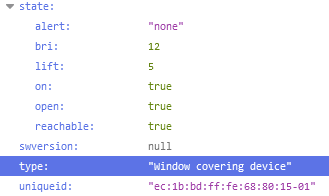
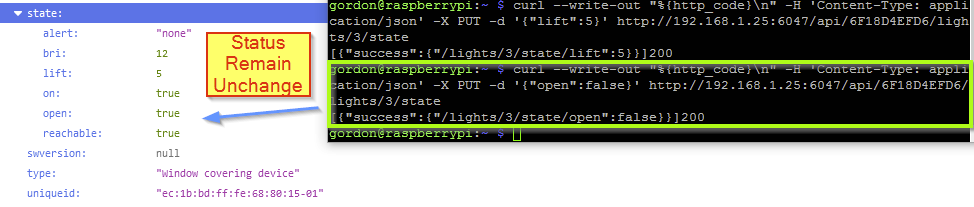
UPDATE: i found the "on" and "open" command are not update the status in the API even the motor is spinning in two direction.
so let me summarize current behavior:
Bri/Lift : Update Status OK, Motor only spin in 1 direction
On/Open: Update Status NOT WORKING. Motor able to spin in 2 direction
czm97176
on 14 Sep 2020
2020-09-13 12:04:35 DEBUG (MainThread) [pydeconz.gateway] Sending "put" "{'on': True, 'bri': 254}" to "192.168.1.25 /lights/3/state",
2020-09-13 12:04:35 DEBUG (MainThread) [pydeconz.gateway] HTTP request response: [{'success': {'/lights/3/state/lift': 100}}],
2020-09-13 12:04:41 DEBUG (MainThread) [pydeconz.websocket] {"e":"changed","id":"3","r":"lights","state":{"alert":null,"bri":254,"lift":100,"on":true,"open":false,"reachable":true},"t":"event","uniqueid":"ec:1b:bd:ff:fe:68:80:15-01"}
2020-09-13 12:10:13 DEBUG (MainThread) [pydeconz.gateway] Sending "put" "{'on': False}" to "192.168.1.25 /lights/3/state",
2020-09-13 12:10:13 DEBUG (MainThread) [pydeconz.gateway] HTTP request response: [{'success': {'/lights/3/state/open': True}}],
If you take a look on those logs, you can see a first log with [{'success': {'/lights/3/state/lift': 100}}], this one is useless, because deconz send it even the device don't react (even the device is offline), but the second one pydeconz.websocket mean it s the device itself that send information. And you have one for "bri" command but not "on".
So I m seing 3 solutions.
- I m not reading the good tuya value, so you never see websocket return when using open/on
- I have reversed the 2 commands, so they don't change.
- The missing calibration, if you haven't set the min and max position, the motor can move, but it can't know if it have reached one position to send information if it was open or close.
Smanar
on 14 Sep 2020
Ok, sorry my bad, I think now it s perfect.
I was reading the bad value for open/close/stop ^^, 0x0104 instead of 0x0401
I have updated the code. Now I think it s the last one.
Smanar
on 14 Sep 2020
Thank you so much. So for the spinning direction... i will try and report once i have calibration.
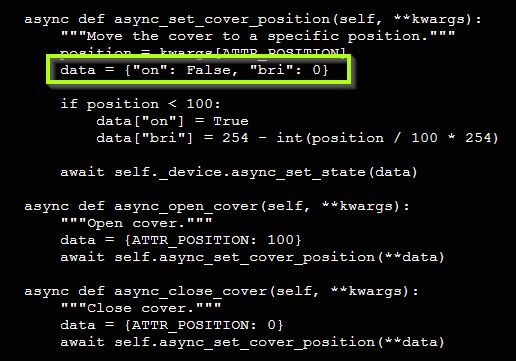
For the status issue on HA.i just fork the HA Core and add bri = 0 command along with on = false and it works quite well, the close and open button are showing correctly
czm97176
on 14 Sep 2020
The next deconz is realy close, so I have linked the issue to the PR.
IDK if the PR will be validated, but can correct after, most of the features are working (except battery)
Smanar
on 14 Sep 2020
Related issues
 flex-0
·
4Comments
flex-0
·
4Comments
 joggs
·
3Comments
joggs
·
3Comments
 wizkidorg
·
3Comments
wizkidorg
·
3Comments
 qm3ster
·
3Comments
qm3ster
·
3Comments
 ReeChip
·
5Comments
ReeChip
·
5Comments