Deconz-rest-plugin: Bosch Smart ZigBee Wireless Motion Detector RFDL-ZB-SH-EU
Hey there. I can not pair my new Bosch Smart ZigBee Wireless Motion Detector RFDL-ZB-SH-EU.
The official manual say I should scan the qr-code with the bosch app.
I am unsure if my sensor is in paring mode. It is slowly blinking orange.
Unsure how much it differs to this:
https://github.com/dresden-elektronik/deconz-rest-plugin/issues/2289
I am not 100% sure how to use the gui of deconz but I am very sure that this is the Bosch Motion sensor:

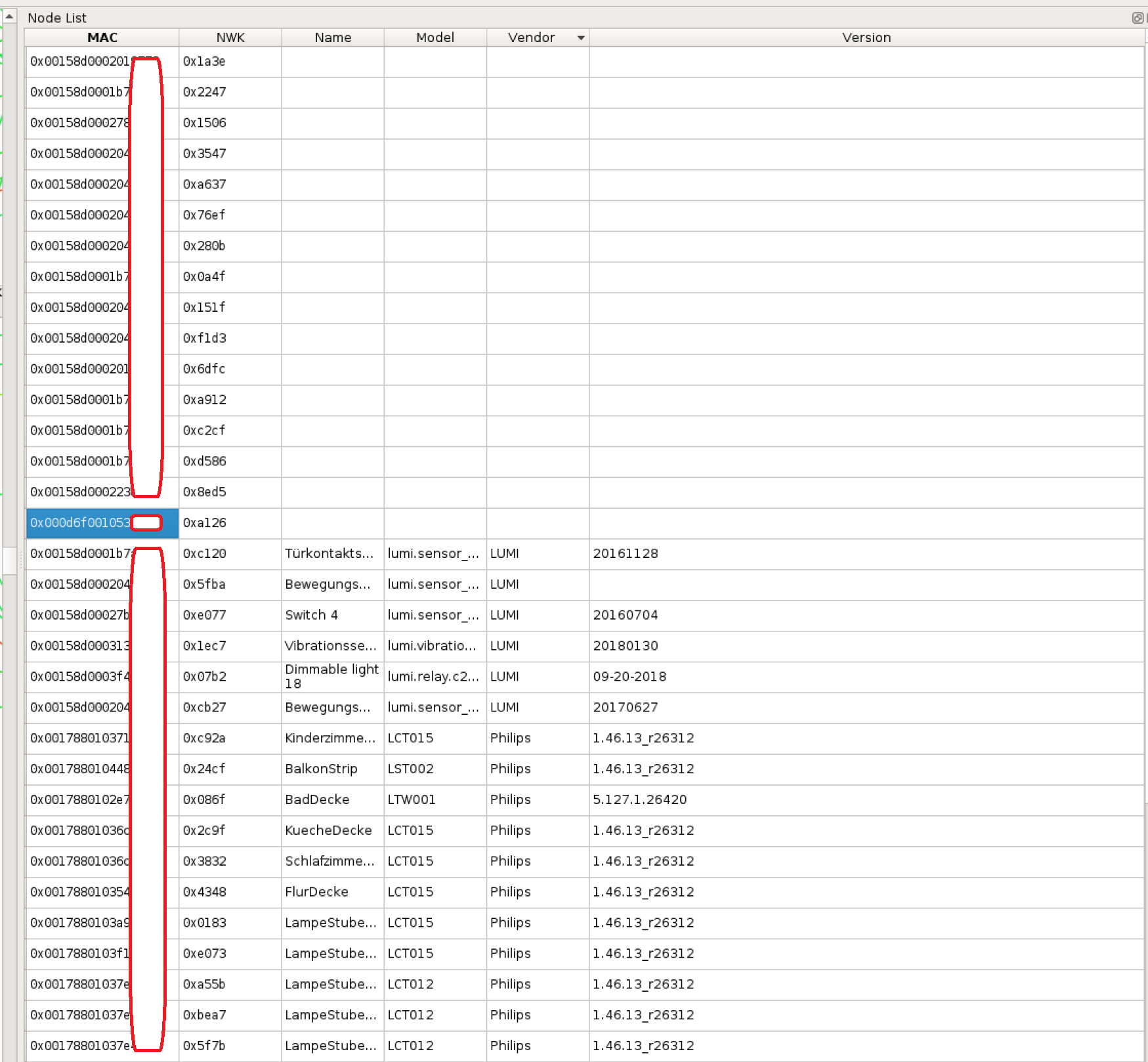
Phoscon is not able to find the sensor within 3 minutes.
 sorryusernameisalreadytaken
All 14 comments
I found out that some firmwares and the app's sourcecode is availible here:
https://www.bosch-smarthome.com/de/de/open-source-software
sorryusernameisalreadytaken
on 17 Jul 2020
Which deconz version are you running?
As from your first screenshot, please re-read the node descriptor and then read the simple descriptor. You need to ensure the device is awakre for that, so either short press any physical button on it or induce a motion trigger. This should finally enable the second black bullet on the right side of the node to show up.
When this is successful, please continue with providing the required screenshots for device as mentioned in the template.
 SwoopX
on 19 Jul 2020
SwoopX
on 19 Jul 2020
Which deconz version are you running?
As from your first screenshot, please re-read the node descriptor and then read the simple descriptor. You need to ensure the device is awakre for that, so either short press any physical button on it or induce a motion trigger. This should finally enable the second black bullet on the right side of the node to show up.
When this is successful, please continue with providing the required screenshots for device as mentioned in the template.
I am running deCONZ version: 2.05.79
On a rpi4 with buster and docker, exactly this docker image:
https://github.com/marthoc/docker-deconz
THX for the answer.
Okay, what I should do is to activate my Bosch motion detector by clicking the Back button and then using vnc as follows

The last time I tried these buttons, I may have triggered the wrong one, but I'm sure the second bubble never appeared.
Sorry but which template did you mean?
sorryusernameisalreadytaken
on 20 Jul 2020
@sorryusernameisalreadytaken This one
 Mimiix
on 20 Jul 2020
Mimiix
on 20 Jul 2020
@sorryusernameisalreadytaken This one
Thanks but unfortunately nothing happens when i click on "read node descriptor" and then on "read simple descriptor(s)".
Meanwhile I either press the small mode switch on the back of the device or move the whole sensor.
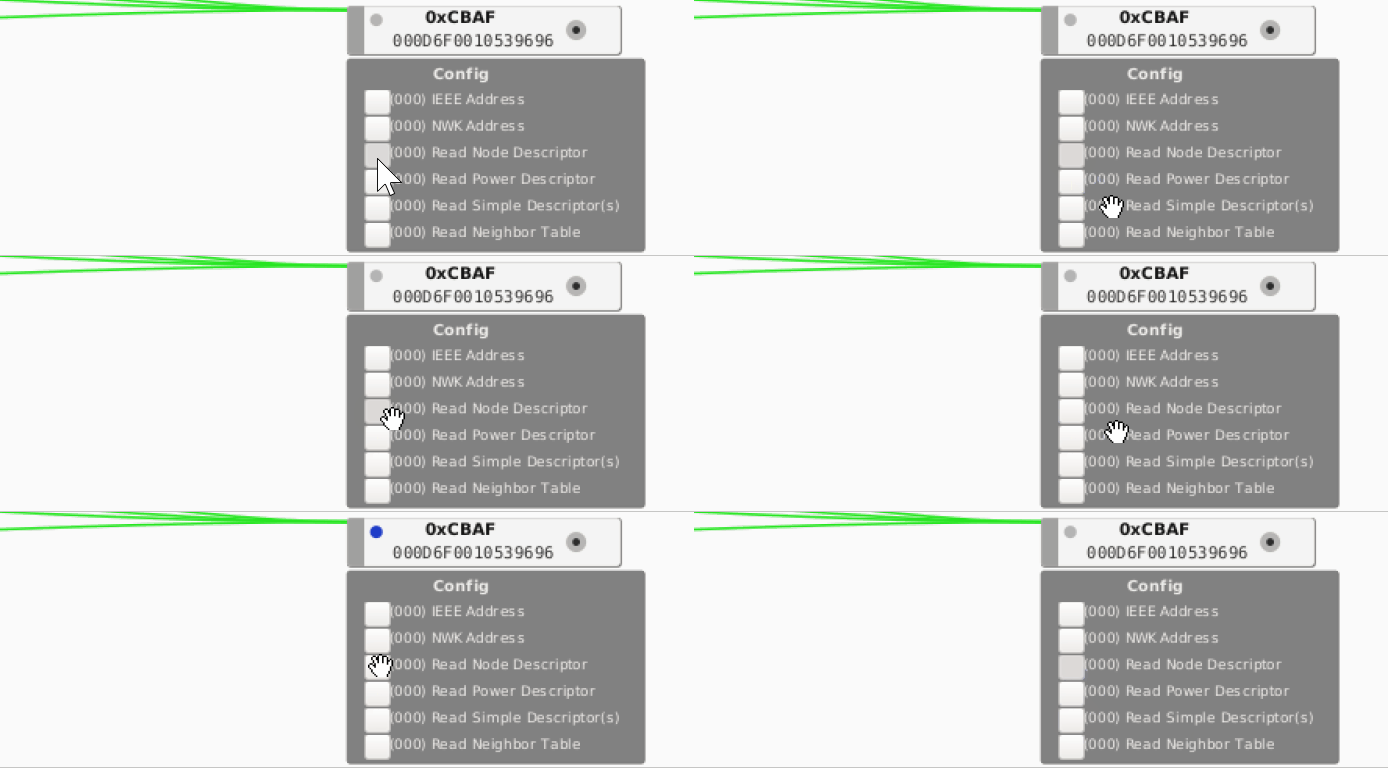
I have looked in the Bosch FAQ and found instructions to reset the sensor. This works too. The LED lights up orange once every 10 seconds now. This should be the pairing mode.
Manual says to leds:


Here is the pdf: https://tt-smarthome.resource.bosch.com/documents/products/manuals/bewegungsmelder/Bewegungsmelder_EN_02_2018_web.pdf
Here the FAQ: https://www.bosch-smarthome.com/uk/en/service/faq
There are 2 qr-codes on the device. One is a large one with 95 characters and the other is covered with a sticker, this contains an 8-digit number. Maybe a PIN?
In addition to the QR code there is also an "Install code". I think this code is requested when you choose the manual installation.
The regular way seems to be to scan a QR code with the Bosch app to connect this sensor. Unfortunately I can't do that, because I don't have the Bosch base.

Here is a video:
https://youtu.be/HgQavI2K-M0?t=61
sorryusernameisalreadytaken
on 20 Jul 2020
I will unfortunately have to send the device back to the dealer in 3 days :( This is not meant to be leverage :D
If anyone has any advice on how to do this so we can provide support for the unit, I'd be delighted.
I can imagine that the source code of the base station could be useful to make any Bosch-Zigbee sensor compatible with deconz. This would of course be ideal for the future.
The source code of the base station can be found here:
https://tt-smarthome.resource.bosch.com/nrt/web/firmware/oss/shc/smart-home-controller-9.17.0-d20200522.zip
But I'm not sure if this is really the complete source code?
Here is another list:
https://www.bosch-smarthome.com/uk/en/open-source-software
sorryusernameisalreadytaken
on 21 Jul 2020
There's probably not too much we can do here without sniffing. Z2m also doesn't list that specific model.
One other thing worth to try could be:
- Enter sensor search in Phoscon
- Reset the device
- After that, wait like 30 seconds.
- In deconz GUI, select "permit join" and set the duration to 0.
I've seen that this helps occasionally.
SwoopX
on 21 Jul 2020
uhh. Ok.
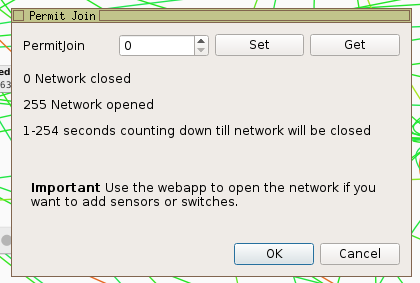
Just hit ok than or should I hit get or set once?
sorryusernameisalreadytaken
on 24 Jul 2020
It's important that you first click on set, and then ok.
SwoopX
on 24 Jul 2020
Nope, no success :(
Sorry that I own no bosch base to get further into it. But @SwoopX thank you a lot for your help.
I guess we need to send the code from the qr-code on the backside.
I send them back to the seller so here is the code:
RB01SG0D83CAE0479C0010000000000000000000000D6F0010539696DLKEB51647C4457D6C6C7006E607BECB390C4D1
And there is a Install-Code written on the backside:
EB51-647C-4457
D6C6-C700-6E60
7BEC-B390-C4D1

sorryusernameisalreadytaken
on 24 Jul 2020
@philbuettner is there a chance to get some help from bosch to get this running?
sorryusernameisalreadytaken
on 27 Jul 2020
@sorryusernameisalreadytaken: The Deconz pairing strategy does not support the pairing strategy for the Bosch Smart Home Motion Detector. I am sorry to tell you this, but there is currently no plan to publish the interfaces or the pairing strategies of the Bosch Smart Home edge devices.
 philbuettner
on 29 Jul 2020
philbuettner
on 29 Jul 2020
I had the exact same problem two months ago. No chance of connecting this device :(
I already tried it with the experimental function "PUT /api/[apikey]/devices/[uniqueid]/installcode". It says: "Adds an Zigbee 3.0 Install Code for a device to let it securely join. Unstable API to experiment: don't use in production!"
But unfortunately that did not work either. Can someone from deCONZ tell me if it will work with this at some point?
Maybe @manup or @ebaauw can help?
 cinemarene
on 3 Aug 2020
cinemarene
on 3 Aug 2020
This issue has been automatically marked as stale because it has not had recent activity. It will be closed if no further activity occurs. Thank you for your contributions.
![stale[bot] picture](https://avatars3.githubusercontent.com/in/1724?v=4&s=40) stale[bot]
on 24 Aug 2020
stale[bot]
on 24 Aug 2020
Related issues
 felixstorm
·
4Comments
felixstorm
·
4Comments
 joggs
·
3Comments
joggs
·
3Comments
 wizkidorg
·
3Comments
wizkidorg
·
3Comments
 qm3ster
·
3Comments
qm3ster
·
3Comments
 Thomas-Vos
·
4Comments
Thomas-Vos
·
4Comments