Deconz-rest-plugin: IKEA Blind Stopped Working - Conbee II not recognized after firmware update
Describe the bug
In the last couple of days, by IKEA blind has stopped responding.
I have factory reset the blind, re-paired it to Deconz, and recharged the battery. Nothing has worked. I then tried updating Deconz to the latest but that hasn't helped either.
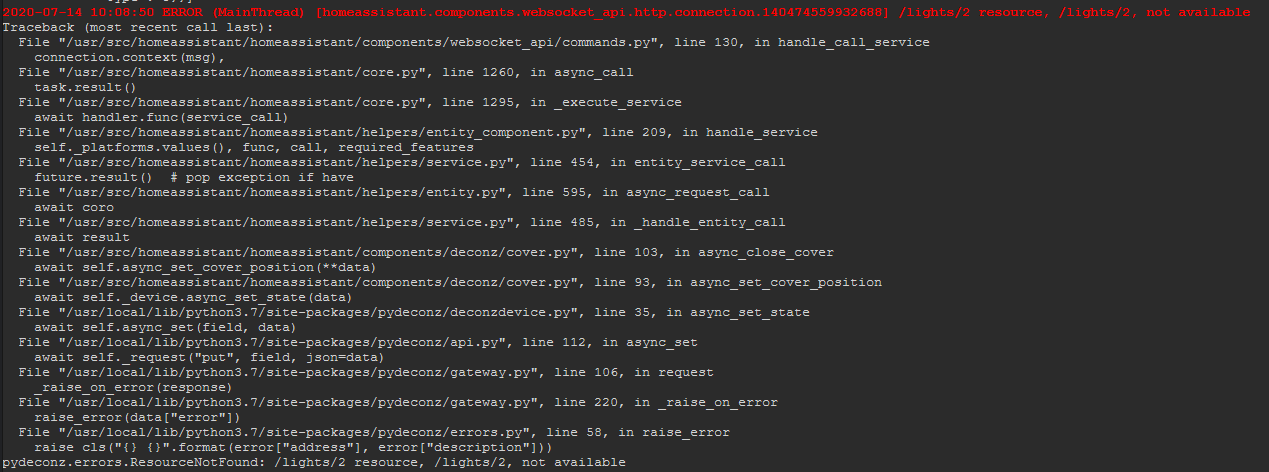
I can see the device in VNC and on the web app. but if I try to adjust it from the web app or from home assistant nothing happens. On Home Assistant I get a "Failed to call service cover/close_cover. /lights/2 resource, /lights/2, not available" and on Node-Red I get an API error.
I'm running my system in Docker. It has been working fine for a while.
If I manually call the "cover" service in HA, I see this error in the logs:

I also see this in the logs constantly.

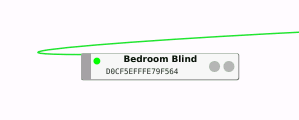
Also, in VNC, the device is sitting with a green flashing indicator. All other devices flash blue.

How can I troubleshoot please? The logs for the add-on don't really show much..
I have tried to update the firmware on the ConbeeII but now Deconz won't connect to it.
Steps to reproduce the behaviour
Blind should open or close.
Screenshots

Environment
- Host system: NAS
- Running method: Home Assistent deCONZ Add-on
- Firmware version:
- deCONZ version: 2.05.78
- Device: ConBee II
- Do you use an USB extension cable: yes
deCONZ Logs
12:53:37:454 wait reconnect 10 seconds
12:53:38:454 wait reconnect 9 seconds
12:53:39:454 wait reconnect 8 seconds
12:53:40:454 failed to reconnect to network try=2
12:53:40:454 wait reconnect 7 seconds
12:53:41:454 wait reconnect 6 seconds
12:53:42:454 wait reconnect 5 seconds
12:53:43:454 wait reconnect 4 seconds
12:53:44:454 wait reconnect 3 seconds
12:53:45:454 failed to reconnect to network try=3
12:53:45:454 wait reconnect 2 seconds
12:53:46:454 wait reconnect 1 seconds
12:53:46:651 COM: /dev/ttyACM0 / serialno: DE2129434
12:53:46:651 COM: --dev: /dev/ttyACM0 (ConBee II)
12:53:47:282 device state timeout ignored in state 2
12:53:48:333 device state timeout ignored in state 2
12:53:49:383 device state timeout ignored in state 2
12:53:50:433 device state timeout ignored in state 2
12:53:50:454 try to reconnect to network try=4
12:53:51:954 device state timeout ignored in state 2
12:53:52:954 device state timeout (handled)
12:53:52:993 device disconnected reason: 1, index: 0
12:53:53:454 wait reconnect 15 seconds
12:53:53:454 void zmMaster::handleStateIdle(zmMaster::MasterEvent) not connected goto OFF state
12:53:53:454 device state timeout ignored in state 1
12:53:54:454 wait reconnect 14 seconds
12:53:55:454 failed to reconnect to network try=5
12:53:55:454 wait reconnect 13 seconds
12:53:56:454 wait reconnect 12 seconds
12:53:57:453 wait reconnect 11 seconds
12:53:58:454 wait reconnect 10 seconds
12:53:59:454 wait reconnect 9 seconds
12:54:00:454 failed to reconnect to network try=6
12:54:00:454 wait reconnect 8 seconds
12:54:01:454 wait reconnect 7 seconds
12:54:02:453 wait reconnect 6 seconds
12:54:03:453 wait reconnect 5 seconds
12:54:04:454 wait reconnect 4 seconds
12:54:05:454 failed to reconnect to network try=7
12:54:05:454 wait reconnect 3 seconds
12:54:06:453 wait reconnect 2 seconds
12:54:07:454 wait reconnect 1 seconds
12:54:07:650 COM: /dev/ttyACM0 / serialno: DE2129434
12:54:07:650 COM: --dev: /dev/ttyACM0 (ConBee II)
12:54:08:229 device state timeout ignored in state 2
12:54:09:279 device state timeout ignored in state 2
12:54:10:331 device state timeout ignored in state 2
12:54:10:454 try to reconnect to network try=8
12:54:11:954 device state timeout ignored in state 2
12:54:12:954 device state timeout ignored in state 2
12:54:13:954 device state timeout (handled)
12:54:13:994 device disconnected reason: 1, index: 0
12:54:14:454 wait reconnect 15 seconds
12:54:14:454 void zmMaster::handleStateIdle(zmMaster::MasterEvent) not connected goto OFF state
12:54:14:454 device state timeout ignored in state 1
12:54:15:453 failed to reconnect to network try=9
12:54:15:453 wait reconnect 14 seconds
Additional context
 Puntoboy
All 37 comments
Seems like the issue I am having now is the same as this one https://github.com/dresden-elektronik/deconz-rest-plugin/issues/2702
Puntoboy
on 14 Jul 2020
The firmware update wouldn't work on Hassio, so I created a Ubuntu VM on my PC and flashed it there. Downgrading the firmware doesn't resolve the issue but does complete successfully. Here are the logs.
`chris@chris-VirtualBox:/usr/share/applications$ deCONZ --dbg-info=2 --dbg-zdp=1 --dbg-zcl=1 --db-aps=1 --dbg-http=1
libpng warning: iCCP: known incorrect sRGB profile
14:01:34:989 HTTP Server listen on address 0.0.0.0, port: 8080, root: /usr/share/deCONZ/webapp/
14:01:34:991 CTRL. 3.22.014:01:35:013 COM: /dev/ttyACM0 : ConBee II (0x1CF1/0x0030)
14:01:35:013 ZCLDB init file /home/chris/.local/share/dresden-elektronik/deCONZ/zcldb.txt
14:01:35:052 parent process bash
14:01:35:052 gw run mode: normal
14:01:35:052 GW sd-card image version file does not exist: /home/chris/.local/share/dresden-elektronik/deCONZ/gw-version
14:01:35:052 DB sqlite version 3.22.0
14:01:35:052 DB PRAGMA page_count: 30
14:01:35:052 DB PRAGMA page_size: 4096
14:01:35:052 DB PRAGMA freelist_count: 0
14:01:35:052 DB file size 122880 bytes, free pages 0
14:01:35:052 DB PRAGMA user_version: 6
14:01:35:052 DB cleanup
14:01:35:052 DB create temporary views
14:01:35:052 DB view [0] created
14:01:35:052 DB view [1] created
14:01:35:052 DB view [2] created
14:01:35:052 DB view [3] created
14:01:35:052 sql exec SELECT apikey,devicetype,createdate,lastusedate,useragent FROM auth
14:01:35:052 sql exec SELECT key FROM config2
14:01:35:052 sql exec SELECT key,value FROM config2
14:01:35:052 Load config UTC: 2020-07-14T11:07:46 from db.
14:01:35:052 Load config announceinterval: 10 from db.
14:01:35:053 Load config announceurl: http://dresden-light.appspot.com/discover from db.
14:01:35:053 Load config apiversion: 2.05.77 from db.
14:01:35:053 Load config bridgeid: 00212EFFFF04F8BA from db.
14:01:35:053 Load config datastoreversion: 60 from db.
14:01:35:053 Load config dhcp: true from db.
14:01:35:053 Load config discovery: true from db.
14:01:35:053 Load config factorynew: false from db.
14:01:35:053 Load config fwneedupdate: false from db.
14:01:35:053 Load config fwupdatestate: idle from db.
14:01:35:053 Load config fwversion: 0x264a0700 from db.
14:01:35:053 Load config gateway: 127.0.0.1 from db.
14:01:35:053 Load config group0: 65520 from db.
14:01:35:053 Load config groupdelay: 50 from db.
14:01:35:053 Load config gwpassword: $1$8282jdkm$moajcS3VXwDsvHFXOaAiQ0 from db.
14:01:35:053 Load config gwusername: delight from db.
14:01:35:053 Load config homebridge: not-managed from db.
14:01:35:053 Load config homebridge-pin: from db.
14:01:35:053 Load config homebridgeupdate: false from db.
14:01:35:053 Load config homebridgeupdateversion: from db.
14:01:35:053 Load config homebridgeversion: from db.
14:01:35:053 Load config ipaddress: 10.0.2.15 from db.
14:01:35:053 Load config linkbutton: false from db.
14:01:35:053 Load config localtime: 2020-07-14T12:07:46 from db.
14:01:35:053 Load config mac: 38:60:77:7c:53:18 from db.
14:01:35:053 Load config modelid: deCONZ from db.
14:01:35:053 Load config name: Phoscon-GW from db.
14:01:35:053 Load config netmask: 255.0.0.0 from db.
14:01:35:053 Load config networkopenduration: 60 from db.
14:01:35:053 Load config otauactive: false from db.
14:01:35:053 Load config otaustate: off from db.
14:01:35:053 Load config panid: 0 from db.
14:01:35:053 Load config permitjoin: 0 from db.
14:01:35:053 Load config permitjoinfull: 0 from db.
14:01:35:053 Load config port: 8080 from db.
14:01:35:053 Load config portalservices: false from db.
14:01:35:053 Load config proxyaddress: none from db.
14:01:35:053 Load config proxyport: 0 from db.
14:01:35:053 Load config rfconnect: 1 from db.
14:01:35:053 Load config rfconnected: false from db.
14:01:35:053 Load config rgbwdisplay: 1 from db.
14:01:35:053 Load config runmode: normal from db.
14:01:35:053 Load config starterkitid: from db.
14:01:35:053 Load config swcommit: 2a26b78f4139a179968e61aa0e0caf3fd1917162 from db.
14:01:35:053 Load config swupdatestate: noupdates from db.
14:01:35:053 Load config swversion: 2.05.77 from db.
14:01:35:053 Load config system: other from db.
14:01:35:053 Load config timeformat: 12h from db.
14:01:35:053 Load config timezone: from db.
14:01:35:053 Load config updatechannel: stable from db.
14:01:35:053 Load config uuid: 208920d3-91e4-44db-9f19-7b2bbb20eceb from db.
14:01:35:053 Load config websocketnotifyall: true from db.
14:01:35:053 Load config websocketport: 443 from db.
14:01:35:053 Load config wifi: not-available from db.
14:01:35:053 Load config wifibackupname: from db.
14:01:35:053 Load config wifibackuppw: from db.
14:01:35:053 Load config wifibackuppwenc: from db.
14:01:35:053 Load config wifichannel: 1 from db.
14:01:35:053 Load config wificlientname: from db.
14:01:35:053 Load config wificlientpw: from db.
14:01:35:053 Load config wifiip: 192.168.8.1 from db.
14:01:35:053 Load config wifilastupdated: 0 from db.
14:01:35:053 Load config wifimgmt: 0 from db.
14:01:35:053 Load config wifiname: from db.
14:01:35:053 Load config wifipageactive: false from db.
14:01:35:053 Load config wifipw: from db.
14:01:35:053 Load config wifipwenc: from db.
14:01:35:053 Load config wifitype: accesspoint from db.
14:01:35:053 Load config workingname: from db.
14:01:35:053 Load config workingpw: from db.
14:01:35:053 Load config workingpwenc: from db.
14:01:35:053 Load config workingtype: from db.
14:01:35:053 Load config zclvaluemaxage: 0 from db.
14:01:35:053 Load config zigbeechannel: 15 from db.
14:01:35:053 sql exec SELECT key,value FROM userparameter
14:01:35:053 sql exec SELECT * FROM groups
14:01:35:053 Sqlite group: gid = 0xFFF0
14:01:35:053 Sqlite group: name = All
14:01:35:053 Sqlite group: state = normal
14:01:35:053 Sqlite group: hidden = false
14:01:35:053 Sqlite group: type = LightGroup
14:01:35:053 Sqlite group: class = Other
14:01:35:053 DB found group All 0xFFF0
14:01:35:053 ~Resource() /groups 0x7ffed5d95db0
14:01:35:053 sql exec SELECT * FROM resourcelinks
14:01:35:053 sql exec SELECT * FROM scenes
14:01:35:053 sql exec SELECT * FROM rules
14:01:35:053 sql exec SELECT * FROM schedules
14:01:35:053 sql exec SELECT * FROM sensors
14:01:35:053 Sqlite sensors: sid = 1
14:01:35:053 Sqlite sensors: name = Daylight
14:01:35:053 Sqlite sensors: type = Daylight
14:01:35:053 Sqlite sensors: modelid = PHDL00
14:01:35:053 Sqlite sensors: manufacturername = Philips
14:01:35:053 Sqlite sensors: uniqueid = 00:21:2e:ff:ff:04:f8:ba-01
14:01:35:053 Sqlite sensors: swversion = 1.0
14:01:35:053 Sqlite sensors: state = {"dark":false,"daylight":true,"lastupdated":"2020-07-14T13:01:26.246","status":170,"sunrise":"2020-07-14T03:59:07","sunset":"2020-07-14T20:20:39"}
14:01:35:053 Sqlite sensors: config = {"configured":true,"lat":"52.396322","long":"-0.730249","on":true,"sunriseoffset":30,"sunsetoffset":-30}
14:01:35:053 Sqlite sensors: deletedState = normal
14:01:35:053 Sqlite sensors: mode = 1
14:01:35:053 DB found sensor Daylight 1
14:01:35:053 ~Resource() /sensors 0x7ffed5d95dc8
14:01:35:053 sql exec SELECT * FROM gateways
14:01:35:053 don't close database yet, keep open for 900 seconds
14:01:35:053 Daylight now: solarNoon, status: 170, daylight: 1, dark: 0
14:01:35:053 started websocket server at port 443
14:01:35:054
14:01:35:054
14:01:35:054
14:01:35:054
14:01:35:054
14:01:35:054
14:01:35:054
14:01:35:054
14:01:35:054
14:01:35:054
14:01:35:054
14:01:35:054
14:01:35:054
14:01:35:054
14:01:35:054
14:01:35:054
14:01:35:054
14:01:35:054
14:01:35:054
14:01:35:054
14:01:35:054
14:01:35:054
14:01:35:054
14:01:35:054
14:01:35:054
14:01:35:054
14:01:35:054
14:01:35:054
14:01:35:054
14:01:35:054
14:01:35:054
14:01:35:054
14:01:35:054
14:01:35:054
14:01:35:054
14:01:35:054
14:01:35:054
14:01:35:054
14:01:35:054
14:01:35:054
14:01:35:054
14:01:35:054
14:01:35:054
14:01:35:054
14:01:35:054
14:01:35:054
14:01:35:054
14:01:35:054
14:01:35:054
14:01:35:054
14:01:35:054
14:01:35:054
14:01:35:054
14:01:35:054
14:01:35:054
14:01:35:054
14:01:35:054
14:01:35:054
14:01:35:054
14:01:35:054
14:01:35:054 found node plugin: libde_rest_plugin.so - REST API Plugin
14:01:35:055 found node plugin: libde_signal_plugin.so - Signal Monitor Plugin
14:01:35:057 found node plugin: libstd_otau_plugin.so - STD OTAU Plugin
14:01:35:064 COM: /dev/ttyACM0 : ConBee II (0x1CF1/0x0030)
14:01:35:084 discard sensor state push for 1: state/dark (already pushed)
14:01:35:086 discard sensor state push for 1: state/status (already pushed)
14:01:35:087 discard sensor state push for 1: state/lastupdated (already pushed)
14:01:37:154 NOTIFY * HTTP/1.1
HOST: 239.255.255.250:1900
CACHE-CONTROL: max-age=100
LOCATION: http://10.0.2.15:8080/description.xml
SERVER: Linux/3.14.0 UPnP/1.0 IpBridge/1.26.0
GWID.phoscon.de: 00212EFFFF04F8BA
hue-bridgeid: 00212EFFFF04F8BA
NTS: ssdp:alive
NT: upnp:rootdevice
USN: uuid:208920d3-91e4-44db-9f19-7b2bbb20eceb::upnp:rootdevice
14:01:37:154 NOTIFY * HTTP/1.1
HOST: 239.255.255.250:1900
CACHE-CONTROL: max-age=100
LOCATION: http://10.0.2.15:8080/description.xml
SERVER: Linux/3.14.0 UPnP/1.0 IpBridge/1.26.0
GWID.phoscon.de: 00212EFFFF04F8BA
hue-bridgeid: 00212EFFFF04F8BA
NTS: ssdp:alive
NT: uuid:208920d3-91e4-44db-9f19-7b2bbb20eceb
USN: uuid:208920d3-91e4-44db-9f19-7b2bbb20eceb
14:01:37:155 NOTIFY * HTTP/1.1
HOST: 239.255.255.250:1900
CACHE-CONTROL: max-age=100
LOCATION: http://10.0.2.15:8080/description.xml
SERVER: Linux/3.14.0 UPnP/1.0 IpBridge/1.26.0
GWID.phoscon.de: 00212EFFFF04F8BA
hue-bridgeid: 00212EFFFF04F8BA
NTS: ssdp:alive
NT: urn:schemas-upnp-org:device:basic:1
USN: uuid:208920d3-91e4-44db-9f19-7b2bbb20eceb::urn:schemas-upnp-org:device:basic:1
14:01:39:815 COM: /dev/ttyACM0 : ConBee II (0x1CF1/0x0030)
14:01:39:815 GW firmware update select USB device
14:01:40:529 Announced to internet http://dresden-light.appspot.com/discover
14:01:44:798 Daylight now: solarNoon, status: 170, daylight: 1, dark: 0
14:01:44:805 COM: /dev/ttyACM0 : ConBee II (0x1CF1/0x0030)
14:01:44:806 auto connect com /dev/ttyACM0
14:01:44:838 Serial com connected
14:01:45:317 device state timeout ignored in state 2
14:01:46:288 device state timeout ignored in state 2
14:01:47:305 device state timeout ignored in state 2
14:01:48:288 device state timeout ignored in state 2
14:01:49:289 device state timeout ignored in state 2
14:01:49:796 COM: /dev/ttyACM0 : ConBee II (0x1CF1/0x0030)
14:01:50:289 device state timeout (handled)
14:01:50:344 Serial com disconnected, reason: 1
14:01:50:344 device disconnected reason: 1, index: 0
14:01:50:788 wait reconnect 15 seconds
14:01:50:788 void zmMaster::handleStateIdle(zmMaster::MasterEvent) not connected goto OFF state
14:01:50:788 device state timeout ignored in state 1
14:01:51:789 wait reconnect 14 seconds
14:01:52:791 wait reconnect 13 seconds
14:01:53:796 wait reconnect 12 seconds
14:01:54:798 Daylight now: solarNoon, status: 170, daylight: 1, dark: 0
14:01:54:798 wait reconnect 11 seconds
14:01:55:288 networkState: CC_ReconnectNetwork
14:01:55:288 start reconnect to network
14:01:55:791 wait reconnect 10 seconds
14:01:56:793 wait reconnect 9 seconds
14:01:56:793 NOTIFY * HTTP/1.1
HOST: 239.255.255.250:1900
CACHE-CONTROL: max-age=100
LOCATION: http://10.0.2.15:8080/description.xml
SERVER: Linux/3.14.0 UPnP/1.0 IpBridge/1.26.0
GWID.phoscon.de: 00212EFFFF04F8BA
hue-bridgeid: 00212EFFFF04F8BA
NTS: ssdp:alive
NT: upnp:rootdevice
USN: uuid:208920d3-91e4-44db-9f19-7b2bbb20eceb::upnp:rootdevice
14:01:56:793 NOTIFY * HTTP/1.1
HOST: 239.255.255.250:1900
CACHE-CONTROL: max-age=100
LOCATION: http://10.0.2.15:8080/description.xml
SERVER: Linux/3.14.0 UPnP/1.0 IpBridge/1.26.0
GWID.phoscon.de: 00212EFFFF04F8BA
hue-bridgeid: 00212EFFFF04F8BA
NTS: ssdp:alive
NT: uuid:208920d3-91e4-44db-9f19-7b2bbb20eceb
USN: uuid:208920d3-91e4-44db-9f19-7b2bbb20eceb
14:01:56:793 NOTIFY * HTTP/1.1
HOST: 239.255.255.250:1900
CACHE-CONTROL: max-age=100
LOCATION: http://10.0.2.15:8080/description.xml
SERVER: Linux/3.14.0 UPnP/1.0 IpBridge/1.26.0
GWID.phoscon.de: 00212EFFFF04F8BA
hue-bridgeid: 00212EFFFF04F8BA
NTS: ssdp:alive
NT: urn:schemas-upnp-org:device:basic:1
USN: uuid:208920d3-91e4-44db-9f19-7b2bbb20eceb::urn:schemas-upnp-org:device:basic:1
14:01:57:792 wait reconnect 8 seconds
14:01:58:788 wait reconnect 7 seconds
14:01:59:789 wait reconnect 6 seconds
14:01:59:796 COM: /dev/ttyACM0 : ConBee II (0x1CF1/0x0030)
14:01:59:796 GW firmware update select USB device
14:02:00:539 failed to reconnect to network try=1
14:02:00:788 wait reconnect 5 seconds
14:02:01:789 wait reconnect 4 seconds
14:02:02:788 wait reconnect 3 seconds
14:02:03:789 wait reconnect 2 seconds
14:02:04:791 Daylight now: solarNoon, status: 170, daylight: 1, dark: 0
14:02:04:791 wait reconnect 1 seconds
14:02:04:798 COM: /dev/ttyACM0 : ConBee II (0x1CF1/0x0030)
14:02:04:798 auto connect com /dev/ttyACM0
14:02:04:825 Serial com connected
14:02:05:302 device state timeout ignored in state 2
14:02:05:789 try to reconnect to network try=2
14:02:07:288 device state timeout ignored in state 2
14:02:08:289 device state timeout ignored in state 2
14:02:09:296 device state timeout ignored in state 2
14:02:09:813 COM: /dev/ttyACM0 : ConBee II (0x1CF1/0x0030)
14:02:10:346 device state timeout ignored in state 2
14:02:10:793 try to reconnect to network try=3
14:02:12:290 device state timeout (handled)
14:02:12:290 MASTER kill cmd 0x08 (ERROR)
14:02:12:290 MASTER kill cmd 0x08 (ERROR)
14:02:12:343 Serial com disconnected, reason: 1
14:02:12:343 device disconnected reason: 1, index: 0`
Puntoboy
on 14 Jul 2020
Have you used version .78? I see .77 in the log...
 SwoopX
on 14 Jul 2020
SwoopX
on 14 Jul 2020
Have you used version .78? I see .77 in the log...
I downloaded it this morning and that was the latest... There's no update for the hassio addon.
Puntoboy
on 14 Jul 2020
@Puntoboy What version is your HA addon :)?
 Mimiix
on 14 Jul 2020
Mimiix
on 14 Jul 2020
@Puntoboy What version is your HA addon :)?
5.3.6. It was 5.3.5 (I think) but as part of my troubleshooting for the IKEA blind I upgraded. Which has only made things worse.
Puntoboy
on 14 Jul 2020
Okay.
Can you please provide me:
- The output of : https://www.home-assistant.io/integrations/deconz/#debugging-integration that logging
- A screenshot of your configuration page of the HA addon.
Mimiix
on 14 Jul 2020
Okay.
Can you please provide me:
* The output of : https://www.home-assistant.io/integrations/deconz/#debugging-integration that logging

* A screenshot of your configuration page of the HA addon.
At the moment I have uninstalled the deconz addon for Hassio as part of the troubleshooting I have been trying.
I have Deconz installed on a Windows PC and a Ubuntu VM, I used the Ubunutu VM as the firmware upgrade wouldn't complete on hassio. Neither the UB VM or Windows PC can connect to the ConBeeII since upgrading the firmware.
Puntoboy
on 14 Jul 2020
https://github.com/dresden-elektronik/deconz-rest-plugin/wiki/Update-deCONZ-manually
Did you follow that guide and read trough it properly?
Mimiix
on 14 Jul 2020
Yes, the update does complete successfully, so it says, but the Deconz application will no longer connect.
Puntoboy
on 14 Jul 2020
The page says:
Warning: It is strongly advised to use a native installation of one of the update methods. Virtual Machines _may_ work but are not supported, using a VM while trying to update firmware is on your own risk.
While reading that page, i noticed that there wasn't any mentioning about not able to update in HA . i've added that.
I suggest you to use the deCONZ windows version to update the firmware.
However, do you have any logs? Where does it not connect?
Mimiix
on 14 Jul 2020
I posted the logs above. The Deconz app wouldn't allow me to connect. https://github.com/dresden-elektronik/deconz-rest-plugin/issues/3044#issuecomment-658166879
I have now updated via Windows, I had tried that first but it wouldn't work either. Hence why I tried the VM.
Now I'm trying to get the Hassio install working again so I can find out why the IKEA blind stopped working.
Puntoboy
on 14 Jul 2020
OK so I have the Hassio addon installed, I can VNC to Deconz and I can see the devices. Great :)

However, when I got to the Phoscon webapp I'm missing all the lights (understandable) and when I go to Gateway it's blank...

Tried rebooting everything on my HA but still not appearing.
Puntoboy
on 14 Jul 2020
Have you tried with another browser ? or with deleting cache ?
On my side I have this bug when I use the wrong ip (the deconz on windows without conbee, instead of using the Pi ip)
 Smanar
on 14 Jul 2020
Smanar
on 14 Jul 2020
Have you tried with another browser ? or with deleting cache ?
On my side I have this bug when I use the wrong ip (the deconz on windows without conbee, instead of using the Pi ip)
I was just trying that when you replied :) Seems HA cached the page. I'm back in now so I can restore my backup.
Puntoboy
on 14 Jul 2020
I can VNC to Deconz and I can see the devices. Great :)
Looks like the REST API resources haven't been created (the nodes still show the NWK address instead of the resource name). Also note the descriptors for the two end devices in the middle haven't been read. Looks like you lost the deCONZ database. Best restore that from backup. Alternatively, you'll need to re-pair each device. Best search for devices in Phoscon and read the _Basic_ cluster attributes in the GUI. When the name of the node changes, the resource has been created and Phoson should show the device. Make sure to wake the end devices when reading the _Basic_ cluster and read the _Simple Descriptor(s)_ from the left drop-down menu to see the clusters.
 ebaauw
on 14 Jul 2020
ebaauw
on 14 Jul 2020
Thanks. I only understood some of that, but restoring the backup is exactly what I was just doing. I can see all the names in GUI now and I can see switches and sensors in Phoscon, but not lights... it's empty.


Puntoboy
on 14 Jul 2020


The greyed out devices are expected, they died a while ago and I haven't got round to fixing them.
Puntoboy
on 14 Jul 2020
Best search for devices in Phoscon and read the Basic cluster attributes in the GUI. When the name of the node changes, the resource has been created and Phoson should show the device. Make sure to wake the end devices when reading the Basic cluster and read the Simple Descriptor(s) from the left drop-down menu to see the clusters.
I think it can solve your "invisible" light in phoscon.
For grayed Xiaomi device, I think you can re-include them ^^, for them I think it s dead.
Smanar
on 14 Jul 2020
The lights came back, I didn't change anything :)

Puntoboy
on 14 Jul 2020
joke application ^^
Smanar
on 14 Jul 2020
OK so things aren't stable. When I try to re-pair a switch (that's greyed out) Deconz crashes. The VNC server closes and I can't control any devices.
Log file from docker.
Puntoboy
on 14 Jul 2020
Could you provide this in a txt file? This reads really bad.
I've asked you before: Can you show me a screenshot of your configuration page of the addon?
You need to place the full serial string there, not just the dev/tty*
18:01:34:108 COM: --dev: /dev/ttyACM0 (ConBee II)
Change that to the ID shown in supervisor > System>Hardware.
As the documentation of the addon shows, it should look like: /dev/serial/by-id/usb-dresden_elektronik_ingenieurtechnik_GmbH_ConBee_II_XXXXXXXX-if00"
Mimiix
on 14 Jul 2020
Edited my last comment a bit.
Mimiix
on 14 Jul 2020
Could you provide this in a txt file? This reads really bad.
I've asked you before: Can you show me a screenshot of your configuration page of the addon?
You need to place the full serial string there, not just the dev/tty*
I could, but I'll have to convert the file. That's how it was outputted from Docker.
The documents say I can use dev/tty*

Here's the config page.

Puntoboy
on 14 Jul 2020
Bare in mine my system was working perfectly fine, until the blind stopped working a couple of days ago.
I used to use the full string but it would display my device as a RaspBee not ConBeeII.
Puntoboy
on 14 Jul 2020
OK changing it to the full device string seems to have fixed the crashing. Weird.
Puntoboy
on 14 Jul 2020
Neither of this is a issue caused by the deCONZ application. We've got multiple reports and seen that the full string worked. This is something that needs to be fixed in the addon, which is not maintained by us.
I could, but I'll have to convert the file. That's how it was outputted from Docker.
Docker outputting in a xlsx?
I used to use the full string but it would display my device as a RaspBee not ConBeeII.
This also is a HA Addon issue.
Mimiix
on 14 Jul 2020
That's fine, It was the addon people that sent me here without fully understanding my issue.
Everything seems to working now. Even the blind has started working, even though nothing had changed to stop it from working in the first place.
Puntoboy
on 14 Jul 2020
@Puntoboy Where did they send you here?
Can you provide me a url/name?
Mimiix
on 14 Jul 2020
I posted in their github first and they closed it and pointed me here.
Tbh I don't know what the root cause was. In troubleshooting the blind not working I made things worse so additional steps where needed to recover. It's all working now :) thank you.
Puntoboy
on 14 Jul 2020
Can you provide me the URL of that issue :)?
Mimiix
on 14 Jul 2020
I opened two :)
https://github.com/home-assistant/hassio-addons/issues/1460#event-3543256625
https://github.com/home-assistant/hassio-addons/issues/1461#issuecomment-658134820
Puntoboy
on 14 Jul 2020
Found it already:)
Closed#3044
Mimiix
on 14 Jul 2020
Docker outputting in a xlsx?
Yes. Well a CSV that I had to change to XLSX as Github wouldn't allow me to upload CSV.

Puntoboy
on 14 Jul 2020
This is a Synology VM...
You couldve just renamed to .txt.
Mimiix
on 14 Jul 2020
This is a Synology VM...
You couldve just renamed to .txt.
It's a Docker VM on Synology.
I could have, that's what I said about converting it. It wasn't needed anyway.
Puntoboy
on 14 Jul 2020
Related issues
 lynix
·
4Comments
lynix
·
4Comments
 stevenwfoley
·
3Comments
stevenwfoley
·
3Comments
 joggs
·
3Comments
joggs
·
3Comments
 wizkidorg
·
3Comments
wizkidorg
·
3Comments
 horchi
·
5Comments
horchi
·
5Comments