Deconz-rest-plugin: Issues with unreachable devices
Hi everyone,
i'm having an issue with unreachable devices in a Docker (marthoc) + ConBeeII setup with HUE bulbs, Osram lights and Xiaomi Sensors. Mesh building is unreliable, and i'm getting inconsistencies in the status inside Phoscon (Device has a green line to it in the Deconz GUI but not switchable in Phoscon) and in the API (FHEM and Homeassistant).
My setup is the following:
ConbeeII on a Raspberry Pi 4 (Ubuntu) with Deconz running on marthoc/deconz Docker container. the version as reported in Phoscon is 2.05.78 / 22.5.2020 (tried to downgrade to .76 and .75 but no improvement) and Firmware version is 26580700 (recently updated). ConBee is plugged in a USB2 Port with a 1m USB extension.
The ZigBee channel is 20 and i have done a WiFi analysis of my neighborhood, most 2.4GHz WiFis reside on channel 1 or 11.
The issues began recently: with one HUE bulb on the first floor (as a router) with five Xiaomi temperature, door and motion sensors attached. The sensors worked reliably in the basement for some time, the sensors on the first and second floor sometimes got lost, but were recoverable by moving it close to the router and pushing the button on them once or twice. Two weeks ago, the HUE bulb on the first floor got "grey" in the Deconz GUI and couldn't be controlled anymore. At that time also, the first and second floor sensors stopped working.
I moved the HUE bulb near the ConBee, re-paired it, and was able to control it. Left it there for some days for testing, and it was fine.
Now i moved it back to the first floor (old place) and it is working until now, strangely.
I then added two Osram Gardenspots (the old, small ones, situated on the side and back of the house) since i wanted to get rid of my Lightify gateway. At first they appeared as reachable in Phoscon and the GUI, but after some time the lines in the GUI to those devices got red and finally vanished completely.
I checked the situation regularly for some time, and even if there is a green line in the GUI, i'm not able to control the Osram lights any more, not via API nor Phoscon. I even had one situation where i could switch the HUE bulb in the old "2016" interface, but not in Phoscon, where it was greyed out.
Furthermore, the Xiaomi Sensors are acting weird. One door and one motion sensor, even if not connected in the GUI, is sending updates regularly.
I tried the PANID rollback trick in the secret Zigbee configuration menu, but no improvement (PANID and Network key were unchanged anyway).
Now comes the really strange part: Currently i'm not able to control the Osram devices, even if they are connected with a green line in the GUI! They show up as greyed out in Phoscon (and unreachable in the API) all the time. Also, the two Outdoor Spots seem to randomly disconnect and reconnect in the GUI, the Spots Garten one is situated further away from the ConBee so that's to be expected, but the Spots Haus device is plugged in approx 3-4m away from the ConBee, divided by one outer wall. This is the current situation in the GUI:

and in Phoscon
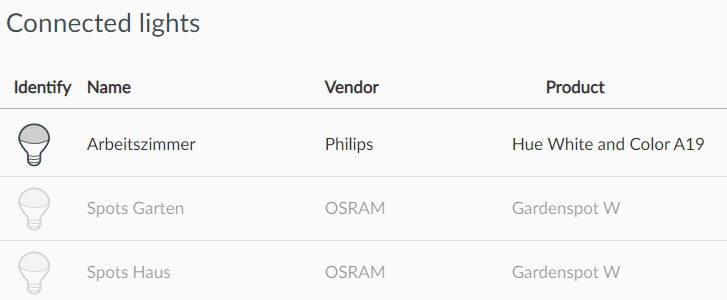
I'm currently afraid to add more devices to ConBee because of this adventure. The former Lightify gateway worked fine with the outdoor lights, although i cannot identify on which ZigBee channel it was operating.
I still have one Philips Hue bridge (operating on channel 11) which is working fine for 10-15 lights inside the house. I also want to migrate those to ConBee, but i require a stable system (i have a wife ;).
I'm happy to provide some targeted logging if required.
Thanks for any help in advance!
Torben
 tmakowka
All 33 comments
@tmakowka Are you able to add any logging on this? Refer to this page for info on that. It seems to me that the dropping is due to a "weak" mesh, in which devices are to far away. Logging would be helpful for that.
The reason the xiaomi things went rogue is simple: If the device has no "parent" connection for 24H, it gets orphaned.
 Mimiix
on 8 Jul 2020
Mimiix
on 8 Jul 2020
@Mimiix Thanks for the reply, this is the docker logging output as of today:
deconz.log
Weak mashes means all devices are too far away in order to establish a stable connection? Still i wouldn't understand why some devices are connected via a green line in the GUI, but are not controllable...
Would adding additional devices improve the quality of the mesh? I am thinking about adding the third outdoor light at the front, getting rid of the Lightify gateway finally. Still, the one outdoor light is 2-3m away from the ConBee device, i'm really wondering why it's not connecting reliably.
tmakowka
on 8 Jul 2020
Yes, that is what i mean. The green lines are mostly indication. Routers would significantly add coverage. My initial guess was right. I found some error codes in your log.
On line 849:
09:53:20:621 0x841826000001BBF3 error APSDE-DATA.confirm: 0xD0 on task
And 852:
09:53:33:064 0x841826000001BBF3 error APSDE-DATA.confirm: 0xA7 on task
and 1009:
10:02:24:927 0x841826000001BBF3 error APSDE-DATA.confirm: 0xE9 on task
Error 0xD0
Error 0xA7
Error 0xE9
That MacID is your "Spots Haus"
Once, theres a second device popping up showing the 0xE9:
12:31:20:634 0x00178801105DC596 error APSDE-DATA.confirm: 0xE9 on task
Which corresponds to arbeitszimmer.
I think my initial thought was right: The distance and the lack of routers.
Mimiix
on 8 Jul 2020
Thanks for the insights on this. I will then keep all thumbs pressed and add the third outdoor light. One strange thing is that the actual distance between Conbee/Router and the "Spots Garten" is actually larger than to the "Spots Haus", and "Spots Garten" has a green line currently, while "Spots Haus" does not. And i cannot control any of those two since they are greyed out :(
Is there anything i can do to re-initialize or "ping" the unreachable devices? Or force a reconnect?
If i add the third outdoor device, in the worst case i won't be able to control any of them at the moment :(
On another note, if i transfer all lights from my Philips Bridge to ConBee, i'm not able to use the Philips app on my mobile phone any more, right?
tmakowka
on 8 Jul 2020
@tmakowka Don't pin much on those lines. They are glitchy :)
The thing is, some items may connect to Spots Garten, and then Spots haus is connected there too. If stuff gets instable, it might lose connection. Long story short: There's not many roads to Rome so it say.
If you move the lights from the philips bridge, the app won't work anymore. However, it should be compatible but it is not working atm.
There's another nice app though: https://www.hueessentials.com/
Mimiix
on 8 Jul 2020
@Mimiix Thanks a lot for your support so far! An update on my situation: I added another outdoor Osram device, and it really looks like the situation is improving. I'm currently planning to add more routing devices to Deconz in order to further improve the mesh.
I know HUE Essentials, just need to find an alternative for iOS since my wife is an Apple fan ;)
How are updates for HUE devices handled via Deconz?
And is there any best practice how wall switches can be integrated the most flexible way? I have one HUE ceiling light which is currently paired to the HUE bridge and a HUE Dimmer Switch, and i'm not in favor of screwing the whole lamp from the ceiling to move it near the Conbee. Any advice how i could handle this migration?
And i understand that it's possible to add HUE or Ikea switches to Conbee and use them in rules to automate things. Are these rules configurable via HUE Essentials also?
tmakowka
on 10 Jul 2020
@tmakowka Great! :)
Hue devices can be updated trough deCONZ. However: Those files are not open source thus hard to get. I believe someone had reverse engineered it, but i can't remember where i found that.
For your advice related questions i love to forward you to our Discord (url in the readme) :)
Mimiix
on 10 Jul 2020
You have some HUE firmware here > https://github.com/dresden-elektronik/deconz-rest-plugin/wiki/OTA-Image-Types---Firmware-versions
And is there any best practice how wall switches can be integrated the most flexible way? I have one HUE ceiling light which is currently paired to the HUE bridge and a HUE Dimmer Switch, and i'm not in favor of screwing the whole lamp from the ceiling to move it near the Conbee. Any advice how i could handle this migration?
For Hue you can use the philips remote, or the conbee touchlink feature (not working on all devices) And better include device at their final place, you don't need to put them close to the conbee (only usefull when using touchlink)
 Smanar
on 10 Jul 2020
Smanar
on 10 Jul 2020
For Hue you can use the philips remote, or the conbee touchlink feature (not working on all devices) And better include device at their final place, you don't need to put them close to the conbee (only usefull when using touchlink)
Thanks for the hint, i know touchlink from previous migrations, but how do i migrate via the remote? Or do you say i should rather reset (delete from HUE bridge?) the device and re-add it at the current place? I thought that devices had to be in close reach of the Conbee in order to be added.
tmakowka
on 10 Jul 2020
Ha you are right, it 's easier with the HUE app, if the device leave cleanly the HUE network, it will be ready for the deconz one, without other manipulation (from most device, just need a power cycle)
I thought that devices had to be in close reach of the Conbee in order to be added.
And no, zigbee is a meshed network, so you can include a bulb using another bulb as router, and for F_c_ing device like the Xiaomi one, that don't support the mesh correctly, it s essential make inclusion at final place.
Smanar
on 10 Jul 2020
This issue has been automatically marked as stale because it has not had recent activity. It will be closed if no further activity occurs. Thank you for your contributions.
![stale[bot] picture](https://avatars3.githubusercontent.com/in/1724?v=4&s=40) stale[bot]
on 1 Aug 2020
stale[bot]
on 1 Aug 2020
Hi team,
i'd like to reopen this topic since i'm getting this behaviour again and again, and it looks like a bug to me.
I have created a log output of the current issue i'm seeing
deconz.log
Lights are grayed out in the UI interface, as well via API in the linked systems (FHEM and Home Assistant in my case), and are seen as "unreachable" there, and also not controllable.
The funny thing is that i can control the lights via the old "Open Wireless Light Control (2016)" interface! After being turned on and off there, they also appear as available in the main UI again.
My connected Xiaomi Sensors seem to be working quite reliably.
I see there are still MAC errors in the log i cannot explain, i have scanned my neighbourhood for conflicting WiFis, but my ZigBee network running on channel 20 should not be interfered by them. I also use a USB extension cable.
Any ideas on this? Is additional logging required?
Thanks
tmakowka
tmakowka
on 14 Oct 2020
So the "unreachable" bulb are still inside the network and can be trigger using the old web app (or deconz direclty I think ?)
Perhaps you have a faulty router ?
Your mesh is strange too, only 1 connection by router ? (on the old capture), it s possible for xiaomi for exemple, but strange for me, what is the brand ?
Smanar
on 14 Oct 2020
Hi @Smanar,
yes. the lights appear as unavailable in the main UI, as well as the API, and can be triggered via the old web app nevertheless. I did some more testing yesterday, and have to admit that this is not the case all of the time, but i had several cases in which this situation was there.
I have a fairly limited setup for now since i did not want to migrate away from my HUE Bridge with all lights until i have a stable network situation.
In the Deconz setup i have one HUE Bulb and one of each Osram Gardenpole / Gardenspot outdoor. The two Osram lights are close to the HUE Bulb, as well as the ConbeeII.
Do you have any idea how i can identify whether i have a faulty router in my setup?
@Mimiix Could you please also look into this issue again? Big thx!
Thanks
tmakowka
tmakowka
on 15 Oct 2020
@tmakowka The osrams are known to be a bit odd. Did you update to the latest version yet? While you do that: I'll ask around at the devs for you.
Mimiix
on 15 Oct 2020
@Mimiix Do you mean update to the latest version of Deconz or of the Osram devices? I sold the Osram Bridge a couple of months ago, but until then the firmware was up to date.
Regarding Deconz i'm on 2.05.82 / 14.9.2020, Firmware 26580700
tmakowka
on 15 Oct 2020
What is the distance beetween the 2 osram bulb ?
And beetween the Arbeitzimmer and them ?
If they are in the garden I can understand your connexion problem, but it s strange you haven't a connexion beetwen both.
When they are working, have you try to take a look on LQI value in deconz ? (on the menu bar, it will print number on green link)
Smanar
on 15 Oct 2020
Hi @Smanar,
the distance between the two Osram devices is approx. 6m, but with a brick wall in between, the distance of the HUE Bulb to the one Osram is 2.5m through a window, to the other approx. 6m through a brick wall. The distance of both Osram's to the Conbee is about 4m each through a brick wall.
I made a screenshot of the current state, all devices are available at the moment:
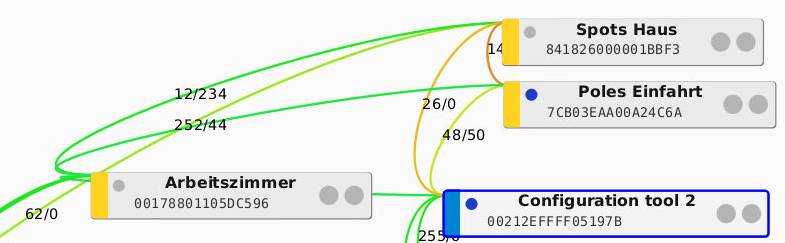
The both "Spots" are the Osrams, Arbeitszimmer is the HUE Bulb.
tmakowka
on 15 Oct 2020
Except you have realy bad value, your mesh is more "standard" on this capture.
Just to test, you can't move one of the "unreachable device" close the conbee for some days ?
Smanar
on 16 Oct 2020
Just wanted to leave an update here. I just updated to the last marthoc Docker image (2.05.86 / 15.10.2020), after seeing unresponsive lights again.
At the moment, all lights are unavailable, but can be controlled via the legacy Open Wireless Light Control (2016) UI! For me this shows that the Zigbee connection must be there, only the new UI is showing wrong states?!
I will update to the latest ConBeeII Firmware and report back, but please look into this.
I have made another log of the current situation, after reboot with the new Docker image:
deconz_log_20201021.txt
tmakowka
on 21 Oct 2020
You have ALL light marked as "unvailable" in phoscon ?
Smanar
on 21 Oct 2020
@tmakowka I see this:
https://github.com/dresden-elektronik/deconz-rest-plugin/issues/1917
The 0xf0 doesn't ring a bell.
Mimiix
on 22 Oct 2020
@Smanar Yes, at that time, all lights were markes as unavailable (grayed out in the UI)
Right now, everything is working absolutely fine, I can see that the Spots Haus light is disconnecting from time to time in the Home Assistant history (gray in the history graph):
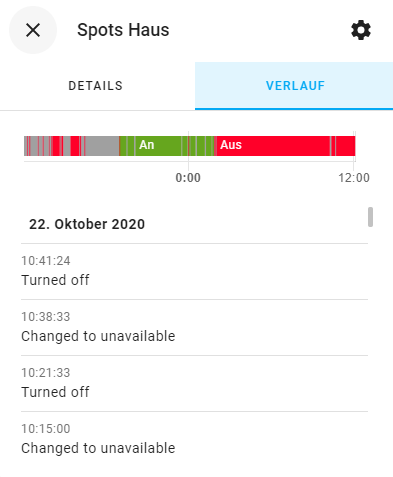
I'm wondering why i'm experiencing these total disconnections from time to time, and then (at least most of the time) being able to control the lights via the legacy 2016 interface.
@Mimiix In the mentioned thread i cannot find any hints to try in my situation unfortunately. Have you heard anything from the devs yet?
tmakowka
on 22 Oct 2020
On the old web app, you are using group command or single command ?
Because from my memory there is something in the code that display an error message if you are using a command for a device marked as unreacheable on the deconz database (even if the device is reachable in reality)
Smanar
on 22 Oct 2020
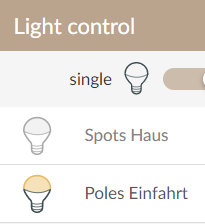
Hi @Smanar, i'm using the following button, i suppose this is the single command? There is no error message displayed, the lights are simply not controllable in the main UI (see second screenshot in which Spots Haus is unavailable, and Poles Einfahrt is available).
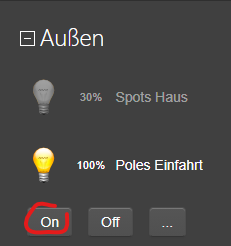
tmakowka
on 22 Oct 2020
Yes, it s group command. The individual command is using the bulb icon.
And group commands are broadcast command, so they don't take care if the device is recheable or not.
They are too grayed in deconz (the node title) ?
Smanar
on 22 Oct 2020
@Smanar I will try to switch the unavailable light via the single command the next time.
With "too grayed in deconz", do you mean the overview i'm getting via VNC? I will check that next time the lights become unavailable.
tmakowka
on 23 Oct 2020
Yep, on your capture you can see some node are grayed.
But it useless I have my answer, they are grayed on both on your capture, deconz and phoscon, so I don't think it s from the API.
Smanar
on 23 Oct 2020
All my with conbee integrated devices (Xiaomi and Osram) are also unavailable several times per hour.
My system is on the following versions:
Deconz 2.05.84
Conbee 26390500
HassOS 4.15
Core 0.117.1
Supervisor 2020.11.0
 flonair
on 13 Nov 2020
flonair
on 13 Nov 2020
@Mimiix Any news from the devs yet on this topic? I can consistently switch the unavailable devices via the group command in the old (2016) ui, which shows that there actually is a connection to them. There is also no delay when switching those this way.
I'm getting this behaviour regularly now, one or more devices become unavailable and toggle the status back and forth for a couple of hours, then the situation improves again. I seem to have this once or twice a month, and it severly limits my trust in the deconz solution momentarily.
tmakowka
on 16 Nov 2020
@tmakowka Are you able to provide some logs in this channel? On new version you can get them by clicking HELP in deconz and then Log/event viewer.
Mimiix
on 16 Nov 2020
Hi @Mimiix,
i will monitor the availability of the affected lights and download a log when i encounter this again. I'm on 2.06.00 / 15.11.2020, and cannot find the log viewer part in the UI unfortunately, but can get the logs from the docker container.
tmakowka
on 20 Nov 2020
Hi @Mimiix,
i created a log now. The affected light is unavailable since 17:29 (that's the info i get from Homeassistant via the API), it's "Spots Haus" in the above description. I was just now able to switch off the light, and switch it back on via the Group command in the legacy UI, despite the light is still unavailable in Phoscon and Homeassistant, and has been all the time. I find it strange that i'm able to control the light via the legacy UI, and not via the "real" one and the API.
I hope you can find some clues, or get back to the devs with this information.
Greetings tmakowka
tmakowka
on 20 Nov 2020
Related issues
 jan666
·
4Comments
jan666
·
4Comments
 stevenwfoley
·
3Comments
stevenwfoley
·
3Comments
 Thomas-Vos
·
4Comments
Thomas-Vos
·
4Comments
 g0dsCookie
·
3Comments
g0dsCookie
·
3Comments
 mvasicek
·
4Comments
mvasicek
·
4Comments