Deconz-rest-plugin: deCONZ is not joining network on raspbian
There are 2 issues, either deCONZ gui doesn't start from Raspbian menu, or when it starts Join is failing in loop.
I did reinstall of deconz and updated firmware manually https://github.com/dresden-elektronik/deconz-rest-plugin/wiki/Update-deCONZ-manually that didn't help.
 antonakv
All 25 comments
Hello,
If you have GUI problem, use thoses lines and give us result, pls.
sudo systemctl status deconz
sudo systemctl status deconz-gui
You are using the raspbian build-in application for VNC client ?
But only if the GUI is not loading at all, else make try on windows (with installing deconz), and check if you have USB deconnection loop, (if you have the USB connection/disconnection sound activated)
 Smanar
on 3 Jul 2020
Smanar
on 3 Jul 2020
I started from the install, and there is error: Failed to set capabilities on file `/usr/bin/deCONZ' (Operation not supported)
pi@raspberrypi:~ $ sudo apt install deconz
Reading package lists... Done
Building dependency tree
Reading state information... Done
The following packages were automatically installed and are no longer required:
  dc iptraf-ng libmicrodns0 libqt5script5 rpi-eeprom-images
Use 'sudo apt autoremove' to remove them.
The following NEW packages will be installed:
  deconz
0 upgraded, 1 newly installed, 0 to remove and 0 not upgraded.
Need to get 0 B/5,305 kB of archives.
After this operation, 22.6 MB of additional disk space will be used.
Selecting previously unselected package deconz.
(Reading database ... 179333 files and directories currently installed.)
Preparing to unpack .../deconz_2.05.77-raspbian-buster-stable_armhf.deb ...
Unpacking deconz (2.05.77-raspbian-buster-stable) ...
Setting up deconz (2.05.77-raspbian-buster-stable) ...
Failed to set capabilities on file `/usr/bin/deCONZ' (Operation not supported)
The value of the capability argument is not permitted for a file. Or the file is not a regular (non-symlink) file
Processing triggers for mime-support (3.62) ...
Processing triggers for gnome-menus (3.31.4-3) ...
Processing triggers for desktop-file-utils (0.23-4) ...
Here you are status outputs:
pi@raspberrypi:~ $ sudo systemctl status deconz
● deconz.service - deCONZ: ZigBee gateway -- REST API
   Loaded: loaded (/lib/systemd/system/deconz.service; enabled; vendor preset: enabled)
   Active: active (running) since Fri 2020-07-03 20:14:23 CEST; 15h ago
 Main PID: 21874 (deCONZ)
    Tasks: 5 (limit: 4915)
   Memory: 13.7M
   CGroup: /system.slice/deconz.service
           └─21874 /usr/bin/deCONZ -platform minimal --http-port=80

Jul 03 20:14:23 raspberrypi systemd[1]: Started deCONZ: ZigBee gateway -- REST API.
Jul 03 20:14:23 raspberrypi deCONZ[21874]: QStandardPaths: XDG_RUNTIME_DIR not set, defaulting to '/tmp/runtime-pi'
Jul 03 20:14:23 raspberrypi deCONZ[21874]: libpng warning: iCCP: known incorrect sRGB profile
Jul 03 20:14:23 raspberrypi deCONZ[21874]: This plugin does not support propagateSizeHints()
Jul 03 20:14:23 raspberrypi deCONZ[21874]: This plugin does not support propagateSizeHints()
Jul 03 20:14:33 raspberrypi deCONZ[21874]: This plugin does not support propagateSizeHints()
Jul 03 21:01:10 raspberrypi deCONZ[21874]: This plugin does not support propagateSizeHints()
Jul 04 11:18:28 raspberrypi systemd[1]: /lib/systemd/system/deconz.service:8: Unknown lvalue 'StartLimitIntervalSec' in section 'Service', ign
pi@raspberrypi:~ $ sudo systemctl status deconz
● deconz.service - deCONZ: ZigBee gateway -- REST API
   Loaded: loaded (/lib/systemd/system/deconz.service; enabled; vendor preset: enabled)
   Active: active (running) since Fri 2020-07-03 20:14:23 CEST; 15h ago
 Main PID: 21874 (deCONZ)
    Tasks: 5 (limit: 4915)
   Memory: 13.7M
   CGroup: /system.slice/deconz.service
           └─21874 /usr/bin/deCONZ -platform minimal --http-port=80

Jul 03 20:14:23 raspberrypi systemd[1]: Started deCONZ: ZigBee gateway -- REST API.
Jul 03 20:14:23 raspberrypi deCONZ[21874]: QStandardPaths: XDG_RUNTIME_DIR not set, defaulting to '/tmp/runtime-pi'
Jul 03 20:14:23 raspberrypi deCONZ[21874]: libpng warning: iCCP: known incorrect sRGB profile
Jul 03 20:14:23 raspberrypi deCONZ[21874]: This plugin does not support propagateSizeHints()
Jul 03 20:14:23 raspberrypi deCONZ[21874]: This plugin does not support propagateSizeHints()
Jul 03 20:14:33 raspberrypi deCONZ[21874]: This plugin does not support propagateSizeHints()
Jul 03 21:01:10 raspberrypi deCONZ[21874]: This plugin does not support propagateSizeHints()
Jul 04 11:18:28 raspberrypi systemd[1]: /lib/systemd/system/deconz.service:8: Unknown lvalue 'StartLimitIntervalSec' in section 'Service', ignoring
and
$ sudo systemctl status deconz-gui
● deconz-gui.service - deCONZ: ZigBee gateway -- GUI/REST API
   Loaded: loaded (/lib/systemd/system/deconz-gui.service; disabled; vendor preset: enabled)
   Active: inactive (dead)

Jul 03 20:12:46 raspberrypi systemd[1]: /lib/systemd/system/deconz-gui.service:10: Unknown lvalue 'StartLimitIntervalSec' in section 'Service', ignoring
Jul 03 20:12:46 raspberrypi systemd[1]: /lib/systemd/system/deconz-gui.service:10: Unknown lvalue 'StartLimitIntervalSec' in section 'Service', ignoring
Jul 03 20:12:46 raspberrypi systemd[1]: /lib/systemd/system/deconz-gui.service:10: Unknown lvalue 'StartLimitIntervalSec' in section 'Service', ignoring
Jul 03 20:12:58 raspberrypi systemd[1]: /lib/systemd/system/deconz-gui.service:10: Unknown lvalue 'StartLimitIntervalSec' in section 'Service', ignoring
Jul 03 20:13:06 raspberrypi systemd[1]: /lib/systemd/system/deconz-gui.service:10: Unknown lvalue 'StartLimitIntervalSec' in section 'Service', ignoring
Jul 03 20:13:06 raspberrypi systemd[1]: Started deCONZ: ZigBee gateway -- GUI/REST API.
Jul 03 20:13:07 raspberrypi deCONZ[19958]: QStandardPaths: XDG_RUNTIME_DIR not set, defaulting to '/tmp/runtime-pi'
Jul 03 20:13:07 raspberrypi deCONZ[19958]: libpng warning: iCCP: known incorrect sRGB profile
Jul 03 20:14:01 raspberrypi systemd[1]: deconz-gui.service: Succeeded.
Jul 04 11:22:33 raspberrypi systemd[1]: /lib/systemd/system/deconz-gui.service:10: Unknown lvalue 'StartLimitIntervalSec' in section 'Service', ignoring
I don't have windows at all, so I can't test it. Unfortunately Deconz is not available on Mac OS and docker device passthrough doesn't work.
antonakv
on 4 Jul 2020
Ok so first, there is something bad on your installation , you have the headless version running, so not possible having the Gui version too in same time
sudo systemctl disable deconz
sudo systemctl stop deconz
Ok, I disabled deconz headless and Join in deconz-gui doesn't work. btw I can't find any documentation how to authorise for instance Home assistant in deconz headless.
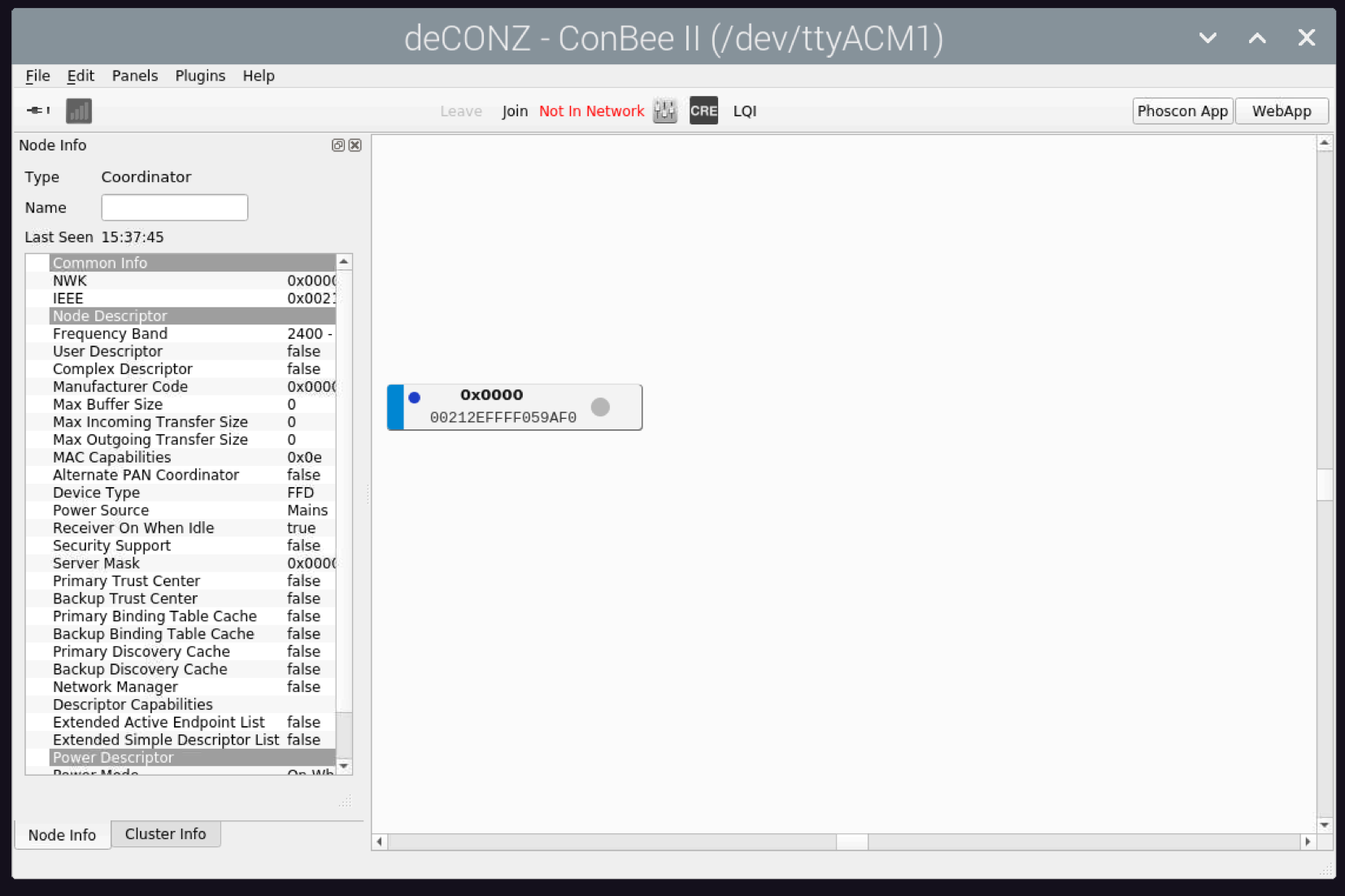
antonakv
on 4 Jul 2020
Have you take a look in phoscon/gateway, at firmware version I think you have a "not connected".
A realy standard bug is a connect/disconnect USB looping bug, for this one > https://github.com/dresden-elektronik/deconz-rest-plugin/issues/3001
For other situation, try to use USB extension cable, don't use USB 3.0.
What is the result of command "GCFFlasher_internal -l"
And I don't realy understand what you mean by "how to authorise for instance Home assistant in deconz headless" ?
Smanar
on 4 Jul 2020
Here you are command output
$ GCFFlasher_internal -l
GCFFlasher V3_13 (c) dresden elektronik ingenieurtechnik gmbh
Path             | Vendor | Product | Serial     | Type
-----------------+--------+---------+------------+-------
/dev/ttyACM2     | 0x1CF1 | 0x0030  | DE2191879  | ConBee II
And here is phoscon:
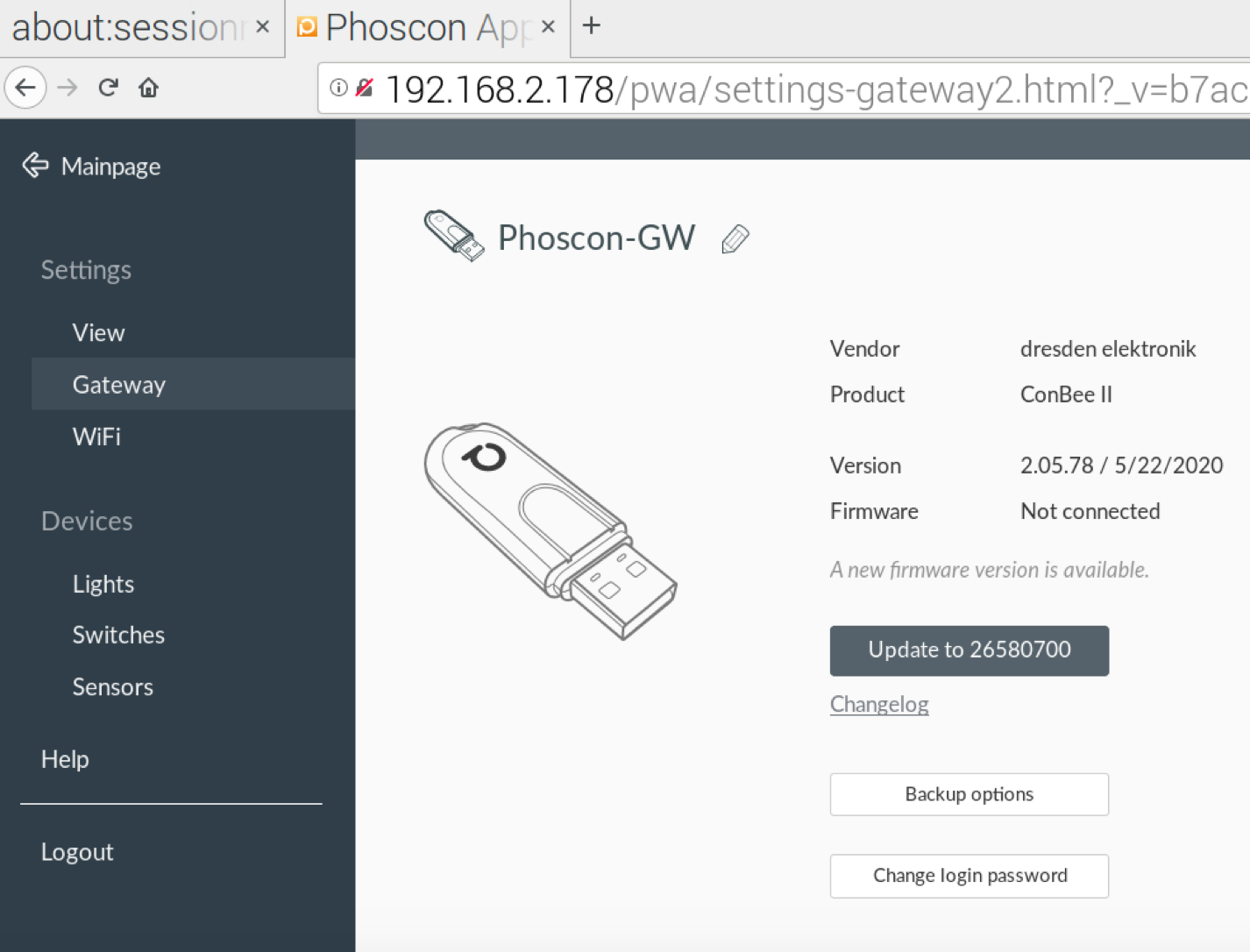
It's on usb 2 port now. Still the same problem.
by "how to authorise for instance Home assistant in deconz headless" I mean gui and headless gui approach is confusing. When you install it, both daemons are activated deconz and deconz-gui. It's not clear what is headless at all. How to do "Settings → Gateway → Advanced → Authenticate app" in headless mode without Phoscon app. With gui again ? But gui is disabled.
Dongle is not found when I use usb extension cable, kernel can found it only when it's connected directly to USB 2 port
antonakv
on 4 Jul 2020
I changed usb port and did systemctl restart deconz-init It could join cluster with deconz disabled and deconz-gui enabled
There is cdc_acm 1-1.3:1.0: failed to set dtr/rts in dmesg output though
After reboot it doesn't work again and not visible in GCFFlasher_internal output
antonakv
on 4 Jul 2020
@antonakv Could you please elaborate why you've skipped all the requested information of the issue template?
Anyway, deconz default setting is to start in GUI mode, not headless and not both. From the output you provided above
Selecting previously unselected package deconz.
one can see that deconz was already installed before. No info about how it has been removed. That being said, the reason why you initially couldn't start deconz GUI was simply that 2 different instances were running (or should run).
Now, your setup shows the Conbee II on /dev/ttyACM2, which is a bit unusual. What is the output of ls -la /dev/tty*?
 SwoopX
on 4 Jul 2020
SwoopX
on 4 Jul 2020
by "how to authorise for instance Home assistant in deconz headless" I mean gui and headless gui approach is confusing. When you install it, both daemons are activated deconz and deconz-gui. It's not clear what is headless at all. How to do "Settings → Gateway → Advanced → Authenticate app" in headless mode without Phoscon app. With gui again ? But gui is disabled.
IDK wich one install procedure you have used, but no, as said by SwoopX, by defaut you only have the GUI version.
Phoscon is the same, with headless setup or with the GUI, so no change for the "Authenticate app" button.
And for your disconnection bug, I have just see you have re-open a closed issue, do you realy need it was usefull ?
Smanar
on 4 Jul 2020
@SwoopX I'm sorry for that. I provided all the information I could collect. The issue template looked like overkill.
I see too much issues with Conbee II hardware design. It looks kinda dumb and not proactive. Where is USB3 support ?
USB3 isn't new and appeared years ago. What is student-like "failed to set dtr/rts" issue. It's screaming "Firmware has number of bugs".
I'm extremely disappointed by the product.
There is ttyA list
pi@raspberrypi:~ $ ls -la /dev/ttyA*
crw-rw---- 1 root dialout 166,  0 Jul  4 20:40 /dev/ttyACM0
crw-rw---- 1 root dialout 166,  1 Jul  4 20:40 /dev/ttyACM1
crw-rw---- 1 root dialout 204, 64 Jul  4 19:26 /dev/ttyAMA0
ttyACM0 is TI CC2531 USB CDC connected to Zigbee2mqtt on my system, /dev/ttyACM1 is Conbee ii which is appearing and disappearing. Why conbee ii got ttyACM2 when I did screenshot is not clear.
antonakv
on 4 Jul 2020
@antonakv It just makes it for us (as cummonity) extremely hard to nail down the root cause if vital info (in that case around your system setup) is missing as we're otherwise tapping in the dark. And that wasts the first hours or days with trying to get that info or asking for that. You can imagine that that's also frustrating from our end?
Where is USB3 support ?
Oh, Conbee does support USB3 afaik, but USB3.0 doesn't support 2.4GHz networking very well https://www.intel.com/content/www/us/en/products/docs/io/universal-serial-bus/usb3-frequency-interference-paper.html
What is student-like "failed to set dtr/rts" issue.
If you check google, you see that it's a Linux USB kernel driver message. I don't think they are willing to change that.
But regardless, let's see if we can make some progress. Have you tried running Conbee as sole USB device? Have you tried it with an extension cable? On which channel does z2m run?
There might be also an option to try out in reconfiguring the system if you're willing. Ping me on Discord channel if you're up to it.
SwoopX
on 4 Jul 2020
@SwoopX
Thank you for the useful link.
I heard about 2.4Ghz USB3 issue. Here is example how it was resolved by one of routers manufacturer: "We have resolved this issue with better hardware design that isolates this noise and reduces the impact to almost negligible on our Wi-Fi routers with USB 3.0 like the R6250 (AC1600 WiFi router). In a non-optimized design the impact can be quite significant on the 2.4GHz band." ;)
z2m runs on default channel 11. Yes, I tried 0.5m extension cable. With that cable CC2531 works fine. But not conbee ii, cable doesn't help. I ordered 1m cable, let's see if it helps.
antonakv
on 4 Jul 2020
"We have resolved this issue with better hardware design that isolates this noise and reduces the impact to almost negligible on our Wi-Fi routers with USB 3.0 like the R6250 (AC1600 WiFi router). In a non-optimized design the impact can be quite significant on the 2.4GHz band."
C'mon dude, you need to smile on that yourself 😉 That's kinda comparing motorcycles and trucks pulling trailers.
So, afaik, deconz' default channel is 25, no channel overlap there. You tried it with Conbee alone, without the CC2531, right?
SwoopX
on 4 Jul 2020
It's a good way to start with deCONZ.
https://github.com/dresden-elektronik/deconz-rest-plugin/wiki/deCONZ-for-Dummies
Regards!
 morfei1
on 4 Jul 2020
morfei1
on 4 Jul 2020
I tried to use 1m usb extension cable and Conbee ii stuck in USB loop
[73973.934155] cdc_acm 1-1.3:1.0: failed to set dtr/rts
[73982.166044] usb 1-1.3: new full-speed USB device number 97 using xhci_hcd
[73982.307586] usb 1-1.3: New USB device found, idVendor=1cf1, idProduct=0030, bcdDevice= 1.00
[73982.307602] usb 1-1.3: New USB device strings: Mfr=1, Product=2, SerialNumber=3
[73982.307615] usb 1-1.3: Product: ConBee II
[73982.307628] usb 1-1.3: Manufacturer: dresden elektronik ingenieurtechnik GmbH
[73982.307639] usb 1-1.3: SerialNumber: DE2191879
[73982.314430] cdc_acm 1-1.3:1.0: ttyACM1: USB ACM device
[73986.223495] usb 1-1.3: USB disconnect, device number 97
[73986.224022] cdc_acm 1-1.3:1.0: failed to set dtr/rts
[73994.716235] usb 1-1.3: new full-speed USB device number 98 using xhci_hcd
[73994.855428] usb 1-1.3: New USB device found, idVendor=1cf1, idProduct=0030, bcdDevice= 1.00
[73994.855448] usb 1-1.3: New USB device strings: Mfr=1, Product=2, SerialNumber=3
[73994.855454] usb 1-1.3: Product: ConBee II
[73994.855492] usb 1-1.3: Manufacturer: dresden elektronik ingenieurtechnik GmbH
[73994.855594] usb 1-1.3: SerialNumber: DE2191879
[73994.864080] cdc_acm 1-1.3:1.0: ttyACM1: USB ACM device
Nothing changed actually
antonakv
on 6 Jul 2020
Hello, can you show the command line you have used.
You have close deconz before ?
Smanar
on 6 Jul 2020
@antonakv It appears that ModemManager is running. Please stop or disable it and try again. The latest combination of deconz and firmware should prevent that in future.
SwoopX
on 9 Jul 2020
You can see that in this log ?
Smanar
on 9 Jul 2020
You can see that in this log ?
[73986.224022] cdc_acm 1-1.3:1.0: failed to set dtr/rts
That usualy is the ModemManager thingy. Google it, it's a linux thingy.
 Mimiix
on 9 Jul 2020
Mimiix
on 9 Jul 2020
@SwoopX Yes, ModemManager was installed. I removed it and there is still usb connect loop:
[   16.049557] usb 1-1.3: USB disconnect, device number 6
[   24.537982] usb 1-1.3: new full-speed USB device number 7 using xhci_hcd
[   24.677745] usb 1-1.3: New USB device found, idVendor=1cf1, idProduct=0030, bcdDevice= 1.00
[   24.677761] usb 1-1.3: New USB device strings: Mfr=1, Product=2, SerialNumber=3
[   24.677767] usb 1-1.3: Product: ConBee II
[   24.677773] usb 1-1.3: Manufacturer: dresden elektronik ingenieurtechnik GmbH
[   24.677778] usb 1-1.3: SerialNumber: DE2191879
[   24.686909] cdc_acm 1-1.3:1.0: ttyACM1: USB ACM device
[   28.083301] usb 1-1.3: USB disconnect, device number 7
[   30.303102] fuse init (API version 7.27)
[   36.577998] usb 1-1.3: new full-speed USB device number 8 using xhci_hcd
[   36.716887] usb 1-1.3: New USB device found, idVendor=1cf1, idProduct=0030, bcdDevice= 1.00
[   36.716895] usb 1-1.3: New USB device strings: Mfr=1, Product=2, SerialNumber=3
[   36.716900] usb 1-1.3: Product: ConBee II
[   36.716906] usb 1-1.3: Manufacturer: dresden elektronik ingenieurtechnik GmbH
[   36.716914] usb 1-1.3: SerialNumber: DE2191879
[   36.723589] cdc_acm 1-1.3:1.0: ttyACM1: USB ACM device
[   40.117683] usb 1-1.3: USB disconnect, device number 8
[   48.347966] usb 1-1.3: new full-speed USB device number 9 using xhci_hcd
[   48.487058] usb 1-1.3: New USB device found, idVendor=1cf1, idProduct=0030, bcdDevice= 1.00
[   48.487069] usb 1-1.3: New USB device strings: Mfr=1, Product=2, SerialNumber=3
[   48.487074] usb 1-1.3: Product: ConBee II
[   48.487080] usb 1-1.3: Manufacturer: dresden elektronik ingenieurtechnik GmbH
[   48.487085] usb 1-1.3: SerialNumber: DE2191879
[   48.498068] cdc_acm 1-1.3:1.0: ttyACM1: USB ACM device
[   51.895172] usb 1-1.3: USB disconnect, device number 9
Hello, can you show the command line you have used.
Smanar
on 14 Jul 2020
@Smanar Hi, command line doing what action ?
antonakv
on 14 Jul 2020
Deconz sets a udev rule that suppresses the modem manager and MTP probe interference. You probably don't have this one.
SwoopX
on 14 Jul 2020
@SwoopX Ok, I have reinstalled Deconz and having usb disconnects again
antonakv
on 15 Jul 2020
This issue has been automatically marked as stale because it has not had recent activity. It will be closed if no further activity occurs. Thank you for your contributions.
![stale[bot] picture](https://avatars3.githubusercontent.com/in/1724?v=4&s=40) stale[bot]
on 6 Aug 2020
stale[bot]
on 6 Aug 2020
Related issues
 lynix
·
4Comments
lynix
·
4Comments
 1onar
·
5Comments
1onar
·
5Comments
 philko123
·
3Comments
philko123
·
3Comments
 salopette
·
4Comments
salopette
·
4Comments
 ScharV
·
5Comments
ScharV
·
5Comments