Deconz-rest-plugin: Conbee 2 stick firmware not connected with docker installation.
Describe the bug
Stick not available after installation homeassistant (link below) on Raspberry PI 4 with PI OS and SSD boot.
https://community.home-assistant.io/t/installing-home-assistant-supervised-on-raspberry-pi-os/201836
Steps to reproduce the behavior
PI 4 4GB with PI OS and SSD boot with stable boot from USB BIOS.
Clean install PI OS (32bit) follow the docker supervised install of HA (link above) and after installing open Deconz en no light and switches and going to gateway firmware NOT CONNECTED
Expected behavior
Screenshots
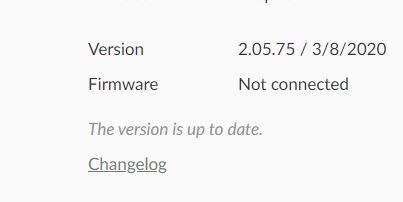
Environment
See screenshot
- Host system: (Raspberry Pi 4
- Running method: (Raspbian Home Assistent deCONZ Add-on / Marthoc Docker container
- Firmware version: (264A0700)
- deCONZ version: (2.05.75)
- Device: ConBee II
- Do you use an USB extension cable: no
deCONZ Logs
Additional context
 Peter750
All 41 comments
I'll ask Manup to look into this. Maybe he will know.
 Mimiix
on 22 Jun 2020
Mimiix
on 22 Jun 2020
Can you please provide the deCONZ logs shown in the HA Add-on. It's critical that the configuration uses the right device, usually it is /dev/ttyACM0.
Note that the SSD / USB 3.0 might interfere badly with nearby 2.4 GHz RF like Zigbee, Bluetooth and WiFi. Here I highly recommend a USB extension cable.
 manup
on 22 Jun 2020
manup
on 22 Jun 2020
Log attached from what i could copy from the HA log
Is there a place were i can copy the complete log or is attached ok?
log.txt
Did this evening complete reinstall with fresh PI OS 32bit to SSD and every step one on one except raspberryp4 for machine type from the manual attached.
https://community.home-assistant.io/t/installing-home-assistant-supervised-on-raspberry-pi-os/201836
And same error, in deconz firmware not connected and no lights or switches, compleet empty
Peter750
on 22 Jun 2020
@Peter750 As @manup Suggested: Can you try with a extension cable?
Mimiix
on 23 Jun 2020
I don't have cable will look for one
Is there any logic for a extension cable besides the reception part, same hardware with hassio SD all ok and SSD with manual install then not connected firmware?
If I put stick in windows machine I see all connected lights and switches and in pi straying phoscon software stick is empty , interference issue?
Peter750
on 23 Jun 2020
The thing with the extension cable is mostly that there's issues with USB 3.0 and 2.4ghz devices. More or less interference. There's a whitepaper from Intel on it.
Mimiix
on 23 Jun 2020
Conbee 2 on USB extenstion, see picture,, did test first on hassio and there all fine, then USB boot and firmware not connected,
Gues it is in the software because all hardwrae is the same, swtiching only PI OS docker install USB for for SD with Hassio, and loose USB in picture is the RFXCom to exclude the interfrence off that device for the test

Peter750
on 23 Jun 2020
I'd rather put my bet on insufficient permissions on the serial device.
 SwoopX
on 23 Jun 2020
SwoopX
on 23 Jun 2020
Yes me to, how can I check this?
Peter750
on 23 Jun 2020
ls -la /dev/tty*
Should be root dialout
SwoopX
on 23 Jun 2020
Looks ok to me

Peter750
on 23 Jun 2020
@Peter750 On the photo, it looks like the deCONZ is in the USBC on the side. Is that correct?
Mimiix
on 23 Jun 2020
Hi, yes it is in a USB3.0 port, same with hassio and there it works perfect, did also test on USB 2 from the back left side, same issue firmware not connected.
Same hardware only change SD with SSD (hassio vs Pi OS), so looks like software thing, if hardware then problem should also occur at hasio i guess
Peter750
on 23 Jun 2020
Hm, so from the log file, deconz is connecting to /dev/ttyAMA0 where permissions look ok. However, you got lots of 0xC4 errors in there. I assume that's the correct error description:

I'm afraid that's a bit beyond me.
SwoopX
on 23 Jun 2020
For a check, which of the below config.txt are valid for the PI 4 and conbee2?
enable_uart=1
dtoverlay=pi3-disable-bt
or
dtoverlay=pi3-miniuart-bt
And second quesion could the problem be software related like is the docker deconz software the same as add on in Home assistant --> https://hub.docker.com/r/marthoc/deconz
And third question: is below stil needed?
Go to Settings → Gateway → Advanced → Authenticate app in the Phoscon App and then use the deCONZ configurator in Home Assistant frontend to create an API key. When you're done setting up deCONZ it will be stored as a configuration entry. You can manually add deCONZ by going to the integrations page
Peter750
on 23 Jun 2020
The C4 status basically means that the access to the air channel couldn't be established which is a high indicator that something spams the RF. The connection between deCONZ and the ConBee II itself is working (otherwise the status won't show up).
Hard to tell where the RF is jammed but in general it's best to bring as much space as possible between ConBee II and USB 3.0 devices. In the picture they are very close together.
manup
on 24 Jun 2020
Ok did test with conbee as on picture with USB SSD conected (with find running on SSD disk for activity) and booting from SD with Hassio, then all is fine only when booting from SSD then problem occurs,
Find it already strange that booting from SSD the deconz gateway has no devices and stick in laptop or booting from SD then I
can see all devices.
Will show devices be blocked and deconz gateway show firmware not connected if the stick can't start RF?
Peter750
on 24 Jun 2020
I have the exact same problem. Tried multiple solutions but nothing solved it yet.
Running from SD works flawless. Running from SSD in supervised docker does not work.
 eddetollenaer
on 28 Jun 2020
eddetollenaer
on 28 Jun 2020
I have the strange feeling that this is not something in deCONZ. When the PI is booted from USB, it simply doesn't seem to see other USB Devices (Or use them).
Mimiix
on 29 Jun 2020
That is not true with my PI 4 with 4GB, my USB P1 smartmeter and USB rfxcom
did work perfectly, only the conbee 2 was not working, changed also USB
positions but no changes
On June 29, 2020 09:03:42 Dennis D notifications@github.com wrote:
>
I have the strange feeling that this is not something in deCONZ. When the
PI is booted from USB, it simply doesn't seem to see other USB Devices (Or
use them).
—
You are receiving this because you were mentioned.
Reply to this email directly, view it on GitHub, or unsubscribe.
Peter750
on 29 Jun 2020
Interesting. Then it would be some sort of permission thing.
Also, im not sure if you already showed. What is on the Supervisor >System> Hardware page?
Does something like /dev/serial/by-id/usb-dresden_elektronik_ingenieurtechnik_GmbH_ConBee_II_XXXXXX-if00 show?
Mimiix
on 29 Jun 2020
Exactly as you discribed, and connected it with the long name and as ttyACM0

Peter750
on 29 Jun 2020
So you did have this in the config page of the addon? Which didnt work?

Mimiix
on 29 Jun 2020
Yes exactly the same hardware info as from the SD boot so all looks good to
me but in deconz with SSD firmware not connected.
So hardware was recognised that makes the problem so strange
On June 29, 2020 10:37:59 Dennis D notifications@github.com wrote:
>
So you did have this in the config page of the addon? Which didnt work?
—
You are receiving this because you were mentioned.
Reply to this email directly, view it on GitHub, or unsubscribe.
Peter750
on 29 Jun 2020
Did you put what i showed in my screenshot? Or did you put ttyACM0?
Mimiix
on 29 Jun 2020
I used the long name but also the short name with ttyACM0, short is preferred then it shows conbee 2 in deconz instead off rasbee
Peter750
on 29 Jun 2020
If it does change, it probably is a permission issue somewhere.
Something which could help:
Try to install ubuntu on the SSD and boot from that, see if deCONZ works then (so no docker or anything).
This will help determine if the issue is with firmware/drivers or with docker (as docker isn't used in my proposed install method).
Mimiix
on 29 Jun 2020
Ok I will next week, is there a full deconz log which I can retrieve for examination besides the log viewer in HA?
Peter750
on 29 Jun 2020
Did you put what i showed in my screenshot? Or did you put ttyACM0?
You can check that via ls -la /dev/tty*
SwoopX
on 29 Jun 2020
I tried both ways, long and short name for the device, short name by ttyACM0 and long the name with usb_dresden_elektronic.......
Peter750
on 29 Jun 2020
For a check, which of the below config.txt are valid for the PI 4 and conbee2?
enable_uart=1
dtoverlay=pi3-disable-btor
dtoverlay=pi3-miniuart-bt
My Rpi4 (test env) runs with enable_uart=1 dtoverlay=pi3-disable-bt, my Rpi Zero (prod env) enable_uart=1 #dtoverlay=pi3-disable-bt. However, got a Raspbee I attached to each.
SwoopX
on 29 Jun 2020
Ok I will next week, is there a full deconz log which I can retrieve for examination besides the log viewer in HA?
When you run a bare linux without any middleware on top of it, login to your machine and stop the deCONZ service.
sudo systemctl stop deconz (Headless version), or
sudo systemctl stop deconz-gui (GUI version, will probably be your default then)
now start deCONZ with debug output redirected to the file debug
/usr/bin/deCONZ --dbg-info=2 --dbg-error=1 > debug
SwoopX
on 29 Jun 2020
I created a video on how to fix this.
https://youtu.be/2PK3TrOGWNs
eddetollenaer
on 1 Jul 2020
I m realy bad to understand english, but it s not a 5mn video that explain how to use an USB extension cable ?
 Smanar
on 2 Jul 2020
Smanar
on 2 Jul 2020
Glad somebody did video and share information about it, instant ordered
long extension cable ;)
On July 2, 2020 11:11:48 Smanar notifications@github.com wrote:
>
I m realy bad to understand english, but it s not a 5mn video that explain
how to use an USB extension cable ?
—
You are receiving this because you commented.
Reply to this email directly, view it on GitHub, or unsubscribe.
Peter750
on 2 Jul 2020
Lol
Its not like it'was noticied on official site and on the issue template.
Smanar
on 2 Jul 2020
I did have (small) extension cable but 10 cm from usb disk is not long enough, did used 1,8 meters and now all is fine
Thanks all for the help
Peter750
on 14 Jul 2020
Ha good to know, I m saying 50cm, but I have never make test.
Smanar
on 15 Jul 2020
I am facing a similar problem, an extension cord does not help. The deconz is constantly not connected. I have a raspberry pi 3, external ssd, raspbian installed. The problem appeared after the raspberry upgrade (upgrade). Before the update, everything was discovered. List of devices on the screen. What could be the gap in this case?
I would be grateful for any help, if you need to provide some more information, please write.

 malinovsku
on 23 Jul 2020
malinovsku
on 23 Jul 2020
Long story you can find if you search a little, but to resume, make a fiwmare upload (the same you already have) but on real machine, a windows one if possible, using the command line with (-t 60) https://github.com/dresden-elektronik/deconz-rest-plugin/wiki/Update-deCONZ-manually
Don't use USB 3.0.
Smanar
on 24 Jul 2020
I have already updated and it costs 26580700 firmware, I do not use usb 3.0, since it does not exist in the raspberry pi 3, for example, everything worked on synolodgy at once, I use it so far, but I would like to return it to working condition on rpi. I have already re-read everything, and nothing like that, which would not be displayed in tty, did not find anything like this and I can not figure out what to do. what do i need to provide to solve the gaps?
malinovsku
on 26 Jul 2020
Related issues
 horchi
·
5Comments
horchi
·
5Comments
 1onar
·
5Comments
1onar
·
5Comments
 mvasicek
·
4Comments
mvasicek
·
4Comments
 philko123
·
3Comments
philko123
·
3Comments
 joggs
·
3Comments
joggs
·
3Comments
Most helpful comment
I created a video on how to fix this.
https://youtu.be/2PK3TrOGWNs