Deconz-rest-plugin: Xiaomi Mi door/window contact (MCCGQ01LM) does not work with the firmware 0x26350500
I have updated my system to the latest deCONZ version, but unfortunately the Xiaomi Mi door/window contact does not work anymore.
OS: Raspbian GNU/Linux 9 (stretch)
HW: RaspBee I
Faulty ZigBee sensor: Xiaomi Mi - Door/window contact - MCCGQ01LM (included in the compatibility list)
_Original version:_
deCONZ: V2.05.74
Firmware: 0x26330500
_Previous version:_
deCONZ: V2.05.77
Firmware: 0x26350500
The update to V2.05.77 has worked well so far. Afterwards the firmware of the RaspBee should be updated. I have done that. After that deCONZ unfortunately did not show any connection to the Xiaomi Mi door/window contact. Also several reboots did not solve the problem.
I deleted the sensor in deCONZ and Phoscon and tried to reconnect the device to the network. After a longer time a new device was displayed in deCONZ, but only with NWK address and no further information (also the endpoint menu button was missing). A communication with the Zigbee sensor was no more possible.
Only a downgrade of the firmware to the previous version 0x26330500 was successful. The sensor has reconnected to the network and was correctly displayed in deCONZ with the profile and all clusters.
Except for the Xiaomi Mi door/window contact all other devices with firmware 0x26350500 worked fine.
 Markkuuss
All 32 comments
After that deCONZ unfortunately did not show any connection to the Xiaomi Mi door/window contact.
I assume you mean the lines from deconz GUI? Those do not indicate a connection, but an available oute. With Xiaomi devices, it can take up to 1h till you see any line at all.
After a longer time a new device was displayed in deCONZ, but only with NWK address and no further information (also the endpoint menu button was missing). A communication with the Zigbee sensor was no more possible.
That is indeed a sign that the device has not been paired properly. Have you correctly reset the sensor before and moved the magnet while pairing to keep it awake? Xiaomi's can be a bit subborn here.
 SwoopX
on 27 May 2020
SwoopX
on 27 May 2020
I assume you mean the lines from deconz GUI? Those do not indicate a connection, but an available oute. With Xiaomi devices, it can take up to 1h till you see any line at all.
That's right, I mean the line.
I made the update and waited at least 5 hours after that. Even after that time the sensor could not be reached.
That is indeed a sign that the device has not been paired properly. Have you correctly reset the sensor before and moved the magnet while pairing to keep it awake? Xiaomi's can be a bit subborn here.
Yeah, I did that after the sensor was unreachable. I reset it by pressing and holding the button. Then I tried to pair it, but unfortunately that didn't work (as described above). During this process, I moved a magnet all the time. The sensor always flashed shortly.
I performed the same procedure again after a downgrade. Then it worked immediately. So I assume that I performed all steps correctly.
Markkuuss
on 28 May 2020
That is really weired. However, I also have one of them which refuses to pair. Havent't sniffed the traffic yet to check if any communication is caught up at all due to laziness. My device has been a bit more "special" than the others though all the time.
SwoopX
on 28 May 2020
I also have one of them which refuses to pair.
If I understand this correctly. You also have a Xiaomi Mi door/window contact (MCCGQ01LM) that no longer works with firmware 0x26350500?
Markkuuss
on 28 May 2020
I have that device, but it is not firmware related
SwoopX
on 28 May 2020
But can you reproduce my problem? Or how can I help you to find the cause of the error?
Markkuuss
on 28 May 2020
Well, like I said, I also got one device that I cannot pair. But that is not firmware related. Was just too lazy until now to sniff the traffic and had other priorities.
SwoopX
on 28 May 2020
Okay, very strange. But it can't have anything to do with the new deCONZ version, because it works with the current deCONZ version and the old firmware.
Markkuuss
on 28 May 2020
Tried a bit today and it wouldn't even pair with my test network. However, solution was the commonly known one: new battery.
SwoopX
on 28 May 2020
In the currently working configuration with the "old" firmware, it is indicated that the battery has 100%. So I would not consider the battery to be the cause of the error.
{
    "config": {
        "battery": 100,
        "on": true,
        "reachable": true,
        "temperature": null
    },
    "ep": 1,
    "etag": "23bca6b3da4f3d284b3e280f1b2e1830",
    "lastseen": "2020-05-28T15:51:58.205",
    "manufacturername": "LUMI",
    "modelid": "lumi.sensor_magnet",
    "name": "Balkon",
    "state": {
        "lastupdated": "2020-05-27T20:06:55.770",
        "open": false
    },
    "type": "ZHAOpenClose",
    "uniqueid": "00:15:8d:00:01:f3:87:a2-01-0006"
}
Markkuuss
on 28 May 2020
Same here. I cannot pair new Xiaomi door sensors (I mean Mija not Aqara model). They're visible in deCONZ but without any name and therefore don't appear in Phoscon.
I've tested 2 sensors so far trying to pair them a couple times, with no success. Got exactly the same result with both of them. Those recent issues with deCONZ are really annoying...
 fi-sch
on 8 Jun 2020
fi-sch
on 8 Jun 2020
Same here. I cannot pair new Xiaomi door sensors (I mean Mija not Aqara model). They're visible in deCONZ but without any name and therefore don't appear in Phoscon.
I've tested 2 sensors so far trying to pair them a couple times, with no success. Got exactly the same result with both of them. Those recent issues with deCONZ are really annoying...
Same issue here with the Xiaomi Mija temperature sensor. Shows up in Deconz but only with MAC and NWK
Deconz 2.05.74
 kq9914
on 9 Jun 2020
kq9914
on 9 Jun 2020
Can you please provide a screenshot from deconz GUI of the device? Click on the rightmost bullet of the node to expand all its clusters.
SwoopX
on 17 Jun 2020
I have the same issue with the "Mijia Light Sensor". It does not show up in Phoscon, but I see it in Openhab using the deconz binding.
 PainElemental
on 19 Jun 2020
PainElemental
on 19 Jun 2020
@PainElemental This is due to the fact that phoscon didn't integrate it yet, but it is in the API. Please read this.
 Mimiix
on 19 Jun 2020
Mimiix
on 19 Jun 2020
I will provide the details on Sunday :) Thanks!
fi-sch
on 19 Jun 2020
Can you please provide a screenshot from deconz GUI of the device? Click on the rightmost bullet of the node to expand all its clusters.


fi-sch
on 21 Jun 2020
Hm, those should work. I'd require a debug log with multiple open/close events to check.
SwoopX
on 22 Jun 2020
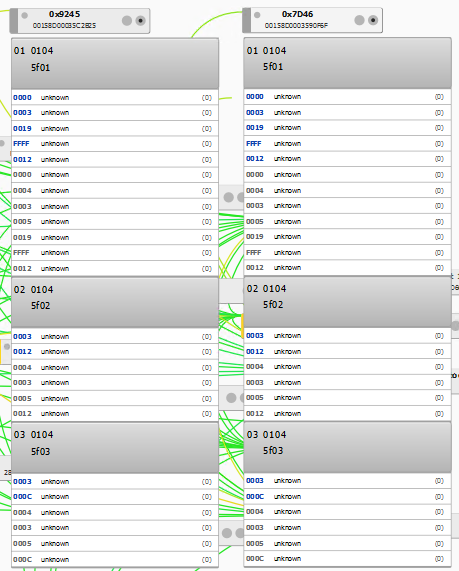
@SwoopX Sorry for the slow response. Here's two different nodes information. Let me know if anything additional would be useful.
To be clear, this is the unit in question: https://xiaomi-mi.com/sockets-and-sensors/xiaomi-mi-temperature-humidity-sensor/
Thanks,
James
kq9914
on 22 Jun 2020
@kq9914 There's something seriously gone fubar at your end. Either you played with general.xml and missed something or the file is corrupted.
SwoopX
on 22 Jun 2020
Hm, those should work. I'd require a debug log with multiple open/close events to check.
Which log do you mean? I will try to collect what's needed. I hope this could be fixed ASAP because I have 7 sensors that I want to setup.
PS I already use multiple Aqara door sensors and 2 Xiaomi sensors and they work well.
fi-sch
on 22 Jun 2020
Collect the debug data as follows:
sudo systemctl stop deconz-gui
/usr/bin/deCONZ --dbg-info=2 > xiaomi_debug
@kq9914 There's something seriously gone fubar at your end. Either you played with
general.xmland missed something or the file is corrupted.
Hmm. Okay. I tried adding a SmartThings motion sensor and got the same results, so there is definitely something else going on - not just Xiaomi related.
Didn't touch general.xml. Went ahead and restored it from the latest version and still get the same results in deCONZ.
This bug isn't the place to keep troubleshooting it - since this is not necessarily a bug with the code, I'm not sure the repo is the best place to continue. Do you have a suggestion on how to pursue a fix for this?
Thanks,
James
kq9914
on 22 Jun 2020
Collect the debug data as follows:
sudo systemctl stop deconz-gui
/usr/bin/deCONZ --dbg-info=2 > xiaomi_debug
I'm afraid that I cannot do that on HassOS. I'm also too huge noob when it comes to unix systems to figure it out other way on my own.
fi-sch
on 22 Jun 2020
@kq9914 You may want to join Discord. Invite link is in the readme.
SwoopX
on 22 Jun 2020
@kq9914 You may want to join Discord. Invite link is in the readme.
Wanted to followup with a solution for my issue in case anyone else ran across it (see previous screenshot - identified as a different issue than where this thread has gone...)
I run deCONZ on Windows under a service account with low privilege from c:\program files(x86)\ rather than appdata. This is the default behavior when you run the installer as an admin. In this case, the installer puts the executables in program files, but still create's some data in the current user's appdata directory. This is where the problems come in since I'm running the installer as a different highly privileged user, but intend to run the application as a different, low privileged user.
I did a backup from Phoscon, then completely uninstalled deCONZ and removed the deCONZ folders from program files and appdata for both users. I reinstalled deCONZ as the privileged user, got Phoscon up (also as the privileged user) without adding lights/groups, restored my backup. Then I copied the privileged user's appdata deCONZ folder to the low privileged account's appdata and launched deCONZ as the low privileged user and it seemed to work.
My assumption is that when I upgraded versions, something went wrong when the appdata folder of the low-privileged user wasn't updated by the installer since it was running as the high-privileged user.
I'm not sure if this should be a separate bug report since installing with high privileged and running as low privilege is a best practice or if that's just a consequence of the decision to store the configuration in a user's appdata instead of globally that has to be dealt with. I get this might be non-standard for a typical home user of deCONZ on Windows...
kq9914
on 25 Jun 2020
I struggled with pairing new sensors before (in 2.05.77). I also saw the sensor only in deCONZ without any name.
However, it seemed that pairing and then immediately opening and closing the window helps with proper pairing. I was able to pair 4 sensors using that method yesterday.
fi-sch
on 5 Jul 2020
I struggled with pairing new sensors before (in 2.05.77). I also saw the sensor only in deCONZ without any name.
However, it seemed that pairing and then immediately opening and closing the window helps with proper pairing. I was able to pair 4 sensors using that method yesterday.
I second that. I tried it today and it connected immediately.
 GreyEarl
on 22 Jul 2020
GreyEarl
on 22 Jul 2020
I second that. I tried it today and it connected immediately.
Did you also experience #3016 issue?
fi-sch
on 22 Jul 2020
I second that. I tried it today and it connected immediately.
Did you also experience #3016 issue?
Tot be honest, I'm not sure. I do see sometimes "ghost" devices in Lights. Haven't payed attention if this happens after a pair session, but I think it is. The difference is that in my case the actual sensor is correctly listed and sometimes an unknown device is added as light. It is always named as 'Dimmer switch
I just remove it and that's it.
GreyEarl
on 22 Jul 2020
This issue has been automatically marked as stale because it has not had recent activity. It will be closed if no further activity occurs. Thank you for your contributions.
![stale[bot] picture](https://avatars3.githubusercontent.com/in/1724?v=4&s=40) stale[bot]
on 14 Aug 2020
stale[bot]
on 14 Aug 2020
I had this issue too and can confirm that initializing scan, then resetting the sensor and then opening and closing the window will make it pair - I guess it's in deep sleep until it senses the magnet
 polymodular
on 24 Aug 2020
polymodular
on 24 Aug 2020
Related issues
 stevenwfoley
·
3Comments
stevenwfoley
·
3Comments
 ScharV
·
5Comments
ScharV
·
5Comments
 7wells
·
4Comments
7wells
·
4Comments
 ReeChip
·
5Comments
ReeChip
·
5Comments
 joggs
·
3Comments
joggs
·
3Comments