Deconz-rest-plugin: Manually Upgrading Conbee II Firmware
I have searched high and low for a guide to manually upgrade the firmware on the Conbee II for my implementation
Ubuntu Linux>>HA installed in Docker>>Deconz add-in for HA.
Nothing seems to explain upgrading the firmware when you are running the Deconz add-in on HA where HA is in a docker container. Not a separate docker container for Deconz.
Can anyone help?
 meremortals70
All 35 comments
@meremortals70, you can follow this guide: https://github.com/dresden-elektronik/deconz-rest-plugin/wiki/Update-deCONZ-manually
I've done an upgrade to my Conbee II two days ago using the Docker method and everything went well.
 stickpin
on 27 May 2020
stickpin
on 27 May 2020
Sorry, that will not work.
It is for the marthoc's deCONZ Docker image
not the add-on installed in HA which is a docker image.
That is a separate docker image for deconz standalone.
meremortals70
on 27 May 2020
@meremortals70 ok.
If you running HASS.IO, you can install the Portainer Addon from the Addons Store, but please be careful, you can destroy your setup if you will do something wrong with your dockers.
In the Portainer go to the Settings - Settings and remove all the filters from Hidden containers.
Now go to the Containers, you would see addon_core_deconz, press exec console button and connect using /bin/bash.
Now execute the following:
/usr/bin/GCFFlasher_internal -l
You would see list of the devices. Something like this:

ls -1 /usr/share/deCONZ/firmwareto see list of available firmware in this docker. Should look something like this:

Now be careful and make sure you choose the correct firmware and correct device.
If you sure the next command should be:
/usr/bin/GCFFlasher_internal -d <device_path> -f /usr/share/deCONZ/firmware/<firmware_filename>
So if you want to flash Conbee II, your command should look like this:
/usr/bin/GCFFlasher_internal -d /dev/ttyACM0 -f /usr/share/deCONZ/firmware/deCONZ_ConBeeII_0x26580700.bin.GCF
Please enter and pray. :)
I hope it helps.
You can remove Portainer Addon after that if you don't need it.
stickpin
on 27 May 2020
And the method explained on the marthoc's deCONZ Docker Github ?
https://github.com/marthoc/docker-deconz#updating-conbeeraspbee-firmware
 Smanar
on 27 May 2020
Smanar
on 27 May 2020
And the method explained on the marthoc's deCONZ Docker Github ?
https://github.com/marthoc/docker-deconz#updating-conbeeraspbee-firmware
Your access to bash is limited once you running managed Hass.IO image. So you cannot do what is explained in this link.
stickpin
on 27 May 2020
Ha ok, my bad I have read he use a container for "deconz", not for the "deconz HA add on"
Smanar
on 27 May 2020
As there was no response from @meremortals70 on this, i'll be closing this up!
 Mimiix
on 12 Jun 2020
Mimiix
on 12 Jun 2020
There was no response because no one was actually listening to my problem.
meremortals70
on 13 Jun 2020
@meremortals70 : @stickpin gave some comprehensive input on your issue. I'm happy to reopen if you need some more debugging on this with him.
Mimiix
on 13 Jun 2020
Actually no because I am not running that docker image as previously explained.
Ubuntu Linux>>HA installed in Docker>>Deconz add-in for HA.
My Deconz is not in a separate container. It is the add-in for HA
meremortals70
on 13 Jun 2020
As far as i know, the Addon in HA does run in a seperate containers. I'm still on the old firmware, i'll try his method later today.
Mimiix
on 13 Jun 2020
Can’t paste an image here as I am currently on an iPad. However I only have three containers in my docker and they are HA, Hassio multicast and assistant relay.
With the Mathic image, you create and container by loading the image.
What I have is I loaded the HA image and then added the Deconz add-in from supervisor.
meremortals70
on 13 Jun 2020
I've had that too(i'm trying now), but did you go to settings and remove the labels? That made deconz show up for me.
Mimiix
on 13 Jun 2020
I think this is mute for the moment as I have downgraded to .75 because .76 and .77 are so troublesome
meremortals70
on 13 Jun 2020
But what do you mean by removing the labels
meremortals70
on 13 Jun 2020
stickpin Wrote:
In the Portainer go to the Settings - Settings and remove all the filters from Hidden containers.
I just did that, but not i'm getting another error on trying to flash. Not sure how to fix that though. I'm using a Nas so that complicates things in terms of usb devices. Maybe its trough that, i don't know.
I've created a issue for that: https://github.com/dresden-elektronik/deconz-rest-plugin/issues/2935
Mimiix
on 13 Jun 2020
This issue has been automatically marked as stale because it has not had recent activity. It will be closed if no further activity occurs. Thank you for your contributions.
![stale[bot] picture](https://avatars3.githubusercontent.com/in/1724?v=4&s=40) stale[bot]
on 6 Jul 2020
stale[bot]
on 6 Jul 2020
After the last step i recive:
/usr/bin/GCFFlasher_internal.bin: /lib/arm-linux-gnueabihf/libc.so.6: version `GLIBC_2.28' not found (required by /usr/lib/libwiringPi.so)
How to solve this ?
@meremortals70 ok.
If you running HASS.IO, you can install the Portainer Addon from the Addons Store, but please be careful, you can destroy your setup if you will do something wrong with your dockers.In the Portainer go to the
Settings-Settingsand remove all the filters fromHidden containers.
Now go to theContainers, you would seeaddon_core_deconz, pressexec consolebutton and connect using/bin/bash.Now execute the following:
/usr/bin/GCFFlasher_internal -l
You would see list of the devices. Something like this:
ls -1 /usr/share/deCONZ/firmwareto see list of available firmware in this docker. Should look something like this:
Now be careful and make sure you choose the correct firmware and correct device.
If you sure the next command should be:
/usr/bin/GCFFlasher_internal -d <device_path> -f /usr/share/deCONZ/firmware/<firmware_filename>So if you want to flash Conbee II, your command should look like this:
/usr/bin/GCFFlasher_internal -d /dev/ttyACM0 -f /usr/share/deCONZ/firmware/deCONZ_ConBeeII_0x26580700.bin.GCFPlease enter and pray. :)
I hope it helps.
You can remove Portainer Addon after that if you don't need it.
@meremortals70 ok.
If you running HASS.IO, you can install the Portainer Addon from the Addons Store, but please be careful, you can destroy your setup if you will do something wrong with your dockers.In the Portainer go to the
Settings-Settingsand remove all the filters fromHidden containers.
Now go to theContainers, you would seeaddon_core_deconz, pressexec consolebutton and connect using/bin/bash.Now execute the following:
/usr/bin/GCFFlasher_internal -l
You would see list of the devices. Something like this:
ls -1 /usr/share/deCONZ/firmwareto see list of available firmware in this docker. Should look something like this:
Now be careful and make sure you choose the correct firmware and correct device.
If you sure the next command should be:
/usr/bin/GCFFlasher_internal -d <device_path> -f /usr/share/deCONZ/firmware/<firmware_filename>So if you want to flash Conbee II, your command should look like this:
/usr/bin/GCFFlasher_internal -d /dev/ttyACM0 -f /usr/share/deCONZ/firmware/deCONZ_ConBeeII_0x26580700.bin.GCFPlease enter and pray. :)
I hope it helps.
You can remove Portainer Addon after that if you don't need it.
 oat1
on 8 Jul 2020
oat1
on 8 Jul 2020
@oat1 Please open your own Bug report for this :)
Mimiix
on 8 Jul 2020
The messages seems to indicate missing packages. Try sudo apt -f install
 SwoopX
on 8 Jul 2020
SwoopX
on 8 Jul 2020
@meremortals70 Did you manage to upgrade yet?
Mimiix
on 8 Jul 2020
@Mimiix no I haven't and I have dropped the Deconz add-on for ZHA in HA
meremortals70
on 11 Jul 2020
Okido! Then I will proceed and close this issue :)
Mimiix
on 11 Jul 2020
@meremortals70 ok.
If you running HASS.IO, you can install the Portainer Addon from the Addons Store, but please be careful, you can destroy your setup if you will do something wrong with your dockers.In the Portainer go to the
Settings-Settingsand remove all the filters fromHidden containers.
Now go to theContainers, you would seeaddon_core_deconz, pressexec consolebutton and connect using/bin/bash.Now execute the following:
/usr/bin/GCFFlasher_internal -l
You would see list of the devices. Something like this:
ls -1 /usr/share/deCONZ/firmwareto see list of available firmware in this docker. Should look something like this:
Now be careful and make sure you choose the correct firmware and correct device.
If you sure the next command should be:
/usr/bin/GCFFlasher_internal -d <device_path> -f /usr/share/deCONZ/firmware/<firmware_filename>So if you want to flash Conbee II, your command should look like this:
/usr/bin/GCFFlasher_internal -d /dev/ttyACM0 -f /usr/share/deCONZ/firmware/deCONZ_ConBeeII_0x26580700.bin.GCFPlease enter and pray. :)
I hope it helps.
You can remove Portainer Addon after that if you don't need it.
Hi!
I tried upgrading with portrainer but it gives me the following error
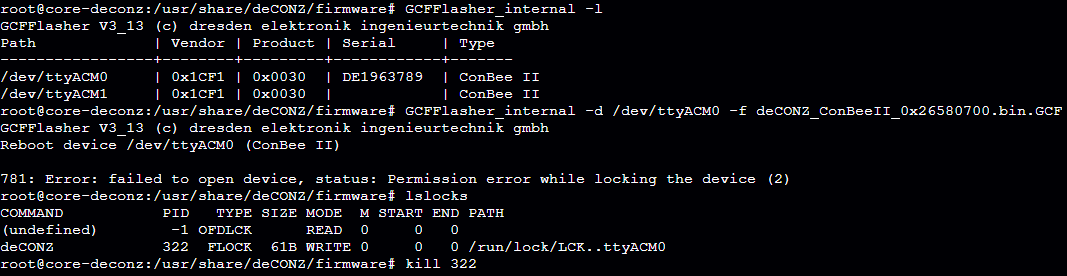
If I try to kill deCONZ process, the whole container will reboot.
I have supported VMDK running on my Synology NAS. Conbee II is working otherwise just fine.
 bgmn
on 29 Jul 2020
bgmn
on 29 Jul 2020
@bgmn As per documentation (and what i wrote before) : VM's are not claimed to be supported to update the device upon. Please refer to This page.
Mimiix
on 29 Jul 2020
@bgmn As per documentation (and what i wrote before) : VM's are not claimed to be supported to update the device upon. Please refer to This page.
Thank you for the quick reply. I was hoping that it would be possible to update them easily via docker container but it's not so big task to update them manually on another computer.
bgmn
on 29 Jul 2020
@bgmn You can, but not within a VM.
VM's add some complexity to serial connections.
Mimiix
on 29 Jul 2020
@meremortals70 ok.
If you running HASS.IO, you can install the Portainer Addon from the Addons Store, but please be careful, you can destroy your setup if you will do something wrong with your dockers.In the Portainer go to the
Settings-Settingsand remove all the filters fromHidden containers.
Now go to theContainers, you would seeaddon_core_deconz, pressexec consolebutton and connect using/bin/bash.Now execute the following:
/usr/bin/GCFFlasher_internal -l
You would see list of the devices. Something like this:
ls -1 /usr/share/deCONZ/firmwareto see list of available firmware in this docker. Should look something like this:
Now be careful and make sure you choose the correct firmware and correct device.
If you sure the next command should be:
/usr/bin/GCFFlasher_internal -d <device_path> -f /usr/share/deCONZ/firmware/<firmware_filename>So if you want to flash Conbee II, your command should look like this:
/usr/bin/GCFFlasher_internal -d /dev/ttyACM0 -f /usr/share/deCONZ/firmware/deCONZ_ConBeeII_0x26580700.bin.GCFPlease enter and pray. :)
I hope it helps.
You can remove Portainer Addon after that if you don't need it.
Thanks for this guide. It assumes the firmware is already in the /firmware folder. How do i pull the latest firmware to this folder with Portainer?
 Harry-1976
on 15 Sep 2020
Harry-1976
on 15 Sep 2020
@Harry-1976 They should come with the latest versions. HA isn't putting those in because of their own reasons. You should open a issue in their Addon repository for this question.
Mimiix
on 15 Sep 2020
@Harry-1976 just go to the folder:
cd /usr/share/deCONZ/firmware/
and then do:
wget http://deconz.dresden-elektronik.de/deconz-firmware/deCONZ_<FIRMWARE_YOU_NEED>.bin.GCF
and then it supposed to work fine. :)
p.s. all the firmware can be found here: http://deconz.dresden-elektronik.de/deconz-firmware/
sort it by Last Modified and choose the relevant firmware. :)
stickpin
on 15 Sep 2020
@stickpin Thanks! That worked.
Update failed though.
Now to find a solution for the 781 error (same error as @bgmn posted) i got.
I’m running HA on an rpi4 though.
Harry-1976
on 15 Sep 2020
@Harry-1976 it seems that you running on some other kind of virtualization.
I am also lately moved to vmware esxi approach and also was not able to upgrade the firmware today.
So my solution was to use some old windows machine to update my Conbee II.
I hope it helps.
stickpin
on 15 Sep 2020
@stickpin Yes, that's how i use to do it. I guess i'll have to stick to it for now.
Cheers.
Harry-1976
on 15 Sep 2020
@Harry-1976 @stickpin upgrading on virtual installations is not supported / recommended.
Mimiix
on 16 Sep 2020
@Mimiix I understand that. I’m running with the standard pi4 installation which i believe is not a virtual installation.
Harry-1976
on 17 Sep 2020
Related issues
 felixstorm
·
4Comments
felixstorm
·
4Comments
 g0dsCookie
·
3Comments
g0dsCookie
·
3Comments
 horchi
·
5Comments
horchi
·
5Comments
 mvasicek
·
4Comments
mvasicek
·
4Comments
 jan666
·
4Comments
jan666
·
4Comments