Deconz-rest-plugin: Issue with home assistant and legrand cover shutter celiane netatmo
Hello
I need support on integration deconz in HA.
In facte all seems good except for Legrand celiane netatmo cover shutter switch.
The switch is present in deconz and in home assistant too but in HA it remains in closed state continuously
The stop command works, the open command works
but the home assistant closing command does not work, it activates the opening, not closing.
If i use deconz api rest i can open and closed the cover normaly
http://1*:40850/api/**/lights/3/state
{ "open": false }
http://1*:40850/api/**/lights/3/state
{ "open": true }
it looks like the entity "cover" in home assistant is badly configured for closing
 plum59
All 104 comments
So it sounds to me it's a HA issue then. You described the REST API works correctly, right?
 SwoopX
on 25 May 2020
SwoopX
on 25 May 2020
Hello , i don't no because when i had discover my switch in deconz (with HA deconz integration) this entity is automaticaly create in HA .
plum59
on 25 May 2020
Heu ? the command in the api for the shutter is not state/open but state/on or state/bri.
I have never tried the "open" command, perhaps it's from the last modification for shutter, I need to take a look ....
Have you the JSON of the device pls ?
 Smanar
on 25 May 2020
Smanar
on 25 May 2020
Ok so there is some change since the last @ebaauw modification.
Now theses devices support "open", but "open" is the opposite at "on", and I don't remember for this device if "on" is "open" or "close"
"open" > targetOpen = map[param].toBool();
"on" > targetOpen = !(map[param].toBool());
Smanar
on 25 May 2020
 ebaauw
on 25 May 2020
ebaauw
on 25 May 2020
Ok So I have found archive ^^
On previous version State/on = true > Close the shutter, so it's good with last modification
$ ph put -v /lights/327/state '{"on": true}'
{
  "open": false
}
So I realy think the problem is from HA, ca you see the command used by HA ?
Smanar
on 25 May 2020
Hello,
like mentionned on discord the problem is when i use cover.closed it seems post on deconnz this intsruction
2020-05-25 18:19:19 DEBUG (MainThread) [pydeconz.gateway] Sending "put" "{'on': True, 'bri': 254}" to "172.30.33.8 /lights/3/state"
2020-05-25 18:19:19 DEBUG (MainThread) [pydeconz.gateway] HTTP request response: [{'success': {'/lights/3/state/lift': 100}}]
or if i use api rest with lift: 100 my cover is opening non closing
plum59
on 25 May 2020
2020-05-25 18:19:19 DEBUG (MainThread) [pydeconz.gateway] Sending "put" "{'on': True, 'bri': 254}" to "172.30.33.8 /lights/3/state"
And using directly the api, this command is working ?
If not, try with only "on" or only "bri"
Edit:
Going to take a look on discord ^^.
Smanar
on 25 May 2020
Ok, so I realy don't see why the code is not working ?
It's a new device ?
Can you check if the model id is still exaclty "Shutter switch with neutral" ?
It have already worked ?
I know how to repair it, but I don't want to break the installation on others users.
And As you have Hass, I think you can't test code modification ?
I will make an ask on legrand issue > https://github.com/dresden-elektronik/deconz-rest-plugin/issues/883#issuecomment-634140206
Smanar
on 26 May 2020
Good evening.
I'm sad , bad news :(
No it is no new device but before i use homekit integration in HA with legrand control hub and it's work fine , but my hub is broken and i try to use deconz intead off.
the model id is still exaclty "Shutter switch with neutral"
In VNC :

In Deconz:

With deconz it is my primary test never test before but with homekit or with the physical button is ok
I have hassio and i don't know how i can try it because it is just a container in docker but , i don't now how i can build the image specific for hassio

To resume , to be sure you have all the good information
When i use service close.cover in hassio
the cover try to opening with this log
2020-05-26 18:14:09 DEBUG (MainThread) [pydeconz.gateway] Sending "put" "{'on': True, 'bri': 254}" to "172.30.33.1 /lights/3/state"
2020-05-26 18:14:09 DEBUG (MainThread) [pydeconz.gateway] HTTP request response: [{'success': {'/lights/3/state/lift': 100}}]
When i use open.cover
the cover opening too with this log
2020-05-26 18:16:14 DEBUG (MainThread) [pydeconz.gateway] Sending "put" "{'on': False}" to "172.30.33.1 /lights/3/state"
2020-05-26 18:16:14 DEBUG (MainThread) [pydeconz.gateway] HTTP request response: [{'success': {'/lights/3/state/open': True}}]
When i use stop action
the cover stop with log
2020-05-26 18:17:01 DEBUG (MainThread) [pydeconz.gateway] Sending "put" "{'bri_inc': 0}" to "172.30.33.1 /lights/3/state"
2020-05-26 18:17:01 DEBUG (MainThread) [pydeconz.gateway] HTTP request response: [{'success': {'/lights/3/state/lift': 'stop'}}]
When i use api rest
{ "open": false } >> closing
{ "open": true } >> opening
{ "on": true } >> closing
{ "on": false } >> opening
{ "lift": 0} >> closing
{ "lift": 100} >> opening
{"bri": 0} >> closing
{"bri": 254} >> opening
{ "on": true, "bri": 254 } >> opening (like i use cover.close see log before)
If i check on cluster info:
When cover is open
Current lift percentage : 0
When cover is close
Current lift percentage : 100
Thx for help
plum59
on 26 May 2020
Yep, It's clear.
I just need to reverse the "bri" command. the command don't work in HA because you are using on and bri in the same command, and ATM at least for your device, this command is reversed.
I have just 2/3 lines to remove, but I realy think the difference is from your device, perhaps a recent firmware update.
I think I will need to check something (perhaps a firmware version, to know if I need to reverse the command or not.
Or If realy I don't found clean solution I will disable the "bri" parameter for legrand. Like that, no more problem, and always compatible.
ATM, I m waiting return for someone else with the same hardware, to know if you are the only one and why.
Smanar
on 26 May 2020
Ok thx
I await your news
plum59
on 27 May 2020
Hello ,
can you give me the modification you think should be do and where (name file) ?
i will try to make a new version in my own side and create a personnal integration with this in hassio.
I will test an if it is ok i will told you
i think is probably around this :
rest_lights.cpp
else if (taskRef.lightNode->modelId() == QLatin1String("Shutter switch with neutral"))
{
// Legrand invert bri and don't support other value than 0
targetLiftZigBee = targetLift == 0 ? 100 : 0;
}
but i don't know what exactly i should modify
thx a lot
plum59
on 27 May 2020
Just remove the line ^^.
Or you can use targetLiftZigBee = targetLift == 0 ? 0 : 100; (Better to have only 2 value)
Or you can too just disable the "bri" command or ignore it according to the device id.
Or you can too use "open" and "close "in HA.
There so much method possible, but I didn't choose one yet.
Smanar
on 27 May 2020
Ok, i will try one of your solution, but i need more help, i will clone repo off github make the modification but how i can make *.deb after when modification will be done ?
plum59
on 27 May 2020
Are you using HA or Hass.io ?
Smanar
on 27 May 2020
Hass.io
plum59
on 27 May 2020
but i think is not a probleme
i have create my own deconz integration i just need deb file with correction to include in docker file
actually docker file is :+1:
ARG DECONZ_VERSION
RUN if [ "${BUILD_ARCH}" = "armhf" ]; \
then \
curl -q -L -o /deconz.deb http://deconz.dresden-elektronik.de/raspbian/beta/deconz-${DECONZ_VERSION}-qt5.deb; \
elif [ "${BUILD_ARCH}" = "aarch64" ]; \
then \
curl -q -L -o /deconz.deb http://deconz.dresden-elektronik.de/raspbian/alpha/deconz_${DECONZ_VERSION}-debian-stretch-beta_arm64.deb; \
else \
curl -q -L -o /deconz.deb http://deconz.dresden-elektronik.de/ubuntu/beta/deconz-${DECONZ_VERSION}-qt5.deb; \
fi \
&& dpkg -i /deconz.deb \
&& rm -f /deconz.deb \
&& chown root:root /usr/bin/deCONZ* \
&& sed -i 's/\/root/\/data/' /etc/passwd
COPY data/ika-otau-dl.sh /bin/
COPY data/ledvance-otau-dl.sh /bin/
COPY data/nginx.conf /etc/nginx/nginx.conf
COPY data/run.sh data/discovery.sh /
plum59
on 27 May 2020
Ok, so sorry, I have already tried to help someone with Hass.io, I can nothing for you
There is window, unix, mac and Hass.io.
But you can use the normal deb, and change only the api file > libde_rest_plugin.so
Smanar
on 27 May 2020
:( it is C language , i m not be sure i will be able to do that :D
plum59
on 27 May 2020
and i m not sure i have right to do that , it seem to be hacking :)
plum59
on 27 May 2020
thank you anyway, i will wait for you to get feedback from other users to maybe update
plum59
on 27 May 2020
On your version you can do all you want, you can freely edit the code.
But act on system on Docker system is just hell for me.
ATM, I think you can act on HA directly ? waiting for patch ? you can't edit the command send by the addon ?
Smanar
on 27 May 2020
I'm sorry for insisting like that. but if I can't find a solution I will have to buy a new hub and it is expensive for me.
I think that in home assistant I cannot modify anything the code of the cover service is integrated.
the only solution for me is to modify the sources of the deconz application. I tried to see but I do not know anything in assembly and therefore I can not modify what I want and redo a deb file.
And i don't know how modify >> libde_rest_plugin.so
By cons I know docker and I have no problem with it
I do not understand when you made your changes in the master branch of git, which compiles the source code? Isn't it your team?
but it does not matter. I can see that you are trying to help me. and thank you for that
plum59
on 28 May 2020
oh , my bad it is explain here
https://github.com/dresden-elektronik/deconz-rest-plugin
plum59
on 28 May 2020
Ha yep, the compiling procedure ?
But in HA, you can to use "virtual device" with command line, remember deconz works with simple REST command, it's easy to use.
Smanar
on 28 May 2020
Hello,
thx a lot i discover the power of rest_command
https://www.home-assistant.io/integrations/rest_command/
I would have preferred an integrated solution, but it works perfectly well
thanks for spending time for me
have a nice week
plum59
on 29 May 2020
It seems this issue is resolved or otherwise inactive. If it is not, please re-open!
 Mimiix
on 6 Jun 2020
Mimiix
on 6 Jun 2020
Not yet ^^
But for the moment there is only one person with this problem, so I m waiting.
Smanar
on 6 Jun 2020
Okay so, I think I have the same issue ...
I trying to compare HA and jeedom right now.
Jeedom is not very reactiv to update plugin for deCONZ integration ...
and here the issue

 samsam-rolon
on 8 Jun 2020
samsam-rolon
on 8 Jun 2020
Ha nice (if I can say that ^^)
Have you make a try with the API ? You have too the "bri" command reversed ? with device updated or not ?
In fact you can close the shutter with :
- bri = 255
- on = true
- open = false
But It seem on the last version the device OPEN the shutter with bri = 255, no changes for others.
Smanar
on 8 Jun 2020
In fact : via API or Jeedom :
{"bri": 0} >> closing
{"bri": 254} >> opening
{"bri_in": 0} >> stop
Via HA UI :
UP==> UP,
Stop ==> Stop
Close ==> UP
I'm running deCONZ in docker on my Synology and HA with Hass.io

samsam-rolon
on 8 Jun 2020
BTW : My shutter is open but :
{
  "etag": "3b5d3f03ac18414340116bf317c15797",
  "hascolor": false,
  "lastseen": "2020-06-08T16:26:29.127",
  "manufacturername": "Legrand",
  "modelid": "Shutter switch with neutral",
  "name": "Volet roulant Salon",
  "state": {
    "alert": "none",
    "bri": 254,
    "lift": 100,
    "on": true,
    "open": false,
    "reachable": true
  },
  "swversion": "0021",
  "type": "Window covering device",
  "uniqueid": "00:04:74:00:00:99:c9:bf-01"
}
samsam-rolon
on 8 Jun 2020
This code open the shutter
{
    "bri": 255,
    "lift": 100,
    "on": true,
    "open": false
}
Okay, so an other issue related I think : whatever way I used, in all case : the bri value is not updated back. I mean, previously, we had immediat feedback about the last bri value. Right now, the value didn't look like updated
samsam-rolon
on 8 Jun 2020
Ok so I will do 2 thing
- Reverse Bri command
- Ignore "bri" if there is too "on"
Someone wana make a try https://github.com/Smanar/deconz-rest-plugin/commit/0f452f65a13f726ff7bf92147d331c4f62d6e542 ?
The code is on a special branch, not the master.
Smanar
on 8 Jun 2020
I will try it ASAP ! :)
samsam-rolon
on 10 Jun 2020
No one can try the modifications ? You have all HAssio ^^ ?
Smanar
on 12 Jun 2020
Yeah, I'm trying ! But I'm still facing issue to bind a custom lib on the https://github.com/marthoc/docker-deconz image ....
It's borring .... https://github.com/marthoc/docker-deconz/issues/114#issuecomment-643760547
samsam-rolon
on 14 Jun 2020
Ha yes, I know, I have so much problems with this kind of system.
Smanar
on 14 Jun 2020
It's really borring because my Synology doesn't have lot of HW ressources and Docker is a good way to up/downgrade an APP with data persistance and co ...
samsam-rolon
on 15 Jun 2020
Ok so I will do 2 thing
* Reverse Bri command

* Ignore "bri" if there is too "on"
Someone wana make a try Smanar@0f452f6 ?
The code is on a special branch, not the master.
Compiliation right now ... I will try at lunch
samsam-rolon
on 3 Jul 2020
It didn't change anything ...
samsam-rolon
on 3 Jul 2020
Seriously ?
You have tried the code on my fork in legrand branch ( and before the official version 77 or 78, I don't remember wich one you had ) ?
In fact : via API or Jeedom :
{"bri": 0} >> closing
{"bri": 254} >> opening
{"bri_in": 0} >> stopVia HA UI :
UP==> UP,
Stop ==> Stop
Close ==> UP
So for you on your last compilation, it still broken ?
You have used the command
git clone --brach legrand https://github.com/dresden-elektronik/deconz-rest-plugin.git
Smanar
on 3 Jul 2020
Well not exactly. I've done more test right now.
On HA :
UP and STOP was Okay. DOWN wasn't working and grey.
But after try it manuly on the shutter and next uusing the position button, down button was usable (black) but up wasn't ....
So IDK why / what the issue ...
So in fact : position 0 = down
position 100 = up
stop = stop
UP/DOWN may not works, depends on the last buton use ...
So related on the last status ?
samsam-rolon
on 3 Jul 2020
The HA buttons are often dodgy.
What happens if you call the cover.open_cover and cover.close_cover services manually?
Mimiix
on 3 Jul 2020
Why HA grey the button ? It disable "up" if the cover is already open for it ?
Perhaps it have reversed values ?
IDK wich one command HA is using for "cover.open_cover" but the only bugged situation is when
- using "bri" and "on" in same time (no move)
- using "bri" alone is working (but reversed)
"on" alone or "open" are working.
Smanar
on 3 Jul 2020
The HA buttons are often dodgy.
What happens if you call the cover.open_cover and cover.close_cover services manually?
IDK how to do that
Why HA grey the button ?
IDK but it's seems that HA think it's not possible to do.
Perhaps it have reversed values ?
Looks like ! But not exactly. As far as I said, the status shown in HA looks like related to the last physical use of the shutter ...
It's strange because, previously, the API was able to know what was the state of the shutter, no matter if it was by API or physicaly. ...
samsam-rolon
on 6 Jul 2020
Mimiix
on 6 Jul 2020
It's strange because, previously, the API was able to know what was the state of the shutter, no matter if it was by API or physicaly. ...
Yes, You haven't it anymore ?
It can be a good test, you haven't changed your wiring, so we can take it as base.
If you move it manualy, what is the result on HA ?
BTW you haven't access to http debug (request send at/from the gateway) on HA ?
Smanar
on 6 Jul 2020
This issue has been automatically marked as stale because it has not had recent activity. It will be closed if no further activity occurs. Thank you for your contributions.
![stale[bot] picture](https://avatars3.githubusercontent.com/in/1724?v=4&s=40) stale[bot]
on 27 Jul 2020
stale[bot]
on 27 Jul 2020
@smesguich https://www.home-assistant.io/docs/scripts/service-calls/
Hum ... I have to test as soon I'll be back of holidays !
It's strange because, previously, the API was able to know what was the state of the shutter, no matter if it was by API or physicaly. ...
Yes, You haven't it anymore ?
It can be a good test, you haven't changed your wiring, so we can take it as base.
If you move it manualy, what is the result on HA ?BTW you haven't access to http debug (request send at/from the gateway) on HA ?
No, I didn't have this function anymore .....a
samsam-rolon
on 10 Aug 2020
Okay, so long days after ...
Up, stop and close services are working on HA with your release @Smanar
samsam-rolon
on 14 Aug 2020
wich one release are you using ?
I have cleaned the fork yesterday, and I think I have deleted all files ....
You will have soon the deconz version 80, just tell me if you still have a problem with it, long time I have started this issue, don't remember all the history.
Smanar
on 14 Aug 2020
Hello
i have test on my side with last ha version and is not working
i have exactly the same shit, when i try to open is opening when a try to close is opening
ha version : 0.114.1
deconz: 2.05.79
plum59
on 14 Aug 2020
But HA don't use open = true/false for open close ?
I can remake change for bri/on, but it don't think it will be on next version, the alpha is already in test.
@smesguich you have compiled the branch legrand on my old fork ? It s the one you are testing ATM ?
Just to be sure can you use pls the command "bri", h_ttp://IP:PORT/api/KEY/lights/ID/state with { "bri": 0} (or using HA if you are sure it s the command used)
And check in the device if bri = 0 when the command is finished (to know if I need to reverse too the returned value.
Smanar
on 14 Aug 2020
wich one release are you using ?
I have cleaned the fork yesterday, and I think I have deleted all files ....
You will have soon the deconz version 80, just tell me if you still have a problem with it, long time I have started this issue, don't remember all the history.
Sorry, I haven't precised :
I was running with Smanar@0f452f6.
Right now, I've switch to :
- Home Assistant Core 0.114.1 with HassOS 4.12
- deCONZ 2.05.80 / 14/08/2020 in Docker
- Conbee II 26580700
with no sucess...
samsam-rolon
on 17 Aug 2020
But HA don't use open = true/false for open close ?
I can remake change for bri/on, but it don't think it will be on next version, the alpha is already in test.
@smesguich you have compiled the branch legrand on my old fork ? It s the one you are testing ATM ?
Just to be sure can you use pls the command "bri", h_ttp://IP:PORT/api/KEY/lights/ID/state with { "bri": 0} (or using HA if you are sure it s the command used)
And check in the device if bri = 0 when the command is finished (to know if I need to reverse too the returned value.
Okay, I will test :)
samsam-rolon
on 17 Aug 2020
BTW someone else have tried, only with API, with new device and haven't problem on his side > https://github.com/dresden-elektronik/deconz-rest-plugin/issues/883#issuecomment-687203640
Perhaps it s because HA is using "on" and "bri" in same time ? but it seem "bri" is working in the good direction.
Smanar
on 4 Sep 2020
@samsam-rolon That is something for the HA Addon repo or the HA integration repo.
Mimiix
on 12 Oct 2020
But I still not understand
BRI : 0 UP (up) and 255 down (close)
So bri = 255 > close
open: false and bri: 255 will open up the shutter
So bri don't overriding ? it s the reverse that happen ?
It mean "bri" alone have the correct action but not used in same time with "open" ?
Smanar
on 12 Oct 2020
Okay my bad, I have delete my post which contain so much errors (after a lot of test .... ), so to recap more clearly :
Tested with Home Assistant 0.116.2 on HassOS 4.13 with Conbee II - Deconz 2.05.84 Firmware 26660700
- This open the shutter :
PUT http://$PHOSCON:$PORT/api/$TOKEN/lights/17/state/ {"bri": 255 }
PUT http://$PHOSCON:$PORT/api/$TOKEN/lights/17/state/ {"open": true }
PUT http://$PHOSCON:$PORT/api/$TOKEN/lights/17/state/ {"lift": 100} - This close the shutter :
PUT http://$PHOSCON:$PORT/api/$TOKEN/lights/17/state/ {"bri": 0}
PUT http://$PHOSCON:$PORT/api/$TOKEN/lights/17/state/ {"open": false }
PUT http://$PHOSCON:$PORT/api/$TOKEN/lights/17/state/ {"lift": 0}
BUT, when we are mixing it
- This open the shutter :
PUT http://$PHOSCON:$PORT/api/$TOKEN/lights/17/state/ {"bri": 255 "open": false} - This close the shutter :
PUT http://$PHOSCON:$PORT/api/$TOKEN/lights/17/state/ {"bri": 0 "open": true}
samsam-rolon
on 12 Oct 2020
ha ok, so all is working but if you use contrary orders, "bri" is prioritary on "open".
I m checking the code it s something normal, it s a dev choose. There is probably a reason, but if you are mixing order not normal you have contrary order ?
If it s from HA, and not from your installation, there is a problem
|| on= true
|| bri = 255
|| open = false
|| lift = 100%
==>shutter closed
ha ok, so all is working but if you use contrary orders, "bri" is prioritary on "open".
Okay, that explain !
I m checking the code it s something normal, it s a dev choose. There is probably a reason, but if you are mixing order not normal you have contrary order ?
If it s from HA, and not from your installation, there is a problem|| on= true || bri = 255 || open = false || lift = 100% ==>shutter closedSorry, I ddint get it.
samsam-rolon
on 12 Oct 2020
Idk how it s called in HA, but in your application to send the command you have used a "widget" (and clicked on it), and it s not logic this one send 2 contrary orders.
Smanar
on 12 Oct 2020
Idk how it s called in HA, but in your application to send the command you have used a "widget" (and clicked on it), and it s not logic this one send 2 contrary orders.
Well ... probably !
Something strange : I have the issue only with all device were was firstly connected (and updated) by LEGRAND GW. But the roller shutter which was only connected to phoscon : no issue
samsam-rolon
on 12 Oct 2020
Have you tried to compare the device JSON ?
Perhaps HA don't see them the same way. It s the same http request for both ?
Smanar
on 12 Oct 2020
hi guys,
I'm experiencing the same problem wiht the following BTicino shutter L4027C in the following configuration:
- deConz v. 2_05_86 installed on Win10
- Hass.IO v. 0.117.1 as virtual appliance on HyperV
Who can help me to solve this problem ?
 lambu76
on 1 Nov 2020
lambu76
on 1 Nov 2020
Yep https://github.com/dresden-elektronik/deconz-rest-plugin/issues/3532
If you can compile the code to test ?
Smanar
on 1 Nov 2020
mmmm....now I connected all the dots.
The current project is the official branch of deconz, and this is the reason you suggested me in the other thread to wait till the new release of deConz.
lambu76
on 1 Nov 2020
Have you tried to compare the device JSON ?
Perhaps HA don't see them the same way. It s the same http request for both ?
Well ... I undestand more now : here 2shutter switch where the shutter is open. Both are phisically OPEN...
The one wich looks like closed in API (ID 16) is with the latest FW by legrand and I had the Home Assistant issue to close it.
The one wich looks like open in API (ID 20) is with the FW OUT OF THE BOX and I dont have the Home Assistant issue to close it, neither the feedback state.
  "16": {
    "etag": "12e2802e75fd260f3f2bc47afc5024e3",
    "hascolor": false,
    "lastannounced": "2020-10-16T20:35:23Z",
    "lastseen": "2020-11-02T21:54Z",
    "manufacturername": "Legrand",
    "modelid": "Shutter switch with neutral",
    "name": "Volet roulant Cuisine",
    "state": {
      "bri": 254,
      "lift": 100,
      "on": true,
      "open": false,
      "reachable": true
    },
    "swversion": "0021",
    "type": "Window covering device",
    "uniqueid": "00:04:74:00:00:99:c9:cd-01"
  },
  "20": {
    "etag": "612e6a6f0639493054d0098a077823dd",
    "hascolor": false,
    "lastannounced": "2020-11-01T05:43:15Z",
    "lastseen": "2020-11-02T22:00Z",
    "manufacturername": "Legrand",
    "modelid": "Shutter switch with neutral",
    "name": "Volet roulant Ch2",
    "state": {
      "bri": 0,
      "lift": 0,
      "on": false,
      "open": true,
      "reachable": true
    },
    "swversion": "001a",
    "type": "Window covering device",
    "uniqueid": "00:04:74:00:00:8c:a7:65-01"
  },
@samsam-rolon You are saying, according to the firmware number, you don't have same result ?
Because on your JSON, all values are reversed .... It s not just a "bri"/"lift" inversion.
When you use them manualy the direction is correct ?
You remember if there is an option to reserve the direction in the application ?
And BTW I remember your hardware issue with Legrand stuff , I have some contact with distributor now, and yes, there is a lot of return for the wired switch without neutral, netatmo is making a new one for the next year, but yes, you are not alone with it.
Smanar
on 3 Nov 2020
@samsam-rolon You are saying, according to the firmware number, you don't have same result ?
Because on your JSON, all values are reversed .... It s not just a "bri"/"lift" inversion.
When you use them manualy the direction is correct ?
Yeah, manually, the direction is correct ^^"
I've used the physical led as a deceptive (détrompeur) to cable them correctly so yes.
So to be clear yeah all value are reversed....
You remember if there is an option to reserve the direction in the application ?
I still have the app for somes sensitives zone which i didn't moove to deconz due to need all works perfectly
there is no option regarding this !
And BTW I remember your hardware issue with Legrand stuff , I have some contact with distributor now, and yes, there is a lot of return for the wired switch without neutral, netatmo is making a new one for the next year, but yes, you are not alone with it.
Oh well to know ! BTW the module have been replaced by RMA with my electrician supplier 👍🏻
samsam-rolon
on 3 Nov 2020
@samsam-rolon just by curiosity, you have deconz with the GUI ?
Can you check some attribute on the devices ? They concern the rotation direction, but idk if they are enabled on Legrand device. And for me they are not, else legrand have used them on the app
All on cluster 0x0102
- Attribute 0x0007
- Attribute 0x0017
Smanar
on 3 Nov 2020
Yeah, I have it.
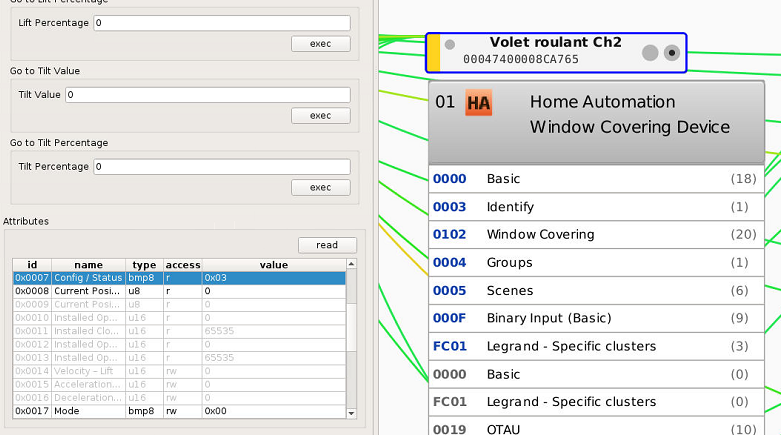
here the first part :

Here API ID 20 (with the FW OUT OF THE BOX and I dont have the Home Assistant issue to close it, neither the feedback state).
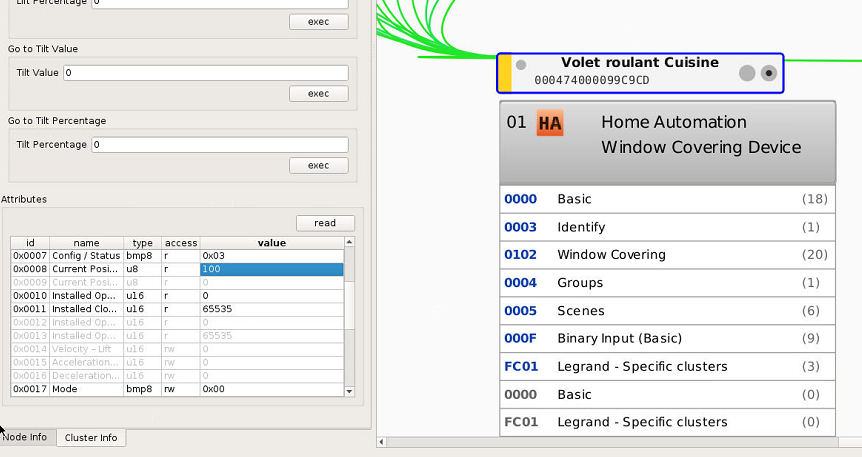
Here API ID 16 (with the latest FW by legrand and I had the Home Assistant issue to close it)
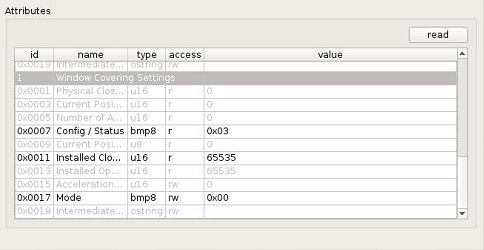
here the 2nd part :

Here API ID 20 :

Here API ID 16 :
samsam-rolon
on 3 Nov 2020
Perfect, thx.
So bad luck, exactly same setting, there is a little difference beetween the 2 firmwares, one of them seem to use the attribute 0x0010 and 0x0011 but not the other, but It don't explain the difference ....
There is another user with the same issue than you, will try to find him, to see if he have updated his device too.
Edit:
Lol he was on same issue was Plum59 and on his capture he have version 0021 too.
Smanar
on 3 Nov 2020
Oh...
So any idea To deal with ?
Promote one specific firmware instead of an other ?
samsam-rolon
on 3 Nov 2020
Nooo, easier, I can make the code act differently according the the swversion.
But it s realy something new, first time I see that, but you are 2 with the same problem and the same firmware, so realy strange.
For the moment I m asking pipiche, to see if he already have encounter this kind of situation.
Smanar
on 3 Nov 2020
Okay ! I have join the discord server. As saglagla#9444
I'm available if needed for debug or screenshare or just to exchange
samsam-rolon
on 3 Nov 2020
I m Smanar too on it.
But now I remember, the firwmare "out of the box" is buggy, I m using an hack in the code, so Legrand have probably corrected the bug on a future firmware and it can explain this result.
I will make the code tommorow, I will contact you for test, from my memory you are able to compile the code ?
just to be sure, on your capture the attribute lift position is reversed 0x0008, but the command are reversed too ? To check just use deconz , cluster 0102, and try "up" and "down", to check if the 2 command react same, or are reversed too.
Smanar
on 3 Nov 2020
I m Smanar too on it.
But now I remember, the firwmare "out of the box" is buggy, I m using an hack in the code, so Legrand have probably corrected the bug on a future firmware and it can explain this result.
I will make the code tommorow, I will contact you for test, from my memory you are able to compile the code ?
just to be sure, on your capture the attribute lift position is reversed 0x0008, but the command are reversed too ? To check just use deconz , cluster 0102, and try "up" and "down", to check if the 2 command react same, or are reversed too.
Okay, nice to know !
I'll confirm : those buton are working as expected for both switchs !

samsam-rolon
on 4 Nov 2020
Hello there !
After a lot of test and exchanges with @Smanar, We've got
- how switch rollershutter works
- differences between FW
- why this buggy on HA
_@pipiche38 : I'm prety sure you'll be intrested in !_
Careful : it's long to explain !
First, you have to know how works exactly the rollershutter with the switch:
- You are pressing a UP/DOWN Command on the switch or via API (no matter there)
- The switch rollershutter is moving a relay inside to switch the electricity to move up or down the rollershutter.
- Inside of the motor, there is some "mechanical stops" to stop the shutter at the end of movement.
Notes : At this moment, the rollershutter have finished to moove and the motor is not more supplied by electricity thanks to mechanical stops but the switch is still sending power supply to the rollershutter
- After few time, the switch is "resetting" the relay to off position in order to not send power anymore to the rollershutter
Notes : _You will ear a click like a turnlight after 1-2min_
Bonus : I suspect it's a pure "timer" but it maybe also a timer after an undetected power consumption in the switch ?
Point 3 and 4 are very important !
## How firmware 26 works (0x001a in hexa) (i.e. Firmware "out-of-the-box")
- You are pressing a UP/DOWN Command on the switch or via API (no matter there)
- The switch rollershutter is moving a relay inside to switch the electricity to move up or down the rollershutter.
At this moment, the rollershutter is mooving and the state of the rollershutter is not UP or DOWN.
in deCONZ API or in zigbee attribute deCONZ GUI even if I force a refresh of attributeit's
"bri":"127"or"lift":"50"
- Inside of the motor, there is some "mechanical stops" to stop the shutter at the end of movement.
REMINDER : At this moment, the roller have finished to moove but the switch is still sending power suppy to the rollershutter
At this moment the state of the rollershutter is UP or DOWN for you and the motor BUT NOT for the switch beacause it's waiting the "return of off position of the relay"
in deCONZ API or in zigbee attribute deCONZ GUI even if I force a refresh of attribute
it's
"bri":"127"or"lift":"50"
- After few time, the switch is "resetting" the relay to off position in order to not send power anymore to the rollershutter
REMINDER : _You will ear a click like a turnlight after 1-2min_
or in deCONZ API or in zigbee attribute deCONZ GUI even if I force a refresh of attribute
it's
"bri":"255"or"lift":"100"if OPEN
it's"bri":"0"or"lift":"0"if CLOSE
## How firmware 33 works (0x0021 in hexa) (i.e. call "Firmware updated")
Physical switch action case :
- You are pressing a UP/DOWN Command on the switch
- The switch rollershutter is moving a relay inside to switch the electricity to move up or down the rollershutter.
> At this moment, the rollershutter is mooving and the API state of the rollershutter is immediadtly UP or DOWN.
> in zigbee attribute deCONZ GUI or in deCONZ API
> > it's"bri":"255"or"lift":"100"if CLOSE
> > it's"bri":"0"or"lift":"0"if OPEN
NOTE : Attribute is
"bri":"127"or"lift":"50"if you are using STOP command (API or physical) before the end of the mouvement
- Inside of the motor, there is some "mechanical stops" to stop the shutter at the end of movement.
REMINDER : At this moment, the roller have finished to moove but the switch is still sending power suppy to the rollershutter
At this moment the state of the rollershutter is UP or DOWN for you and the motor BUT NOT for the switch beacause it's waiting the "return of off position of the relay"
Nothing change in deCONZ API or in zigbee attribute deCONZ GUI
- After few time, the switch is "resetting" the relay to off position in order to not send power anymore to the rollershutter
REMINDER : _You will ear a click like a turnlight after 1-2min_
Nothing change in deCONZ API or in zigbee attribute deCONZ GUI
API action case :
- You are asking a UP/DOWN Command on the API (with
"open":"true/false"ou"lift":"0/100" - The switch rollershutter is moving a relay inside to switch the electricity to move up or down the rollershutter.
> At this moment, the rollershutter is mooving but the state of the rollershutter is still the old one. Neither updated throught websocket
NOTE : API is immediatly updated if you're force refresh the attribute in deCONZ GUI
NOTE : Attribute is
"bri":"127"or"lift":"50"if you are using STOP command (API or physical)before the end of the mouvement
- Inside of the motor, there is some "mechanical stops" to stop the shutter at the end of movement.
REMINDER : At this moment, the roller have finished to moove but the switch is still sending power suppy to the rollershutter
At this moment the state of the rollershutter is UP or DOWN for you and the motor BUT NOT for the switch beacause it's waiting the "return of off position of the relay"
NOTE : Nothing change in deCONZ API or in zigbee attribute deCONZ GUI
- After few time, the switch is "resetting" the relay to off position in order to not send power anymore to the rollershutter
REMINDER : _You will ear a click like a turnlight after 1-2min_
NOTE : After few time, the network refresh the device attribute and the deCONZ API or in zigbee attribute deCONZ GUI is updated. The information is received by websocket
Conclusion
With latest FW, any API command need to force a refresh of attribute just after in order to get HA not buggy
That why the HA UP/DOWN button are unusable sometime, because return state is buggy ... and mouvement may be inversed ....
samsam-rolon
on 5 Nov 2020
thx for the clear explanation of the problem, but now the question for you is crystal clear....is there any way to fix in HA or in deConz in order to have properly working ?
thx
One more question....how can I understand which is my firmware installed ? I was looking for one of the two strings referred by you inside deConz cluster info panel and I didn't find it.
I checked on Phoscon app and I can see only that my "Shutter SW with level control" has version 00b
lambu76
on 5 Nov 2020
thx for the clear explanation of the problem, but now the question for you is crystal clear....is there any way to fix in HA or in deConz in order to have properly working ?
Yes ! @Smanar is going to pull a MR to correct that
thx
One more question....how can I understand which is my firmware installed ? I was looking for one of the two strings referred by you inside deConz cluster info panel and I didn't find it.
I checked on Phoscon app and I can see only that my "Shutter SW with level control" has version 00b
Hum, very strange.
I made an API Call like this :
http://172.16.0.65:8080/api/TOKEN_API/lights/17
json
{
  "etag": "e23005c63baee54ae855d83d17ab50c9",
  "hascolor": false,
  "lastannounced": "2020-10-17T21:54:09Z",
  "lastseen": "2020-11-05T14:35Z",
  "manufacturername": "Legrand",
  "modelid": "Shutter switch with neutral",
  "name": "Volet roulant Salon",
  "state": {
    "bri": 254,
    "lift": 100,
    "on": true,
    "open": false,
    "reachable": true
  },
  "swversion": "0021",
  "type": "Window covering device",
  "uniqueid": "00:04:74:00:00:99:c9:bf-01"
}

samsam-rolon
on 5 Nov 2020
@lambu76
Is your device was previously connected to Official Gateway ? If yes, When ?
What's the device legrand model number ?
samsam-rolon
on 5 Nov 2020
I don't have at all the Gateway.
I executed the API call and this is a fragment of the response.
{"etag":"fdb515f4e8280d1e1a978696fcd36b10","hascolor":false,"lastannounced":"2020-11-04T09:27:40Z","lastseen":"2020-11-04T18:19Z","manufacturername":"Legrand","modelid":"Shutter SW with level control","name":"Tapparella","state":{"bri":127,"lift":50,"on":true,"open":true,"reachable":true},"swversion":"00b","type":"Window covering device","uniqueid":"00:04:74:00:00:b1:dc:0a-01"}
aligned with the Phoscon App.

I just bought 10 days ago on Amazon for some tests.
lambu76
on 5 Nov 2020
Hum very strange .... maybe a very old firmware so ...
Can you confirm the reference product ID ?
On my side it's Ref. 0 648 96 like : https://www.legrand.fr/pro/catalogue/42566-version-celiane-with-netatmo/interrupteur-filaire-connecte-celiane-with-netatmo-pour-volet-roulant-graphite
samsam-rolon
on 5 Nov 2020
lambu76
on 5 Nov 2020
Oh .... very different !
samsam-rolon
on 5 Nov 2020
I think it0's only different in term of cover but not in term of functionalities....btw it generates the same problem.
It works perfectly from deConz, but not from HA
lambu76
on 5 Nov 2020
@lambu76 I have already answered (and on several issue), your device is not yet in deconz, if you want to make try with it, you need to compile the code or wait for future version.
Smanar
on 5 Nov 2020
let's wait.... :-((
lambu76
on 5 Nov 2020
Ok so for the little story, we have found 2 methods to try
- Force the device state just after the command (set the device to "open" even it s not open in reality after an "open" order).
- Force the device state at unknow position just after the command ( 0 = closed, 100 = open, 50= stopped or working).
All have advantages and disadvantages. For exemple if you use the "stop" command. if you use script or monitoring, or the delay to have the return.
@samsam-rolon is testing the 2d method ATM.
Smanar
on 5 Nov 2020
Problem is the same with firmware 0x23 :-(
 pipiche38
on 8 Nov 2020
pipiche38
on 8 Nov 2020
I tried last firmware 2.05.88 and there is no changes in the wrong behavior with Legrand Bticino Living Light L4027C used with Hass.IO ....let's hope in the very new version 2.06.00 just released today.
lambu76
on 15 Nov 2020
Yep, the patch was not in the version 88, but in the 2.6.0
https://github.com/dresden-elektronik/deconz-rest-plugin/releases/tag/v2.6.0-beta
Smanar
on 16 Nov 2020
ok thx.
I have to wait the auto update for Deconz add-on into Hass.IO.
thx
lambu76
on 16 Nov 2020
yes, i have exactly the same problem ! but as i'm a noob with Deconz and HA, not sure to understand everything.....
i never had the chance to down the shutter !
It works perfectly from deConz interface, when i use the buttons there.
 blendesign
on 17 Nov 2020
blendesign
on 17 Nov 2020
There is a patch (probably) for this bug in the deconz version 2.6.0 (beta version)
Smanar
on 17 Nov 2020
ok.... is it difficult to install it on HA ?
blendesign
on 17 Nov 2020
Yes ^^, and more if you are using container.
If you don't have deconz on another machine/VM, I think it s better for you waiting for they use it.
Smanar
on 17 Nov 2020
i installed Deconz also on my computer ( Windows10 ).... is it possible to update it there, and then put the Conbee2 on my Pi4 ?
blendesign
on 17 Nov 2020
ha yes to try you can install deconz on the PC I have just see the beta version available for windows too (but the conbee need to be on the PC)
And you can configure HA to use the deconz installed on the PC, but I can't explain the procedure for HA.
It s deconz you need to update, not the conbee.
Smanar
on 17 Nov 2020
after some thought about that, i think the windows version of Deconz is not the same than the Pi4 version under HA....
i think i mix the Conbee2 firmware ( same for both: Pi4 and windows) and the Deconz Software ( different) !
blendesign
on 17 Nov 2020
Related issues
 salopette
·
4Comments
salopette
·
4Comments
 ReeChip
·
5Comments
ReeChip
·
5Comments
 qm3ster
·
3Comments
qm3ster
·
3Comments
 felixstorm
·
4Comments
felixstorm
·
4Comments
 philko123
·
3Comments
philko123
·
3Comments
Most helpful comment
Hello there !
After a lot of test and exchanges with @Smanar, We've got
_@pipiche38 : I'm prety sure you'll be intrested in !_
Careful : it's long to explain !
First, you have to know how works exactly the rollershutter with the switch:
Point 3 and 4 are very important !
## How firmware 26 works (0x001a in hexa) (i.e. Firmware "out-of-the-box")
## How firmware 33 works (0x0021 in hexa) (i.e. call "Firmware updated")
Physical switch action case :
> At this moment, the rollershutter is mooving and the API state of the rollershutter is immediadtly UP or DOWN.
> in zigbee attribute deCONZ GUI or in deCONZ API
> > it's
"bri":"255"or"lift":"100"if CLOSE> > it's
"bri":"0"or"lift":"0"if OPENAPI action case :
"open":"true/false"ou"lift":"0/100"> At this moment, the rollershutter is mooving but the state of the rollershutter is still the old one. Neither updated throught websocket
Conclusion
With latest FW, any API command need to force a refresh of attribute just after in order to get HA not buggy
That why the HA UP/DOWN button are unusable sometime, because return state is buggy ... and mouvement may be inversed ....