Deconz-rest-plugin: Ikea dimmer not working with fast clockwise spin (signal 1002)
I have two Ikea dimmers in Deconz. I'm using Home Assistant with Node Red. When I hook up the dimmer inputs to debug nodes in Node Red, I'm able to see 3 out of the 4 codes come in.
4002 - Fast CCW
3002 - CCW
2002 - CW
_missing_ 1002 - Fast CW _missing_
Code 1002 has not come up once for me on either dimmer. I tried setting them up every imaginable way, but cannot for the life of me get the fast clockwise spin to show up.
I believe this may be an issue with the Deconz system not supporting this spin, although I have seen others able to receive this signal previously.
Deconz 5.3.2 from Hassio, dimmers on 1.2.248.
 benblb
All 21 comments
Binned mine. Too sensitive and even Ikea stopped selling them.
 djashjones
on 19 May 2020
djashjones
on 19 May 2020
I just purchased mine from eBay (not going to Ikea during COVID-19) this week. I was aware that it is not a great product before I placed my order, but I was after the smart bulbs.
I would still like the option of using the dimmer's full functionality regardless of product quality, and filed an issue because I believe it is a problem with Deconz.
benblb
on 19 May 2020
I had trouble with mine even when paired with the ikea hub, soon replaced them for the 5 button remote.
With deconz used it as a volume knob for my speaker via node-red. Again nightmare.
You might have better luck!
djashjones
on 19 May 2020
I'm cautiously optimistic, but don't have any real control here since I think I'm at Phoscon's mercy. I have motion lighting set up and will only use the dimmer if I need to manually make changes to the lighting.
Right now I have:
Slow CW --> Lights to 100% (since fast CCW doesn't work)
Slow CCW --> -10% brightness for each reading
Fast CCW --> Lights to 0%
It works well enough, but I would like to switch my Slow CW to be +10% brightness for each reading and then make fast CW lights to 100%.
benblb
on 19 May 2020
I'm not sure how to put this delicately, but basically the dimmer sucks. Better use the On/Off remote which also dims when holding the buttons.
They released new ZB3 firmware for the dimmer, which does seem to make it more reliable. Update can be done through the deCONZ OTAU plugin. With the new firmware, it now supports group bindings. I changed the REST API plugin to create a group and bind the sensor to it on pairing in Feb, see #2485, to prevent the dimmer from sending broadcasts.
In retrospect, that might not have been the best idea. We found that the SYMFONISK controller was flooding the network with repeated broadcasts (groupcasts) while turning, see #1898. So I changed that to bind only to the coordinator. We might need the same for the wireless dimmer with the new firmware.
 ebaauw
on 19 May 2020
ebaauw
on 19 May 2020
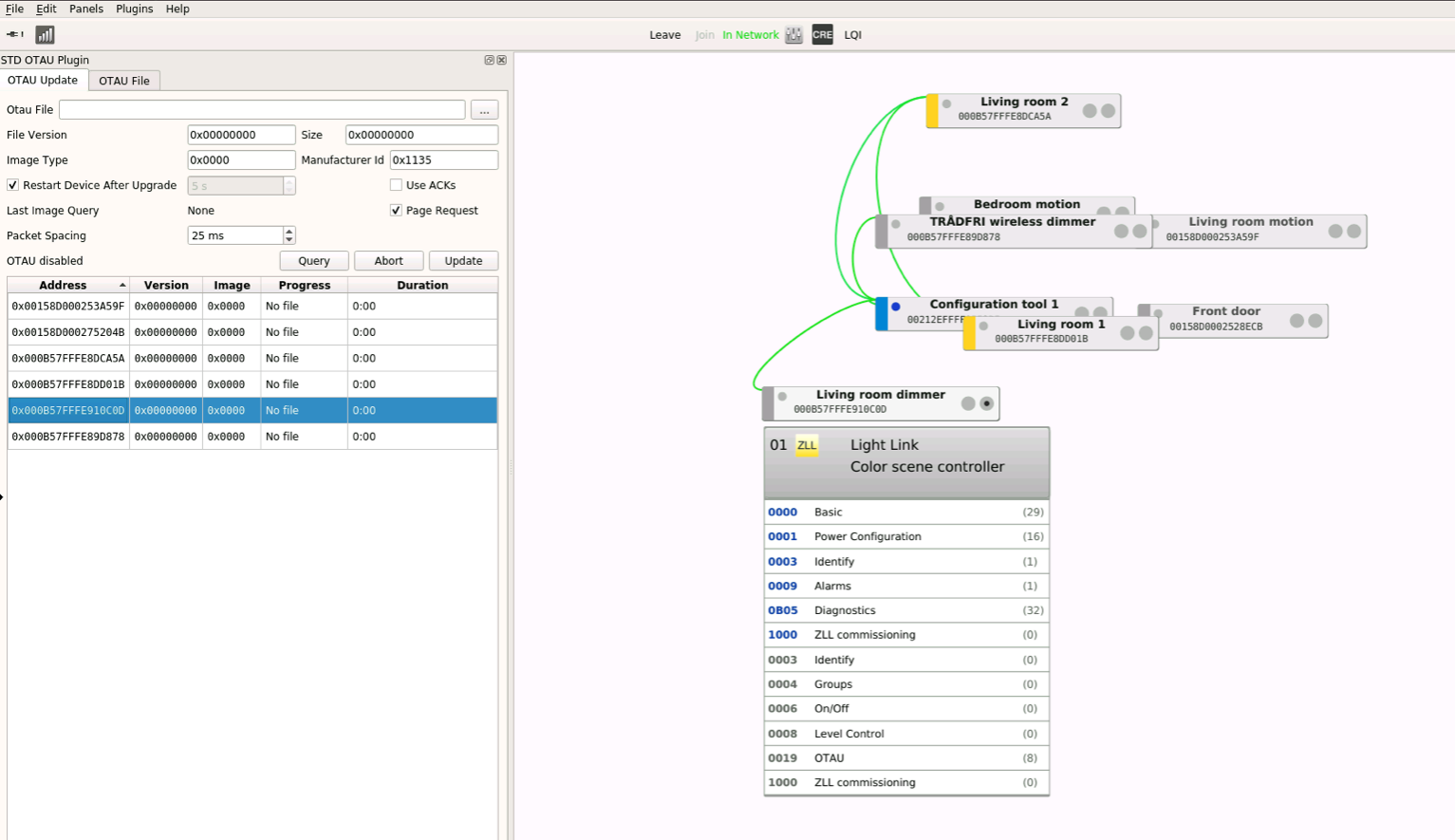
@ebaauw Thanks for your reply. Yep, didn't imagine this was a quality product, but I wanted to play with it anyways. I'm in VNC and can see the update tab. I highlighted the correct address and clicked "query" (per this guide), but nothing has happened. I'm new to Zigbee and Deconz and am a bit confused.
Mind telling me what I've done wrong?
benblb
on 19 May 2020
Run ikea-ota-download.py to download the firmware to ~/otau and restart deCONZ. Then follow the instructions linked from https://github.com/dresden-elektronik/deconz-ota-plugin. Make sure to wake the dimmer when pressing _Query_. Alternatively, remove and re-insert the battery. After the file has been found, press _Update_, while making sure the dimmer is awake. Update will take some 4 hours. Make sure the battery will last that long.
ebaauw
on 19 May 2020
I second that the dimmer sucks, Great concept but poorly executed.
djashjones
on 19 May 2020
Alright, I downloaded the firmware and restarted deCONZ, but I'm very scared about the 4 hours update! Is that for certain, or just possibly will take 4 hours?
87% on one of them, 60% on the other. Will start with 87% dimmer, but they are just little watch batteries.
benblb
on 19 May 2020
Nothing's for certain. It might take longer. Or maybe only 3.5 hours.
CR2032. IKEA sells them ridiculously cheap as PLATBOJ.
ebaauw
on 19 May 2020
Hope you got spare batteries, lol
djashjones
on 19 May 2020
Sounds like I might have to buy some new ones!
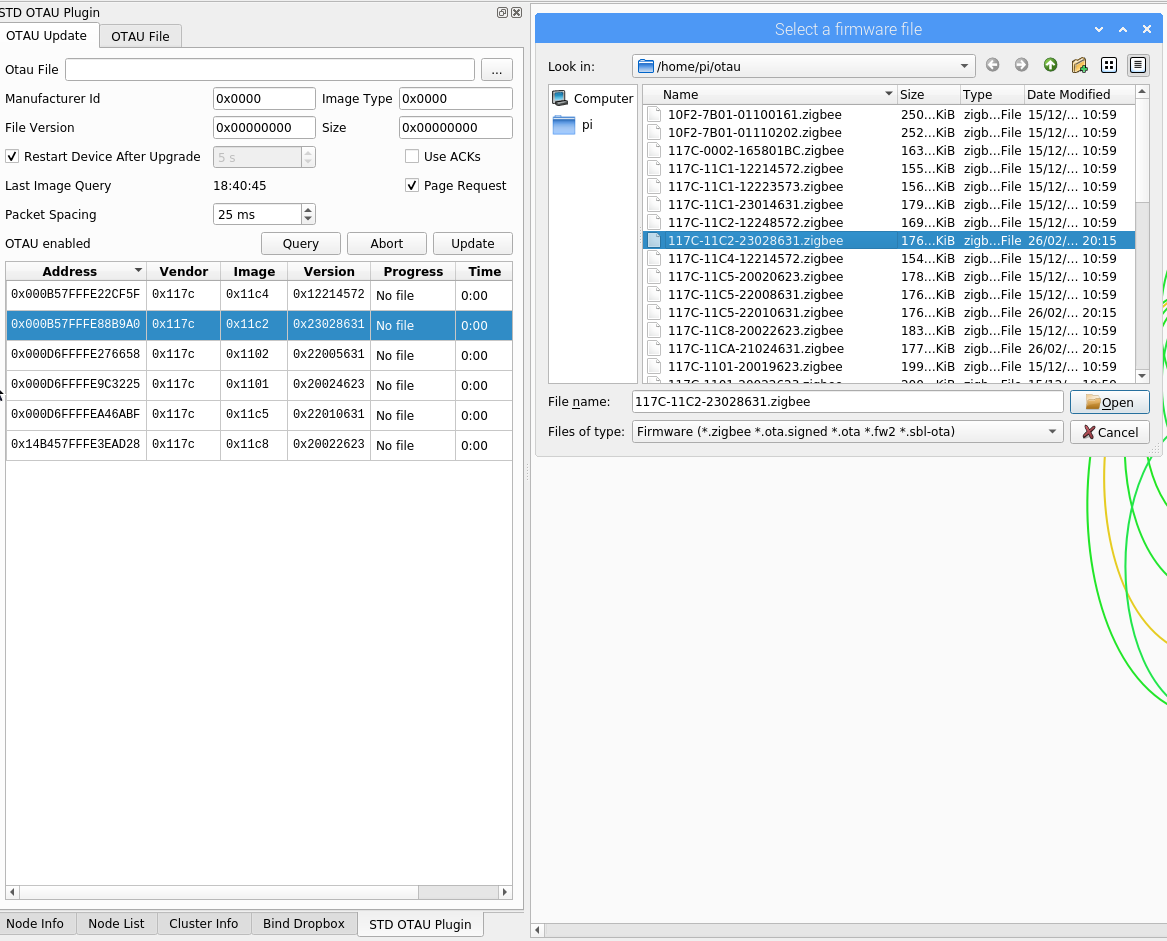
@ebaauw thanks you so much for your help and patience this far. I'm having some trouble following the instructions, do I select my firmware? I see "OTAU disabled" in the corner. How do I know which firmware to choose?
benblb
on 19 May 2020
do I select my firmware
No, the OTAU plugin should select it (if deCONZ has been (re-) started after you download the files to ~/otau).
I see "OTAU disabled" in the corner.
Not good. Enable it in the old web app or through ph -p put /config '{"otauactive": true}'.
How do I know which firmware to choose?
Compile and install the latest version of the OTAU plugin, and match the device _Manufacturer Code_ and _Image Type_ with the _Manufacturer Code_ and _Image Type_ in the filename. The OTAU plugin copies the files under a standard name on startup.
ebaauw
on 19 May 2020
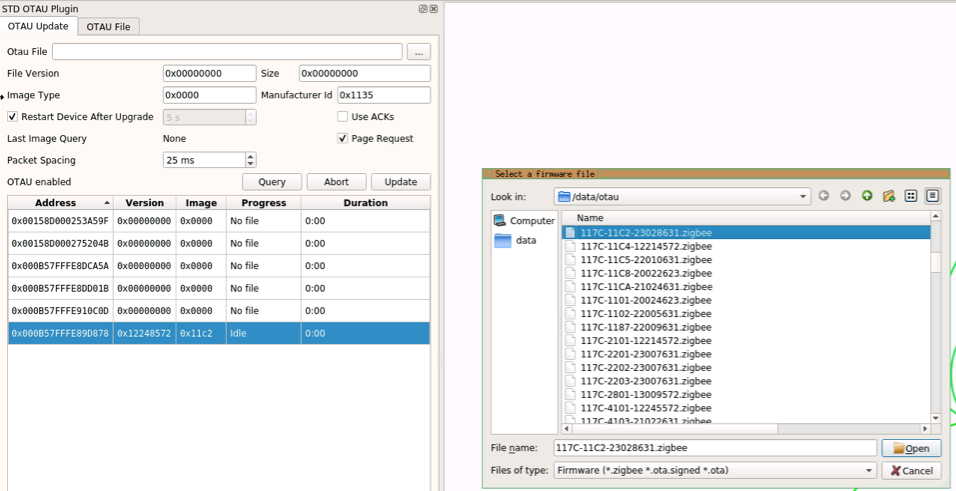
Wohoo baby steps. I now have OTAU enabled, selected my device, and hit query while moving the dimmer. It says "idle" and has done for a few minutes.
I also managed to find the firmware myself, but did not click "open" as I believe based on your explanation I don't need to? Instead of using query should I manually select the firmware and click "update"?
benblb
on 19 May 2020
Update: haven't done anything further, but one of my lightbulbs has decided to update itself? It was not highlighted on the list when I clicked query.
FW update was successful, that's pretty cool. Doing the second light, then will try the dimmer.
benblb
on 19 May 2020
The plugin starts update of mains powered devices automatically. Lights usually take anywhere between 10 and 40 minutes to update. Note the plugin only updates one device at a time.
ebaauw
on 19 May 2020
Good to know! Yep, 10:15 for the first light, about 10% per minute. You know your stuff 😛
Any tips on getting the dimmer to wake up, you said take the battery out and put back in? Once the update begins it remains awake, correct?
Also it might go over my head, but I am curious to understand why the lights update in 10m while a dimmer may take 4h.
Edit: stuck at 8 seconds?
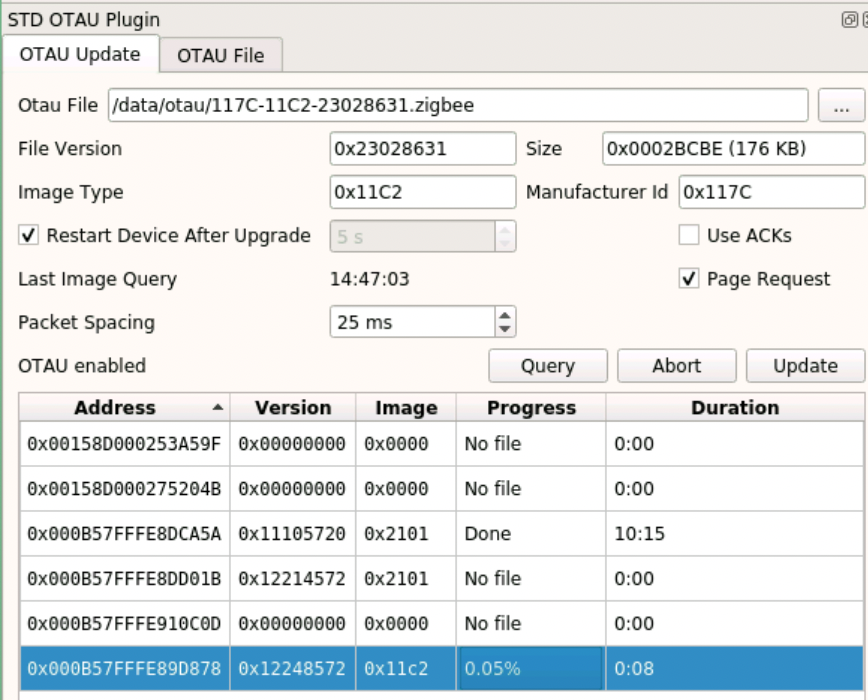
Aborting, removing battery, putting battery back, and pressing update got it moving.
Edit 2: My guess is due to the nature of the switch, it can't accept data very quickly so the update takes forever lol.
benblb
on 19 May 2020
Just finished the update on one of the switches! It took just under 4 hours as promised.
I restarted deCONZ, Node Red, and for good measure, my home assistant server. The switch behavior is the same, still not able to get it to output a fast clockwise turn.
Version 2.48, build 165425 is now running on my dimmer.
Unfortunately, I'm still unable to receive a fast clockwise turn. I know no one likes these dimmers and I understand if it isn't supported, but it would be cool to get Node Red to recognize its fourth action. If not, three states will be fine. Really grateful for your help earlier today @ebaauw !
benblb
on 20 May 2020
The speed of the firmware update is dictated by the device. It requests a chunk of data to which the OTAU server responds. I suspect the end device sends the request, goes to sleep, wakes up after 5 seconds or so, polls its parent for the response, and then sends the next request.
The dimmer sends commands which are picked up by the REST API plugin to create button events from them. If you don’t get the fast turn, it’s because deCONZ doesn’t see the corresponding commands. This could be because the network is flooded (cf the SYMFONISK issue) or because the dimmer doesn’t send it. In the first case, I’d expect the issue to be intermittent. In the seconds case: try resetting and re-pairing the dimmer. Did you replace the battery after the firmware update? These coin-cell powered devices tend to behave erroneously as battery voltage drops, sometimes well before the battery percentage shows as critical.
ebaauw
on 20 May 2020
Ah that explains it. Sounds like a good way to prevent corruption if the device goes to sleep unexpectedly at the expense of speed.
Still showing a very high battery percentage... 87% still in fact. And my other dimmer which was barely touched today went down to 21%... I have a feeling Home Assistant swapped the values around. After deleting and re-pairing I see it on version 2.3.028 in deCONZ, but still am unable to get anything for fast CW unfortunately. Fast CCW still working fine.
benblb
on 20 May 2020
It seems this issue is inactive / resolved. If it is not, please re-open or create another issue!
 Mimiix
on 5 Jun 2020
Mimiix
on 5 Jun 2020
Related issues
 tenholde
·
3Comments
tenholde
·
3Comments
 horchi
·
5Comments
horchi
·
5Comments
 1onar
·
5Comments
1onar
·
5Comments
 qm3ster
·
3Comments
qm3ster
·
3Comments
 salopette
·
4Comments
salopette
·
4Comments
Most helpful comment
No, the OTAU plugin should select it (if deCONZ has been (re-) started after you download the files to
~/otau).Not good. Enable it in the old web app or through
ph -p put /config '{"otauactive": true}'.Compile and install the latest version of the OTAU plugin, and match the device _Manufacturer Code_ and _Image Type_ with the _Manufacturer Code_ and _Image Type_ in the filename. The OTAU plugin copies the files under a standard name on startup.