Deconz-rest-plugin: Capteur PST03-A
salut
est il prévu d'intégrer le capteur Capteur PST03-A ?
merci
hi
Is it planned to integrate the PST03-A sensor?
thank you
https://community.jeedom.com/t/capteur-pst03-a-zigbee-sous-jeedom/27441/9
 rudak
rudak
All 36 comments
Hello, try to use english please, at least with google translate, lot of people here don't understand french
I can perhaps, have you try to include it using deconz (and not phoscon ?
I need theses screenshoot to include it https://github.com/dresden-elektronik/deconz-rest-plugin/wiki/Request-Device-Support
Like usual, as it's a battery powered device, you will probbly need to wake up the device when pressing the "read" button to fill fields.
Hello, essayes d'utiliser l'anglais, au pire avec google translate, beacoup de monde ici ne comprend pas le francais.
Sinon je peux faire un essais mais j'aurais besoin de capture d’écran de l'appareil inclus sous deconz et pas phoscon, les memes que sur le lien precedent.
C'est un appareil a pile donc tu risques d'avoir a le reveiller en meme temps que tu presses le bouton "read" pour remplir les champs.
Edit:
En realité, je viens de trouver les infos sur un autre projet zigbee, donc ca devrait aller si je n'ai pas toutes les infos, mais essayes au moins les captures d'ecran stp.
 Smanar
on 9 May 2020
Smanar
on 9 May 2020
ok I can try but I only have Jeedom at disposal with the deconz plugin and obviously the captures come from somewhere else, so if you have indications to make these captures I will follow them.
rudak
on 9 May 2020
Ok, so there is another problem, if I make code modification, you need to compile it to test it (I can't on my side because I haven't the device) and I already have some problem with users on jeedom. We can make without test, but the result will not be garanted)
BTW. to get theses screenshoot if you haven't acess to the GUI (From my memory jeedom are mostly headless machine), the easy way is installing deconz a second time on a PC machine.
Swap the key, make the inclusion on the PC machine, take screenshoot, and swap again the key.
- The configuration is on the machine so on the pc you will have an empty network (it's normal)
- Make fast because some devices like xiaomi will leave the network without the conbee on jeedom after some hours.
- The device will be invisible in Phoscon but visible on deconz (with GUI), after inclusion. If you have problem, you can make inclusion directly in deconz, but better try with phoscon first.
As I have said, I can find somes informations elsewhere, so don't worry, if you haven't all of them, but will be usefull to be sure this device can be included in deconz, and a minimal amount of information.
Pour les captures :
1 - l'image complete du node avec la liste des clusters apres avoir selectionné le second rond dans le node (barre de titre)
2 - onglet "node info"
3 - onglet "cluster info" apres avoir selectionné "Basic 0000", ne pas oublier de reveiller l'appareil et de presser "Read", c'est le plus dur a faire.
Smanar
on 10 May 2020
Ok I'll try that, but first I have to make sure that when I put the flash drive back on the jeedom side, my devices will come back just like before. (I'm a noob)
So:
- I install the .exe on a pc
- I note the key
- I'm changing it to run the tests
- I'll retrieve the information mentioned and send it to you here.
- I put the conbee back on my rpi and I put the saved key back on.
- everything's back to the way it was before the operation
If you confirm me, I'll do it during the day.
rudak
on 10 May 2020
1- install deconz on PC https://phoscon.de/en/conbee2/install
2 - Just unplug the conbee from jeedom and plug it on the PC
3 - Start deconz
4 - pair the device, using Phoscon first, else deconz itself
5 - Use deconz to find information (french tuto > https://presentationdeconz.wordpress.com/linterface-graphique/)
6 - make capture
7 - unplug the conbee, and replug it on jeedom
8 - you will need to restart the deconz plugin on jeedom (not sure, but I think)
Smanar
on 10 May 2020
Are those values enough for you @Smanar ?
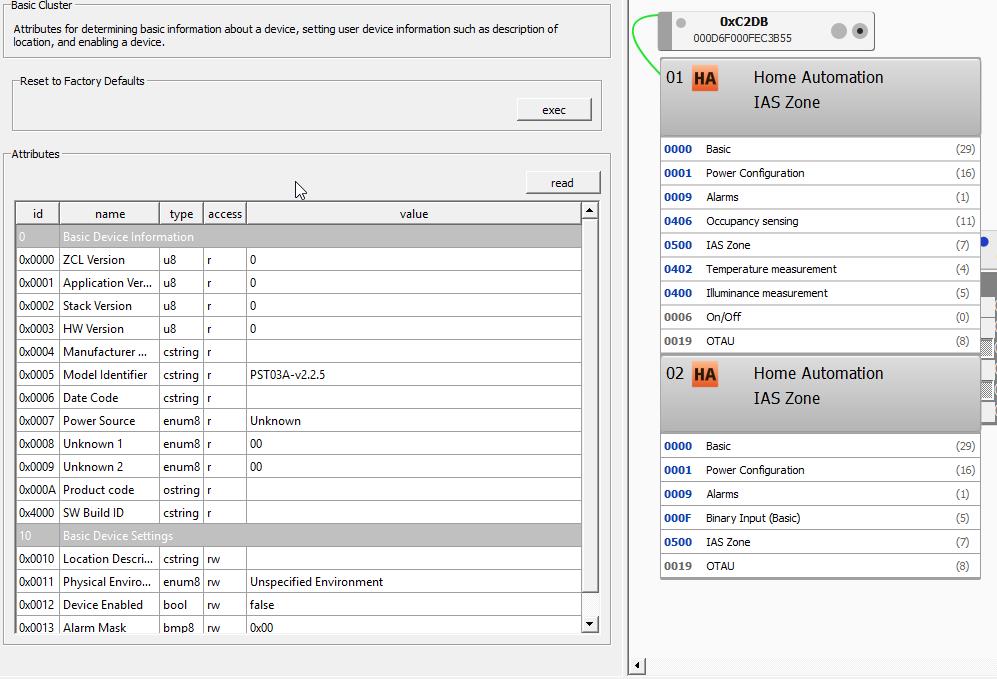
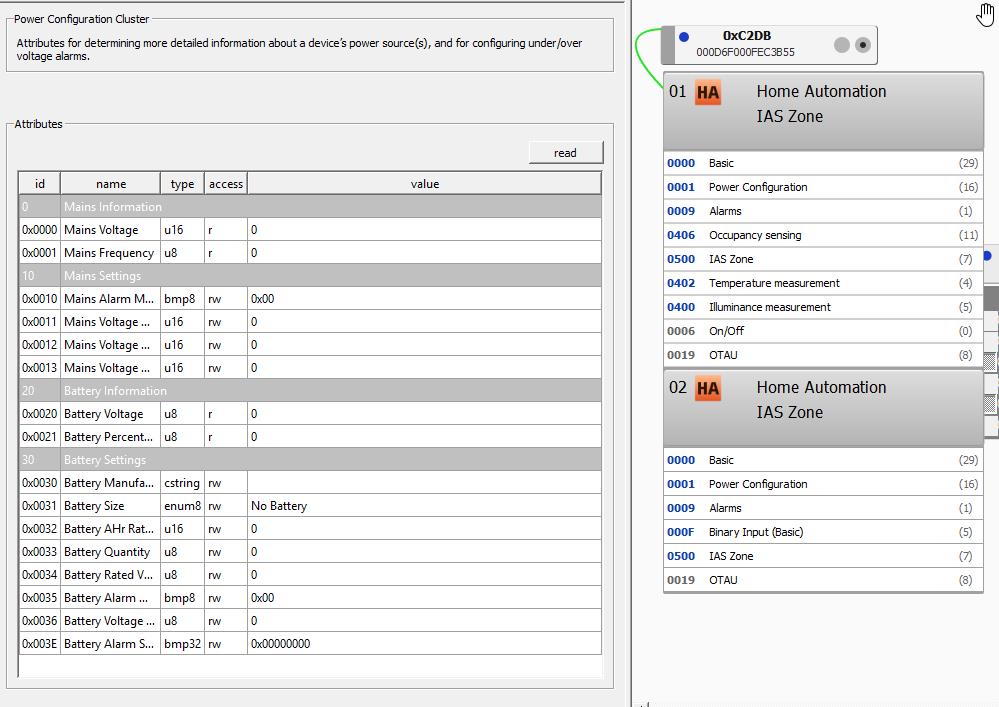
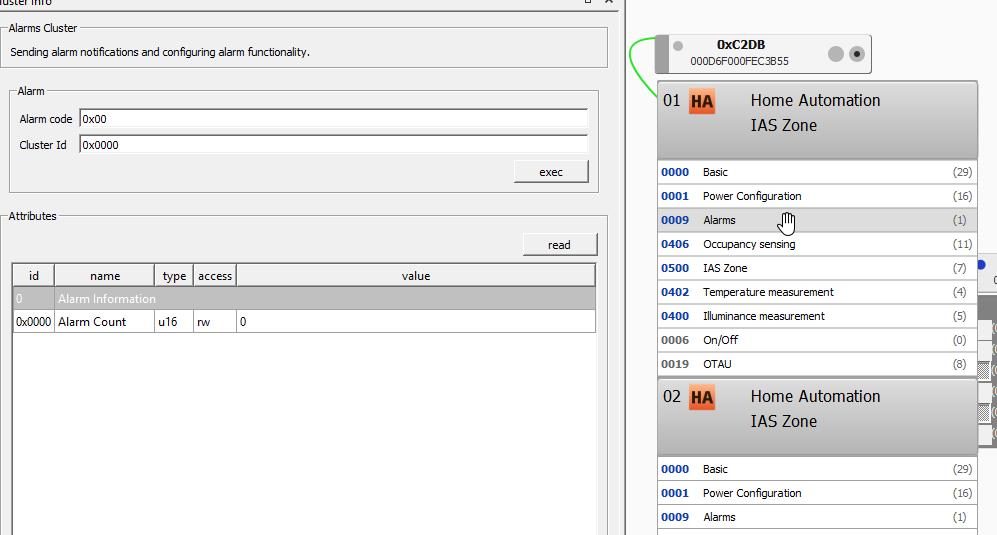
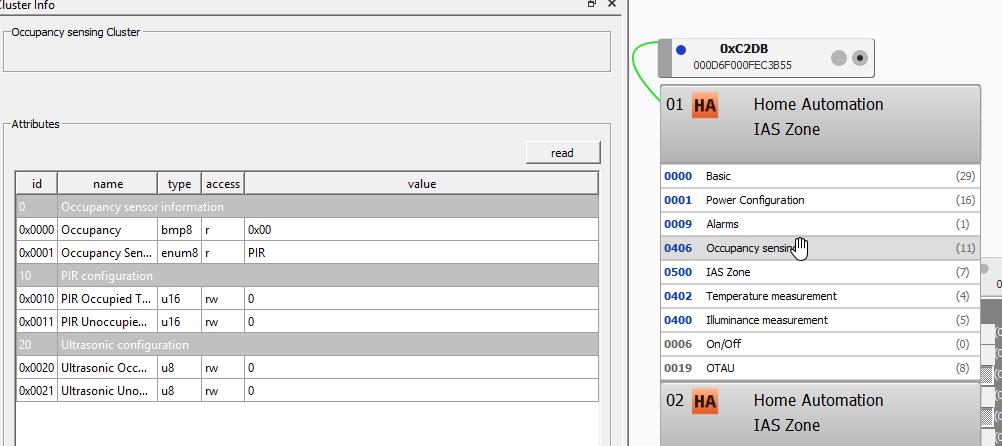
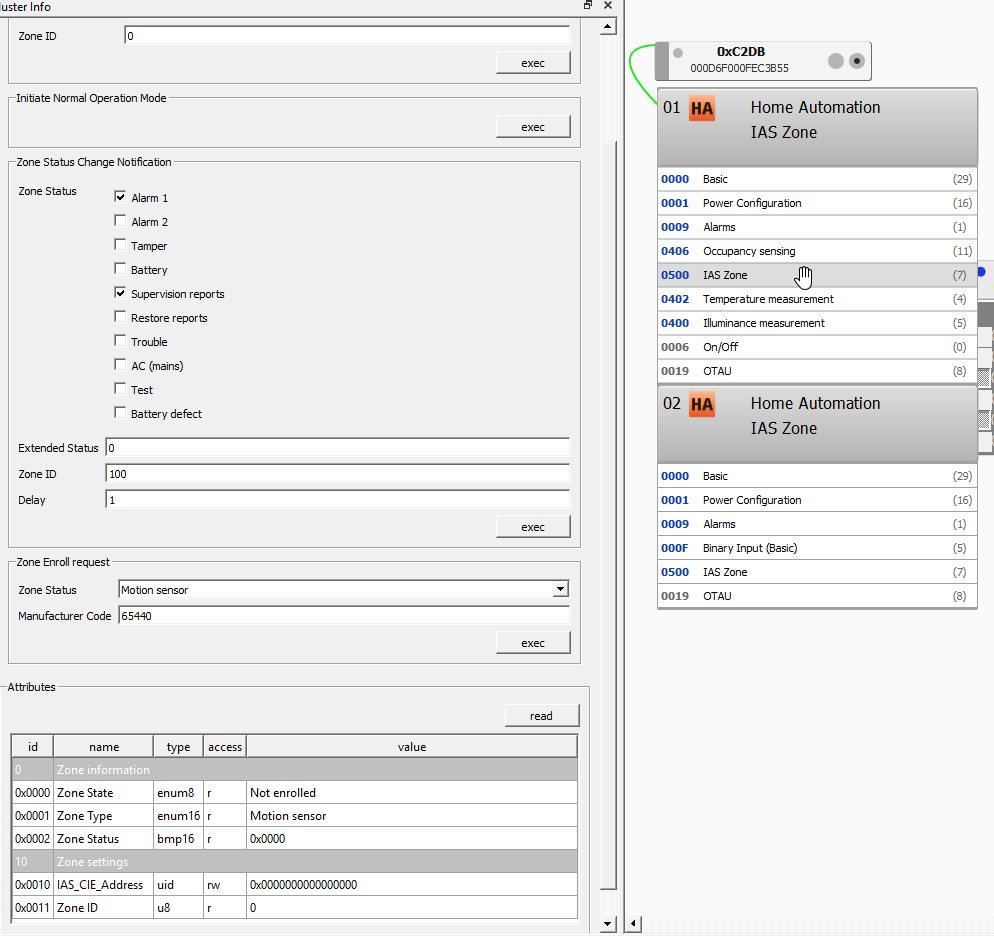
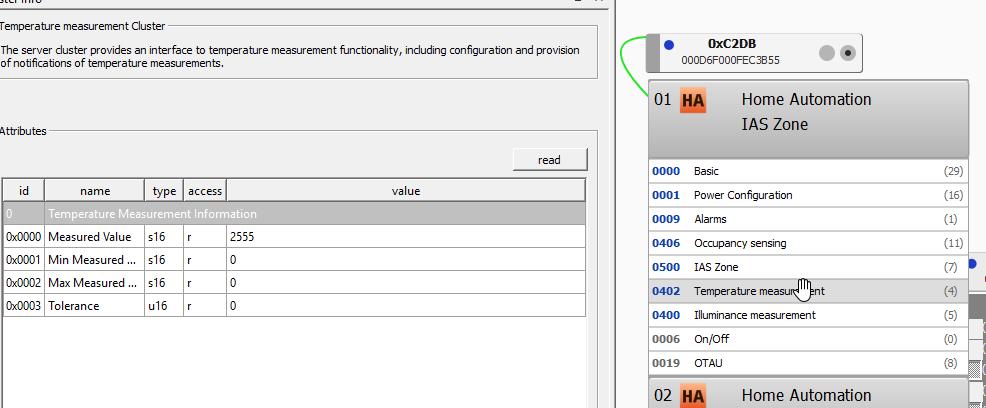
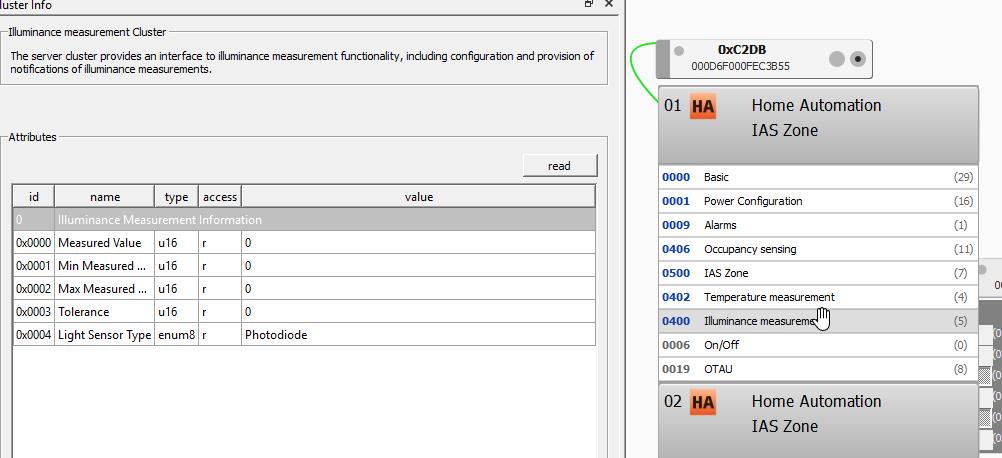
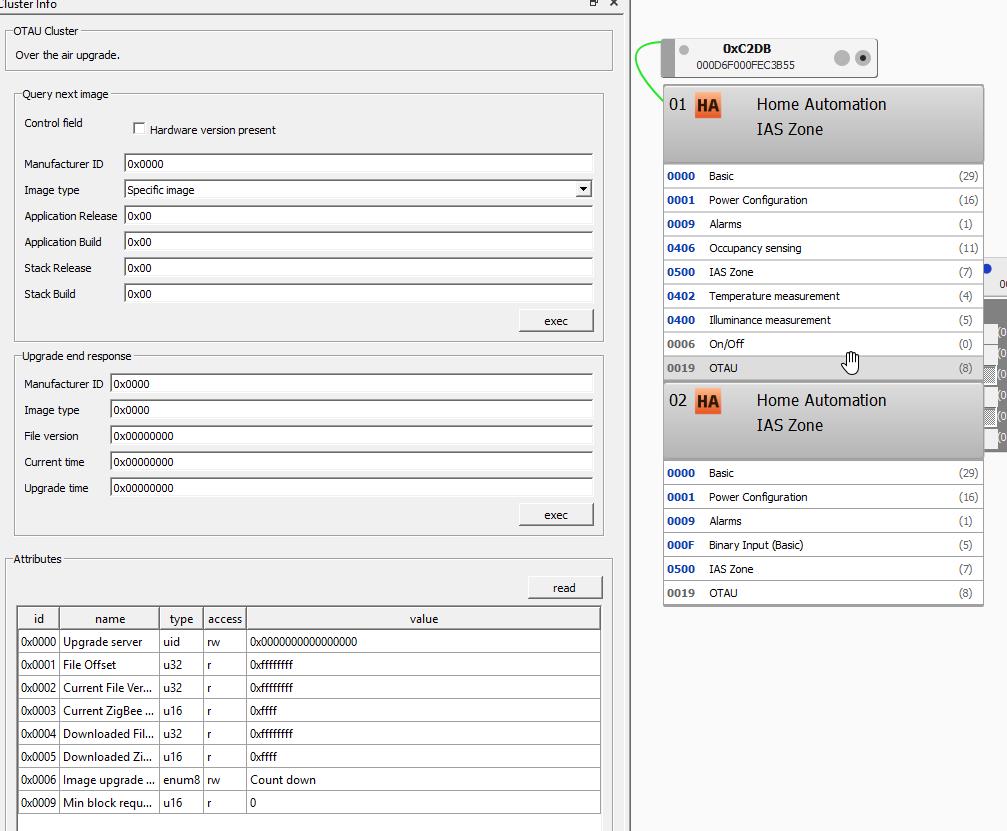
rudak
on 10 May 2020
Yes ^^. Perfect.
I just miss the manufacturer but I will try to find it somewhere else or the device can miss it.
And the "node info" but I think I can find the information too.
Smanar
on 10 May 2020
Ok so finnaly, I m interested by the panel "node info"
It's this one
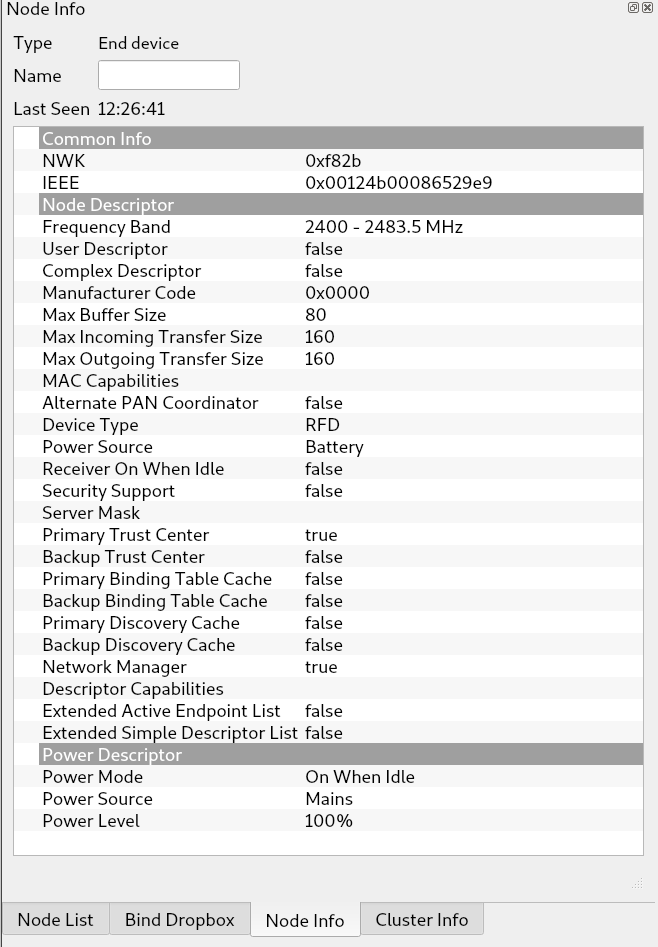
Sorry.
I m asking because I can't say if your device in from "enki" or "philio" https://www.zwavetaiwan.com.tw/pst03
And now the hard part, I have made basic change (only 4/5 lines to change, I just need the manufacturer code) but now how to test the code.
What is your machine for jeedom ? 64 bit ARM or a Raspberry ?
Smanar
on 10 May 2020
Yes ^^. Perfect.
I just miss the manufacturer but I will try to find it somewhere else or the device can miss it.
And the "node info" but I think I can find the information too.
The manufacturer is Philio and it works with Leroy Merlin Enki domotic box.
(I also found a doc that mentions the brand Evology, which is also a brand distributed by Leroy Merlin).
rudak
on 10 May 2020
But the code works with a number 0xXXXX, deconz use this value to reconize the manufacture, and I don't find it on the net.
Smanar
on 10 May 2020
Here's the part I forgot.
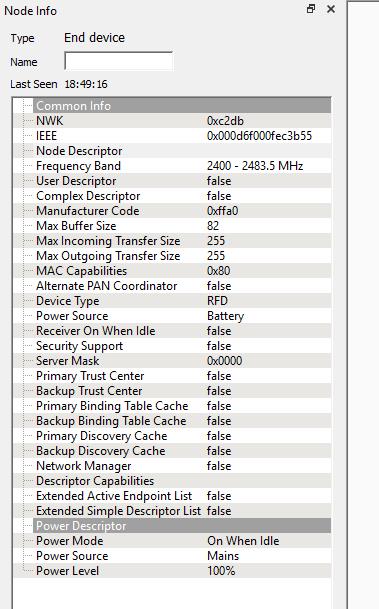
rudak
on 10 May 2020
Nice It's that 0xffa0.
Ok so now how to try the code ?
What is your jeedom machine ? ARm64 or a raspberry ?
Smanar
on 10 May 2020
_Sorry, I answer point by point but at least the information is clearer._
I'm personally with Jeedom v4 on rpi4.
rudak
on 10 May 2020
I don't know how to test a plugin modification with jeedom without going through the original market circuit.
but if I have to I can do some research.
Otherwise, if you're sure of yourself, just merge the commit to the plugin and ...banzaï !
rudak
on 10 May 2020
NP , I have time ^^.
So now 2 solutions.
1 - Compile the code yourself
2 - I can compile it for Raspberry 3, hopping for compatibility for you (I think pi3 > Pi4 will be ok, and both are 32bit )
If you choose the method 1, you have the procedure here https://github.com/dresden-elektronik/deconz-rest-plugin at "Install deCONZ development package (optional, Linux only)" just replace the step 1 by
git clone https://github.com/Smanar/deconz-rest-plugin.git
And if you want to make a backup, the only modified file will be "libde_rest_plugin.so" in "/usr/share/deCONZ/plugins"
It will take 10mn to compile, nothing changed in your configuration.
Edit:
I have see your message too late, but this procedure change only 1 file, you can check if jeedom haven't changed the location of the file, but if you don't use docker or VM it's realy easy.
/usr/share/deCONZ/plugins/libde_rest_plugin.so
Smanar
on 10 May 2020
I'm having a little trouble compiling
pi@raspberrypi:~/deconz-rest-plugin $ qmake && make -j2
qmake: could not find a Qt installation of ''
I installed
sudo apt-get install qt5-default
and now I have
pi@raspberrypi:~/deconz-rest-plugin $ qmake && make -j2
Info: creating stash file /home/pi/deconz-rest-plugin/.qmake.stash
Project ERROR: Unknown module(s) in QT: serialport websockets
I add modules
sudo apt-get install libqt5xxxx ...
now I have
pi@raspberrypi:~/deconz-rest-plugin $ qmake && make -j2
make -f Makefile.Release
make[1] : on entre dans le répertoire « /home/pi/deconz-rest-plugin »
/usr/lib/qt5/bin/uic -no-stringliteral de_web_widget.ui -o ui_de_web_widget.h
g++ -c -pipe -Wno-attributes -Wno-psabi -Wall -O2 -std=gnu++11 -Wall -W -D_REENTRANT -fPIC -DDECONZ_DLLSPEC=Q_DECL_IMPORT -DARCH_ARM -DARCH_ARMV7 -DUSE_WEBSOCKETS -DGW_SW_VERSION=\"2.05.75\" -DGW_SW_DATE=1589129851 -DGW_API_VERSION=\"1.16.0\" -DGIT_COMMMIT=\"c19340fd415d348d99b8859c11fa373da3272bd0\" -DGW_AUTO_UPDATE_AVR_FW_VERSION=0x260b0500 -DGW_AUTO_UPDATE_R21_FW_VERSION=0x26420700 -DGW_MIN_AVR_FW_VERSION=0x26330500 -DGW_MIN_R21_FW_VERSION=0x26490700 -DGW_MIN_DERFUSB23E0X_FW_VERSION=0x22030300 -DGW_DEFAULT_NAME=\"Phoscon-GW\" -DQT_NO_DEBUG -DQT_PLUGIN -DQT_WIDGETS_LIB -DQT_GUI_LIB -DQT_SERIALPORT_LIB -DQT_WEBSOCKETS_LIB -DQT_NETWORK_LIB -DQT_CORE_LIB -I. -I../.. -I../../common -isystem /usr/include/arm-linux-gnueabihf/qt5 -isystem /usr/include/arm-linux-gnueabihf/qt5/QtWidgets -isystem /usr/include/arm-linux-gnueabihf/qt5/QtGui -isystem /usr/include/arm-linux-gnueabihf/qt5/QtSerialPort -isystem /usr/include/arm-linux-gnueabihf/qt5/QtWebSockets -isystem /usr/include/arm-linux-gnueabihf/qt5/QtNetwork -isystem /usr/include/arm-linux-gnueabihf/qt5/QtCore -Irelease -I. -I/usr/lib/arm-linux-gnueabihf/qt5/mkspecs/linux-g++ -o release/authorisation.o authorisation.cpp
g++ -c -pipe -Wno-attributes -Wno-psabi -Wall -O2 -std=gnu++11 -Wall -W -D_REENTRANT -fPIC -DDECONZ_DLLSPEC=Q_DECL_IMPORT -DARCH_ARM -DARCH_ARMV7 -DUSE_WEBSOCKETS -DGW_SW_VERSION=\"2.05.75\" -DGW_SW_DATE=1589129851 -DGW_API_VERSION=\"1.16.0\" -DGIT_COMMMIT=\"c19340fd415d348d99b8859c11fa373da3272bd0\" -DGW_AUTO_UPDATE_AVR_FW_VERSION=0x260b0500 -DGW_AUTO_UPDATE_R21_FW_VERSION=0x26420700 -DGW_MIN_AVR_FW_VERSION=0x26330500 -DGW_MIN_R21_FW_VERSION=0x26490700 -DGW_MIN_DERFUSB23E0X_FW_VERSION=0x22030300 -DGW_DEFAULT_NAME=\"Phoscon-GW\" -DQT_NO_DEBUG -DQT_PLUGIN -DQT_WIDGETS_LIB -DQT_GUI_LIB -DQT_SERIALPORT_LIB -DQT_WEBSOCKETS_LIB -DQT_NETWORK_LIB -DQT_CORE_LIB -I. -I../.. -I../../common -isystem /usr/include/arm-linux-gnueabihf/qt5 -isystem /usr/include/arm-linux-gnueabihf/qt5/QtWidgets -isystem /usr/include/arm-linux-gnueabihf/qt5/QtGui -isystem /usr/include/arm-linux-gnueabihf/qt5/QtSerialPort -isystem /usr/include/arm-linux-gnueabihf/qt5/QtWebSockets -isystem /usr/include/arm-linux-gnueabihf/qt5/QtNetwork -isystem /usr/include/arm-linux-gnueabihf/qt5/QtCore -Irelease -I. -I/usr/lib/arm-linux-gnueabihf/qt5/mkspecs/linux-g++ -o release/bindings.o bindings.cpp
In file included from bindings.cpp:11:
de_web_plugin.h:16:10: fatal error: deconz.h: Aucun fichier ou dossier de ce type
 #include <deconz.h>
          ^~~~~~~~~~
compilation terminated.
make[1]: *** [Makefile.Release:520: release/bindings.o] Error 1
make[1]: *** Attente des tâches non terminées....
In file included from authorisation.cpp:13:
de_web_plugin_private.h:23:10: fatal error: sqlite3.h: Aucun fichier ou dossier de ce type
 #include <sqlite3.h>
          ^~~~~~~~~~~
compilation terminated.
make[1]: *** [Makefile.Release:502: release/authorisation.o] Error 1
make[1] : on quitte le répertoire « /home/pi/deconz-rest-plugin »
make: *** [Makefile:40: release] Error 2
this time I'm not able to fix things.
Ah, it's probably because of sudo apt installed deconz-dev that I couldn't install, he can't find the package...
rudak
on 10 May 2020
Yep, it's that.
Last chance command
sudo apt update
sudo apt upgrade
sudo apt install deconz-dev
There is too
wget -O - http://phoscon.de/apt/deconz.pub.key | sudo apt-key add -
sudo sh -c "echo 'deb http://phoscon.de/apt/deconz $(lsb_release -cs)-beta main' > /etc/apt/sources.list.d/deconz.list"
To make before the previous one, but on a normal system it's not needed.
If you can't install deconz-dev you can give up.
Else I will make the compilation on my side tomorow.
Smanar
on 10 May 2020
Je viens d'avoir un doute, Jeedom ca tourne sur Raspbian ? Ils auraient pas un autre systeme ? et 64 bit justement ?
Smanar
on 10 May 2020
that's it I compiled ! I put the file, I reboot and I test if something still works, and hopefully if I see the new hardware appear!
my jeedom works on Raspbian GNU/Linux 10 (buster) 32bits (armv7l)
rudak
on 10 May 2020
unfortunately no new devices have arrived on jeedom.
rudak
on 10 May 2020
The code just add the device in whitelist with
model name PST03A-v2.2.5
mac adress starting with 0x000d6f
Manu code 0xFFA0
You have changed the step 1 ?
You need to make a new inclusion, I don't think the device will appear in phoscon, but It will appear in jeedom (perhaps after a synchronisation), and you will have lot of new entries (I think 4/5), I will make explanation later.
You need to make inclusion with phoscon (add new sensor), if you make with deconz, the lib can't work. When the device is added in whitelist, the lib can add it in the API.
Smanar
on 10 May 2020
Yes, I've done the inclusion of material like I do with the other devices, but nothing.
I've got the .so binary in the right place

step 1 is ok

so now I don't know. No error in the logs, it just doesn't appear.
sadness
rudak
on 10 May 2020
You have restarted deconz ?
you need to restart it to use the new file, else it is using the old one already loaded.
Smanar
on 10 May 2020
You have restarted deconz ?
you need to restart it to use the new file, else it is using the old one already loaded.
Yeah, I reboot the rpi4 and restarted services.
I'll try to check with phoscon like you said above but he usually doesn't see the stuff so I don't think that's gonna change...
=> I tried, but still nothing on jeedom or phoscon.
rudak
on 10 May 2020
wouldn't it be possible to recover the devices even if they are not in the white list? at least for debugging purposes (in a debug branch ?)
rudak
on 10 May 2020
Devices was blocked only in the API, you can see and act on them using deconz.
There is too a debug command line realy usefull, but not sure you will like it on jeedom ^^, so I m trying to avoid it.
I have a theorie for the code don't work.
If you look at your screenshoot, on the first one you miss "manufacture name", and It can be something blocking, my first idea was you have a problem during pairing, but some device realy miss it.
So I have modified the code to force a manufacture name
https://github.com/Smanar/deconz-rest-plugin/commit/5af3dded45b826268676ef93667be07b9b463b08
Else for information (in the worst situation) to enable debug mode, you need to add some flag, so on jeedom, If I m right, you need to close it and relaunch it with
sudo deCONZ –auto-connect=1 –dbg-error=1 –http-port=8484 –ws-port=20877 –upnp=0 -platform minimal –dbg-info=2 –dbg-aps=0 –dbg-zcl=0 –dbg-zdp=0 –dbg-http=0
If you use it as command line, all logs will be send on the console, so nothing will be memorised on your drive (usefull if you are using SD card), but you need to look at them carefully ^^.
I have just see the jeedom plugin can receive deconz log too (you have some button on the plugin config to retreive log), but the log can realy be hudge. I think in the plugin the debug level is the dbg-info and dbg-error value
Smanar
on 11 May 2020
Hi, I'm not able to tell you why, but I pulled your commit, recompiled and tried pairing again, it worked straight away!
thanks a lot for your help, I'm available if you need to make changes somewhere. thanks again.
rudak
on 11 May 2020
Already ?
And You have found all devices ?
Because I think some of them will be useless, you will have at least 1 Lux + 1 Temp + 1 presence + 2 alarm, and perhaps some zhaswitch.
You pulled the commit after or before the last modification (for the manu name) ?
Smanar
on 11 May 2020
I made the commit before and followed the qmake procedure to generate a new file, (it was very fast this time by the way) and everything worked directly.
not everyone will recognize because not everyone uses Jeedom but here is the information returned by the equipment

rudak
on 11 May 2020
Yep, the first time take more time, because you need to compile all files, but in c++ you don't compile all file all the time, only needed files, and there is a link phase after.
The next not supported device, you will be able to include it yourself ^^, you have done the hardest part, if you look at my code modification, you will see I have absolute do nothing.
So I have let the code as it was (realy few change) so the API have created device according the cluster list (the blue number).
Everytime, the UniqueID is composed by
- the device mac adress
- the endpoint (01 or 02 for you)
- the cluster (the blue number)
There is some magic in the deconz code, so not all cluster create entries, and some of them can be special. Lot of things are automatic, like for values return but not in all situations, so take time to check all entries.
For exemple the Entry "Boutton 01-0006", I don't think this one will be usefull.
I don't think It will work, because I haven't finished this part, but IDK if you need it, I think you will prefer to use motion/contact entry. And it have perhaps created a group for it.
You have too some setting or battery level to check, but this device seem realy compliant with zigbee stuff, nice, less work to do.
If you haven't problem with the actual code, I will make the PR for future users.
Smanar
on 11 May 2020
Now I just installed it on a door, I'm going to make some tests to be able to make a return on the good functioning in a few days, it could be useful to add a maximum of details for those who will follow the issue one day or the other...
I can see the modifications made and indeed, it's not huge but you always have to know where to implement them and that's another music, especially blind like you did. good work.
rudak
on 11 May 2020
Ok, so I will wait before making the PR.
Smanar
on 12 May 2020
So, after a few tests, it works quite well but then the material is not of great quality. I compare it with other sensors with identical functionality and it's clearly not great I'm disappointed.
Apart from this subjective point, yes it goes up well so you can do the PR without any problems.
rudak
on 12 May 2020
Ok. I do it now.
But wich one problem have you ? This device seem realy nice.
Distance detection ? weak ? perhaps it's a setting problem ?
Smanar
on 12 May 2020
in fact there is an anti-tearing sensor behind, but once it's engaged, (when it's fixed to the wall) it doesn't detect the presence, the brightness sensor is bad, the values are really bad compared to the equivalent material of xiaomi.
for the temperatures, it can still be ok even if I find it badly calibrated.
I do not recommend the purchase of this device ^^
rudak
on 12 May 2020
And I don't see setting for temperature or brightness sensor on your capture, so not possible having better ....
And I m agree, I stop to buy Xiaomi, because I have too much mesh problem with them (they are not zigbee compliant at all) , but it's realy a pity, because theses device works realy good.
Smanar
on 13 May 2020
Related issues
 philko123
·
3Comments
philko123
·
3Comments
 1onar
·
5Comments
1onar
·
5Comments
 horchi
·
5Comments
horchi
·
5Comments
 lynix
·
4Comments
lynix
·
4Comments
 felixstorm
·
4Comments
felixstorm
·
4Comments