Deconz-rest-plugin: [Device Support Request] Xiaomi Mija ZB3.0 smart plug ZNCZ04LM (lumi.plug.mmeu01)


Endpoint 15:

Endpoint 16:

 SwoopX
All 85 comments
The attributes from cluster FCC0:
ZigBee Cluster Library Frame, Mfr: Unknown (0x115f), Command: Discover Attributes Response, Seq: 157
    Frame Control Field: Profile-wide (0x1c)
        .... ..00 = Frame Type: Profile-wide (0x0)
        .... .1.. = Manufacturer Specific: True
        .... 1... = Direction: Server to Client
        ...1 .... = Disable Default Response: True
    Manufacturer Code: Unknown (0x115f)
    Sequence Number: 157
    Command: Discover Attributes Response (0x0d)
    Attribute Status Record
        Attribute: 0x00f3
        Data Type: 8-Bit Unsigned Integer (0x20)
    Attribute Status Record
        Attribute: 0x00f5
        Data Type: 32-Bit Unsigned Integer (0x23)
    Attribute Status Record
        Attribute: 0x00f6
        Data Type: 16-Bit Unsigned Integer (0x21)
    Attribute Status Record
        Attribute: 0x00fa
        Data Type: Boolean (0x10)
    Attribute Status Record
        Attribute: 0x00fc
        Data Type: Boolean (0x10)
    Attribute Status Record
        Attribute: 0x00fe
        Data Type: Character String (0x42)
    Attribute Status Record
        Attribute: 0x00ff
        Data Type: Octet String (0x41)
    Attribute Status Record
        Attribute: 0x0100
        Data Type: 8-Bit Unsigned Integer (0x20)
    Attribute Status Record
        Attribute: 0x0200
        Data Type: 8-Bit Unsigned Integer (0x20)
    Attribute Status Record
        Attribute: 0x0201
        Data Type: Boolean (0x10)
    Attribute Status Record
        Attribute: 0x0202
        Data Type: Boolean (0x10)
    Attribute Status Record
        Attribute: 0x0203
        Data Type: Boolean (0x10)
    Attribute Status Record
        Attribute: 0x0204
        Data Type: Single Precision Floating Point (0x39)
    Attribute Status Record
        Attribute: 0x0205
        Data Type: 8-Bit Unsigned Integer (0x20)
    Attribute Status Record
        Attribute: 0x0206
        Data Type: Single Precision Floating Point (0x39)
    Attribute Status Record
        Attribute: 0x0207
        Data Type: Boolean (0x10)
    Attribute Status Record
        Attribute: 0x020b
        Data Type: Single Precision Floating Point (0x39)
    Attribute Status Record
        Attribute: 0xf000
        Data Type: 8-Bit Unsigned Integer (0x20)
    Attribute Status Record
        Attribute: 0xfffd
        Data Type: 16-Bit Unsigned Integer (0x21)

0000   1c 5f 11 9d 0d 01 f3 00 20 f5 00 23 f6 00 21 fa   ._...... ..#..!.
0010   00 10 fc 00 10 fe 00 42 ff 00 41 00 01 20 00 02   .......B..A.. ..
0020   20 01 02 10 02 02 10 03 02 10 04 02 39 05 02 20    ...........9..
0030   06 02 39 07 02 10 0b 02 39 00 f0 20 fd ff 21      ..9.....9.. ..!
And some investigation to find out what they are for:
<attribute id="0x00f3" name="Unknown" type="u8" mfcode="0x115f" access="rw" required="m"> </attribute>
<attribute id="0x00f5" name="Unknown" type="u32" mfcode="0x115f" access="rw" required="m"> </attribute>
<attribute id="0x00f6" name="Reporting Interval" type="u16" mfcode="0x115f" access="rw" required="m"> </attribute>
<attribute id="0x00fa" name="Unknown" type="bool" mfcode="0x115f" access="rw" required="m"> </attribute>
<attribute id="0x00fc" name="Unknown" type="bool" mfcode="0x115f" access="rw" required="m"> </attribute>
<attribute id="0x00fe" name="Serial Number" type="cstring" mfcode="0x115f" access="rw" required="m"> </attribute>
<attribute id="0x00ff" name="Unknown (write only)" type="ostring" mfcode="0x115f" access="w" required="m"> </attribute>
<attribute id="0x0100" name="Unknown" type="u8" mfcode="0x115f" access="rw" required="m"> </attribute>
<attribute id="0x0200" name="Unknown" type="u8" mfcode="0x115f" access="rw" required="m"> </attribute>
<attribute id="0x0201" name="Restore Power on Outage" type="bool" mfcode="0x115f" access="rw" required="m"> </attribute>
<attribute id="0x0202" name="Auto-off after 20m below 2W" type="bool" mfcode="0x115f" access="rw" required="m"> </attribute>
<attribute id="0x0203" name="Device LED off" type="bool" mfcode="0x115f" access="rw" required="m"> </attribute>
<attribute id="0x0204" name="Unknown" type="float" mfcode="0x115f" access="rw" required="m"> </attribute>
<attribute id="0x0205" name="Unknown" type="u8" mfcode="0x115f" access="rw" required="m"> </attribute>
<attribute id="0x0206" name="Unknown" type="float" mfcode="0x115f" access="rw" required="m"> </attribute>
<attribute id="0x0207" name="Consumer connected" type="bool" mfcode="0x115f" access="r" required="m"> </attribute>
<attribute id="0x020b" name="Max. Load exceeded at (in W)???" type="float" mfcode="0x115f" access="rw" required="m"> </attribute>
<attribute id="0xf000" name="Unknown" type="u8" mfcode="0x115f" access="rw" required="m"> </attribute>
<attribute id="0xfffd" name="Unknown" type="u16" mfcode="0x115f" access="rw" required="m"> </attribute>
Decoding of manufacturer specific attribute reporting (attribute 0x00F7. cluster FCC0, Endpoint 1, first byte is always the length)
ZigBee Cluster Library Frame, Mfr: Unknown (0x115f), Command: Report Attributes, Seq: 45
    Frame Control Field: Profile-wide (0x1c)
        .... ..00 = Frame Type: Profile-wide (0x0)
        .... .1.. = Manufacturer Specific: True
        .... 1... = Direction: Server to Client
        ...1 .... = Disable Default Response: True
    Manufacturer Code: Unknown (0x115f)
    Sequence Number: 45
    Command: Report Attributes (0x0a)
    Attribute Field, Octets: 64:10:00:03:28:17:98:39:00:00:00:00:95:39:1a:a4:…
        Attribute: 0x00f7
        Data Type: Octet String (0x41)
        Octet String: 64:10:00:03:28:17:98:39:00:00:00:00:95:39:1a:a4:…

0000   3d 64 10 00 03 28 17 98 39 00 00 00 00 95 39 1a
0010   a4 ec 3d 96 39 00 60 0b 45 97 39 00 00 00 00 05
0020   21 02 00 9a 20 00 08 21 16 01 07 27 00 00 00 00
0030   00 00 00 00 09 21 00 01 0b 20 00 9b 10 01
03 28 18                (Zcl8BitInt)     Device temperature
05 21 02 00             (Zcl16BitUint)   Unknown
07 27 00 00 00 00 00 00 00 00       (Zcl64BitUint)   Unknown
08 21 16 01             (Zcl16BitUint)   Unknown
09 21 00 01             (Zcl16BitUint)   Unknown
0b 20 00                (Zcl8BitUint)    Unknown
64 10 01                (ZclBoolean)     on/off
95 39 e0 7c e5 3d           (ZclSingleFloat) Consumption
96 39 00 60 0b 45           (ZclSingleFloat) Voltage
97 39 49 5f 53 41           (ZclSingleFloat) Current
98 39 44 8b 3c 40           (ZclSingleFloat) Power
9a 20 00                (Zcl8BitUint)    Unknown
9b 10 01                (ZclBoolean)     Unknown
How to read ENERGY and POWER(endpoint 15 and 16) from API ?
Are only visible from GUI?
 Smlooc
on 14 Mar 2020
Smlooc
on 14 Mar 2020
As of now, you can't since the device is not supported yet. However, I'm almost done and I just need to amend some data types...
SwoopX
on 14 Mar 2020
I have lumi.plug.mmeu01 I was disappointed to find that consumption and history were not working, my question soon be included and maintained?
 Kristian8606
on 24 Mar 2020
Kristian8606
on 24 Mar 2020
I have an open pull request pending for the device. Locally, with the changes I made, it works perfectly from a deconz perspective. How middleware handles the sensor and data is a different question not to be discussed here then.
Once integrated, you will see a consumption and a power sensor, providing corresponding data. If you cannot wait, you may want to compile the version from my repo manually.
SwoopX
on 24 Mar 2020
Sorry for the stupid question but can you help me because I don't know how to install your code, some instruction would be helpful
Kristian8606
on 24 Mar 2020
Have a look at the readme of the repo, the steps and requirements are mentioned there. To be abe to get the deconz dev package, check out phoscon.de to see how to add the deconz repository.
For compilation, there might be further packages required which you need to install first.
SwoopX
on 24 Mar 2020
if i wait will it be integrated into the next official update?
Kristian8606
on 24 Mar 2020
That's my current assumption.
SwoopX
on 24 Mar 2020
One thing I noticed quite by accident is that when I unplugged the device and plugged it back in, eve showed historical data.

Kristian8606
on 5 Apr 2020
Not sure what exactly you mean. Can you elaborate a bit? Consumption is historical data, power is not.
SwoopX
on 5 Apr 2020
Sorry about my bad English. when I plug the plug into the mains and then plug in the heater in the app it records neither amps nor power consumption. After 15 minutes I unplug it and plug it back in and eve reads the story.


Kristian8606
on 5 Apr 2020
The thought is that the unit show nothing, amper nor power consumption, but still records a story only when I turn it off and plug it in the electrical
Kristian8606
on 5 Apr 2020
The _Simple Metering_ cluster, 0x0702, exposes life-time consumption (_Current Summation Delivered_ attribute, 0x0000), and current power (_Instantaneous Demand_ attribute, 0x0400). The REST API plugin exposes these as state.consumption and state.power in a ZHAConsumption /sensors resource.
The _Electrical Measurement_ cluster, 0x0B04, exposes current power (_Active Power_ attribute, 0x050B). The REST API plugin exposes this as state.power in a ZHAPower /sensors resource.
The wired Xiaomi switches I've seen report power through the _Analog Input_ cluster on the lower endpoint, and consumption through the _Analog Input_ cluster on the higher endpoint. The lower endpoint should be exposed as ZHAPower, the higher as ZHAConsumption.
Eve needs both consumption and power to show history, so Homebridge Hue will compute any missing value from the other. For devices with a ZHAConsumption resource, Homebridge Hue creates the history based on state.consumption. For devices with only a ZHAPower resource, Homebridge Hue creates history based on state.power, approximating consumption by applying power over time.
 ebaauw
on 5 Apr 2020
ebaauw
on 5 Apr 2020
Thanks for the explanation. Also i would like to know where in the app i can adjust the price for kwh.
Kristian8606
on 5 Apr 2020
@Kristian8606 that was not really a language problem ;) The code just got merged.
@ebaauw Very true. I've provided an updated code to handle the analog input clusters and consumption and power values are exposed now. Works like a charm locally.
SwoopX
on 5 Apr 2020
Also i would like to know where in the app i can adjust the price for kwh.
Settings | General | Energy Cost
ebaauw
on 5 Apr 2020
@SwoopX would you view this problem about Xiaomi lumi.plug.mmeu01
Kristian8606
on 9 Apr 2020
Thanks. There's indeed some more work required to expose V and A as well. I'll check it out.
SwoopX
on 9 Apr 2020
Updated it. If you want, you can compile my repo to test it.
SwoopX
on 9 Apr 2020
Great after work, I'll test it immediately.
Kristian8606
on 10 Apr 2020
Thanks for the lightning reaction! Now this outlet is working as expected. I'll watch it for bugs and report if any. Once again thank you.
Kristian8606
on 11 Apr 2020
@SwoopX would you consider this problem again
https://github.com/ebaauw/homebridge-hue/issues/664#issuecomment-615164112
Kristian8606
on 17 Apr 2020
@Kristian8606 There's pretty much nothing I can do. I have no idea where those clusters come from, as the device simply doesn't have them.
What does the REST API output and what are the clusters in deconz GUI? Maybe you got a different firmware than I do. Please also provide a screenshot of the basic cluster when the attribues have been read.
EDIT:
What? I just have re-read the simple descriptors and out of a sudden, the 2 clusters showed up! Need some more investigation on that one. Really strange... Luckily, the sniffer was running.
SwoopX
on 17 Apr 2020
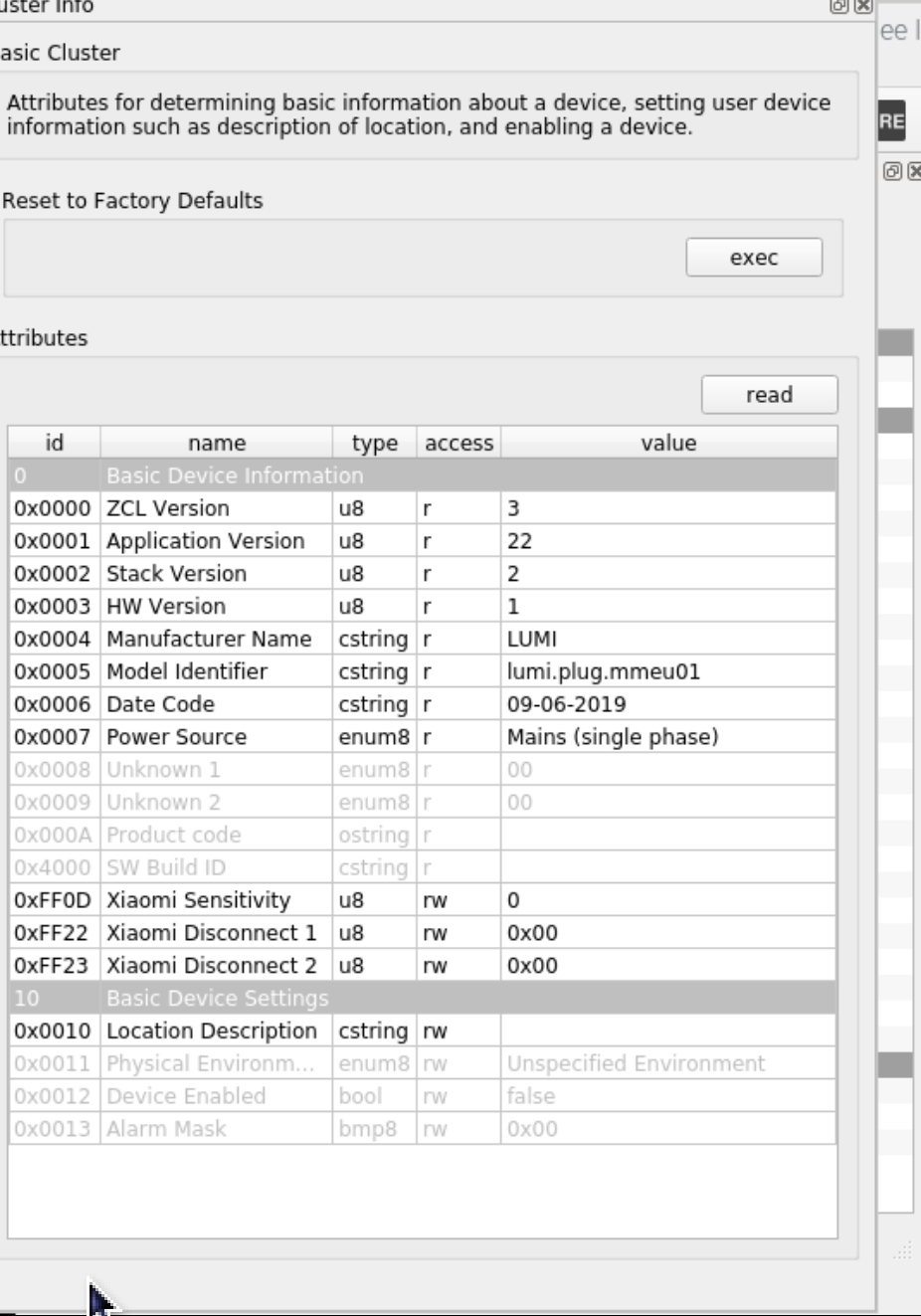
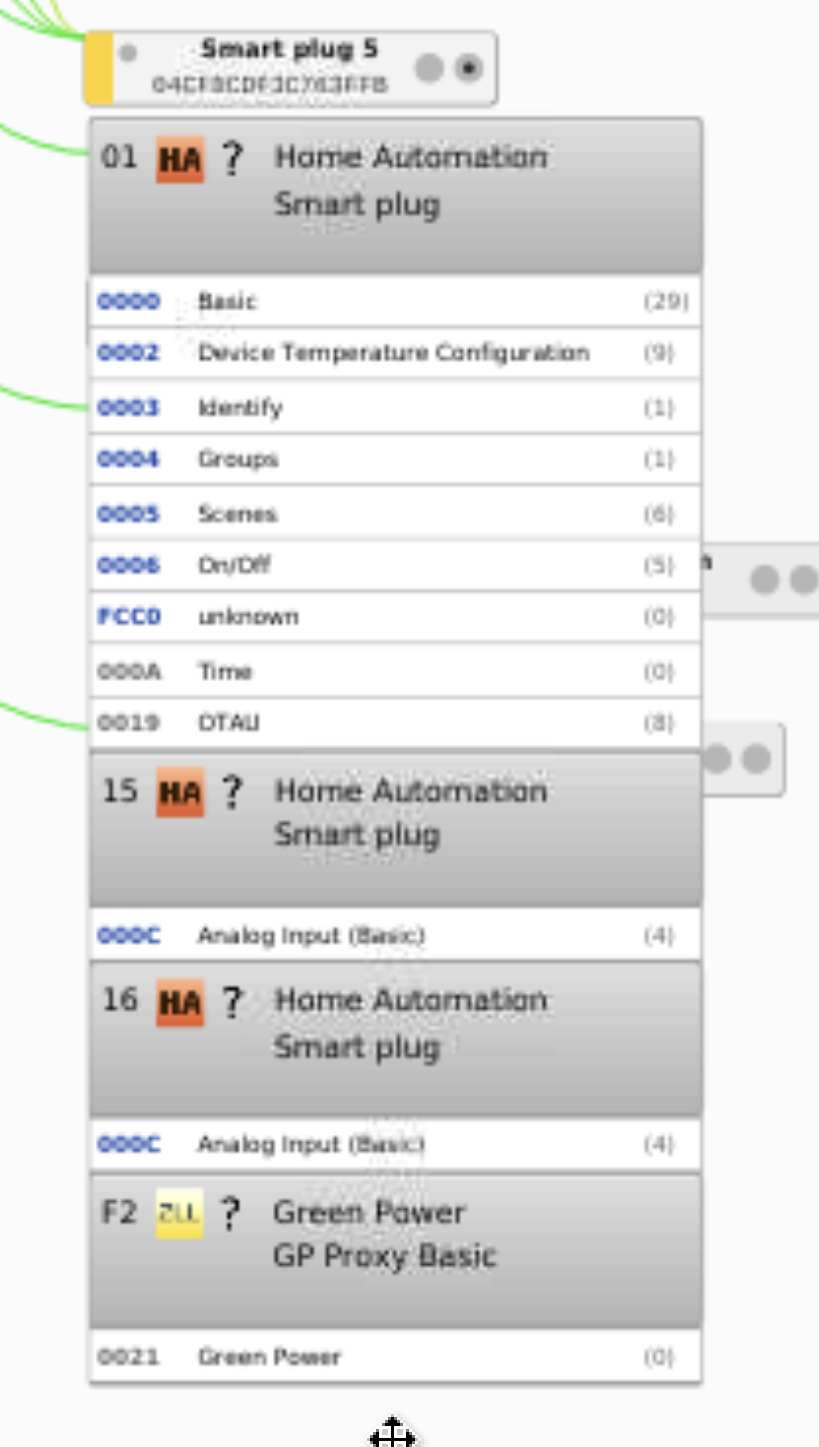
Kristian8606
on 17 Apr 2020
Thanks. Same values I have. I don't get it, maybe it has something to do with the yet unknown attribues I used to play with. The analog endpoints are reported to be not active any more... I'll investigate this in the evening with a fresh and empty deconz DB.
SwoopX
on 17 Apr 2020
So I double checked the device with a clean deconz database now and noticed that the sensors weren't created as the should be. Turned out that I've overlooked a whitelisting; must have happened while porting the code changes from my dev environment to the repo. That's now included with a new commit.
However, that does not explain your experience with the 2 sensors from the non-existing clusters. I've re-read the simple descriptor multiple times and neither cluster 0x0702 nor 0x0b04 showed up.
In my case, it must have been a side effect of me hacking the database an hour earlier. You haven't deleted anything directly in the database just before that occurred, have you?
SwoopX
on 18 Apr 2020
I didn't delete anything. i will reinstall my raspberry to start clean and let you know.
Kristian8606
on 18 Apr 2020
This is what I see now. The problem also remained
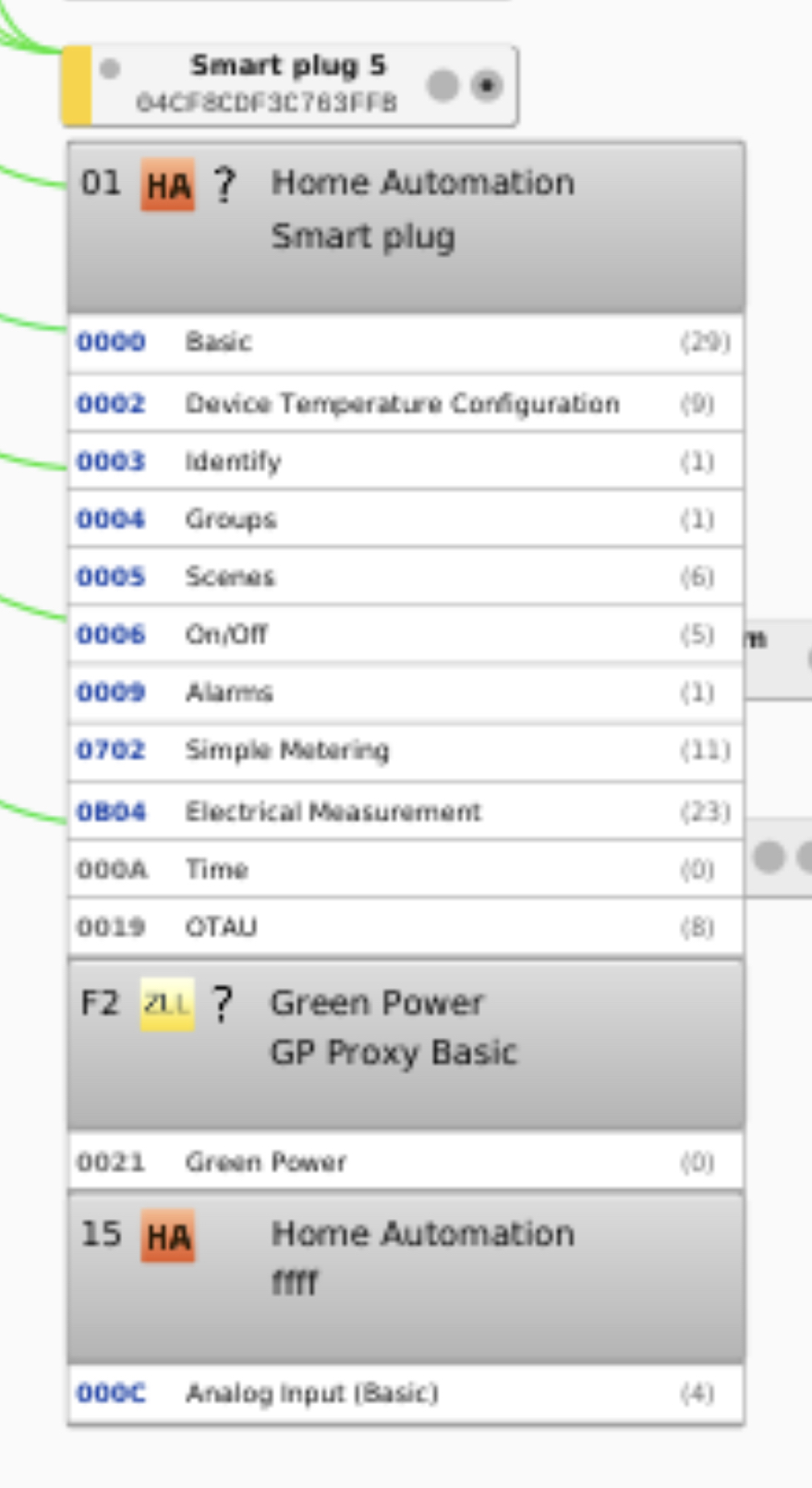
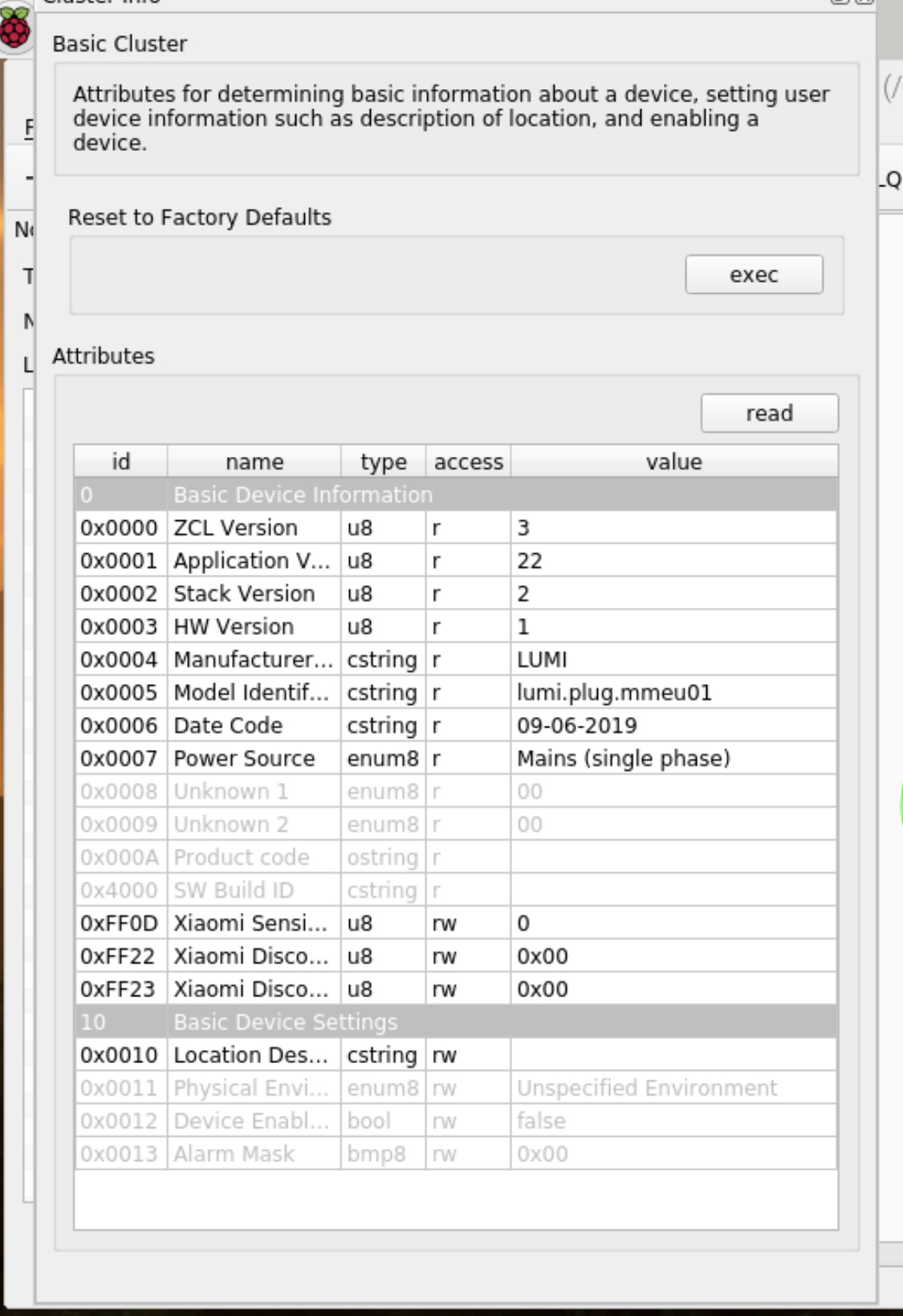
Kristian8606
on 18 Apr 2020
The clusters in you screenshot are total garbage, no clue why. However, that's what I've seen yesterday as well. I personally trust what I see in the sniffer logs, and that's the very first post.
Eventually, other Xiaomi devices could cause some hickups due to whatever reason. I also had a magic cube and temp sensor running in my test network. What other Xiaomi devices do you have included? Any other smart plugs?
SwoopX
on 18 Apr 2020
Aqara temperature sensor and mijia door / window sensor
Kristian8606
on 18 Apr 2020
I did a clean installation but now the consumption is gone
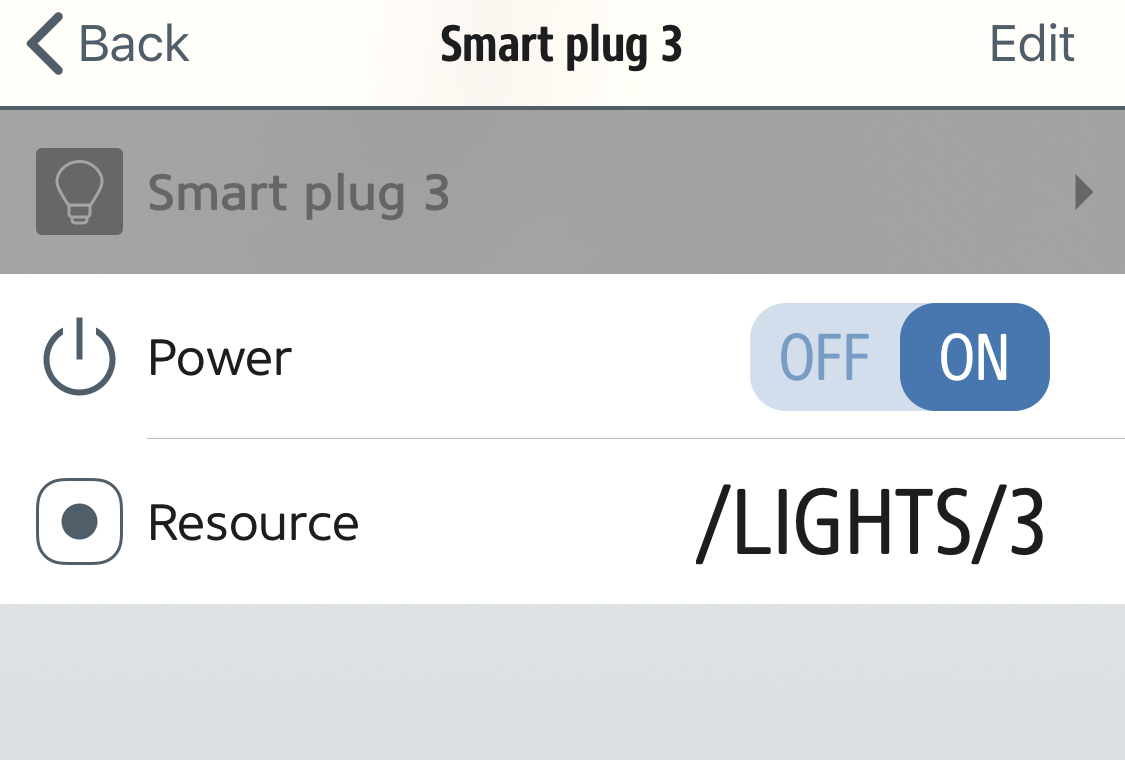
Kristian8606
on 18 Apr 2020
Turn on sensor search in Phoscon and then read the basic attributes via deconz GUI. Made the experience now during further tests that the device not necessarily joins 100% smoothly every now and then.
SwoopX
on 19 Apr 2020
Small update: Somehow managed to reproduce that but not sure if it's repeatable. All I can say right now is that it happened after I deleted an innr smart plug from Phoscon. Need more investigation.
SwoopX
on 20 Apr 2020
I will continue to investigate it. Sometimes it does not respond to the on / off command of the phoscon application.
Kristian8606
on 20 Apr 2020
Thanks for your work so far @SwoopX .. I've been running the most recent master version of the REST-Plugin which include your first commits regarding Xiaomi Consumption.
I was wondering if you've ever encountered this issue that after restarting dECONZ:
While the device shows up as available, toggling on/off through homebridge or Phoscon does nothing. It takes a manual on/off trigger via the plug's button before dECONZ catches up and I'm once again able to control it.
 sieren
on 30 Apr 2020
sieren
on 30 Apr 2020
Hello,
first of all, thanks for adding the EU version of this plug.
i updated the deconz a few days ago and two measurement sensors are showed, but they don't change any value. Power remains always 0 (even when i am using some device on it) and consumption remains the same as before.
i already deleted and added it again and also tried to read all attributes again from the deconz gui interface. no luck. Any tips?
Thanks
 kt666
on 2 May 2020
kt666
on 2 May 2020
@kt666 Have you tried this?
Turn on sensor search in Phoscon and then read the basic attributes via deconz GUI.
it works for me
Kristian8606
on 2 May 2020
@kt666 Have you tried this?
Turn on sensor search in Phoscon and then read the basic attributes via deconz GUI.
it works for me
Hi Kristian,
yes, i already did it. i can see the sensor power and consumption, they just dont update at all.
kt666
on 2 May 2020
Did you clone the SwoopX repository?
Kristian8606
on 2 May 2020
I was wondering if you've ever encountered this issue that after restarting dECONZ:
While the device shows up as available, toggling on/off through homebridge or Phoscon does nothing. It takes a manual on/off trigger via the plug's button before dECONZ catches up and I'm once again able to control it.
@sieren And I have the same problem.
Kristian8606
on 2 May 2020
@Kristian8606 glad to hear, so it definitely seems like a bug or something hasn't been implemented yet. I've only built this with master from the deconz repo (not SwoopXs), so haven't had a chance to test this with https://github.com/dresden-elektronik/deconz-rest-plugin/pull/2668 since @SwoopX made some modifications (however they seem unrelated to the issue we encounter)
sieren
on 2 May 2020
Did you clone the SwoopX repository?
hi. I was using it previously. but as far as I understood was already merged with the main repo.
long story short, when I received the smart socket it only saw on/off. no electrical measures or even mention of that. so I found the SwoopX repo and started to using it. a few days ago I received new sensors (not smart plugs related) and they didn't wanted to pair at all (xiaomi door / window sensors, which I already have a few installed previously as well), and because of it, I decided to change back to the main repo (Uninstalled everything for it) and after I installed it again, I could see the electrical measures attribute and also created the sensors. just don't update it. no matter what.
I also already turned on / off manually. didn't helped.
kt666
on 3 May 2020
hi. I was using it previously. but as far as I understood was already merged with the main repo.
Yes it was merged with the main one, but then there were more changes that were not yet merged. That's why I think the latest changes to this plug have not yet been added to the main repo. I lose my xiaomi door sensors quite often, but after cloning this repo I had no case of a failed sensor.
Kristian8606
on 3 May 2020
hi. I was using it previously. but as far as I understood was already merged with the main repo.
Yes it was merged with the main one, but then there were more changes that were not yet merged. That's why I think the latest changes to this plug have not yet been added to the main repo. I lose my xiaomi door sensors quite often, but after cloning this repo I had no case of a failed sensor.
hi Kristian,
i don't have any issues with my paired sensors. and said that, when I changed to swoopx repo, I didn't had problems either. the problem appeared when I received 3 new sensors (same model as before) and wanted to pair this ones. it didn't worked at all. but the ones that was already paired was working without issues. maybe I'll try again the swoopx repo now, that I don't expect to receive any new sensor. let's see. I'll try that later.
kt666
on 3 May 2020
Interestingly, I now experience all the same. Had other priorities, but I'll investigate soon.
SwoopX
on 3 May 2020
Thanks for your work so far @SwoopX .. I've been running the most recent master version of the REST-Plugin which include your first commits regarding Xiaomi Consumption.
I was wondering if you've ever encountered this issue that after restarting dECONZ:
While the device shows up as available, toggling on/off through homebridge or Phoscon does nothing. It takes a manual on/off trigger via the plug's button before dECONZ catches up and I'm once again able to control it.
Haven't tried that one before to be honest, but it doesn't work at all for me. All I can see when I try to toggle via Phoscon is that the coordinator is sending identiy commands... Probably some futher amendment required somewhere in this regard.
SwoopX
on 4 May 2020
When it can't be turned on / off after restarting deCONZ I noticed that reading the attributes again puts it back to work.
Kristian8606
on 6 May 2020
Guys, I now played around with the device for quite some time trying to figure out where those 2 mysterious clusters electrocal measurement and simple metering came from. To be honest, I have no clue. I was only able to catch/observe that condition twice now and it reverted after a couple of seconds...
The only way I can think of how to prevent deconz acting on those creating the wrong sensors, as of now, is to implement a skip mechanism for the device during sensor creation. Happy to do that if you like.
SwoopX
on 10 May 2020
I'm not sure I understand the translation well, but do it
Kristian8606
on 11 May 2020
Hey just a quick question, the app now recognizes the lumi.plug.mmeu01 as light, but no sensors. @SwoopX will your update released in any upcoming versions, or is it already merged?
 lajoshanko
on 22 May 2020
lajoshanko
on 22 May 2020
Already merged. In the meantime, start sensor search in Phoscon and read the basic cluster in deconz GUI. That should trigger sensor creation.
SwoopX
on 22 May 2020
Hey Thanks for the super fast answer!
The problem is, that I have installed headless image on the raspbee, so I do not have deconz gui, is there a way to read the basic cluster from command line?
I am noob with the whole phoscon stuff, should I see the sensor in the phoscon app?
lajoshanko
on 22 May 2020
Check out the wiki. I've written a guide how to use the GUI nevertheless in headless setups with minimal effort.
SwoopX
on 22 May 2020
First I have to thank you for your work to make this integration work! I have managed to get it working.
I see some strange things that I am trying to make sense of.
At the simple metering cluster(0702) the Current Summation Delivered is seems to be stuck at 145 kWh, and then sometimes it sends the accumulated value which seems to be correct.
I wonder how can it be reset or normalized other than scritpting it in ha.
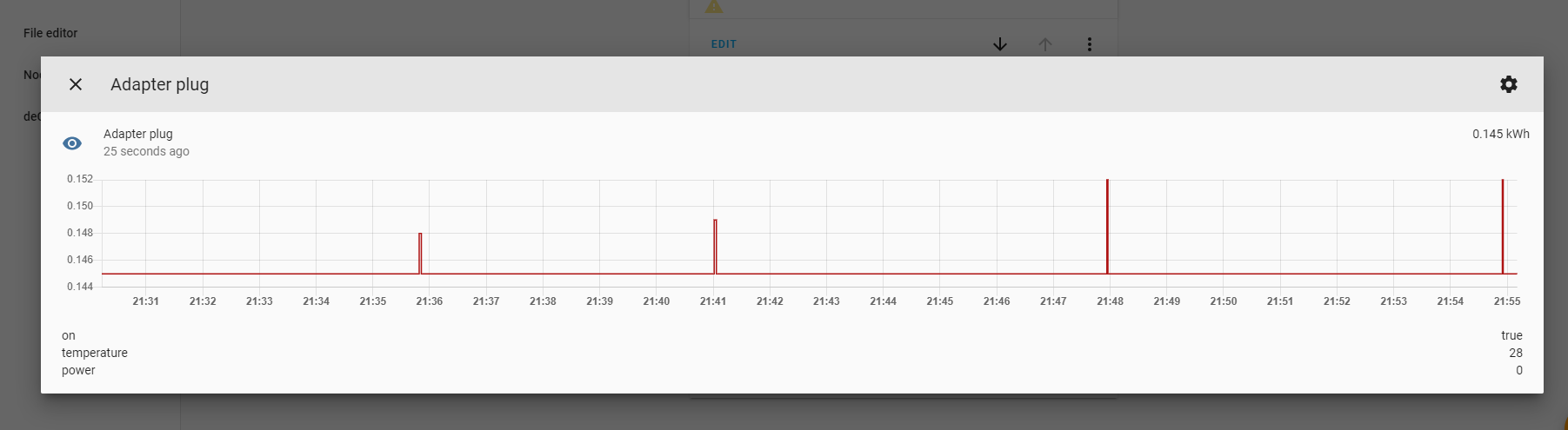

lajoshanko
on 22 May 2020
Lol, why 145 ?
Another mystery !
 Smanar
on 22 May 2020
Smanar
on 22 May 2020
Point is, simple metering and electrical measurement clusters are wrong for this device. I don't know why this comes up in rare cases. Anyway, I added some code to prevent that in future. The device is also just supported with deconz .76
SwoopX
on 22 May 2020
Hi. I installed the new version, removed the old smart plug (which wasn't updating the measures) and paired it again. Now, i only got the on/off and the power sensor. no consumption.
Anyone else?
i did the proceed reading all attributes as usual.. no luck.
kt666
on 24 May 2020
@kt66, are you sure it's the same model ID ? some model have just a letter different.
Have you take a look in the GUI if you have values ?
You haven't the entry for consumption or you have it and without value ? In this situation, just re set Phosocn in permit join, select the basic cluster "0000", and press "Read" button, to read again the attribute.
Smanar
on 24 May 2020
Hello @Smanar
Yes, i am sure that my device is the mentioned one. i am not seeing the consumption at all. I did the procedure to read the basic attributes when i was pairing it (phoscon app still opened).
Before, when i was using the old version, i had an item called electrical measures (or something like that).. now, i only have this.

kt666
on 24 May 2020
On your screen shoot there is only 1 cluster 000C, so you can't have 2 sensors.
And yep, the device change his cluster, I have see the same issue on other place. IDK what happen, perhaps it's a bad inclusion, but the device as it can't have power+consumption.
If you use the first circle in the title node in deconz (and use command inside), you can force deconz to send command to check cluster, perhaps you will have the missing one (you miss the cluster 16)
Smanar
on 24 May 2020
@Smanar thanks for the fast reply. I deleted and added again. Same result :(
What do you mean by send command to check cluster? i didn't really understood what you suggested me to do, sorry.
kt666
on 24 May 2020
I've already elaborated on this throughout this thread, the device behaves irrational in 2 ways:
- On rare occassions, the device responds with simple metering and electrical measurement clusters in the simple descriprots for endpoint 1. I don't know why this happens, but it is just wrong. I've implemented some code that those clusters are blocked from creating any sensors in the future. Now, if you already had that particular case,
you can only get rid of those sensors by starting with a fresh deconz installation or manually delete the corresponsing entries in the database.you can delete the inappropriate sensors (0x0702 and 0x0b04) via REST API. - More often, not all endpoints are retureds within an active endpoint response. You see the results in the screenshot here https://github.com/dresden-elektronik/deconz-rest-plugin/issues/2583#issuecomment-633249422 , but it also can look even worse. A workaround, which always fixed that for me is: start sensor search in Phoscon, after about 15 seconds set permit join duration in deconz GUI to 0 and then read the simple descriptors of the device.
SwoopX
on 24 May 2020
@kt666 It s the command which just spoke SwoopX > read the simple descriptors.
You have this command when selecting the first circle.
Smanar
on 25 May 2020
Hi @SwoopX
i paired and deleted the sensor a few times. Every time, to make sure that no residues was on the api, i deleted it from the database using the rest api commands, like you mentioned in 1.
I'll try your suggestion on 2.
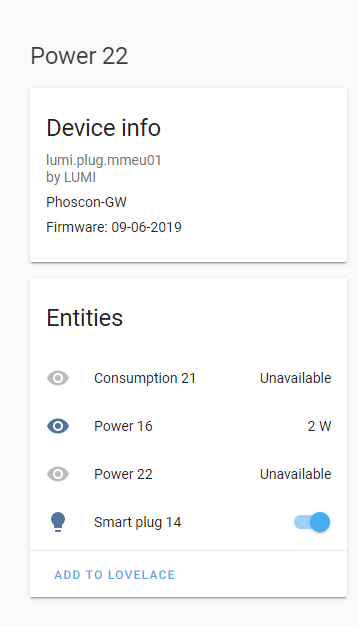
@Smanar tried that yesterday. it "helped". Now i have three sensors on my HA:
2x Power (one is working, the other was always 0 and now unavailable) and 1x consumption. The "best" is that consumption is unavailable - but look at the history - it keep the track of it:
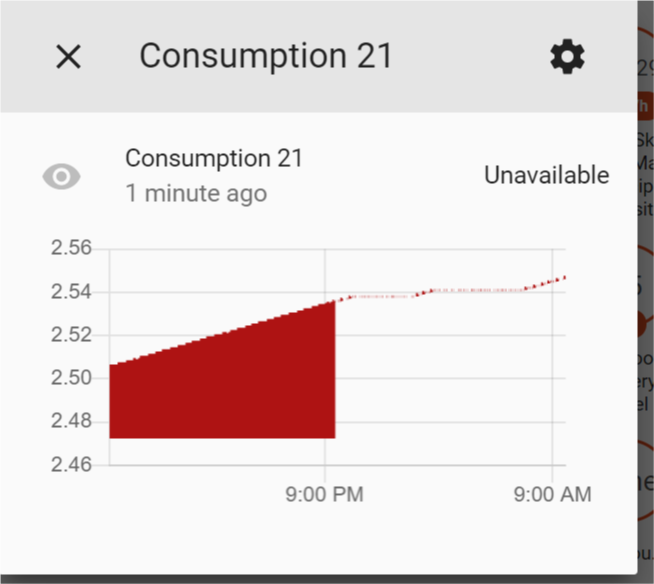
at Deconz gui i can see now two 000C cluster. not sure what i am doing wrong on this.. its just.. weird.
kt666
on 26 May 2020
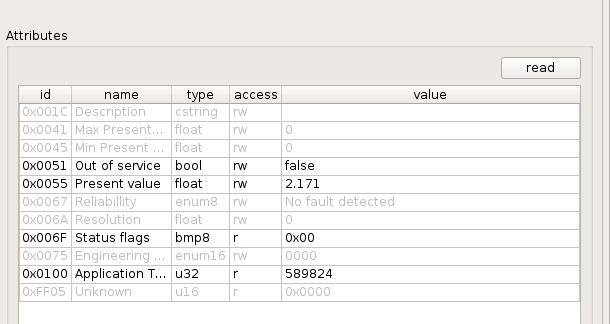
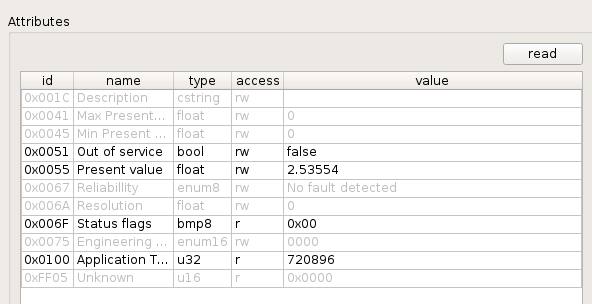
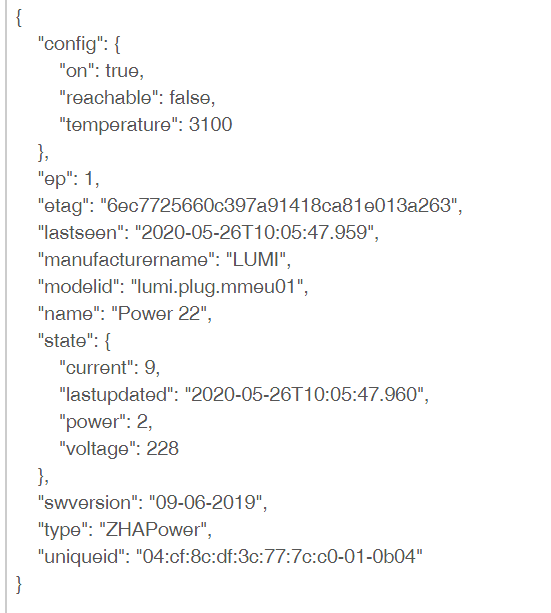
2x 000C cluster is correct. Endpoint 15 is power, endpoint 16 is consumption. Maybe you can share once more the current state of the device from deconz GUI and the available sensors from REST API.
SwoopX
on 26 May 2020
Hi @SwoopX i think, i got all prints that you requested.
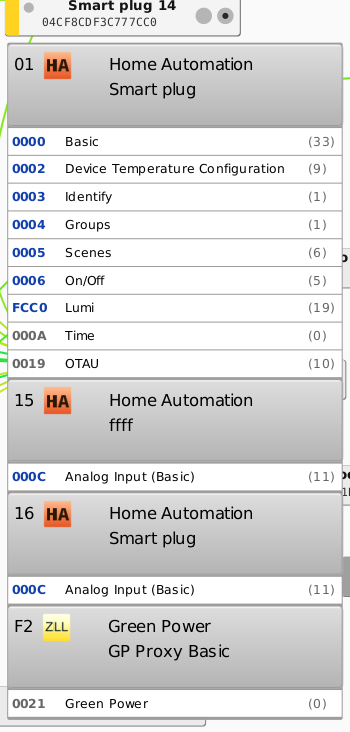
kt666
on 26 May 2020
Thanks. Your sensors are just wrong. Like I said, 0x0b04 and 0x0702 is bad. Delete that sensor and then run sensor search again.
SwoopX
on 26 May 2020
Sorry for jumping in on this conversation, but I do have a question I hope someone here can answer. For cluster 0702, is there a way to reset Current Summation Delivered back to zero if a user wanted to reset this monthly/weekly or on demand?
 jsconstantelos
on 26 May 2020
jsconstantelos
on 26 May 2020
Factory-reset the device. You need to re-pair it after that.
ebaauw
on 26 May 2020
Ouch, I definitely don't want to do that. Thanks for the quick reply. One last question? The divisor should be 1000 to properly display kWh? I believe I saw a chart in another github discussion showing that, but I just want to confirm.
jsconstantelos
on 26 May 2020
Should, but not all devices seem to implement it correctly. That’s why it’s not used by the REST API plugin. There’s also another attribute which indicates the units for _Total Summation Delivered_. On paper, the cluster could also be used for metering other utilities than electricity. Have never seen that in practice, though.
ebaauw
on 26 May 2020
Thanks! I was hoping that PowerFactor (attribute 0x0006) could be retrieved to determine that, but I haven't tried that yet.
jsconstantelos
on 26 May 2020
You don't want the power factor to come into play ;) It would, with the current code, significantly complicate things. With Current Summation Delivered, it's easy most of the time: the value displayed must be divided by the divisor to gain kWh. However, there's also the formatting, which tells you where to but the comma (details to be found in zigbee spec). However, REST API displays in Wh. So kinda thumb rule (in most cases): if the divisor is 1000, the bare value of Current Summation Delivered will be provided by the REST API.
SwoopX
on 26 May 2020
Hi, all
Trying to set up a couple of these plugs through deCONZ (marthoc) . As of right now sensors for power consumption appear in Home Assistant, but are unavailable. Still learning the ins and outs of deCONZ, can anyone help me in understanding the possible issue?
This is my visibility. I followed @SwoopX advice: set Permit Join to 0 after ~15sec and read the Simple Descriptors.
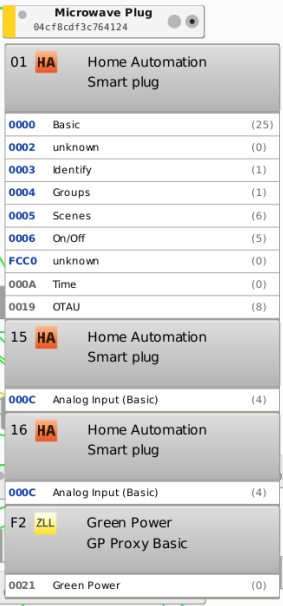
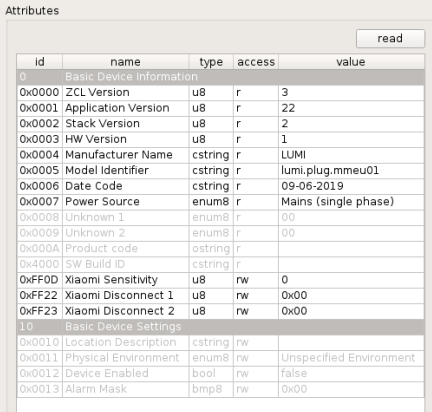
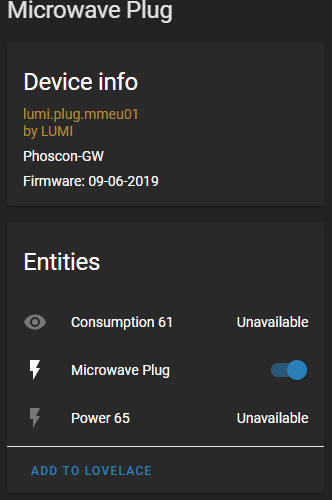
Thanks!
 imcass
on 4 Jul 2020
imcass
on 4 Jul 2020
V2_05_79 broke Consumption for me again. I tried repairing and re-scanning for the sensors but it pretty much only updates once (when reading the descriptors) and then goes stale after re-starting deconz:
{"config":{"on":true,"reachable":true,"temperature":2900},"ep":22,"etag":"3328d1a96955a923ef223f38d5c73bdc","lastseen":"2020-07-21T20:29:47.214","manufacturername":"LUMI","modelid":"lumi.plug.mmeu01","name":"Adapter plug (2)","state":{"lastupdated":"2020-07-21T20:18:03.173"},"swversion":"09-06-2019","type":"ZHAConsumption","uniqueid":"04:cf:8c:df:3c:75:a8:61-16-000c"}
Any idea what could've happened there?
sieren
on 21 Jul 2020
The sensor as such presented above looks perfectly fine. In it's default settings, you only get a consumption update every 10 mins. If the value doesn't change, then there's no update.
SwoopX
on 22 Jul 2020
I rolled back to the previous version earlier tonight and the numbers came back (obv in one go, hence the high number). The device ran last evening when it was reporting no updates in consumption.
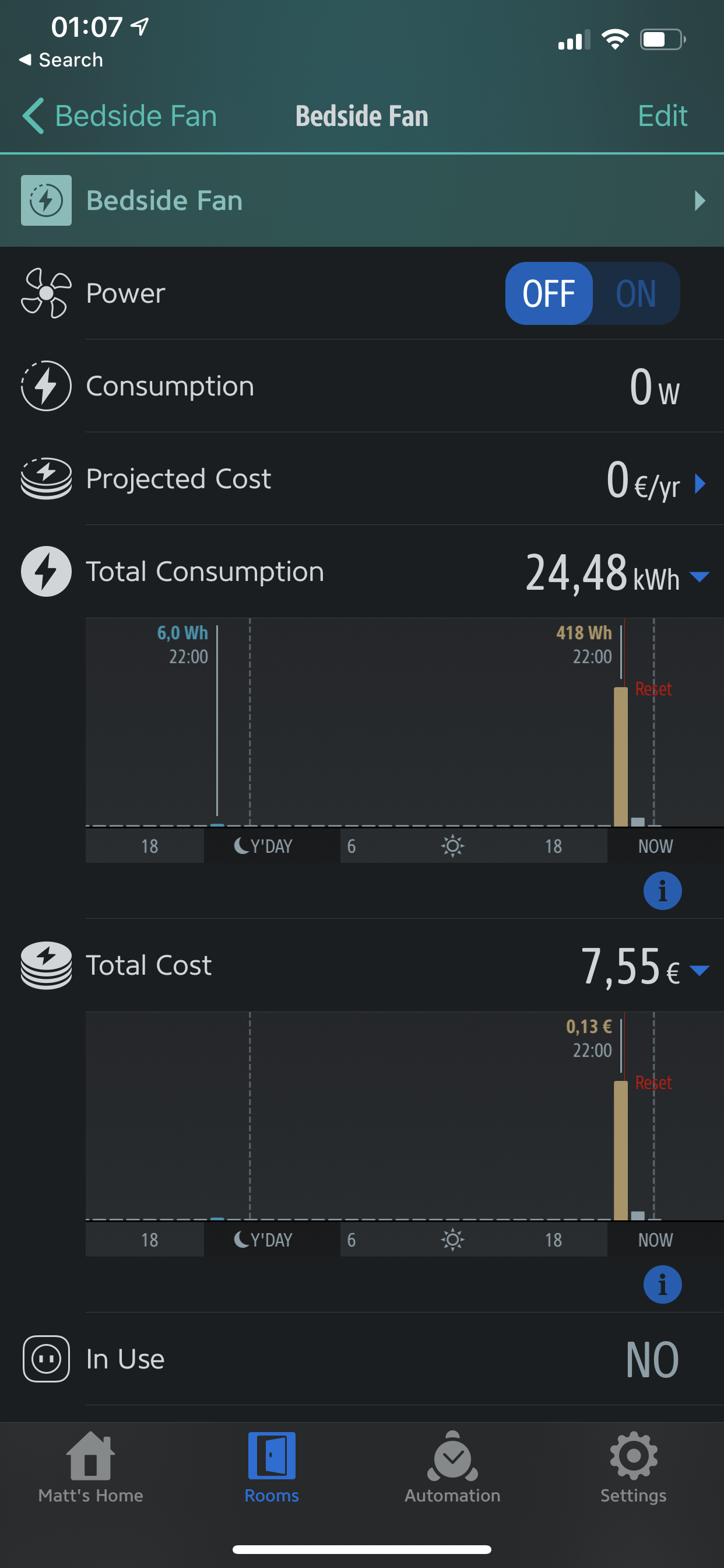
sieren
on 22 Jul 2020
I did indeed a mistake on the consumption values, which only had effects on Xiaomi devices with consumption The fix is already committed. Sorry for that one.
SwoopX
on 26 Jul 2020
Nice! Thanks for finding a fix so quickly
sieren
on 26 Jul 2020
Thank you for raising this. Otherwise, we probably wouldn't have noticed. It should work as with version .78 then.
SwoopX
on 26 Jul 2020
@Kristian8606
Hi,
researching a phoscon issue I stumbled over your beautiful app screenshots displaying power metering stats.
I was wondering what the app name / system are you using for that is?
Thanks, Thomas
Link to your screenshot comment: https://github.com/dresden-elektronik/deconz-rest-plugin/issues/2583#issuecomment-609405105
 thikade
on 27 Jul 2020
thikade
on 27 Jul 2020
That’s the Eve app for Apple’s HomeKit, see https://www.evehome.com/en/eve-app. Use Homebridge and Homebridge Hue to expose the devices connected to deCONZ to HomeKit, see https://github.com/ebaauw/homebridge-hue.
ebaauw
on 27 Jul 2020
Thanks, Erik!
On Mon, Jul 27, 2020 at 7:25 PM Erik Baauw notifications@github.com wrote:
That’s the Eve app for Apple’s HomeKit, see
https://www.evehome.com/en/eve-app. Use Homebridge and Homebridge Hue to
expose the devices connected to deCONZ to HomeKit, see
https://github.com/ebaauw/homebridge-hue.—
You are receiving this because you commented.
Reply to this email directly, view it on GitHub
https://github.com/dresden-elektronik/deconz-rest-plugin/issues/2583#issuecomment-664530859,
or unsubscribe
https://github.com/notifications/unsubscribe-auth/ACDHIHYOLOHHNVYE5EJEGOLR5W2ATANCNFSM4LHM3MOA
.
thikade
on 28 Jul 2020
Related issues
 ScharV
·
5Comments
ScharV
·
5Comments
 jan666
·
4Comments
jan666
·
4Comments
 lynix
·
4Comments
lynix
·
4Comments
 horchi
·
5Comments
horchi
·
5Comments
 wizkidorg
·
3Comments
wizkidorg
·
3Comments
Most helpful comment
As of now, you can't since the device is not supported yet. However, I'm almost done and I just need to amend some data types...