Deconz-rest-plugin: GLEDOPTO GL-S-007Z strange behaviour with deCONZ
Hello,
I jumped into the ZLL train recently.
I got hold of a GLEDOPTO GL-S-007Z light bulb and expected it to work with deCONZ.
I use a Conbee II USB key on a Raspberry Pi (tested on Windows 10 as well with the same outcome).
Well, the good news is that it's partially working. I can update the light state with RBG and Colour Temperature just fine. It works using Phoscon, the REST API or Hue Essentials. That part is great.
When it comes to defining scenes. It is more of a mixed bag.
Defining a scene with RGB colour is working, no doubt.
When defining a scene with CT (shades of whites), it is definitely not.
When I recall the scene, the light bulb switches to a weird colour using only RGB LEDs.
I checked the light state using the REST API and all parameters are correct, except the colour mode that is defined as 'hs' and not 'ct' as I expected.
Please, note that I defined scene as "store" using the current light settings, NOT modifying an existing scene from Phoscon.
So I blamed the bulb initially. But other people on the internet have the bulb reacting just fine on scene changes, including using CT. The only difference is that they were using the Philips Hue bridge.
That's a bummer as I found deCONZ to be superior to the official Hue bridge in many ways.
I wanted to know the bottom of it and I ordered a Philips Hue bridge to test it out.
As soon as I got it, I paired the GLEDOPTO GL-S-007Z bulb with it and it started to work flawlessly, including with scenes defined as CT.
I believe there is something wrong (a bug?) with scenes using CT with deCONZ.
Otherwise how could one explain the same feature is not working on deCONZ but working on another bridge?
How can I help to fix that problem?
I'd very much like to use deCONZ for its flexibility instead of Philips Hue.
 xvil
xvil
All 51 comments
I must add that I can see the device in the deCONZ gui.
But the cluster info remains empty. I don't know whether that's alright or not.
xvil
on 24 Jan 2020
Hello,
It's been a week I posted the issue. I expected some reactions here. At least, from the official staff.
I am offering the help I can provide but I have no clue of where to start.
Could someone drive in the right direction please?
Or does no one care about it? I sincerely hope it's not this last option...
xvil
on 30 Jan 2020
I'm using a GLEDOPTO GL-C-008 RGB+CCT LED controller and I believe I have the same issue.
I have full light control but when setting up a scene, if I have the GL-C-008 in 'ct' mode, saving and then recalling the scene it will reliably switch to the 'hs' color mode.
The state of the UI gets confused as well. After recalling a scene, the Scenes editor will still show the "Color temperature" pane for the light, but with nonsense values for the sliders or values from another scene. Same deal if I return to light control, the UI state doesn't reflect the state of the controller.
I'm very new to deCONZ and Phoscon so I have some more reading to do and I'll try to provide some useful debugging info.
 lvivier
on 31 Jan 2020
lvivier
on 31 Jan 2020
Hello Luke,
I have this controller for LED strips as well but I haven't tested it yet.
I see the same behaviour as yours in Phoscon app. The sliders are
definitely not at the right place. Plus Phoscon is displaying CT controls
when the bulb state is in HS mode (but the internal state of Phoscon is
probably loaded from the locally saved state of the scene)
I'd gladly provide debug information if someone could give some guidance
about it.
Cheers,
Xavier
Le ven. 31 janv. 2020 à 08:13, Luke Vivier notifications@github.com a
écrit :
I'm using a GLEDOPTO GL-C-008 RGB+CCT LED controller and I believe I have
the same issue.I have full light control but when setting up a scene, if I have the
GL-C-008 in 'ct' mode, saving and then recalling the scene it will
reliably switch to the 'hs' color mode.The state of the UI gets confused as well. After recalling a scene, the
Scenes editor will still show the "Color temperature" pane for the light,
but with nonsense values for the sliders or values from another scene. Same
deal if I return to light control, the UI state doesn't reflect the state
of the controller.I'm very new to deCONZ and Phoscon so I have some more reading to do and
I'll try to provide some useful debugging info.—
You are receiving this because you authored the thread.
Reply to this email directly, view it on GitHub
https://github.com/dresden-elektronik/deconz-rest-plugin/issues/2364?email_source=notifications&email_token=AHQDNXYELNI5MH7JMMNCEHDRAPFTBA5CNFSM4KKT7H32YY3PNVWWK3TUL52HS4DFVREXG43VMVBW63LNMVXHJKTDN5WW2ZLOORPWSZGOEKNXGRQ#issuecomment-580612934,
or unsubscribe
https://github.com/notifications/unsubscribe-auth/AHQDNX7R6Q75RN2TNWC3H3LRAPFTBANCNFSM4KKT7H3Q
.
xvil
on 31 Jan 2020
I've been occupied with other projects, but just bumping to say that I do have a spare GLEDOPTO GL-C-008 controller that I'd be happy to mail to the dev team to add to the hardware library.
lvivier
on 24 Apr 2020
Thanks, but I have one of those lying around.
Colour temperature is a bit of a stepchild to Zigbee. The standard doesn't provide for _Color temperature_ (attribute 0x0007) in scenes, incorrectly claiming that it could be expressed as _Current X_ and _Current Y_. While this might hold for 3 (4)-channel RGB(W) lights, it doesn't hold for 5-channel RGB+CCT lights, where ct drives the white channels, and xy the RGB channels. See also #2507.
Different lights use different ways to cope with this lack of standard. Some use _Current X_ to store the _Color Temperature_ value in scenes, others use _Enhanced Hue_, others don't support it, and only accept xy or hs in scenes. I'm not sure what the GLEDOPTOs do, but I wouldn't be surprised if different models (or even endpoints within a model) handle this differently.
 ebaauw
on 1 May 2020
ebaauw
on 1 May 2020
It seems this issue is resolved or otherwise inactive. If it is not, please re-open!
 Mimiix
on 6 Jun 2020
Mimiix
on 6 Jun 2020
Colour temperature is a bit of a stepchild to Zigbee. The standard doesn't provide for _Color temperature_ (attribute 0x0007) in scenes, incorrectly claiming that it could be expressed as _Current X_ and _Current Y_. While this might hold for 3 (4)-channel RGB(W) lights, it doesn't hold for 5-channel RGB+CCT lights, where
ctdrives the white channels, andxythe RGB channels. See also #2507.
Hi, not sure why this got closed. I have the same issue using GLEDOPTO GL-C-008 RGB+CCT LED v2.02 (same with v1.06) and #2507 does not seem to help (or I don't get it), using Phoscon App / Hue Essentials yields the same results:
- Manual control of RGB / CCT works just fine -> set LED to some WW/CW setting
- Store current setting as new scene -> no error
- Call new scene sets LED to some RGB setting (seemingly no matter what the previous setting was, i.e. also if LED is at WW/CW when calling scene)
Storing/calling RGB scenes works fine.
When using a Philips Hue Bridge 2.0, the controllers behave just fine, including scene management.
My system is a Raspbee2 FW 26610700, Phoscon 2.05.78
Grateful for help - or a pointer should I just have failed to find the solution.
Thanks!
Schorsch
 Schorsch980
on 29 Jun 2020
Schorsch980
on 29 Jun 2020
@Schorsch980 What API call do you use to store the scene on deCONZ; and on the Hue bridge?
When you recall the scene, does the controller show the colour temperature or the random RGB colour? Is this is same or different for the Hue bridge? Does the API reflect the actual state after recalling the scene, or some other random state? What if you read the _Color Control_ cluster attributes in the GUI: does the API light state change?
2507 was looking specifically at colour temperature lights, not at extended colour lights.
ebaauw
on 4 Jul 2020
@Schorsch980 What API call do you use to store the scene on deCONZ; and on the Hue bridge?
I use Phoscon WebApp / Hue Essentials app (same results) to "store current light settings as new scene".
When you recall the scene, does the controller show the colour temperature or the random RGB colour?
The controller shows color temperature but the lamp is set to RGB. The brightness is correct btw. If I manually touch the color temperature slider, it is set to color temp also and the correct - but not just by calling the scene.
If I select "add standard scenes" for the room in Hue Essentials, all CCT scenes such as "reading", "activate" etc. are present but when called end up with some RGB.
Is this is same or different for the Hue bridge?
Hue bridge calls all scenes correctly, no issue at all.
Does the API reflect the actual state after recalling the scene, or some other random state?
No at least the GUI (web app) indicates a correct CCT setting but the LED is on RGB
What if you read the _Color Control_ cluster attributes in the GUI: does the API light state change?
Sorry - how do I read that? Just working with Phoscon web app and Hue Essentials...
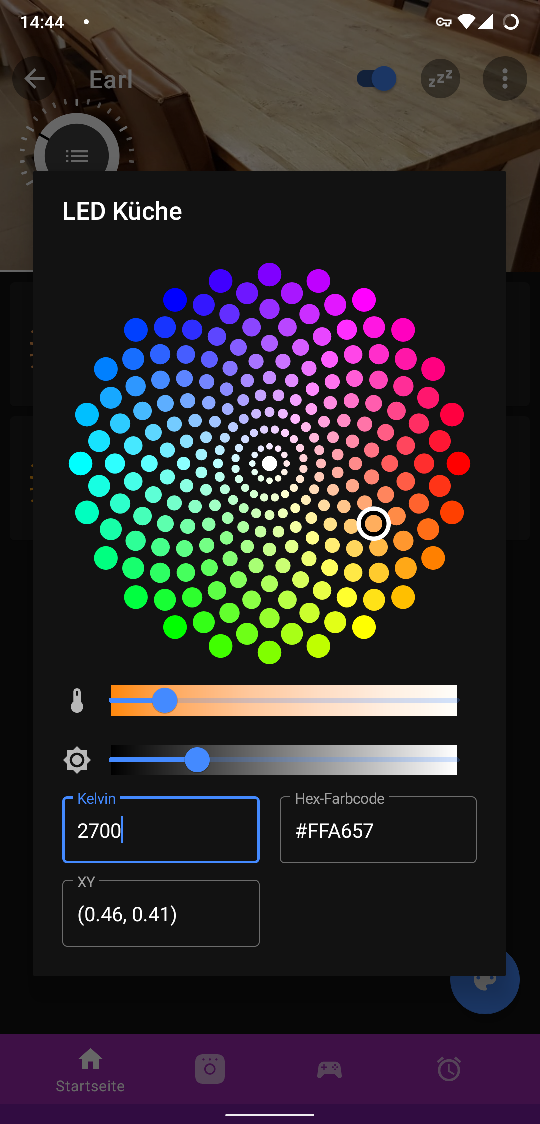
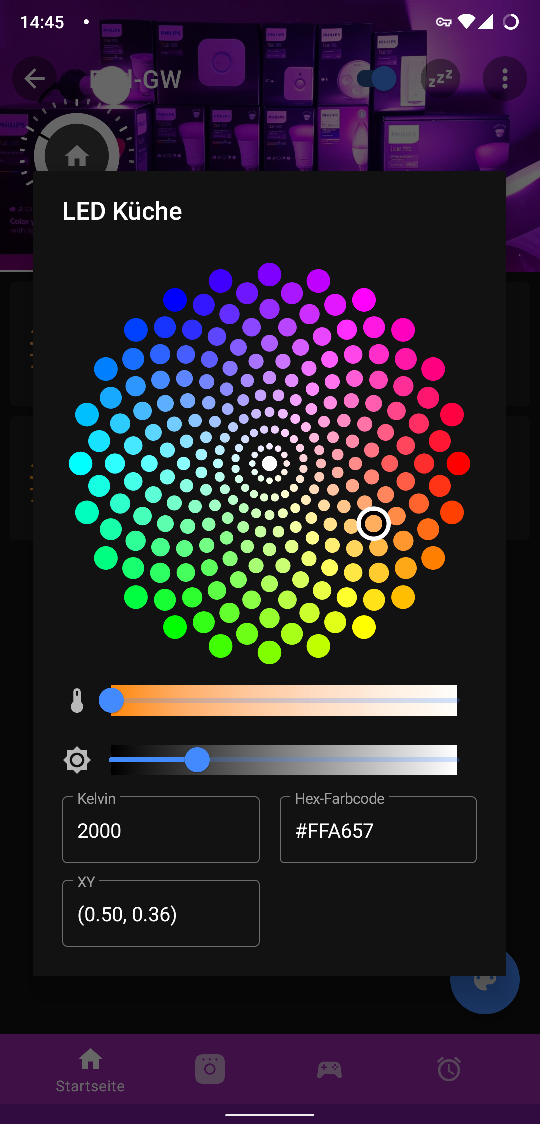
EDIT: Ok so below are two captures "store" and "called". "Store" shows I set the LED to 2700 temperature, then I saved as new scene, then called new scene. Note that an RGB FFA657 is also present. "Called" seems to activate this RGB hence LED is on RGB then...
Schorsch980
on 4 Jul 2020
I use Phoscon WebApp / Hue Essentials app (same results) to "store current light settings as new scene".
I'm sorry, this is not helping. I need the API calls.
ebaauw
on 4 Jul 2020
@Schorsch980 I created issue #1911 a while ago. It's closed because it was marked stale, but the problem was never addressed. Does it sound like a similar problem to what you're experiencing?
 ab1470
on 4 Jul 2020
ab1470
on 4 Jul 2020
I'm sorry, this is not helping. I need the API calls.
Ok I need to figure out how to log or otherwise access API calls, am just an ordinary user :}
@Schorsch980 I created issue #1911 a while ago. It's closed because it was marked stale, but the problem was never addressed. Does it sound like a similar problem to what you're experiencing?
Possibly for the Scene handling, I have a 1ID device though. Anyway the issue seems to be similar for a couple of Gledopto devices...
Schorsch980
on 4 Jul 2020
Did some testing with deCONZ and GL-C-008 (single endpoint). It doesn't seem to store the current scene correctly when colormode is ct. Upon recalling the scene, the RGB channels are on, instead of the CCT channels; the colormode reports hs. By design, the REST API plugin changes the mode to xy when storing a scene with state and writes _Current X_ and _Current Y_ (translated from ct).
I didn't have the time to setup the Hue bridge with the GL-C-008; I wonder what Zigbee commands it sends when setting up the default scenes.
ebaauw
on 4 Jul 2020
Thanks for verifying! This confirms the behaviour I have seen.
I have a Hue Bridge 2.0 over here that I could set up and connect the GL-C-008 to - it will work ok including scenes, even the Hue standard scenes work ok (tested before). Will (once more) have to figure out how I log the Zigbee communcation of the Hue Bridge in order to provide useful input here...
Schorsch980
on 5 Jul 2020
Just thought
Did some testing with deCONZ and GL-C-008 (single endpoint). It doesn't seem to store the current scene correctly when colormode is
ct. Upon recalling the scene, the RGB channels are on, instead of the CCT channels; the colormode reportshs. By design, the REST API plugin changes the mode toxywhen storing a scene with state and writes _Current X_ and _Current Y_ (translated fromct).I didn't have the time to setup the Hue bridge with the GL-C-008; I wonder what Zigbee commands it sends when setting up the default scenes.
I can confirm this. Does not switch scene back to CCT. I've got a hue bridge that handles it correctly. I'll attempt to log it's API calls over the weekend and post here.
 pXius
on 9 Jul 2020
pXius
on 9 Jul 2020
Just wanted to chip in and say I have the same issue with GL-C-008 v. 1.04.
Got error message from HASS : " /lights/3/state parameter, ct, not available" when activating the unit using a scene.
I can´t recall having this issue in the past.
I still have my hue brigde so I might move it over if its working there, still I would prefer deconz of course
 frelev
on 16 Jul 2020
frelev
on 16 Jul 2020
@frelev This is fixed in latest version. Not sure when the HA addon is updated.
Mimiix
on 16 Jul 2020
@frelev This is fixed in latest version. Not sure when the HA addon is updated.
@Mimiix
I run deconz in docker outside Hass, updated yesterday to 2.05.78 with FW 2635000 Conbee 1
I still have the same issue unfortunately
frelev
on 16 Jul 2020
@frelev https://github.com/marthoc/docker-deconz/pull/244 Your already behind 😄
It was fixed in .79
Mimiix
on 16 Jul 2020
I just tried .79 (which has been updated in home assistant) but I am still seeing problems with scenes not using the white LEDs.
 domoritz
on 21 Jul 2020
domoritz
on 21 Jul 2020
@ebaauw when you setup the GL-C-008 with deconz via the conbee, did you find out whether the problem is in deconz or the light bulb? It would be great to use scenes with the GL-C-008 and GL-C-007 but right now the light bulb is not very useful.
domoritz
on 30 Jul 2020
I have the same behaviour with two GL-MK-001. I have the latest home assistant with version 2.05.79 and a conbee II.
 apolci
on 14 Aug 2020
apolci
on 14 Aug 2020
I just tried .79 (which has been updated in home assistant) but I am still seeing problems with scenes not using the white LEDs.
Same here - .79 has not fixed the CT handling error in scenes.
Schorsch980
on 15 Aug 2020
For people that use home assistant: I noticed that the problem is only present with deconz scenes, while scenes created in home assistant itself works as expected. This has some linitation but it can be a workaround
apolci
on 15 Aug 2020
Deconz 2.05.80 shows the same problem (via Phoscon website and Hue Essentials. Would be interesting to see what Home Assistant does differently,as it seems to work on Home Assistant.
Schorsch980
on 29 Aug 2020
@Schorsch980 Does this mean it's a Phoscon thing?
Mimiix
on 29 Aug 2020
I don't think we know whether it's a phoscon issue. I suspect that home assistant sets scenes by setting every light individually. It does not know about scenes in deconz.
Therefore, I believe this issue is a bug, not a user question.
domoritz
on 29 Aug 2020
@domoritz That's not what i asked 😅
Mimiix
on 31 Aug 2020
@Schorsch980 Does this mean it's a Phoscon thing?
Not sure, as mentioned I'm just a user. I observe the CT scene handling issue in both the web interface (Phoscon) and Hue Essentials while it does not seem to be present in Home Assistant. I don't know what Home Assistant does differently.
Schorsch980
on 31 Aug 2020
@Mimiix Haha, okay. What did you ask then?
Does this mean it's a Phoscon thing?
I didn't know what "it" and "this" refer to.
Either way, I don't think this issue should be labeled as a question since there is a bug somewhere.
domoritz
on 1 Sep 2020
It's also a pretty annoying bug because most of my scenes use ww cw LEDs and currently I can only use them on the Hue Bridge (that I'd like to retire). Only RGB scenes work on the deconz gateway.
Edit: The issue shows when calling/loading a stored scene that contains CT, it will be called as RGB scene. Storing/calling can be via Website (Phoscon) or Hue Essentials (assume REST API), either way the scene seems to be stored in the gateway as you can eg store via Phoscon and call via Hue Essentials or vice versa with identical (wrong) behavior.
Schorsch980
on 2 Sep 2020
@domoritz I think you do, but i suggest reading this .
Mimiix
on 2 Sep 2020
Thank you for the link @Mimiix. Since the problem also shows up with Hue Essential, isn't that an indicator that the bug may not be in Phoscon but instead in deconz?
domoritz
on 6 Sep 2020
As there hasn't been any response in 21 days, this issue has been automatically marked as stale. At OP: Please either close this issue or keep it active It will be closed in 7 days if no further activity occurs.
![stale[bot] picture](https://avatars3.githubusercontent.com/in/1724?v=4&s=40) stale[bot]
on 29 Sep 2020
stale[bot]
on 29 Sep 2020
@xvil, can you confirm that this is still an issue?
domoritz
on 29 Sep 2020
Last time I tested (and others reported the same), this is indeed still a
problem. The only working solution that has been working without a hiccup
is, unfortunately, using the original Philips Hue bridge.
Recording an actual communication between Gledopto devices and the Philips
bridge could give some clues on how scenes are working, because they really
are with all bells and whistles. That recording is a bit out of my league I
believe but given detailed steps I could help with that.
Le mar. 29 sept. 2020 à 03:37, Dominik Moritz notifications@github.com a
écrit :
@xvil https://github.com/xvil, can you confirm that this is still an
issue?—
You are receiving this because you were mentioned.
Reply to this email directly, view it on GitHub
https://github.com/dresden-elektronik/deconz-rest-plugin/issues/2364#issuecomment-700372694,
or unsubscribe
https://github.com/notifications/unsubscribe-auth/AHQDNX6WV5CPICBAD4CFS7LSIE27HANCNFSM4KKT7H3Q
.
xvil
on 29 Sep 2020
Forwarded to @manup
Mimiix
on 29 Sep 2020
Being just a user I'm afraid I can't contribute much - but I have a spare controller (GL-C-008 v. 1.06) and could send it to someone who can...
Schorsch980
on 30 Sep 2020
It is an issue at all and now. I use the very latest phoscon and deconz versions.
Version: 2.05.82 dated with 2020-09-14, Firmware: 26580700.
I use FHEM, can send the standard rgb and ct commands, but if I want to call a standard HUE_Scene it fails. Interesting thing is, that the scenes will be created correctly, but can't be never recalled, neither in phoscon or HUE_Essentials, nor in FHEM. If you modify the scenes in phoscon the "save" but fail to recall.
It's really annoying...
 Shamal2008
on 2 Oct 2020
Shamal2008
on 2 Oct 2020
I seem to be experiencing the same problem. When switching scenes that were set on a white tint, the light switches to some RGB tint that was not set in the scene.
I'm seeing this with Gledopto GL-C-008, Conbee ii and Phoscon. I can confirm that calling a scene via Hue essentials yields the same result.
 basg
on 9 Oct 2020
basg
on 9 Oct 2020
Finally found the time to hook up my GL-C-008 to the Hue bridge and sniff what's happening there. As far as I can tell, the bridge doesn't use the _Scenes_ cluster on the GLEDOPTO at all: it simply sends unicast _OnOff_, _Level Control_, and _Color Control_ commands to the GLEDOPTO, right after broadcasting the _Recall Scene_.
So it _is_ the GLEDOPTO, but the Hue bridge implemented a workaround. Not sure if we want to implement the same workaround in REST API Plugin as well. deCONZ supports more lights (up to 200) than the Hue bridge (50), and the workaround doesn't scale well.
ebaauw
on 17 Oct 2020
Thank you for looking into it @ebaauw! I don't know how involved the workaround would be but I suspect that the workaround would make all Gledopto color lights compatible with Deconz (which would be great), right?
Is https://github.com/dresden-elektronik/deconz-rest-plugin/wiki/Supported-Devices the source of truth on what lights are supported? If so, https://zigbee.blakadder.com/Gledopto_GL-B-007Z.html should probably be updated to not say that Deconz is supported right now (cc @blakadder).
domoritz
on 17 Oct 2020
Thanks @ebaauw for looking into this. Had hoped for a better result obviously, in particular since the handling of scenes seemed to have changed a little between 2.05.79 (and earlier) and 2.05.84 (have not tried interim versions). When I stored a ct scene using the older version, recalling it resulted in seemingly arbitrary RGB values. Storing a ct scene in the new version is different in that calling it results in the last RGB setting becoming active (rather than arbitrary). This is colorwise, brightness is stored/called correctly. So the new version also gets it wrong in that it fails to put the LED in ct. But it's wrong in a different way because the RGB setting coming up when you call the ct scene is no longer arbitrary.
I can't opt for or against a work around as I don't know what's involved. I did buy the Raspbee II though because it is described as compatible with the Gledopto device that I could use ok with the Hue Bridge already. I cannot change the Gledoptos so I guess I will have to revert back to the Hue Bridge, if Deconz continues to not work with Gledopto - it should then no longer be described as compatible because that's misleading...
Schorsch980
on 17 Oct 2020
@Schorsch980 I completely agree with you. I also bought 14 GLedoptos, 1id,2id, 007, 007s, 008s.... all with the same behaviour. I'm really disappointed and it's definitely not the way it should work . Deconz/Conbee seem to have a problem with scenes, so they should state it clear, that this feature doesn't work.
Shamal2008
on 22 Oct 2020
I've forwarded this issue to manup ;)
Mimiix
on 23 Oct 2020
Deconz/Conbee seem to have a problem with scenes
Please read my comment above: the GLEDOPTOs have problems with Zigbee scenes and the Hue bridge works around that by not using Zigbee scenes. The REST API only supports Zigbee scenes (and Zigbee groups), that work very differently (and vastly more efficient) than scenes and groups in your regular home automation system. You could issue an enhancement request for support of non-Zigbee groups and scenes handled completely by the API (cf. schedules or rules), but the behaviour you’re seeing is not caused by a bug in deCONZ.
Zigbee scenes and groups don’t exist as single entity. A Zigbee group is very much like a multicast address. Each light stores to which groups it has subscribed, in the server _Groups_ cluster. A Zigbee scene is very much like an ID. Each like stores their target state under this ID, in the server _Scenes_ cluster. When recalling a Zigbee scene, the gateway sends a single broadcast message to a group, containing the ID of the state to be restored. For comparison, your regular home automation system sends a unicast command to each light with the state. This is what the Hue bridge does for the GLEDOPTO.
There are two commands to define a target state on a light: _Add Scene_ and _Store Scene_. The first takes the state as parameters, the second stores the current light state. The API sends _Add Scene_ on the Modify Scene command:
PUT /api/<apikey>/groups/<group_id>/scenes/<scene_id>/lights/<light_id>/state
and _Store Scene_ on the Store Scene command:
PUT /api/<apikey>/groups/<group_id>/scenes/<scene_id>/store
I don’t use Phoscon, but I think it only uses _Add Scene_, unfortunately, just like the old web app.
Unfortunately, there are some issues with Zigbee scenes, beyond what deCONZ can influence or control:
- In their infinite whisdom, the Zigbee standard doesn’t cater for _Color Temperature_ in a scene, wrongly assuming it could be specified just as easily by _Current X_ and _Current Y_. While this holds for early RGB lights, that create colour temperatures by mixing the RGB channels, it doesn’t work for RGB+CCT lights, that drive the CCT channels on _Color Temperature_ and the RGB channels on _Current X_ and _Current Y_. This means you cannot specify _Color Temperature_ in _Add Scene_. Some _Color Temperature Light_ manufacturers implemented workarounds for this (using _Hue_ or _Current X_), each of which needs to be whitelisted in the API plugin. For others, you need to use _Store Scene_ instead. I’m not aware of any workarounds for _Extended Color Lights_.
- Some light firmware is broken and don’t implement _Add Scene_ correctly. I think that might be the cause of lights not turning off on scene recall (https://github.com/dresden-elektronik/deconz-rest-plugin/issues/3135).
- We’ve seen the _Scenes_ table become corrupted when updating the firmware on IKEA lights.
- _Store Scene_ is bound give unexpected results, when received while the light is still transitioning from one state to another.
My best practice for defining scenes is not to use Phoscon (nor the old web app). Instead I set the light state, wait a couple of seconds, making sure any transition has finished, send a _Store Scene_, and wait another couple of seconds before changing the light state. You can do this in the GUI, or through the API. I’m actually using bash scripts that use ph to send API commands.
I also bought 14 GLedoptos, 1id,2id, 007, 007s, 008s.... all with the same behaviour.
The 2ID GLEDOPTO devices use different endpoints for the RGB vs the CCT channels. Each endpoint has their own _Groups_ and _Scenes_ cluster, effectively making them two independent lights. The 1ID GLEDOPTO use a single endpoint, which at any given moment either drives the RGB or the CCT channels, but not both at the same time.
ebaauw
on 23 Oct 2020
Here is a message I got from Gledopto about this issue
Philips setting the scene is to split the scene command into on/off, brightness, and color commands.
deconz is a scene command used directly. The products we ship do not support cct scene commands. Will be improved in the next version.
domoritz
on 13 Nov 2020
This leads to a question, I asked in other threads: Will there be any possibility to upgrade Firmware in the Gled-Optos? Are there any infos out there?
Shamal2008
on 13 Nov 2020
@Shamal2008 That is not to be asked here.
Mimiix
on 13 Nov 2020
From memory, they don’t expose the _OTAU_ cluster, so no over-the-air update.
ebaauw
on 13 Nov 2020
Related issues
 lynix
·
4Comments
lynix
·
4Comments
 7wells
·
4Comments
7wells
·
4Comments
 salopette
·
4Comments
salopette
·
4Comments
 marthoc
·
6Comments
marthoc
·
6Comments
 ReeChip
·
5Comments
ReeChip
·
5Comments
Most helpful comment
Finally found the time to hook up my GL-C-008 to the Hue bridge and sniff what's happening there. As far as I can tell, the bridge doesn't use the _Scenes_ cluster on the GLEDOPTO at all: it simply sends unicast _OnOff_, _Level Control_, and _Color Control_ commands to the GLEDOPTO, right after broadcasting the _Recall Scene_.
So it _is_ the GLEDOPTO, but the Hue bridge implemented a workaround. Not sure if we want to implement the same workaround in REST API Plugin as well. deCONZ supports more lights (up to 200) than the Hue bridge (50), and the workaround doesn't scale well.