Deconz-rest-plugin: Aqara Wall switch QBKG04LM - How to enable decoupled mode (disconnect button from relay)
Hello everyone!
Could anybody please help me with disconnecting button from relay for switch Aqara QBKG04LM (1 line, no neutral)?
In other thread realted to 2 line switch Aqara QBKG12LM https://github.com/dresden-elektronik/deconz-rest-plugin/issues/1420#issuecomment-483057308 @ebaauw clarified that Aqara switches can work in decoupled mode and all you need to do is write new values (0xFE) in attributes 0xFF22 and 0xFF23. Unfortunatelly, deconz don't show this parameters for my switch QBKG04LM with default general.xml, despite in this files there is relevant lines.
<attribute id="0xFF22" name="Xiaomi Disconnect 1" type="u8" showas="hex" access="rw" required="o" mfcode="0x115F">
<description>Set to 0x12 (0xFE) to connect (disconnect) the left button to (from) the relay.</description>
</attribute>
From this topic https://github.com/dresden-elektronik/deconz-rest-plugin/issues/1487#issuecomment-488347147 I discovered that my switch QBKG04LM uses another manufacturing code - 0x1037 instead of 0x115F. When I changed mfcode to 0x137 in the file general.xml to correct value I discovered that disconnecting parameters appeared in deconz interface with a 0x00 value. But when I try to read or write a new value, for example 0xFE, I get an error:
failed UNSUP_MANUF_GENERAL_COMMAND

I read as many topics realted to my case as I could, but didn't find anything what could help me. Moreover I use Conbee II so I can't use ZSHARK for sniffing my xiaomi zigbee gateway and can't look out a command that disconnect switch button from relay.
I would really appreciate if anyone can give me advice how I can try to fix my problem.
==========
== UPDATE ==
TEMPORARY SOLUTION by @KapJI: https://github.com/dresden-elektronik/deconz-rest-plugin/issues/1816#issuecomment-545662130
 am1ter
All 44 comments
@ebaauw clarified that Aqara switches can work in decoupled mode
All I clarified is that one particular model Aqara switch can work in decoupled mode. There’s no such thing as “Aqara switches”: every model works differently, and they seem to be using the same commercial model name for different technical models.
 ebaauw
on 3 Sep 2019
ebaauw
on 3 Sep 2019
@ebaauw clarified that Aqara switches can work in decoupled mode
All I clarified is that one particular model Aqara switch can work in decoupled mode. There’s no such thing as “Aqara switches”: every model works differently, and they seem to be using the same commercial model name for different technical models.
Thank you for your reply. In fact this Aqara switch can work in decoupled mode when it is connected to Xiaomi Aqara Gateway. This option works fine. But I can't find out a way to do the same thing using Deconz and Conbee II gateway.
am1ter
on 3 Sep 2019
Just a long shot: Did you try the attribute definition without a manufacturer code?
ebaauw
on 3 Sep 2019
Just a long shot: Did you try the attribute definition without a manufacturer code?
Yes, I did. In a such case there is another error:
writing failed

am1ter
on 3 Sep 2019
I have the same problem. My switches ID is 0x1037 and I cannot find a way to enable decoupled mode...
 ArkadiuszNiemiec
on 24 Sep 2019
ArkadiuszNiemiec
on 24 Sep 2019
I have bought a CC2531 dongle to snif a network. Can I connect a switch do Xiaomi HUB and sniff what it sends when I enable a decoupled mode?
ArkadiuszNiemiec
on 2 Oct 2019
I have bought a CC2531 dongle to snif a network. Can I connect a switch do Xiaomi HUB and sniff what it sends when I enable a decoupled mode?
I think you could. I would really appreciate if you would upload your sniffed data.
am1ter
on 4 Oct 2019
I have bought a CC2531 dongle to snif a network. Can I connect a switch do Xiaomi HUB and sniff what it sends when I enable a decoupled mode?
I think you could. I would really appreciate if you would upload your sniffed data.
I will post it as soon as I have the hardware.
ArkadiuszNiemiec
on 7 Oct 2019
I have the same problem. I can confirm that this switch support decoupled mode by sending 0xFE to 0xFF22 and 0xFF23. I added support of this feature to zigbee2mqtt few months ago and it works fine: https://github.com/Koenkk/zigbee-herdsman-converters/pull/287
But deCONZ with Conbee 2 can't write this attribute for some reason.
 KapJI
on 20 Oct 2019
KapJI
on 20 Oct 2019
After sniffing traffic and comparing with what zigbee2mqtt does I found that manufacturer code 0x115F should be used (it's part of request). Deconz detects it incorrectly and then uses it to match with extra attributes from general.xml
@manup can you clarify how deconz detects mfcode?
KapJI
on 23 Oct 2019
zigbee2mqtt for example just has it hardcoded: https://github.com/KapJI/zigbee-shepherd-converters/blob/be0c869339da485842b2b56bf5cd370f22ba2b89/converters/toZigbee.js#L15
KapJI
on 23 Oct 2019
@am1ter @ArkadiuszNiemiec if you're still interested I created custom endpoint for rest plugin: https://github.com/KapJI/deconz-rest-plugin/tree/set-mfcode
It can write attribute with correct manufacturer code. Compile plugin, replace existing one.
Then you can use it like:
curl -X POST http://127.0.0.1:8090/api/<api_key>/attributes/<id> -d '{"key": 65314, "value": 254}'
Use <id> from /api/<api_key>/sensors.
65314 for left button, 65315 for right button.
254 for decoupled mode, 18 or 34 for enabling relay control back.
KapJI
on 24 Oct 2019
@KapJI great job, thank you! I will be back in my flat in two weeks. I will update you here after I test it :+1:
ArkadiuszNiemiec
on 24 Oct 2019
@KapJI Thank you very much for your solution! I would really appreciate if you could give me some additional details. I compiled plugin and replaced existing, but I am not sure that I did it correctly.
A couple of questions:
- I got an api key. When I send GET request to
/sensors I get a correct answer. But I am not sure what part of answer I should use as . Below an example of answer:
 "2": {
        "config": {
            "on": true,
            "reachable": false,
            "temperature": 2400
        },
        "ep": 4,
        "etag": "26ed2d6fa261328a18f2deb36c289794",
        "manufacturername": "LUMI",
        "mode": 1,
        "modelid": "lumi.ctrl_neutral1",
        "name": "lumi.ctrl_neutral1",
        "state": {
            "buttonevent": 1002,
            "lastupdated": "2019-08-26T19:45:33"
        },
        "swversion": "11-25-2017",
        "type": "ZHASwitch",
        "uniqueid": "00:15:8d:00:02:4d:4f:cb-04-0006"
    }
Is my id for POST request is "2" or "00:15:8d:00:02:4d:4f:cb-04-0006"?
- When I try to send a POST command
curl -X POST http://192.168.0.115:40850/api/XXXXXXXXXXX/attributes/2 -d '{"key": 65314, "value": 254}'
I get an error:
[
{"error":
{"address":"/attributes/2","description":"method, POST, not available for resource, attributes/2","type":4}
}
]
So I suppose that I made a mistake while compiling plugin.
I would be grateful for any advice!
am1ter
on 25 Oct 2019
@am1ter
- Yes, "2" is correct id.
- It looks like you don't have my changes. Check if you have this commit in your checkout: https://github.com/KapJI/deconz-rest-plugin/commit/8749dc71182459fc7f9ae513a36eacc870d1d809
Did you checkout correct branch in my fork? Did you restart deconz after replacing the plugin?
KapJI
on 25 Oct 2019
@KapJI, Thank you very much for your solution. Everything works perfect. My mistake was moving copiled plugin to incorrect docker container. When I copied it in the correct I got an opportunity to write attributes.
I updated first post with link to this solution.
am1ter
on 29 Oct 2019
@am1ter Great to hear!
KapJI
on 29 Oct 2019
@ebaauw you are the only contributor here, what do we need to do to merge @KapJI work to master?
ArkadiuszNiemiec
on 6 Nov 2019
Technically, a pull request.
Not sure if it should be merged, though. I think it should be a PUT instead of a POST. Also, I don't like the hardcoded endpoint and mfcode.
You should be able to write the attribute using the CLI plugin (https://github.com/ma-ca/deconz-cli-plugin).
ebaauw
on 6 Nov 2019
@ebaauw I think the proper fix will be using the correct mfcode for Xiaomi devices in deConz itself. But as sources are closed, I can't submit pull request there :(
I believe there's hardcoded mapping somewhere between model id and mfcode.
KapJI
on 13 Nov 2019
The deCONZ core programme is closed source, but the _Cluster Info_ panel is configurable through general.xml, which is part of this repository. That's how I added support for decoupled mode for the other Xiaomi switch.
I believe there's hardcoded mapping somewhere between model id and mfcode.
No. Per the ZigBee standard, the deCONZ core programme uses the _Manufacturer Code_ from the _Device Descriptor_ to determine which manufacturer-specific attributes (from general.xml) to show in the GUI.
The issue with this Xiaomi switch is that it uses a different codes in the descriptor vs the _Basic_ cluster. Working around this mutilation of the standard seems way beyond the current design and function of the core programme. The values of the _Basic_ cluster attributes are used only by the REST API plugin, not by the core programme.
The "proper" fix would be for Xiaomi to release firmware that adheres to the standard. I don't think that's likely to happen, so, unfortunately, we're stuck with "improper" workarounds. Which, imho, is still preferable over not supporting devices that don't adhere to the standard.
ebaauw
on 13 Nov 2019
Which, imho, is still preferable over not supporting devices that don't adhere to the standard.
Yes, please! I have equipped my whole house with these switches with the intention to use some of them as wireless switches for smart lamps or bulbs. That's the reason why I have bought the ConBeeII and set up Deconz :smile:
Ccan you suggest or help to develop the improper but acceptable workaround for this? I have found your PR with decoupled mode for another switch (#1444) and tried to follow it but it's still too hard for me to grasp.
ArkadiuszNiemiec
on 15 Nov 2019
I don't see a workaround using the deCONZ GUI. For the more technical people: send the _Write Attributes_ command using the deconz-cli-plugin (there you can specify mfcode yourself).
For the non-technical people, proper support by the REST API (and by its clients, like Phoscon) would be needed. As you only set this once when commissioning the switch, I see no urge to do this. Also, without access to a switch, development and testing would be very hard.
I suppose adding a config.detached REST attribute would be the proper way. Then we run into the same issue as with config.group: different switch endpoints have different settings, but are combined in a single REST resource. Best left to API v2.
ebaauw
on 15 Nov 2019
For the more technical people: send the _Write Attributes_ command using the deconz-cli-plugin (there you can specify mfcode yourself).
I have prepared a docker with deconz-cli-plugin and I am currently trying to write the attribute. I am not quite sure what is wrong so maybe you can help.
I am typing:
zclattrmanu 0x6341 1 0x0000 0x115F 02FF2320FE
where: 0x6341 is NWK (address), 1 is the ep, 0x0000 is the cluster,0x115Fis manufacturer code and then there is a command:02to write,FF23attribute identifier (16 bits according to docs),20is data type (u8) andFE` is data to write.
Is that right? What is wrong? Thank you in advance!
ArkadiuszNiemiec
on 16 Nov 2019
I think you need to specify the payload in Big Endian? So 0223FF20FE.
ebaauw
on 16 Nov 2019
I think you need to specify the payload in Big Endian? So
0223FF20FE.
You are right, it worked! I have a decoupled switch now. Thank you and thanks @KapJI
ArkadiuszNiemiec
on 16 Nov 2019
Hello. I bought QBKG03LM switches and ran into the problem of adding. More precisely, a switch is added. At first it is added as 4 devices, but after restarting the gui, only two remain. But the sleepy problem is not that. How to implement a logic switch. One of the buttons should control the smart lamp. I tried to compile the plugin and set the parameter through it, succession reported, but at the same time, as the relay clicked, it continued to click.
 aleksandrdobrynin
on 21 Nov 2019
aleksandrdobrynin
on 21 Nov 2019
Guys, when Deconz start work fine with all the features of these switches? Why is it impossible to include the decoupled mode in the phoscon functionality? Why is it possible in s**t Z2M and not in Deconz?
 SAOPP
on 6 Mar 2020
SAOPP
on 6 Mar 2020
It works fine, check out the following post: https://github.com/dresden-elektronik/deconz-rest-plugin/issues/1420#issuecomment-483057308
 SilverFire
on 11 Apr 2020
SilverFire
on 11 Apr 2020
It seems this issue is resolved or otherwise inactive. If it is not, please re-open!
 Mimiix
on 6 Jun 2020
Mimiix
on 6 Jun 2020
@am1ter @ArkadiuszNiemiec if you're still interested I created custom endpoint for rest plugin: https://github.com/KapJI/deconz-rest-plugin/tree/set-mfcode
It can write attribute with correct manufacturer code. Compile plugin, replace existing one.
Then you can use it like:curl -X POST http://127.0.0.1:8090/api/<api_key>/attributes/<id> -d '{"key": 65314, "value": 254}'Use
<id>from/api/<api_key>/sensors.
65314 for left button, 65315 for right button.
254 for decoupled mode, 18 or 34 for enabling relay control back.
How can i compile & install your version from windows 10.
This link is broken: https://www.dresden-elektronik.de/deconz/win/
With original deconz version:
curl -X POST http://127.0.0.1:8080/api/7D49DCAD4F/attributes/3 -d '{"key": 65315, "value": 254}'
I receive the error mentioned above:
[{"error":{"address":"/attributes/3","description":"method, POST, not available for resource, /attributes/3","type":4}}]
 50l3r
on 11 Jun 2020
50l3r
on 11 Jun 2020
I’d like to understand decoupled mode better. Where do I find more information?
 chbndrhnns
on 12 Jun 2020
chbndrhnns
on 12 Jun 2020
What specifically interests you?
SAOPP
on 12 Jun 2020
- What are the implications and advantages of enabling the decoupled mode? I understand it would allow to connect switches to lights without phoscon? Is that right?
- Is there a way to find out which devices support it?
- given the hacks listed above that are required to enable it, are there risks I should be aware of?
chbndrhnns
on 12 Jun 2020
I understand it would allow to connect switches to lights without phoscon? Is that right?
No. It detaches the button(s) from the output line(s), so you can use them as wireless switch(es) without switching the wired light(s).
You can use any device without Phoscon - I never even use Phoscon. It's just a browser-based front-end app, connecting to deCONZ over the REST API, see deCONZ for Dummies.
To use wireless switches without deCONZ, they need to act as a controller, i.e. send commands directly to the lights (typically through a group). Whether a switch can act as controller is determined in its firmware. Xiaomi switches cannot; nothing we can do to change that. You can recognise controllers in the API by the ZHASwitch /sensors resource exposing config.group. And in the GUI by having (a) client (grey) _On/Off_ cluster(s).
ebaauw
on 12 Jun 2020
@ebaauw could you throw some light to my problem? Im stuck at this point. Thanks in advance
50l3r
on 12 Jun 2020
@chbndrhnns Just like Eric said. This is the decoupling of the button from the physical relay of the switch. Those your relay is constantly on (convenient for smart lighting), and the keys turn into logical ones with their own events, 1002, 2002 and 3002 - exactly the same as the Xiaomi wireless switch of the first revision, 3 actions. In this case, u can also control two relays via home automation system like Home Assistant and etc.
SAOPP
on 12 Jun 2020
@50l3r You should be able to set decoupled mode using the cli plugin or the rest plugin changes by @KapJI, see above. In both cases you need to compile and install a plugin yourself. I don't think compiling on Windows is supported.
ebaauw
on 12 Jun 2020
@50l3r You should be able to set decoupled mode using the cli plugin or the rest plugin changes by @KapJI, see above. In both cases you need to compile and install a plugin yourself. I don't think compiling on Windows is supported.
Thats very frustrating. I cant advance in this area. I have "no neutral" version and the lights blink constantly. Deconz cant detect my decoupled option and if i try to setup the switches with xiaomi gateway it cant integrate with other home devices.
do you know any alternative to the aqara wall switch? Maybe wireless version?
50l3r
on 20 Jun 2020
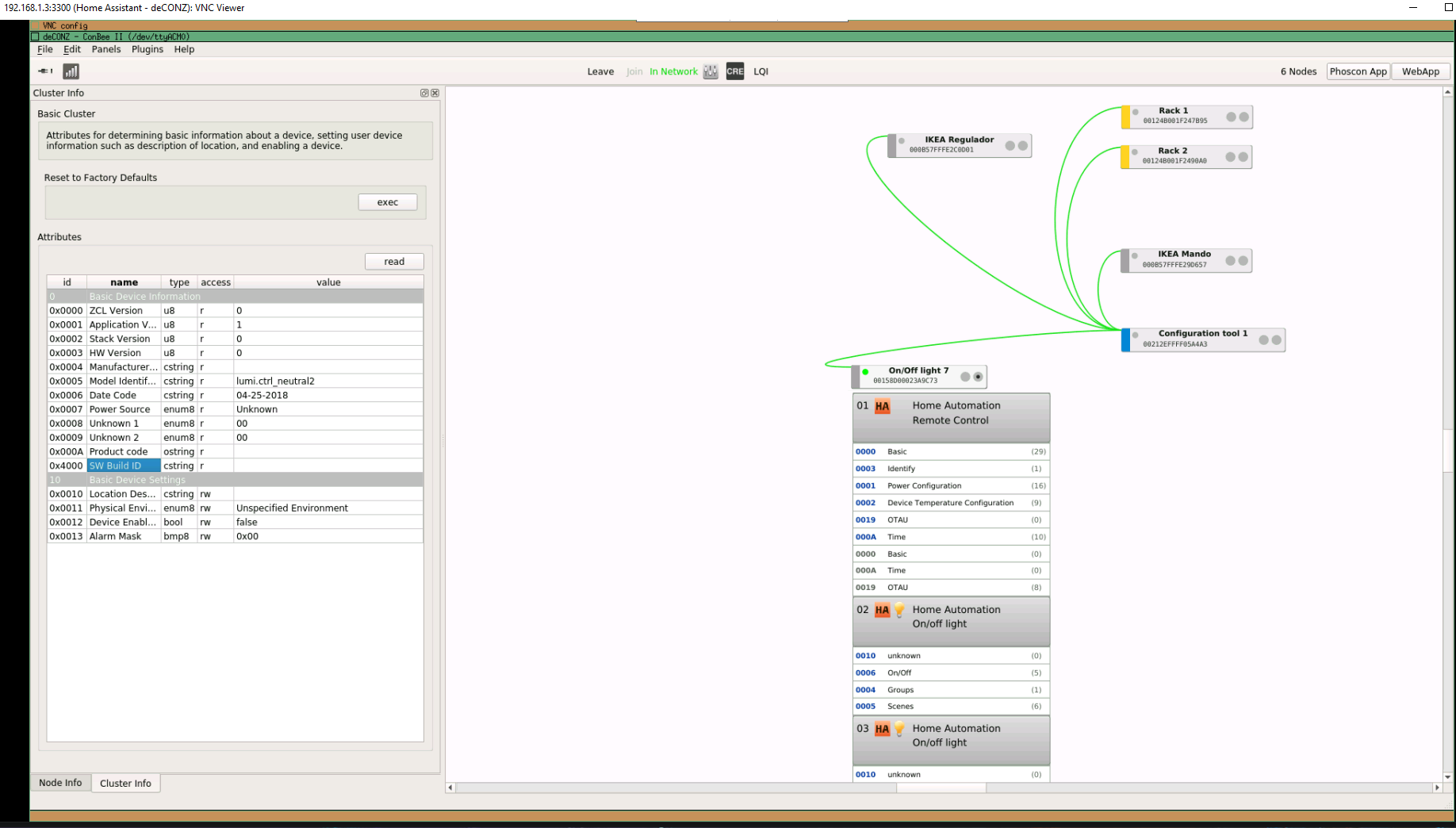
i can compile rest plugin inside home assistant? i host my home assistant in a proxmox vps.
If i access via vnc i view the gui:
50l3r
on 20 Jun 2020
Thats very frustrating. I cant advance in this area. I have "no neutral" version and the lights blink constantly. Deconz cant detect my decoupled option and if i try to setup the switches with xiaomi gateway it cant integrate with other home devices.
But, this option can nothing for you, it s an electricial problem. Or you want to use only the switch and let the relay always "on" ?
BTW this option is on Cluster 0x0000 , attribute 0xff22 and 0xff23, not visible on yours, wich one deconz version have you ? The manufacter is 0x115f on your device too ?
 Smanar
on 20 Jun 2020
Smanar
on 20 Jun 2020
Thats very frustrating. I cant advance in this area. I have "no neutral" version and the lights blink constantly. Deconz cant detect my decoupled option and if i try to setup the switches with xiaomi gateway it cant integrate with other home devices.
But, this option can nothing for you, it s an electricial problem. Or you want to use only the switch and let the relay always "on" ?
BTW this option is on Cluster 0x0000 , attribute 0xff22 and 0xff23, not visible on yours, wich one deconz version have you ? The manufacter is 0x115f on your device too ?
Yes, i want to let relay always on and only use switch events with home assistant to execute actions like start vacuum or someting.
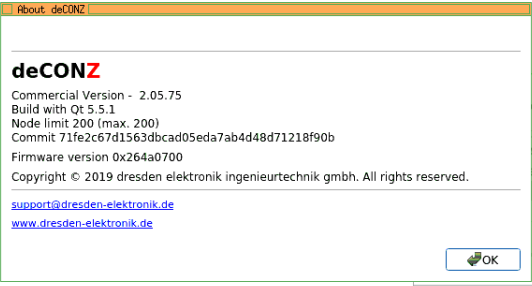
Thats my deconz version. I connecting with vnc to my home assistant with deconz addon:
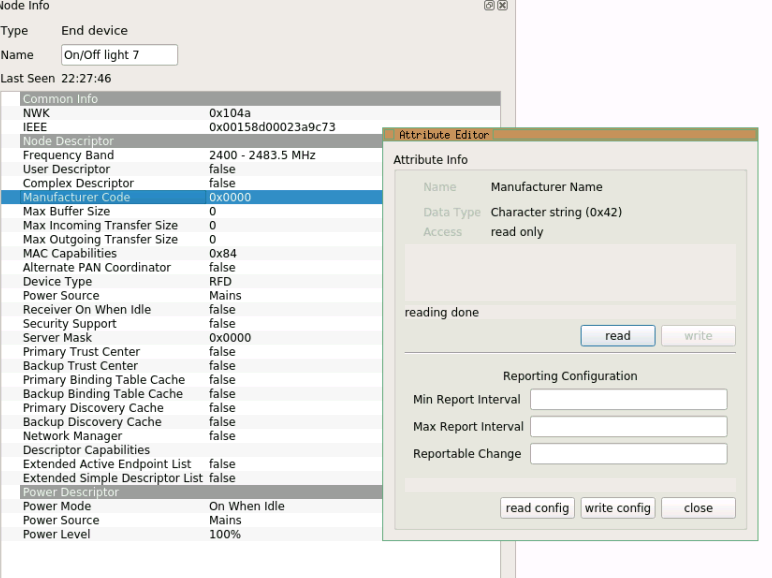
How can i get the manufacturer version? Maybe here?
50l3r
on 21 Jun 2020
Is there any chance that somebody who knows how to do this could make a video while doing it.. Might be easier for us noobs to be a able to ape the steps.. Thanx
 rskhaira
on 16 Aug 2020
rskhaira
on 16 Aug 2020
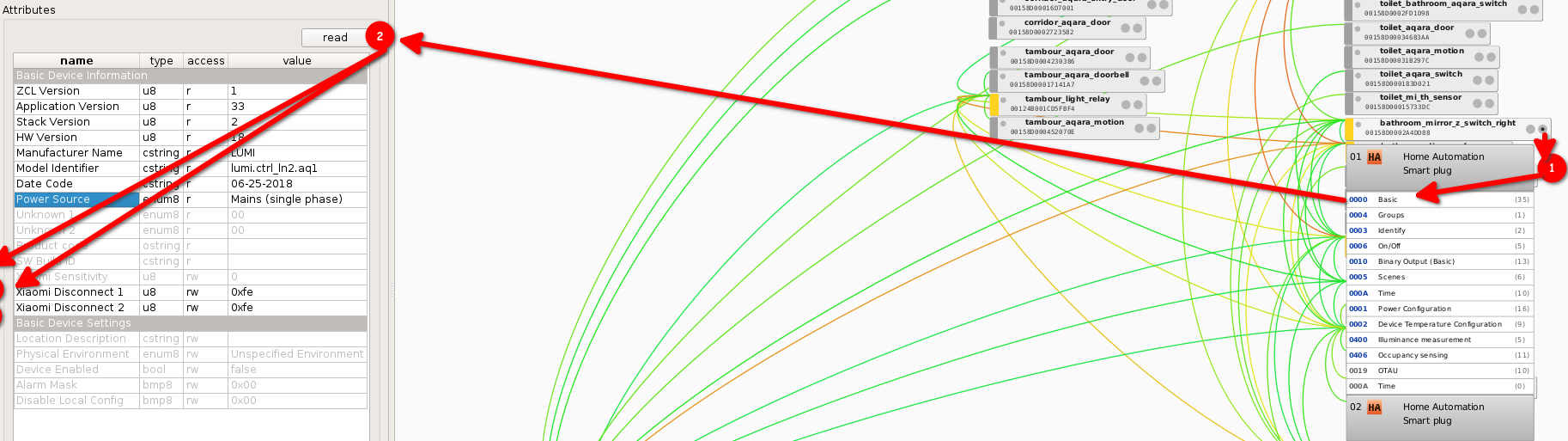
Easy, open the basic cluster, read data, and open the channel 1 or 2, or maybe u got 1 way rocker, so then only 1 relay. Next double click on the channel:
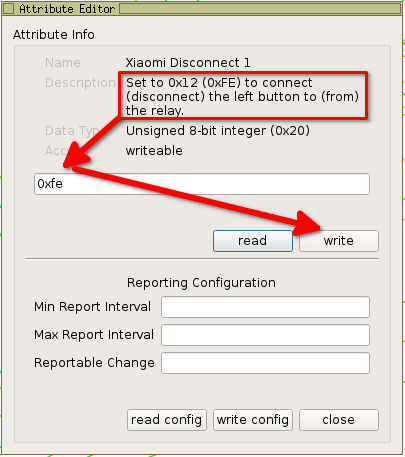
...and type needed code for connect and disconnect releays. Read comments in the window. It's all.
SAOPP
on 16 Aug 2020
Related issues
 felixstorm
·
4Comments
felixstorm
·
4Comments
 tenholde
·
3Comments
tenholde
·
3Comments
 philko123
·
3Comments
philko123
·
3Comments
 ScharV
·
5Comments
ScharV
·
5Comments
 wizkidorg
·
3Comments
wizkidorg
·
3Comments
Most helpful comment
@am1ter @ArkadiuszNiemiec if you're still interested I created custom endpoint for rest plugin: https://github.com/KapJI/deconz-rest-plugin/tree/set-mfcode
It can write attribute with correct manufacturer code. Compile plugin, replace existing one.
Then you can use it like:
Use
<id>from/api/<api_key>/sensors.65314 for left button, 65315 for right button.
254 for decoupled mode, 18 or 34 for enabling relay control back.