Deconz-rest-plugin: Osram Smart+ Plugs cannot be switched on/off in V2_05_66
Yesterday I updated to the latest version V2_05_66. Since then, my two Osram Smart+ Plugs no longer work correctly. A timeout occurs when switching via the on/off cluster. That goes so far that the devices lose their zigbee connection afterwards. I can only switch on the devices by switching on the group they are in.
I have read on the Internet that newer firmware versions of Osram Plugs can cause problems. My plugs have versions 1.04.12 and 1.04.90.
Can anybody reproduce a similar problem with the Osram Smart+ Plugs?
 Markkuuss
All 93 comments
Which firmware version are you using?
When using the On/Off cluster directly it should always work, since the commands will be send directly to the plug. I'll check later if I can reproduce this with my OSRAM Smart+ plug.
 manup
on 25 Jun 2019
manup
on 25 Jun 2019
I am using firmware version 26330500.
It is also not possible to read the attributes of the OTAU cluster.
Can you please tell me which firmware your Smart+ Plugs have?
Markkuuss
on 25 Jun 2019
It's the European version V1.04.12.
I can currently just control it remotely from the office but this seems to work.
manup
on 25 Jun 2019
Have you tried to power-cycle the plugs?
Do the other lights in the network work?
manup
on 25 Jun 2019
Have you tried to power-cycle the plugs?
Yes, without success.
Do the other lights in the network work?
Yes, several of dresden elektronik, ubisys, philips, ... They all work. Only the two Osram plugs cause problems.
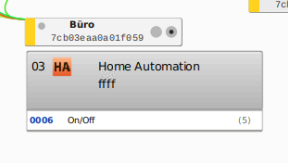
I just reset one of the two nodes with F5 in deconz. Normally the node acts as a ZLL. Now it is displayed as follows:
Markkuuss
on 25 Jun 2019
It's the European version V1.04.12.
So the same version as me.
What about deconz? Do you also use the latest version and the latest firmware of the Raspbee?
Markkuuss
on 25 Jun 2019
I also had a problem with my Osram Plug. I couldn't control it anymore after updated deconz to 2.05.66.
My plug has firmware version V1.05.11.
I deleted it and re-added and it's been fine since.
 Philje123
on 25 Jun 2019
Philje123
on 25 Jun 2019
I'm now back at 2.05.65. That didn't help at first. Then I reloaded the firmware (according to the description), now the Osram plugs are reachable as usual.
@Philje123: What do you mean by "deleted"?
This one:

Or did you set the plug to factory settings?
Markkuuss
on 25 Jun 2019
i am also on 1.04.12 (eu)
i see newer versions here like 1.04.90 1.05.11
how to update those osrams? i have issues with it if my xiaomi sensors are connected to it
 pergolafabio
on 26 Jun 2019
pergolafabio
on 26 Jun 2019
I deleted the plug via the phoscon web page.
I have an Osram lightify Hub so updated my osram products via that before pairing with deconz.
Philje123
on 26 Jun 2019
ah ok , you saw some release notes in there ? , so 1.05.11 is latest one?
pergolafabio
on 26 Jun 2019
1.04.90 is on my Osram Smart+ Outdoor Plug. But I think that is the same hardware as the indoor only in a different case.
An update is probably only possible via the Osram Hub, since the firmware files are only available for download as encrypted .bin files. Or is anyone familiar with another solution?
Markkuuss
on 26 Jun 2019
i hope for another solution :)
dont want to buy a hub, only for upgrading :)
pergolafabio
on 26 Jun 2019
i dropped osram a support mail, but not hoping for a good reply anyway :)
pergolafabio
on 26 Jun 2019
Yeah I only got the hub as my local supermarket were selling a load of Osram stuff off cheap and only paid £12 for it. It's come in handy as I have quite a few Osram bulbs etc.
Philje123
on 26 Jun 2019
you also have xiaomi motion sensors? seems there are issues with it in combination with osram , so maybe firmwares can help
pergolafabio
on 26 Jun 2019
But isn't the update procedure very complicated? Could you explain it shortly, @Philje123 ? Do you have to set the Osram devices to factory defaults? You'll have to somehow remove them from the deconz network and then reinsert them? Do the Osram devices get a new ID after they have been reinserted into the deconz network after the update?
Markkuuss
on 26 Jun 2019
i dropped osram a support mail, but not hoping for a good reply anyway :)
Please tell us the answer here.
Markkuuss
on 26 Jun 2019
Yeah, once I receive a reply ;)
pergolafabio
on 26 Jun 2019
with googling i was able to find the directory to those encrypted bin files :)
http://s3-eu-west-1.amazonaws.com/lightify-osram-firmware/
and here is the link to the release notes for that 1.04.90 and 1.05.10
pergolafabio
on 26 Jun 2019
also, got response from lightify, already asked if possible to send me the unecrypted files :)
_thank you for your request. Unfortunately the LIGHTIFY devices can be updated only via the LIGHTIFY Gateway with the LIGHTIFY App._
pergolafabio
on 26 Jun 2019
and another reply from another osram team :-)
_The firmware of SMART + products can also be updated via the third-party systems from Qivicon and Samsung Smart Things. Please ask for the possibility and the necessary steps at the respective manufacture_r.
pergolafabio
on 26 Jun 2019
These are exactly the answers that can also be found in the Osram FAQs. Maybe you should ask Qivicon and Samsung Smart Things? ;-)
Markkuuss
on 26 Jun 2019
:-)
i dont have that hardware , so its a nogo anyway
pergolafabio
on 26 Jun 2019
I've sent a support request to SmartThings. 🤞
Edit: SmartThings told me to buy/use their hub. 🙄
I've asked Qivicon/Telekom now
——
Edit2: Telekom Community is just like: stop whining, by their gateway... 🙄
No official response yet
 timbru31
on 27 Jun 2019
timbru31
on 27 Jun 2019
By looking at the firmware files I figure these just need to be extended with the proper Zigbee OTA header. Normally it doesn't matter if OTA files are encrypted since the data is only passed through and handled by the receiving device.
manup
on 27 Jun 2019
ok, i can try to update one of my osrams, but never done this before
ist there a guide? can it be done with then GUI application or command line like upgrading conbee stick ?
i am using marthoc addon
pergolafabio
on 27 Jun 2019
By looking at the firmware files I figure these just need to be extended with the proper Zigbee OTA header. Normally it doesn't matter if OTA files are encrypted since the data is only passed through and handled by the receiving device.
I've tried to load the file in the OTAU Plugin, but it did not load correctly.
Would you shed some light on the proper Zigbee OTA header? (I'm too lazy to dig up the Zigbee spec again)
timbru31
on 27 Jun 2019
So I've been testing it again for the last few days. With the last stable version (V2.05.65) and the corresponding firmware (0x26330500) it doesn't work. I have disconnections and the Osram plugs are often shown as offline. If they are online, I often have timeouts. I restarted all devices, deleted the plugs from the network and added them again. Then it runs for a while until there are problems again.
I have now switched to firmware 0x262f0500. It has been running for two days without any problems, which was never the case with the 0x263... firmware versions.
Markkuuss
on 2 Jul 2019
some good news, received a reply from osram, they are going to make a platform to download the firmwares
Many thanks for contacting us.
Our current company policy doesn´t permitt publishing of the firmware.
We are working on a platform which will offer the firmware and
download options.This one will be available in 2 months.
Best regards
Ledvance Smarthome Support Team
mailto:[email protected]
www.ledvance.com
pergolafabio
on 4 Jul 2019
So I've been testing it again for the last few days. With the last stable version (V2.05.65) and the corresponding firmware (0x26330500) it doesn't work. I have disconnections and the Osram plugs are often shown as offline. If they are online, I often have timeouts. I restarted all devices, deleted the plugs from the network and added them again. Then it runs for a while until there are problems again.
I have now switched to firmware 0x262f0500. It has been running for two days without any problems, which was never the case with the 0x263... firmware versions.
Allright, so running deconz 2.05.66, with firmware 0x262f0500, makes everything work again?
EDIT:
Seems to be working fine with that combo, thanks.
 rehnmarkse
on 5 Jul 2019
rehnmarkse
on 5 Jul 2019
Same issue here with the Osram plugs.
Running 2.05.66 with firmware 0x26330500.
They work after replugging them, but will eventually be unavailable after a while.
 jo-me
on 10 Jul 2019
jo-me
on 10 Jul 2019
what is a while? mine is stable for 2 weeks with osram? i must say, i dont use the power on/off on osram, its just sitting in the wall act as a router
pergolafabio
on 10 Jul 2019
@pergolafabio maybe after a day or so. It is quite frequently since I updated to the versions above. Before I did not have trouble with them. I have a light connected to one of them that I use very evening and it happens now every other day that I have to unplug the plug so that it responds again. I typically interact with it from Home Assistant where it is listed as unavailable.
Strangely, in phoscon, I can toggle the light back and forth but the plug does not do anything.
jo-me
on 10 Jul 2019
well, in my case i have no issues anymore, fingers crossed tough, still 2 weeks passed
before on older firmware and 64 and .65 , my xiaomi sensors loose connection to osram, i always needed to repair after 2-3 days
also, must say, i did some wifi changes, i had 3 accesspoints, each on one floor, i had them on signal 1 , 6 , 11 => so changed them to 1 , 6 , 1 , so still no overlapping because of 3 floors, and changed conbee to channel 25 , thats actually in 11 range for wifi2.4
so no interence normally, this maybe helped too
pergolafabio
on 10 Jul 2019
deconz 2.05.66, with firmware 0x262f0500 worked for around 2 weeks, then it got unresponsive again.
Only solution was to remove the power to the device, to get it to work again.
Ended up returning the device and replaced it with an Nexa Outdoor switch(433mhz) oldschool device instead.
rehnmarkse
on 16 Jul 2019
some good news, received a reply from osram, they are going to make a platform to download the firmwares
Many thanks for contacting us.
Our current company policy doesn´t permitt publishing of the firmware.
We are working on a platform which will offer the firmware and
download options.This one will be available in 2 months.Best regards
Ledvance Smarthome Support Team
mailto:[email protected]
www.ledvance.com
@pergolafabio :
Did you ever heard back from them that the platform is ready? (If not, could you possibly ping them again with the already started support request/ticket?)
timbru31
on 16 Oct 2019
No, sended some more mails, no replys anymore... I ditched my osrams, and bought Ikea, much better...
pergolafabio
on 17 Oct 2019
@timbru31 better write them directly. More people request the firwmare, more chances it would actually happen
 Adminiuga
on 17 Oct 2019
Adminiuga
on 17 Oct 2019
Totally agree. Unfortunately, I’m not sure which contact channel I have to contact.
Would be awesome if someone could link the email or website
Sent from my iPhone
On 17. Oct 2019, at 4:11 PM, Alexei Chetroi notifications@github.com wrote:
@timbru31 better write them directly. More people request the firwmare, more chances it would actually happen—
You are receiving this because you were mentioned.
Reply to this email directly, view it on GitHub, or unsubscribe.
timbru31
on 17 Oct 2019
here, i just share my last email
received from: [email protected]
Odoslané: | 27.06.19 14:40:05
-- | --
Vec: | RE: RE: (8501723528) Firmware update using Deconz
Many thanks for contacting us.
Our current company policy doesn´t permitt publishing of the firmware.
We are working on a platform which will offer the firmware and
download options.This one will be available in 2 months.
Best regards
Daniela Bakytova
Ledvance Smarthome Support Team
mailto:[email protected]
www.ledvance.com
pergolafabio
on 17 Oct 2019
Wrote them as well to [email protected] got a similar response
many thanks for contacting us.
Unfortunately for now are Firmware files not free for download, but we are already working on an solution.
To install new firmware, your SMART+ Zigbee lamps need to be connected to a partner smart home system that is authorized to install our firmware. For firmware updates currently authorized systems are OSRAM LIGHTIFY, Samsung SmartThings, Schwaiger Home4You and the Qivicon/Telekom Magenta SmartHome system.
I suggest writing them as well, as more people keep asking about this, then more reasons for them to do it.
Adminiuga
on 18 Oct 2019
It will come, maybe a Christmas present
pergolafabio
on 18 Oct 2019
Is this what you are waiting for?
https://update.ledvance.com/firmware-overview
 CherAlban
on 30 Oct 2019
CherAlban
on 30 Oct 2019
Yippee!
Adminiuga
on 30 Oct 2019
cool , but i sold my osrams :-)
strange they dont answer on mails
pergolafabio
on 30 Oct 2019
this i needed for my osrams plus :> 2. Improve network performance.
they had indeed weak perforcmace, thats why i sold them :-)
pergolafabio
on 30 Oct 2019
Is Ledvance OSRAM or not?
I have OSRAM LIGHTIFY RT Tunable White': manufacture_id=4364, image_type=12 and OSRAM LIGHTIFY A19 RGBW': manufacture_id=4364, image_type=24 but it won't return any firmware for those.
Adminiuga
on 30 Oct 2019
well, manufacturer_id=4364 is in the firmware list, but there are no images for image_type 24 and 12
Adminiuga
on 30 Oct 2019
I successfully updated my OSRAM SMART+ devices by downloading the corresponding images below (renaming them from .ota -> .zigbee):
Classic A60 W clear - LIGHTIFY -> CLA60 W CLEAR
SMART+ Plug 01 -> Plug01 OnOff MK
CherAlban
on 30 Oct 2019
How can I update the plugs?
 andriej
on 30 Oct 2019
andriej
on 30 Oct 2019
I can't find firmware for LEDVANCE PLUG, nor for OSRAM LIGHTIFY Flex RGBW
Adminiuga
on 30 Oct 2019
I successfully updated my OSRAM SMART+ devices by downloading the corresponding images below (renaming them from .ota -> .zigbee):
Classic A60 W clear - LIGHTIFY -> CLA60 W CLEAR
SMART+ Plug 01 -> Plug01 OnOff MK
Works perfectly! Thanks!
 kugelkopf123
on 31 Oct 2019
kugelkopf123
on 31 Oct 2019
I successfully updated my OSRAM SMART+ devices by downloading the corresponding images below (renaming them from .ota -> .zigbee):
Classic A60 W clear - LIGHTIFY -> CLA60 W CLEAR
SMART+ Plug 01 -> Plug01 OnOff MKWorks perfectly! Thanks!
Could you please point direction how to update with phoscon/deconz?
andriej
on 31 Oct 2019
Thats not an official HowTo. Its on your own Risk.
I'm using a Raspberry Pi with a Raspbee as Gateway.
- Download the right Firmware for your Device from the Firmware Website.
- Rename this File from .OTA to .zigbee (dot)
- Start the Deconz Software in the GUI from your Raspi
- From the dropDown Menu "Plugins" choose STD OTAU Plugin
- In this upcomming window, click on "..." OTAU File. En choose your renamed File.
- From the list, select the Device you want to update. It has to be the correct device for your FW File.
- Now click on Query, the Image Type of the selected Device should change.
- This Image HEX Code should be the same as the Code above > "Image Type". If it isn't, than this is not the right FW.
- Be shure that your device stays online for the time, you update.
- Click on Update.
- Update process takes 10- 70min.
Its faster if your Device is near your gateway.
kugelkopf123
on 31 Oct 2019
Thank you for the instructions. At least on my setup these are still loosing some of the messages that i.e. Xiaomi door or motion sensors are willing to send to my conbee :-(
andriej
on 17 Nov 2019
Thats not an official HowTo. Its on your own Risk.
I'm using a Raspberry Pi with a Raspbee as Gateway.
- Download the right Firmware for your Device from the Firmware Website.
- Rename this File from .OTA to .zigbee (dot)
- Start the Deconz Software in the GUI from your Raspi
- From the dropDown Menu "Plugins" choose STD OTAU Plugin
- In this upcomming window, click on "..." OTAU File. En choose your renamed File.
- From the list, select the Device you want to update. It has to be the correct device for your FW File.
- Now click on Query, the Image Type of the selected Device should change.
- This Image HEX Code should be the same as the Code above > "Image Type". If it isn't, than this is not the right FW.
- Be shure that your device stays online for the time, you update.
- Click on Update.
- Update process takes 10- 70min.
Its faster if your Device is near your gateway.
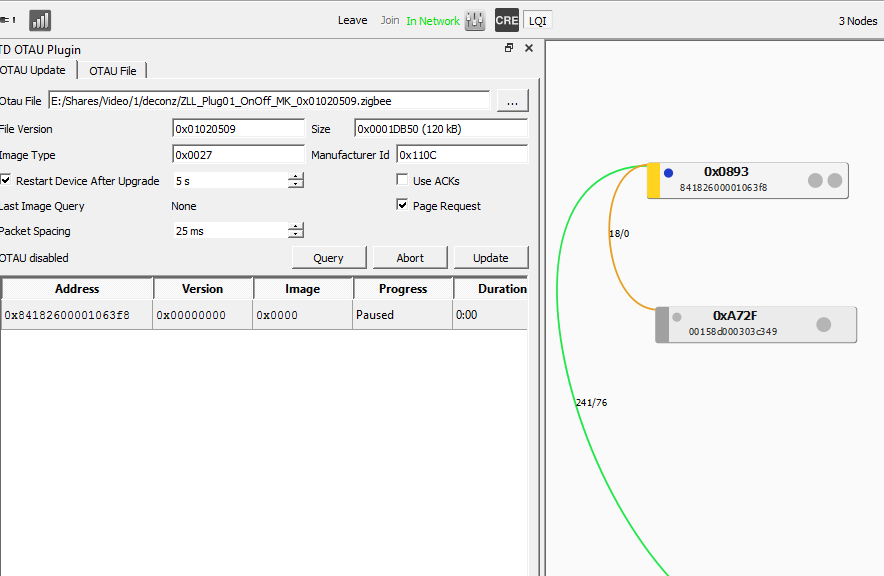
well... I am trying the following: when I press "Query" button...no changes.
Do you easily press "Update" any way?
 alp-by
on 9 Dec 2019
alp-by
on 9 Dec 2019
Thats not an official HowTo. Its on your own Risk. ...
@alp-by
https://phoscon.de/en/support#ota-update-osram-devices
Check this link!
Don’t know why it’s like this on your gui.
Sent with GitHawk
kugelkopf123
on 9 Dec 2019
Thats not an official HowTo. Its on your own Risk. ...
@alp-by
https://phoscon.de/en/support#ota-update-osram-devices
Check this link!
Don’t know why it’s like this on your gui.Sent with GitHawk
thx. I will try.
alp-by
on 9 Dec 2019
Thats not an official HowTo. Its on your own Risk. ...
@alp-by
https://phoscon.de/en/support#ota-update-osram-devices
Check this link!
Don’t know why it’s like this on your gui.
Sent with GitHawkthx. Yes, strange. I use both:
- linux docker with VNC and connect to VNC remotelly via VNC viewer. There button "select file" is not active it all. When I press it no reacting
- windows -> screenshot was attached in the prev. message
Perhaps the Plug is allready on the latest firmware?
Its strange that you dont have any names on the devices.
Check it via the cluster info. Click on the (i think) right grey button from the two on your Osram Node. in the GUI.
Change the view to Cluster Info (Look at the picture of from the manual on Step 2 and 3) choose cluster Basic or OATU and click on Read in the Cluster Info Panel. That should give you the acutal FW Verison.
kugelkopf123
on 9 Dec 2019
Thats not an official HowTo. Its on your own Risk. ...
@alp-by
https://phoscon.de/en/support#ota-update-osram-devices
Check this link!
Don’t know why it’s like this on your gui.
Sent with GitHawkthx. Yes, strange. I use both:
- linux docker with VNC and connect to VNC remotelly via VNC viewer. There button "select file" is not active it all. When I press it no reacting
- windows -> screenshot was attached in the prev. message
Perhaps the Plug is allready on the latest firmware?
Its strange that you dont have any names on the devices.
Check it via the cluster info. Click on the (i think) right grey button from the two on your Osram Node. in the GUI.
Change the view to Cluster Info (Look at the picture of from the manual on Step 2 and 3) choose cluster Basic or OATU and click on Read in the Cluster Info Panel. That should give you the acutal FW Verison.
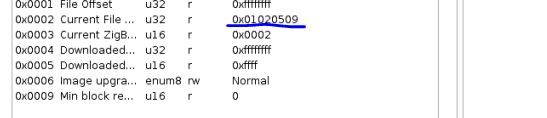
thx. I managed to update it finally (I press the same buttons and it work from 2 or 3 times ... probably because of the VNC viewer software..don't know). But my Phoscon still shows as light with the "old" FW: V1.04.12. Is it normal?
alp-by
on 9 Dec 2019
Thats not an official HowTo. Its on your own Risk. ...
@alp-by
https://phoscon.de/en/support#ota-update-osram-devices
Check this link!
Don’t know why it’s like this on your gui.
Sent with GitHawkthx. Yes, strange. I use both:
- linux docker with VNC and connect to VNC remotelly via VNC viewer. There button "select file" is not active it all. When I press it no reacting
- windows -> screenshot was attached in the prev. message
Perhaps the Plug is allready on the latest firmware?
Its strange that you dont have any names on the devices.
Check it via the cluster info. Click on the (i think) right grey button from the two on your Osram Node. in the GUI.
Change the view to Cluster Info (Look at the picture of from the manual on Step 2 and 3) choose cluster Basic or OATU and click on Read in the Cluster Info Panel. That should give you the acutal FW Verison.thx. I managed to update it finally (I press the same buttons and it work from 2 or 3 times ... probably because of the VNC viewer software..don't know). But my Phoscon still shows as light with the "old" FW: V1.04.12. Is it normal?
The updated was 100%? And had you heard the Plug Switch off/on on the end of the update? Give it a bit time to reconnect to your network and than click once again on read. Perhaps you have to restart the system. Or unplug and replug the osram device. But Please, dont do this while updateing! ;)
kugelkopf123
on 10 Dec 2019
Thats not an official HowTo. Its on your own Risk. ...
@alp-by
https://phoscon.de/en/support#ota-update-osram-devices
Check this link!
Don’t know why it’s like this on your gui.
Sent with GitHawkthx. Yes, strange. I use both:
- linux docker with VNC and connect to VNC remotelly via VNC viewer. There button "select file" is not active it all. When I press it no reacting
- windows -> screenshot was attached in the prev. message
Perhaps the Plug is allready on the latest firmware?
Its strange that you dont have any names on the devices.
Check it via the cluster info. Click on the (i think) right grey button from the two on your Osram Node. in the GUI.
Change the view to Cluster Info (Look at the picture of from the manual on Step 2 and 3) choose cluster Basic or OATU and click on Read in the Cluster Info Panel. That should give you the acutal FW Verison.thx. I managed to update it finally (I press the same buttons and it work from 2 or 3 times ... probably because of the VNC viewer software..don't know). But my Phoscon still shows as light with the "old" FW: V1.04.12. Is it normal?
The updated was 100%? And had you heard the Plug Switch off/on on the end of the update? Give it a bit time to reconnect to your network and than click once again on read. Perhaps you have to restart the system. Or unplug and replug the osram device. But Please, dont do this while updateing! ;)
yes update was 100%! As for "Plug Switch off/on on the end" - i don't remember, I didn't pay attention on it.... but you are right:I had to wait a little bit more....now it is V1.05.09 :)
But it should work as light with new FW, shouldn't it? Because I still see no chance how to change the status in Phoscon (it works ON\OFF only from Domoticz)
alp-by
on 10 Dec 2019
Thats not an official HowTo. Its on your own Risk. ...
@alp-by
https://phoscon.de/en/support#ota-update-osram-devices
Check this link!
Don’t know why it’s like this on your gui.
Sent with GitHawkthx. Yes, strange. I use both:
- linux docker with VNC and connect to VNC remotelly via VNC viewer. There button "select file" is not active it all. When I press it no reacting
- windows -> screenshot was attached in the prev. message
Perhaps the Plug is allready on the latest firmware?
Its strange that you dont have any names on the devices.
Check it via the cluster info. Click on the (i think) right grey button from the two on your Osram Node. in the GUI.
Change the view to Cluster Info (Look at the picture of from the manual on Step 2 and 3) choose cluster Basic or OATU and click on Read in the Cluster Info Panel. That should give you the acutal FW Verison.thx. I managed to update it finally (I press the same buttons and it work from 2 or 3 times ... probably because of the VNC viewer software..don't know). But my Phoscon still shows as light with the "old" FW: V1.04.12. Is it normal?
The updated was 100%? And had you heard the Plug Switch off/on on the end of the update? Give it a bit time to reconnect to your network and than click once again on read. Perhaps you have to restart the system. Or unplug and replug the osram device. But Please, dont do this while updateing! ;)
yes update was 100%! As for "Plug Switch off/on on the end" - i don't remember, I didn't pay attention on it.... but you are right:I had to wait a little bit more....now it is V1.05.09 :)
But it should work as light with new FW, shouldn't it? Because I still see no chance how to change the status in Phoscon (it works ON\OFF only from Domoticz)
Great!
Yes, you will find them in Phoscon on the group "Devices/Lights":
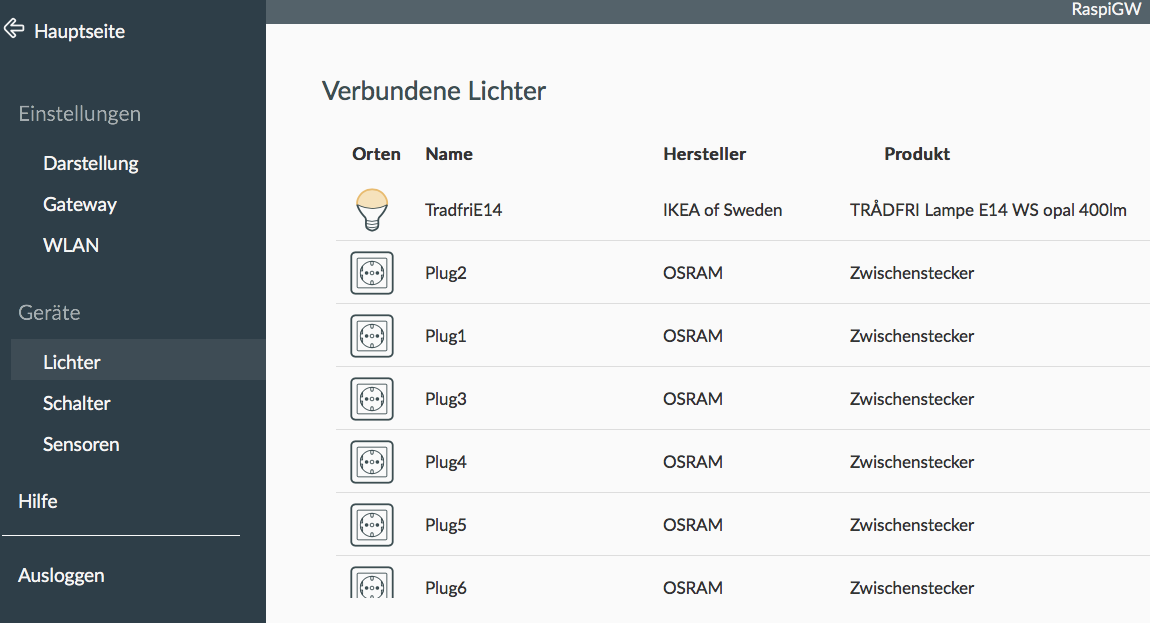
As you click on one of them, the green LED on the Button of the Plug should blink to recognize them.
To switch them on/off via Phoscon, you have to create a Group in the Mainmenu, add one Plug and from there you can switch it on and off. As Group or as individual device.
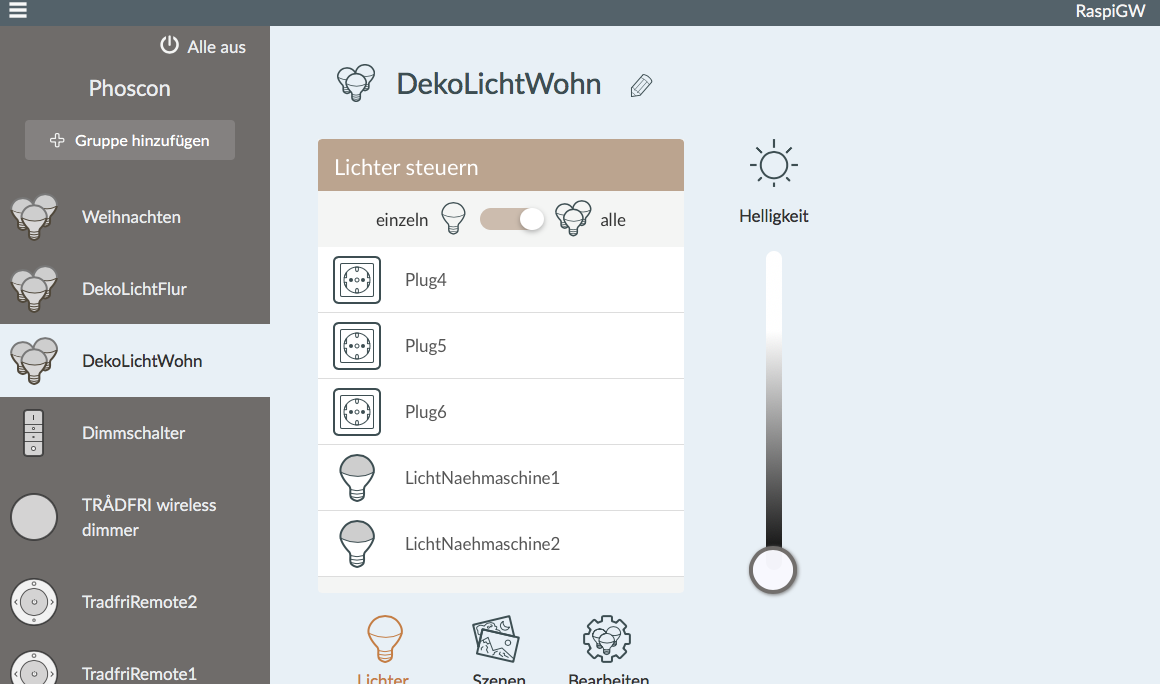
kugelkopf123
on 10 Dec 2019
Thats not an official HowTo. Its on your own Risk. ...
@alp-by
https://phoscon.de/en/support#ota-update-osram-devices
Check this link!
Don’t know why it’s like this on your gui.
Sent with GitHawkthx. Yes, strange. I use both:
- linux docker with VNC and connect to VNC remotelly via VNC viewer. There button "select file" is not active it all. When I press it no reacting
- windows -> screenshot was attached in the prev. message
Perhaps the Plug is allready on the latest firmware?
Its strange that you dont have any names on the devices.
Check it via the cluster info. Click on the (i think) right grey button from the two on your Osram Node. in the GUI.
Change the view to Cluster Info (Look at the picture of from the manual on Step 2 and 3) choose cluster Basic or OATU and click on Read in the Cluster Info Panel. That should give you the acutal FW Verison.thx. I managed to update it finally (I press the same buttons and it work from 2 or 3 times ... probably because of the VNC viewer software..don't know). But my Phoscon still shows as light with the "old" FW: V1.04.12. Is it normal?
The updated was 100%? And had you heard the Plug Switch off/on on the end of the update? Give it a bit time to reconnect to your network and than click once again on read. Perhaps you have to restart the system. Or unplug and replug the osram device. But Please, dont do this while updateing! ;)
yes update was 100%! As for "Plug Switch off/on on the end" - i don't remember, I didn't pay attention on it.... but you are right:I had to wait a little bit more....now it is V1.05.09 :)
But it should work as light with new FW, shouldn't it? Because I still see no chance how to change the status in Phoscon (it works ON\OFF only from Domoticz)Great!
Yes, you will find them in Phoscon on the group "Devices/Lights":
As you click on one of them, the green LED on the Button of the Plug should blink to recognize them.
To switch them on/off via Phoscon, you have to create a Group in the Mainmenu, add one Plug and from there you can switch it on and off. As Group or as individual device.
thx a lot :)
alp-by
on 10 Dec 2019
Btw... sometimes my osram plug is getting gray and not available (it doesn't work from domoticz)
Physically it's located quite close to my server with Conbee II stick.
Is it because of device or is it an issue with Conbee II ?

alp-by
on 10 Dec 2019
just FYI. I had to play with location of my zigbee stick.
As soon as I took it out from backside of the server (it was installed there, near Zwave stick) and put more in the front - the signal quality became much better!
Pay a lot attention of your Conbee stick location.
At the moment I am in the testing mode: 6 hours - works quite fine
alp-by
on 10 Dec 2019
just FYI. I had to play with location of my zigbee stick.
As soon as I took it out from backside of the server (it was installed there, near Zwave stick) and put more in the front - the signal quality became much better!
Pay a lot attention of your Conbee stick location.At the moment I am in the testing mode: 6 hours - works quite fine
As far as i know, deconz suggest a usb extension cable for the conbee stick. And you should have look at your WiFi Network. On witch channel it is, to find a good channel for your Zigbee Signals.
kugelkopf123
on 11 Dec 2019
And preferably on USB2 port without any USB3.0 devices nearby.
Adminiuga
on 11 Dec 2019
just FYI. I had to play with location of my zigbee stick.
As soon as I took it out from backside of the server (it was installed there, near Zwave stick) and put more in the front - the signal quality became much better!
Pay a lot attention of your Conbee stick location.
At the moment I am in the testing mode: 6 hours - works quite fineAs far as i know, deconz suggest a usb extension cable for the conbee stick. And you should have look at your WiFi Network. On witch channel it is, to find a good channel for your Zigbee Signals.
yes, firstly I tried with USB extension cable, but it wasn't long enough :)
And preferably on USB2 port without any USB3.0 devices nearby.
Correct, also read about it. I use esxi with usb2.0 emulation ... not sure if it switches the physical port to USB2.
alp-by
on 11 Dec 2019
well... additional test showed me that sometimes I take about 140-150 mins timeout from my xiaomi temperature sensors :(
alp-by
on 11 Dec 2019
Afaik it sends only changes. Perhaps there wasn’t any changes in temperature within this time?
Never had any problems with osram and Aqara multisensors. Only when the battery got a bit to low. Then I got wrong values.
Sent with GitHawk
kugelkopf123
on 11 Dec 2019
Afaik it sends only changes. Perhaps there wasn’t any changes in temperature within this time?
Never had any problems with osram and Aqara multisensors. Only when the battery got a bit to low. Then I got wrong values.Sent with GitHawk
By now: 650 mins with no update ... it should be the changes with temperature
alp-by
on 11 Dec 2019
Ever checked the lqi in the deconz gui? Perhaps it is not in range?
Sent with GitHawk
kugelkopf123
on 11 Dec 2019
Ever checked the lqi in the deconz gui? Perhaps it is not in range?
Sent with GitHawk
how to do it?
alp-by
on 11 Dec 2019
https://flemmingss.com/wp-content/uploads/2019/08/deconz_gui_in_vnc_viewer.jpg on the top bar next to CRE.
Than you can see the quality of the connection. But you can also see it by the Color of the lines. If it is red, it’s bad...
Sent with GitHawk
kugelkopf123
on 12 Dec 2019
https://flemmingss.com/wp-content/uploads/2019/08/deconz_gui_in_vnc_viewer.jpg on the top bar next to CRE.
Than you can see the quality of the connection. But you can also see it by the Color of the lines. If it is red, it’s bad...Sent with GitHawk
well...that's my case:
The sensor where I receive no data has no line :(

alp-by
on 12 Dec 2019
https://flemmingss.com/wp-content/uploads/2019/08/deconz_gui_in_vnc_viewer.jpg on the top bar next to CRE.
Than you can see the quality of the connection. But you can also see it by the Color of the lines. If it is red, it’s bad...
Sent with GitHawkwell...that's my case:
The sensor where I receive no data has no line :(
Too far away from one of the routers? You should pair the sensors at the place where they are going to stay. Do not pair them next to your conbee and take the Sensor afterwards away to another place. The Aqara sensors are really bad in making new connection ways.
So if the osram plug is your nearest router to your sensor, then try to rejoin the sensor there.
kugelkopf123
on 12 Dec 2019
https://flemmingss.com/wp-content/uploads/2019/08/deconz_gui_in_vnc_viewer.jpg on the top bar next to CRE.
Than you can see the quality of the connection. But you can also see it by the Color of the lines. If it is red, it’s bad...
Sent with GitHawkwell...that's my case:
The sensor where I receive no data has no line :(
Too far away from one of the routers? You should pair the sensors at the place where they are going to stay. Do not pair them next to your conbee and take the Sensor afterwards away to another place. The Aqara sensors are really bad in making new connection ways.
So if the osram plug is your nearest router to your sensor, then try to rejoin the sensor there.
Too far away from one of the routers? - it shouldn't - in my eyes. That's why I bought osram + plug and put it in between .... in order to have additional repeater.
I didn't know about the paring at the place where they are going to stay. I paired it near the router and than brought away from it to the "right" location place. But it worked before ... I mean several days ago it worked quite good with getting update quite regular. I will also try to replace the battery, but the previous battery status (that I saw) was more that 50-60%.
alp-by
on 12 Dec 2019
Xiaomi are picky about their parent device. Osram would not hold xiaomi sensor as they don't check in often enough. See https://community.hubitat.com/t/xiaomi-aqara-devices-pairing-keeping-them-connected/623
Adminiuga
on 12 Dec 2019
Yes. Good link! Really try replace the battery. Would be bad if you try so much and later on was the only problem a low battery.
Sent with GitHawk
kugelkopf123
on 12 Dec 2019
Xiaomi are picky about their parent device. Osram would not hold xiaomi sensor as they don't check in often enough. See https://community.hubitat.com/t/xiaomi-aqara-devices-pairing-keeping-them-connected/623
well... according to this info it should work with "OSRAM/Sylvania LIGHTIFY" OSRAM Smart+ Outlet - model AB3257001NJ (UK & EU only) ... that's exactly what I have.
Yes. Good link! Really try replace the battery. Would be bad if you try so much and later on was the only problem a low battery.
Sent with GitHawk
Didn't work. With new battery the same issue - no connection.
alp-by
on 13 Dec 2019
Then I have no idea. The combination of Raspbee with 8x Osram smart+ Plugs and 8x Aqara Multisensors and Window / Doorsensors works for me.
60% of the sensors are not in the area of the Raspbee.
Never had any problems with it, no matter which deconz firmware.
Due to the fact that the Aqara sensors do not like to reconnect after restarting the Raspbee it may be necessary to short press the button on the sensor 1-2 times so that it reconnects.
Thats it.
kugelkopf123
on 13 Dec 2019
Due to the fact that the Aqara sensors do not like to reconnect after restarting the Raspbee it may be necessary to short press the button on the sensor 1-2 times so that it reconnects.
Thats it.
did it .... got it connected and saw updated data.... will check how it goes afterwards
The distance between my osram +plug (repeater) and my "problem" Aqara sensor is 5 meters with glass and wood construction between.
The distance between the same plug (repeater) and my "good" Aqara sensor (regular updating from it) is about 3 meters and concrete wall between
alp-by
on 13 Dec 2019
well...I put my osram+plug (repeater) quite close to my "problem" sensor. 2 meters distance with a window between only :) ... let's see. Osram+plug works good at this location
alp-by
on 13 Dec 2019
well... closing location to "problem" sensor gave me regular updates from it. But now I get some missing info from prev-'good' sensor. Sometimes I get the timeout from it.
So, I can make the conclusion that Aqara sensors don't have strong enough translation and need help in passive repeaters.
alp-by
on 15 Dec 2019
well... small update: 1 week test. ("bad" sensor located near passive repeater)
Sometimes I still lose the connection with my "bad" sensor and get timeouts ...
I have a feeling that my Osram +Plug just goes in sleep mode after N hours and/or stops resending signals from "bad" sensor.
I will try to make the regular check (1 time in 2-3 hours) in order to "activate" Osram +Plug i.e. switch in On\Off.
alp-by
on 24 Dec 2019
Would also suggest to add more active items to your mesh. Such as lightbulbs and more outlets.
Sent with GitHawk
kugelkopf123
on 25 Dec 2019
Would also suggest to add more active items to your mesh. Such as lightbulbs and more outlets.
Sent with GitHawk
Ok. At the moment my current OSRAM +Plug sometimes getting "grey" at Phoscon application.
I have already ordered additional OSRAM + Plug to integrate it on my network. So... I will have more "active" devices there.
Also thinking to make router on CC2531 (https://www.zigbee2mqtt.io/how_tos/how_to_create_a_cc2530_router.html)
or will try to replace my conbee II with CC2531 device with the corresponding flashware.
alp-by
on 25 Dec 2019
I will try to make the regular check (1 time in 2-3 hours) in order to "activate" Osram +Plug i.e. switch in On\Off.
1 day testing (I did it so: every hour my domoticz changed the state of it i.e. switch it ON and OFF). Didn't worked for 100%. After several hours it's getting "grey" in Phoscon.... very strange behaviour
alp-by
on 27 Dec 2019
This issue has been automatically marked as stale because it has not had recent activity. It will be closed if no further activity occurs. Thank you for your contributions.
![stale[bot] picture](https://avatars3.githubusercontent.com/in/1724?v=4&s=40) stale[bot]
on 26 Apr 2020
stale[bot]
on 26 Apr 2020
Was there a conclusion? I am having similar issue with an Osram outdoor plug. Thanks
 mhristache
on 27 Jul 2020
mhristache
on 27 Jul 2020
Sometimes osram plugs do that. Power cycle them.
Adminiuga
on 27 Jul 2020
Related issues
 joggs
·
3Comments
joggs
·
3Comments
 qm3ster
·
3Comments
qm3ster
·
3Comments
 tenholde
·
3Comments
tenholde
·
3Comments
 Thomas-Vos
·
4Comments
Thomas-Vos
·
4Comments
 g0dsCookie
·
3Comments
g0dsCookie
·
3Comments
Most helpful comment
Thats not an official HowTo. Its on your own Risk.
I'm using a Raspberry Pi with a Raspbee as Gateway.
Its faster if your Device is near your gateway.