Deconz-rest-plugin: Konke motion sensor
I bought this zigbee sensor off aliexpress. It looks nice but it doesnt work yet with deconz.
https://nl.aliexpress.com/item/33014773963.html?spm=a2g0s.9042311.0.0.5dff4c4d8Csnuz
What to do to get this sensor supported? I tried to pair it as a sensor but nothing happens.
 sweebee
All 48 comments
We need to add it to the REST-API first. Can you please provide the information as described here:
https://github.com/dresden-elektronik/deconz-rest-plugin/wiki/Request-Device-Support
 manup
on 19 Jun 2019
manup
on 19 Jun 2019
I have raspbee but no interface on my rasbian. does the debug info give enough info?
deCONZ --dbg-info=1 --dbg-aps=1 --dbg-zcl=1 --dbg-zdp=1 --http-port=80
edit: I tried this command but i get:
QXcbConnection: Could not connect to display
@manup I think its this device:

sweebee
on 20 Jun 2019
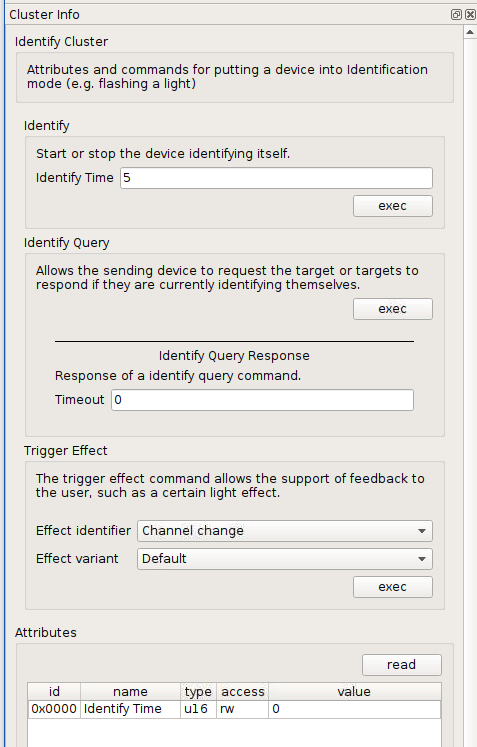
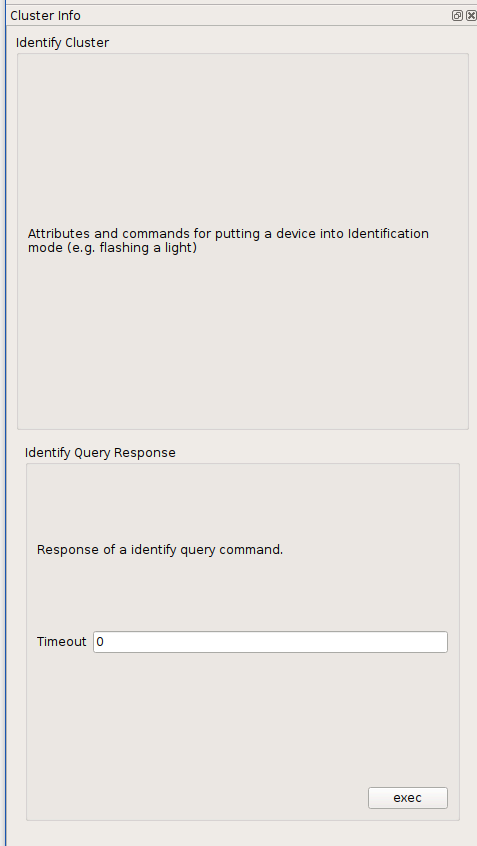
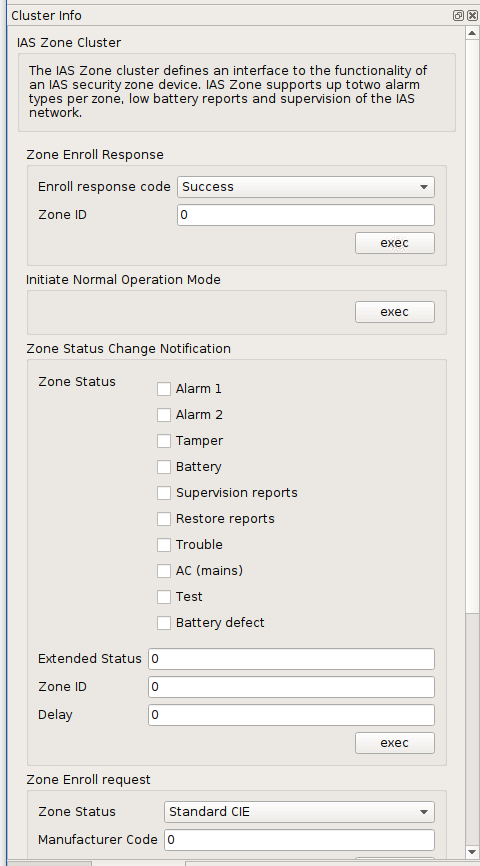
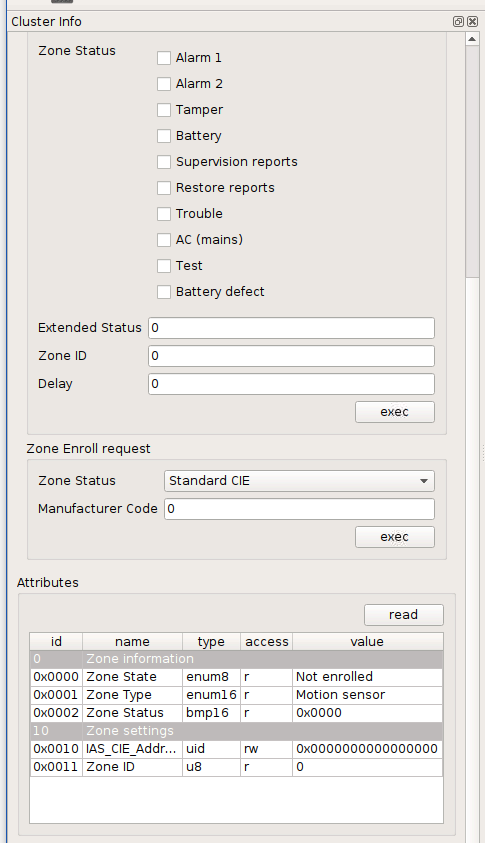
This gives us the manufacturer code. We'd also need the attributes from the basic cluster like model identifier and the endpoint clusters as shown in the above screenshots.
manup
on 20 Jun 2019
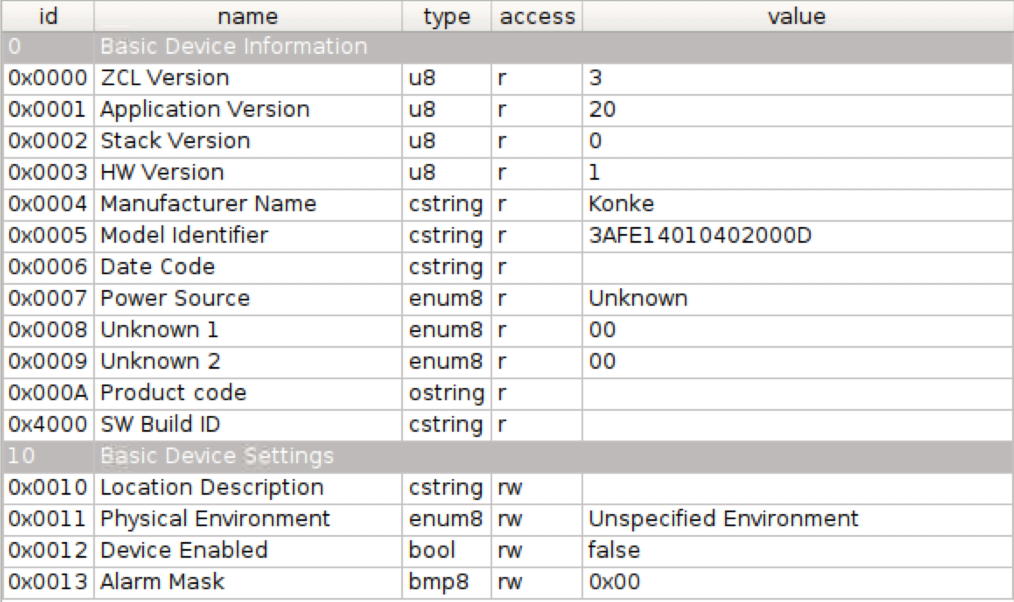
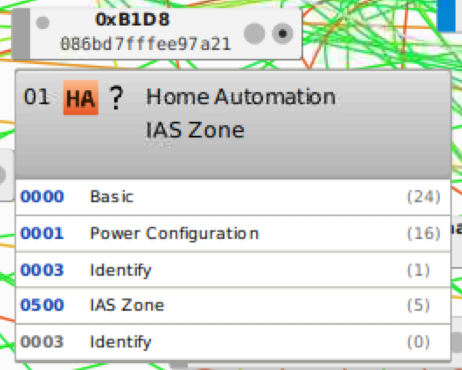
sweebee
on 20 Jun 2019
here are some other data
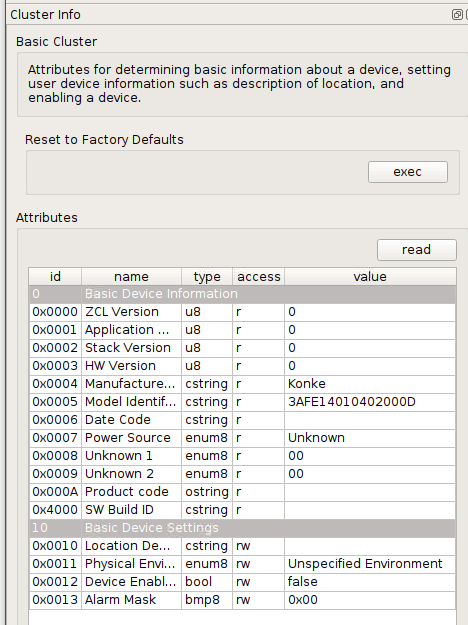
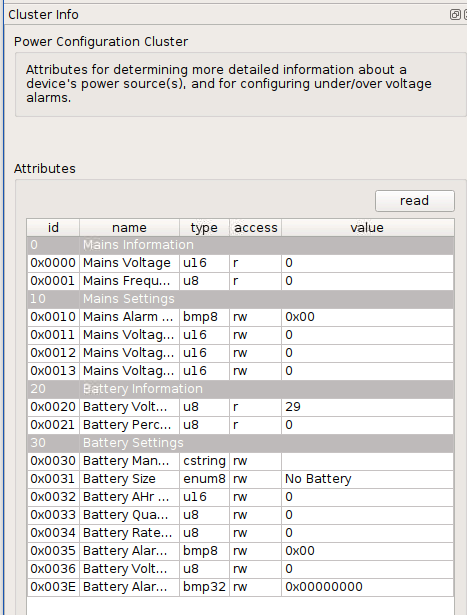
 BigWumpus
on 30 Jun 2019
BigWumpus
on 30 Jun 2019
@manup Do you need any more information?
sweebee
on 8 Jul 2019
Any progress with this sensor? I bought one too in hope to get a motion stop status. Want to replace Xiaomi motion sensors.
 goermezer
on 16 Jul 2019
goermezer
on 16 Jul 2019
Hi add ?
 online002
on 18 Jul 2019
online002
on 18 Jul 2019
I just bought the same little sensor. I'm happy to test where wanted :)
 vandalon
on 19 Jul 2019
vandalon
on 19 Jul 2019
Any timeline on the integration of this device? Just bought one.
 phdelodder
on 27 Jul 2019
phdelodder
on 27 Jul 2019
Lol, I have just discovered theses devices, there is same device than Xiaomi, but cheaper.
 Smanar
on 27 Jul 2019
Smanar
on 27 Jul 2019
@manup I've got the same device, also got their temperature and humidity sensor and contact sensor.
Both the contact sensor and motion sensor work with IAS.
Got this log of the motion sensor when it detects motion:
18:43:06:268 APS-DATA.indication srcAddr: 0xfaf4, srcEp: 0x00 dstAddrMode: 2, profile: 0x0000, cluster: 0x0000, lqi: 255, rssi: -43
18:43:06:269 APS-DATA.request id: 218, addrmode: 0x02, addr: 0xfaf4, profile: 0x0000, cluster: 0x8000, ep: 0x00 -> 0x00 queue: 1 len: 12 tx.options 0x04
18:43:31:031 APS-DATA.indication srcAddr: 0xfaf4, srcEp: 0x00 dstAddrMode: 2, profile: 0x0000, cluster: 0x0000, lqi: 255, rssi: -48
18:43:31:031 APS-DATA.request id: 151, addrmode: 0x02, addr: 0xfaf4, profile: 0x0000, cluster: 0x8000, ep: 0x00 -> 0x00 queue: 1 len: 12 tx.options 0x04
And contact sensor (while opening and closing the contact):
18:45:32:616 APS-DATA.indication srcAddr: 0x201e, srcEp: 0x00 dstAddrMode: 2, profile: 0x0000, cluster: 0x0000, lqi: 255, rssi: -44
18:45:35:808 APS-DATA.indication srcAddr: 0x201e, srcEp: 0x00 dstAddrMode: 2, profile: 0x0000, cluster: 0x0000, lqi: 255, rssi: -49
18:45:37:637 APS-DATA.indication srcAddr: 0x201e, srcEp: 0x00 dstAddrMode: 2, profile: 0x0000, cluster: 0x0000, lqi: 255, rssi: -43
18:45:37:641 APS-DATA.indication srcAddr: 0x201e, srcEp: 0x00 dstAddrMode: 2, profile: 0x0000, cluster: 0x0000, lqi: 255, rssi: -44
For temperature/humidity I got these logs:
18:12:33:298 APS-DATA.indication srcAddr: 0xc3ca, srcEp: 0x01 dstAddrMode: 2, profile: 0x0104, cluster: 0x0405, lqi: 255, rssi: -52
18:12:33:298 APS-DATA.request id: 171, addrmode: 0x02, addr: 0xc3ca, profile: 0x0104, cluster: 0x0405, ep: 0x01 -> 0x01 queue: 1 len: 5 tx.options 0x00
18:17:15:472 APS-DATA.indication srcAddr: 0xc3ca, srcEp: 0x01 dstAddrMode: 2, profile: 0x0104, cluster: 0x0402, lqi: 255, rssi: -51
18:17:15:473 APS-DATA.request id: 11, addrmode: 0x02, addr: 0xc3ca, profile: 0x0104, cluster: 0x0402, ep: 0x01 -> 0x01 queue: 1 len: 5 tx.options 0x00
18:36:58:098 APS-DATA.indication srcAddr: 0xc3ca, srcEp: 0x01 dstAddrMode: 2, profile: 0x0104, cluster: 0x0402, lqi: 255, rssi: -52
18:36:58:098 APS-DATA.request id: 63, addrmode: 0x02, addr: 0xc3ca, profile: 0x0104, cluster: 0x0402, ep: 0x01 -> 0x01 queue: 0 len: 5 tx.options 0x00
18:42:47:434 APS-DATA.indication srcAddr: 0xc3ca, srcEp: 0x01 dstAddrMode: 2, profile: 0x0104, cluster: 0x0405, lqi: 255, rssi: -51
18:42:47:435 APS-DATA.request id: 36, addrmode: 0x02, addr: 0xc3ca, profile: 0x0104, cluster: 0x0405, ep: 0x01 -> 0x01 queue: 1 len: 5 tx.options 0x00
 jurriaan
on 31 Jul 2019
jurriaan
on 31 Jul 2019
After rejoining the contact sensor and setting the IAS_CIE_Address to the gateway IEEE address I do get more log messages:
19:00:58:759 APS-DATA.indication srcAddr: 0xc62f, srcEp: 0x00 dstAddrMode: 2, profile: 0x0000, cluster: 0x0000, lqi: 255, rssi: -52
19:00:59:767 APS-DATA.indication srcAddr: 0xc62f, srcEp: 0x01 dstAddrMode: 2, profile: 0x0104, cluster: 0x0500, lqi: 255, rssi: -52
19:01:00:775 APS-DATA.indication srcAddr: 0xc62f, srcEp: 0x01 dstAddrMode: 2, profile: 0x0104, cluster: 0x0500, lqi: 255, rssi: -52
19:01:00:822 APS-DATA.indication srcAddr: 0xc62f, srcEp: 0x00 dstAddrMode: 2, profile: 0x0000, cluster: 0x0000, lqi: 239, rssi: -64
19:01:00:827 APS-DATA.indication srcAddr: 0xc62f, srcEp: 0x00 dstAddrMode: 2, profile: 0x0000, cluster: 0x0000, lqi: 239, rssi: -64
19:01:01:884 APS-DATA.indication srcAddr: 0xc62f, srcEp: 0x01 dstAddrMode: 2, profile: 0x0104, cluster: 0x0500, lqi: 239, rssi: -64
19:01:01:975 APS-DATA.indication srcAddr: 0xc62f, srcEp: 0x00 dstAddrMode: 2, profile: 0x0000, cluster: 0x0000, lqi: 255, rssi: -52
19:01:01:984 APS-DATA.indication srcAddr: 0xc62f, srcEp: 0x00 dstAddrMode: 2, profile: 0x0000, cluster: 0x0000, lqi: 255, rssi: -52
19:01:02:792 APS-DATA.indication srcAddr: 0xc62f, srcEp: 0x01 dstAddrMode: 2, profile: 0x0104, cluster: 0x0500, lqi: 255, rssi: -51
19:01:02:840 APS-DATA.indication srcAddr: 0xc62f, srcEp: 0x00 dstAddrMode: 2, profile: 0x0000, cluster: 0x0000, lqi: 255, rssi: -61
19:01:02:845 APS-DATA.indication srcAddr: 0xc62f, srcEp: 0x00 dstAddrMode: 2, profile: 0x0000, cluster: 0x0000, lqi: 255, rssi: -61
19:01:03:807 APS-DATA.indication srcAddr: 0xc62f, srcEp: 0x01 dstAddrMode: 2, profile: 0x0104, cluster: 0x0500, lqi: 255, rssi: -61
19:01:04:269 APS-DATA.indication srcAddr: 0xc62f, srcEp: 0x00 dstAddrMode: 2, profile: 0x0000, cluster: 0x0000, lqi: 255, rssi: -53
19:01:04:276 APS-DATA.indication srcAddr: 0xc62f, srcEp: 0x00 dstAddrMode: 2, profile: 0x0000, cluster: 0x0000, lqi: 255, rssi: -52
19:01:04:813 APS-DATA.indication srcAddr: 0xc62f, srcEp: 0x01 dstAddrMode: 2, profile: 0x0104, cluster: 0x0500, lqi: 255, rssi: -53
19:01:05:822 APS-DATA.indication srcAddr: 0xc62f, srcEp: 0x01 dstAddrMode: 2, profile: 0x0104, cluster: 0x0500, lqi: 255, rssi: -57
19:01:06:864 APS-DATA.indication srcAddr: 0xc62f, srcEp: 0x01 dstAddrMode: 2, profile: 0x0104, cluster: 0x0500, lqi: 255, rssi: -49
19:01:07:855 APS-DATA.indication srcAddr: 0xc62f, srcEp: 0x01 dstAddrMode: 2, profile: 0x0104, cluster: 0x0500, lqi: 255, rssi: -55
19:01:08:852 APS-DATA.indication srcAddr: 0xc62f, srcEp: 0x01 dstAddrMode: 2, profile: 0x0104, cluster: 0x0500, lqi: 255, rssi: -52
19:01:09:864 APS-DATA.indication srcAddr: 0xc62f, srcEp: 0x01 dstAddrMode: 2, profile: 0x0104, cluster: 0x0500, lqi: 255, rssi: -57
Same for the motion sensor:
18:59:28:831 APS-DATA.indication srcAddr: 0xfaf4, srcEp: 0x00 dstAddrMode: 2, profile: 0x0000, cluster: 0x0000, lqi: 255, rssi: -45
18:59:28:832 APS-DATA.request id: 142, addrmode: 0x02, addr: 0xfaf4, profile: 0x0000, cluster: 0x8000, ep: 0x00 -> 0x00 queue: 2 len: 12 tx.options 0x04
18:59:49:430 APS-DATA.indication srcAddr: 0xfaf4, srcEp: 0x00 dstAddrMode: 2, profile: 0x0000, cluster: 0x0000, lqi: 255, rssi: -47
18:59:49:432 APS-DATA.request id: 32, addrmode: 0x02, addr: 0xfaf4, profile: 0x0000, cluster: 0x8000, ep: 0x00 -> 0x00 queue: 1 len: 12 tx.options 0x04
18:59:50:492 APS-DATA.indication srcAddr: 0xfaf4, srcEp: 0x01 dstAddrMode: 2, profile: 0x0104, cluster: 0x0500, lqi: 255, rssi: -46
19:00:18:763 APS-DATA.indication srcAddr: 0xfaf4, srcEp: 0x00 dstAddrMode: 2, profile: 0x0000, cluster: 0x0000, lqi: 255, rssi: -47
19:00:18:764 APS-DATA.request id: 16, addrmode: 0x02, addr: 0xfaf4, profile: 0x0000, cluster: 0x8000, ep: 0x00 -> 0x00 queue: 1 len: 12 tx.options 0x04
19:00:19:867 APS-DATA.indication srcAddr: 0xfaf4, srcEp: 0x01 dstAddrMode: 2, profile: 0x0104, cluster: 0x0500, lqi: 255, rssi: -47
I got the motion sensor and the window/door sensor to work, but it requires some manual actions still to get it set up. Hopefully someone more familiar with the matter can help me out. See #1722.
jurriaan
on 1 Aug 2019
https://github.com/Koenkk/zigbee2mqtt/issues/1689#issue-464244888
According to this issue, the sensors only work on channel 15, 20 and 25.
Is this correct? That might be the reason why mine won't show up in the deconz gui.
 Hypfer
on 18 Aug 2019
Hypfer
on 18 Aug 2019
Can't see my konke motion sensor in phoscon but visible in home assistant.
phdelodder
on 27 Aug 2019
@phdelodder the sensor is only supported by the api, not by the frontend (phoscon).
sweebee
on 27 Aug 2019
@phdelodder @sweebee
Which zigbee channel are you using?
Hypfer
on 28 Aug 2019
@Hypfer I'm using channel 15.
@sweebee thanks for the info.
phdelodder
on 28 Aug 2019
Am I the only one or is this sensor slow in reaction to motion? It takes up to 3 seconds for me for the sensor to report motion.
vandalon
on 31 Aug 2019
Yea, to be honest the sensor is quite bad. Slow reaction. And no “no motion” trigger.
Also a small fov. I hoped it would be like 160 degrees or so.
sweebee
on 31 Aug 2019
It does however push state updates every few seconds instead of the 1 minute weirdness of the xiaomi motion sensor.
Maybe a combination of those two would make sense? Use the Xiaomi for brightness & fast initial response + the Konke to detect end of motion?
Semi-OT: Is there a proper Motion sensor which does everything well?
Hypfer
on 31 Aug 2019
I have one hue motion sensor and it works great. But also quite expensive.
The xiaomi pirs work better if you mod them.
sweebee
on 31 Aug 2019
I had two Xiaomi motion sensors( latest version for now, with light sensor). I modified them accurately but they stopped sending any motion at all, pinky illumination data. Even when I returned all the changes I made to the sensors hardware
 ivan-leschinsky
on 31 Aug 2019
ivan-leschinsky
on 31 Aug 2019
I managed to set the IAS_CIE address
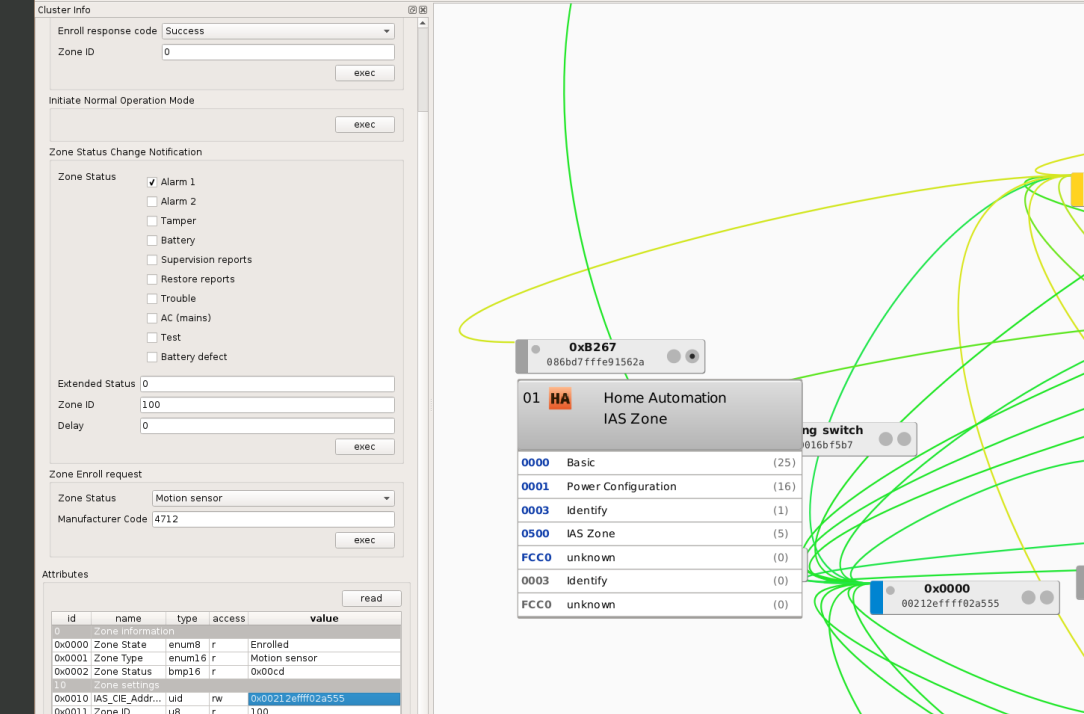
channel is set to 25 in deconz, device pairs so it shows in deconz
Also in the logs i can see the response everytime i pass my hand over it
docker logs -f --tail 50 deconz | grep -i 'b267'
13:07:13:090     * neighbor: 0x086BD7FFFE91562A (0xB267), LQI: 42, relation: 0x01 rxOnWHenIdle: 0
13:07:29:205 APS-DATA.indication srcAddr: 0xb267, srcEp: 0x01 dstAddrMode: 2, profile: 0x0104, cluster: 0x0500, lqi: 255, rssi: -53
13:07:52:349 APS-DATA.indication srcAddr: 0xb267, srcEp: 0x01 dstAddrMode: 2, profile: 0x0104, cluster: 0x0500, lqi: 255, rssi: -53
13:08:00:127     * neighbor: 0x086BD7FFFE91562A (0xB267), LQI: 42, relation: 0x01 rxOnWHenIdle: 0
13:08:07:682 APS-DATA.indication srcAddr: 0xb267, srcEp: 0x01 dstAddrMode: 2, profile: 0x0104, cluster: 0x0500, lqi: 255, rssi: -53
But no matter what it doesn't appear in ha, if i query all sensors to the API endpoint also no traces.
Anything else to try?
 subzero79
on 19 Sep 2019
subzero79
on 19 Sep 2019
is there anything new to this one?
 nicedevil007
on 5 Dec 2019
nicedevil007
on 5 Dec 2019
Looks like this is closed.
Just in case someone is comes along looking for Home Assistant integration with a konke motion sensor ...
Currently doesn’t look to be working as of 102.3.
Just in case it is useful to someone working on this in the future (konke motion sensor) here is a dump of some logs of joining the device to a raspberry pi with hassio deployed -
[0x0000:zdo] ZDO request 0x0036: [60,
Device 0xa89a (08:6b:d7:ff:fe:e9:70:18) joined the network
[0xa89a] Requesting 'Node Descriptor'
[0xa89a] Extending timeout for 0x99 request
Device 0xa89a (08:6b:d7:ff:fe:e9:70:18) joined the network
Skip initialization for existing device 08:6b:d7:ff:fe:e9:70:18
[0xa89a:zdo] ZDO request 0x0013: [0xa89a, 08:6b:d7:ff:fe:e9:70:18, 128]
[0xa89a] Node Descriptor:
[0xa89a] Discovering endpoints
[0xa89a] Extending timeout for 0x9b request
[0xa89a] Discovered endpoints: [1]
[0xa89a:1] Discovering endpoint information
[0xa89a] Extending timeout for 0x9d request
[0xa89a:1] Discovered endpoint information:
[0xa89a:1:0x0000] ZCL deserialize:
[0xa89a:1] Manufacturer: Konke
[0xa89a:1] Model: 3AFE28010402000D
Checking quirks for Konke 3AFE28010402000D (08:6b:d7:ff:fe:e9:70:18)
Considering
Fail because input cluster mismatch on at least one endpoint
Considering
Fail because device_type mismatch on at least one endpoint
Considering
Fail because endpoint list mismatch: {11, 13} {1}
Considering
Fail because profile_id mismatch on at least one endpoint
Considering
Fail because input cluster mismatch on at least one endpoint
Considering
Fail because endpoint list mismatch: {3} {1}
Considering
Fail because endpoint list mismatch: {1, 2} {1}
Considering
Fail because device_type mismatch on at least one endpoint
Considering
Fail because endpoint list mismatch: {232, 230} {1}
Considering
Fail because endpoint list mismatch: {232, 230} {1}
Considering
Fail because input cluster mismatch on at least one endpoint
device - 0xa89a:08:6b:d7:ff:fe:e9:70:18 entering async_device_initialized - is_new_join: True
device - 0xa89a:08:6b:d7:ff:fe:e9:70:18 has joined the ZHA zigbee network
0xa89a: started configuration
0xa89a:ZDO: channel: 'async_configure' stage succeeded
[0xa89a] Extending timeout for 0xa1 request
[0xa89a] Extending timeout for 0xa3 request
[0xa89a] Extending timeout for 0xa5 request
[0xa89a] Invalid state on future for 0xa1 seq -- probably duplicate response
[0xa89a] Extending timeout for 0xa7 request
[0xa89a] Extending timeout for 0xa9 request
[0xa89a] Extending timeout for 0xab request
[0xa89a:1:0x0000] ZCL deserialize:
[0xa89a:1:0x0001] ZCL deserialize:
[0xa89a:1:0x0500] ZCL deserialize:
[0xa89a] Extending timeout for 0xad request
[0xa89a] Extending timeout for 0xaf request
[0xa89a:1:0x0500] ZCL deserialize:
[0xa89a:1:0x0001] ZCL deserialize:
[0xa89a:1:0x0500] ZCL deserialize:
[0xa89a:1:0x0500] ZCL request 0x0001:
[0xa89a] Extending timeout for 0xb1 request
0xa89a: completed configuration
0xa89a: stored in registry: ZhaDeviceEntry(name='Konke 3AFE28010402000D', ieee='08:6b:d7:ff:fe:e9:70:18', last_seen=1576060751.6373394)
0xa89a: started initialization
0xa89a:ZDO: entry loaded from storage: ZhaDeviceEntry(name='Konke 3AFE28010402000D', ieee='08:6b:d7:ff:fe:e9:70:18', last_seen=1576060751.6373394)
0xa89a:ZDO: channel: 'async_initialize' stage succeeded
[0xa89a] Extending timeout for 0xb3 request
[0xa89a] Extending timeout for 0xb5 request
[0xa89a] Extending timeout for 0xb7 request
[0xa59f:1:0x0402] ZCL deserialize:
[0xa59f:1:0x0402] ZCL request 0x000a: [[
[0xa59f:1:0x0402] Attribute report received: measured_value=2706
[0xa59f:1:0x0405] ZCL deserialize:
[0xa59f:1:0x0405] ZCL request 0x000a: [[
[0xa59f:1:0x0405] Attribute report received: measured_value=7330
[0xa89a:1:0xfcc0] ZCL deserialize:
[0xa89a:1:0xfcc0] ZCL request 0x000a: [[
[0xa89a:1:0x0000] ZCL deserialize:
[0xa89a:1:0x0001] ZCL deserialize:
[0xa89a:1:0x0500] ZCL deserialize:
[0xa89a] Extending timeout for 0xb9 request
[0xa89a] Extending timeout for 0xbb request
[0xa89a:1:0xfcc0] ZCL deserialize:
[0xa89a:1:0xfcc0] ZCL request 0x000a: [[
[0xa89a:1:0x0001] ZCL deserialize:
[0xa89a:1:0x0500] ZCL deserialize:
[0xa89a] Extending timeout for 0xbd request
[0xa89a:1:0x0001] ZCL deserialize:
[0xa89a] Extending timeout for 0xbf request
[0xa89a:1:0x0001] ZCL deserialize:
0xa89a: power source: Battery or Unknown
0xa89a: completed initialization
It does pair and show in HA but initially as a water sensor (which you can change it class). After initial pairing it doesn’t look to get any more updates.

 chrisjbawden
on 11 Dec 2019
chrisjbawden
on 11 Dec 2019
How did you all achieve writing the IEEE Adress into this special clusterfield?
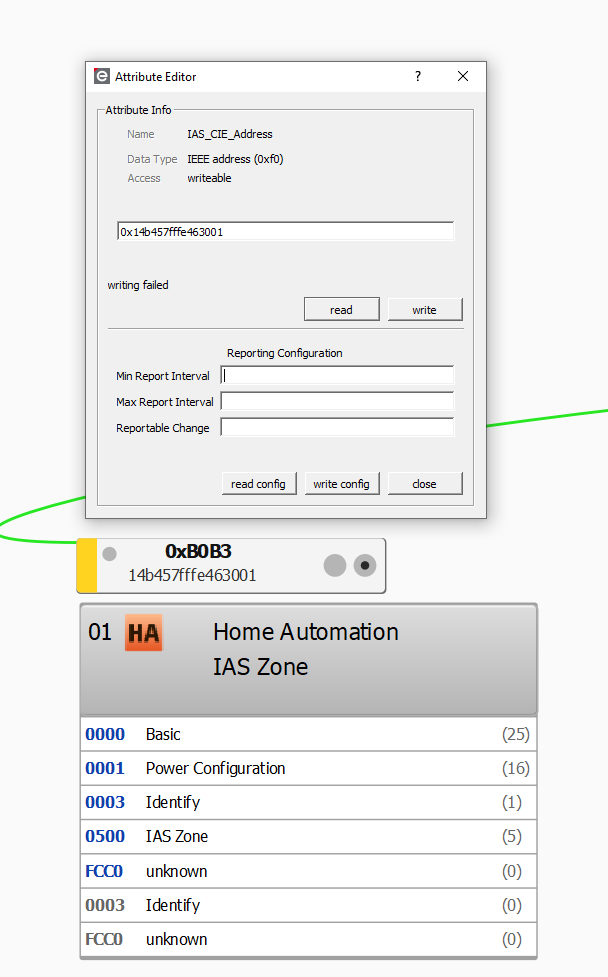
nicedevil007
on 22 Dec 2019
@nicedevil007 like this but without the write failing 🙃
Hypfer
on 22 Dec 2019
@Hypfer wahhhh I tryed it on my Windows PC now, and also writing failure :( Did you do anything else special to achieve this? Channel is 25 as you wrote in an other thread. Should I press the button on the PIR or even multiple times or do I have to bring the conbee Stick into pairing mode or activate the authenticate thing for 3rd party apps first?
nicedevil007
on 22 Dec 2019
Hello, can anyone tell me, how I can make my second Konke motion sensor (which I bought in december) to appear in HA? I suppose it's not exposed via REST API because of manufacturer code which differs from 0x1002. Am I right?
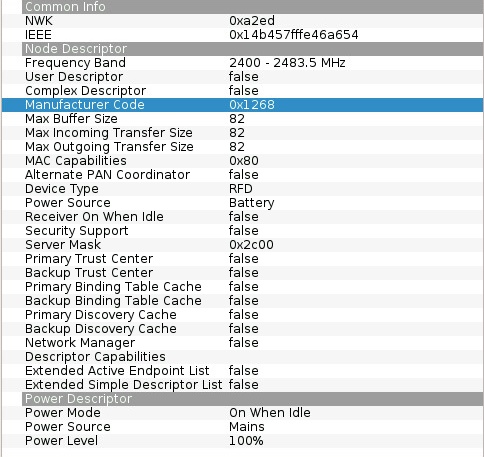
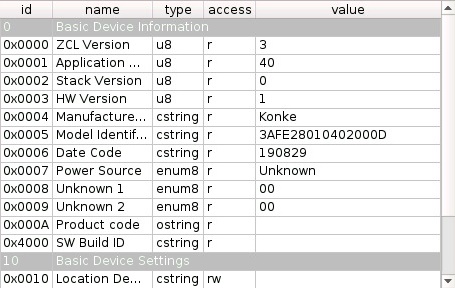
 airens
on 6 Jan 2020
airens
on 6 Jan 2020
As does the _Model Identifier_. You’d need to whitelist the new model here
https://github.com/dresden-elektronik/deconz-rest-plugin/blob/bb47cdbc19c257e3000fdb8475aa456830e6df94/de_web_plugin.cpp#L103
You might want to check (search the code for the old _Model Identifier_) if the old model is whitelisted anywhere else, and also whitelist the new model there.
 ebaauw
on 6 Jan 2020
ebaauw
on 6 Jan 2020
As does the _Model Identifier_. You’d need to whitelist the new model here
https://github.com/dresden-elektronik/deconz-rest-plugin/blob/bb47cdbc19c257e3000fdb8475aa456830e6df94/de_web_plugin.cpp#L103You might want to check (search the code for the old _Model Identifier_) if the old model is whitelisted anywhere else, and also whitelist the new model there.
So, I added new MacPrefix 0x14b4570000000000ULL, new supported device 3AFE28010402000D but couldn't find, where to add new manufacture code. It have to be set instead of VENDOR_EMBER?
airens
on 6 Jan 2020
It have to be set instead of VENDOR_EMBER?
Yes. You might want to lookup to whom the max prefix belongs and who is vendor 0x1268 for the right names for the #defines.
ebaauw
on 6 Jan 2020
It have to be set instead of VENDOR_EMBER?
Yes. You might want to lookup to whom the max prefix belongs and who is vendor 0x1268 for the right names for the #defines.
Sorry, I couldn't find where does the previous manufacture code 0x1002 set to just use it as example. Also, I don't understand, why previous model is set to VENDOR_EMBER which contains mask emberMacPrefix but not, for example, new VENDOR_KONKE #define with konkeMacPrefix?
airens
on 6 Jan 2020
Typically these are the codes belonging to the OEM manufacturer. They're used in devices from multiple, different commercial vendors.
Some extensive googling reveals:
https://github.com/wireshark/wireshark/blob/13703434da30977805ed44f8252c6ea94e119d72/epan/dissectors/packet-zbee.h#L958
And 14:B4:57 SiliconL Silicon Laboratories on https://www.wireshark.org/tools/oui-lookup.html.
ebaauw
on 6 Jan 2020
Typically these are the codes belonging to the OEM manufacturer. They're used in devices from multiple, different commercial vendors.
Some extensive googling reveals:
https://github.com/wireshark/wireshark/blob/13703434da30977805ed44f8252c6ea94e119d72/epan/dissectors/packet-zbee.h#L958And
14:B4:57 SiliconL Silicon Laboratorieson https://www.wireshark.org/tools/oui-lookup.html.
Thanks. Looks like I have done it: #2293.
airens
on 6 Jan 2020
Typically these are the codes belonging to the OEM manufacturer. They're used in devices from multiple, different commercial vendors.
Some extensive googling reveals:
https://github.com/wireshark/wireshark/blob/13703434da30977805ed44f8252c6ea94e119d72/epan/dissectors/packet-zbee.h#L958
And14:B4:57 SiliconL Silicon Laboratorieson https://www.wireshark.org/tools/oui-lookup.html.Thanks. Looks like I have done it: #2293.
Does this change mean that Phoscon would detect the Konke motion sensor?
 Juanezm
on 6 Jan 2020
Juanezm
on 6 Jan 2020
Typically these are the codes belonging to the OEM manufacturer. They're used in devices from multiple, different commercial vendors.
Some extensive googling reveals:
https://github.com/wireshark/wireshark/blob/13703434da30977805ed44f8252c6ea94e119d72/epan/dissectors/packet-zbee.h#L958
And14:B4:57 SiliconL Silicon Laboratorieson https://www.wireshark.org/tools/oui-lookup.html.Thanks. Looks like I have done it: #2293.
Does this change mean that Phoscon would detect the Konke motion sensor?
No, it’s just all about the REST plugin
airens
on 6 Jan 2020
I've got the same sensor and it shows up in the network. It did read node info as following:
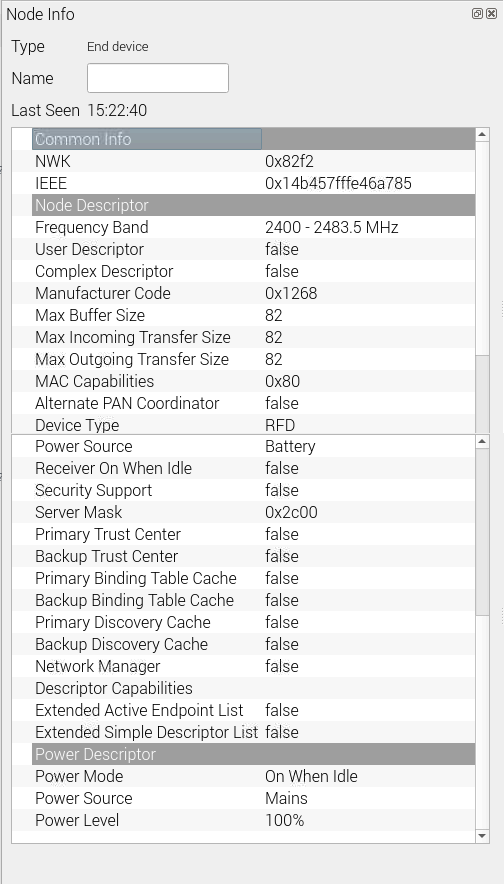
It also gets updated when motion is detected (Last Seen Updates). I am not able to read any cluster basic info, and IAS_CIE_Address as mentioned from others here is at 0 too.
What do I have to do to expose it to the RestAPI and finally get it into iobroker? I am not very familiar with deconz, just used it for some xiaomi buttons so far...
 dbweb-ch
on 10 Jan 2020
dbweb-ch
on 10 Jan 2020
Yesterday I've updated my deCONZ RasBee GW to Version 2.05.74/Firmware 26350500. Looking to the messages received by the deCONZ zigbee web server on port 443, I was surprised by notifying event messages from the Konke Motion Sensor (Zigbee channel 15). Now, I can use this small, nice sensor within my Home Automation System. Unfortunately the sensor doesn't show up in Phoscon. How much effort is necessary to list the device in the Phoscon app? I would be pleased if this device would be available in Phoscon in one of the next versions.
Here are the messages I receive from the decCONZ zigbee web server:
device:  {
  e: 'changed',
  id: '48',
  r: 'sensors',
  state: {
    lastupdated: '2020-03-30T05:04:23',
    lowbattery: false,
    presence: true,
    tampered: false
  },
  t: 'event',
  uniqueid: '14:b4:57:ff:fe:46:a6:1d-01-0500'
}
device:  {
  e: 'changed',
  id: '48',
  r: 'sensors',
  state: {
    lastupdated: '2020-03-30T05:05:23',
    lowbattery: false,
    presence: false,
    tampered: false
  },
  t: 'event',
  uniqueid: '14:b4:57:ff:fe:46:a6:1d-01-0500'
}
 mrdago
on 30 Mar 2020
mrdago
on 30 Mar 2020
Hi, it seems the sensor still does not show in Phscon but in deconz.
Is there a plan to have this one fully integrated?
 Doreinie
on 17 Aug 2020
Doreinie
on 17 Aug 2020
Hi, it seems the sensor still does not show in Phscon but in deconz.
Is there a plan to have this one fully integrated?
I opened a request to add here --> https://github.com/dresden-elektronik/phoscon-app-beta/issues/193
 aap82
on 12 Sep 2020
aap82
on 12 Sep 2020
Seems your request was closed and referred back to this thread.
I do not know why but maybe there is no solution for this manufacturer?
Possible I do not understand some of the previous post for the Konke sensor.
Hi, it seems the sensor still does not show in Phscon but in deconz.
Is there a plan to have this one fully integrated?I opened a request to add here --> dresden-elektronik/phoscon-app-beta#193
Doreinie
on 12 Sep 2020
There is an issue with the current implementation: It reports battery level as null, resulting in a low battery status in gateways such as homebridge. At the same time I can see that the device itself reports a lowbattery state of false. Can't we disable battery percentage reporting altogether and only keep reporting the lowbattey status?
 retrography
on 27 Oct 2020
retrography
on 27 Oct 2020
I have done a correctif some days ago > https://github.com/dresden-elektronik/deconz-rest-plugin/pull/3347
You are not concerned by it ?
Smanar
on 27 Oct 2020
It looks like it, thanks! I will report back if the beta doesn't solve the issue.
retrography
on 27 Oct 2020
Related issues
 1onar
·
5Comments
1onar
·
5Comments
 g0dsCookie
·
3Comments
g0dsCookie
·
3Comments
 salopette
·
4Comments
salopette
·
4Comments
 jan666
·
4Comments
jan666
·
4Comments
 philko123
·
3Comments
philko123
·
3Comments
Most helpful comment
I got the motion sensor and the window/door sensor to work, but it requires some manual actions still to get it set up. Hopefully someone more familiar with the matter can help me out. See #1722.