Deconz-rest-plugin: ConBee II firmware update loop
Hi,
I'm using deCONZ Version 2.05.64 and a ConBee II Stick. Curently installed directly on Ubuntu 18.04 following the instructions on the site.
When I try to connect the device and start the deCONZ gui, the gui tells there's an firmware update that needs to be installed. It starts to flash and gets to the end, then it tries to connect to the ConBee again but gets the same "Firmware update needed" state and thus can not connect to any devices. It keeps on getting stuck at this point. Also the Phoscon gui shows available update for the device but are unable to show the current firmware version.
The device and it's port is recognized by the GCFFlasher tool as well, showing that it's connected to /dev/ttyACM0.
 krihil
All 18 comments
Hi can you please try the following:
- Close deCONZ
Manually run the update with debug output via -x option
GCFFlasher_internal -x 3 -d /dev/ttyACM0 -f \
           /usr/share/deCONZ/firmware/deCONZ_ConBeeII_0x26490700.bin.GCF
If that doesn't work please share the output.
Further interesting is the output of:
sudo GCFFlasher_internal -l
As well as some information of the system:
- Are there other USB devices connected?
- Is this a native system or a virtual machine?
 manup
on 22 May 2019
manup
on 22 May 2019
Trying to update the firmware with the GCFFlasher ended in "Error: uart reset failed, check retry" message several times on this particular device. This system was a Virtual and it did not have any other USB devices connected. I suspected this could be somehow related to the mapping of the USB device to the virtual if it get's booted and don't connect back in time.
After trying this for several times I downloaded and installed a sd-card image from this site and put it on a raspberry pi:
https://phoscon.de/en/conbee/sdcard
Running the manual installer from there did not help with the first time either, but I tried it couple times and finally the new firmware got flashed.
sudo GCFFlasher_internal -d /dev/ttyACM0 -f deCONZ_ConBeeII_0x26490700.bin.GCF
GCFFlasher V3_03 (c) dresden elektronik ingenieurtechnik gmbh
Reboot device /dev/ttyACM0 (ConBee II)
deCONZ firmware version 26490700
action: update firmware after 7052 ms
flashing 158985 bytes: |==============================|
verify: .
SUCCESS
However I think that the loop with the deCONZ graphical interface could need some improvement to at least give some kind of indication what might be going wrong as well.
krihil
on 22 May 2019
However I think that the loop with the deCONZ graphical interface could need some improvement to at least give some kind of indication what might be going wrong.
Absolutely, this is currently our main priority. We're in the process of checking all parts like firmware, bootloader, GCFFlasher and deCONZ invocation of it.
manup
on 22 May 2019
I have exactly the same problem with the ConBee ii when I call the gui interface it always wants to install a firmware update although the firmware is up to date.
Firmware Report.txt
I tried to install the firmware update manually which worked. Unfortunately the gui interface still can't be opened. It still wants to do a firmware update and I can´t open the gui
.
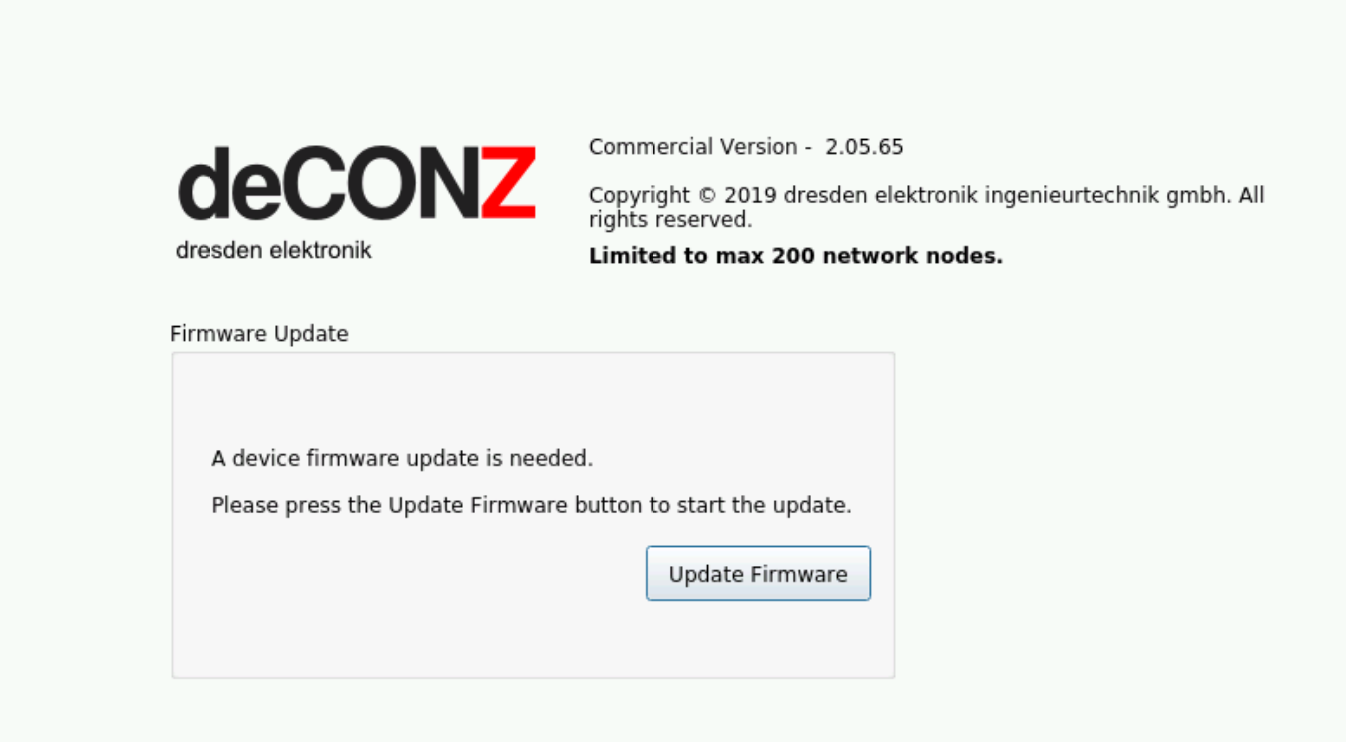
I have rebooted several times.
 Nastras
on 6 Aug 2019
Nastras
on 6 Aug 2019
Here are some data about the used system:

Nastras
on 6 Aug 2019
I have now activated the service deconz-gui to start on boot. It shows me the following errors in the journal after the boot:
Aug 06 09:47:10 HBS systemd[1]: deconz-gui.service: Service RestartSec=100ms expired, scheduling restart.
Aug 06 09:47:10 HBS systemd[1]: deconz-gui.service: Scheduled restart job, restart counter is at 2.
Aug 06 09:47:11 HBS systemd[1]: Stopped deCONZ: ZigBee gateway -- GUI/REST API.
Aug 06 09:47:11 HBS systemd[1]: Started deCONZ: ZigBee gateway -- GUI/REST API.
Aug 06 09:47:11 HBS deCONZ[1553]: Invalid MIT-MAGIC-COOKIE-1 keyqt.qpa.screen: QXcbConnection: Could not connect to display :0
Aug 06 09:47:11 HBS deCONZ[1553]: Could not connect to any X display.
Aug 06 09:47:11 HBS systemd[1]: deconz-gui.service: Main process exited, code=exited, status=1/FAILURE
Aug 06 09:47:11 HBS systemd[1]: deconz-gui.service: Failed with result 'exit-code'.
Aug 06 09:47:11 HBS systemd[1]: deconz-gui.service: Service RestartSec=100ms expired, scheduling restart.
Aug 06 09:47:11 HBS systemd[1]: deconz-gui.service: Scheduled restart job, restart counter is at 3.
Aug 06 09:47:11 HBS systemd[1]: Stopped deCONZ: ZigBee gateway -- GUI/REST API.
Aug 06 09:47:11 HBS systemd[1]: Started deCONZ: ZigBee gateway -- GUI/REST API.
Aug 06 09:47:11 HBS deCONZ[1788]: Invalid MIT-MAGIC-COOKIE-1 keyqt.qpa.screen: QXcbConnection: Could not connect to display :0
Aug 06 09:47:11 HBS deCONZ[1788]: Could not connect to any X display.
Aug 06 09:47:11 HBS systemd[1]: deconz-gui.service: Main process exited, code=exited, status=1/FAILURE
Aug 06 09:47:11 HBS systemd[1]: deconz-gui.service: Failed with result 'exit-code'.
Aug 06 09:47:12 HBS systemd[1]: deconz-gui.service: Service RestartSec=100ms expired, scheduling restart.
Aug 06 09:47:12 HBS systemd[1]: deconz-gui.service: Scheduled restart job, restart counter is at 4.
Aug 06 09:47:12 HBS systemd[1]: Stopped deCONZ: ZigBee gateway -- GUI/REST API.
Aug 06 09:47:12 HBS systemd[1]: Started deCONZ: ZigBee gateway -- GUI/REST API.
Aug 06 09:47:12 HBS deCONZ[1830]: Invalid MIT-MAGIC-COOKIE-1 keyqt.qpa.screen: QXcbConnection: Could not connect to display :0
Aug 06 09:47:12 HBS deCONZ[1830]: Could not connect to any X display.
Aug 06 09:47:12 HBS systemd[1]: deconz-gui.service: Main process exited, code=exited, status=1/FAILURE
Aug 06 09:47:12 HBS systemd[1]: deconz-gui.service: Failed with result 'exit-code'.
Aug 06 09:47:12 HBS systemd[1]: deconz-gui.service: Service RestartSec=100ms expired, scheduling restart.
Aug 06 09:47:12 HBS systemd[1]: deconz-gui.service: Scheduled restart job, restart counter is at 5.
Aug 06 09:47:12 HBS systemd[1]: Stopped deCONZ: ZigBee gateway -- GUI/REST API.
Aug 06 09:47:12 HBS systemd[1]: deconz-gui.service: Start request repeated too quickly.
Aug 06 09:47:12 HBS systemd[1]: deconz-gui.service: Failed with result 'exit-code'.
Aug 06 09:47:12 HBS systemd[1]: Failed to start deCONZ: ZigBee gateway -- GUI/REST API.
Nastras
on 6 Aug 2019
I found the mistake now. The first problem is that the headless mode has been activated.
Disable this sudo systemctl disable deconz.service and enable the GUI service with sudo systemctl enable deconz-gui.service
The second error is that the deconz.service starts faster than my x11vnc so the deconz-gui.service does not start and stops after 5 tries because there is no display available
I solved the problem by calling the service with sudo nano /lib/systemd/system/deconz-gui.service and adding the following line to delay the service start on boot.
ExecStartPre=/bin/sleep 10
[Unit]
Description=deCONZ: ZigBee gateway -- GUI/REST API
Wants=deconz-init.service deconz-update.service
After=lightdm.service vncserver-x11-serviced.service
[Service]
User=1000
Environment="DISPLAY=:0"
ExecStart=/usr/bin/deCONZ --http-port=80
Restart=on-failure
StartLimitInterval=60
AmbientCapabilities=CAP_NET_BIND_SERVICE CAP_KILL CAP_SYS_BOOT CAP_SYS_TIME
ExecStartPre=/bin/sleep 10
[Install]
WantedBy=multi-user.target
I tried to use the Wants= and After= functions in deconz-gui.service to prioritize my x11vnc.service to start which didn't work.
@manup Maybe you should add a delay to deconz-gui.service by default to fix it 4 all vnc user?
I still have a question about these error messages. Are these important if no Can they be suppressed?
Aug 06 11:24:12 HBS deCONZ[2358]: libEGL warning: DRI2: failed to authenticate
Aug 06 11:24:13 HBS deCONZ[2358]: QStandardPaths: XDG_RUNTIME_DIR not set, defaulting to '/tmp/runtime-nastra'
Aug 06 11:24:14 HBS deCONZ[2358]: libpng warning: iCCP: known incorrect sRGB profile
Nastras
on 6 Aug 2019
You may also install 2.05.66 it has some relaxed auto update rules for ConBee II.
I solved the problem by calling the service with sudo nano /lib/systemd/system/deconz-gui.service and adding the following line to delay the service start on boot.
ExecStartPre=/bin/sleep 10
Please don't edit the service files directly, since the changes will get lost after an update.
The preferred way is to use a systemd override:
sudo systemctl edit deconz-gui
Thanks for the tip with the service. A very good idea!
Nastras
on 9 Aug 2019
I solved it now with a systemctl timer that delays the start for deconz-gui.service after a boot .-)
Nastras
on 10 Aug 2019
I solved it now with a systemctl timer that delays the start for deconz-gui.service after a boot .-)
What does that look like? I don’t like the sleep in ExecStartPre as that also delays (re) starting deCONZ manually, long after the system has booted.
 ebaauw
on 10 Aug 2019
ebaauw
on 10 Aug 2019
Good Morning Erik,
i have removed the entry ExecStartPre from the deconz-gui.service again exactly for this reason.
Then I disabled the autostart of deconz-gui.service with:
sudo systemctl disable deconz-gui.service
To start the deconz-gui.service I created systemd timer with:
sudo nano /etc/systemd/system/deconz-gui.timer
In the timer unit I added the following content so that the start is only delayed during the boot process.
[Unit]
Description=deconz-gui.timer
[Timer]
OnBootSec=1min
Unit=deconz-gui.service
[Install]
WantedBy=timers.target
afterwards activate the timer with:
sudo systemctl enable deconz-gui.timer
Now deconz-gui is started delayed only after a restart.
I also noticed something in the interaction with your hue plugin during deconz-gui start. If deconz builds the network after a restart and homebridge-hue is already started, some devices will be turned on or off.
I think your plugin will get the status for all devices bit by bit. If a device is in deconz but not yet in the network then a wrong status is sent to your plugin and the device is switched on.
Therefore I delayed the start of homebridge-hue by 5 min with a timer as described above so that the network is completely set up before data is requested.
Are you aware of this?
Nastras
on 10 Aug 2019
Thanks, will try this.
homebridge-hue delays the startup of homebridge’s HAP server until deCONZ has started and responds to REST API requests. I do find that deCONZ returns random (old?) states for devices that haven’t yet been polled. homebridge-hue, by design, will mirror these states in HomeKit, but it shouldn’t change the actual lights. These are changed only, when you change the HomeKit state.
ebaauw
on 10 Aug 2019
I made the experience when setting up where I often restarted that the old states changed the status of the device. Sometimes single lights were switched on or outlets were switched off after a restart.
Now that I delayed the start of homebridge-hue to 5 min after a restart, it no longer occurs. It seems as if deconz has updated everything during this time and delivers the correct data to homebridge-hue.
Thanks, will try this.
Is it working?
Nastras
on 11 Aug 2019
Yes, got it working. deCONZ still crashed once for starting too early, so I’m using 2min. There’s a type (copy/paste) error in your post: the label should read [Timer].
ebaauw
on 11 Aug 2019
Oh, yes, I corrected.
Nice that works 👍
Nastras
on 11 Aug 2019
This issue has been automatically marked as stale because it has not had recent activity. It will be closed if no further activity occurs. Thank you for your contributions.
![stale[bot] picture](https://avatars3.githubusercontent.com/in/1724?v=4&s=40) stale[bot]
on 9 Dec 2019
stale[bot]
on 9 Dec 2019
snip
To start the deconz-gui.service I created systemd timer with:
sudo nano /etc/systemd/system/deconz-gui.timerIn the timer unit I added the following content so that the start is only delayed during the boot process.
[Unit]
Description=deconz-gui.timer[Timer]
OnBootSec=1min
Unit=deconz-gui.service[Install]
WantedBy=timers.targetafterwards activate the timer with:
sudo systemctl enable deconz-gui.timerNow deconz-gui is started delayed only after a restart.
snip
This was just the thing I was looking for. I have been having problems with PiHole and DeCONZ plugin for a long time. After every reboot or power cycle deCONZ was preventing PiHole to start the web service. I needed to make sure that deCONZ was started after piHole. This elegant little script does just that (just had to modify it for deconz and not deconz-gui). So kudos!
PS. Sorry for resurrecting this ¨old¨ thread ;)
 Sjonnie2018
on 12 Apr 2020
Sjonnie2018
on 12 Apr 2020
Related issues
 7wells
·
4Comments
7wells
·
4Comments
 Thomas-Vos
·
4Comments
Thomas-Vos
·
4Comments
 1onar
·
5Comments
1onar
·
5Comments
 qm3ster
·
3Comments
qm3ster
·
3Comments
 marthoc
·
6Comments
marthoc
·
6Comments
Most helpful comment
Good Morning Erik,
i have removed the entry ExecStartPre from the deconz-gui.service again exactly for this reason.
Then I disabled the autostart of deconz-gui.service with:
sudo systemctl disable deconz-gui.serviceTo start the deconz-gui.service I created systemd timer with:
sudo nano /etc/systemd/system/deconz-gui.timerIn the timer unit I added the following content so that the start is only delayed during the boot process.
[Unit]
Description=deconz-gui.timer
[Timer]
OnBootSec=1min
Unit=deconz-gui.service
[Install]
WantedBy=timers.target
afterwards activate the timer with:
sudo systemctl enable deconz-gui.timerNow deconz-gui is started delayed only after a restart.
I also noticed something in the interaction with your hue plugin during deconz-gui start. If deconz builds the network after a restart and homebridge-hue is already started, some devices will be turned on or off.
I think your plugin will get the status for all devices bit by bit. If a device is in deconz but not yet in the network then a wrong status is sent to your plugin and the device is switched on.
Therefore I delayed the start of homebridge-hue by 5 min with a timer as described above so that the network is completely set up before data is requested.
Are you aware of this?