Deconz-rest-plugin: Conbee II not connected with after firmware update with deCONZ_ConBeeII_0x26490700.bin.GCF
Hi!
I am new to Conbee and i think, something went wrong when I updated the firmware.
I am running debian stretch (proxmox vm) and have successfully installed deCONZ/phoscon (minimal/headless) and was able to add some lights, switches and sensors.
I then found the "Manual update Instructions"-Site for the manual firmware update procedure and I couldn't resist to try updating the stick. I followed the instructions with the firmware version mentioned in the topic (GCFFlasher_internal -d /dev/ttyAMC0 -f deCONZ_ConBeeII_0x26490700.bin.GCF). The GCFFlasher-Tool ended with "success". But: Since then the stick appears to be not connected in the phoscon app. I cannot switch lights (they disappeared) and my sensors are shown as not being reachable. This is what I have tried to get things better: I unplugged the stick and plugged it in again. I powered off the whole machine and restartet it (with stick plugged in during boot up and without). No luck. I set up a new vm with ubuntu and installed deCONZ. On the start screen of deCONZ the stick is beeing displayed but I cannot connect.
Unfortunately I also get some weird output of dmesg:
[ 12.045167] usb 4-1: New USB device found, idVendor=1cf1, idProduct=0030
[ 12.045169] usb 4-1: New USB device strings: Mfr=1, Product=2, SerialNumber=3
[ 12.045171] usb 4-1: Product: ConBee II
[ 12.045172] usb 4-1: Manufacturer: dresden elektronik ingenieurtechnik GmbH
[ 12.045173] usb 4-1: SerialNumber: DE1964192
[ 12.054672] cdc_acm 4-1:1.0: ttyACM0: USB ACM device
[ 12.056991] usbcore: registered new interface driver cdc_acm
[ 12.056992] cdc_acm: USB Abstract Control Model driver for USB modems and ISDN adapters
[ 20.590858] Bluetooth: Core ver 2.22
[ 20.590875] NET: Registered protocol family 31
[ 20.590876] Bluetooth: HCI device and connection manager initialized
[ 20.590880] Bluetooth: HCI socket layer initialized
[ 20.590882] Bluetooth: L2CAP socket layer initialized
[ 20.590891] Bluetooth: SCO socket layer initialized
[ 39.627194] cdc_acm 4-1:1.0: failed to set dtr/rts
[ 39.641753] cdc_acm 4-1:1.0: failed to set dtr/rts
[ 39.803951] usb 4-1: USB disconnect, device number 3
[ 39.804919] cdc_acm 4-1:1.0: failed to set dtr/rts
[ 42.559674] usb 4-1: new full-speed USB device number 4 using uhci_hcd
[ 43.007901] usb 4-1: New USB device found, idVendor=1cf1, idProduct=0030
[ 43.007903] usb 4-1: New USB device strings: Mfr=1, Product=2, SerialNumber=3
[ 43.007904] usb 4-1: Product: ConBee II
[ 43.007905] usb 4-1: Manufacturer: dresden elektronik ingenieurtechnik GmbH
[ 43.007906] usb 4-1: SerialNumber: DE1964192
[ 43.010383] cdc_acm 4-1:1.0: ttyACM1: USB ACM device
[ 68.507696] cdc_acm 4-1:1.0: failed to set dtr/rts
[ 68.572214] usb 4-1: USB disconnect, device number 4
[ 71.432066] usb 4-1: new full-speed USB device number 5 using uhci_hcd
[ 71.881510] usb 4-1: New USB device found, idVendor=1cf1, idProduct=0030
[ 71.881512] usb 4-1: New USB device strings: Mfr=1, Product=2, SerialNumber=3
[ 71.881513] usb 4-1: Product: ConBee II
[ 71.881514] usb 4-1: Manufacturer: dresden elektronik ingenieurtechnik GmbH
[ 71.881515] usb 4-1: SerialNumber: DE1964192
[ 71.883992] cdc_acm 4-1:1.0: ttyACM0: USB ACM device
[ 91.503889] cdc_acm 4-1:1.0: failed to set dtr/rts
[ 91.636292] usb 4-1: USB disconnect, device number 5
showing me, that the stick is initially recognized but somehow disconnects again.
GCFFlasher_internal -l first gives me:
GCFFlasher V3_03 (c) dresden elektronik ingenieurtechnik gmbh
Path | Vendor | Product | Serial | Type
-----------------+--------+---------+------------+-------
/dev/ttyACM0 | 0x1CF1 | 0x0030 | DE1964192 | ConBee II
But after some time the stick disappears:
GCFFlasher V3_03 (c) dresden elektronik ingenieurtechnik gmbh
Path | Vendor | Product | Serial | Type
-----------------+--------+---------+------------+-------
I guess I did not flash a wrong firmware since the file name indicates to be right ("deCONZ_ConBeeII_xxx") and since the GCFFlasher told me that the update was successful, I believe the update process didn't went wrong.
Is there anything else I can try?
Thanks in advance!
 triagony
All 63 comments
Can you please run the firmware update again, with debugging enabled and post the output:
GCFFlasher_internal -d /dev/ttyAMC0 -f deCONZ_ConBeeII_0x26490700.bin.GCF -x 3
 manup
on 7 May 2019
manup
on 7 May 2019
After shutting down and powering my computer back on I have flashed the firmware again with -x 3:
sudo GCFFlasher_internal -d /dev/ttyACM0 -f deCONZ_ConBeeII_0x26490700.bin.GCF -x 3
GCFFlasher V3_03 (c) dresden elektronik ingenieurtechnik gmbh
using firmware file: deCONZ_ConBeeII_0x26490700.bin.GCF
ls dev: /dev/ttyUSB0 (0x0403/0x6001) sn: A9YXXF7Z
ls dev: /dev/ttyUSB1 (0x0403/0x6001) sn: A9V655PW
ls dev: /dev/ttyACM0 (0x1CF1/0x0030) sn: DE1964192
Reboot device /dev/ttyACM0 (ConBee II)
bootloader detected after 7 ms
action: update firmware after 27 ms
, 14:55:05
 (127 ms)
flashing 158985 bytes: |==============================|
verify: .
SUCCESS
The stick at lest seems not do disconnect anymore. GCFFlasher_internal -l works as expected listing the stick constantly. Nevertheless I get no connection (neither in the phoscon app nor the deCONZ-gui-version (using ssh -X)):

(klicking "connect" does not work).
Thanks!
triagony
on 7 May 2019
From the logs it looks like the prior update didn't work, GCFFlasher would have shown the firmware version otherwise.
It looks like you have some FTDI based USB devices connected, is it possible that their services try to connect to ConBee II serial interface?
To see which programms access the USB interface try the following command:
lsof /dev/ttyACM0
lsof /dev/ttyACM0
didn't show anything suspicious.
Though, after very many retries, I finally have managed to get at least FW ConBeeII_0x26480700 up and running so that the stick is shown as "connected" in phoscon/deCONZ. All my lights (and sensors) are back again.
But there's another problem: all devices seem to be not connected/reachable. Do I have to delete and re-add them? Or can I upload a backup-file to phoscon an everything will work again?
triagony
on 8 May 2019
@triagony how did you update the firmware? I have a Conbee II on Home Assistant with docker container and exactly your same behaviour.
With GCFFlasher_internal -l I get no devices
 xenio
on 8 May 2019
xenio
on 8 May 2019
Can you provide some info about the other connected UBS devices, especially which services are using them? I think the problem here really is that some other service/software tries to access the ConBee II serial interface. Directly after an firmware update this can cause the firmware to not be applied fully. This is indicated as well in your logs above.
manup
on 8 May 2019
Yes I can. The other connected USB devices are 2 arduino nano. I use them to control devices with 433 Mhz / 868 Mhz and fhem (nanocul/firmware: culfw). Do you need more/other information?
Directly after an firmware update this can cause the firmware to not be applied fully.
If so, it is very irritating that the tool claims at the end of the flashing process that the update was successful even though it was not.
triagony
on 8 May 2019
@xenio I don't have experience with docker. Perhaps it helps to power down your computer completely, plug out the stick and plug it in again and then power on the computer. At least in my case the stick was then listet by GCFlasher permanently.
Then I reflashed the stick several times with firmware ConBeeII_0x26480700; plugged it out and in again; until it finally appeared in the phoscon app. I guess I just have been lucky.
triagony
on 8 May 2019
If so, it is very irritating that the tool claims at the end of the flashing process that the update was successful even though it was not.
Indeed, we will improve this in next versions. The actual flashing is finished but but the success message is printed too early. Some details: after flashing is done, the application needs to set some bits in mcu flash to verify it's working on order that partially or not working applications can be detected by the bootloader as fail safe.
The next version of GCFFlasher will yield the success message only after the application is running and communicating via serial interface. This adds a few seconds to firmware update process but should guard against the above problem.
Yes I can. The other connected USB devices are 2 arduino nano. I use them to control devices with 433 Mhz / 868 Mhz and fhem (nanocul/firmware: culfw). Do you need more/other information?
And which services/applications do access the devices? If possible can you try to stop these and start the deCONZ service, this would be an interesting test to see if the other services are interfering or perhaps the problems still persist.
manup
on 9 May 2019
@manup I have a problem with each update, that the port is changed back to 80, while I changed it to 8080. Is there a way to prevent this?
 TungstenE2
on 15 May 2019
TungstenE2
on 15 May 2019
I have the same Problem as OP with deCONZ_ConBeeII_0x26490700.bin.GCF. My Setup is totally broken right now.
 th3cube
on 19 May 2019
th3cube
on 19 May 2019
Can please also provide the output of the following command to check if it is indeed the same problem:
sudo GCFFlasher_internal -l
GCFFlasher 3.4 will add an extra 10 seconds delay after the flashing process to prevent other processes to interfere with the completion of the update.
manup
on 19 May 2019
Strange, after resetting the Gateway over the Phoscon Webinterface, the Stick showed up.
What I have done:
I had to reflash the Stick serval times, because the Stick wouldn't stay connected - Looked like it was in a reboot loop. Flashing over Docker also failed serval times.
Then i flashed directly over my laptop with Ubuntu, but the stick still would not show up in PSC. Then I did a full reset of the GW.
I guess I have to reconnect everything now?
th3cube
on 19 May 2019
I guess I have to reconnect everything now?
Have you created a backup before the reset?
There is also a page to reconfigure previously working configurations, but after a gateway reset this data is lost. The process is described here:
https://github.com/dresden-elektronik/deconz-rest-plugin/releases/tag/V2_05_59
And can you please provide the output of:
sudo GCFFlasher_internal -l
I have restored the Backup and followed the Steps from your Link. The Devices showing up in Phoscon again but they won't connect.
Here is the Output you asked for:
GCFFlasher V3_03 (c) dresden elektronik ingenieurtechnik gmbh
Path | Vendor | Product | Serial | Type
----------------+--------+---------+-----------+-------
/dev/ttyACM0 | 0x1CF1 | 0x0030 | DEXXXXX | ConBee II
th3cube
on 19 May 2019
After unplugging the Stick and replugging it again, it doesn’t show up again in Phoscon.
Very strange behavior. It was working with the last FW version.
Im also getting errors on DMESG Output:
2941.958730] usb 1-1: new full-speed USB device number 16 using xhci_hcd
[ 2942.520488] PPP generic driver version 2.4.2
[ 2942.532563] cdc_acm 1-1:1.0: ttyACM0: USB ACM device
[ 2942.539352] usbcore: registered new interface driver cdc_acm
[ 2942.545967] cdc_acm: USB Abstract Control Model driver for USB modems and ISDN adapters
[ 2949.609373] usb 1-1: USB disconnect, device number 16
[ 2949.923964] usb 1-1: new full-speed USB device number 17 using xhci_hcd
[ 2955.064516] usb 1-1: unable to read config index 0 descriptor/all
[ 2955.071374] usb 1-1: can't read configurations, error -110
[ 2955.200512] usb 1-1: new full-speed USB device number 18 using xhci_hcd
[ 2960.341001] usb 1-1: unable to read config index 0 descriptor/all
[ 2960.347941] usb 1-1: can't read configurations, error -110
[ 2960.476979] usb 1-1: new full-speed USB device number 19 using xhci_hcd
[ 2965.497517] usb 1-1: unable to read config index 0 descriptor/all
[ 2965.504360] usb 1-1: can't read configurations, error -110
[ 2965.633469] usb 1-1: new full-speed USB device number 20 using xhci_hcd
[ 2965.653708] cdc_acm 1-1:1.0: ttyACM0: USB ACM device
[ 2965.677478] usbcore: deregistering interface driver cdc_acm
[ 2965.767664] usb 1-1: USB disconnect, device number 20
[ 2966.027428] usb 1-1: new full-speed USB device number 21 using xhci_hcd
[ 2968.396581] PPP generic driver version 2.4.2
[ 2968.407467] cdc_acm 1-1:1.0: ttyACM0: USB ACM device
[ 2968.414447] usbcore: registered new interface driver cdc_acm
[ 2968.420884] cdc_acm: USB Abstract Control Model driver for USB modems and ISDN adapters
[ 2970.102908] usbcore: deregistering interface driver cdc_acm
[ 2972.923716] PPP generic driver version 2.4.2
[ 2972.934764] cdc_acm 1-1:1.0: ttyACM0: USB ACM device
[ 2972.940707] usbcore: registered new interface driver cdc_acm
[ 2972.947066] cdc_acm: USB Abstract Control Model driver for USB modems and ISDN adapters
[ 2973.669263] usb 1-1: USB disconnect, device number 21
[ 2973.982685] usb 1-1: new full-speed USB device number 22 using xhci_hcd
[ 2974.126954] cdc_acm 1-1:1.0: ttyACM0: USB ACM device
th3cube
on 19 May 2019
And which services/applications do access the devices? If possible can you try to stop these and start the deCONZ service, this would be an interesting test to see if the other services are interfering or perhaps the problems still persist.
Sorry for the delay. How do I check this? I have another stick here (bought because I thougt I destroyed my 1st stick during flashing) with the exact same behaviour which I could use for testing purposes. I have no intention to use the stick which is now up and running for testing.
triagony
on 20 May 2019
Hey triagony,
Struggling with the same problem here :/
To see which programms access the USB interface try the following command:
lsof /dev/ttyACM0
th3cube
on 20 May 2019
Here is the output:
User@fhem-vm:~$ sudo lsof /dev/ttyACM0                                      COMMAND PID  USER   FD   TYPE DEVICE SIZE/OFF  NODE NAME
deCONZ  693 User 14u   CHR  166,0      0t0 12318 /dev/ttyACM0
User@fhem-vm:~$
I think, there is nothing suspicious.
triagony
on 20 May 2019
How do I check this? I have another stick here (bought because I thougt I destroyed my 1st stick during flashing) with the exact same behaviour which I could use for testing purposes.
Note the stick can't be destroyed by flashing, even if that fails, the bootloader is designed so that also failed or invalid firmware updates can be fixed.
It's hard to tell which other services are trying to access the USB interface. I would recommend to look for anything which uses you other USB devices and try to disable these temporary.
manup
on 20 May 2019
I wonder why Conbee II keeps disconnecting and reconnecting. Is it because of bad firmware?
From previous posts in this issue I can see that this is more common...
I think I will try to connect it to Windows instance...
 Oliviakrkk
on 20 May 2019
Oliviakrkk
on 20 May 2019
I recon the most problematic issue is interfering services trying to access the serial interface while ConBee II bootloader is starting before deCONZ firmware runs.
manup
on 20 May 2019
@th3cube @triagony try to connect your not working conbee ii to deconz on windows. Mine is showing firmware version again (was firmware not connected before).
Oliviakrkk
on 20 May 2019
@Oliviakrkk I try to avoid Windows whenever I can. No real option for me.
triagony
on 20 May 2019
Me too. But I have one for gaming...
Now I created new Ubuntu 18.04 VM on KVM and tried to reinstall firmware.
GCFFlasher V3_03 (c) dresden elektronik ingenieurtechnik gmbh
Path             | Vendor | Product | Serial     | Type
-----------------+--------+---------+------------+-------
/dev/ttyACM0     | 0x1CF1 | 0x0030  | DE1962673  | ConBee II
dmesg
[ 1273.451787] usb 3-1: new full-speed USB device number 2 using uhci_hcd
[ 1273.824325] usb 3-1: New USB device found, idVendor=1cf1, idProduct=0030
[ 1273.824328] usb 3-1: New USB device strings: Mfr=1, Product=2, SerialNumber=3
[ 1273.824331] usb 3-1: Product: ConBee II
[ 1273.824333] usb 3-1: Manufacturer: dresden elektronik ingenieurtechnik GmbH
[ 1273.824335] usb 3-1: SerialNumber: DE1962673
[ 1273.834796] cdc_acm 3-1:1.0: ttyACM0: USB ACM device
Firmware update:
GCFFlasher_internal -d /dev/ttyACM0 -f deCONZ_ConBeeII_0x26490700.bin.GCF -x 3
using firmware file: deCONZ_ConBeeII_0x26490700.bin.GCF
ls dev: /dev/ttyACM0 (0x1CF1/0x0030) sn: DE1962673
ls dev: /dev/ttyS0 (0x0000/0x0000) sn:
Reboot device /dev/ttyACM0 (ConBee II)
deCONZ firmware version 26490700
set watchdog ttl status: 0x00
bootloader write CMD_GetID after 3152 ms
close serial after 3152
failed reset 10000

1434: Error: uart reset failed, check retry


md5-c28f52046750e0e5bbef82f0eba13d09


[ 1388.074811] cdc_acm 3-1:1.0: failed to set dtr/rts
[ 1388.225707] usb 3-1: USB disconnect, device number 2
[ 1388.226412] cdc_acm 3-1:1.0: failed to set dtr/rts


md5-977d1c06518ec561df718f6d3b5aeea9


[ 1475.054850] usb 3-2: new full-speed USB device number 3 using uhci_hcd
[ 1475.430718] usb 3-2: New USB device found, idVendor=1cf1, idProduct=0030
[ 1475.430720] usb 3-2: New USB device strings: Mfr=1, Product=2, SerialNumber=3
[ 1475.430721] usb 3-2: Product: ConBee II
[ 1475.430722] usb 3-2: Manufacturer: dresden elektronik ingenieurtechnik GmbH
[ 1475.430723] usb 3-2: SerialNumber: DE1962673
[ 1475.440445] cdc_acm 3-2:1.0: ttyACM0: USB ACM device
Is there a way to re flash firmware on Windows?
Oliviakrkk
on 20 May 2019
Is there a way to re flash firmware on Windows?
Yes, open up explorer and paste %localappdata%\dresden-elektronik\deCONZ\
there should be a folder called firmware and bin. there you can find the firmware files and GCFFlasher for Windows
im starting to get a headache bc of this Conbee II Stick.
th3cube
on 20 May 2019
Updating the firmware inside a VM is very tricky because the device needs to reboot into bootloader which will re-enumerate the USB device. If possible prefer update firmware on a native system.
manup
on 21 May 2019
What I don’t understand is that even i didn’t change anything on my System the Stick doesn't work anymore. Just did that FW update. I even flashed back to the old FW over another System...
th3cube
on 21 May 2019
@manup I will try flashing tonight in Windows. Bare metal with stick connected directly to motherboard.
Oliviakrkk
on 21 May 2019
What I don’t understand is that even i didn’t change anything on my System the Stick doesn't work anymore. Just did that FW update. I even flashed back to the old FW over another System...
Do you have the ConBee II connected directly to the PC? If so can you please try to use an USB extension cable to rule out any interference with the peripherals.
Do you have access to the deCONZ GUI and is it showing the blue coordinator node? If so can you please show the deCONZ → Network Settings, so I can check that all parameters are valid.
manup
on 21 May 2019
I've got the same problem.
I received my Conbee II stick this week and I use it with Home Assistant. First I did try the official addon. After setting up all my Xiaomi Aqara motion sensors, temp sensor, cube and 3 bulbs everything went well. And I could everything via Home Assistant.
But the next day I lost connection with the Conbee stick. The Phoscon showed "Not connected"
Yesterday i tried the Addon of marthoc (https://github.com/marthoc/hassio-addons)
Again everything went well. And I was able to control everything via Home Assistant.
And this morning I was not able to control my devices via Home Assistant and not via Phoscon.
But now the stick is recognized (firmware 26490700)
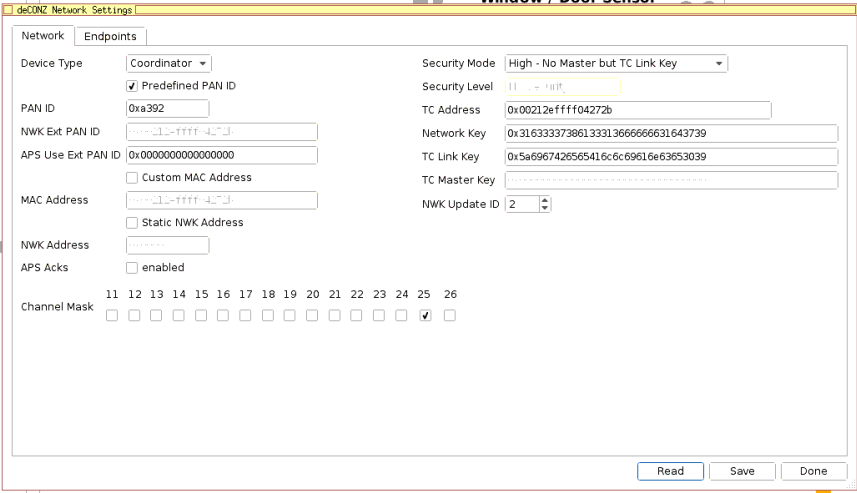
Now I have the Conbee II in my Windows pc. I'm able to start deCONZ. This is a screenshot of the network settings.
https://imgur.com/a/AWLT12E
All my devices are still there. But no connection lines between them.
https://imgur.com/Wo3li1l
 Kitser
on 26 May 2019
Kitser
on 26 May 2019
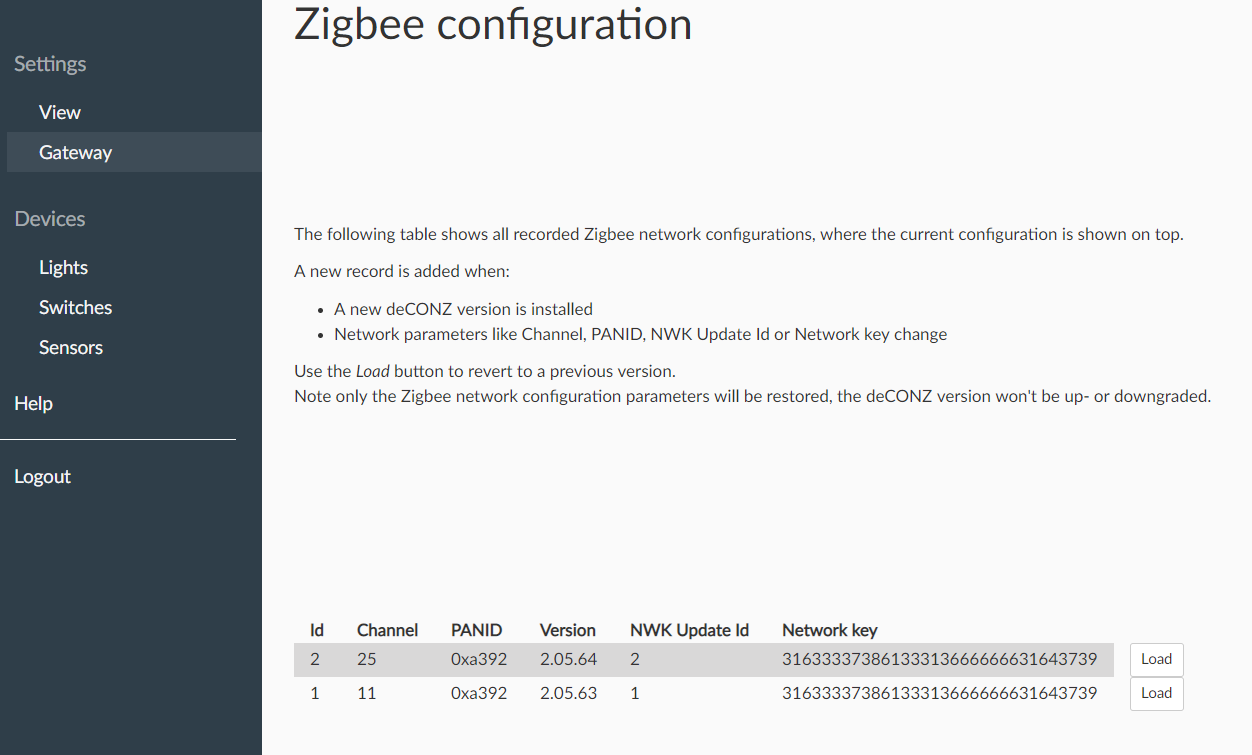
Can you please check the Zigbee configuration page as described in:
https://github.com/dresden-elektronik/deconz-rest-plugin/releases/tag/V2_05_59
Do you already use an USB extension cable to prevent interference with peripherals?
Can you provide some details on which lights you are using?
manup
on 27 May 2019
Hi Manuel,
Thanks for your reply.
I did make a screenshot of my Zigbee configuration page:

I use a USB extension cable to connect the Conbee II to a laptop which is running Proxmox.
On Proxmox I'm running Hassio. And there I used the official addon and the marthoc addon.
I've got these Xiaomi devices:
MCCGQ11LM - Xiaomi Aqara door & window contact sensor (1x)
RTCGQ11LM - Xiaomi Aqara human body movement and illuminance sensor (7x)
ZNLDP12LM - Xiaomi Aqara smart LED bulb (3x)
MFKZQ01LM - Xiaomi Mi/Aqara smart home cube (1x)
WSDCGQ11LM - Xiaomi Aqara temperature, humidity and pressure sensor (1x)
WXKG02LM - Xiaomi Aqara double key wireless wall switch (2x)
Because of my problems with the Cobee II and deCONZ, for now I use my CC2531 stick to zigbee2mqtt again on my live Hassio installation.
The ConbeeII stick is still in the Prroxmox laptop. I also have an Ubuntu server VM on Proxmox.
Now I'm running the marthoc/deconz Docker container.
As a test I paired the following:
MCCGQ11LM - Xiaomi Aqara door & window contact sensor
RTCGQ11LM - Xiaomi Aqara human body movement and illuminance sensor
ZNLDP12LM - Xiaomi Aqara smart LED bulb
This works for now. So I'll let it there for a couple of hours to see if it is stable now.
I'm on firmware "26490700". Is this the latest? Where can I find overview of these firmware versions?
Kitser
on 27 May 2019
After 2 days the ZNLDP12LM and the RTCGQ11LM don't react anymore.
The MCCGQ11LM work like it should. What can I do about this?
After I restart the container all 3 devices work again.
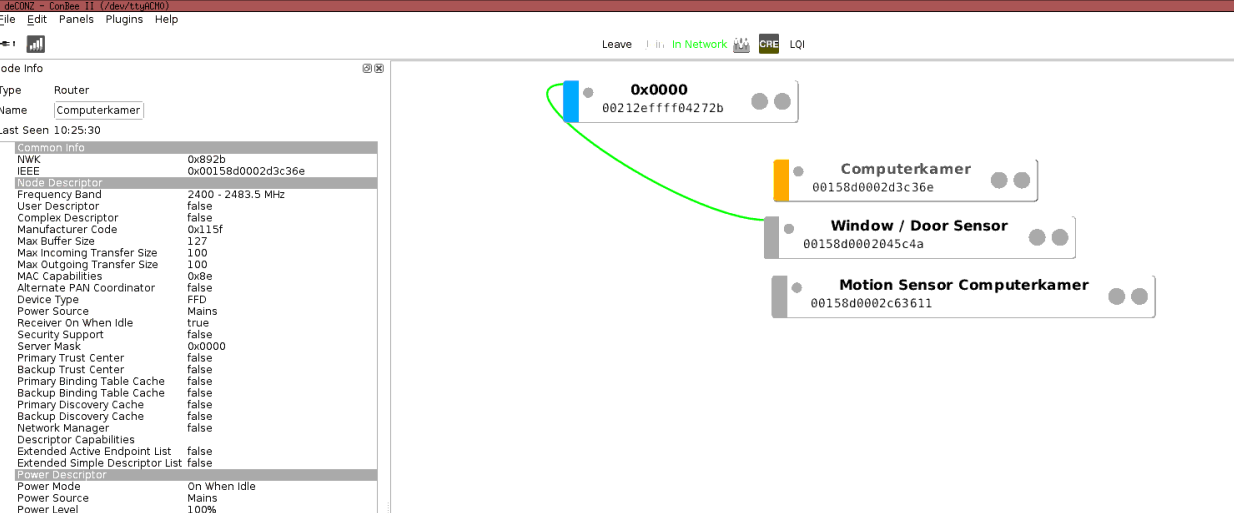
Kitser
on 29 May 2019
Just a wild guess, have you tried power-cycling the Xiaomi light, does it come back?
We had issues that other Xiaomi mains-powered devices could get stuck over time due to some requests which they didn't like. Perhaps the ZNLDP12LM - Xiaomi Aqara smart LED bulb needs to be handled the same.
manup
on 29 May 2019
I didn't tried that. When it doesn't react again in the Phoscon app I'll try.
But it is not only the ZNLDP12LM. The motion sensor (RTCGQ11LM) stopped working as well. Are there also problems with that?
With the CC2531 all my Xiaomi devices stays available..
The reason to try the Conbee stick is that deconz has a platinum integration with Home Assistant.
Kitser
on 29 May 2019
Add me to the list for 'Dead after update'...
I recieved my stick today, connected to HassIO (Pi 4amp power supply) via an extension due to reading up on it before starting. Set it all up so my Tradfri switches and 1 bulb worked (before adding the others) and then saw a firmware update was available.
Did the recommended backup and let it flash the update. 4hours later it still showed it was in progress.
Figuring this was wrong (everyone seems to say it takes minutes?) I loaded up another window to the web interface that showed it was on the new firmware. Closed the other window and went back to HomeAssistant.
I thought I should restart the Add-on as I had made quite a lot of changes to my groups etc and I get similar issues as above:
00:34:44:922 dev /dev/ttyAMA0
00:34:44:922 COM: /dev/ttyACM0 / serialno:
00:34:44:922 COM: --dev: /dev/ttyACM0 (ConBee II)
00:34:45:460 device state timeout ignored in state 2
00:34:46:510 device state timeout ignored in state 2
00:34:47:510 device state timeout ignored in state 2
00:34:48:510 device state timeout ignored in state 2
00:34:49:510 device state timeout ignored in state 2
00:34:50:511 device state timeout (handled)
00:34:50:984 dev /dev/ttyAMA0
00:34:51:009 void zmMaster::handleStateIdle(zmMaster::MasterEvent) not connected goto OFF state
00:34:51:009 device state timeout ignored in state 1
00:34:51:510 wait reconnect 15 seconds
00:34:52:510 wait reconnect 14 seconds
00:34:53:510 wait reconnect 13 seconds
I bought a ConBee as wanted to go full Zigbee and everyone stated it was the easiest for newbies (me).
 Coedy
on 15 Jun 2019
Coedy
on 15 Jun 2019
If you have done a backup just before, have you tried to use it after the update ?
 Smanar
on 15 Jun 2019
Smanar
on 15 Jun 2019
It doesn't seem to actually see the stick now though? Eg, it doesn't know what firmware it's on, it says not connected on the UI. When I try reloading the backup it just says failed.
Coedy
on 15 Jun 2019
Hmm something did wen't wrong. Can you please try to update the firmware manually:
https://github.com/dresden-elektronik/deconz-rest-plugin/wiki/Update-deCONZ-manually
manup
on 17 Jun 2019
Ok, followed the guide. (well, tried to)
On step 3 I get:
sudo: GCFFlasher_internal: command not found
I thought that would have been installed by the sudo apt update and sudo apt install when installing it?
(I put it into a spare pi and followed the install guide here so that I didn't risk my existing Home assistant install. I cant find anywhere how to install this separately via command line.
I then tried following the windows install guide but nothing shows in the drop down to select something to connect to. (after putting the conbee into my windows laptop)

And when trying to run the GCFFlasher file from the website I get:
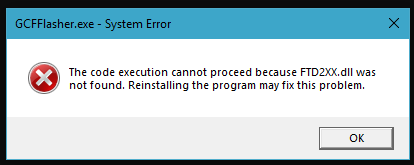
Any help?
Coedy
on 17 Jun 2019
I also checked again in the logs of the HASSio addon via Home Assistant (trying the trick of multiple re-inserts of the stick after 15+seconds) and noticed the following in the logs if it helps?
19:47:07:941 COM: /dev/ttyACM0 / serialno:
19:47:07:941 COM: --dev: /dev/ttyACM0 (ConBee II)
19:47:08:490 device state timeout ignored in state 2
19:47:09:511 device state timeout ignored in state 2
19:47:10:510 device state timeout ignored in state 2
19:47:11:510 device state timeout ignored in state 2
19:47:12:510 device state timeout ignored in state 2
19:47:13:015 scan finished
Apparently I have no Serial Number?
Coedy
on 17 Jun 2019
Also here is the Phoscon interface:

Coedy
on 17 Jun 2019
I have the same problem. On my second ConBee2 now, had to return the first one to the store. Current stick worked for a few days, now it's just connecting / disconnecting every 15 seconds. Tried on several computers, same error.
 sluquet
on 19 Jun 2019
sluquet
on 19 Jun 2019
The manual update instructions now also contain steps for Ubuntu and Windows.
https://github.com/dresden-elektronik/deconz-rest-plugin/wiki/Update-deCONZ-manually
Current stick worked for a few days, now it's just connecting / disconnecting every 15 seconds. Tried on several computers, same error.
Do you have any other USB devices/dongles connected?
Have you tried an USB extension cable?
manup
on 19 Jun 2019
Hi, the problem is i cannot update it because it was disconnecting / connecting every 10-15 seconds. No other USB devices connected, and used an extention cable. Presented to a single vm running ubuntu. I switched it out at the store for the second time today, now it connects as it should. Hopefully it will work more than a few days this time.
sluquet
on 19 Jun 2019
Will try a manual update via windows again later on and see how it goes. Thanks for updating the guide for us Newbies.
Coedy
on 19 Jun 2019
Same issue for a missing DLL.

Coedy
on 19 Jun 2019
Ok, resorted to the risky act of downloading a random DLL file with the same name... Managed to get further but appears my stick is not recognized at all.
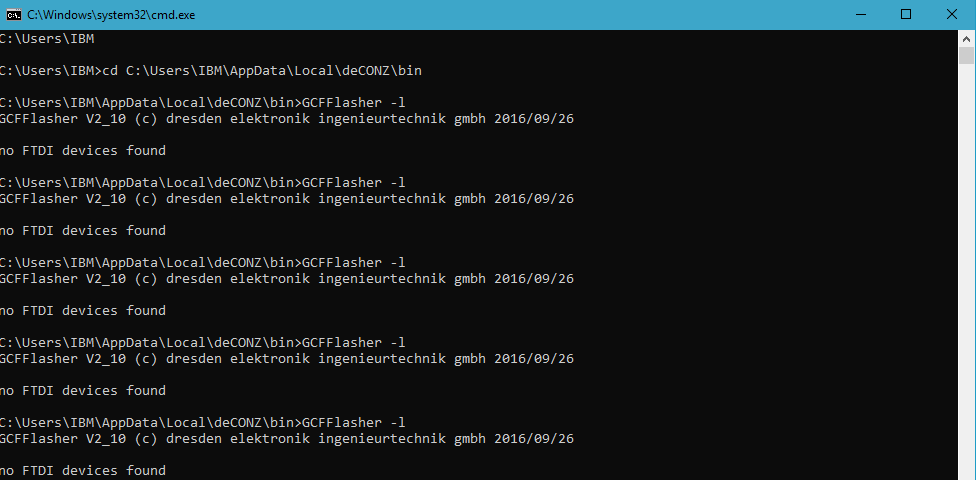
The multiple tries you see are me trying every USB port on the laptop....
Coedy
on 19 Jun 2019
@Coedy have you installed the window drivers ? https://phoscon.de/en/conbee2/install#windows7
Smanar
on 19 Jun 2019
I hadn't! I heard the new device ding and thought it had auto installed.
I hunted through the device manager and found a USB>Serial adapter (Com4) that disappears when I removed the conbee stick. I changed that driver to the one on the link so now shows as below:
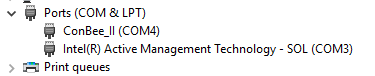
However it still shows up as "no FTDI devices found".
I'm going to try a reboot and try again after I eat.
Coedy
on 19 Jun 2019
Just noticed you're using the old GCFFlasher 2.10 (we're going to clean the old reference to this on the Homepage asap).
Please try with the GCFFlasher 3.5 which is part of deCONZ installation. The instructions for this can be found here:
https://github.com/dresden-elektronik/deconz-rest-plugin/wiki/Update-deCONZ-manually#update-in-windows
manup
on 19 Jun 2019
THANK YOU!

I would like to thank everyone who offered me advice and help (and thanks for the patience...)
Coedy
on 19 Jun 2019
I didn't tried that. When it doesn't react again in the Phoscon app I'll try.
But it is not only the ZNLDP12LM. The motion sensor (RTCGQ11LM) stopped working as well. Are there also problems with that?
With the CC2531 all my Xiaomi devices stays available..
The reason to try the Conbee stick is that deconz has a platinum integration with Home Assistant.
I just want to report that I don't have any problems anymore with the Conbee II stick with Hassio.
After the last update of the addon I tried it again. And now it's really stable for the last week.
Kitser
on 22 Jun 2019
Succes!
I was seeing the same connect/disconnect sequence in dmesg, app would not connect. Based on the bits pieces above, I finally arrived at this road to recovery:
- find appropriate docker container using '''docker container ls''';
- attach to the container: '''docker exect -it
bash'''; - '''GCFFlasher_internal -l''' only occasionally returned a connected device, most of the time it would not (makes sense, it loading and disconnecting in the host machine)
- did a number of '''GCFFlasher_internal -r''' to try and force device reset. by repeating this a number of times, I did at some point get a response indicating that the command had indeed talked to the device.
- '''GCFFlasher_internal -l''' still had an on/of behaviour, so no real change.
- Tried a number manual '''GCFFlasher_internal -d /dev/ttyACM0 -x 3 -f /usr/share/deCONZ/firmware/deCONZ_ConBeeII_0x26490700.bin.GCF''', but didn't hit the sweet spot with then.
- noticed the -R (max retries) command line option and decided to go brutal: '''GCFFlasher_internal -d /dev/ttyACM0 -x 3 -f /usr/share/deCONZ/firmware/deCONZ_ConBeeII_0x26490700.bin.GCF -R 1000'''
- somewhere after a couple of hundred attempts (goes really fast) it did hit the sweetspot, and once the firmware upload started it completed at the first attempt without disconnecting in between;
- after completing, the Conbee II device settled down, no more disconnects and I was able to connect the app to it again;
The above was in a container for the hassio addon, the path to the firmware on 'the other' container mentioned here may differ, of course.
Hope this helps other people struggling with this.
 averstappen
on 2 Jul 2019
averstappen
on 2 Jul 2019
@manup I have this problem too and I can't find GCFFlasher 3.5 (Windows) anywhere. I have the latest(?) release of deCONZ installed (2.05.20) but the GCFFlasher is still 2.10. Where can I find it?
 exxoff
on 18 Jul 2019
exxoff
on 18 Jul 2019
The latest version of deCONZ is 2.05.66, check https://www.dresden-elektronik.de/deconz/ for the correct versions (2.05.63 is said to be latest stable) The new GCFFlasher is included in this release.
@manup is it possible to have correct pointers to last releases in Phoscon?
Here is what I am getting:

And when I follow the changelog link:

Which is confusing for users as not all follow the link back to github.
 wvuyk
on 18 Jul 2019
wvuyk
on 18 Jul 2019
@wvuyk Cheers and thanks! I wonder why they don't link to it on their web page.
exxoff
on 18 Jul 2019
@manup is it possible to have correct pointers to last releases in Phoscon?
[...]Which is confusing for users as not all follow the link back to github.
Totally agree, we already have this on the radar, here are some details:
- The release notes will be based on a RSS feed in the future, which can be fetched and displayed in various places like Phoscon App, Phoscon homepage, RSS feed reader or any app which likes to show the release notes.
- phoscon.de will get a dedicated deCONZ page which provides all downloads and the release notes.
- The old links and deCONZ/download pages on dresden-elektronik.de won't be public anymore (but still exists and refer to phoscon.de to not break links to it).
manup
on 18 Jul 2019
This issue has been automatically marked as stale because it has not had recent activity. It will be closed if no further activity occurs. Thank you for your contributions.
![stale[bot] picture](https://avatars3.githubusercontent.com/in/1724?v=4&s=40) stale[bot]
on 15 Nov 2019
stale[bot]
on 15 Nov 2019
Hello
I have the same problem.
After a Reboot Conbee 2 connects and disconnects again.
It takes 5 minutes, then the connection remains stable.
If Conbee 2 does not appear connected, „ls -l / dev / ttyACM*“ displays everything well:
crw - rw - - - - 1 root dialout 166, 0 Nov 17 10:13 /dev/ttyACM0
Also lsusb is fine:
Bus 001 Device 009: ID 1cf1:00300 Dresden Elektronic
I have followed all the ideas and instructions.
These here, for example:
https://github.com/dresden-elektronik/deconz-rest-plugin/wiki/Update-deCONZ-manually
However, nothing has worked for it:
sudo GCFFlasher_internal -d /dev/ttyACM0 -t 60 \ -f /usr/share/deCONZ/firmware/deCONZ_ConBeeII_0x26490700.bin.GCF
Only this has helped me out of necessity:
sudo GCFFlasher_internal -d /dev/ttyACM0 -x 3 -f /usr/share/deCONZ/firmware/deCONZ_ConBeeII_0x26490700.bin.GCF -R 1000
My logs give that again what others also report.
My system:
Raspberry Pi 3b +
ConBee2 connected via USB cable
Other external devices connected to the USB or not connected
Version 2.05.70 / 25.10.2019
Firmware 26490700
As I said, the whole thing is stable after 5 minutes after a reboot.
What could that be?
Best regards
thomas
 eifeler-thd
on 17 Nov 2019
eifeler-thd
on 17 Nov 2019
Hello, Known issues for V70.
The commit 7699c9 introduced a bug which can lead to a restarting loop of deCONZ.
If you're affected by this, please wait until version 2.05.71 gets released. The bug is fixed in commit 048180.
Smanar
on 17 Nov 2019
This issue has been automatically marked as stale because it has not had recent activity. It will be closed if no further activity occurs. Thank you for your contributions.
stale[bot]
on 17 Mar 2020
Related issues
 1onar
·
5Comments
1onar
·
5Comments
 stevenwfoley
·
3Comments
stevenwfoley
·
3Comments
 marthoc
·
6Comments
marthoc
·
6Comments
 joggs
·
3Comments
joggs
·
3Comments
 salopette
·
4Comments
salopette
·
4Comments
Most helpful comment
Succes!
I was seeing the same connect/disconnect sequence in dmesg, app would not connect. Based on the bits pieces above, I finally arrived at this road to recovery:
The above was in a container for the hassio addon, the path to the firmware on 'the other' container mentioned here may differ, of course.
Hope this helps other people struggling with this.