Deconz-rest-plugin: OSRAM Smart+ new version shown as LEDVANCE, unable to select blue via Phoscon
I bought some more OSRAM Smart+ RGB-CT lamps (in the UK via Amazon, using the same link as my others) and these are a newer version. They are shown a LEDVANCE as the manufacture and I am unable to get BLUE via Phoscon web app. When these lamps are paired to their own controller (Lightify gateway), I can select blue from the colour wheel. From Phoscon the slider at blue, gives a more purple light.
As shown in Phoscon:

Basic details from deCONZ:

Is there anything else you need to know that would help understand why I cannot get blue?
 ademobile
All 29 comments
I have the previous version (Still show as Osram CLA60 RGBW).
Firmware Shows as v1.05.10.
When I control them via Home Assistant if I click on a colour in the colour wheel it jumps to another colour and doesn't always set correctly the first time. Selecting blue the wheel jumps to red but the colour doesn't change until I select it a second time.
Must be something weird with the Osram bulbs.
To be honest I've never been too keen on them.
I bought 3 when they were on sale years ago for like £12. They were a pain to pair with Hue and didn't like Touchlink much.
Then slowly each of those bulbs has failed and (to their credit) Osram has sent me replacements out no questions asked.
 Philje123
on 8 May 2019
Philje123
on 8 May 2019
I have the identical lights and can confirm the problem. A blue turns out purple, selecting red gives a pinkish color.
 cruftex
on 18 Jun 2019
cruftex
on 18 Jun 2019
I have GU10 versions of the old OSRAM and new LEDVANCE ones. Only the LEDVANCE lights have the problem.
Vendor LEDVANCE
Model PAR16 RGBW Z3
Version 00103029
 holdestmade
on 25 Jun 2019
holdestmade
on 25 Jun 2019
Another thing I have noticed is the OSRAM bulbs are recognised as ZLL Light Link Extended color light whilst the LEDVANCE ones are recognised as HA Home Automation Extended color light.
Is there any way to force one to the other and try if that solves it ?
Also in the Color control tab in the network map, the Current y is always different between the 2 types for the same colour
holdestmade
on 17 Oct 2019
I've reached out to LEDVANCE to see if they have any advice
LEDVANCE response was that its a 3rd party controller so not interested
holdestmade
on 17 Oct 2019
This issue has been automatically marked as stale because it has not had recent activity. It will be closed if no further activity occurs. Thank you for your contributions.
![stale[bot] picture](https://avatars3.githubusercontent.com/in/1724?v=4&s=40) stale[bot]
on 14 Feb 2020
stale[bot]
on 14 Feb 2020
Any progress on this ?
holdestmade
on 14 Feb 2020
Any progress on this, if you set rgb in HA to 0,0,255 HA changes the bulbs to 10,0,255, so theres always a bit of red on so blue looks purple
holdestmade
on 2 Apr 2020
Ive got to chime in on this, just got my gateway today and can confirm this issue with my bulbs. I can never get to full blue (0,0,255), the closest is 10,0,255. This prevents me from using this gateway as I have 25 OSRAM/LEDVANCE bulbs.
 cree8
on 22 May 2020
cree8
on 22 May 2020
Also in the Color control tab in the network map, the Current y is always different between the 2 types for the same colour
Colour is a bitch. Zigbee uses the CIE 1931 colour space, where your computer uses RGB. To set consistent colours, you need to use the xy values; hue and sat are utterly useless, as the same values are different colours to different types of lights. If HA does RGB, it (or its integration) needs to transform the RGB values into XY values. See https://developers.meethue.com/develop/get-started-2/core-concepts/#colors-get-more-complicated.
You might want to set the colour from the deCONZ GUI, setting the xy values through the _Move to color_ command. The Zigbee values are the REST API values times 65535. Note that the maximum value for each is 65279 (0xFEFF). Also note that some light firmwares hang due to a division by 0 when setting Y to 0 (the same bug is in the conversion algorithm from the Hue developers portal). The same xy values should result in the same colour on different types of lights, as long as they physically support that colour.
Lights create colours by mixing the light of red, green, and blue LEDs. Different types of lights, even from the same vendor, use different types of LEDs, thereby supporting a different range of colours, or a different colour gamut. The transformation from RGB to XY should take into account what colours the light supports, and map the requested colour to the closest matching colour that the light supports.
Zigbee actually defines the attributes for the light to report its gamut. These are the XY coordinates and intensity of the “primaries”, the red, green, and blue LEDs. Unfortunately not all vendors support these, but I think OSRAM / LEDVANCE does. ph probe tries to determine the gamut by setting extreme xy values and checking what the light reports back. Unfortunately, this only works for lights that report the actual colour displayed, instead of echoing the colour requested.
You might want to check whether the OSRAM and the LEDVANCE have the same gamut. If not, there’s nothing you can do, except swap your lights, so all lights in a room have the same gamut.
Another thing I have noticed is the OSRAM bulbs are recognised as ZLL Light Link Extended color light whilst the LEDVANCE ones are recognised as HA Home Automation Extended color light.
Is there any way to force one to the other and try if that solves it ?
The Zigbee profile and device type are set in the light firmware, and are unrelated to the colour gamut supported by the light hardware. IKEA are actually changing most of their ZLL devices into Zigbee 3 ZHA devices With their latest firmwares. LEDVANCE uses ZHA, as apparently, ZLL wasn’t that big in North America. I’ve seen some reports of people being able to use ORSAM firmware on LEDVANCE lights, but I think that’s only for the first generation LEDVANCE, that used the OSRAM _Manufacturer Code_ 0xBBAA.
 ebaauw
on 22 May 2020
ebaauw
on 22 May 2020
@ebaauw That was SUPER helpful.
I was able to change the x and y values and the blue hue I expect from the bulbs is displayed. This excites me greatly as I like the Deconz software and wish to continue using it.
So the strange thing here is now that the color slider within the deconz webpage does not set the appropriate X,Y values, but setting the color manually through the cluster control does..
cree8
on 22 May 2020
Is that the old web app or Phoscon? You might want to check (sniff the IP network) what command the app actually sends to the API (hue/sat vs xy). Although you might be able to infer that from the _Color Mode_.
ebaauw
on 22 May 2020
@ebaauw Did more digging.
Looks like X and Y values are not required to get the desired color. There seems to be a bug when picking color from within Phoscon.
When I use the manual commands for Hue/Sat or X/Y values within the DeconzGUI, the colors are perfect.
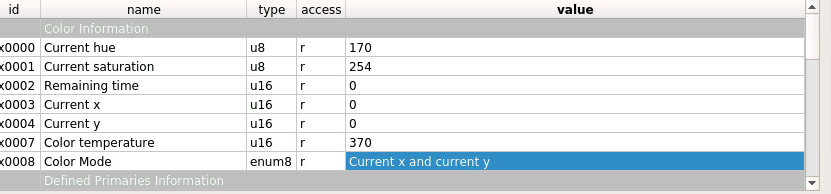
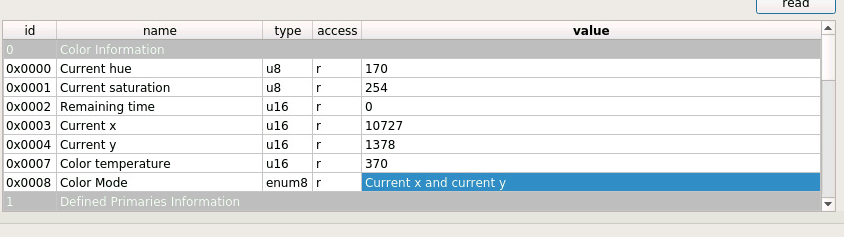
When I choose the color from the Phoscon web app, the X and Y values are incremented wildly past their max value
cree8
on 22 May 2020
X and Y values are incremented wildly past their max value
Meaning? What X and Y values does Phoscon send? What values are you sending from the GUI?
ebaauw
on 22 May 2020
@ebaauw
When using the GUI (thru vnc) I set X to 18, Y to 7 and get blue.
When using the GUI, I set Hue to 170, Sat to 254, X to 0 and Y to 0 and get blue
When I leave the VNC session/GUI and go to the Phoscon web app, the color slider is set to blue for that particular bulb. When I move the slider from that position and back again, I do not get the same color.
After moving the slider back to blue and viewing an incorrect color on the actual bulb, I then go back to VNC/GUI to check the bulbs reported values. The value for X and Y are very high (2nd snapshot above) From what I gather X and Y values should be between 0 and 100, but let me know if that is an incorrect assumptionOnce I zero out X and Y values again (with the manual Move to Color command), and I leave the Hue and Sat values the same, the color returns as expected (1st snapshot above)
cree8
on 22 May 2020
I have tried this with the 8 LEDVANCE bulbs I have and can confirm the exact same action as cree8 is seeing.
I have them in a group in Phoscon and can set them to blue with the 170, 254 and 0 and 0 for x and y.
As soon as I move the colour slider in Phoscon, the Hue and Sat stay the same but the x and y varies.
Using HA and selecting red, green and blue, these values show in deconz gui:
Red - x: 45940, y:19077
Green - x:11272, y:47324
Blue - x:8912, y:2621
Interestingly, I also have some older OSRAM ones and they do show blue correctly. These are the x and y for those:
Red - x: 45940, y:19594
Green - x:11272, y:48954
Blue - x:8912, y:2621
Only the blue is the same between the 2 !
holdestmade
on 22 May 2020
When using the GUI, I set Hue to 170, Sat to 254, X to 0 and Y to 0 and get blue
I have them in a group in Phoscon and can set them to blue with the 170, 254 and 0 and 0 for x and y.
You cannot set both Hue/Sat and XY in one command.
The _Color control_ cluster has three complementary sets of attributes: _Hue_ (or _Enhanced Hue_) and _Saturation_ (hue and sat in the API); _Current X_ and _Current Y_ (xy in the API), and _Color temperature_ (ct in the API). Only one of these sets can be changed at a time, and _Color Mode_ (or _Enhanced Color Mode_) reflects which was most recently used.
From what I gather X and Y values should be between 0 and 100, but let me know if that is an incorrect assumption
No, between 0 and 0xFEFF (65279), see my previous remark. These translate to a value between 0.0000 to 0.9961 in the API.
As soon as I move the colour slider in Phoscon, the Hue and Sat stay the same but the x and y varies.
I suppose it's up to the light, how to deal with the other colour sets when one set has been used. Hue lights update the attributes to the equivalent values (so setting xy will result in hue/sat and ct being updated); other lights don't and keep reporting the old, now invalid values. I don't know your OSRAM/LEDVANCE lights, so I wouldn't know how they react.
Only the blue is the same between the 2 !
Some lights report the actual colour, where others just echo the last colour set. There is no light that can physically display the colour corresponding to xy values of (0, 0), so if they report those values, you know that they just echo the last value set. Make sure to read the attributes after sending the _Move to color_ command to see the updated values.
For example, if I set my gamut-B Hue light to (0, 0), it actually displays and reports (10944, 2621) which translates to (0.167, 0.04), the blue-est colour the light can display. If I set my gamut-A Hue light to (0, 0), it displays and reports (9044, 5243) or (0.138, 0.08), which is far blue-er. For green (0, 65729) the differences are even greater: (26803, 33947) or (0.409, 0.518) vs (14097, 46569) or (0.2151, 0.7106).
ebaauw
on 22 May 2020
Note that the values correspond to the supported colours as reported by the respective lights:
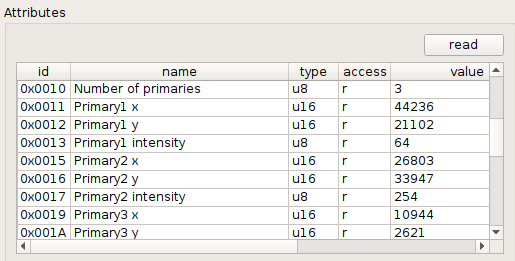
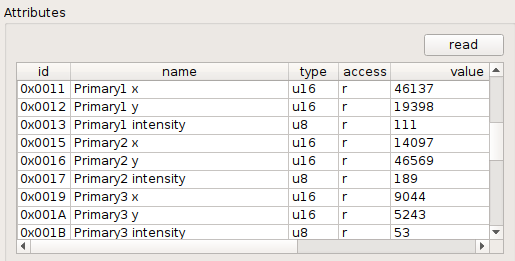
Could you post screenshots of the _Color control_ cluster of the OSRAM vs the LEDVANCE lights, in particular of the attributes for the primaries.
ebaauw
on 22 May 2020
See the following picture (from the Hue developers portal) of the CIE 1931 colour space, and the gamuts for the different types of Hue lights:
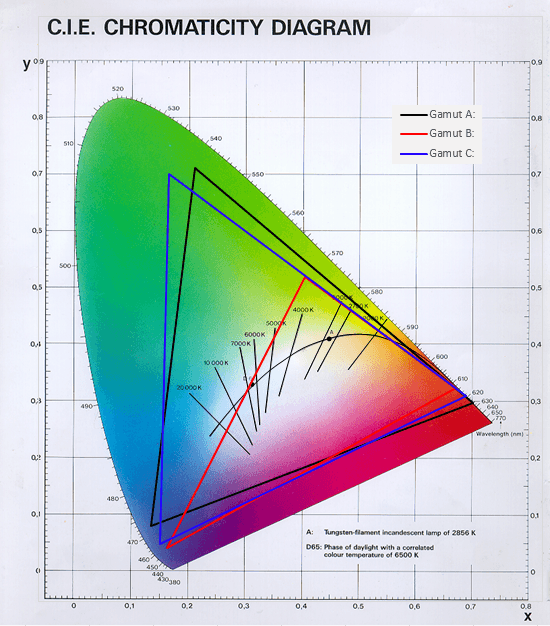
Based on the primaries reported by the OSRAM and LEDVANCE lights, you could plot their gamuts. Now the tricky part: Of you set the colour to (0, 0), the light should display the closest colour it supports. Depending on the position of the triangle for its gamut, that might not be the blue point (or more common, the red point). This could cause blue to look purple-ish and red pink-ish. I see this e.g. for my GLEDOPTO with:
    gamut: {
      r: [0.7006, 0.2993],
      g: [0.1387, 0.8148],
      b: [0.1510, 0.0227]
    },
I have the following gamut listed for OSRAM in Homebridge Hue:
    gamut: {
      r: [0.6877, 0.3161],
      g: [0.1807, 0.7282],
      b: [0.1246, 0.0580]
    },
I don't remember where I got it from.
ebaauw
on 22 May 2020
@ebaauw Great info. I was just going to ask @holdestmade for that information as I dont have access to an older bulb.
I see what you mean with the color space. When I move to 0,0 for X,Y, I get the truest blue you can get for the bulb. Learned something new there. Still strange that it is impossible to get this color aside from manual commands.
You mentioned that you are unable to set both X,Y values and HS values at the same time. I find that when using the slider, both HS and XY values are changed rather than one or the other.
Another thing I will try is to use the Node-Red Deconz node as it is obvious that the appropriate colors are possible, but there is some miscommunication happening either between reading the bulbs current color state or transmitting the new values. If I can identify a way to manually send the correct commands in a manner available to my automations, all will be good.
Research continues..
I'll report back after digesting the info above and doing more testing.
Again thank you for the immense knowledge you are providing @ebaauw
cree8
on 22 May 2020
Again thank you for the immense knowledge you are providing @ebaauw
Thanks. 5+ years of bitter experience creating Homebridge Hue.
You mentioned that you are unable to set both X,Y values and HS values at the same time. I find that when using the slider, both HS and XY values are changed rather than one or the other.
Do you mean the values in the GUI? Or in Phoson? I don't use that app, so I wouldn't know how it works. I case in Phoson, it might actually update the values locally. In case of the GUI, then likely, the light probably updates _Hue_ (or _Enhanced Hue_) and _Sat_ after _Move to color_.
When I move to 0,0 for X,Y, I get the truest blue you can get for the bulb.
Usually. It depends on who maps (0, 0) to a supported colour. Homebridge Hue does this by determining the closest point in/on the triangle of the lights's gamut (as per the specs on the Hue development portal). This might not be the blue-est colour the light supports, depending on how oddly the triangle is positioned (of course Philips/Signify only take into account Hue lights). If it's left to the light, your guess is as good as mine. I would think Phoscon would do the same as Homebridge Hue, so the cached value in the REST API will match the value displayed (otherwise, the colour would "jump" when the light is next polled by the REST API).
For fun, you could try changing the colour through a group - then the gamut isn't used (there isn't one for a heterogeneous group, and the API doesn't keep track whether a group might be homogeneous). Some of my Homebridge Hue users had lights for which ignoring the gamut yielded better colours than applying it. Having an app jumping colours might be the lesser evil when compared to the light not showing the expected colour.
ebaauw
on 22 May 2020
@ebaauw Unfortunately the color group method did not work.
I did end up being able to set the colors correctly through the node-red method. I use an injection node to send the appropriate XY values. As Node-red is where I do all my automations, this works out perfectly for me. Many thanks for your help.
Sucks for those that buy the bulbs and think they are deficient though (although the purple is pretty weak!). It seems when I would send the hue command, theres a weird conversion that goes on and the value would come back a different color.
But all is good now, for my use case at least. Hope this helps you as well @holdestmade
EDIT:
Have to reiterate how useful the chromaticity diagram is. All the colors I need are available there.
For future reference:
X values are roughly between 0 - 0.75
Y values are roughly between 0 - 0.84
cree8
on 22 May 2020
Thanks, I don't use node red, but maybe I'll take a look at it.
holdestmade
on 22 May 2020
It seems when I would send the hue command, theres a weird conversion that goes on and the value would come back a different color.
As I said above:
hueandsatare utterly useless, as the same values are different colours to different types of lights.
Have to reiterate how useful the chromaticity diagram is.
Indeed. My (limited, in this case) understanding is that with a _Saturation_ of 254, _Hue_ determines a spot on the outer sides of the gamut triangle. Using a smaller _Saturation_ value "goes inside" the triangle. Nothing todo with the HSV values in the RGB colour space.
ebaauw
on 22 May 2020
Interesting. I did try lowering the SAT values as well during my testing to no avail.
I also was able to get the bulb to color loop, but only through deconz GUI. No amount of fiddling with the RESTAPI would trigger the same.
I believe there are some functions available to the deconz app that are not published in the API
cree8
on 22 May 2020
PUT /lights/#/state with a body of {"effect": "colorloop", "colorloopspeed": 25}. The speed is optional, and defaults to 25. The other parameters (from memory: up/down, starting colour) aren't exposed. Put {"effect": "none"} to stop the loop.
The REST API plugin, and thereby any API client, incl. Phoscon, only supports a subset of the Zigbee commands and attributes. The GUI supports in principle all of them (as long as they're defined in general.xml), except for some exotic data types and some nasty bugs.
ebaauw
on 23 May 2020
Yep, thats exactly what I have set up in the http injection node.
Only way I am able to get the color loop going in the GUI is to tell it the starting color and time, otherwise it spits back INVALID_COMMAND. As those arent exposed, that idea may be dead in the water. I think ill just manually implement a loop through some javascript function.
It would be nice if the deconz GUI had a debug mode that listed the commands as they leave and go in readable form. Most of it is hex garble (to my untrained eye).
cree8
on 23 May 2020
I have the previous version (Still show as Osram CLA60 RGBW).
Firmware Shows as v1.05.10.
When I control them via Home Assistant if I click on a colour in the colour wheel it jumps to another colour and doesn't always set correctly the first time. Selecting blue the wheel jumps to red but the colour doesn't change until I select it a second time.
Must be something weird with the Osram bulbs.<
I can confirm this, when using phoscon to change the colour (tried orange), the bulbs don't chage and phoscon jumps back to red. When I try it via the api I get the completely wrong colour, same with x,y. When I fiddle around more they suddenly change to warm white. It looks like the bulbs refuse certain colours...very strange
 scholzmichael
on 2 Jul 2020
scholzmichael
on 2 Jul 2020
This issue has been automatically marked as stale because it has not had recent activity. It will be closed if no further activity occurs. Thank you for your contributions.
stale[bot]
on 25 Jul 2020
Related issues
 tenholde
·
3Comments
tenholde
·
3Comments
 1onar
·
5Comments
1onar
·
5Comments
 qm3ster
·
3Comments
qm3ster
·
3Comments
 salopette
·
4Comments
salopette
·
4Comments
 Thomas-Vos
·
4Comments
Thomas-Vos
·
4Comments