Deconz-rest-plugin: All devices in phoscon are not reachable
All devices are not reachable. In Phoscon all devices are greyed out. Can not control any of them.
Deconz is located on a RP 3+ with a Raspbee Head.
 Sturmhorst
All 84 comments
I had the same issue a week ago - no devices respond to Phoscon/REST API calls. Also, switches in a group don't toggle the respective lights anymore.
What fixed it for me (probably more of a workaround) was starting a device search in Phoscon and then factory-resetting/reconecting the light. They will be found and mapped to the groups but all group/scene config has to be redone. Same for switches.
 rikroe
on 26 Jan 2019
rikroe
on 26 Jan 2019
No reset shouldn't be needed.
Have you tried logging out and in again?
Also restarted the Raspberry Pi?
 manup
on 26 Jan 2019
manup
on 26 Jan 2019
i restarted the Pi, restarted Deconz and tried the login method
Sturmhorst
on 26 Jan 2019
Hmm strange can you please create a backup in the Phoscon App and send it to [email protected]
I saw in the other issue you've updated from firmware version 0x26240500, I can check that all parameters are still valid.
manup
on 26 Jan 2019
The Mail is on the way.
Sturmhorst
on 26 Jan 2019
I have somehow the same problem....Running the Deconz app in Ubuntu 16.04LTS, REST API installed too...
After restart of my VM all lights and sensors missing in the Deconz app... Phoscon shows them but says not reachable.... Firmware is the latest.....
 eddy2501
on 27 Jan 2019
eddy2501
on 27 Jan 2019
I had somewhat the same problem, but couldn't determine what caused this. Updated the Conbee firmware and the app (docker container) at the same time and afterwards all my devices were greyed out. But it still seemed to work right after the updates
Couldn't manage to reenable them. At the end i had to delete the old entries and paired them again (at the moment i have only one light bulb, one dimmer and one power socket, so it was no big deal).
 fbrinker
on 27 Jan 2019
fbrinker
on 27 Jan 2019
manup helped me alot with this issue. Thanks
Sturmhorst
on 27 Jan 2019
The underlying bug is in the firmware, we're hunting this for quite a while now and have pin pointed it last week. The next firmware version will contain a fix for that.
Problem:
- The parameters: panid, network key and sometimes channel get invalid values in RAM. Likely due memory corruption, or bad initialization after soft reset.
- More dramatic these invalid values will be written to NVRAM and are applied also on further restarts.
The database file which is also part of the backup luckily logs all changes to the configuration. That's the reason the original working parameters are not lost and can be restored to get the network in operational state again without the need to reset all devices. Currently this can be done only manually.
So beside the firmware bugfix we'll add a page to Phoscon App to easily inspect and revert the configuration to a working state.
manup
on 27 Jan 2019
OK..
When will the new firmware be available?
eddy2501
on 27 Jan 2019
When will the new firmware be available?
Within the next two weeks.
manup
on 27 Jan 2019
I have a firmware version from the 30th of January. Should this include the fix already? I still observe the same issue. @manup how is it possible to manually restore the origional working parameters?
 moritzschaefer
on 13 Feb 2019
moritzschaefer
on 13 Feb 2019
I have a firmware version from the 30th of January. Should this include the fix already? I still observe the same issue. @manup how is it possible to manually restore the origional working parameters?
I have the same issue. How can I fix this manually? Would another sample backup help to fix this problem?
 SebSemmi
on 13 Feb 2019
SebSemmi
on 13 Feb 2019
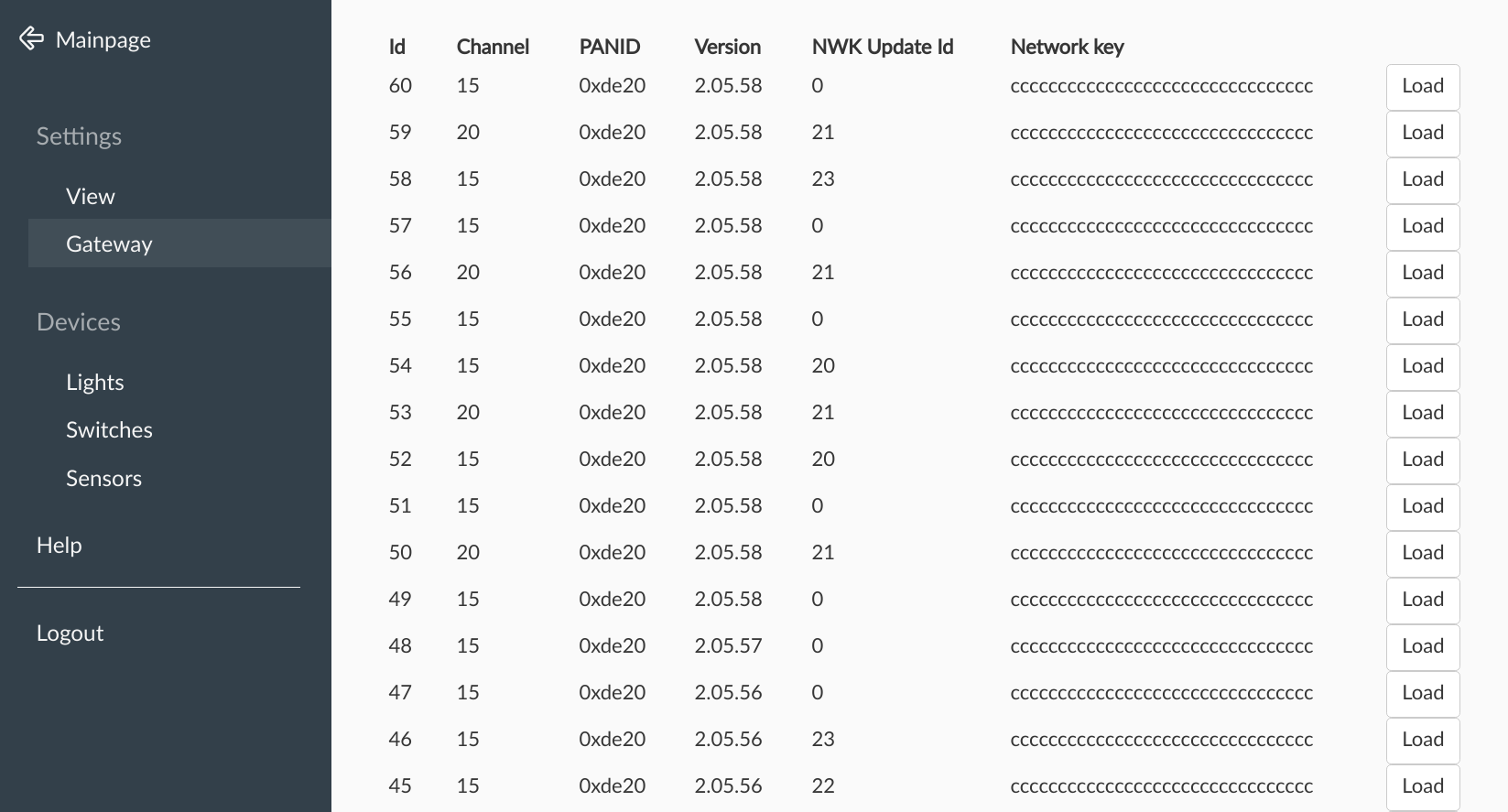
Hi, sorry for the delay, tomorrow version 2.05.59 will be released which contains a simple page to diagnose and revert to previous working Zigbee configuration just a button press.
The page will just list all known previous configurations and by pressing the Load button it will be applied.
The backups which I requested in the last weeks showed that either PANID, Channel or Network key were scrambled, so if that is the case, just select the previous known working version.
This is a screenshot of the page, note the many different configurations here are just from my tests, it will look very uniform in your setups, so that invalid configurations can be easily spottet.
The actual firmware fix to prevent the issue for good is planned for 2.05.60.
manup
on 13 Feb 2019
Ok, till then I just won't reboot my Pi :)
moritzschaefer
on 14 Feb 2019
Dumb question... How can I update my stick with ubuntu? My phoscon app says 2.05.20 is the newest
eddy2501
on 9 Mar 2019
@manup Are there any updates on this? I would like to restart my Pi for several weeks now but don't want to fight with this bug after a restart..
moritzschaefer
on 15 Mar 2019
You can install the 2.05.60 version now with the new firmware.
The bug shouldn't occur anymore. Also the above mentioned new page allows fixing the config easily even if the bug wold occur :)
manup
on 15 Mar 2019
@manup Just happened to me with these FW versions:
Product ConBee II
Version 2.05.64 / 22/04/2019
Firmware 26490700
I will try to use the hidden page recovery thingy now …
… well, that did unfortunately not work. I only had one entry in the Zigbee configuration history page. I tried loading that one again, anyway. In my setup as a Hass.io addon I always have to restart the addon after such changes or the Phoscon app will be unreachable.
So, after the addon restart everything was exactly the same as before. All devices unreachable.
I also tried backing the GW up, wiping the addon and loading the backup again. Not working, either.
I guess I will have to start over, which kind of sucks, because I just did exactly that, because I could not pair more Ikea remotes. The second time everything worked pretty good.
Not sure if it matters, but one thing I did is: besides mostly Ikea stuff, I also have a Hue bulb, that I could not pair, even after resetting it. So, I went in the old webapp and tried the Touchlink reset thing, which could not find the bulb. I might have done a few other things, but before that everything worked fine and after that the problem occurred.
 butschi
on 27 Apr 2019
butschi
on 27 Apr 2019
The above bug was only related to ConBee and RaspBee not ConBee II.
Starting from scratch usually shouldn't be needed. Does the log shown anything useful?
Is the firmware shown as connected (aka the firmware version) in Phoscon App > Menu > Settings > Gateway?
manup
on 27 Apr 2019
The FW version was shown just fine, the logs did not show anything that helped me, anyway.
What I did was what @rikroe suggested and repaired all lights and switches without removing them. The group configurations worked like before but I had to redo all the scenes, just like he experienced, as well.
If it is helpful I can hook you up with a before/after backup of the gateway.
butschi
on 30 Apr 2019
Same problem here, had to remove and pair everything again. Where do I find that new page to restore previous settings?
Product ConBee
Version 2.05.64 / 4/22/2019
Firmware 260B0500
 bhansson
on 12 May 2019
bhansson
on 12 May 2019
Where do I find that new page to restore previous settings?
Currently only described in the respective release note:
https://github.com/dresden-elektronik/deconz-rest-plugin/releases/tag/V2_05_59
Product ConBee
Version 2.05.64 / 4/22/2019
Firmware 260B0500
I'd recommend to upgrading your ConBee firmware to 0x26330500 to prevent the problem happen again. If the update isn't shown in Phoscon App > Menu > Settings > Gateway you can update it manually:
https://github.com/dresden-elektronik/deconz-rest-plugin/wiki/Update-deCONZ-manually
manup
on 12 May 2019
This happened to me as well with a ConBee II after rebooting the Pi running Hassio. Haven't been able to figure out how to get them back and I've already had to re-add everything once from the same thing happening. Resetting 15 bulbs every time I reboot isn't really an option...
Running the latest 0x26490700 firmware already on the ConBee II and these are all standard Hue lights if that makes any difference.
 lordkev
on 22 Jun 2019
lordkev
on 22 Jun 2019
I have the same problem with ConBee II.
Firmware: 0x26490700
All lights are grayed out. The only error I see in the logs is about Invalid admin password hash.
Any news on this ?
 jordyverbeek
on 12 Jul 2019
jordyverbeek
on 12 Jul 2019
Have you tried a previous backup, if you can ?
 Smanar
on 12 Jul 2019
Smanar
on 12 Jul 2019
I have the same problem with ConBee II.
Firmware: 0x26490700
All lights are grayed out. The only error I see in the logs is about Invalid admin password hash.Any news on this ?
This started happening after I rebooted my server. My OS messed up the ACM assignments, so deconz and zigbee2mqtt were both listening on /dev/ttyACM1. Problem had nothing to do with deconz.
jordyverbeek
on 15 Jul 2019
Where is this hidden page? I'm having the issue where all devices are listed in PWA but unreachable. Happened spontaneously yesterday. I have managed to add another (new) device which connects fine so it has to be some id changing.
Product: RaspBee
Gateway: 2.05.66
Firmware: 26330500
Edit: Found the instructions in the release notes for 2.05.59
https://github.com/dresden-elektronik/deconz-rest-plugin/releases/tag/V2_05_59
 sberryman
on 26 Jul 2019
sberryman
on 26 Jul 2019
I have the same problem now with Deconz now ... Conbee II, firmware 264A0700, hassio, raspberry Pi 3 b+
Just installed hassio today and started from scratch, after abot 2 hous alle lights where greyed out ...
The alt+click didn't work
 edtwodth
on 1 Sep 2019
edtwodth
on 1 Sep 2019
I get
/usr/bin/GCFFlasher_internal.bin: /lib/arm-linux-gnueabihf/libc.so.6: version `GLIBC_2.28' not found (required by /usr/lib/libwiringPi.so)
when I try to update the firmware as described here https://hub.docker.com/r/marthoc/deconz/
moritzschaefer
on 1 Sep 2019
Same problem here, conbee II, firmware 264A0700, hassio, raspberry Pi 3 b+, all devices greyed out.
 privatesam
on 15 Sep 2019
privatesam
on 15 Sep 2019
same problem here, different times:
- conbee II, firmware 264A0700, phoscom, pc, all devices greyed out (reincluded all the devices with on-off procedure.)
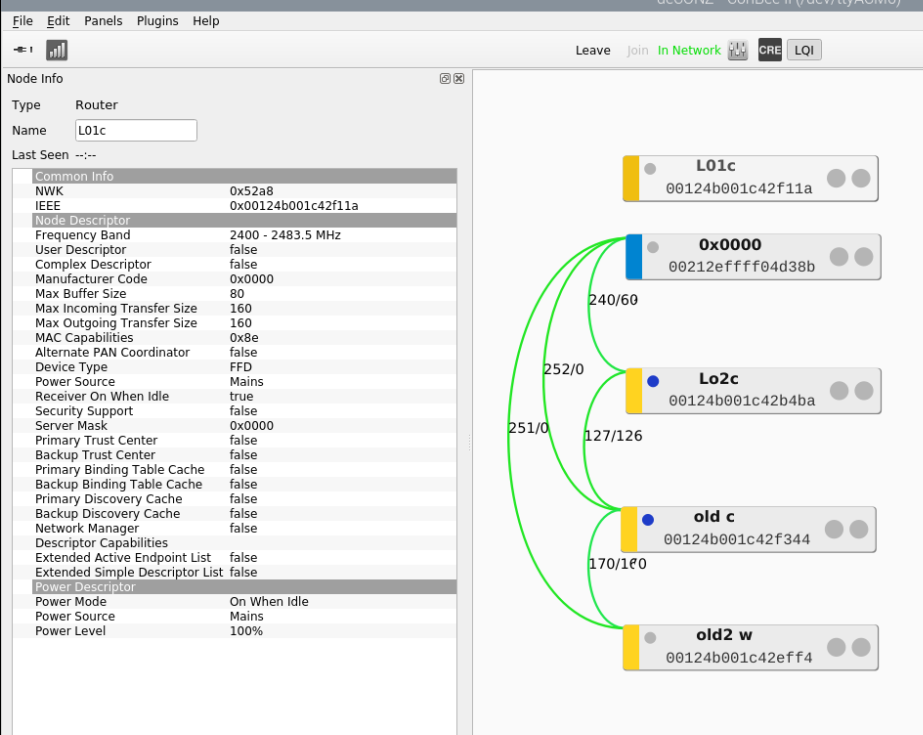
- conbee II, firmware 264A0700, phoscom, pc, included 30 devices, then moved to another area included 35 devices more. Then the 30 devices grayed out. (I have the pc and the conbee backup ar SW)
- conbee II, firmware 264A0700, phoscom, raspberry Pi3, included 1 device, I've reinstalled deconz.
the day after the lamp was gray. I've tried to move to different channel with no result.
 sergiocaridi
on 15 Sep 2019
sergiocaridi
on 15 Sep 2019
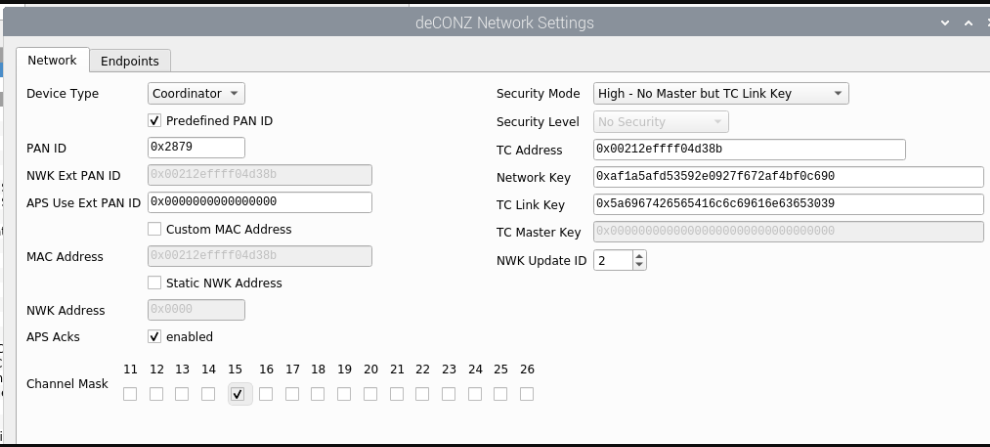
one more thing, is there a different network settings configuration to minimize this problem.
I realli need to find out a solution ASAP
sergiocaridi
on 15 Sep 2019
The settings look fine. Can you provide more details on your devices, are these yellow devices Xiaomi routers?
Currently we can't recommend channel changes with Xiaomi devices, they don't seem to follow the change reliably.
manup
on 15 Sep 2019
Thanks manup
the router are device from Homa Shenzen.
In my project I'll have toma and Sunricher (Philips)

sergiocaridi
on 15 Sep 2019
here is the situation.
I've restored the previus image (6) in the " hidden zigbee configuration" and it works.
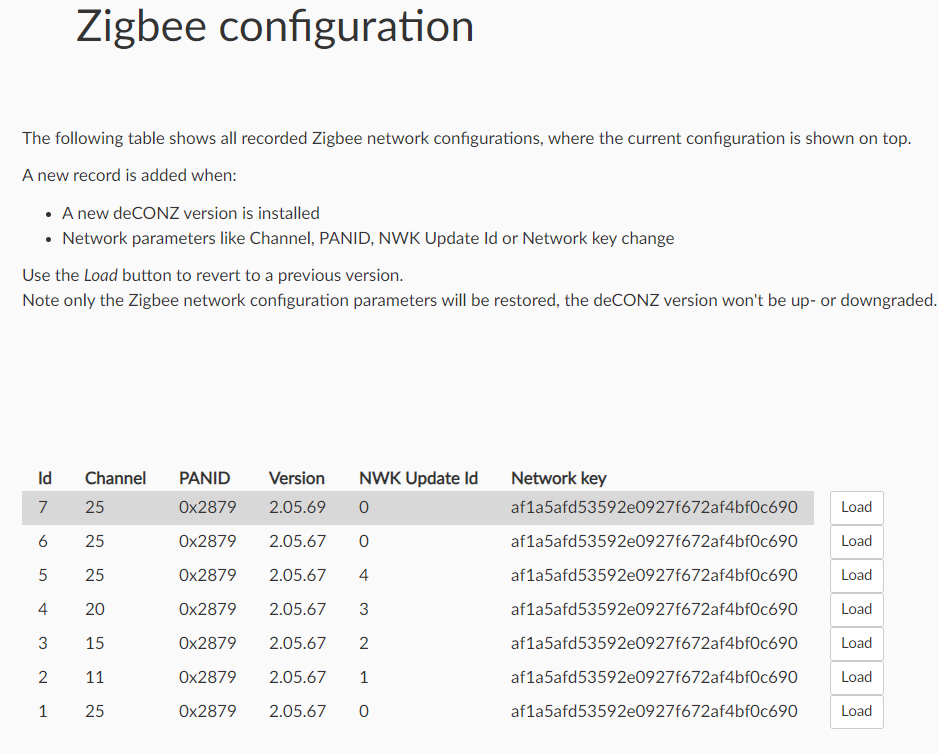
I turned off and on the rasberry and the problem was back again.
same process (again n.6) an it works.
sergiocaridi
on 16 Sep 2019
News... bad news.
I'm testing more and more.
This time it doesn't work anymore.

old2 c is missing in action!
sergiocaridi
on 17 Sep 2019
Hey guys
sorry to borther U.
It was the socket unplugged this time.
I'm so sorry!
sergiocaridi
on 17 Sep 2019
Today all my lights are grayed out (though they appear on the list.
Running ConBee II attached to Synology NAS and deconz running in Docker
 AlexKalopsia
on 22 Sep 2019
AlexKalopsia
on 22 Sep 2019
Same problem here. I've sent an email to their support but haven't heard back. It's quite incredible how they can't be bothered fixing such serious issues. It seems that they don't quite understand how annoying it is to re-pair numerous ZigBee devices. I even had to buy a Hue Dimmer just for being able to reset/re-add my Hue lights.
On my side this issue seems easy reproducible if you pull the plug after adding a device. What I do now is restarting the service and creating a backup whenever I add a new device.
(Generally something doesn't seem to be quite right after adding devices. It for example isn't possible to create backups until you restart the service)
 EndlessDelirium
on 17 Oct 2019
EndlessDelirium
on 17 Oct 2019
I also have the same problem, after rebooting the server with the conbee II stick in it all my devices are grayed out, nothing seems to help except resetting the gateway, resetting all lights, sensors and remotes and adding everything again. This is now the second time so I really would like a different solution.
The new network page only shows 1 entry for me, so restoring to previous working settings is not a solution here.
 JensTimmerman
on 19 Oct 2019
JensTimmerman
on 19 Oct 2019
Same problem here. Restarted my server and now i can't control anything since everything is grayed out. I have also only 1 entry in the network restore page just like @JensTimmerman.
I wrote to the support and hopefully there will be a fix soon. It's not worth using it like that.
 D3Troy
on 20 Oct 2019
D3Troy
on 20 Oct 2019
Same issue: all devices unreachable/greyed out after Hass.io restart. Second time this has occurred in october. I restored a working backup configuration, but that did not have any affect. Had to reset and rejoin all devices.
 brisketfingers
on 29 Oct 2019
brisketfingers
on 29 Oct 2019
Same here I am afraid...
 BrianKlDK
on 3 Nov 2019
BrianKlDK
on 3 Nov 2019
@everyone: This is a really annoying bug in the software or firmware. It happens to me every month or two.
- Navigate to the Phoscon App (web page)
- Go to settings and gateway
- Hold down the alt key while left clicking on the advanced icon
- Look for Network key and PANID that appears the most frequent. It should be very easy to spot in the list and click the
Loadbutton for the most recent Id. It is most likely the 2nd row. - Wait a few minutes and you'll start to see lights, switches and sensors reconnect.
FYI, I'm on version 2.05.66 and have seen the issue since at least 2.05.64.
sberryman
on 3 Nov 2019
Product: Conbee II
Using Docker container on RPi 3b+
Current firmware: 264A0700
Same problem here, electricity turned off, my lights and some sensors got greyed out. My xiaomi sensors are not greyed out, but I suspect they are not read properly anymore.
I managed to readadd some lights by deleting them and resetting them.
I updated the app, loading the network values from the hidden page entered a nice "segfault" entry to the log. Is there any update on the issue?
 ketzu
on 1 Dec 2019
ketzu
on 1 Dec 2019
I have the same issue, all the lights and sensors are gone after my power went out.
Tried to reload the configuration using the hidden page, but no success.
Is there any other way to reconnect my lights?
This is the 5th time this happened to me... Really frustrating...
 sverleysen
on 3 Dec 2019
sverleysen
on 3 Dec 2019
same here
 cwildt
on 4 Dec 2019
cwildt
on 4 Dec 2019
Same here. Conbee 2, Hassio, RPi3B+, all sensors lost connection and unreachable.
 michalzadkowski
on 17 Dec 2019
michalzadkowski
on 17 Dec 2019
I have the same:
Conbee 2, RPi4B+, home assistant and deconz in docker containers. Restart of deconz container cousing all sensors (all Xiaomi) not updating :(
only one configuration in hidden page
 pawelbura
on 12 Jan 2020
pawelbura
on 12 Jan 2020
Sorry to say it, but my advice is to just ditch deconz and use zha built
into Home Assistant. It's been way more stable.
On Sat, Jan 11, 2020 at 6:33 PM pawelbura notifications@github.com wrote:
I have the same:
Conbee 2, RPi4B+, home assistant and deconz in docker containers. Restart
of deconz container cousing all sensors (all Xiaomi) not updating :(
only one configuration in hidden page—
You are receiving this because you commented.
Reply to this email directly, view it on GitHub
https://github.com/dresden-elektronik/deconz-rest-plugin/issues/1185?email_source=notifications&email_token=AAEGDEHOZHQJTDGLAMSTCIDQ5JJNRA5CNFSM4GSQ6PS2YY3PNVWWK3TUL52HS4DFVREXG43VMVBW63LNMVXHJKTDN5WW2ZLOORPWSZGOEIWNPSI#issuecomment-573364169,
or unsubscribe
https://github.com/notifications/unsubscribe-auth/AAEGDEGHFGD7Y4GCBHEQII3Q5JJNRANCNFSM4GSQ6PSQ
.
lordkev
on 12 Jan 2020
I have the same issue with the following Settings:
Version: 2.05.71 / 12.12.2019
Firmware 264A0700
Deconz direct on a PC or within Docker or HA Add-On.
After the first reboot and power off all devices are unreachable.
New Instanz and restore backup not resolving this issue.
Just added around 15 Devices and its a big issue for me.
@manup Do you have any ideas to resolve this issue? I think here are more people with this problem.
Alt + click is not working for me... no hidden menu
 ezzq
on 13 Jan 2020
ezzq
on 13 Jan 2020
Same or likewise problem. I had it running just fine; lost connections to all devices after an update.
Version 2.05.72.
Firmware 264A0700
Tried on Raspberry Pi3b+, Pi4, Windows and a Macbook pro. Even tried the image on the site on a Raspberry Pi.
I've reset all lights to factory settings (several times), tried reflashing firmware and everything in the book, but it just wont find any lights.
 zenzay
on 16 Jan 2020
zenzay
on 16 Jan 2020
I also have the same issue: all lights became unavailable after rebooting my RPi 3 running Home Assistant. I've emailed support a few days ago but no reply.
@manup : communication is important - it'd be good to hear that you're at least aware of the issue and looking into it. There are a lot of related issues so it seems to affect quite a few people (#2015, #2023, #2035, #2273, #2333 etc).
 tdesplenter
on 17 Jan 2020
tdesplenter
on 17 Jan 2020
Also maybe this #2344 about channel changing - could be a pointer?
 osos
on 20 Jan 2020
osos
on 20 Jan 2020
Contacted support just this evening. Having the same problem. After a power outage of my Raspberry Pi everything is grey and no more "green lines" to the lights. In Deconz Sensors and switches where entirely gone. After Backup restore, still the same. Grey sensors in phoscon but in deconz some sensors start to come but still not reachable in phoscon and not possible to see status in iobroker.... This makes the Conbee2 useless, if I have to repair every device after a poweroutage of the raspy
 MegaMatze
on 21 Jan 2020
MegaMatze
on 21 Jan 2020
Same issue here. This insanely infuriating. I've spent two full evenings switching over from ZHA and HUSBZB-1 because I was having awful latency issues. I finally get all of my devices paired with Conbee II and after rebooting my Pi, they are all unavailable and don't work.
I'm starting to think that Zigbee with Home Assistant is a huge waste of time.
 ultimateguy
on 25 Jan 2020
ultimateguy
on 25 Jan 2020
Have had my setup crash two times while running Deconz through Docker on a Synology DS with Conbee II. Setup becoming inoperative upon any shutdown/ halt/ reboot/ power loss. Using the same hardware and setup on a Raspberry Pi (installation in Raspbian) WITHOUT docker I have no issues, even with power losses or shutdowns.
Probably makes sense if we try to standardize the reporting here to see if there is some sort of issue, e.g., while using docker
 mountainsandcode
on 25 Jan 2020
mountainsandcode
on 25 Jan 2020
Same shit here... unbelievable that this bug is there for a year now and still not fixed...
 thenightfighter
on 27 Jan 2020
thenightfighter
on 27 Jan 2020
I got my setup up and running. I'm not sure if this will help anyone but figured I would share just in case.
I have another USB stick on my Raspberry Pi in addition to the Conbee II. That other stick is a HUSBZB-1 that I use for my Z-Wave devices. The device path for my Z-Wave integration in Home Assistant was set to something like /dev/ttyAMA0. Problem is that Linux does not have a set order in which it loads USB devices on boot, so that device path will not always point to the same device if there are 2 or more USB devices connected.
I reconfigured BOTH the Z-Wave stick and the Conbee II using their "by-id" paths instead of the generic /dev/ttyAMA0 type of path. These can found by going to the Home Assistant UI -> Hass.io in the sidebar -> System tab -> Hardware.
The Conbee II path looks something like /dev/serial/by-id/usb-dresden_elektronik_ingenieurtechnik_GmbH_ConBee_II_DE2126718-if00 and the HUSBZB-1 path looks like
/dev/serial/by-id/usb-Silicon_Labs_HubZ_Smart_Home_Controller_513000FF-if00-port0. (There is another identical entry ending with if01-port0 for the Zigbee part of the HUSBZB-1, which I'm not using.)
This works so far. Hard rebooted and Deconz is still working. Fingers crossed that it stays this way.
ultimateguy
on 27 Jan 2020
I also use the by-ID path but I still have the issue.
sverleysen
on 28 Jan 2020
I ran into the same problem. Greyed out Zigbee items without functionality. Also the Raspberry is hanging on reboot/shutdown. After a while I have to pull the plug, to get the system up and running again.
Version 2.05.72 (12.12.2019)
Firmware 264A0700
 psanwald
on 29 Jan 2020
psanwald
on 29 Jan 2020
Same here. Devices unreachable, though I can reboot the gateway to get the sensors working again. Sensors will initialy be greyed out, but after the first report of each sensor they will displayed as online.
Conbee II on Raspberry 3B+
 GreyEarl
on 2 Feb 2020
GreyEarl
on 2 Feb 2020
I did face with the same issue after an electricity outage.
- All devices were listed but as 'not reachable' in the Phoscon page
- I have xiaomi sensors (Aqara window and weather) and OSRAM on/off sensor
- forced updates from sensors did not help
- restart of my Raspberry PI 4 and Conbee II did not help
- backup / restore from Phoscon did not help
I have ended up re-pairing all my devices. It was a real pain and I believe this makes this device almost useless. I did now a fresh backup after all this, next time I'll try to restore this one.
I might try to reproduce this case before adding new devices. If this won't be fixed I'll buy a (much cheaper) MQTT device and forget about Conbee.
Let me know if you need any further details. Thank you!
 xmaska
on 4 Feb 2020
xmaska
on 4 Feb 2020
For the moment I have learned the following "rules" in this situation:
- Never, ever reboot a working Phoscon system (use a ups and hope they might fix this bug soon)
- Don't panic when all actors are suddenly disabled. After a few new searches and re-pairing of one or two items they might all reconnect automatically.
- If the phoscon app tells you, there is no contact sensor x, but the deCONZ Adapter in ioBroker says, there is one, ioBroker is always right ;)
- ZigBee is a mesh and your controller is the center. Always remember, to begin pairing with the closest, "always on" devices.
Following these "rules", I got a nice running conBee-Phoscon-system connected to openHAB and ioBroker with Osram Sensors/Lights, Paulmann LEDs, Schwaiger Door Sensors. It is very fast and way more reliable than my CC2531-network, that I run parallel.
psanwald
on 4 Feb 2020
The problem seems to persist. Today I have sent a mail to the support. But it is more than frustrating that there is no solution from the manufacturer, because the issue has been around for a long time.
If there is no solution from support I will reset the device and send it back to the manufacturer, which is a pity, because until reboot the device is great - but only until reboot.
Are there any news about that issue?
 Homee-BC
on 7 Apr 2020
Homee-BC
on 7 Apr 2020
I had a couple of power outages and this issue seems not happening anymore. First time I did reset the device and added all my sensors and switches back and made a fresh backup. Not sure if this helps anyone but maybe worth a try doing the boring part from scratch once more. On long term I will get a UPS...
xmaska
on 7 Apr 2020
Update:
I have now once again dealt with the problem.
Reboot of the container no problem, reboot of the Raspberry no problem either - as long as the ConBee 2 stick is powered.
But if you unplug the stick or shut down the machine, the problem occurs.
The tactic to get a running environment via the backup fails completely. Lights are there briefly - but not controllable - and then after about 2 minutes they are gone again.
My firmware: 264A0700
Why is there no reaction from the manufacturer?
Homee-BC
on 8 Apr 2020
Hello,
I have the same issue. Just after setting up all lights and define the automations everothing works fine. But as soon as you restart the Raspberry starts the issues. The main issues is some lights dissapear and even you restarts the deCONZ component. The only way is set up it again.
Where is the problem? in deCONZ component or Phoscon software?
deCONZ: 5.3.2 (FW 264A0700)
HassOS 3.13
 eche86
on 22 Apr 2020
eche86
on 22 Apr 2020
Exact same issue here.
I'm running everything with docker-compose and had to restart it.
All sensors but one were unreachable. I've tried to load a backup file, then all devices were gone unreachable.
I'm seriously disappointed.
software: 2.05.75
firmware: 264A0700
 AnthonyMavic
on 24 Apr 2020
AnthonyMavic
on 24 Apr 2020
Same issue here.
Debian amd64
Docker
software: 2.05.75
firmware: 264A0700
Hope for "killing" this bug quickly
 fume68
on 31 May 2020
fume68
on 31 May 2020
Have the same issue, it's a new Raspbee II, current firmware. After a reboot it forgets all devices and I have to re-learn all of them.
The device is running on a Raspberry Pi B+ with Raspbian and all updates are installed.
 andreasscherbaum
on 4 Jun 2020
andreasscherbaum
on 4 Jun 2020
I'll make sure this gets looked into.
For everyone mentioning issues with HA and the .77 update: Please reffer to #2875
 Mimiix
on 5 Jun 2020
Mimiix
on 5 Jun 2020
@Mimiix Let me know if I can help debugging this.
Currently I have this setup on a dedicated Pi, and it's not yet "in production".
andreasscherbaum
on 5 Jun 2020
@andreasscherbaum On the 0.77 issue? There's a dedicated channel on Discord. Feel free to join that. @manup is there too!
Mimiix
on 5 Jun 2020
@Mimiix On getting the issue with losing devices revolved.
You got a link to the Discord channel, please?
andreasscherbaum
on 5 Jun 2020
Mimiix
on 5 Jun 2020
As this seems stale, i will close this issue.
However, if you still have this issue i would like to invite you to open a new issue
Mimiix
on 26 Jun 2020
50 comments of people having the same issue. No fix indicated. Then closed
as stale. Interesting...
Not that I particularly care anymore. I ditched deconz long ago for the
very reason that this was never even looked into.
On Fri, Jun 26, 2020 at 1:57 AM Dennis D notifications@github.com wrote:
Closed #1185
https://github.com/dresden-elektronik/deconz-rest-plugin/issues/1185.—
You are receiving this because you commented.
Reply to this email directly, view it on GitHub
https://github.com/dresden-elektronik/deconz-rest-plugin/issues/1185#event-3485345300,
or unsubscribe
https://github.com/notifications/unsubscribe-auth/AAEGDEHL4IV2IPFGVSJEZK3RYRBEPANCNFSM4GSQ6PSQ
.
lordkev
on 26 Jun 2020
@lordkev
50 comments of people having the same issue. No fix indicated.
As i've learned from other issues: hardly every issue is the exact same. That being said, we need information on each case. I recently closed a issue like this and 2 people opened a seperate case after it. After getting their information their cases were similar in the fact they didn't update anything, but other than that the issues weren't the same.
Then closed as stale. Interesting...
Fixing stuff works both ways in this kind of stuff. DE needs information to do so.
Not that I particularly care anymore. I ditched deconz long ago for the very reason that this was never even looked into.
I can't argue that. That's why i reached out and opened to help and make sure everyone get the help they need. Now i am trying to fix stuff.
I would like to ask you in this case: Please leave emotions out as it won't bring us anywere. If you still need any help, please open another issue and i'll make sure it gets sorted.
Mimiix
on 26 Jun 2020
Why open another issue, when you could just leave this one open?
The above issues aren't resolved and plenty of people (me included) are having the same problems.
 pjcarly
on 26 Jun 2020
pjcarly
on 26 Jun 2020
@pjcarly As i've mentioned in my previous comment:
_As i've learned from other issues: hardly every issue is the exact same. That being said, we need information on each case. I recently closed a issue like this and 2 people opened a seperate case after it. After getting their information their cases were similar in the fact they didn't update anything, but other than that the issues weren't the same._
I've had a discussion about what you mention here
Down the line: Not one issue is the same. If the issue is the same, it is easier to merge those people into one issue. This issue is from 26 jan 2019. Meaning it has been open for exactly 1 year and 5-6 months. Stuff changed. Not only on deCONZ end but also on your local hardwares end.
If people open their own issues with all related information , which is asked in the bug report templates, it's easier to find structural issues.
Mimiix
on 26 Jun 2020
@lordkev Please, update your phoscon system to the latest versions as described here:
Version 2.05.78
Firmware: 26580700 (for conbeeII)
You will see, that the behaviour of losing the devices changed in the meantime. It may be not completely solved, but the guys behind the software need information about current problems in this matter. If you still experience problems, you are free to open new issue. But this one is just plain deprecated. I think, Mimiix decided right to close this case.
psanwald
on 26 Jun 2020
After talking on Discord for a few minutes a possible solution to my issues were presented.
Apparently firmware updates do not work through a Home Assistant Add-on, and because of that i'm still running an ancient version of the Conbee firmware, which is probably the reason for the unreachable devices.
pjcarly
on 26 Jun 2020
Related issues
 horchi
·
5Comments
horchi
·
5Comments
 ReeChip
·
5Comments
ReeChip
·
5Comments
 tenholde
·
3Comments
tenholde
·
3Comments
 stevenwfoley
·
3Comments
stevenwfoley
·
3Comments
 flex-0
·
4Comments
flex-0
·
4Comments
Most helpful comment
Sorry to say it, but my advice is to just ditch deconz and use zha built
into Home Assistant. It's been way more stable.
On Sat, Jan 11, 2020 at 6:33 PM pawelbura notifications@github.com wrote: