Deconz-rest-plugin: Request support for Visonic MCT-340 E
Hi guys,
I recently bought a ConBee dongle and two Visonic temperature/motion sensors for my research purposes. I was able to pair the sensors with the dongle and they show up in the deCONZ software. But I am unable to get readings from the sensors (Temperature Measurement remains 0), nor can I find the device with REST API. Why is the reading always 0, is this a sensor problem or a pairing problem? Can anyone help me out please?
Here's some related information:


 ZheYang-sjtu
All 70 comments
some debug info from terminal:
23:41:41:383     * neighbor: 0x000D6F000B3E121C (0x4398), LQI: 252, relation: 0x01 rxOnWHenIdle: 0
23:41:44:625 MGTM_Lqi_req zdpSeq: 14 to 0x00212EFFFF029E2D start index 0
23:41:44:625 APS-DATA.request id: 25, addrmode: 0x02, addr: 0x0000, profile: 0x0000, cluster: 0x0031, ep: 0x00 queue: 0 len: 2
23:41:44:713 APS-DATA.confirm id: 25, status: 0x00 SUCCESS
23:41:44:713 APS-DATA.confirm request id: 25 -> confirmed, timeout 59840
23:41:44:745 APS-DATA.indication srcAddr: 0x00212effff029e2d, dstAddrMode: 2, profile: 0x0000, cluster: 0x8031, lqi: 55, rssi: 0
23:41:44:745 APS-DATA.indication request id: 25 -> finished
23:41:44:745 APS-DATA.request id: 25 erase from queue
23:41:44:745 ZDP status = 0x00 -> SUCCESS
23:41:44:745 ZDP Mgmt_Lqi_rsp zdpSeq: 14 from 0x00212EFFFF029E2D total: 2, startIndex: 0, listCount: 1
23:41:44:745     * neighbor: 0x000D6F000B3DEA7B (0x37FF), LQI: 247, relation: 0x01 rxOnWHenIdle: 0
23:41:45:105 MGTM_Lqi_req zdpSeq: 16 to 0x00212EFFFF029E2D start index 1
23:41:45:105 APS-DATA.request id: 28, addrmode: 0x02, addr: 0x0000, profile: 0x0000, cluster: 0x0031, ep: 0x00 queue: 0 len: 2
23:41:45:194 APS-DATA.confirm id: 28, status: 0x00 SUCCESS
23:41:45:194 APS-DATA.confirm request id: 28 -> confirmed, timeout 59840
23:41:45:226 APS-DATA.indication srcAddr: 0x00212effff029e2d, dstAddrMode: 2, profile: 0x0000, cluster: 0x8031, lqi: 55, rssi: 0
23:41:45:226 APS-DATA.indication request id: 28 -> finished
23:41:45:226 APS-DATA.request id: 28 erase from queue
23:41:45:226 ZDP status = 0x00 -> SUCCESS
23:41:45:226 ZDP Mgmt_Lqi_rsp zdpSeq: 16 from 0x00212EFFFF029E2D total: 2, startIndex: 1, listCount: 1
ZheYang-sjtu
on 26 Nov 2018
Has anyone encounterd the 0 reading issue? Is it a problem with pairing or with my sensor?
ZheYang-sjtu
on 26 Nov 2018
Maybe the reporting needs to be configured in order to get temperature readings. Supporting the sensor should be straightforward given it's IAS Zone and Temperature cluster.
 manup
on 26 Nov 2018
manup
on 26 Nov 2018
Thanks Manuel
ZheYang-sjtu
on 26 Nov 2018
IAS ZOne info

BTW I still read 0 after I set report interval and reportable change..
ZheYang-sjtu
on 26 Nov 2018
Did you create a binding from the _Temperature measurement_ cluster to the RaspBee/ConBee ZHA endpoint?
You might need to enroll the device first, by writing the mac address of your RaspBee/ConBee to the _IAS_CIE_Address_ attribute.
 ebaauw
on 27 Nov 2018
ebaauw
on 27 Nov 2018
You may try version 2.05.49 and rejoin the sensor in theory two sensors resources should be created.
manup
on 27 Nov 2018
@ebaauw Hi Erik, thanks for the help. In IAS Zone I wrote ConBee's MAC address to the corresponding location (though Zone Enroll Request command gives me UNSUP_CLUSTER_COMMAND response). Then I created a binding from Temperature measurement cluster 0x0402 to ConBee Home Automation Configuration tool. I still get 0 reading at _Measured Value_. Do you think there's anything I can do to debug this situation?
@manup Thanks for the responsiveness. I reckon that the precompiled packages are a bundle of deConZ and the REST plugin? Could you please also upload version 2.05.49 for Ubuntu? I am using ConBee. Incidentally, I also tried to install version 2.05.48 but then compile the source code of REST plugin of version 2.05.49, but there seems to be a bug. in de_web_plugin_private.h it uses deconz.h, but the latter seems not to be there. So I couldn't compile the code.
ZheYang-sjtu
on 28 Nov 2018
though Zone Enroll Request command gives me UNSUP_CLUSTER_COMMAND response
I’ve yet to find a device that supports this.
I still get 0 reading at _Measured Value_.
Does the sensor respond to the read attributes command with a value of 0, or does it simply not respond and deCONZ continues to show the default value? Do the other attributes get populated? You might need to wave in front of the sensor to make sure it’s awake, while reading the attributes. Then again, the sensor might not support reading the attributes, and rely on attribute reporting, like some Xiaomi sensor.
The deCONZ REST API sets up the binding before configuring the reporting. The devices I’ve seen don’t seem to care about the order, but maybe this sensor does. Typical reporting settings for a temperature setting are: minimum: 10, maximum: 300, change: 20.
it uses deconz.h, but the latter seems not to be there.
This is not part of the REST API plugin. It describes the C++ API the deCONZ core provides to plugins. It’s installed to /usr/include on installing the development package.
I think compiling the REST API plugin is supported on Raspbian only. Typically you want the core program (and dev package) to match the version of the plugin.
ebaauw
on 28 Nov 2018
@ebaauw Hi Erik, I think the sensor responds with 0 reading, for it says "reading done", and I can successfully read and write report intervals.
I wrote reporting settings with 10, 300, and 20 successfully to the device, after I manually established a binding. The sensor reading stays at 0. I don't know whether it's because I missed some important stuff, for both sensors are at 0, unlikely that both are malfunctioning.
Thanks.
ZheYang-sjtu
on 28 Nov 2018
The ubuntu version is now uploaded, to compile the plugin you also need to install the -dev.deb package.
manup
on 28 Nov 2018
@manup Hi Manu, thanks very much for the update! Now I can read data out of the sensor from the software and also the REST API works! It's great. You are so responsive. I am going to close this issue.
@ebaauw Thanks Erik too for your detailed information. You've been very helpful.
ZheYang-sjtu
on 29 Nov 2018
@ZheYang-sjtu did you need to manually adjust check-in or poll values? I've paired this sensor but it will not reflect open/close or temperature changes via REST (specifically Home Assistant).
 jjlawren
on 6 Feb 2019
jjlawren
on 6 Feb 2019
@manup @ebaauw I'm running the latest REST API and firmware and can see both MCT-340 E sensors in the REST API, but their values never update. If I force a read of the IAZ Zone I can see the Zone Status update based on the door sensor state.
After the initial pairing, is there another step necessary to get these sensors to work properly?
Example REST response:
{
-"config": {
"battery": null,
"on": true,
"pending": [ ],
"reachable": true
},
"ep": 1,
"etag": "12345678a41530e2dae5cbdbd4e54321",
"manufacturername": "Visonic",
"modelid": "MCT-340 E",
"name": "MCT-340 E",
-"state": {
"lastupdated": "none",
"lowbattery": false,
"open": false,
"tampered": false
},
"type": "ZHAOpenClose",
"uniqueid": "de:ad:be:ef:0b:12:1b:69-01-0500"
}
Sorry if I'm missing something obvious, this is the first device I'm adding to my RaspBee and I'm not sure if it's me or an unsupported sensor.
jjlawren
on 7 Feb 2019
After the initial pairing, is there another step necessary to get these sensors to work properly?
Was the sensor paired recently or with an earlier version? With current version of deCONZ the IAS devices should be configured properly to send reports.
manup
on 7 Feb 2019
@manup I've reset the controller and started from scratch with the same results. What info can I provide?
jjlawren
on 7 Feb 2019
Can you please delete and rejoin the sensor again but with logging enabled:
deCONZ --dbg-info=1 --dbg-aps=2 --dbg-zcl=1 --http-port=80
Here we should see if the IAS cluster bindings and setup steps are executed.
manup
on 7 Feb 2019
@ZheYang-sjtu did you need to manually adjust check-in or poll values? I've paired this sensor but it will not reflect open/close or temperature changes via REST (specifically Home Assistant).
Hi I did manually configure in deCONZ user interface as suggested by Manu
 youryz
on 7 Feb 2019
youryz
on 7 Feb 2019
Hi @manup, here's the logging output: https://www.hastebin.com/osogipoyas.makefile
The device is shown in Deconz, but it doesn't appear the device knows it's paired. It keeps flashing in the pattern that reflects it's still available to pair. I've done a controller reset and device factory reset several times with the same behavior.
I can however see the various cluster attributes and the zone status updates based on the magnet presence:

So far the temperature cluster has always reported 0 in all my tests.
jjlawren
on 8 Feb 2019
Thanks that helps a lot. There are some steps missing in setting up this device:
- [5] write IAS CIE address
- [6] sens IAS zone enroll response
I'll check the code why these aren't processed.
manup
on 8 Feb 2019
Interesting, when you look at basic cluster you should see that after join neither attributes SW Build ID 0x4000 nor Datecode 0x0006 are supported.
The current code expects that at least one of them is supported. Will be fixed in 2.05.59.
manup
on 8 Feb 2019
Is there a public release schedule? Can we reopen this case until the support is stable?
jjlawren
on 9 Feb 2019
Sure, deCONZ versions are released every 1–2 weeks on average. Next version 2.05.59 should arrive this weekend.
manup
on 9 Feb 2019
2.05.59 is available now, please check if the Visonic MCT-340 E can be joined now.
https://github.com/dresden-elektronik/deconz-rest-plugin/releases/tag/V2_05_59
manup
on 15 Feb 2019
It joins and I'm able to get data for both the door sensor and temperature over REST. It still does not show up under the connected sensors in the Phoscon app. Is this expected?
jjlawren
on 15 Feb 2019
@manup the door sensor has been very reliable over REST, but the temperature hasn't updated since the very first reading. Can I provide anything to troubleshoot?
jjlawren
on 16 Feb 2019
If I manually update the "Temperature measurement" cluster in deCONZ, the new temperature is immediately sent out over REST.
jjlawren
on 17 Feb 2019
Sounds like attribute reporting for the _Temperature measurement_ cluster hasn’t been setup. You can do so manually: in the _Bind Dropbox_ panel, create a binding from this cluster to the RaspBee’s first endpoint. Then in the _Cluster Info_ panel, double click on the _Current Temperature_ attribute and in the popup window write the report configuration. Typical values are: min 1, max 300, change: 20.
ebaauw
on 17 Feb 2019
@ebaauw thanks, that seems to make it update semi-regularly. Unfortunately it looks like it only reports in full-degree Celsius increments which is quite imprecise.
jjlawren
on 17 Feb 2019
With abovementioned setting it should send at most one report per second when temparature changes by at least 0.2°C, and once every 5 minutes. Maybe the device temperature resolution is 1°C?
ebaauw
on 17 Feb 2019
Yep, looks like a device limitation.
jjlawren
on 18 Feb 2019
I followed @ebaauw's suggestion here and I thought that fixed my updating issue. However, I've noticed that the device never sleeps (always flashing green in Deconz GUI) and the battery died in less than 3 weeks of use. Could this be an integration issue?
jjlawren
on 9 Mar 2019
In an attempt to fix the lack of sleep and battery drain, I factory reset the sensor and re-joined to my RaspBee. I did _not_ set up a binding for the temperature sensor this time nor did I change the attribute reporting for the temperature cluster.
Now the behavior is that the device seems to miss door open/close events after several hours of no activity (ie, overnight) and I must open the battery cover to wake it. After opening the battery cover it's responsive and reliable for the next few hours. Can I provide anything else to see if this is a firmware issue @manup?
jjlawren
on 16 Mar 2019
@jurriaan I can't even figure out how to reset and get them to join.
I tried various combinations of tamper switch and removing the battery, but nothing really seems to work.
I think these might be related to something, but it's hard to say:
17:07:22:673 FP indication 0x0000 / 0x0013 (0x000D6F000B11D85B / 0x5566)
17:07:22:674                       ...     (0x000D6F000B11D85B / 0x5566)
17:07:22:675 device announce 0x000D6F000B11D85B (0x5566) mac capabilities 0x80
17:07:22:676 FP indication 0x0000 / 0x0013 (0x000D6F000B11D85B / 0x5566)
17:07:22:677                       ...     (0x000D6F000B11D85B / 0x5566)
17:07:22:677 device announce 0x000D6F000B11D85B (0x5566) mac capabilities 0x80
17:07:22:993 CTRL skip polling while permit join is set
How do you physically reset them and get them to join?
 rb2k
on 17 Mar 2019
rb2k
on 17 Mar 2019
Can I provide anything else to see if this is a firmware issue @manup?
Do you have the deCONZ gui running? It would be interesting to see to which parent the sensor is connected.
manup
on 17 Mar 2019
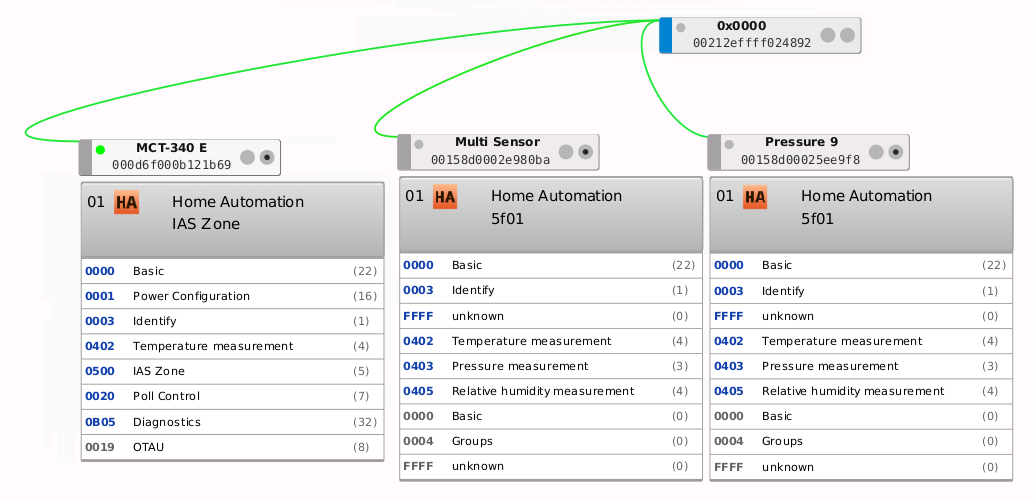
@manup I just have three sensors attached to my Raspbee: this one and two Xiaomi temp/humid/pressure sensors. All are attached directly to the Raspbee:
jjlawren
on 17 Mar 2019
@rb2k to factory reset these devices, hold down the battery door switch while inserting the battery and for ~4 seconds after.
jjlawren
on 17 Mar 2019
Thanks, that helps understanding, so basically they can't loose their parent. By the way which firmware version are you using?
Not sure why they stop sending sending after some hours. Can you please check if this is also reflected in IAS Zone cluster in the Cluster Info Panel. There should be no changes visible when open/close the sensor.
I've just noticed the Poll Control cluster which can perhaps be used to get the battery issue under control.
manup
on 17 Mar 2019
2.05.59 / 262F0500. Anything older and it wouldn't even pair.
Since it seems to go to sleep indefinitely, what exactly should I be looking for in the IAS Zone cluster? Should I force wake the device before checking?
jjlawren
on 17 Mar 2019
I'm wondering if the device becoming unavailable is a side-effect of the fast battery drain as the replacement battery was fully dead this morning. Could it be randomly turning off because of low voltage and a manual wake will sometimes bring it back online temporarily?
jjlawren
on 18 Mar 2019
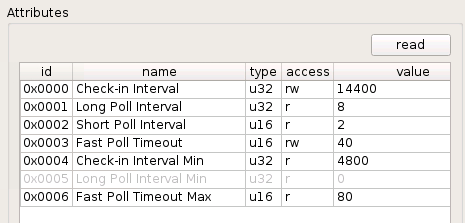
And in case it's helpful, here's what the Poll Control Cluster looks like now:
jjlawren
on 18 Mar 2019
Could it be randomly turning off because of low voltage and a manual wake will sometimes bring it back online temporarily?
Could be, at least it's known that low battery devices act weird.
The above Poll Control Cluster screenshot is after reading values?
what exactly should I be looking for in the IAS Zone cluster?
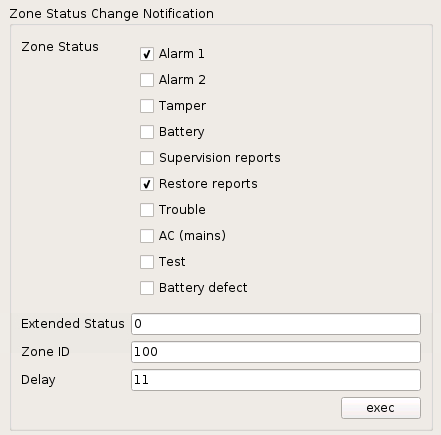
The Zone Status Change Notification command and here the Zone Status checkboxes.
When the sensor is open usually either Alarm 1 or Alarm 2 should be checked.
manup
on 18 Mar 2019
Yes, the poll values shown are immediately after a successful read.
Zone Status Change Notification when awake:
jjlawren
on 18 Mar 2019
As a reference here is the smart things groovy script handler.
Nothing new here, seems identical to current deCONZ handling.
However found this in the Zigbee ZCL spec for the Poll Control Cluster:
3.16.3 Commissioning Process
Poll Control Cluster Clients SHALL configure bindings on the device implementing the Poll Control Cluster Server so that they will receive the regular check-in command on the configured Check-In Interval. This can be done during the configuration period on the end device implementing the Poll Control Cluster Server during which it is in fast poll mode. The device that implements the Poll Control Cluster Server SHALL check its bindings on the configured check-in Interval. If it has any bindings related to any endpoint and the Poll Control Cluster, it will send a check-in command out on that binding.
Currently this isn't done automatically, not sure if it helps.
Can you try creating a binding between Poll Control Cluster and the Gateway 01 Configuration Tool endpoint via Binding Dropbox.
Here is an example how it looks for my OSRAM Motion Sensor-A:

manup
on 18 Mar 2019
I've added the binding from cluster 0020 (Poll Control). Should I expect the device to sleep with that in place? If it does not, do I possibly need to restart the device or Deconz for it to have an effect on sleep?
jjlawren
on 18 Mar 2019
I've added the binding from cluster 0020 (Poll Control). Should I expect the device to sleep with that in place? If it does not, do I possibly need to restart the device or Deconz for it to have an effect on sleep?
No action should be needed, it will only make sure device checks in every 1 hour.
Next step should be adjusting the Long Poll Interval, currently it is 8 which means 8 x 250 milliseconds between mac poll attempts (when the node blinks green) = poll every 2 seconds.
This is actually overkill for the small CR2032 coin battery.
Next step
Double click on the attribute and write an larger value to it like 7200 so that the sensor polls every 30 minutes.
manup
on 18 Mar 2019
Long Poll Interval is a read-only attribute as shown here.
jjlawren
on 18 Mar 2019
Ah damn, right. It can only be modified with the 0x02 command Set Long Poll Interval which isn't yet in the ZCLDB general.xml file. I'll add it for the next version.
Also the command is optional so I'm not sure if it is supported by the device.
manup
on 18 Mar 2019
One more thing. Deconz never marks the device as dead even when it’s been offline for several hours. The open/close status simply stops updating.
jjlawren
on 19 Mar 2019
@manup any other suggestions for improving battery life? I still need to swap out fresh batteries every couple weeks.
jjlawren
on 13 Apr 2019
Ah damn, right. It can only be modified with the 0x02 command Set Long Poll Interval which isn't yet in the ZCLDB general.xml file. I'll add it for the next version.
Also the command is optional so I'm not sure if it is supported by the device.
@manup is this still coming in a future build?
jjlawren
on 3 May 2019
I'm currently implementing the Poll Control functionality for the SmartThings devices, looks like this is working. It should then work equally for the Visonic devices.
manup
on 11 May 2019
Thank you, @manup, I'm looking forward to testing the new functionality.
I have two more known issues regarding this device:
- The battery level reporting over REST / Home Assistant always shows 100%
- The device does not show up in Phoscon
jjlawren
on 13 May 2019
zigbee2mqtt added some converters over here: https://github.com/Koenkk/zigbee-shepherd-converters/pull/434 , not sure that really helps, but I thought I'd add it here just because I happen to be subscribed to both issues.
rb2k
on 14 May 2019
@manup will V2_05_65 help with this issue (i.e., https://github.com/dresden-elektronik/deconz-rest-plugin/commit/d81cd529be58d0acd3efe3840d23cc409dd58611)? Or will more changes be necessary for this specific sensor?
jjlawren
on 4 Jun 2019
I recently bought the Conbee II and set this up using the marthoc/deconz container. I don't know this software very well yet but I am having the same issues as @jjlawren I have 6 MCT-340e devices connected and none show up in the Phoscon web gui but do show up in deconz desktop software when using VNC to get to the desktop app in the container. When linking to home-assistant I see the open/close status but the temperature says unknown for all the sensors and the battery seems to either be 100 or true. I should note that I don't have the green line in the desktop app connecting some of the MCT-340 sensor to any of the other two zigbee devices I have connected to the Conbee II but I assume that is because the device is in sleep state.
I don't know if I should be able to but from the desktop app where I can see the MCT-340e sensor's I can't change the name of any of those sensors or any device for that matter.
Also of note I have another sensor, ISW-ZPR1-WP13, that also does not show up in the sensors gui in the phoscon web app.
 eadamsintel
on 7 Jun 2019
eadamsintel
on 7 Jun 2019
I've upgraded and now see the option to set the long poll interval. However, every value I've tried to enter so far returns with INVALID_VALUE. Am I using the wrong format or is it not supported by the device? The read-only value still reports 8.
jjlawren
on 14 Jun 2019
Is anybody having success pairing this? I am moving a few over from Smart Things and while I can see it in the VNC window, the sensor itself shows a blinking red light even though Phoscon said "Sensor ready"
 hgelpke
on 16 Jun 2019
hgelpke
on 16 Jun 2019
@hgelpke, you may need to do a factory reset to pair. Remove the battery and then hold the door switch while you replace the battery.
As of now the device does not display in Phoscon but is available over REST.
jjlawren
on 17 Jun 2019
I've done that a few times with little to no luck.
I know they don't show in Phoscon but how can I check their status in
Deconz over VNC? They seem to appear but when I look at them in Home
Assistant the data does not appear to be passed.
On Mon, Jun 17, 2019 at 7:03 AM jjlawren notifications@github.com wrote:
@hgelpke https://github.com/hgelpke, you may need to do a factory reset
to pair. Remove the battery and then hold the door switch while you replace
the battery.As of now the device does not display in Phoscon but is available over
REST.—
You are receiving this because you were mentioned.
Reply to this email directly, view it on GitHub
https://github.com/dresden-elektronik/deconz-rest-plugin/issues/978?email_source=notifications&email_token=ACQWXGDELSHQ6WPXVAIXLU3P26KUTA5CNFSM4GGJFEY2YY3PNVWWK3TUL52HS4DFVREXG43VMVBW63LNMVXHJKTDN5WW2ZLOORPWSZGODX3IP3I#issuecomment-502695917,
or mute the thread
https://github.com/notifications/unsubscribe-auth/ACQWXGFXYXKJQ62PDJ7MH5LP26KUTANCNFSM4GGJFEYQ
.
hgelpke
on 17 Jun 2019
I've done that a few times with little to no luck. I know they don't show in Phoscon but how can I check their status in Deconz over VNC? They seem to appear but when I look at them in Home Assistant the data does not appear to be passed.
…
On Mon, Jun 17, 2019 at 7:03 AM jjlawren @.*> wrote: @hgelpke https://github.com/hgelpke, you may need to do a factory reset to pair. Remove the battery and then hold the door switch while you replace the battery. As of now the device does not display in Phoscon but is available over REST. — You are receiving this because you were mentioned. Reply to this email directly, view it on GitHub <#978?email_source=notifications&email_token=ACQWXGDELSHQ6WPXVAIXLU3P26KUTA5CNFSM4GGJFEY2YY3PNVWWK3TUL52HS4DFVREXG43VMVBW63LNMVXHJKTDN5WW2ZLOORPWSZGODX3IP3I#issuecomment-502695917>, or mute the thread https://github.com/notifications/unsubscribe-auth/ACQWXGFXYXKJQ62PDJ7MH5LP26KUTANCNFSM4GGJFEYQ .
Like you I am having some issues with my MCT-340 sensors. One sensor won't pair properly and is left unconnected. If I delete it with deconz GUI then it just shows up again after I restart the Docker container. Does anyone know how I can remove this defunct sensor that keeps auto populating in deconz? HomeAssistant see's it as constantly open yet the battery has been out of the sensor for an entire day. Every time I move the magnetic switch on the sensor when the battery is in a red light blinks 3 times whereas my other sensors don't do this. I am thinking I have a bad one. The other 5 sensors show open/close status in HomeAssistant quickly but battery is 100% and temperature is not shown.
I use Docker with my setup and am using the https://hub.docker.com/r/marthoc/deconz container. Add the following to your docker command line and then you can just VNC to ip_address:0 or maybe try ip_address:1 if that 0 display doesn't work. That should show you the deconz GUI.
-e DECONZ_VNC_MODE=1 -e DECONZ_VNC_PASSWORD=abcdefg
On a side note when I had these sensors connected to smartthings they did show the battery although the battery seemed like it was perpetually at 67% or 33% until they went to 11% and stayed for a long time. I vaguely remember even at 0% these batteries still working for weeks and weeks. The temperature also worked with smart things and seemed to show the correct temp.
eadamsintel
on 17 Jun 2019
I thought about the long poll value and realized I wasn't setting it in hex, so I tried with 0x1C20 (7200 seconds). It accepted the change and the device almost immediately became unavailable. I guess we'll see if it comes back and remains operational...
jjlawren
on 18 Jun 2019
It looks good! It still sends updates immediately when triggered and goes back to sleep very quickly. I'll monitor battery life but I expect it to be improved.
jjlawren
on 19 Jun 2019
@jjlawren Good find! I went ahead and set 5 of my sensors to this value and will test. I am not at home now so I can't test yet. How do you make it stick though? I put in 0x1c20 and clicked the "exec" button next to the "New Long Poll Interval" box. If I reboot the device through the GUI it persists but if I restart the Docker container I am running this in then the values all reset back to 0x0000. I would think the conbee II would hold the values.
I also have a phantom sensor node not connected that won't go away when I delete it. Well it does go away but restarting the docker container or computer makes it come back. Any ideas on how to remove that? It is my 6th MCT-340e sensor that I am having issues with. TIA
eadamsintel
on 19 Jun 2019
Are you reading the cluster attributes to check? You'll only have a very short time period to query after activating the device if this long poll change has been successful.
After setting the long poll value in the top section, the long poll interval attribute changes from the default of 8 to 7200. I wouldn't expect the "set" values to reflect the device's current values.
jjlawren
on 19 Jun 2019
Where do I change the poll value?
Logged into Deconz via VNC
hgelpke
on 21 Jun 2019
Expand the available clusters (right radio button on device), look at cluster info for "0020 Poll Control". In the cluster info panel you should see a section name "Set Long Poll Interval". This is the only way to change the long poll value and must be set in hexadecimal. The attributes below should reflect the new value in number of seconds. You may have to force a fresh read of the attributes.
jjlawren
on 26 Jun 2019
@jjlawren Do you know how to remove one of these sensors from deconz? Two of my sensors are unconnected in the GUI. If I delete them then when I restart my computer or restart the docker container they just show back up again. I try to add them back and the Phoscon web gui keeps finding sensors but they never connect. At this point I am thinking to delete the db file and start over adding things and reintegrating with HomeAssistant but I am not sure if that will even work.
Also, is it possible to rename these sensors? Mine are showing up as "MCT-340 E (4)" and "MCT-340 E (5)" I change the name in the Node Info --> Name Box and it says "sending user descriptor set request" but if i click off the node and click on nothing happens. I've tried opening/closing the sensor around the same time as I set this to wake it up and it doesn't ever change the name.
eadamsintel
on 2 Jul 2019
I do not know the proper way to remove them, but starting with a fresh database should do it. I had to do that a few times earlier on in this issue when pairing was half-failing.
Renaming these sensors has not worked consistently for me.
jjlawren
on 2 Jul 2019
This issue has been automatically marked as stale because it has not had recent activity. It will be closed if no further activity occurs. Thank you for your contributions.
![stale[bot] picture](https://avatars3.githubusercontent.com/in/1724?v=4&s=40) stale[bot]
on 30 Oct 2019
stale[bot]
on 30 Oct 2019
Related issues
 lynix
·
4Comments
lynix
·
4Comments
 philko123
·
3Comments
philko123
·
3Comments
 flex-0
·
4Comments
flex-0
·
4Comments
 ReeChip
·
5Comments
ReeChip
·
5Comments
 felixstorm
·
4Comments
felixstorm
·
4Comments