Deconz-rest-plugin: deCONZ and trust.com (klikaanklikuit.nl) Zigbee ZLL devices compatibility
Hi
I plan to buy ZYCT-202 remote control and i'm interested in the compatibility of these devices and deCONZ:
http://www.trust.com/zigbee
https://www.klikaanklikuit.nl/nl/producten.html
Zigbee Remote Control ZYCT-202
Zigbee LED Bulbs
Zigbee Wireless Motion Sensor
Zigbee Wireless Contact Sensor
Zigbee Smoke Detector (soon to come)
Zigbee Water Leakage Detector (soon to come)
Regards
 oleg77s
All 86 comments
The lights should already work, the (available) sensors and switches are currently not supported but I guess integration should be simple. I look forward to order these in the next days.
https://github.com/dresden-elektronik/deconz-rest-plugin/issues/221
 manup
on 14 Nov 2017
manup
on 14 Nov 2017
are there any news? Can we support in some way?
 andrejem
on 14 Dec 2017
andrejem
on 14 Dec 2017
Update on current state:
- The remote can be integrated with some hacks in a future version. The remote can be used within the deCONZ network and paired with lights, but it won't be listed in the REST-API currently.
- The Trust motion sensor joins but other than that it doesn't respond or send useful commands yet.
- I haven't looked into the Trust door contact sensor yet.
Main problem with Trust devices is they don't provide a modelid and don't respond in a proper way to ZCL commands. To be honest I'm a bit disappointed since this makes integration very difficult.
In February I'll continue to integrate at least the Trust remote.
manup
on 14 Dec 2017
I can confirm I got the remote ZYCT-202 to join the network and through my deConz -> mqtt bridge I can see some events from the remote.
I have no yet tried the REST API but things are looking much better, thanks.
 vamanea
on 3 Jan 2018
vamanea
on 3 Jan 2018
Just gotten DeConz working and have been able connect a couple of Xiaomi sensors and switches, now I'm trying to connect the ZYCT-202, but are not able to get it to connect.
Tried to keep the I button down and also clicking the I while the network is opened.
Any special things that has to be done to connect it to Conbee with DeConz?
 lillpjot
on 23 Jan 2018
lillpjot
on 23 Jan 2018
Are there any new news about the ZYCT-202 switch?
 ThomasBoettner
on 26 Mar 2018
ThomasBoettner
on 26 Mar 2018
No news yet, as noted earlier the remote can be integrated and is on the todo list but due limited time it will take while until it is available in the api. Though it should be possible already to connect the remote to the network and pair it to lights directly.
manup
on 26 Mar 2018
I had some problems pairing with it, but it worked for me if I paired the remote first with the lights and had the lights then join my network.
Not all the functionality works(eg groups) but I have a deConz plugin that sends events to a MQTT server with openhab integration and it works great.
vamanea
on 27 Mar 2018
One update here, when I was trying to get the remote to join the network one group was somehow created and if I add lights to it the respond normally when the remote uses it's first Group.
The group is a bit weird, it's called Group 145 and it can be deleted(unlike other groups created for switches) but it works fine.
vamanea
on 14 Apr 2018
I now bought two trust remotes and via de phoscon webapp when I select add sensor and I press the "two bulbs" button until leds flash, I can see the remote appearing on the deconz application but the phoscon webapp doesnt do anything. via rest i dont see the remotes.
is there any way to know the button presses via api?
 mat1990dj
on 26 Aug 2018
mat1990dj
on 26 Aug 2018
Added from within sensor? The trust remote is a switch within phoscon, but
can not be selected there! So put in a request to add it there?
Op zo 26 aug. 2018 om 10:16 schreef mat1990dj notifications@github.com
I now bought two trust remotes and via de phoscon webapp when I select add
sensor and I press the "two bulbs" button until leds flash, I can see the
remote appearing on the deconz application but the phoscon webapp doesnt do
anything. via rest i dont see the remotes.
is there any way to know the button presses via api?—
You are receiving this because you are subscribed to this thread.
Reply to this email directly, view it on GitHub
https://github.com/dresden-elektronik/deconz-rest-plugin/issues/261#issuecomment-416022099,
or mute the thread
https://github.com/notifications/unsubscribe-auth/AFpiKMEV5VRQdbFP-kUkN9Ccsk0LM2d1ks5uUllTgaJpZM4QX8k_
.
 kasteleman
on 26 Aug 2018
kasteleman
on 26 Aug 2018
It was to try, as on sensors we have "other" and not under switches. But it should definitely be under Switches.
Regarding the trust sensor movements I have similar problem. I go to webapp and click add Sensors and select Other, and the I get the 3 minutes, I reset my motion sensor and it starts flashing, and then stops. I can see that the sensor appears on the deconz program, but the phoscon webapp doesnt detect the sensor
Edit: If you want me to send any data or screenshot of the deconz program with the motion sensor and the remote connected just ask
mat1990dj
on 26 Aug 2018
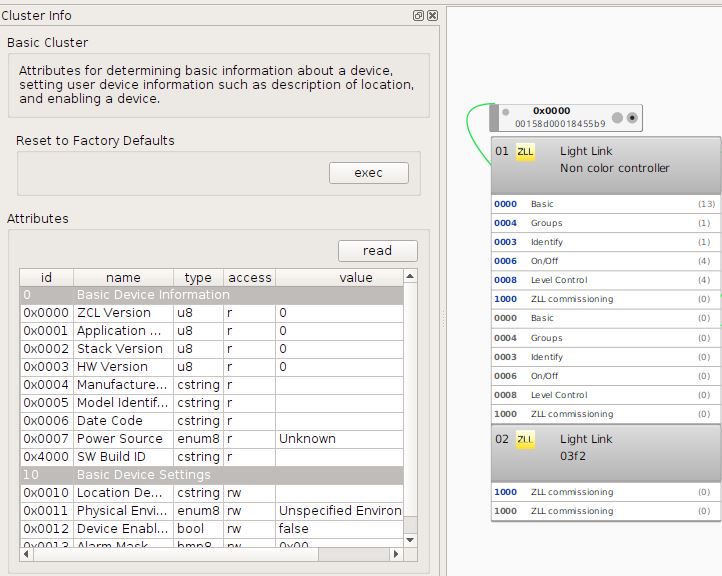
Info from the remote:
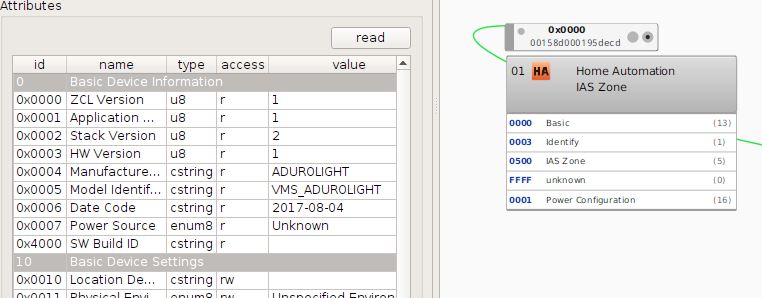
Info from the motion sensor
mat1990dj
on 26 Aug 2018
Is there anything that I can do to help on the development?
mat1990dj
on 7 Sep 2018
I have a Conbee installed and Deconz 2.05.38. Still, I did not manage to connect an ZYCT-202. What button(s) should I use to connect the remote?
 jee67
on 21 Sep 2018
jee67
on 21 Sep 2018
You need to start sensor search and then reset the remote.
To reset you need to press the pairing button with the two light bulbs for about 10 (?) seconds.
Also note that the remote is currently only supported in the REST-API, switch editor support comes in a a few days.
manup
on 21 Sep 2018
I discovered that I didn’t install the latest commits. This evening I cloned the latest version, compiled and installed it. Up to now, I still haven’t been able to connect the remote. I did a reboot of the Raspberry and have to retry after that. I’ll report later whether it succeeds.
My lamps are recognized by the system and I can cannect the lamps to the remote, so it seems all hardware is working. Last step is connecting everything to Conbee.
jee67
on 22 Sep 2018
I was able to link the motion sensor, haven't tried the remote
Obtener Outlook para Androidhttps://aka.ms/ghei36
From: jee67 notifications@github.com
Sent: Saturday, September 22, 2018 8:40:56 PM
To: dresden-elektronik/deconz-rest-plugin
Cc: mat1990dj; Comment
Subject: Re: [dresden-elektronik/deconz-rest-plugin] deCONZ and trust.com (klikaanklikuit.nl) Zigbee ZLL devices compatibility (#261)
I discovered that I didn’t install the latest commits. This evening I cloned the latest version, compiled and installed it. Up to now, I still haven’t been able to connect the remote. I did a reboot of the Raspberry and have to retry after that. I’ll report later whether it succeeds.
—
You are receiving this because you commented.
Reply to this email directly, view it on GitHubhttps://github.com/dresden-elektronik/deconz-rest-plugin/issues/261#issuecomment-423764672, or mute the threadhttps://github.com/notifications/unsubscribe-auth/AE-m2xWep6pawxELQOnlbif21_COGgElks5udoQ4gaJpZM4QX8k_.
mat1990dj
on 22 Sep 2018
I discovered that I didn’t install the latest commits. This evening I cloned the latest version, compiled and installed it. Up to now, I still haven’t been able to connect the remote. I did a reboot of the Raspberry and have to retry after that. I’ll report later whether it succeeds.
My lamps are recognized by the system and I can cannect the lamps to the remote, so it seems all hardware is working. Last step is connecting everything to Conbee.
My remotes are not recognised sofar. Help is welcome.
jee67
on 23 Sep 2018
I'll be back tomorrow home so I can tell you if I'm able to pair them
mat1990dj
on 23 Sep 2018
Ok, so I'm also not able to pair the remotes.
In fact I can see that they appear as linked to the raspbee but not available on the REST API
mat1990dj
on 24 Sep 2018
I have managed to pair my ZYCT-202 and the rest API is reporting to home assistant and I have some working automations.
I have been looking at the logs and it seems to log when you change the group( pressing the light with 5 LEDs). Something like reanimate group 146
Is there anyway to report this over the rest API so I can control different different lights with home assistant?
 Charliedean
on 1 Oct 2018
Charliedean
on 1 Oct 2018
Can you tell me how did you link the remote with deconz please?
mat1990dj
on 1 Oct 2018
These instructions were commented earlier..
You need to start sensor search and then reset the remote. ( Go to sensor, choose other).
To reset you need to press the pairing button with the two light bulbs for about 10 (?) seconds.
This is how I paired it. Took two attempts.
Charliedean
on 1 Oct 2018
I tried that before and didn't work.
Now I got one of my two remotes to pair after 4 o 5 tries. The second one I'm not able to get it to pair, the flashing light for less 1 3 and 5 is short, 15 seconds, and it never gets to pair.
I've tried a reset with 10 seconds the 0 button and try again but no luck
Edit: could there be any limitation of deconz?
mat1990dj
on 1 Oct 2018
It will be great as Charliedean says to know on what group we are to toggle things on different devices, thats what makes this remote better than Hue one
mat1990dj
on 1 Oct 2018
I reinstalled my system and deconz 2.05.39, but did not manage to pair my remotes until now.
jee67
on 1 Oct 2018
I reinstalled my system and deconz 2.05.39, but did not manage to pair my remotes until now.
I’m a step further. Both my ZYCT-202 were connected to deCONZ. They are still not visible in the Phoscon App, but my domotica system sees them and I can use them to control the lights.
To connect the remotes to deCONZ you have to reset them by pressing the 0 button until the lights flash. Then, If you press the button with the two lights until the lights flash again, the remote is connected to deCONZ.
I still have no clue how to connect them to the Phoscon app.
jee67
on 4 Oct 2018
The phoscon implementation is not complete yet.
Charliedean
on 4 Oct 2018
I have managed to pair my ZYCT-202 and the rest API is reporting to home assistant and I have some working automations.
I have been looking at the logs and it seems to log when you change the group( pressing the light with 5 LEDs). Something like reanimate group 146
Is there anyway to report this over the rest API so I can control different different lights with home assistant?
Here are some ideas for handling switches with multiple groups.
1. Button event group
We can provide the last received group as attribute like state/buttoneventgroup which would also be forwarded as Websocket event — maybe combied withbuttonevent? Not to be confused with config/group which is static and describes the groups used by an device.
Rules or external events can build logic on top of that.
This might also be useful for the innr rc 110 remote https://github.com/dresden-elektronik/deconz-rest-plugin/issues/635 as well as the Ubisys, OSRAM, Busch-Jaeger, Paul Neuhaus and Paulmann switches, which all support multiple groups.
2. Relative Button event group
state/buttoneventgroup could be a relative index into config/group. This would allow simpler and more maintainable logic for rules, for example after a device is rejoined after a factory reset often the groups will change to some new random numbers.
{
"config":
{
"group": [ "146", "167", "22", "2362" ]
},
"state":
{
"buttonevent": 1002,
"buttoneventgroup": 3
}
}
Here buttoneventgroup refers to group index 2 which is "22".
manup
on 7 Oct 2018
Today I played a little with my two remotes.
If I remove the battery from one I'm able to pair the second, and then the first stops working...
mat1990dj
on 7 Oct 2018
One more idea.
3. Encode the group index in the button event
This would be a minimal change and is backward compatible.
"buttonevent": 1002, // first group
"buttonevent": 1102, // second group
"buttonevent": 1202, // third group
"buttonevent": 1302  // fourth group
buttonevent = ABCD
AThe physical button numberBThe group index (new)CUnused, set to 0DThe action
manup
on 7 Oct 2018
Idea 3 is definitely the way to go.
Charliedean
on 7 Oct 2018
Yes this would be perfect!
mat1990dj
on 7 Oct 2018
Why not see the groups as different buttons? So use 1002, 2002, 3002, 4002 for first, second, third, and fourth group? That doesn't require changes in REST API clients like homebridge-hue.
 ebaauw
on 7 Oct 2018
ebaauw
on 7 Oct 2018
That doesn't require changes in REST API clients like homebridge-hue.
Isn't it possible to use the prefix up to the group index just as button number, or
do the button numbers need to be continues?
To me it feels a bit overwhelming and it hides interesting details behind math. But that's only my perception or mental model when I'm looking at the buttonevent number.
I'm not sure which one is better in the end. We should figure out a way which is most understandable to REST-API users and can be documented and used easily as well.
Example
Consider the Busch-Jaeger switch which has 8 buttons and up to 4 groups.
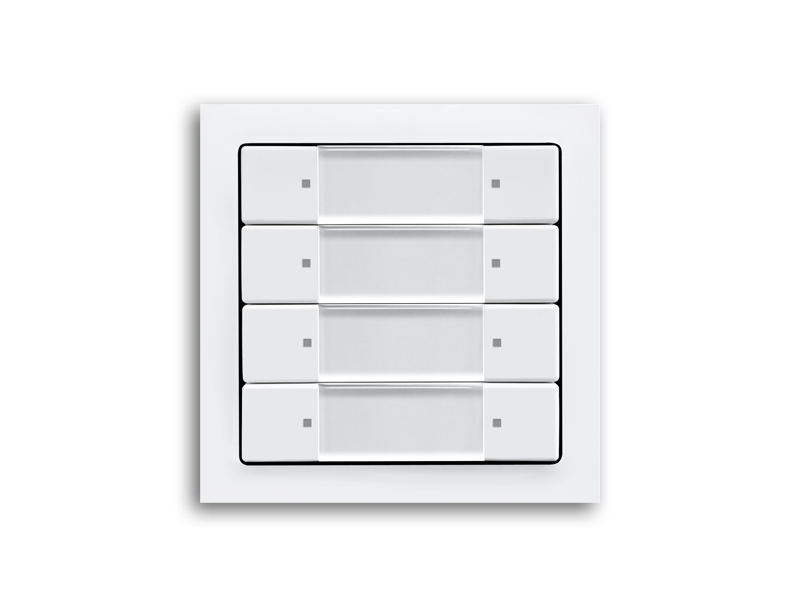
Example trigger
- The lower right button
8is pressed - Would be buttonevent 8002, if there was just one group
- But here it triggers command to fourth group
Questions about buttonevent
- What physical button was pressed?
- Which group was triggered?
1. Method button event multiplied by group count
8 button × 4 would yield:
{ "buttonevent": 320002 }
Which one is button 32? — It's the same as button 24, 16 and 8 but here related to the fourth group.
There are more complex remotes like the Paul Neuhaus remote which has 10 buttons and 6 groups here it gets tricky:
{ "buttonevent": 160002 }
- button 6 group 2?
- button 4 group 4?
2. Method button event with group index
Here I can immediately tell the event relates to button 8 and group 4 the information is not hidden, it's part of the button event.
{ "buttonevent": 8302 }
I've implemented method 1 for the innr RC 110, counting up to 27002: _DimDown_ (-), _On/Off_, _DimUp_ (+) buttons combined with seven groups. Not saying it's pretty...
Isn't it possible to use the prefix up to the group index just as button number, or
do the button numbers need to be continues?
That would require some refactoring. Current implementation in homebridge-hue uses the button number as index into the array of HomeKit services for the switch. I suppose I could change the array to a map instead, but I'll still need to multiply out the button/group combinations (or simply don't expose the group to HomeKit). HomeKit uses a service per (HomeKit) button, and only supports _Single Press_, _Double Press_, and _Long Press_ per button.
ebaauw
on 7 Oct 2018
With a little buttonevent transform helper function the logic and array index still works:
const buttonevent = 8202; // ABCD format as described above
const group = Math.floor(buttonevent / 100 % 10);
const button = Math.floor(buttonevent / 1000);
const action = buttonevent % 10;
const be = button * (group || 1) * 1000 | action;
// be = 16002
I noticed that there isn't much discussion for TRUST's Contact sensor ZCTS-808
I've went on and actually made screenshots of its node and cluster info:

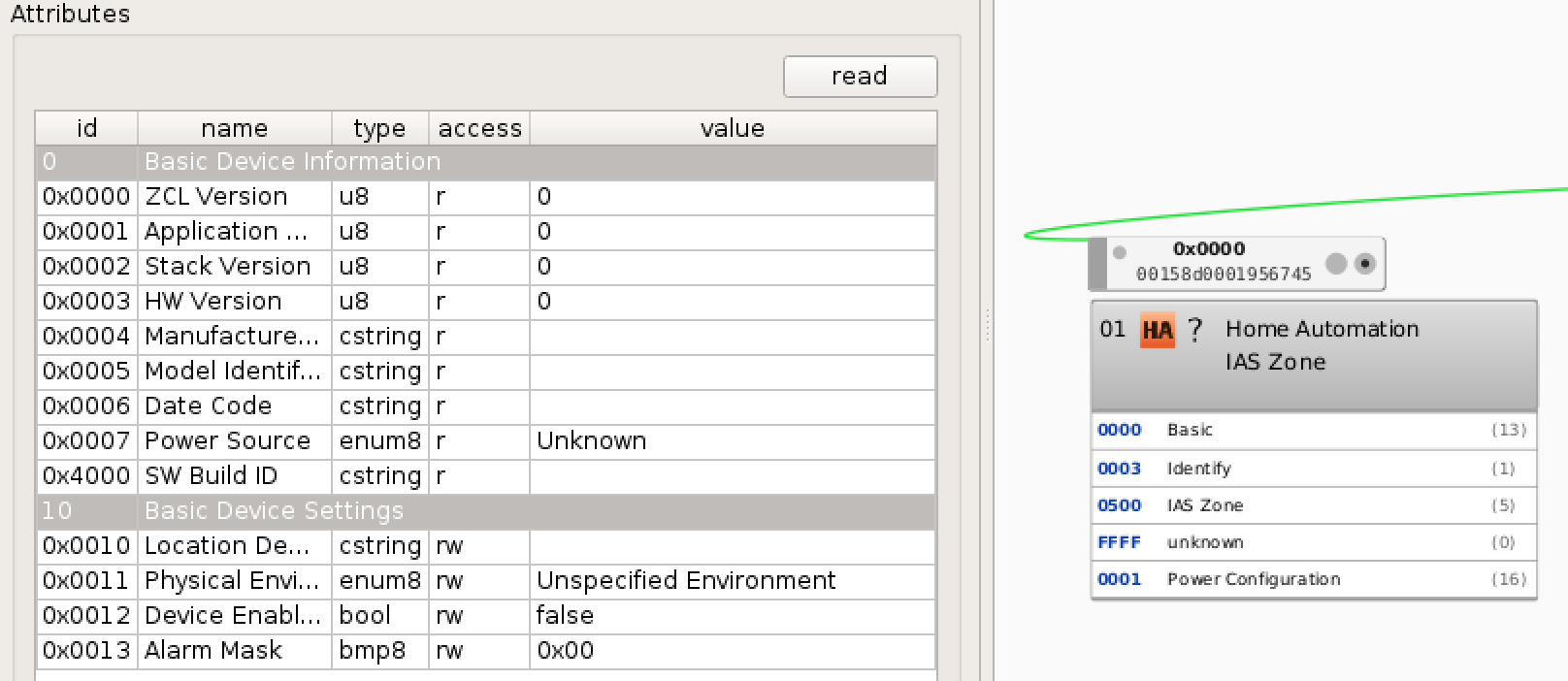
I hope this will be for some use. Sadly the contact sensor also doesn't send any model id which could be tricky adding in support. I don't know how remote support has been added so I can't check if there's a different way to identify it without making the API get confused by remote/contact
 TheTimeWalker
on 2 Jan 2019
TheTimeWalker
on 2 Jan 2019
I don't know how remote support has been added so I can't check if there's a different way to identify it without making the API get confused by remote/contact
Indeed tricky devices. The remote and motion sensors were added by comparing the fingerprint of the clusters and endpoints. I think this can be done here too. The IAZ Zone cluster sensor type should be interesting, hopefully it tells better that this is the contact sensor.
I have one Trust contact sensor here for testing, it's still in the package since a few months :)
manup
on 2 Jan 2019
Very good idea!
I've checked the IAS Zone and yes, it does detect it as a Contact switch
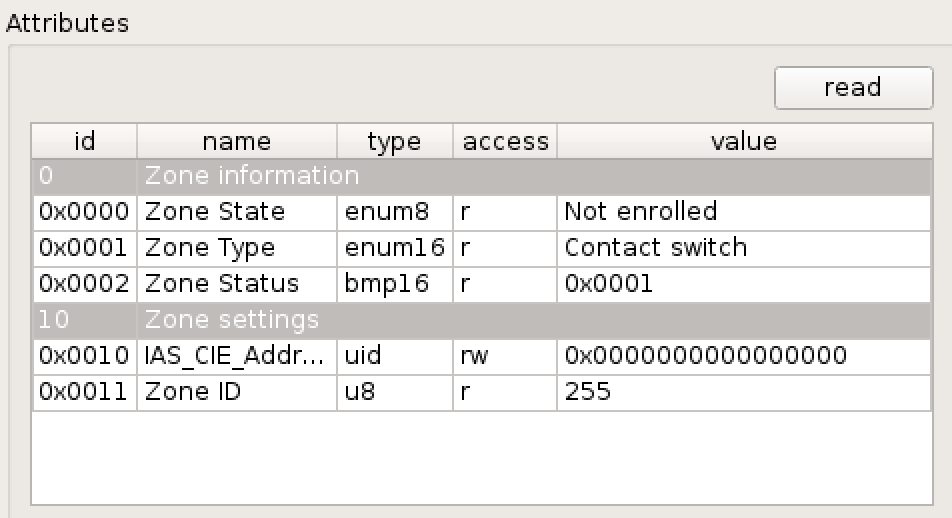
Even better, the Zone Status does change too. 0x0001 is shown when there's no contact and 0x0000 when there is contact
Also when I was trying to check the Zone Status, the device does at some point send more identity information in its cluster. The manufacturer changes to ADUROLIGHT

TheTimeWalker
on 2 Jan 2019
Hey guys
After a long time playing around I was finally able to connect 1 door/window sensor ZCTS-808, 1 motion sensor ZPIR-8000 and 4 remotes ZYCT-202.
The ZYCT-202 were the hardest to find out as I first was not pressing long enough:
- click on add switch in the phoscon app -> other
- press and hold the button with the two bulps for around 10 seconds. first the leds 1,3 & 5 blink and after that all leds blink quickly
- you won't get a message in the phoscon app, but it will appear in the deconz gui and if you are lucky it will also appear in the rest api
note: I needed many attempts! sometimes the device did not appear at all, sometimes only in the gui without a proper name and was not visible in the api. the workaround then is to press the off button for 10 seconds until all leds flash and then you can try again the steps described above
Tested using deconz 2.05.54
json
"16": {
"config": {
"battery": 100,
"duration": 60,
"on": true,
"reachable": true
},
"ep": 1,
"etag": "0b75ef769c503c8ee065b1ef28f21033",
"manufacturername": "Trust",
"modelid": "VMS_ADUROLIGHT",
"name": "VMS_ADUROLIGHT",
"state": {
"lastupdated": "2019-01-11T17:52:22",
"lowbattery": false,
"presence": false,
"tampered": false
},
"type": "ZHAPresence",
"uniqueid": "00:15:8d:00:01:95:dd:9b-01-0500"
},
"18": {
"config": {
"group": "4401",
"on": true,
"reachable": true
},
"ep": 1,
"etag": "7223748051edb1d24afb48e915442cb0",
"manufacturername": "Trust",
"mode": 1,
"modelid": "ZYCT-202",
"name": "Switch 18",
"state": {
"buttonevent": 4002,
"lastupdated": "2019-01-11T17:50:41"
},
"type": "ZHASwitch",
"uniqueid": "00:15:8d:00:01:cd:11:2f-01-1000"
},
"19": {
"config": {
"battery": 100,
"on": true,
"reachable": true
},
"ep": 1,
"etag": "65d253e14884ad6fd6468e47c620a780",
"manufacturername": "Trust",
"modelid": "VMS_ADUROLIGHT",
"name": "OpenClose 19",
"state": {
"lastupdated": "2019-01-11T16:51:27",
"lowbattery": false,
"open": false,
"tampered": false
},
"type": "ZHAOpenClose",
"uniqueid": "00:15:8d:00:01:95:67:4d-01-0500"
},
"20": {
"config": {
"group": "7435",
"on": true,
"reachable": true
},
"ep": 1,
"etag": "d5d1a33a21b49121534015ce8a844826",
"manufacturername": "Trust",
"mode": 1,
"modelid": "ZYCT-202",
"name": "Switch 20",
"state": {
"buttonevent": 4002,
"lastupdated": "2019-01-11T17:50:39"
},
"type": "ZHASwitch",
"uniqueid": "00:15:8d:00:01:c8:1d:06-01-1000"
},
"21": {
"config": {
"group": "42890",
"on": true,
"reachable": true
},
"ep": 1,
"etag": "0113f569ef89a193a716da1e180c3756",
"manufacturername": "Trust",
"mode": 1,
"modelid": "ZYCT-202",
"name": "Switch 21",
"state": {
"buttonevent": 4002,
"lastupdated": "2019-01-11T17:50:42"
},
"type": "ZHASwitch",
"uniqueid": "00:15:8d:00:01:cc:a7:85-01-1000"
},
"22": {
"config": {
"group": "38887",
"on": true,
"reachable": true
},
"ep": 1,
"etag": "d92378582eadcb8933c84f8809e12d80",
"manufacturername": "Trust",
"mode": 1,
"modelid": "ZYCT-202",
"name": "Switch 22",
"state": {
"buttonevent": 4002,
"lastupdated": "2019-01-11T17:50:44"
},
"type": "ZHASwitch",
"uniqueid": "00:15:8d:00:01:cc:97:e2-01-1000"
}
 MadMonkey87
on 11 Jan 2019
MadMonkey87
on 11 Jan 2019
Oh, huh, you managed to add ZCTS-808? I thought this wasn't supported in the API still as I can't find this being added anywhere in a commit or pull request... I'll try that out
In the mean time asking @manup if there was some stealthy updates to this? 😃
[Edit]
After searching for switches I've been able to connect the ZCTS-808 Contact Sesnor and can see it through Home Assistant as OpenClose. Incredible!
TheTimeWalker
on 17 Jan 2019
One more idea.
3. Encode the group index in the button event
This would be a minimal change and is backward compatible.
"buttonevent": 1002, // first group
"buttonevent": 1102, // second group
"buttonevent": 1202, // third group
"buttonevent": 1302  // fourth group
buttonevent = ABCD* `A` The physical button number * `B` The group index (new) * `C` Unused, set to 0 * `D` The action
Any progress on this?
jee67
on 17 Jan 2019
One more idea.
3. Encode the group index in the button event
This would be a minimal change and is backward compatible.
"buttonevent": 1002, // first group
"buttonevent": 1102, // second group
"buttonevent": 1202, // third group
"buttonevent": 1302  // fourth group
buttonevent = ABCD* `A` The physical button number * `B` The group index (new) * `C` Unused, set to 0 * `D` The actionAny progress on this?
I've just tested with my four ZYCT-202 and I've noticed that each of them uses entirely different group ids! Ex:
Remote 1:
group1 : 42885
group2 : 42886
group3 : 42887
group4 : 42888
group5 : 42889
all : 42890
Remote 2:
group1 : 4399
group2 : 4400
group3 : 4401
group4 : 4402
group5 : 4403
all : 4404
-> I don't think you can get a group index in a generic way
MadMonkey87
on 17 Jan 2019
I've updated to the now latest 2.5.57 version and I've paired both sensors again. I can confirm that both motion sensor and contact sensor now appear correctly in the interface:

I did notice that they now don't report any battery levels anymore over the API. Not sure if that's intended?
TheTimeWalker
on 20 Jan 2019
It may take a while until this is populated
"27": {
        "config": {
            "battery": 100,
            "on": true,
            "reachable": true
        },
        "ep": 1,
        "etag": "50e100ab8c29bacd54d5e1058feb896a",
        "manufacturername": "ADUROLIGHT",
        "modelid": "CSW_ADUROLIGHT",
        "name": "CSW_ADUROLIGHT",
        "state": {
            "lastupdated": "2019-01-19T23:04:10",
            "lowbattery": false,
            "open": false,
            "tampered": false
        },
        "swversion": "v0.1.0",
        "type": "ZHAOpenClose",
        "uniqueid": "00:15:8d:00:01:95:67:61-01-0500"
    }
Thanks, you're right. After restarting deCONZ, it instantly populated the battery state of the sensors. I guess I was a bit too excited there 😛
How did you manage to make the sensors actually report their Model IDs? It seems to be so random to make them report the data.
I've found out that Trust did release the water leakage sensor (ZWLD-100) and smoke sensor (ZSDR-850). They should be available in UK, DE, etc.
TheTimeWalker
on 20 Jan 2019
How did you manage to make the sensors actually report their Model IDs? It seems to be so random to make them report the data.
The code to join end-devices was refactored in general so that devices which support reading attributes during joining can be queried more reliable. For the Trust contact and motion sensor this works really well. The remote on the other side just returns empty strings so detection here is made based on the fingerprint of the device.
I've found out that Trust did release the water leakage sensor (ZWLD-100) and smoke sensor (ZSDR-850). They should be available in UK, DE, etc.
When the required data is provided these can be added easily I suppose they are IAS Zone devices too, which makes integration simple.
manup
on 22 Jan 2019
This issue has been automatically marked as stale because it has not had recent activity. It will be closed if no further activity occurs. Thank you for your contributions.
![stale[bot] picture](https://avatars3.githubusercontent.com/in/1724?v=4&s=40) stale[bot]
on 22 May 2019
stale[bot]
on 22 May 2019
Not sure if it's a good idea that the bot closes the issue. Compatibility isn't fully complete as there are still the other two devices + remote support isn't 100% complete yet
TheTimeWalker
on 31 May 2019
I bought the ZYCT-202, and i got i to pair, not able to see it Phoscon, as expected as i can read from these posts, i can find it in the old "Wireless Light Control", and when i switch group ( the button with 1 bulb ) and fx. press "Turn Off", it removes the old remote, and creates a new one (removing my pairing from it), i guess since it does this
21:34:20:278 reanimate group 3255 for sensor Switch 2
21:34:20:278 delete old group 3254 of sensor Switch 2
21:34:20:278 Attached sensor 2 to group ZYCT-202 2
21:34:22:554 button 4002 Off
Not sure if this is allready known or not, but better with too much info than too little i guess :)
 MartinTerp
on 14 Jul 2019
MartinTerp
on 14 Jul 2019
I don't think it's currently supported in the new Phoscon, but it is exposed over the API and therefore works well for me in Home Assistant.
I only get the delete and reanimate logs when using the group change button on the ZYCT-202
Charliedean
on 14 Jul 2019
Dosnt the reanimate affect your home assistant conf?
Also i cant see my Remote in home assistant, did you do anything special? It can find my bulbs but not remote, but i can see in HA logs that it registers the button pushes
( im still very new to this btw )
MartinTerp
on 14 Jul 2019
You need to manually setup an automation as it won't show up in home assistant.
Here is an example automation:
alias: remote on
  initial_state: 'on'
  trigger:
    platform: event
    event_type: deconz_event
    event_data:
      id: switch_2
      event: 1002
  action:
    service: light.turn_on
    entity_id: light.main_bedroom_light
You will need to replace the id with your own. You can get this from the logs or the switch name in Phoscon.
Charliedean
on 14 Jul 2019
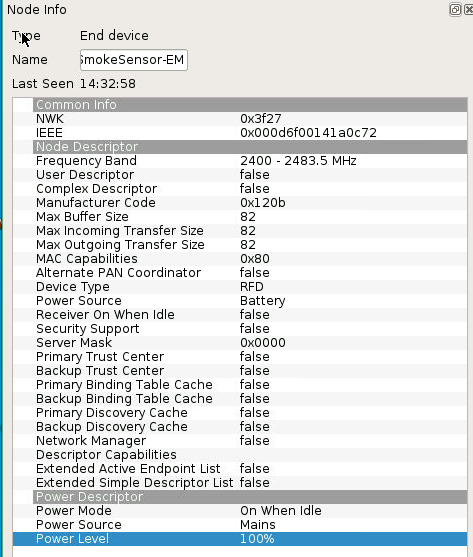
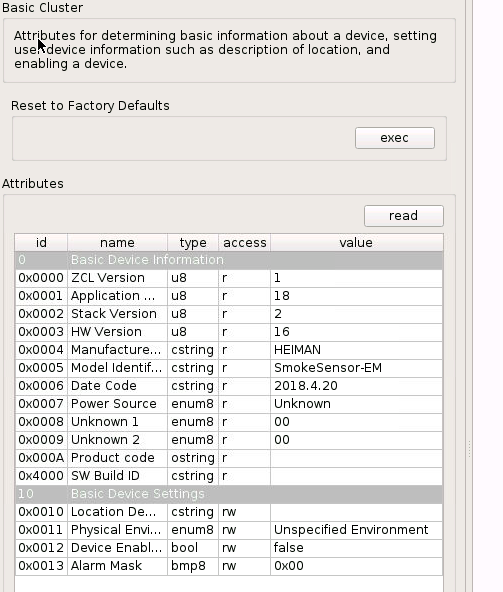
I've got three of these ZSDR-850 sensors ready and waiting.
I can see they can connect to the gateway but they are not showing up on the Phoscon page.
What are the attributes required to add these?
 tipofthesowrd
on 13 Oct 2019
tipofthesowrd
on 13 Oct 2019
I have ZYCT-202 switch (trust/KIKA). I able to include it in the network, is shows up (correctly) in deCONZ gui. But never popups in the api. I tried include it with the gui, in Phoscon as light, switch and sensor. I deleted and included it again a lot.
Anybody a tip?
 RDols
on 18 Nov 2019
RDols
on 18 Nov 2019
It should appear as a switch when you search for devices over the API. You won't find it in the Phoscon GUI if that's what you mean. You'd need to use a different app like Home Assistant or Node RED to make use of the remote.
TheTimeWalker
on 19 Nov 2019
I'm using Domoticz with an plugin. Can see the other devices. I understoond from earlier in this thread it doesn't show up in Phoscon. I directly look at the API url "{IP}/API/{KEY}" to be sure it's not the plugin that misses it. See my other devices, but not the new switch. Although it shows correctly in the GUI.
As stated @MadMonkey87 before, it's difficult to add the device correctly. Im hoping somebody knows a way to add so it show up at the api.
Note that im new to Deconz, so it's possible im missing the obvious.
RDols
on 19 Nov 2019
Hey guys
After a long time playing around I was finally able to connect 1 door/window sensor ZCTS-808, 1 motion sensor ZPIR-8000 and 4 remotes ZYCT-202.
The ZYCT-202 were the hardest to find out as I first was not pressing long enough:
- click on add switch in the phoscon app -> other
- press and hold the button with the two bulps for around 10 seconds. first the leds 1,3 & 5 blink and after that all leds blink quickly
- you won't get a message in the phoscon app, but it will appear in the deconz gui and if you are lucky it will also appear in the rest api
note: I needed many attempts! sometimes the device did not appear at all, sometimes only in the gui without a proper name and was not visible in the api. the workaround then is to press the off button for 10 seconds until all leds flash and then you can try again the steps described above
Tested using deconz 2.05.54
    "16": {
        "config": {
            "battery": 100,
            "duration": 60,
            "on": true,
            "reachable": true
        },
        "ep": 1,
        "etag": "0b75ef769c503c8ee065b1ef28f21033",
        "manufacturername": "Trust",
        "modelid": "VMS_ADUROLIGHT",
        "name": "VMS_ADUROLIGHT",
        "state": {
            "lastupdated": "2019-01-11T17:52:22",
            "lowbattery": false,
            "presence": false,
            "tampered": false
        },
        "type": "ZHAPresence",
        "uniqueid": "00:15:8d:00:01:95:dd:9b-01-0500"
    },
"18": {
        "config": {
            "group": "4401",
            "on": true,
            "reachable": true
        },
        "ep": 1,
        "etag": "7223748051edb1d24afb48e915442cb0",
        "manufacturername": "Trust",
        "mode": 1,
        "modelid": "ZYCT-202",
        "name": "Switch 18",
        "state": {
            "buttonevent": 4002,
            "lastupdated": "2019-01-11T17:50:41"
        },
        "type": "ZHASwitch",
        "uniqueid": "00:15:8d:00:01:cd:11:2f-01-1000"
    },
    "19": {
        "config": {
            "battery": 100,
            "on": true,
            "reachable": true
        },
        "ep": 1,
        "etag": "65d253e14884ad6fd6468e47c620a780",
        "manufacturername": "Trust",
        "modelid": "VMS_ADUROLIGHT",
        "name": "OpenClose 19",
        "state": {
            "lastupdated": "2019-01-11T16:51:27",
            "lowbattery": false,
            "open": false,
            "tampered": false
        },
        "type": "ZHAOpenClose",
        "uniqueid": "00:15:8d:00:01:95:67:4d-01-0500"
    },
    "20": {
        "config": {
            "group": "7435",
            "on": true,
            "reachable": true
        },
        "ep": 1,
        "etag": "d5d1a33a21b49121534015ce8a844826",
        "manufacturername": "Trust",
        "mode": 1,
        "modelid": "ZYCT-202",
        "name": "Switch 20",
        "state": {
            "buttonevent": 4002,
            "lastupdated": "2019-01-11T17:50:39"
        },
        "type": "ZHASwitch",
        "uniqueid": "00:15:8d:00:01:c8:1d:06-01-1000"
    },
    "21": {
        "config": {
            "group": "42890",
            "on": true,
            "reachable": true
        },
        "ep": 1,
        "etag": "0113f569ef89a193a716da1e180c3756",
        "manufacturername": "Trust",
        "mode": 1,
        "modelid": "ZYCT-202",
        "name": "Switch 21",
        "state": {
            "buttonevent": 4002,
            "lastupdated": "2019-01-11T17:50:42"
        },
        "type": "ZHASwitch",
        "uniqueid": "00:15:8d:00:01:cc:a7:85-01-1000"
    },
    "22": {
        "config": {
            "group": "38887",
            "on": true,
            "reachable": true
        },
        "ep": 1,
        "etag": "d92378582eadcb8933c84f8809e12d80",
        "manufacturername": "Trust",
        "mode": 1,
        "modelid": "ZYCT-202",
        "name": "Switch 22",
        "state": {
            "buttonevent": 4002,
            "lastupdated": "2019-01-11T17:50:44"
        },
        "type": "ZHASwitch",
        "uniqueid": "00:15:8d:00:01:cc:97:e2-01-1000"
    }```
Hi guys,
i read all your posts and they helped me a lot in the Trust ZYCT-202 integration in Home Assistant.
Your discussion about the group is really interesting.
Any update about the group management with this switch?
In my log I have something like this:
2019-07-19 21:22:21 DEBUG (MainThread) [pydeconz.deconzdevice] Switch 2 created as
{'config': {'group': '3257', 'on': True, 'reachable': True},
'ep': 1,
'etag': '082c4edb15674c0b5a9c78d9a9d4a875',
'manufacturername': 'Trust',
'mode': 1,
'modelid': 'ZYCT-202',
'name': 'Switch 2',
'state': {'buttonevent': 4002, 'lastupdated': '2019-07-19T11:54:49'},
'type': 'ZHASwitch',
'uniqueid': '00:15:8d:00:01:cd:0c:b4-01-1000'}
Where can I get the value of "'group': '3257'" in home assitant (I'm not speaking about the log)?
 egoodi
on 3 Dec 2019
egoodi
on 3 Dec 2019
I didnt manage to get it in home asssitant, but i use nodered, where i can read the group change event, in there i just set a global variable and use it in my flows
MartinTerp
on 3 Dec 2019
Interesting...
can you show me an example? I'm quite new in this world.
thanks
egoodi
on 4 Dec 2019
I will provide a full example when i get home from work, that you can import in node-red
MartinTerp
on 4 Dec 2019
thank you so much
egoodi
on 4 Dec 2019
I use the folloing pallets:
node-red-contrib-deconz
node-red-contrib-home-assistant-websocket
I added my "flow" for also the dimming buttons.
So the only thing you need to do:
1) import the txt document in nodered
2) configure deconz and HA in nodered
3) edit the "Spisestue Switch" to point to your remote control
4) edit the node after, "change: 2 rules", i added a note above it "config"
5) should work 🤞
edit: found a error in the file, fixed it
nodered-trust-202-fixed.txt
note, it wont trigger group change, until you press on/off/dim buttons.
So when you need to figure out the group ids for your remote, just cycle though them and press ON, it will show the group ids in the debug log
disclaimer: im also a bit new at node-red, so it could maybe be done in a smarter way, but this works for me :)
MartinTerp
on 4 Dec 2019
Hello,
I also bought this sensor last week and unfortunately it does not come online even in the Rest-api not receiving anything to HA. What is different is that the site now supports the ZYCT-202.
 JohCo-hassio
on 22 Feb 2020
JohCo-hassio
on 22 Feb 2020
Can you see it in deconz ? if yes compare your informations with theses one already on this issue.
 Smanar
on 22 Feb 2020
Smanar
on 22 Feb 2020
I only see the device in the vnc connection
JohCo-hassio
on 22 Feb 2020
I've added some of these devices successfully with an older deconz version s.t it was fully accessible trough the api. Now I've trieded to redo this and I am actually able to connect it (appears in the UI), but not within the api nor phoscon. Guess the once working api is now broken?
MadMonkey87
on 5 May 2020
It seems this issue is resolved or otherwise inactive. If it is not, please re-open!
@MadMonkey87 Please open a new issue for those :)
 Mimiix
on 6 Jun 2020
Mimiix
on 6 Jun 2020
I just cannot get the ZYCT-202 to pair. Tried all the suggestions above.
 Puntoboy
on 15 Nov 2020
Puntoboy
on 15 Nov 2020
I just cannot get the ZYCT-202 to pair. Tried all the suggestions above.
What I do ( have paired 4 remotes like this )
1) reset it by holding in O until the 5 led blinks ( can be awhile, else stop and try again )
2) Start deconz search
3) move the remote up close to the conbee (really close)
4) press and hold the button with the 2 lamps until LED 1,3,5 starts to blink
it should now be paired, but you cant see it in the normal deconz, you need to go to deconz -> help -> Open Wireless Light Control (2016)
MartinTerp
on 15 Nov 2020
Thank you.
I can see it in Deconz now, but not the webapp (the old one doesnt seem to load for me)
I'm also not seeing any events in node-red when pressing the buttons.
Puntoboy
on 15 Nov 2020
Try and restart nodered, and see if you can see the switches as devices
MartinTerp
on 15 Nov 2020
No joy I'm afraid. I can see it reacting in the Deconz GUI, but nothing in the Web App or Node-Red.
Puntoboy
on 15 Nov 2020
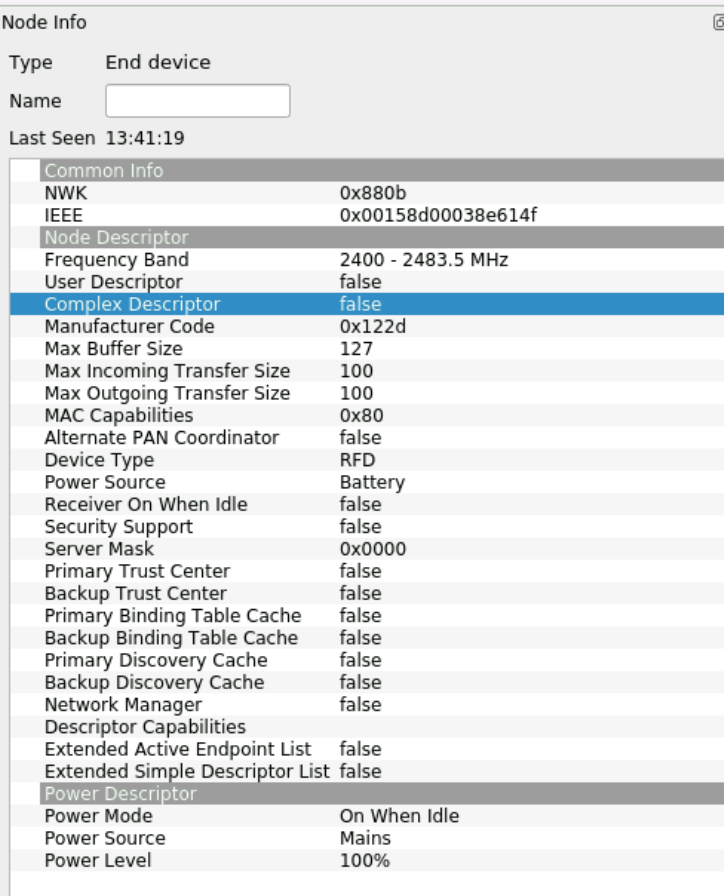
Puntoboy
on 15 Nov 2020
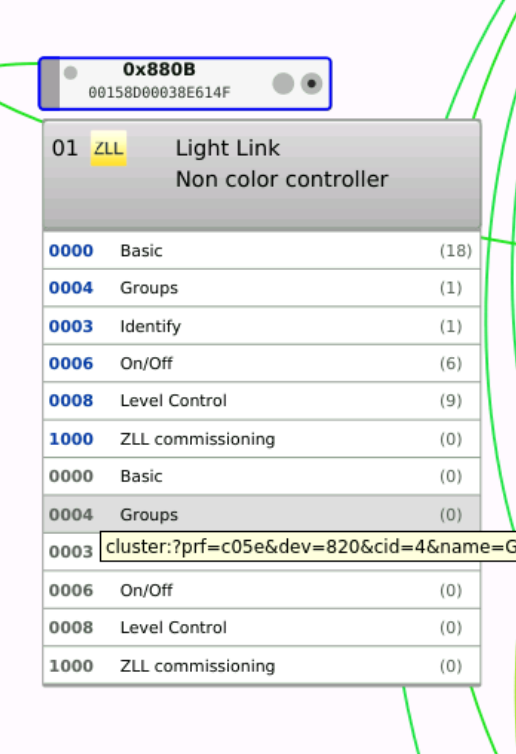
@Puntoboy Can you post a screen of the basic cluster? Make sure it's read!
Mimiix
on 16 Nov 2020
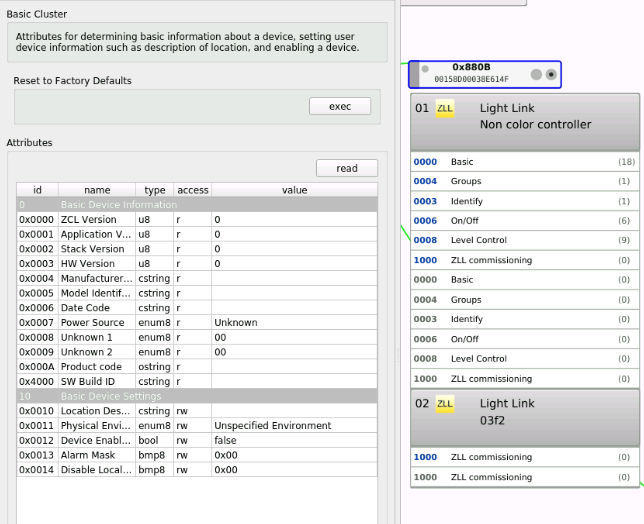
Puntoboy
on 16 Nov 2020
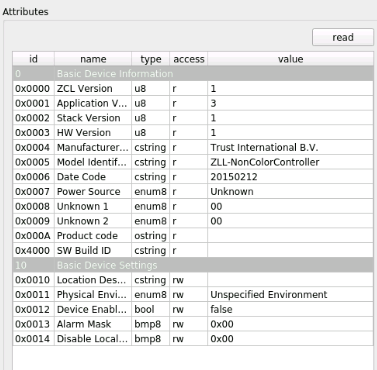
It isn't read... Please click the read buton
Mimiix
on 16 Nov 2020
Sorry I thought I had.
Puntoboy
on 16 Nov 2020
Seems not to be supported @Puntoboy I suggest opening a new Device request providing all screens.
Mimiix
on 16 Nov 2020
Seems not to be supported @Puntoboy I suggest opening a new Device request providing all screens.
Is it not the same device listed above?

Puntoboy
on 16 Nov 2020
AFAIK not. I searched for the model identifier in this git repo and your didn't show.
Mimiix
on 16 Nov 2020
They must have updated the hardware, as that model number on the rear is the same (ZYCT-202)
Puntoboy
on 16 Nov 2020
If the model and buttons are the same, is there any way to use settings for the existing model identifier for this new one?
Puntoboy
on 16 Nov 2020
@Puntoboy Device request it.
Mimiix
on 16 Nov 2020
Related issues
 stevenwfoley
·
3Comments
stevenwfoley
·
3Comments
 salopette
·
4Comments
salopette
·
4Comments
 marthoc
·
6Comments
marthoc
·
6Comments
 1onar
·
5Comments
1onar
·
5Comments
 wizkidorg
·
3Comments
wizkidorg
·
3Comments
Most helpful comment
One more idea.
3. Encode the group index in the button event
This would be a minimal change and is backward compatible.
buttonevent = ABCDAThe physical button numberBThe group index (new)CUnused, set to 0DThe action