Deconz-rest-plugin: Busch Jaeger wall switch button events?
I own several busch jaeger wall switches (Model RM01, BJ 6711/6715) with 4 button face plates (BJ 6736) and have tried to understand if I can get button events from them. I know I can map scenes from them, but I'd like to trigger rules in deCONZ based on button presses - I don't need long, short, press or release at the moment, but that would be nice to have.
I tried to sniff these using @ebaauw's dc_eventlog, but couldn't get anything to show up.
Anyhow is this something those switches can provide or are they only able to recall scenes - and if they're only able to recall scenes, can I somehow run a rule when such a scene is recalled?
Thanks!
Example dimmer:
"1": {
    "config": {
      "group": "1",
      "on": true,
      "reachable": true
    },
    "ep": 10,
    "etag": "dadb46fab3c12985740e586341c2f071",
    "manufacturername": "Busch-Jaeger",
    "mode": 1,
    "modelid": "RM01",
    "name": "S-LL-02",
    "state": {
      "buttonevent": -1,
      "lastupdated": "2017-07-01T07:40:11"
    },
    "swversion": "1.0.0",
    "type": "ZHASwitch",
    "uniqueid": "d8:5d:ef:11:a1:00:18:3d-0a-1000"
  },
and example switch:
"2": {
    "config": {
      "group": "2",
      "on": true,
      "reachable": true
    },
    "ep": 10,
    "etag": "69df49467e68ab35e4493a31abe2fbb9",
    "manufacturername": "Busch-Jaeger",
    "mode": 1,
    "modelid": "RM01",
    "name": "S-D-01",
    "state": {
      "buttonevent": -1,
      "lastupdated": "2017-07-01T07:40:12"
    },
    "swversion": "1.0.0",
    "type": "ZHASwitch",
    "uniqueid": "d8:5d:ef:11:a1:00:18:51-0a-1000"
  },
As a side note: FHEM reports the dimmer as DM01, while the switch is reported as RM01 - where does deCONZ get the modelid from?
 grover
All 47 comments
Anyhow is this something those switches can provide or are they only able to recall scenes - and if they're only able to recall scenes, can I somehow run a rule when such a scene is recalled?
Normally the button events should be fired, when the endpoints specific clusters are bound to a group — deCONZ should do this when the switch is paired.
This functionality is only available newest switch firmware, I'm afraid that 1.0.0 is too old. Do you have access to the firmware? Not sure if BJG has it available for download but you may ask their support to provide the *.zigbee files.
 manup
on 8 Sep 2017
manup
on 8 Sep 2017
Thanks @manup - I don't have access to the firmware, but I'll try to ask kindly. Will these zigbee files work with OTAU mechanisms in deCONZ or do I need something else? Also the switches are just 4 months old...
grover
on 8 Sep 2017
Will these zigbee files work with OTAU mechanisms in deCONZ or do I need something else?
Yes it will work with the next deCONZ update. The BJG switches with "old" firmware version 1.0.0 only accept OTA updates from a BJG update USB stick, so I need to add a little hack to deCONZ to pretend it's a BJG update server in the OTA handshake.
For later firmware > 1.0.0 they already fixed that and we have successful updated these in various tests.
Also the switches are just 4 months old...
I guess these are from early stock.
manup
on 8 Sep 2017
Hi @manup,
BJG kindly provided me with their update tool, however I haven't received the promised update stick and I don't expect them to provide it to me. Their support is unfortunately a bit unresponsive.
Anyways, I do have the zigbee files and they seem to conform to the OTA format - at least I was able to locate the OTA image header. As these switches are still on 1.0.0 and the files I've got are 1.2.0 I'm back to you.
Any chance of a deCONZ hack for this?
Thanks!
grover
on 19 Oct 2017
Any chance of a deCONZ hack for this?
Yep in theory I just need to put a small redirection into deCONZ to support 1.0.0 BJG devices. The first OTA command of the switch checks if the OTA server is an actual BJG update dongle by comparing the MAC address prefix. Versions > 1.0.0 should work out-of-the-box, we already tested that a while ago.
It's on the todo list for some time now, I'll see to get it work together with the the ubisys OTA issue. So maybe 2.04.84 could work.
manup
on 19 Oct 2017
Hi @manup!
Today I updated to 2.04.90 and tried to update the firmware on my BJ wall switches after seeing the commit https://github.com/dresden-elektronik/deconz-rest-plugin/commit/4a2a8de0388a65c39e109e99cb3783eb905434b5
Unfortunately this doesn't seem to be enough: The switches do not respond to the Query button (unlike all other devices) and choosing an OTAU file and pressing Update only causes the Progress column to change to Queued. After that nothing is happening.
Am I missing something or is the change incomplete? Do you need additional logs?
grover
on 22 Nov 2017
Ah I see, please try with the following firmware which is needed for BJE update, but not yet in the deCONZ package:
$ sudo GCFFlasher -f deCONZ_Rpi_0x261a0500.bin.GCF
deCONZ_Rpi_0x261a0500.bin.GCF.zip
Here are further steps (not testet in a long time, but will try on weekend):
- select OTA file for the device
- press update
- pull out the battery, press a button a few times and put battery in again
- the switch should ask for an OTA update which should start then
If it doesn't work, try to enter the switch config menu by pressing the two buttons on the top for some seconds, the LEDs should make 'ping-pong' and hopefully the switch does ask for an OTA update.
manup
on 22 Nov 2017
That unfortunately didn't help. They are mains powered. The progress column remains in Queued and nothing else is happening.
Even going into the configuration menu doesn't change that - they also do not respond to the version query while in there.
Crossing fingers you'll find something.
grover
on 22 Nov 2017
Sorry took a while.
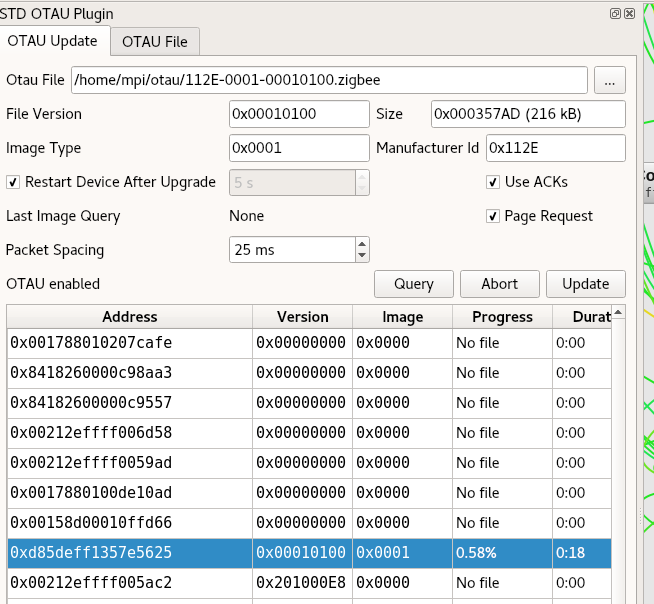
I got it to work now and fixed a issue which prevented the update to start.
Will be fixed in version 2.04.95.
manup
on 4 Dec 2017
Since I didn't see a change for this in the commits - do I need a new firmware in addition to deCONZ 2.04.95? It's still only queued for me. Even after entering the light config menu.
grover
on 7 Dec 2017
Sorry should have mentioned this, the related change is in the core application :)
Beside 2.04.95 you'll need firmware deCONZ_Rpi_0x261a0500.bin.GCF from above.
Here are the steps I did:
- select the device row in the table
- select the firmware file for the device
- click
Updatebutton
The switch should then start the update after some seconds.
manup
on 7 Dec 2017
Hi @manup,
that's unfortunately still not doing it for me. Here's what I did:
- Stopped deCONZ
- Updated RaspBee Firmware via:
sudo GCFFlasher_internal -f deCONZ_Rpi_0x261a0500.bin.GCF
- To be sure I added:
sudo GCFFlasher_internal -r
- Started deCONZ and waited for all nodes to enumerate and show up
- Enabled the OTAU plugin
- Opened the OTAU pane
- Selected the row
- Selected the OTAU file
- Pressed the Update button... Queued.
So I rebooted the Raspberry and tried the above again. No change.
These are mains powered switches. Two dimmer switches and two regular ones with 1 or 2 rockers.
grover
on 7 Dec 2017
Hmm strange, are the fields Version and Image filled in the table?
I've testet it with a mains powered switch which wast already was at version 1.1.0.
I'll request BJ to provide a 1.0.0 OTA file so that I can test update from this version.
manup
on 7 Dec 2017
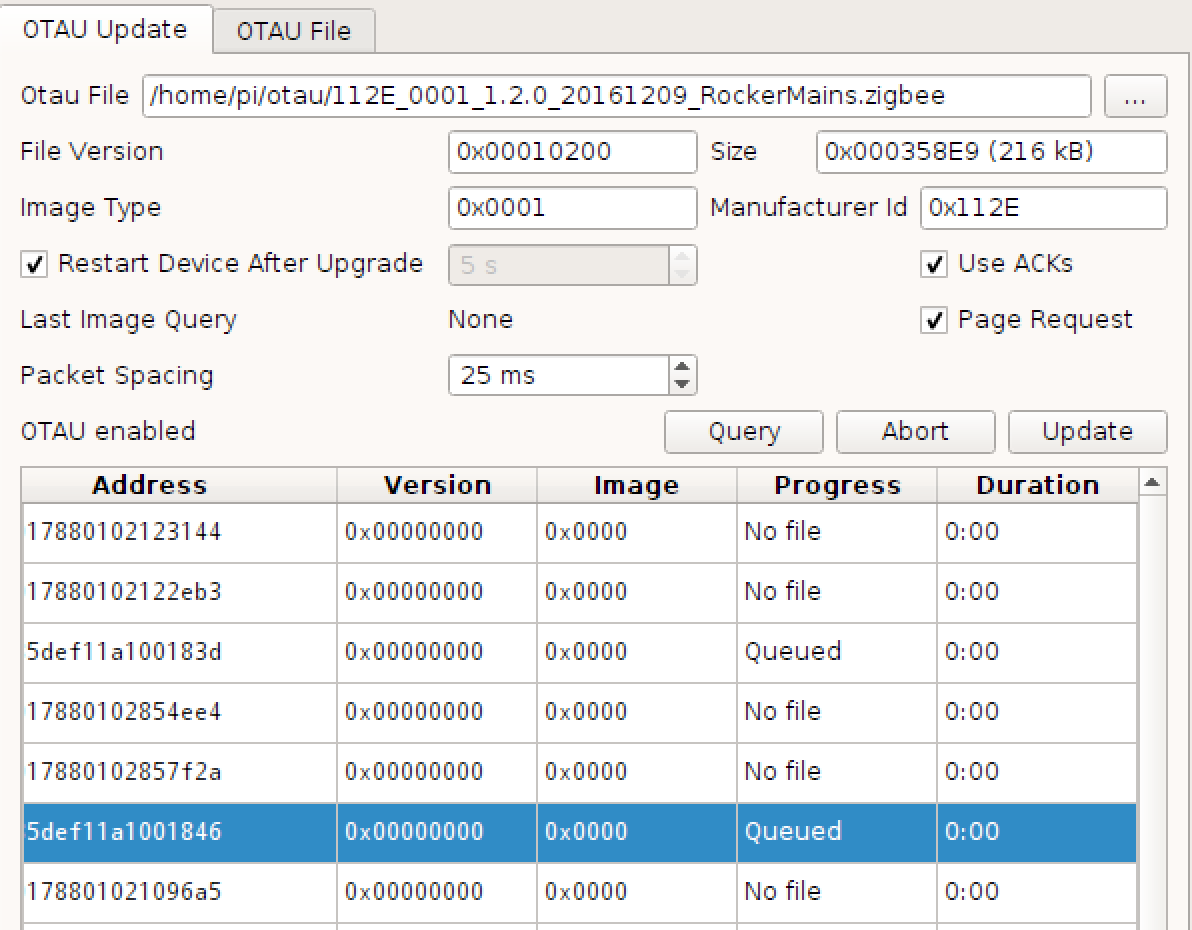
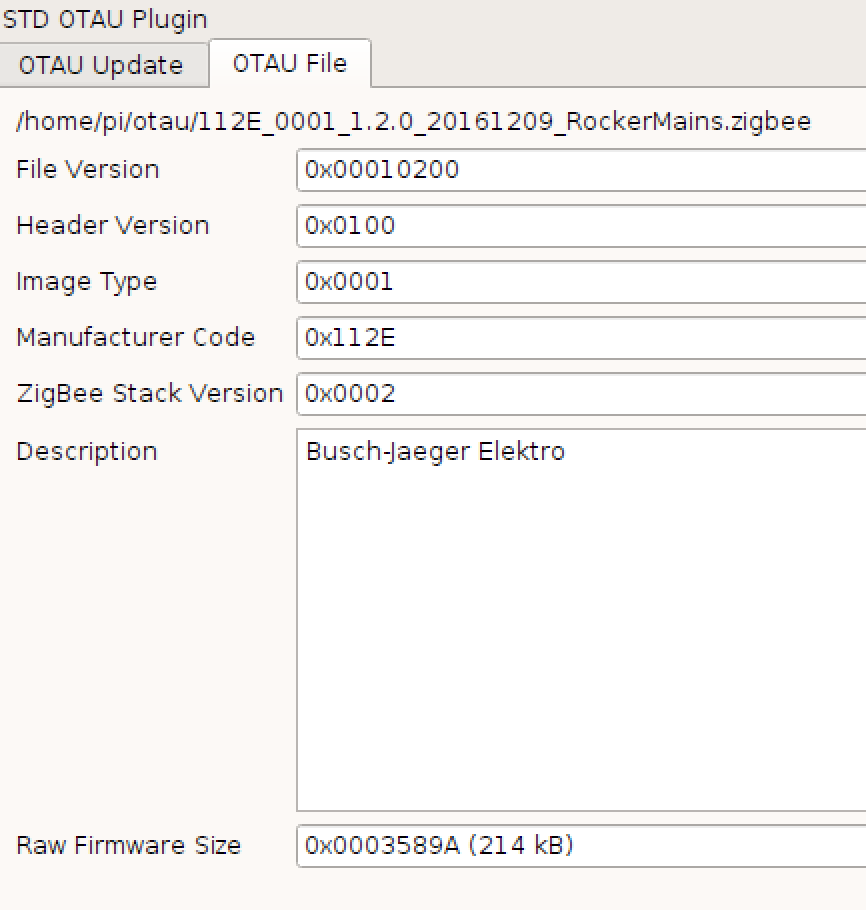
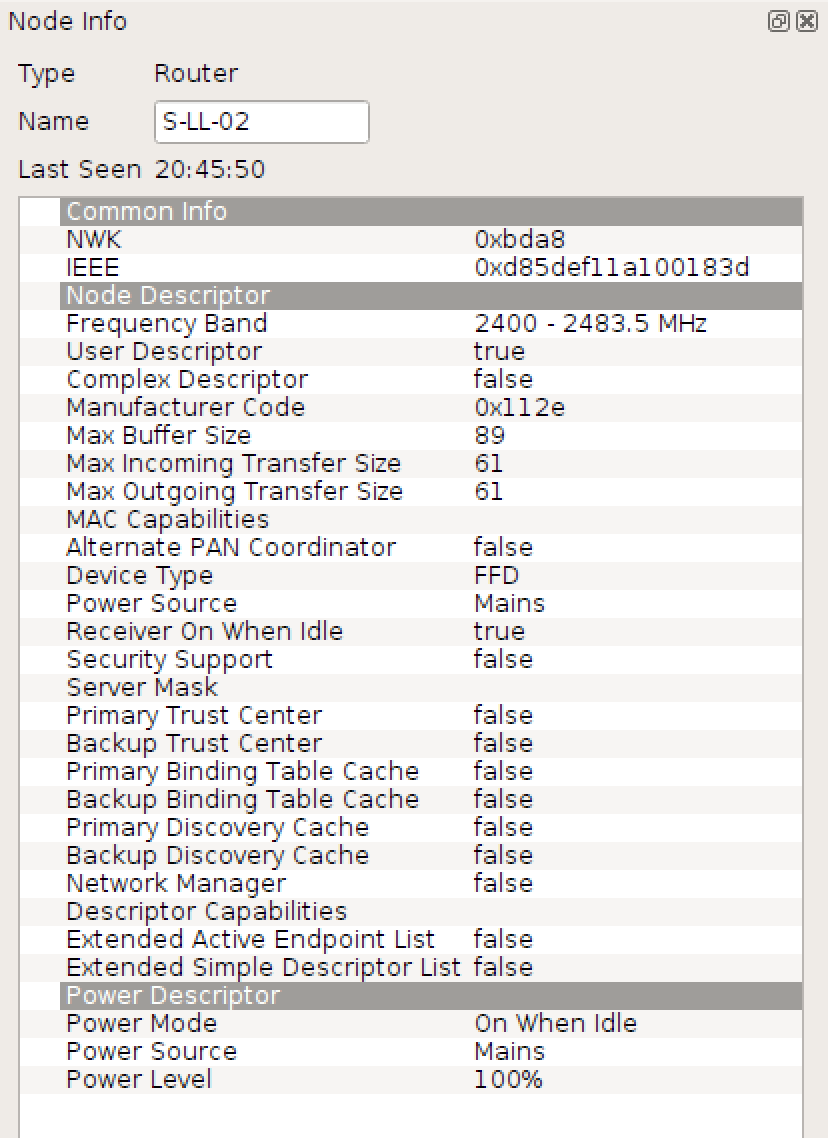
Here's a couple of screenshots:
OTAU Update Tab:
OTAU File Tab:
And from the Node Info tab:
And finally the Attributes:
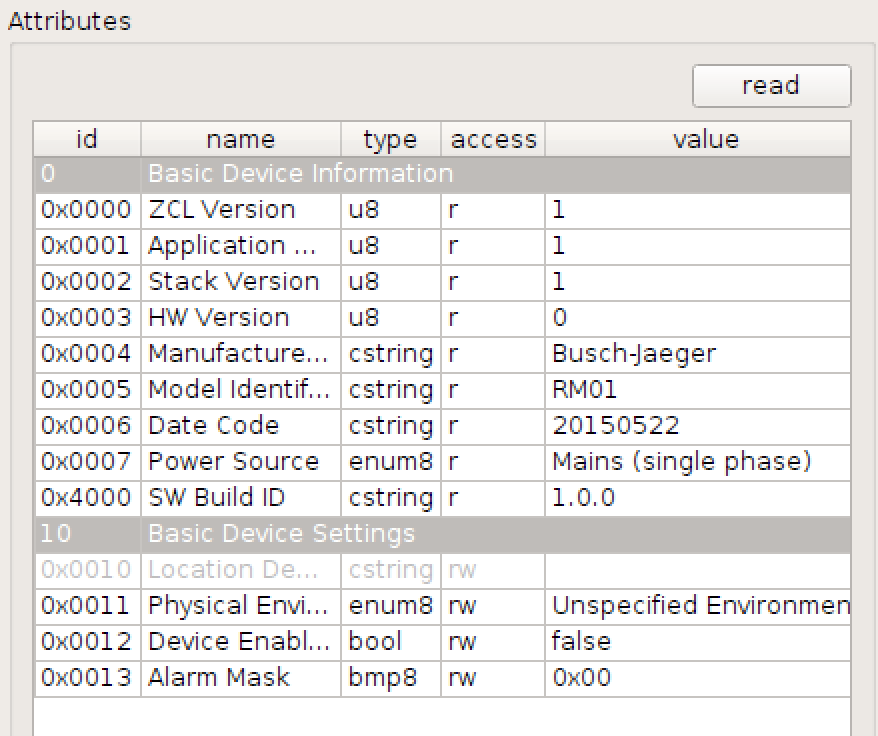
grover
on 7 Dec 2017
The Version and Image fields are still 0x0000... which means the switch hasn't requested a image yet (these fields are taken from the request). Not sure why that it so, have you tried a power cycle of the switch? Normally after Update or Query button is pressed the switch should request an image and show its current version in the table.
For now please just test with the mains powered switch.
manup
on 7 Dec 2017
Ok, I've power cycled the switch... still no dice. Version and Image are still all zero. No changes :(
grover
on 7 Dec 2017
Little update on this: I've contacted the BJ and have now the 1.0 firmware for testing. For some reason my switch doesn't downgrade from 1.1 to 1.0, the downgrade is transferred to 100% but not flashed to mcu in the end.
I'll ask BJ if they have any ideas to this matter. There would be another test, but I'd rather avoid to try it in real setups: changing RaspBee mac address to one with BJ prefix for the update only.
manup
on 9 Dec 2017
@manup Thanks for investing so much time into this. If it helps I'm not that far away from you guys. I could pull out one of these wall switches and provide it to you for testing.
grover
on 9 Dec 2017
Hi, have no new info from BJ yet, if you can provide a mains powered one with version 1.0 that would be great. There is only one problem, not sure if I can figure this out within this year, going to travel starting next week – End of January and don't have access to hardware (other than travel ConBee).
manup
on 13 Dec 2017
No worries. Let’s revisit this in Feb then.
Enjoy your travels and happy holidays.
grover
on 13 Dec 2017
hej, i'm jumping on this wagon as, my issue is somewhat similar, i have a couple of BJ switches (mains and battery) which are recognised by deconz (but only as 1-channel switches, tested with 2 and 4 channel devices)
they are also running a fairly old firmware 1.0.0 and 1.0.4 but i'm not even able to assign any scenes to them. @grover can you maybe provide me with the firmware files?
 kangguru
on 17 Mar 2018
kangguru
on 17 Mar 2018
The issue is currently under investigation BJ provided us OTA update usb dongles to figure out what is happening and how the updates can be installed via deCONZ. It will take a while since next week not much will happen due the light and building exhibition. I'll keep you informed as soon as there is progress on the topic.
manup
on 17 Mar 2018
@kangguru Hi, you can get them by asking BJ support. I can't pass them on freely as I don't have the necessary rights for distribution. Given that ask them for the update tool and extract the zigbee files from the update.
Would be nice to have a central repository of updates for all manufacturers, but I digress.
Sorry.
@manup Great to read that you've finally managed to get the dongles. I still didn't get one even after asking multiple times and them promising to send them "immediately." Not exactly what I expected. Thank you, that you're still on the issue.
grover
on 21 Mar 2018
@kangguru : in case you did not get the FW files yet, in this topic https://community.openhab.org/t/busch-jaeger-zigbee-light-link-control-element-stops-working/27676/5 there is a post where you can download the update tool, after installation you can grab the firmware files from the installation directory.
I have been trying to get the update stick for some time now without succes. For this reason I bought the raspbee so I could use the deCONZ tool to perform the update instead. (And maybe do other cool stuff with it) I have however the same issue that the switch (mains, version 1.0.0) is not requesting the update. I'm running raspbee fw deCONZ_Rpi_0x261e0500 and deCONZ 2.05.15.
@manup : If you need testing of some sort let me know.
 otto24
on 24 Mar 2018
otto24
on 24 Mar 2018
Another update, I read @manup comment about the mac change so I though I give that a try and I thought it worked, it started transferring the file.
To do this go into deCONZ > edit > network settings
select custom mac and enter for example 0xd85def11a1000001
enter same value in TC address (not sure if this is needed)
Use sudo GCFFlasher -r to reset the module once, restart deCONZ.
Select switch and assign fw file in OTAU plugin and power cycle switch (not sure if this is needed either).
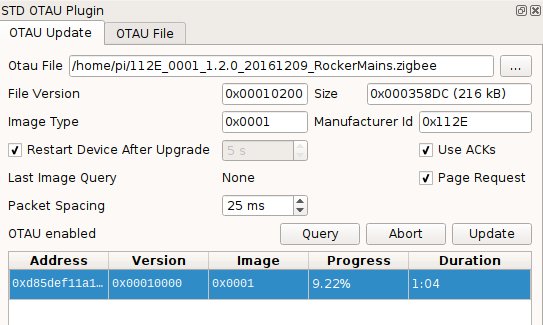
However once file is transferred the switch does not apply the file and remains at 1.0.0 level. I tried this with two different switches multiple times, with different version of resetting the switch, without succes.
otto24
on 24 Mar 2018
I was surprised to see that this worked for you. @manup has one of my switches and I hope that he and his team are able to figure this riddle out.
grover
on 26 Mar 2018
@grover A little update on the matter, your switch could be updated to 1.2 with the BJ USB update stick. Most of my other BJ test switches won't accept the update and start with old firmware after power cycle. This happens with original BJ update stick and also deCONZ OTA plugin.
My test devices are quite old samples and I've been told that these very early devices might have a soldering issue and the flash memory might have lose connectors now (carrying the switches often between home and office surely worsened the problem).
I'll make a few last tests with your device and deCONZ OTA update to verify that all works, so the switch get back to you this week :)
manup
on 27 Mar 2018
Do you need another one of mine in exchange or can I test the deCONZ update myself?
grover
on 27 Mar 2018
Do you need another one of mine in exchange or can I test the deCONZ update myself?
Sorry for the delay my down/-upgrade test via deCONZ didn't work yet :/ I still have the issue that after the update the switch reboots with the old firmware. I need to compare the sniffer logs of the BJ usb stick and deCONZ in more detail.
To update your other switches you can select a switch (easiest mains powered) in the OTA list and assign the rocker mains powered 1.2.0 .zigbee file, then press update. Normally the update should start within 30 seconds afterwards. Requires at least deCONZ version 2.05.16 with firmware version 0x261F0500.
manup
on 30 Mar 2018
Hey @manup!
I finally got around to try it. I upgraded to the deCONZ 2.05.19, upgraded the firmware and followed your steps. The OTAU plugin says queued and nothing has happened for the last couple of minutes.
I then proceeded and applied @otto24's suggestions, which got an update to start, but that got stuck at 0.03%.
After a downgrade to 2.05.16 with the same firmware the update does start and progresses. It is slow, but it is downloading on one of the switches. Is 5.5% in 13 minutes expected?
grover
on 8 Apr 2018
It got stuck at 39.09%. No movement at all for about an hour.
grover
on 9 Apr 2018
Hello @grover, for me the update took about 5-8 minutes. Maybe the distance between your switch and raspbee is too large? Mine were 2 and 4 meters away.
otto24
on 9 Apr 2018
I moved the Raspberry closer to the switch - approx. 1 meter away. It got beyond 39.09%, but took almost 30mins to get there... Anyhow, let's see if it finishes.
grover
on 9 Apr 2018
The update process seems to have completed, but the firmware is still at 1.0.0 - I'm trying another switch right now and will report back.
One weirdness still: The update got "stuck" twice, pressing the Query button allowed it to continue where it left off, but it still feels weird. After restarting deCONZ, it immediately tried to update the switch again even though I didn't set the OTAU file or anything else. How is this happening?
grover
on 9 Apr 2018
I’ve now let it run through twice - this time it was a lot quicker: about 26mins for each run. After the OTAU Plugin completed on the first run it started updating again after maybe two minutes. The same happened after the second run.
The switch remains on 1.0.0 and the update process keeps looping endlessly. I’ve aborted the third run.
Reading the basic cluster reveals it still is on 1.0.0 even after the two runs. Pulling the switch plate off for 10s didn’t help, it still booted firmware 1.0.0.
grover
on 9 Apr 2018
I just tried it with a 2-gang dimmer switch - same story. Update takes about 25mins per run, two runs and it's still on 1.0.0.
grover
on 9 Apr 2018
Hi @grover
In my setup the update loop also happens for some unknown reason, by comparing the logs of the original BJ update stick and deCONZ OTA server I couldn't spot a related difference yet. Hopefully more tests will shed some light on the cause.
I've also changed some bits in the deCONZ OTA server to exactly match the BJ messages (message length, timing ...) still no luck and the OTA loop stays.
I'm not sure if it is a software issue after all, since I even get OTA loops with the original BJ update stick. I've been told that early switch charges might had too weak soldered data flash. But then I wonder why I could update your switch to 1.2.0 but can't get it to downgrade again.
You should receive a update stick shortly would be cool if you can test if the update works with it, or like in my tests it also loops.
As for the update speed, it depends if the device is battery or mains powered, usually the mains powered update takes under 10 minutes. If it got stuck it's best to just wait since the devices will query again on their own again several times. The OTA state machines on these devices are beasts :)
manup
on 13 Apr 2018
All of the switches I tried were mains powered. I suppose there’s some sort of interference that slows it down. I’m on Zigbee channel 25.
Anyhow I’ll repeat the process for the other three I currently have and the four I’ll receive soonish.
Thanks!
grover
on 13 Apr 2018
Hello,
Since my 2 switches do not update either I doubt the soldering is the issue for all of them. Mine also where never carried around. I bought them beginning of 2016. Anyway to check if this is an older batch?
otto24
on 13 Apr 2018
I am having a similar issue.
I have a battery powered BJ wall-switch (1 rocker) which after pairing does not send keypress commands or is able to control any of the assigned lights. When pressing the switch it just blinks 6 times like its not yet configured.
I have tried updating using the above mentioned process and the file (112E_0002_1.2.0_20161222_RockerBatt.zigbee) ripped from the installer and although it finished the switch is still on 1.0.4.
 rogro82
on 27 Apr 2018
rogro82
on 27 Apr 2018
An update: After using a BJ update stick I was able to update all my switches to 1.2.0 and I was able to receive the button events that I expected.
However today a circuit breaker kicked in, which powered off the raspberry running deCONZ. After powering the raspberry back up I'm no longer getting button events from the switches. They weren't affected and were powered the entire time.
Looks like a binding issue maybe? Can I setup those bindings manually?
grover
on 11 May 2018
Another update: Apparently the bindings recovered over night. Everything's working as it is supposed to on 1.2.0.
grover
on 13 May 2018
Cool glad it worked out. The bindings are stored on the switches itself and also should survive a power-cycle. I figure the RaspBee needed to rebuild the routing table which might take some time after power-cycle.
manup
on 13 May 2018
Hi, I still have the problem with update-loop and my switches are still on 1.0.0. I have got 2 wall-switches (8- and 4-button mains powered) and i did all the same tests discribed by grover with same result. The update process took about 15 min. in different distances ( 0.5 - 5 m ). I dont believe in soldering issue at this point. Are there any further investigations in updating BJ wall-switches to version 1.2.0 ?
 Henner3
on 13 May 2018
Henner3
on 13 May 2018
Ok, I understand. The group of people beeing affected (Wall Switches on 1.0.0) ist very small and it is not economical to put hours of investigation in this item. But could anybody provide me an Update-Stick for Updating my two Wall Switches to 1.2.0 ? I woukd support any further investigations in this item, if anybody is interested in.
Henner3
on 12 Jul 2018
This issue has been automatically marked as stale because it has not had recent activity. It will be closed if no further activity occurs. Thank you for your contributions.
![stale[bot] picture](https://avatars3.githubusercontent.com/in/1724?v=4&s=40) stale[bot]
on 23 Nov 2018
stale[bot]
on 23 Nov 2018
This issue has been automatically marked as stale because it has not had recent activity. It will be closed if no further activity occurs. Thank you for your contributions.
stale[bot]
on 23 Mar 2019
Related issues
 joggs
·
3Comments
joggs
·
3Comments
 jan666
·
4Comments
jan666
·
4Comments
 mvasicek
·
4Comments
mvasicek
·
4Comments
 7wells
·
4Comments
7wells
·
4Comments
 lynix
·
4Comments
lynix
·
4Comments