Deconz-rest-plugin: Can i OTA upgrade IKEA lights from deConz ?
Hi,
Time has come where IKEA did an firmware upgrade of the lights. I can see newer version now. Can i upgrade with deConz ? If so how ? Just download the http://fw.ota.homesmart.ikea.net/Tradfri_OTA_release_signed_2017_07_12_161101/bin/159694-TRADFRI-bulb-ws-gu10-1.2.217.ota.ota.signed then somehow use OTAU on the cluster ? How do i choose the image ? I am reluctant trying until someone states this does not brick my device.
 donnib
All 102 comments
The IKEA files are not embedded in ZigBee standard OTA format container so it won't work out of the box, maybe it's possible with the deCONZ OTAU File Editor and the JSON info from IKEA to create the files.
 manup
on 8 Aug 2017
manup
on 8 Aug 2017
The firmware files probably need to be packaged into OTA files before deCONZ can use them, see https://github.com/dresden-elektronik/deconz-rest-plugin/issues/23#issuecomment-303816290.
Once it's online (and downloadable like the current version) I'll give it a go for an update test.
@manup, can we take you up on your promise?
 ebaauw
on 8 Aug 2017
ebaauw
on 8 Aug 2017
@manup, can we take you up on your promise?
Yes I'll check it out during the next days :)
manup
on 8 Aug 2017
That would be great since the release notes states following ZigBee interoperability with 3rd party devices improved. whatever that means and for me i am interested in Stability improvements which might solve my problem with the remote being really bad at detecting push on the button.
donnib
on 8 Aug 2017
Yeah, one would hope that the lights become ZLL compliant with the firmware update, including mesh routing (see https://github.com/dresden-elektronik/deconz-rest-plugin/issues/33#issuecomment-318813819).
ebaauw
on 8 Aug 2017
In the meantime can i upgrade with IKEA Hub or i have to remove the items from deConz first (in that case i probably won't do it) ?
donnib
on 8 Aug 2017
You would have to pair a light with the IKEA Hub before it can upgrade its firmware. In this case, I would remove the light from deCONZ before resetting it (to pair it with the IKEA hub), since I expect it to have a different fingerprint after the upgrade. Then reset the light again, and pair it with deCONZ.
I would love to see what the upgraded light looks like in deCONZ (endpoints, clusters). If you have the time and courage to upgrade at least one light, I'd really appreciate a screenshot.
ebaauw
on 8 Aug 2017
I would love to see what the upgraded light looks like in deCONZ (endpoints, clusters). If you have the time and courage to upgrade at least one light, I'd really appreciate a screenshot.
I have MANY lights that i haven't used yet. I'll take one and probably a remote to upgrade. I am still learning the terminology so where do i find endpoints ?
Similar to this you want to see ? If not what maybe an example would help then i'll provide tonight when i get the chance to do it.

donnib
on 8 Aug 2017
Update starts and is running, lets see if it goes through ..
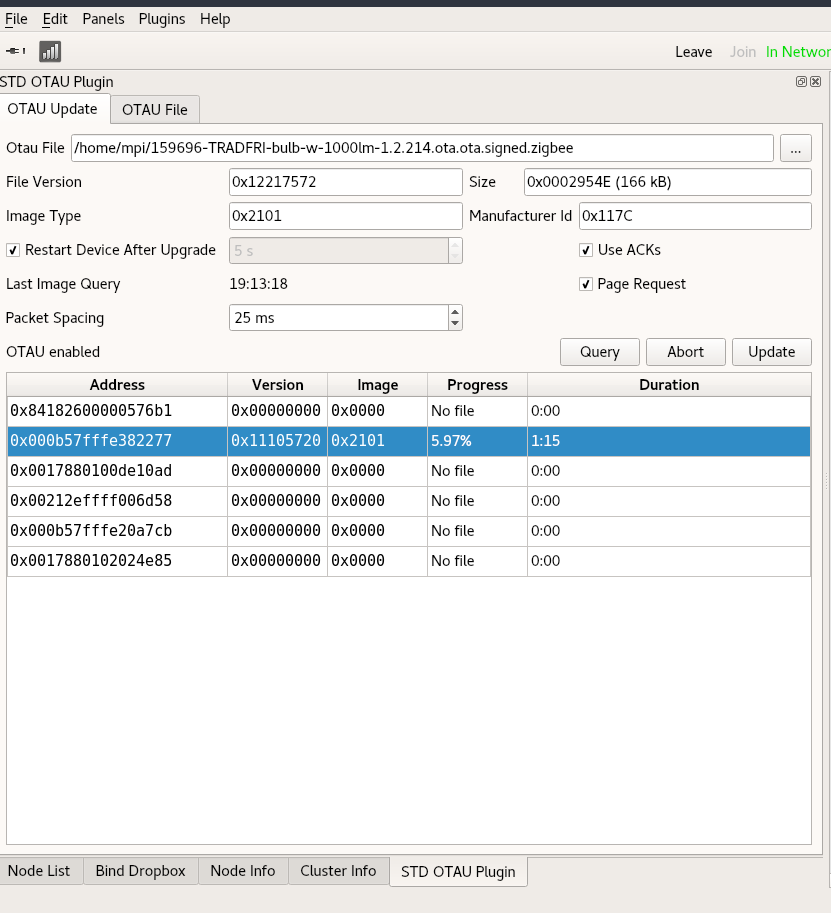
manup
on 8 Aug 2017
Fingers crossed...
ebaauw
on 8 Aug 2017
Nope, update did go through (20 min) but in the upgrade end request the bulb asks for more data.

That means the IKEA update with their gateway must be sniffed in order to figure out what's the difference.
manup
on 8 Aug 2017
Pity.
I'm afraid I won't be able to help here, as I don't have an IKEA Hub. Not yet sure if I want to invest in one having just one IKEA bulb and one remote.
ebaauw
on 8 Aug 2017
That's no problem I have on available, will take a while though, maybe as weekend hacking :)
manup
on 8 Aug 2017
I am trying to update as we speak but the app just hangs on Update pending, tried repairing, killing the app, rebooted the ikea hub but still pending.
UPDATE: the bulb, updated, now waiting for the remote
donnib
on 8 Aug 2017
On the Hue developers forum, they did manage to upgrade the firmware (I assume through the IKEA Hub). With the new firmware, the Trådfri light connects to the Hue bridge, so it must indeed have a ZLL endpoint. See https://developers.meethue.com/content/philips-hue-and-ikea-trådfri?page=2#comment-3701
ebaauw
on 8 Aug 2017
That's good news, i am still waiting for the remote to update, the feedback is really bad in the app just stating Update pending...... and i am waiting.....and waiting
donnib
on 8 Aug 2017
The remote update never succeeded
donnib
on 9 Aug 2017
Updating remotes can be tricky, these devices sleep most of the time and the little batteries usually survive only one update and must be fully charged before.
manup
on 9 Aug 2017
@manup wow yeah maybe that was the case, i suceeded in the end unfortunately the problems with the remote are the same, they suck big time. They are actually not usable in the way they work. I did upgrade all those 10 GU10 spots that i have problems with so now to try pairing them again with deconz.
donnib
on 9 Aug 2017
I would love to see what the upgraded light looks like in deCONZ (endpoints, clusters). If you have the time and courage to upgrade at least one light, I'd really appreciate a screenshot.
@ebaauw Is this what you want to see ? If not let me know what you want to see on the upgraded lamps.

donnib
on 9 Aug 2017
Yes, thanks! It confirms that the light now has a ZLL endpoint instead of ZHA. No changes to the clusters, by the looks of it.
ebaauw
on 9 Aug 2017
Digging and sniffing deeper into IKEA gateway OTA updates. I've created a new plugin which extracts OTA data from the gateway directly via ZigBee. This is kinda nice because now every OTA update firmware can be extracted from any gateway. Works so far with IKEA but should work with Philips and OSRAM gateway too. I'm afraid it's not legal to redistribute the files though .
I was wrong about the public IKEA update files, they do indeed contain the standard ZigBee OTA format files, but they are packed into a further container format (starting with bytes NGIS, whatever this is...).
Next I'll need to test if the extracted OTA part will get accepted by the devices, from what I've seen so far it should work.
manup
on 9 Aug 2017
I've created a new plugin which extracts OTA data from the gateway directly via ZigBee.
I assume the RaspBee needs to join the network created by the gateway, before the firmware can be extracted? I've done so successfully for the Philips Hue bridge and the OSRAM Lightify Gateway (using the ZLL link key), but I haven't been able to make the RaspBee join the network by the innr gateway (tried both the ZLL and ZHA link keys). Then again, their lights reportedly aren't firmware upgradable in the first place (although the UC 110 and PL 110 do offer an OTAU cluster). Maybe I should spend a rainy day sniffing while an innr light joins the innr gateway...
This is kinda nice because now every OTA update firmware can be extracted from any gateway.
Cool. I've got some Philips and one OSRAM light on older firmware that their respective bridges/gateways wouldn't update for some reason. Neither app provides a means to start a firmware upgrade of the light manually.
On the other hand, one would still need a gateway for each vendor. I hope we can also use the files published by vendors (like IKEA).
I'm afraid it's not legal to _redistribute_ the files though .
I wouldn't ask for that. I'm happy to exact them from the bridges/gateways myself.
ebaauw
on 9 Aug 2017
Good news: OTA update works with official IKEA files now, will be available in the next version. Hopefully IKEA keeps the files public in future.

Cool. I've got some Philips and one OSRAM light on older firmware that their respective bridges/gateways wouldn't update for some reason. Neither app provides a means to start a firmware upgrade of the light manually.
If the original bridges won't update the lights, it might be that the firmware can't be extracted at all.
manup
on 10 Aug 2017
@manup that's cool, what does one have to do ? Manually get the file then what ?
donnib
on 10 Aug 2017
Cool. I've got some Philips and one OSRAM light on older firmware that their respective bridges/gateways wouldn't update for some reason. Neither app provides a means to start a firmware upgrade of the light manually.
If the original bridges won't update the lights, it might be that the firmware can't be extracted at all.
I stand corrected, all my Philips lights (of the same type) are now on the same firmware, after the latest Philips firmware update. I do have two ORSAM E14 bulbs (Classic B40 TW - LIGHTIFY) with the same Date Code (20140331CNEF****), one on V1.04.12, and one on V1.03.20. I upgraded at least the one with the higher firmware from the Lightify gateway. This is also the version reported by the Lightify app under _System Update_. Maybe I'm too impatient and should have kept the lights connected to the Lightify gateway for a couple of days? Normally they're connected to deCONZ; I only had them connected to the Lightify gateway for a couple of hours the other day, while sniffing setting the power-on defaults through the Lightly app (see #102).
ebaauw
on 10 Aug 2017
Good news: OTA update works with official IKEA files now, will be available in the next version.
Good news indeed. To celebrate, I've ordered a Xiaomi Magic Cube as well... at less than a third of the price of the Trådfri hub.
ebaauw
on 10 Aug 2017
@manup that's cool, what does one have to do ? Manually get the file then what ?
I'll write a small step-by-step guide tomorrow, it's pretty easy, OTA files will be downloaded automatically from a small python script.
manup
on 10 Aug 2017
I do have two ORSAM E14 bulbs (Classic B40 TW - LIGHTIFY) with the same Date Code (20140331CNEF**), one on V1.04.12, and one on V1.03.20. I upgraded at least the one with the higher firmware from the Lightify gateway.
I'll test this too soon, have a LIGHTIFY home gateway here.
manup
on 10 Aug 2017
I'll write a small step-by-step guide tomorrow, it's pretty easy, OTA files will be downloaded automatically from a small python script.
Terrific, looking forward to that, resetting lamps and using the IKEA gateway is a pain. I've done it on few lights but this would make my life so much easier.
donnib
on 10 Aug 2017
New version is online, more details in the release notes:
https://github.com/dresden-elektronik/deconz-rest-plugin/releases/tag/V2_04_64
manup
on 11 Aug 2017
@manup cool stuff, can't wait !!!
donnib
on 11 Aug 2017
@manup my web interface does not say anything about an update to 0x26120500, i pulled latest changes from master and build them webinterface says 2.04.64 but deConz reports 2.04.63
donnib
on 11 Aug 2017
Ah I see, since you have pulled changes for 2.04.64 the updater won't trigger (it doesn't know that core is still on 2.04.63).
Please update the core manually:
http://www.dresden-elektronik.de/rpi/deconz/beta/deconz-2.04.64-qt5.deb
$ sudo dpkg -i deconz-2.04.64-qt5.deb
It should then show the Update Firmware button in the webapp.
manup
on 11 Aug 2017
.....something is definitely happening now :)

About upgrade nothing is happening in the plugin, i don't see any progress or anything starting to upgrade, have to wait a while ? I did run the python file and it did get the files then i did a restart of deconz. Anything else needs to be done ? I do also have teh OTAU server enabled in the webinterface.
UPDATE: someting happened when i clicked Query in the OTAU plugin then it started to update on of the lights. Maybe it would have started by itself ?
donnib
on 11 Aug 2017
Jep that looks better :)
The lights will ask the gateway from time to time if there is an update available.
You can accelerate that by power off/on a lights (mains power) or by select a light in the OTA plugin and click query button.
manup
on 11 Aug 2017
You can accelerate that by power off/on a lights (mains power) or by select a light in the OTA plugin and click query button.
Yeah exactly what i noticed, can the gateway update only one at a time ? I have tried Query on multiple lights while one device is updating already that i know needs an update but nothing happens.
donnib
on 11 Aug 2017
OK, installed v2.4.64, had some issues updating the RaspBee firmware, but after power cycling the Raspberry Pi, the firmware upgrade went through allright.
I ran the Python script. In ~/otau, I now have ten .ota.ota.signed files, which have been unpacked/copied into ten 117C-xxxx-yyyyyyyy.zigbee files (I assume that's the manufacturer id (IKEA), image code, and file version?). Feeling lucky, I downloaded the latest firmware for my ubisys D1 and placed it in ~/otau. It looks like it's been copied as well, to 10F2-7B01-010E015E.zigbee. There's also a 1014-0005-14010400.zigbee file. Philips? How on earth did it get there?
Ik looks like the OTAU plugin is visiting all nodes, very, very slowly, populating the _Version_ and _Image_ fields, at least for the Philips nodes. The OSRAM, IKEA and ubisys nodes still show all zeroes for these field, even though _Last Query Time_ has been updated. All node continue to show "No file" under _Progress_.
Do I need to select the OTAU files manually and press _Update_? If so, how do I match the right file to the right node? Or should I wait for the _Image_ be populated? Should I specify the mmmm-xxxx-yyyyyyyy.zigbee file, or is either file OK?
I also see that the _Cluster Info_ shows info on the OTAU cluster. Is that new? I don't think I've seen that before.
Some Philips lights show an innr PL 110/UC 110 control box as _Upgrade server_. It has both a server and a client OTAU cluster (see https://github.com/ebaauw/homebridge-hue/wiki/ZigBee-Devices#innr-control-board), but the client cluster doesn't support any of the attributes - guess it's not upgradeable after all.
The OSRAM light on the older firmware shows the Hue bridge as _Upgrade server_; the other OSRAM light shows the OSRAM gateway. Both OSRAMs report the same current file version. Is that the version uploaded to the light or the version seen on the gateway?
ebaauw
on 11 Aug 2017
Yes one at a time, takes 20-25 minutes per light.
Note The light must be selected in the table in OTA plugin (not the node view).
After click on query they should respond with their current firmware immediately, and if a new version is available upload should start after a few seconds.

manup
on 11 Aug 2017
Ok well then it behaves correctly, i just have to be patient and wait for it to be finished before next can start.
donnib
on 11 Aug 2017
There's also a 1014-0005-14010400.zigbee file. Philips? How on earth did it get there?
It was there for a long time I guess, that's the update files from dresden elektronik FLS. These were downloaded by an ancient OTAU download script from deCONZ, I will remove that soon since it doesn't make sense to download stuff likely not needed.
Ik looks like the OTAU plugin is visiting all nodes, very, very slowly, populating the Version and Image fields, at least for the Philips nodes. The OSRAM, IKEA and ubisys nodes still show all zeroes for these field, even though Last Query Time has been updated. All node continue to show "No file" under Progress.
It's the other way around, lights are asking the gateway for updates (often after powerup or after some hours). For some specific devices deCONZ will also automatically query the devices.
You can manually speed that up by select a device in the table and click query.
Do I need to select the OTAU files manually and press Update? If so, how do I match the right file to the right node? Or should I wait for the Image be populated? Should I specify the mmmm-xxxx-yyyyyyyy.zigbee file, or is either file OK?
deCONZ will select the newest file automatically (if available), there new is determined by the filename, which by the way is also part of the ZigBee OTA standard.
I also see that the Cluster Info shows info on the OTAU cluster. Is that new? I don't think I've seen that before.
Its been there for a while, the OTA client cluster (gray) was extended by a few attributes recently.
The OSRAM light on the older firmware shows the Hue bridge as Upgrade server; the other OSRAM light shows the OSRAM gateway. Both OSRAMs report the same current file version. Is that the version uploaded to the light or the version seen on the gateway?
It's the version of the light. The devices will pick the OTA server on their own after power up, some are smart and try multiple servers for updates... some. ;)
manup
on 11 Aug 2017
The first light has completed, i tried Query next lamp but nothing happens, something is funky.....don't know what.
donnib
on 11 Aug 2017
My advice is patience ;) or better just let OTA run in the background, it will start and complete automatically at some time. We update large networks with up to 160 nodes very often, it's supposed to just run in the background.
manup
on 11 Aug 2017
@manup sure will do, i'll go to bed now and see tomorrow what the version of the lights is, it should be the new one. will report tomorrow.
donnib
on 11 Aug 2017
After click on query they should respond with their current firmware immediately
You can manually speed that up by select a device in the table and click query.
Doesn't seem to do anything. Or are some lights supposed to report all zeroes?
ebaauw
on 12 Aug 2017
Have you selected the light in the OTA table view? Its row needs to be selected there.
manup
on 12 Aug 2017
Yes I have. Maybe it's because they're still looking at the wrong _Update server_?
Another question: how do I extract the firmware files from my OSRAM gateway?
ebaauw
on 12 Aug 2017
So it seems that some updates have been done but the node list version is not updated. If i look at the lights attribute the version seems new. Also in the OTA list the light also shows the new version. The node list would be nice to have updated sine it's a good overview of the nodes and their version.
donnib
on 12 Aug 2017
My Trådfri bulb finally updated. Indeed the _Node List_ hasn't been updated. The update removed the weird character from the model identifier.
The update of the ubisys seems to stall at 0.09%. Also, the _Duration_ isn't updated and stalls at 0:26. There's no direct line between the ubisys and the RaspBee, would I need to move them closer?
ebaauw
on 12 Aug 2017
Powered down the innr UC 110 and PL 110. Restarted deCONZ. The OTA table now shows the _Version_ and _Image_ on clicking _Query_. Except for a few Philips nodes - I suspect these are the Hue dimmer switches - and the Trådfri remote.
ebaauw
on 12 Aug 2017
So it seems that some updates have been done but the node list version is not updated. If i look at the lights attribute the version seems new. Also in the OTA list the light also shows the new version. The node list would be nice to have updated sine it's a good overview of the nodes and their version.
Double checked, will be fixed soon.
The update of the ubisys seems to stall at 0.09%. Also, the Duration isn't updated and stalls at 0:26. There's no direct line between the ubisys and the RaspBee, would I need to move them closer?
I remember there were some issues updating ubisys devices, first packet or so was not that the devices expected, I'll have to check that. It might take a while the ubisys device integration is scheduled behind app release. Usually they have very high quality firmware, so the update should not be too urgent :)
Powered down the innr UC 110 and PL 110. Restarted deCONZ. The OTA table now shows the Version and Image on clicking Query. Except for a few Philips nodes - I suspect these are the Hue dimmer switches - and the Trådfri remote.
Yes end devices sleep most of the time and won't respond immediately, for switches you can press a button after clicking query, this should wake them up so they can respond.
Note updating battery devices is a though thing and may drain the battery to nearly empty, because of this IKEA end devices won't update automatically. After firmware is selected by deCONZ, the Update button must be pressed to allow the update to start.
manup
on 12 Aug 2017
@donnib, what's the _Model identifier_ of the IKEA GU.10 spot? and of the E14 spot? I'd like to whitelist them for my homebridge plugin.
If you have one of the IKEA motion sensors already paired, could you post the results of a GET of that sensor as well? Thanks.
ebaauw
on 12 Aug 2017
Setup deCONZ v2.04.64 with the ConBee on my test Raspberry Pi and paired only the Trådfri remote. It's updating, but it took like 1:50 to get to 1%. Fingers crossed...
__Edit__: Still counting: 33.33% at 57:33. At least it a good durability test for the battery ;-)
ebaauw
on 12 Aug 2017
Edit: Still counting: 33.33% at 57:33. At least it a good durability test for the battery ;-)
Did it work? Would be interesting if they changed the commands. Mine is still on the old firmware.
manup
on 12 Aug 2017
96.41% at 166:01
_Edit_: Done at 172:10.

ebaauw
on 12 Aug 2017
May I swoop in:
IKEA GU10
{
        "manufacturer": "IKEA of Sweden",
        "modelid": "TRADFRI bulb GU10 WS 400lm",
        "type": "Color temperature light",
        "uniqueid": "00:0b:57:ff:fe:xx:xx:xx-01",
        ....
}
IKEA motion sensor
{
        "config": {
            "duration": 60,
            "group": "31133",
            "on": true,
            "reachable": true
        },
        "manufacturername": "IKEA of Sweden",
        "modelid": "TRADFRI motion sensor",
        "type": "ZHAPresence",
        "uniqueid": "00:0b:57:ff:fe:xx:xx:xx-01",
        ...
    }
Thanks, @manup.
Did the IKEA motion sensor create the group or did the deCONZ REST API plugin? config.duration is in seconds? And can it be updated from the API?
ebaauw
on 12 Aug 2017
Did the IKEA motion sensor create the group or did the deCONZ REST API plugin? Duration is in seconds? And can it be updated from the API?
The sensor has it's own group to which it sends on with timed off commands, similar to the remote. deCONZ will just pick up the group id, it's fixed and can't be changed. The duration is set by the API, I need to implement something which extracts this information from the sensor commands. For now deconz will just turn presence to false if duration is passed and no new presence was received in the meantime.
For my sensor, I haven't attached any lights to the sensor group but instead I use rules to control a normal light group based on sensor presence.
manup
on 12 Aug 2017
Would be interesting if they changed the commands.
I don't think they have, I still receive the same buttonevents:
- 1002 for _On/Off_ press;
- 2002 for _DimUp_ press; 2001/2003 for _DimUp_ hold/release;
- 3002 for _DimDown_ press; 3001/3003 for _DimDown_ hold/release;
- 4002 for _Previous_ press; 4001/4003 for _Previous_ hold/release;
- 5002 for _Next_ press; 5001/5003 for _Next_ hold/release.
__Edit__ But I do see five 4003 or 5003 buttonevents, two seconds apart, when releasing the _Previous_ or _Next_ button. I'd better reflash the ConBee for some more sniffing...
Sat Aug 12 2017 15:09:00: /sensors/106/state: {"buttonevent":1002,"lastupdated":"2017-08-12T13:08:59"}
Sat Aug 12 2017 15:09:03: /sensors/106/state: {"buttonevent":2002,"lastupdated":"2017-08-12T13:09:03"}
Sat Aug 12 2017 15:09:06: /sensors/106/state: {"buttonevent":2001,"lastupdated":"2017-08-12T13:09:06"}
Sat Aug 12 2017 15:09:08: /sensors/106/state: {"buttonevent":2003,"lastupdated":"2017-08-12T13:09:08"}
Sat Aug 12 2017 15:09:14: /sensors/106/state: {"buttonevent":3002,"lastupdated":"2017-08-12T13:09:14"}
Sat Aug 12 2017 15:09:16: /sensors/106/state: {"buttonevent":3001,"lastupdated":"2017-08-12T13:09:16"}
Sat Aug 12 2017 15:09:18: /sensors/106/state: {"buttonevent":3003,"lastupdated":"2017-08-12T13:09:18"}
Sat Aug 12 2017 15:09:22: /sensors/106/state: {"buttonevent":4002,"lastupdated":"2017-08-12T13:09:22"}
Sat Aug 12 2017 15:09:25: /sensors/106/state: {"buttonevent":4001,"lastupdated":"2017-08-12T13:09:25"}
Sat Aug 12 2017 15:09:26: /sensors/106/state: {"buttonevent":4003,"lastupdated":"2017-08-12T13:09:26"}
Sat Aug 12 2017 15:09:28: /sensors/106/state: {"buttonevent":4003,"lastupdated":"2017-08-12T13:09:28"}
Sat Aug 12 2017 15:09:30: /sensors/106/state: {"buttonevent":4003,"lastupdated":"2017-08-12T13:09:30"}
Sat Aug 12 2017 15:09:32: /sensors/106/state: {"buttonevent":4003,"lastupdated":"2017-08-12T13:09:32"}
Sat Aug 12 2017 15:09:34: /sensors/106/state: {"buttonevent":4003,"lastupdated":"2017-08-12T13:09:34"}
Sat Aug 12 2017 15:09:37: /sensors/106/state: {"buttonevent":5002,"lastupdated":"2017-08-12T13:09:37"}
Sat Aug 12 2017 15:09:41: /sensors/106/state: {"buttonevent":5001,"lastupdated":"2017-08-12T13:09:41"}
Sat Aug 12 2017 15:09:43: /sensors/106/state: {"buttonevent":5003,"lastupdated":"2017-08-12T13:09:43"}
Sat Aug 12 2017 15:09:45: /sensors/106/state: {"buttonevent":5003,"lastupdated":"2017-08-12T13:09:45"}
Sat Aug 12 2017 15:09:47: /sensors/106/state: {"buttonevent":5003,"lastupdated":"2017-08-12T13:09:47"}
Sat Aug 12 2017 15:09:49: /sensors/106/state: {"buttonevent":5003,"lastupdated":"2017-08-12T13:09:49"}
Sat Aug 12 2017 15:09:51: /sensors/106/state: {"buttonevent":5003,"lastupdated":"2017-08-12T13:09:51"}
Something else has changed as well: now the lights in the group react to the _Previous_ and _Next_ buttons, stepping the ct in three levels, 250 -> 370 -> 454 -> 250 -> ... for _Previous_ and 250 -> 454 -> 370 -> 250 -> ... for _Next_. I never managed to get that working earlier. (Yes, I've disabled the rules deCONZ created for these buttons).
Sat Aug 12 2017 15:34:34: /sensors/106/state: {"buttonevent":5002,"lastupdated":"2017-08-12T13:34:33"}
Sat Aug 12 2017 15:34:34: /lights/101/state: {"ct":250}
Sat Aug 12 2017 15:34:36: /sensors/106/state: {"buttonevent":5002,"lastupdated":"2017-08-12T13:34:36"}
Sat Aug 12 2017 15:34:36: /lights/101/state: {"ct":454}
Sat Aug 12 2017 15:34:37: /sensors/106/state: {"buttonevent":5002,"lastupdated":"2017-08-12T13:34:37"}
Sat Aug 12 2017 15:34:37: /lights/101/state: {"ct":370}
Sat Aug 12 2017 15:34:39: /sensors/106/state: {"buttonevent":5002,"lastupdated":"2017-08-12T13:34:39"}
Sat Aug 12 2017 15:34:39: /lights/101/state: {"ct":250}
Sat Aug 12 2017 15:34:41: /sensors/106/state: {"buttonevent":4002,"lastupdated":"2017-08-12T13:34:41"}
Sat Aug 12 2017 15:34:41: /lights/101/state: {"ct":370}
Sat Aug 12 2017 15:34:42: /sensors/106/state: {"buttonevent":4002,"lastupdated":"2017-08-12T13:34:42"}
Sat Aug 12 2017 15:34:42: /lights/101/state: {"ct":454}
Sat Aug 12 2017 15:34:44: /sensors/106/state: {"buttonevent":4002,"lastupdated":"2017-08-12T13:34:43"}
Sat Aug 12 2017 15:34:44: /lights/101/state: {"ct":250}
Sat Aug 12 2017 15:34:49: /sensors/106/state: {"buttonevent":4002,"lastupdated":"2017-08-12T13:34:49"}
Sat Aug 12 2017 15:34:49: /lights/101/state: {"ct":370}
On the bulb, I had to re-create the attribute reporting config and the binding from 0x0300 to the RaspBee, but I haven't changed any binding or reporting config on the remote.
It also works when holding the buttons:
Sat Aug 12 2017 15:35:21: /sensors/106/state: {"buttonevent":5001,"lastupdated":"2017-08-12T13:35:20"}
Sat Aug 12 2017 15:35:21: /lights/101/state: {"ct":250}
Sat Aug 12 2017 15:35:21: /lights/101/state: {"ct":454}
Sat Aug 12 2017 15:35:22: /lights/101/state: {"ct":370}
Sat Aug 12 2017 15:35:24: /lights/101/state: {"ct":250}
Sat Aug 12 2017 15:35:25: /lights/101/state: {"ct":454}
Sat Aug 12 2017 15:35:27: /lights/101/state: {"ct":370}
Sat Aug 12 2017 15:35:28: /lights/101/state: {"ct":250}
Sat Aug 12 2017 15:35:29: /sensors/106/state: {"buttonevent":5003,"lastupdated":"2017-08-12T13:35:28"}
Sat Aug 12 2017 15:35:31: /sensors/106/state: {"buttonevent":5003,"lastupdated":"2017-08-12T13:35:30"}
Sat Aug 12 2017 15:35:32: /sensors/106/state: {"buttonevent":5003,"lastupdated":"2017-08-12T13:35:32"}
Sat Aug 12 2017 15:35:35: /sensors/106/state: {"buttonevent":5003,"lastupdated":"2017-08-12T13:35:34"}
Sat Aug 12 2017 15:35:36: /sensors/106/state: {"buttonevent":5003,"lastupdated":"2017-08-12T13:35:36"}
Sat Aug 12 2017 15:35:46: /sensors/106/state: {"buttonevent":4001,"lastupdated":"2017-08-12T13:35:46"}
Sat Aug 12 2017 15:35:46: /lights/101/state: {"ct":370}
Sat Aug 12 2017 15:35:47: /lights/101/state: {"ct":454}
Sat Aug 12 2017 15:35:48: /lights/101/state: {"ct":250}
Sat Aug 12 2017 15:35:50: /lights/101/state: {"ct":370}
Sat Aug 12 2017 15:35:51: /lights/101/state: {"ct":454}
Sat Aug 12 2017 15:35:52: /lights/101/state: {"ct":250}
Sat Aug 12 2017 15:35:53: /sensors/106/state: {"buttonevent":4003,"lastupdated":"2017-08-12T13:35:53"}
Sat Aug 12 2017 15:35:55: /sensors/106/state: {"buttonevent":4003,"lastupdated":"2017-08-12T13:35:55"}
Sat Aug 12 2017 15:35:57: /sensors/106/state: {"buttonevent":4003,"lastupdated":"2017-08-12T13:35:57"}
Sat Aug 12 2017 15:35:59: /sensors/106/state: {"buttonevent":4003,"lastupdated":"2017-08-12T13:35:59"}
Sat Aug 12 2017 15:36:01: /sensors/106/state: {"buttonevent":4003,"lastupdated":"2017-08-12T13:36:01"}
Ah interesting, it looks that they added ZCL standard commands to the buttons, so that also non IKEA lights change color temperature?
manup
on 12 Aug 2017
it looks that they added ZCL standard commands to the buttons
Keep on dreaming... :-(
I still see the same packets as before: commands 0x07, 0x08 and 0x09 to the 0x0005 cluster for press, hold, release. Only now, it sends five 0x09 commands. They look identical, except for the zclHeader.seqNo.
I think I can ignore the superfluous commands in deCONZ using a single line of code...
__Edit__ damn - two lines, see PR #110.
ebaauw
on 12 Aug 2017
Holding the _On/Off_ button for four seconds send a series of commands, presumably for pairing?
- Command 0x09 to the 0x0005 cluster;
- Move to level with on/off (0x04) with level 0xFE to the Level cluster (0x0008);
- Command 0x07 to the 0x0005 cluster with data[0] 0x02;
- Read attributes (0x00) to the Default cluster (0x0000).
ebaauw
on 12 Aug 2017
@ebaauw sorry for answering too late, seems like @manup answered ;)
what's the Model identifier of the IKEA GU.10 spot? and of the E14 spot? I'd like to whitelist them for my homebridge plugin.
for GU10
TRADFRI bulb GU10 WS 400lm
for E14
TRADFRI bulb E14 WS opal 400lm
donnib
on 12 Aug 2017
That's OK, @donnib. Would still appreciate the info on the E14 and any other lights, though.
ebaauw
on 12 Aug 2017
Hi, I bought my Raspbee when it came out but it was gathering dust in a drawer until this week.
Using the settings provided in one of the other discussions I successfully joined my existing Hue Zigbee network using deCONZ (latest 2.04.64 release). I've been following this discussion so today I bought 2 new TRÅDFRI GU10 bulbs. I got them to join the network and wanted to let them update using the OTAU Plugin. Using the Query button nothing happened, so I selected the 117C-2203-*.zigbee file and pressed Update. Now they show the state Queued and nothing happens. I moved the lamps to the same room as the Raspbee to improve the signal and now I can clearly see a direct green line between the Raspbee and the 2 lamps. Any ideas? I'm using the latest 0x26120500 firmware.
 alexsporn
on 12 Aug 2017
alexsporn
on 12 Aug 2017
Any ideas?
I'm not sure the RaspBee will run as OTAU server when configured as a router. Even so, I image that multiple OTAU servers (the Hue bridge and the RaspBee) on the same network won't help (I got far better response from the deCONZ STD OTAU Plugin panel after powering down the innr lights with an OTAU server cluster).
I would use a separate network for the firmware update (much as I did when updating the Trådfri remote): save the current deCONZ configuration (from _Settings_ in the web app); reset the RaspBee; configure it as a gateway for a new network (on a different channel than the Hue bridge); reset the IKEA bulbs and pair them with the RaspBee network to upgrade their firmware; restore the deCONZ gateway config - it should re-join the Hue bridge network; reset the IKEA bulb and pair them with the Hue bridge.
ebaauw
on 12 Aug 2017
@ebaauw thanks, I've been trying this for the last half hour without luck. After resetting the bulbs (using the 6x off/on, then later the touch-link reset) and letting them join my coordinator, the link to the bulb seem to stall. I cannot get any cluster info read and after a while both nodes turn red. The lamps are about 40cm from the Raspbee. Is there any deCONZ log that can be used to track down the problem? I've recreated the network, reset the lamps and added them multiple times now, but I cannot get any cluster info read.
Any recommended settings for the coordinator network?
alexsporn
on 12 Aug 2017
It seems that another reset and power-cycle fixed that :-/
Now I can read the cluster info. Let's see if I can get the firmware updated now
alexsporn
on 12 Aug 2017
Success! Thanks for the help :-) 
Let's see how well they work in my ZLL network.
alexsporn
on 13 Aug 2017
@manup how does one update a philips lamp or dim switch ? Where does one get the firmware files from ?
donnib
on 13 Aug 2017
now the lights in the group react to the Previous and Next buttons
Apparently the remote (re-)created a binding from the 0x0300 cluster to the group it created after the firmware upgrade.
I had disabled (not deleted!) the rules deCONZ created for the _Previous_ and _Next_ buttons, hoping deCONZ would take this hint, but it created new rules with the same names. I think deCONZ might have deleted the binding to the group?
Also the attribute reporting configuration for 0x0300/0x0007 on the Trådfri bulb was missing. I did power off the bulb - maybe the configuration is stored in volatile memory only?
ebaauw
on 13 Aug 2017
I had disabled (not deleted!) the rules deCONZ created for the Previous and Next buttons, hoping deCONZ would take this hint, but it created new rules with the same names. I think deCONZ might have deleted the binding to the group?
For the IKEA remote it will only create rules and since recently one binding for battery reporting.
Also the attribute reporting configuration for 0x0300/0x0007 on the Trådfri bulb was missing. I did power off the bulb - maybe the configuration is stored in volatile memory only?
Would be unusual but I haven't looked deeper into it, might be worth observation in the sniffer?
manup
on 13 Aug 2017
@manup how does one update a philips lamp or dim switch ? Where does one get the firmware files from ?
Right now Philips doesn't provide OTA files, unlike IKEA nothing can be downloaded from the internet directly. I hope to figure out a way to provide extracted firmware in a legal way in the near future , maybe encrypted.
manup
on 13 Aug 2017
@manup that's a shame but thanx for the answer
donnib
on 13 Aug 2017
I had disabled (not deleted!) the rules deCONZ created for the Previous and Next buttons, hoping deCONZ would take this hint, but it created new rules with the same names.
Changed that in 77ceda7.
Also the attribute reporting configuration for 0x0300/0x0007 on the Trådfri bulb was missing. I did power off the bulb - maybe the configuration is stored in volatile memory only?
Would be unusual but I haven't looked deeper into it, might be worth observation in the sniffer?
I didn't sniff, but just unplugged the Trådfri bulb. It loses the attribute reporting configuration the second its disconnected from power, not just for 0x0300/0x0007 but also for 0x0006/0x0000 and 0x0008/0x0000. My OSRAM bulbs retain the attribute reporting configuration when powered off.
Normally deCONZ should recreate the bindings regularly. With 471679a now also for 0x0300/0x0007. However, I find that deCONZ somehow "skips" some lights, for which the attribute reporting is not updated. When I restart deCONZ it includes them again, but now skips some other light.
Looking at the --dbg-info=2 output, I see multiple Force binding of attribute reporting for node messages for the sensor resources (Hue motion, Hue dimmer, Trådfri remote) and for 20 (out of 39) lights (irrespective of manufacturer: Philips, OSRAM, innr, unisys). For 8 lights I only see one such message, early after deCONZ has started. The attribute reporting configuration for these lights isn't set. For 11 lights, I don't see any of these messages.
I see multiple Force read attributes for node messages for 21 lights and only one for the other 18. Indeed, these 18 lights aren't polled (I checked powering the lights off and on using the 20th century wall switch - only the states for the lights with multiple messages are eventually updated to reflect the power-on default state).
My guess: there's something not going right during the discovery of the lights?
ebaauw
on 14 Aug 2017
I find that deCONZ somehow "skips" some lights, for which the attribute reporting is not updated. When I restart deCONZ it includes them again, but now skips some other light.
It monitors the lights for reporting activity and from time to time it will recheck if bindings are configured. It's a lazy approach on purpose since it must work in larger busy networks.
My guess: there's something not going right during the discovery of the lights?
Only if it's not working after a larger time (10 .. 20 minutes). The polling will be improved in upcoming versions but it should work already, just a bit slowly.
manup
on 14 Aug 2017
It's a lazy approach on purpose since it must work in larger busy networks.
I appreciate that, but should it take days before each light is rechecked?
Only if it's not working after a larger time (10 .. 20 minutes).
That's the case, I left it running overnight...
ebaauw
on 14 Aug 2017
I appreciate that, but should it take days before each light is rechecked?
No, usually it should happen in under an hour. What may happen here is that deCONZ will (should) only verify attribute report bindings if there weren't received related attribute reports in a recent time frame. But the code might have some issues and will be reviewed for when poll improvements will be refactored.
manup
on 15 Aug 2017
Any ideas where to get the firmware updates for OSRAM? I bought some garden poles and have no Lightify hub to update them. It seems as if the SmartThings hub can update the firmware directly, but I haven't found any information regarding current versions and if the ota files are available to download.
alexsporn
on 16 Aug 2017
Got myself a Trådfri motion sensor. Updated it to firmware 1.2.214, again using a separate network for the update (just as for the remote). It took 170:23 minutes and drained the battery from 100% to 87%.
I added a light to the motion sensor group in the web app. As far as I can tell it works, so I assume no changes in commands. Waving in front of the sensor turns on the light, which turns off after a minute (which is the setting of the dial on the back):
Fri Aug 18 2017 19:43:05: /sensors/1/state: {"lastupdated":"2017-08-18T17:43:05","presence":true}
Fri Aug 18 2017 19:43:05: /lights/1/state: {"on":true}
Fri Aug 18 2017 19:43:05: /groups/22089/state: {"any_on":true}
Fri Aug 18 2017 19:44:05: /lights/1/state: {"on":false}
Fri Aug 18 2017 19:44:05: /groups/22089/state: {"any_on":false}
Fri Aug 18 2017 19:44:07: /sensors/1/state: {"lastupdated":"2017-08-18T17:43:05","presence":false}
Next step: Reconfigure the ConBee for sniffing and see what commands it actually sends, and how the dials affect these.
ebaauw
on 18 Aug 2017
With the new firmware, the Trådfri motion sensor has become a ZLL device as well:

Interestingly, the battery is now back at 100%.
Doing some sniffing, indeed, the motion sensor only uses _On with timed off_ commands (0x42), as @manup mentioned earlier. It broadcasts these commands to a specific group (randomly chosen when the sensor is reset?), every time it detects motion. The settings of the dials are refected in the command parameters: _OnOffControl_ is 0x01 for day mode and 0x01 for night mode, and _onTime_ holds the value of the time dial: 0x0258 (600 deciseconds) when the dial is set to 1 minute. _offWaitTime_ is always 0x0000.
The motion sensor does _not_ send anything, when motion is no longer detected - it's a stateless device, very much like the Hue tap. In that respect, it's more a switch than a sensor, cf. https://github.com/dresden-elektronik/deconz-rest-plugin/blob/master/sensor.cpp#L164. deCONZ sets state.presence to false, config.duration seconds after the last _OnOffControl_ command, see https://github.com/dresden-elektronik/deconz-rest-plugin/blob/master/rest_sensors.cpp#L1454. However, it does update config.duration with the _onTime_ value, so state.presence turning false is independent from the lights turning off. I think, for the IKEA motion sensor, state.duration should be read-only (from an API perspective) and reflect the value sent by the motion sensor.
I don't understand the day/night setting. According to the motion sensor manual:
Day/Night setting. During the daytime the lights will always turn on when triggered by motion. At night the lights will only turn on when it is dark and they are triggered by motion.
How would a standalone motion sensor and light know the daytime? Or whether it's dark?
According to the ZCL spec:
The _On/Off Control_ field is 8-bits in length and contains information on how the device is to be operated.
The _Accept Only When On_ sub-field is 1 bit in length and specifies whether the _On With Timed Off_ command is to be processed unconditionally or only when the _OnOff_ attribute is equal to 0x01. If this sub-field is set to 1, the _On With Timed Off_ command SHALL only be accepted if the _OnOff_ attribute is equal to 0x01. If this sub-field is set to 0, the _On With Timed Off_ command SHALL be processed unconditionally.
Maybe IKEA baked something special into their bulb firmware, or maybe the functionality only works in conjunction with the IKEA hub? Also, the manual says, the timer dial can specify 1, 5, or 10 minutes. Indeed, when set to 1 minute, the motion sensor uses 600, but If I turn the dial all the way to 10 minutes, the sent value is less than 6000; also if I place the dial somewhere in between the 1 and 5 minutes, the value seems to match the position.
ebaauw
on 19 Aug 2017
Day/Night setting. During the daytime the lights will always turn on when triggered by motion. At night the lights will only turn on when it is dark and they are triggered by motion.
How would a standalone motion sensor and light know the daytime?
Looking at the German and French translations of the manual, I think they mean: "When set to Day" and "When set to Night" instead of "During the daytime" and "At night". The Dutch translation reflects the English version, though.
Or whether it's dark?
Apparently, the motion sensor has a crude light level sensor. On the Night setting, it actually sends _On/Off Control_ 0x00 when it's dark and 0x01 when it's light.
ebaauw
on 19 Aug 2017
How would a standalone motion sensor and light know the daytime? Or whether it's dark?
Apparently, the motion sensor has a crude light level sensor. On the Night setting, it actually sends On/Off Control 0x00 when it's dark and 0x01 when it's light.
Yes I also think they have included a basic ambient light sensor which is not exposed via ZigBee.
The use of Accept Only When On does indeed suggest the IKEA hub is involved to do some magic behind the scenes.
manup
on 19 Aug 2017
Does anyone know if the IKEA FLOALT LED light panel is supported?
Probably related to this firmware:
159697-TRADFRI-driver-hp-1.2.217.ota.ota.signed
159698-TRADFRI-driver-lp-1.2.217.ota.ota.signed
 snozzlebert
on 20 Aug 2017
snozzlebert
on 20 Aug 2017
They should work like the other IKEA lights, but I haven't had the chance to test them yet.
manup
on 20 Aug 2017
@manup I have added 11 IKEA lights to my setup today and i am trying to observe that they upgrade but nothing happened so i did a querry on one of them then the update started but it's stuck for hours at 0.02% 0:58, i tried few time and same thing. Is there a problem with the OTA upgrade ?
donnib
on 25 Aug 2017
If the update is stuck I'd recommend to power cycle the light, it will when ask for the update again on its own (may take a few minutes). For lights its recommend to just let the update happen automatically not doing anything by hand.
manup
on 25 Aug 2017
@manup ok i did a power cycle and waiting without doing anything, let's see when they start, do i disturb the lights if i use them thru the REST API ?
donnib
on 25 Aug 2017
@manup one light started, stuck again at exactly same spot as the other one, FYI i did not touch them at all in any way not even from REST
donnib
on 25 Aug 2017
@manup ok i did a power cycle and waiting without doing anything, let's see when they start, do i disturb the lights if i use them thru the REST API ?
Depends, OTA is often sensitive it's recommend to not do much else while it's running.
@manup one light started, stuck again at exactly same spot as the other one, FYI i did not touch them at all in any way not even from REST
I have no experience with updating many IKEA lights (albeit updating our own networks with +150 nodes worsk fine), small amounts of IKEA lights seem to work, maybe meshing comes in between here? You may try to turn off some lights to reduce chances of meshing during OTA but it's just a guess.
manup
on 25 Aug 2017
Maybe it does, i don't know, i can try to turn off as much as possible, i have atm 46 IKEA nodes and 3 Philips and 1 Osram just to give you an idea.
donnib
on 25 Aug 2017
I think then you have the largest known IKEA network running :)
Did the last version help to get the network stable? (beside the OTA issue)
manup
on 25 Aug 2017
Yes i believe so but that's why i wanted to increase the network to see how it then works, i need more run time then observe.
I tried again turning off more lights but still it get's stuck at 0.02%
donnib
on 25 Aug 2017
@manup so here is an update after few days. The OTA upgrade does not work even after turning iff some of my mights and also power cycle the IKEA lights. They get stuck
donnib
on 29 Aug 2017
@manup any ideas what to do to my 10 GU10 Ikea spots which get stuck and does not upgrade ? Can i provide something to help fixing this issue?
donnib
on 3 Sep 2017
@manup @ebaauw @donnib sorry for taging all of you and maybe bumping old issue.
I am using Home Assistant (Hass.IO) on my RPi 4 and RaspBee. In my Home Assistant I got the addon deCONZ configured. It has cost me many hours to get it all connected etc.
What I seem to understand from this is, in order to have this working, you need to run the deconz image. But if I do that, I am afraid I have to reset all my bulbs, remotes etc to connect it to this image. Update, go back to Hass.IO, reset bulbs again.. connect it to deconz running on Hass.IO. Is there any way I can get this to work without doing all the above? Sorry, noobie in action here!
 Tosko4
on 8 Dec 2019
Tosko4
on 8 Dec 2019
Whatever you do, do not reset any device. I don't know Home Assistant. Does the Hass.IO addon connect to deCONZ over the REST API, or does it connect to the RaspBee over the serial interface?
In the first case, simply start deCONZ without the -platform=minimal parameter (on Raspberry PI, disable and stop the deconz servcie and start the deconz-gui service) and run the Hass.IO addon and the GUI simultaneously.
In the second case, you need to stop the Hass.IO addon and start deCONZ (with the GUI enabled). The network parameters should be stored in the RaspBee firmware, and the GUI should discover the devices in your network (no need to open the network nor to search for new devices). You don't need the REST API plugin (best disable it); the STD OTAU plugin should work without it.
Note that you need the graphical environment for Raspbian for the GUI to work. This is installed on full Raspbian installation, but not on a light installation. The Pi can still be headless: no need for a connected monitor if you setup the VNC server.
ebaauw
on 8 Dec 2019
How do i identify what file is the correct one for my device?
The file from IKEA is named like this example: 10035514-TRADFRI-bulb-ws-1.2.221.ota.ota.signed
The model TRADFRI bulb E14 W op/ch 400lm, is not listed and identified as a unique file.
Is there any number i can cross reference with the device in the OTAU File tab vs attributes on the device or anywhere else?
 endor-force
on 27 Dec 2019
endor-force
on 27 Dec 2019
If you open the file using the STD OTAU plugin, it lists the _Image Type_ (and _Manufacturer Code_). These should match your device. If you place the files in ~/otau and restart deCONZ, it copies the files to _mmmm_-_iiii_-_vvvvvvvv_.zigbee with _mmmm_ for the _Manufacturer Code_, _iiii_ for the _Image Type_, and _vvvvvvvv_ for the _File Version_.
ebaauw
on 27 Dec 2019
Upgrading my Fyrturs from 2.2.007 to 2.2.009, but quite slow, but if it ends well; no worry.

 olemr
on 30 Dec 2019
olemr
on 30 Dec 2019
It did work! Nice:

olemr
on 30 Dec 2019
Related issues
 jan666
·
4Comments
jan666
·
4Comments
 wizkidorg
·
3Comments
wizkidorg
·
3Comments
 marthoc
·
6Comments
marthoc
·
6Comments
 Thomas-Vos
·
4Comments
Thomas-Vos
·
4Comments
 flex-0
·
4Comments
flex-0
·
4Comments
Most helpful comment
Digging and sniffing deeper into IKEA gateway OTA updates. I've created a new plugin which extracts OTA data from the gateway directly via ZigBee. This is kinda nice because now every OTA update firmware can be extracted from any gateway. Works so far with IKEA but should work with Philips and OSRAM gateway too. I'm afraid it's not legal to redistribute the files though .
I was wrong about the public IKEA update files, they do indeed contain the standard ZigBee OTA format files, but they are packed into a further container format (starting with bytes NGIS, whatever this is...).
Next I'll need to test if the extracted OTA part will get accepted by the devices, from what I've seen so far it should work.