Debug: How should I run debug in vue.js project?
my vue component:
<script>
import debug from 'debug'

const log = debug('app:logging')

export default {
...
  created(){
    log('testing logging');
  }
...
}
<script>
- did run the project in VS Code powershell:
$env:DEBUG='app:*'; npm run serve - did try cmder with
set DEBUG=app:* & npm run serve - did try set DEBUG in .env file got message
[dotenv][DEBUG] "DEBUG" is already defined in "process.env" and will not be overwritten
What should I do to get this working corectly? I would like to see the message testing logging in console.
 xkubow
All 4 comments
 Qix-
on 24 Apr 2019
Qix-
on 24 Apr 2019
I'm new to web developing. I'm using webpack. I set the localstorage in code and chcek the DevTools. But still dont see the message. Could you point me where/how to set the localstorage correcly so it is working.
xkubow
on 24 Apr 2019
We use this in our Vue projects, in whatever js file is your main entry point
import debug from 'debug'
const log = debug('app')

if (config.get('isLocal')) {
  debug.enable('app*,store*,module*,utility*')
  log('Initialized App')
}
The if statement is optional, we just only run debug if our config is set to dev mode.
 kculmback
on 19 Jun 2019
kculmback
on 19 Jun 2019
👍3
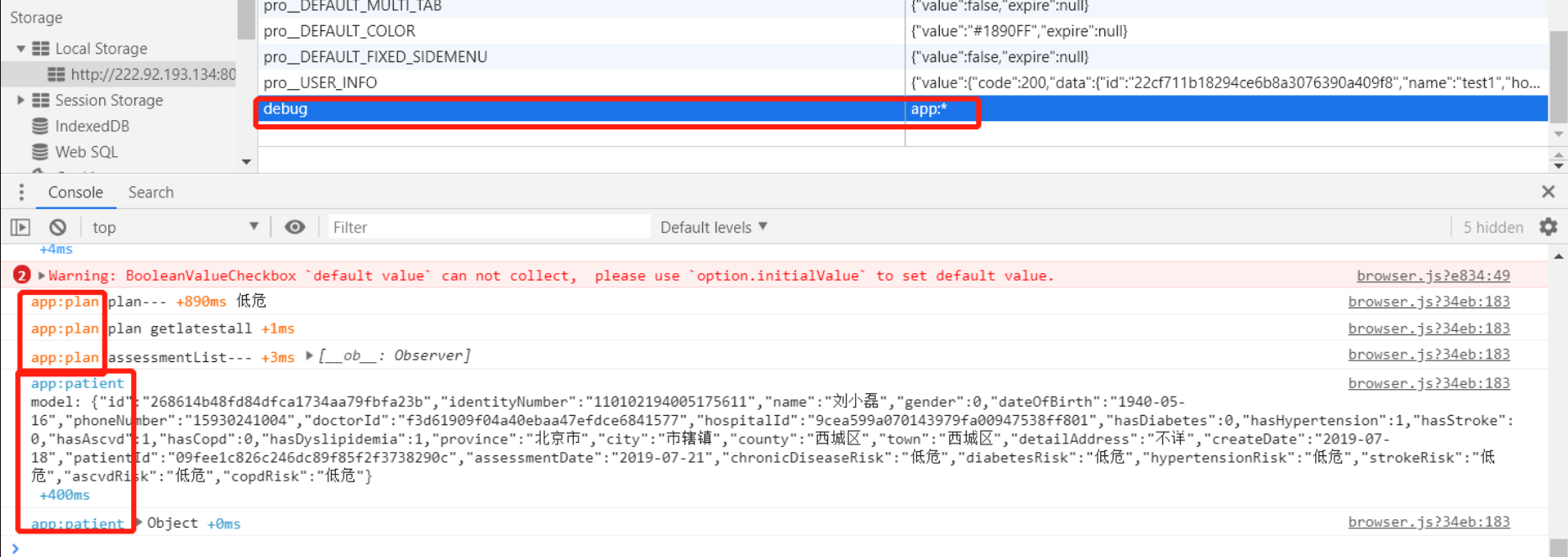
Just set debug item of localstorage and refresh your page, for example, see the following snapshot.
 liudonghua123
on 27 Jul 2019
liudonghua123
on 27 Jul 2019
Was this page helpful?
0 / 5 - 0 ratings
Related issues
 adamcohenrose
·
3Comments
adamcohenrose
·
3Comments
 anishkny
·
6Comments
anishkny
·
6Comments
 ArvoGuo
·
5Comments
ArvoGuo
·
5Comments
 kopax
·
4Comments
kopax
·
4Comments
 roccomuso
·
8Comments
roccomuso
·
8Comments
Most helpful comment
We use this in our Vue projects, in whatever js file is your main entry point
The if statement is optional, we just only run
debugif our config is set to dev mode.