Ddev: "Internet connection not detected" when connected via a VPN (also DNS rebinding, DNSMASQ)
Describe the bug
When I run ddev start and am connected to the internet via VPN, the message "Internet connection not detected" appears and ddev is creating entries in my hosts file, although I have a working internet connection.
To Reproduce
I can reproduce this in macOS 10.15
- Connect to a VPN which is configured to route all traffic through this VPN
- Run
ddev start - You will see
Internet connection not detected
Expected behavior
I would expect to not see the message "Internet connection not detected" and not having entries added to my hosts file
Screenshots
none
Version and configuration information (please complete the following information):
- Host computer OS and Version: macOS Catalina (10.15)
- Docker Desktop version: 2.3.0.3
- ddev version information: 1.15.0
Additional context
none
 koehnlein
All 11 comments
PR #2411 adds more context to the output message, with a link to docs; this will be in v1.15.1+. The simple answer if this is persistent is ddev config global --internet-detection-timeout-ms=3000 to increase the timeout on DNS lookup to 3seconds.
Explanation:
ddev uses the ability to do a DNS lookup of <somethingrandom>.ddev.site as a proxy for whether you're connected to the internet, and it guesses that it ought to be able to complete that in about 750ms or maybe the internet isn't available. If it finds no internet, it will try to create entries in /etc/hosts, since it's assuming you can't use *.ddev.site via DNS.
If the lookup is slower than 750ms you can extend this. I'd say
- See if *.ddev.site is working:
ping xdkkskd.ddev.site- does that work? - If on macOS or Linux,
dig $(openssl rand -base64 8).ddev.site | grep Querywill show you how long a DNS query is taking. - In ~/.ddev/global_config.yaml increase the value of internet_detection_timeout_ms, start with setting it to 3000 (3 seconds) if you're confident that the lookup works most of the time.
Edit: If DNS Rebinding is disallowed by your DNS server (See below https://github.com/drud/ddev/issues/2409#issuecomment-675083658 and https://github.com/drud/ddev/issues/2409#issuecomment-686718237) then you'll need to change that or just live with ddev adding hosts to your /etc/hosts file.
 rfay
on 22 Jul 2020
rfay
on 22 Jul 2020
Thanks for your reply. I tested once again and checke how long the DNS queries are taking. At the moment I do not have any trouble. Maybe, the problem was only a slow network earlier today.
koehnlein
on 22 Jul 2020
I realize this is closed, but I wanted to expand a little for others running into the issue, as slow DNS resolution is not the only source of this error.
Some DNS servers (in my case, DNSMASQ - see "--stop-dns-rebind") support blocking "DNS Rebinding", which is exactly what resolution of *.site.ddev is doing. This is where an upstream DNS server resolves to something in the local/reserved address ranges. This is actually a security feature to help protect a local network from being scanned for hosts.
I think the documentation should provide this guidance, as increasing the timeout is of no help here. Aside from someone changing how their DNS is performed, they would have to do ddev config --use-dns-when-possible=false to be relieved of the error.
So, I would suggest taking some of the expanded explanation from @rfay of telling user's to ensure they can resolve the IP themselves outside DDEV, or else have DDEV do a second resolution when this fails (to something that resolves to an external IP) to be able to describe the issue that has occurred.
As a side-note, for anyone with their own DNSMASQ configuration: you can also add a configuration option of address=/ddev.site/127.0.0.1 rather than disabling DNS rebind protection. (Note that if *.ddev.site should resolve to anything OTHER than 127.0.0.1, then this presents a loss of that functionality and additional configuration would be necessary.)
 wolcen
on 17 Aug 2020
wolcen
on 17 Aug 2020
Thanks for the explanation @wolcen !
rfay
on 17 Aug 2020
I know this issue is closed, but I want to give some additional information as well.
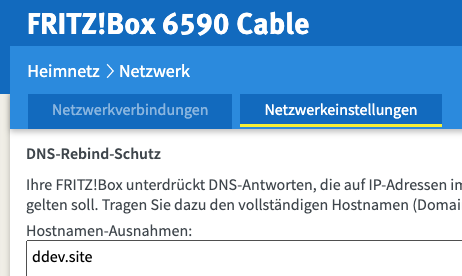
Many people here in Germany use a Fritzbox modem / router to connect to the internet. After the last update I noticed that ddev started complaining about not being able to connect to the internet. After some digging in the extended setting I found out that you have to add ddev.site to the exclusions for dns rebind protection.
Full path to this setting is Heimnetz > Netzwerk > Netzwerkeinstellungen
After opening the weiterte Einstellungen you are able to add ddev.site to the list of exceptions (Hostnamen-Ausnahmen)
 RobertLang
on 3 Sep 2020
RobertLang
on 3 Sep 2020
@RobertLang thank you! i've updated my fritz!box yesterday and ran into the aforementioned "internet connection not detected" issue since then. drove me crazy cuz the dig $(openssl rand -base64 8).ddev.site | grep Query returned a query time of 56ms still ;) your comment was a life saver for my sanity :D
 rpkoller
on 19 Sep 2020
rpkoller
on 19 Sep 2020
Only my observations below.
Summary: I get this error but can get by despite it, it doesn't block my dev work.
I see the "Internet connection not detected" with ddev version v1.15.3 and earlier on my Ubuntu 20.04 machine, with Hyperoptic ISP in the UK - an ISP which I am generally very pleased with.
It happens with ddev import-db command, of a local db, but the db does import correctly when I checked.
The "Internet connection not detected" happening during the ddev import-db command and also the alternative import db command, ddev drush sql-cli < command, has a knock-on effect causing this other error
ERROR 1064 (42000) at line 6997: You have an error in your SQL syntax; check the manual that corresponds to your MariaDB server version for the right syntax to use near 'Internet connection not detected' at line 1
My guess is that the "Internet connection not detected" error is as a result to an internet connection attempt (more on this later) and the error is output in the stream handling the db import, which it, itself thinks it is part of the db, hence that SQL syntax error.
My guess as to why an internet connection attempt is being made during a local db import onto a local project, is for analytics usage data for ddev. Fair enough - this is a great tool and I respect that the ddev makers want to learn about usage to help their business for their paid products.
In any case I regard these errors as a little bit of noise of no apparent consequence, because as I said, the db import is successful my local setup of my site with ddev works.
Going forward, if I really wanted to eliminate this inconsquential error noise, I would consider the following among the above comments:
The timeout value and ping investigations, tweaking possibilities here: https://github.com/drud/ddev/issues/2409 Though I would expect my latency and ping time with Hyperoptic to be within the current parameters, though I can't confirm as the Speed Test tool is down at the moment, http://speed.hyperoptic.com/ though I suppose I could use another.
DNSMASQ comment - https://github.com/drud/ddev/issues/2409#issuecomment-675083658 - though at the moment I don't know what DNSMASQ is, so some learning. I guess that I might need to find out from Hyperoptic if they are using DNSMASQ and how they have configured it.
(By the way, I don't have any affiliation with hyperoptic).
Keep up the great work with ddev - well done!
 therobyouknow
on 24 Oct 2020
therobyouknow
on 24 Oct 2020
FYI, the "internet connection not detected" output is not an error. I think it could be improved by changing the output to "warning: internet connection not detected". Also, it only makes a difference on ddev start, really, where an hostname needs to be added if the internet is not detected. I think it would be an improvement to make it so it's only checked on start. Will think about that.
Opened https://github.com/drud/ddev/issues/2578 to pursue that.
rfay
on 24 Oct 2020
@RobertLang Thanks so much for this - DDEV under WSL2 needs this very much and doesn't resolve the domain otherwise - DANKE!
 a8w4
on 29 Oct 2020
a8w4
on 29 Oct 2020
@RobertLang Thanks for sharing this. Would never have searched there for the problem :-(
@rfay Please update the Troubleshooting section
 griesi007
on 30 Oct 2020
griesi007
on 30 Oct 2020
Would appreciate review of #2605 by anyone in this issue, thanks!
rfay
on 3 Nov 2020
Related issues
therobyouknow
·
5Comments
 itsazzad
·
4Comments
itsazzad
·
4Comments
 jonaseberle
·
6Comments
jonaseberle
·
6Comments
 rvolk
·
4Comments
rvolk
·
4Comments
 mfrieling
·
7Comments
mfrieling
·
7Comments
Most helpful comment
I know this issue is closed, but I want to give some additional information as well.
Many people here in Germany use a Fritzbox modem / router to connect to the internet. After the last update I noticed that ddev started complaining about not being able to connect to the internet. After some digging in the extended setting I found out that you have to add ddev.site to the exclusions for dns rebind protection.
Full path to this setting is Heimnetz > Netzwerk > Netzwerkeinstellungen

After opening the weiterte Einstellungen you are able to add ddev.site to the list of exceptions (Hostnamen-Ausnahmen)