Currently, Shopware 5 is not supported on the same level as Drupal and TYPO3. Using it with apache-fpm works, because of the .htaccess files provided by Shopware, but its slow, and nginx only works with a lot of manual work.
Describe the solution you'd like
Being able to select shopware5 as configuration type and have ddev automatically configure for it.
Describe alternatives you've considered
Defining a nginx-site.conf.
 marcusfellinger
All 22 comments
Thanks!
I found that it worked OK with the demo stuff with apache-fpm and nfs_mount_enabled, and project type php. If you're not using nfs_mount_enabled and you're on macOS or Windows, it's highly recommended.
Do you have a link to an nginx config that is recommended for Shopware? It kind of looked to me like it's Apache-centric.
 rfay
on 29 Nov 2019
rfay
on 29 Nov 2019
I found this configuration https://github.com/bcremer/shopware-with-nginx
It is also the configuration recommended in the Shopware documentation https://developers.shopware.com/sysadmins-guide/shopware-5-performance-for-sysadmins/
marcusfellinger
on 29 Nov 2019
I guess Shopware is pretty much Apache-centric :)
Nginx has been known to run Shopware on several server setups. If you wish to, you can use this web server instead of Apache. Note that this setup is not supported...
I'll try to get an nginx config working.
rfay
on 29 Nov 2019
Try using this file as .ddev/nginx-site.conf, it seems to work for me. If it works, it will be our first stepping-stone to full ddev support for shopware. (Also set webserver_type: nginx-fpm)
# ddev nginx-site.conf for shopware.
# Adapted from https://github.com/bcremer/shopware-with-nginx/blob/master/sites-available/example.com.conf
# and https://github.com/bcremer/shopware-with-nginx/blob/master/global/shopware.conf
# Thanks to @bcremer, https://github.com/bcremer/shopware-with-nginx

# Set https to 'on' if x-forwarded-proto is https
map $http_x_forwarded_proto $fcgi_https {
    default off;
    https on;
}

server {
    listen 80;
    listen 443 ssl http2;

    ssl_certificate /etc/ssl/certs/master.crt;
    ssl_certificate_key /etc/ssl/certs/master.key;

    # The WEBSERVER_DOCROOT variable is substituted with
    # its value when the container is started.
    root $WEBSERVER_DOCROOT;

    include /etc/nginx/monitoring.conf;

    include /mnt/ddev_config/nginx/*.conf;

    set $shopware_env 'production';


   if ($request_method = BAN) {
       rewrite ^ /shopware.php last;
   }

   location = /favicon.ico {
       log_not_found off;
       access_log off;
   }

   ## Deny all attempts to access hidden files such as .env, .htaccess, .htpasswd, .DS_Store (Mac).
   location ~ /\. {
       return 404;
   }

   ## Deny all attems to access possible configuration files
   location ~ \.(tpl|yml|ini|log)$ {
       return 404;
   }

   ## Deny access to media upload folder
   location ^~ /media/temp/ {
       return 404;
   }

   # Shopware caches and logs
   location ^~ /var/ {
       return 404;
   }

   # Deny access to root files
   location ~ (autoload\.php|composer\.(json|lock|phar)|CONTRIBUTING\.md|eula.*\.txt|license\.txt|README\.md|UPGRADE-(.*)\.md|.*\.dist)$ {
       return 404;
   }

   # Restrict access to shop configs files
   location ~ /(web\/cache\/(config_\d+\.json|all.less))$ {
       return 404;
   }

   # Restrict access to theme configurations
   location ~ /themes/(.*)(.*\.lock|package\.json|Gruntfile\.js|all\.less)$ {
       return 404;
   }

   location ^~ /files/documents/ {
       return 404;
   }

   location ^~ /files/backup/ {
       return 404;
   }

   # Restrict access to plugin xmls
   location ~ /custom/.*(config|menu|services|plugin)\.xml$ {
       # rewrite, because this is the default behaviour for non-existing files and
       # makes it difficult to detect whether a plugin is installed or not by checking the files
       rewrite . /shopware.php?controller=Error&action=pageNotFoundError last;
   }

   # Block direct access to ESDs, but allow the follwing download options:
   #  * 'PHP' (slow)
   #  * 'X-Accel' (optimized)
   # Also see http://wiki.shopware.com/ESD_detail_1116.html#Ab_Shopware_4.2.2
   # With Shopware 5.5 a esdKey will be generated in the installation process, please consider changing this value
   location ^~ /files/552211cce724117c3178e3d22bec532ec/ {
       internal;
   }

   # Shopware install / update
   location /recovery/install {
       index index.php;
       try_files $uri /recovery/install/index.php$is_args$args;
   }

   location /recovery/update/ {
       location /recovery/update/assets {
       }
       if (!-e $request_filename){
           rewrite . /recovery/update/index.php last;
       }
   }

   location / {
       location ~* "^/themes/Frontend/(?:.+)/frontend/_public/(?:.+)\.(?:ttf|eot|svg|woff|woff2)$" {
           expires max;
           add_header Cache-Control "public";
           access_log off;
           log_not_found off;
       }

       location ~* "^/web/cache/(?:[0-9]{10})_(?:.+)\.(?:js|css)$" {
           expires max;
           add_header Cache-Control "public";
           access_log off;
           log_not_found off;
       }


       ## All static files will be served directly.
       location ~* ^.+\.(?:css|cur|js|jpe?g|gif|ico|png|svg|webp|html)$ {
           ## Defining rewrite rules
           rewrite files/documents/.* /engine last;
           rewrite backend/media/(.*) /media/$1 last;

           expires 1w;
           add_header Cache-Control "public, must-revalidate, proxy-revalidate";

           access_log off;
           # The directive enables or disables messages in error_log about files not found on disk.
           log_not_found off;

           tcp_nodelay off;
           ## Set the OS file cache.
           open_file_cache max=3000 inactive=120s;
           open_file_cache_valid 45s;
           open_file_cache_min_uses 2;
           open_file_cache_errors off;

           ## Fallback to shopware
           ## comment in if needed
           try_files $uri /shopware.php?controller=Media&action=fallback;
       }

       index shopware.php index.php;
       try_files $uri $uri/ /shopware.php$is_args$args;
   }

   ## XML Sitemap support.
   location = /sitemap.xml {
       log_not_found off;
       access_log off;
       try_files $uri @shopware;
   }

   ## XML SitemapMobile support.
   location = /sitemapMobile.xml {
       log_not_found off;
       access_log off;
       try_files $uri @shopware;
   }

   ## robots.txt support.
   location = /robots.txt {
       log_not_found off;
       access_log off;
       try_files $uri @shopware;
   }

   location @shopware {
       rewrite / /shopware.php;
   }

   location ~ \.php$ {
       try_files $uri $uri/ =404;

       ## NOTE: You should have "cgi.fix_pathinfo = 0;" in php.ini
       fastcgi_split_path_info ^(.+\.php)(/.+)$;
       fastcgi_param SHOPWARE_ENV    $shopware_env if_not_empty;

       # Mitigate httpoxy vulnerability, see: https://httpoxy.org/
       fastcgi_param HTTP_PROXY "";

       client_max_body_size 24M;
       client_body_buffer_size 128k;

       fastcgi_pass unix:/run/php-fpm.sock;
       fastcgi_buffers 16 16k;
       fastcgi_buffer_size 32k;
       fastcgi_param SCRIPT_FILENAME $document_root$fastcgi_script_name;
       fastcgi_param SCRIPT_NAME $fastcgi_script_name;
       fastcgi_index index.php;
       include fastcgi_params;
       fastcgi_intercept_errors off;
       # fastcgi_read_timeout should match max_execution_time in php.ini
       fastcgi_read_timeout 10m;
       fastcgi_param SERVER_NAME $host;
       fastcgi_param HTTPS $fcgi_https;
   }
}
This configuration works for me also.
marcusfellinger
on 30 Nov 2019
Studying Shopware 6 (Platform) a bit, I see that it comes with its own (rather overwhelming) docker local dev environment. It takes perhaps hours to download and install, and at the end of that I got a mean failure message.
I did in fact get it to install after a full rebuild (rm -r, docker rm -f, and start all over).
So this is either a big opportunity, or a place to stay away from because the space is already occupied.
rfay
on 11 Feb 2020
In my opinion the Shopware 6 local dev environment is mostly about working on shopware itself. The setup is quite heavy, therefore we use the https://github.com/shopware/production for projects and ddev local to streamline all our project development.
The above described nginx-site.conf corresponds to our nginx.conf for Shopware 5. I have attached our default ddev nginx configuration files (remove the .txt)
nginx-site.conf.txt
nginx_shopware5.conf.txt
 RobertLang
on 11 Feb 2020
RobertLang
on 11 Feb 2020
@rfay @RobertLang As you said, the local dev environment for Shopware 6 is rather heavy. It also isn't cross platform, see e.g. Docker Installation on Windows. Also, the Shopware environments always use localhost:8000 for the website, and you need additional steps to change this if you want to run multiple instances.
 mfellinger-sisi
on 22 Apr 2020
mfellinger-sisi
on 22 Apr 2020
I'm currently also working on a Shopware 6 project with the provided Docker installation guide (https://docs.shopware.com/en/shopware-platform-dev-en/system-guide/installation) and can admit that it's a really bloated environment compared to what i was used to know while working with TYPO3 and ddev.
It would be great if there was a ddev configuration for Shopware and I'm sure that there would be many people using it.
 createdwithlove
on 29 Jun 2020
createdwithlove
on 29 Jun 2020
For shopware 6 I blogged on how to set that up with ddev here: https://susi.dev/ddev-shopware-6 - maybe that helps in creating some kind of template for it?
 susannemoog
on 21 Jul 2020
susannemoog
on 21 Jul 2020
AWESOME! That should help enormously, https://twitter.com/randyfay/status/1285579776413990912
@susannemoog should we even bother with Shopware 5?
rfay
on 21 Jul 2020
@susannemoog should we even bother with Shopware 5?
I'm not sure - I guess new projects will mostly use Shopware 6; Shopware 5 support would probably be relevant for legacy projects - but at a guess people already have some kind of working setup for that.
susannemoog
on 21 Jul 2020
@susannemoog Very good explained. But where are your plugin files located? Compared to a TYPO3 ddev setup, where I can put everything in a .build folder (like in bootstrap_package) which isn't pushed to the vcs and where the EXT is symlinked to typo3conf I'm still struggling what's the right setup for plugin-development.
At the moment my Plugins live in custom/plugins. Symlinking them doesn't seem to work for me. Or do i miss something?
createdwithlove
on 27 Jul 2020
I finally got it running with Susi's explanation. However it is running very unstable for me. The system breaks down when I am in the admin backend. I permanently have to restart docker. And now I finally even can't get it running again because I only get an exception that the permissions for public key in /config/jwt are wrong.
When I try and change the permissions via ddev ssh and chown, nothing happens.
I mean, I am running docker for windows (not using WSL 2) (and I have it running with ddev very smoothly for TYPO3 development).
Is shopware meant to run under Docker for windows?
 Martin-Ernst
on 30 Jul 2020
Martin-Ernst
on 30 Jul 2020
Could you say why you have to restart docker and what version of Docker Desktop you're running? Have you looked at increasing memory? One problem that perpetually comes up on macOS and WIndows is that people are out of disk space allocated for docker. Causes all kinds of trouble. Please check that.
In classic Docker Desktop for Windows, you can't change permissions inside the container - they're wired to root/root. What about the permissions is wrong? Is shopware complaining about them? Have you tried changing the permissions on the host? Please ddev ssh and ls -l config/jwt and report the results, thanks.
rfay
on 30 Jul 2020
@rfay Thanks for helping. I have Docker Dekstop for Windows 2.3.0.4 (46911) and Docker Compose (1.26.2).
My Docker can use up to 12 CPUs, 6 GB of Memory, 64 GB disk size (17,8 GB used) and 1 GB Swap Size.
At the moment I cannot reproduce the "hanging up" of my containers because I can't get the Shopware running. The error I receive is:
"User Notice: Key file "file:///var/www/html/config/jwt/public.pem" permissions are not correct, recommend changing to 600 or 660 instead of 755".
To be honest, I do not know how to change the user rights on my windows host so that it fits for the client container.
In the container it looks like:
-rwxr-xr-x 1 root root 1704 Jul 30 10:35 private.pem
-rwxr-xr-x 1 root root  451 Jul 30 10:35 public.pem
@Martin-Ernst I'm not sure you'll be able to get it to not complain about permissions in a Windows-mounted filesystem. Windows (and filesystems mounted from Windows) don't do very well with expected permissions. However, I wouldn't be surprised if this is just a warning, not an error. I'll try to take a runthrough on the Shopware setup soon.
rfay
on 31 Jul 2020
I now found a workaround. The check for permissions of the key file can be switched off in /config/services/defaults.xml.
With it deactivated, the shop now runs again. The performance is good too. I jhope my experiences will be better now :-) Thanks very much for your support.
Martin-Ernst
on 31 Jul 2020
I now found a workaround. The check for permissions of the key file can be switched off in /config/services/defaults.xml.
With it deactivated, the shop now runs again. The performance is good too. I jhope my experiences will be better now :-) Thanks very much for your support.
How did you do that ?
 granitibrahimi
on 3 Sep 2020
granitibrahimi
on 3 Sep 2020
In /config/services/defaults.xml I adjusted two entries:
`
<service class="League\OAuth2\Server\CryptKey" id="shopware.private_key">
        <argument>%kernel.project_dir%/config/jwt/private.pem</argument>
        <argument>%env(string:default:jwt_private_key_passphrase_default:JWT_PRIVATE_KEY_PASSPHRASE)%</argument>
        <argument key="$keyPermissionsCheck">false</argument>
    </service>

    <service class="League\OAuth2\Server\CryptKey" id="shopware.public_key">
        <argument>%kernel.project_dir%/config/jwt/public.pem</argument>
        <argument></argument>
        <argument key="$keyPermissionsCheck">false</argument>
    </service>`
The $keyPermissionsCheck is the interesting part.
Martin-Ernst
on 3 Sep 2020
For shopware 6 I blogged on how to set that up with ddev here: https://susi.dev/ddev-shopware-6 - maybe that helps in creating some kind of template for it?
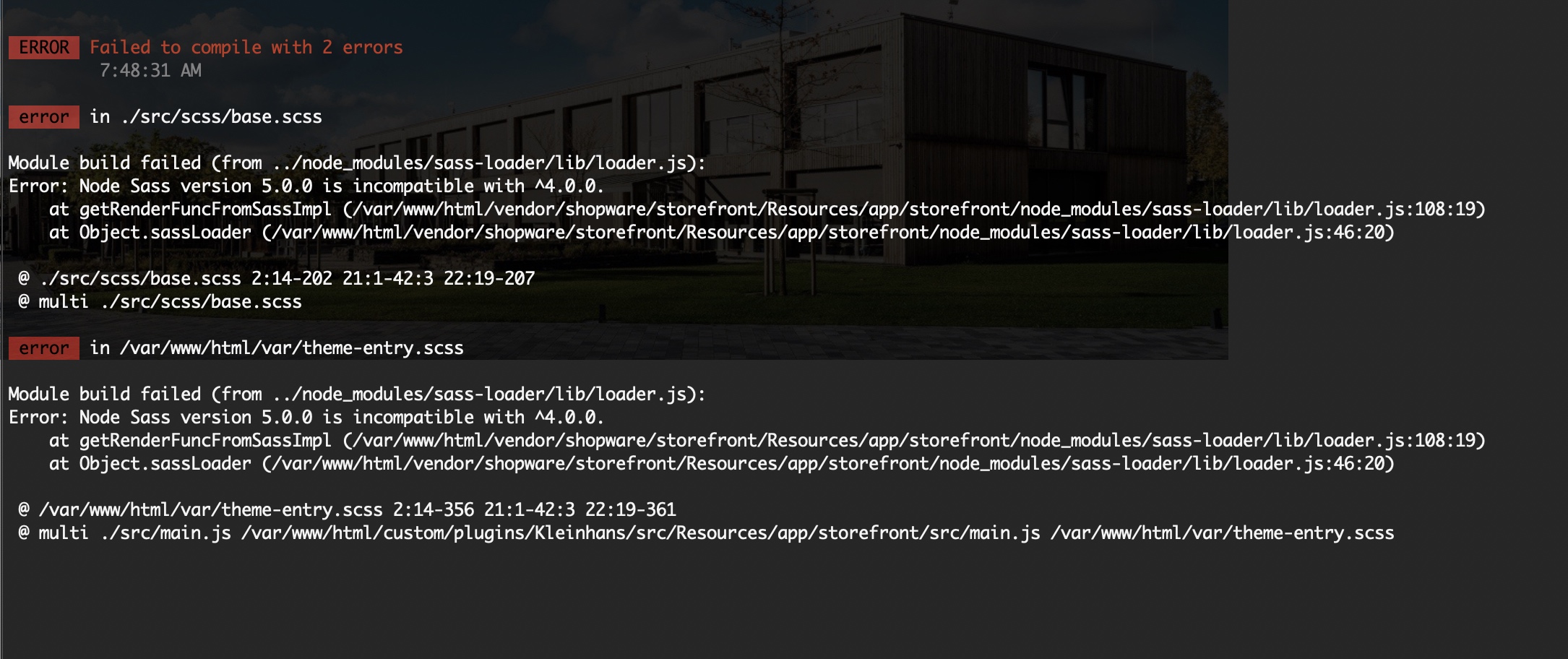
@susannemoog Any ideas why this is happening while using "ddev exec bin/watch-storefront.sh"?
 jwohlfeil
on 26 Nov 2020
jwohlfeil
on 26 Nov 2020
Ah ok, this helped:
npm uninstall node-sass && npm install [email protected]
jwohlfeil
on 26 Nov 2020
Related issues
 jcnventura
·
3Comments
jcnventura
·
3Comments
 Gonzalo2683
·
5Comments
rfay
·
5Comments
Gonzalo2683
·
5Comments
rfay
·
5Comments
 mfrieling
·
7Comments
mfrieling
·
7Comments
 ptoseklukas
·
6Comments
ptoseklukas
·
6Comments
Most helpful comment
I'm currently also working on a Shopware 6 project with the provided Docker installation guide (https://docs.shopware.com/en/shopware-platform-dev-en/system-guide/installation) and can admit that it's a really bloated environment compared to what i was used to know while working with TYPO3 and ddev.
It would be great if there was a ddev configuration for Shopware and I'm sure that there would be many people using it.