Ddev: Release build generates broken windows installer for v1.10.* is completely broken, doesn't install dependencies
It happens after installing version 1.10.1 Somehow the installer doesn't set the environment variable in Windows 10 pro. You can quickly solve it by adding the PATH yourself C:\Program Files\ddev in System properties > Environment Variables
Thanks a lot to Randy Fay for the solution!!
 JavierVelazquez
All 12 comments
There are actually several problems with the v1.10.1 ddev_windows_installer. None of the extra components like sudo and nssm and such get installed properly.
 rfay
on 8 Aug 2019
rfay
on 8 Aug 2019
I changed the title; this is a super-important issue.
Simon Gilli points out this in the installer; nothing except ddev is being installed, so the nfs script, the sudo binary, the nssm binary, etc are all missing.
v1.9.1 shows this at install time:
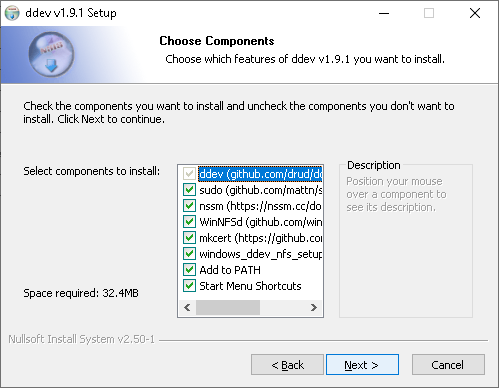
v1.10.1 shows this:

rfay
on 8 Aug 2019
Very insightful. That is indeed the screen of 1.10.1. Also installing through chocolately didn't add the path, so you know. I only used the installer once. After I used choco install which installs in the background so you don't even see the screen.
Thanks again for your work on this.
Much appreciated. Wonderful community in radical times.
JavierVelazquez
on 9 Aug 2019
Basically, the make windows_install step does not work on the CircleCI macOS build agent. It does work on a regular mac running Mojave.
The workaround for the next patch release will be to
- do a normal release build,
- do a
make windows_installon macOS locally, - upload the windows installer and its sha256 to the release.
- Fix the chocolatey install manually and push it
rfay
on 9 Aug 2019
v1.10.2 is out and manually provides a working Windows installer to solve these things.
Fixing the release build to build the right chocolatey will be the next step.
rfay
on 9 Aug 2019
You are fast! At least for now we have a workaround.
I took me a few hours and I wish I asked for help on the slack earlier. You got it solved pretty fast.
JavierVelazquez
on 9 Aug 2019
The CircleCI (macOS) v1.10.2 build (which DOES NOT create a valid windows installer; it produces the invalid installer at https://circleci.com/gh/drud/ddev/16918#artifacts/containers/0) is at https://circleci.com/gh/drud/ddev/16918
A local macOS build of v1.10.2 (macOS mojave) produces a valid installer (with all components) in this output: https://gist.github.com/rfay/2123533ab048f732a7d63df63d871c44 (The locally built installer is at https://www.dropbox.com/s/vu7mf2d5idnrdb7/ddev_windows_installer.v1.10.2.exe?dl=0 )
rfay
on 11 Aug 2019
@rfay Found some differences in the two release concerning the nsis code and data packed to the installer. After a analysis of the two build logs I also found some differences there see screen shot
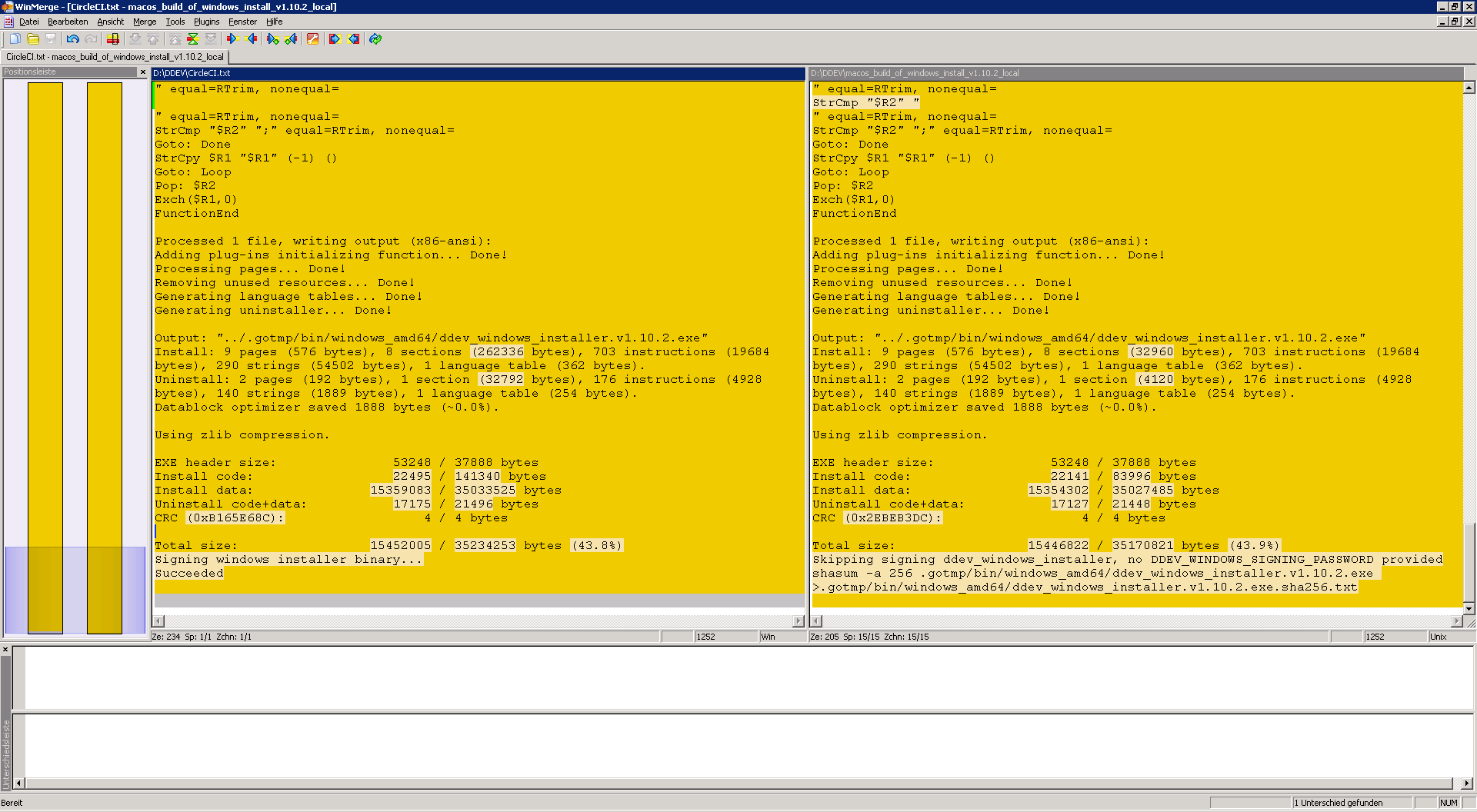
After a second read of the nsis code I have found the SectionIn statement in the optional sections and removed them because the feature of installer types is not used for this installer and I guess this could be the source of the disapearing components.
 gilbertsoft
on 11 Aug 2019
gilbertsoft
on 11 Aug 2019
Awesome. BTW, it's possible to ssh into the build as well, so that will be an option. I'll try a release build on your PR.
rfay
on 11 Aug 2019
Lots of pain chasing this with awesome work by @gilbertsoft
It seems to be an upstream issue with a change made in the homebrew formula, and a replacement homebrew bottle. https://github.com/Homebrew/homebrew-core/pull/39928 .
That explains why I could build locally with macOS (and we'd always built locally successfully). We already had a downloaded version. And they changed the version behind the scenes, which meant that CircleCI machines got the new (broken) binary, and my local machines had the working one.
I've commented on the homebrew PR, we may need to change our strategy to use something other than homebrew to get makensis going forward, or ... ???
rfay
on 11 Aug 2019
rfay
on 12 Aug 2019
@rfay decreasing the max string length to 1024 can be problematic in the add to path function if someone has a longer string in the registry. As you know I'm already on it and have found a new function which includes a workaround for this issue, but it doesn't solve it completely. So perhaps we should make some more tests on the build with 8k string length or other solution could be writing a dll which handles this. I will do some more tests on this and come back to you...
gilbertsoft
on 13 Aug 2019
Related issues
rfay
·
5Comments
 kaystrobach
·
6Comments
kaystrobach
·
6Comments
 r3h6
·
6Comments
r3h6
·
6Comments
 mfrieling
·
7Comments
mfrieling
·
7Comments
 nicodh
·
4Comments
nicodh
·
4Comments
Most helpful comment
You are fast! At least for now we have a workaround.
I took me a few hours and I wish I asked for help on the slack earlier. You got it solved pretty fast.