ddev has has a already built in command for adding your maschines ssh keys to the containers (ddev auth ssh)
When using a private composer repository generated by satis which is behind a basic auth it would be awesome to copy credentials to the container using ddev auth composer
ddev auth composer need to copy /Users/USERNAME/.composer/auth.json to /home/.composer/auth.json in the web container.
 ochorocho
All 15 comments
Thanks for this request. #926, which is on the roadmap, will allow bashrc and related config to be copied over, and it seems reasonable to try the composer auth as well. Note though that many people are running composer only in the container these days, especially on Windows, so there may not be auth in ~/.composer.
 rfay
on 6 Jun 2019
rfay
on 6 Jun 2019
Note though that many people are running composer only in the container these days, especially on Windows, so there may not be auth in ~/.composer.
Just wondering how they manage their composer credentials.
ochorocho
on 6 Jun 2019
Maybe you can mention why use simple credentials instead of ssh auth. I guess I'm surprised at at the local storage of credentials, but not familiar with satis.
rfay
on 6 Jun 2019
We have some private composer packages which we create using satis. Satis only supports basic auth with credentials.
Couldn't find another way to authenticate a user against satis. Is there a way to use ssh auth for satis? haven't seen any docs regarding this.
ochorocho
on 6 Jun 2019
It looks like kind of a standard use case, see https://getcomposer.org/doc/articles/handling-private-packages-with-satis.md
Note that if your private packages are hosted on GitHub, your server should have an ssh key that gives it access to those packages, and then you should add the --no-interaction (or -n) flag to the command to make sure it falls back to ssh key authentication instead of prompting for a password. This is also a good trick for continuous integration servers.
rfay
on 6 Jun 2019
Yep, but we use Satis to generate the JSON file + archives for each package and version which are stored in a dist-Folder.
See: https://satis.knallimall.org/
So the download-path of the packages is something like this:
https://satis.knallimall.org/dist/joro/desktop/joro-desktop-dcf98a95c6f94545327c0acbfac9292170c521a9-zip-ad3ed6.tar
(except for branches)
ochorocho
on 6 Jun 2019
Thanks for helping me understand.
I do think if you can figure out how to use ssh auth, which should absolutely be possible, your situation will be much more secure. Plain-text credentials in files, even on a dev machine, are always questionable. Of course, they may make you question why you use a private repository too.
rfay
on 6 Jun 2019
Yep, plain-text passwords are not good at all.
i doubt its possible to use ssh auth.
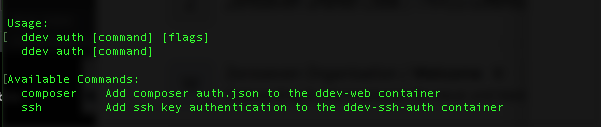
Quickly tried to create an additional command for this (just wanted to see the command to show up):
ochorocho
on 6 Jun 2019
How about a ddev auth composer that took the user/pass?
But I imagine it's possible to have many user/pass combinations in one composer auth right?
rfay
on 6 Jun 2019
How about a ddev auth composer that took the user/pass?
You mean ddev auth composer and ask the user for username and password?
But I imagine it's possible to have many user/pass combinations in one composer auth right?
YES
ochorocho
on 6 Jun 2019
One way to do this right now (from https://getcomposer.org/doc/articles/handling-private-packages-with-satis.md) is to just use ddev composer config http-basic.example.org username password; that article does suggest ssh as a better option.
So you could easily create a post-start hook or (in v1.9 a post-composer hook) to set the username and password. I think this is probably a better option in general.
rfay
on 6 Jun 2019
There is a much easier way to provide composer access data within ddev. Just create a file named auth.json in your project root (same level as .ddev folder) and add your credentials there.
Make sure not to commit this file ;-)
 schliesser
on 14 Jun 2019
schliesser
on 14 Jun 2019
A couple of notes:
- v1.11 will have
ddev composercommands with a live tty, so it's possible to respond to user/password prompts - v1.10 has the nice .ddev/homeadditions directory; anything there gets copied into the user's home directory, so an auth.json will automatically be copied into the in-web-container home directory.
rfay
on 13 Sep 2019
Is it reasonable to close this issue now that ddev composer runs with a tty and prompts for username and password (and saves them in homedir)?
rfay
on 3 Oct 2019
yes :-) Thank you
ochorocho
on 3 Oct 2019
Related issues
 nicodh
·
4Comments
rfay
·
6Comments
nicodh
·
4Comments
rfay
·
6Comments
 juergen-venne
·
7Comments
juergen-venne
·
7Comments
 jfastnacht
·
6Comments
jfastnacht
·
6Comments
 mglaman
·
4Comments
mglaman
·
4Comments
Most helpful comment
There is a much easier way to provide composer access data within ddev. Just create a file named
auth.jsonin your project root (same level as.ddevfolder) and add your credentials there.Make sure not to commit this file ;-)