Dd-trace-rb: Consider removing Version 0.40.0 from published gem version?
The ruby-gems website specifies to install version 0.40.0 https://rubygems.org/gems/ddtrace/versions/0.4.0
This has some breaking changes.
eg:
This error is produced in a hello-world rails application:
...config/initializers/datadog-tracer.rb:3:in <top (required)>': undefined method configure' for Datadog:Module (NoMethodError)
When following the standard install guide that specifies:
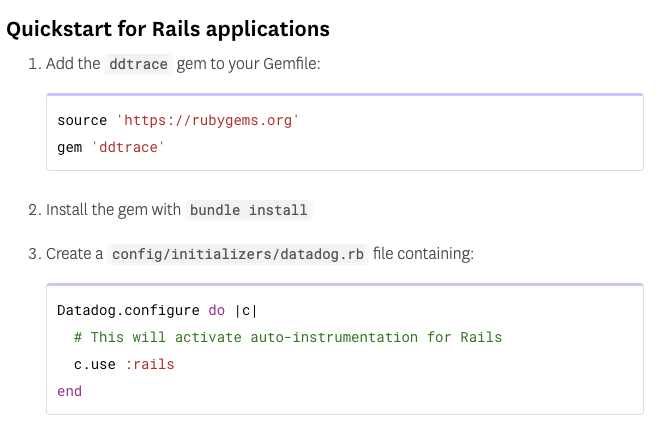
After some investigation we found that Datadog.configure was moved to Datadog.tracer.configure which caused us to check the versioning.
This is unexpected, even considering it may be "unreleased" it's a minor semver increase which should not contain a breaking change.
My team has since downgraded to 0.39.0 after realizing the issue but it wasn't very obvious at first, as there is no mention of 0.40.0 in the changelog or releases pages.
https://github.com/DataDog/dd-trace-rb/blob/master/CHANGELOG.md
https://github.com/DataDog/dd-trace-rb/releases
In fact 0.39.0 is marked as latest
I understand the intention is not for end users to install 0.40.0 at this moment. Yet this simple mistake led us down quite a rabbit hole and i think removing this release from public channel might help others avoid this situation as well.
 SeanDunford
All 3 comments
Hi @SeanDunford, sorry the issues you encountered.
We don't have 0.40.0 published at this moment: https://rubygems.org/gems/ddtrace/versions/0.40.0
I think the issue you are having has to do with a Google SEO issue we've been having where searching for "ddtrace rubygems" returns as the first result a link to https://rubygems.org/gems/ddtrace/versions/0.4.0, which is a very old version. If you go ahead and copy the recommended snippet from that page (gem 'ddtrace', '~> 0.4.0') and paste it into your Gemfile, you'll encounter the issue you have reported.
I tried to install gem 'ddtrace' in a few environments right now, and it correctly installs 0.39.0.
Does this make sense with what you are seeing?
 marcotc
on 13 Aug 2020
marcotc
on 13 Aug 2020
@marcotc - Yes, that makes a lot more sense. Sorry for the flub. Please close.
SeanDunford
on 13 Aug 2020
@SeanDunford no worries, sorry for the trouble again, I'm checking with our SEO wizards to see if we can do something about that.
marcotc
on 13 Aug 2020
Related issues
 delner
·
7Comments
delner
·
7Comments
 kitop
·
7Comments
kitop
·
7Comments
 stevenbuccini
·
3Comments
stevenbuccini
·
3Comments
 gingerlime
·
4Comments
gingerlime
·
4Comments
 renchap
·
4Comments
renchap
·
4Comments