Datetimepicker: iOS 14 Time picker crash
Bug report
Summary
On iOS 14 when pressing the time picker and trying to change the time with the keyboard, the system crashes.
Error:
Argument 0 (NSNumber) of UIManager.measure must not be null
Environment info
react-native info output:
    OS: macOS 10.15.6
    CPU: (4) x64 Intel(R) Core(TM) i5-8210Y CPU @ 1.60GHz
    Memory: 45.46 MB / 8.00 GB
    Shell: 3.2.57 - /bin/bash
  Binaries:
    Node: 13.8.0 - /usr/local/bin/node
    Yarn: 1.22.0 - /usr/local/bin/yarn
    npm: 6.14.4 - /usr/local/bin/npm
    Watchman: 4.9.0 - /usr/local/bin/watchman
  Managers:
    CocoaPods: 1.9.3 - /usr/local/bin/pod
  SDKs:
    iOS SDK:
      Platforms: iOS 14.0, DriverKit 19.0, macOS 10.15, tvOS 14.0, watchOS 7.0
    Android SDK: Not Found
  IDEs:
    Android Studio: 3.5 AI-191.8026.42.35.6010548
    Xcode: 12.0/12A7209 - /usr/bin/xcodebuild
  Languages:
    Java: 13.0.1 - /usr/bin/javac
    Python: 2.7.16 - /usr/bin/python
  npmPackages:
    @react-native-community/cli: Not Found
    react: 16.9.0 => 16.9.0
    react-native: ^0.62.2 => 0.62.2
  npmGlobalPackages:
    *react-native*: Not Found
Library version: x.x.x
Steps to reproduce
- Create a DateTimePicker only with mode="time"
- Press on the default time
- Press on the time again to open keyboard.
- System crashes
Describe what you expected to happen:
- no Crash
Reproducible sample code

good first issue
 Erik1291
👍1
All 7 comments
Can you send your code? From my point just comment textColor
<DateTimePicker
        value={value}
        onChange={onChange}
        mode={'time'}
        // textColor="black"
      />
 sitanjob
on 23 Sep 2020
sitanjob
on 23 Sep 2020
Happens to me too since installing ios 14 last week.
My code is :
<DateTimePicker
          testID='dateTimePicker'
          value={dateState}
          mode='date'
          is24Hour={true}
          display='default'
          onChange={(event, date) =>setDateState(date)}
          style={someStyle}
          textColor={white}
/>
I'm using React Native 0.61 and run it on iphone X.
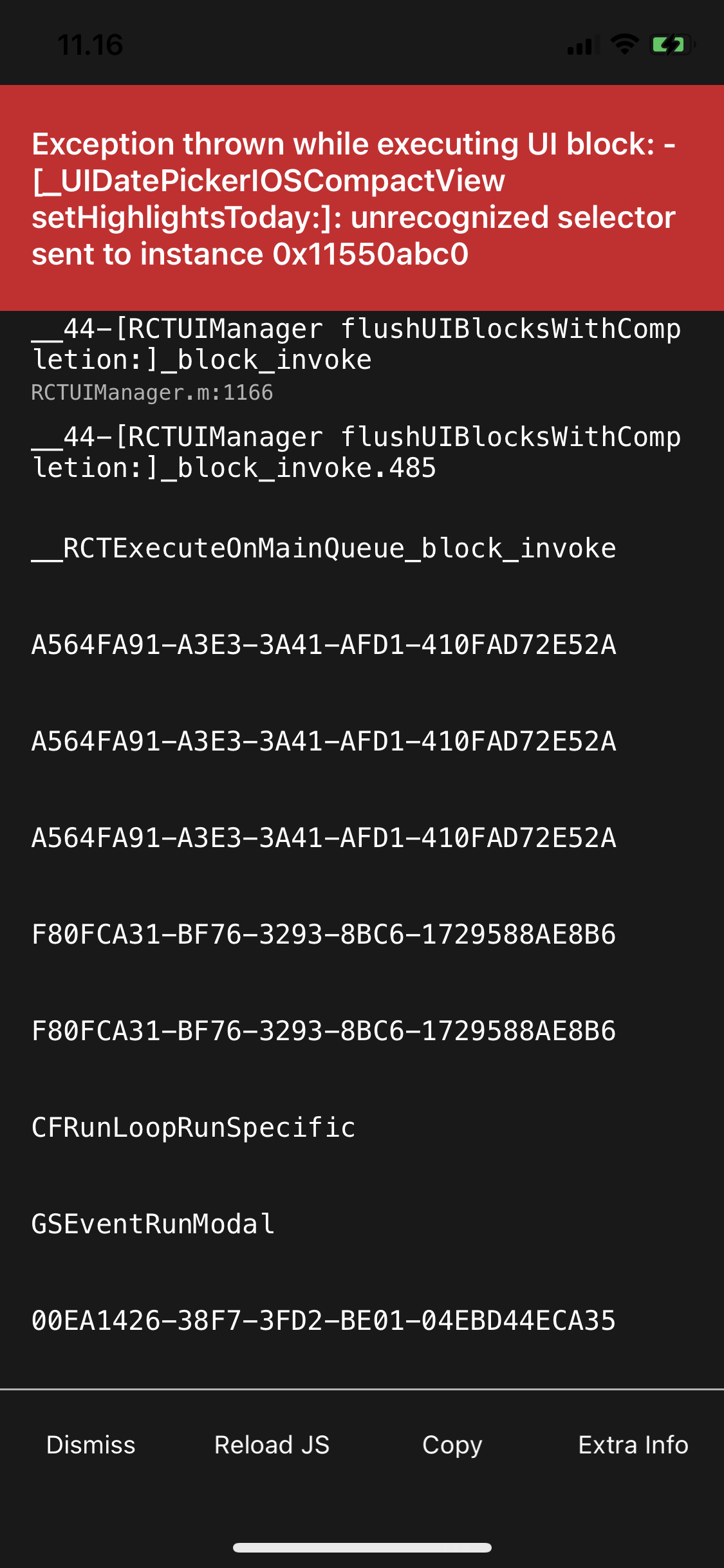
 IrvanMahardhika
on 24 Sep 2020
IrvanMahardhika
on 24 Sep 2020
<DateTimePicker
                        value={this.state.date}
                        mode="time"
                        is24Hour={true}
                        display="default"
                        style={{height:45, width:150, backgroundColor:'#FFF'}}
                        onChange={this.setDate} />
I tried it without style, without display and so on. Still not working.
Erik1291
on 24 Sep 2020
textColor is the cause.
Workaround:
<DateTimePicker
  value={value}
  mode={'date'}
  is24Hour={true}
  onChange={onChangeDatepicker}
  {...(Platform.OS === 'ios' && parseFloat(Platform.Version) >= 14
    ? null
   : { textColor: theme.colors.black })} // on ios 14+ causes crash
/>
 Gentlee
on 24 Sep 2020
Gentlee
on 24 Sep 2020
👍3
🚀2
I did not set any text color...
I upgraded my react native and all dependencies.
The dump/error is gone.
Erik1291
on 24 Sep 2020
Yep text color is the cause.
 harveyconnor
on 27 Sep 2020
harveyconnor
on 27 Sep 2020
👍6
I'm facing this exact same error in Android.
ps: I'm not using textColor.
 andreasadelino
on 23 Oct 2020
andreasadelino
on 23 Oct 2020
Was this page helpful?
0 / 5 - 0 ratings
Related issues
 yesIamFaded
·
5Comments
yesIamFaded
·
5Comments
 Kamalnrf
·
3Comments
Kamalnrf
·
3Comments
 danlugo92
·
5Comments
danlugo92
·
5Comments
 RoTTex
·
3Comments
RoTTex
·
3Comments
 wesff
·
3Comments
wesff
·
3Comments
Most helpful comment
Yep text color is the cause.