Datetimepicker: Support Dark Mode
Could you support dark mode, since ios 13 is going to be released soon ?
 wamry
wamry
All 13 comments
I'm all for supporting the various native OS modes that exist. Do you have any details (docs, blogpost) wrt to that mode? Since we wrap the native modules I suspect it is just a single flag we can set?
 Swaagie
on 13 Aug 2019
Swaagie
on 13 Aug 2019
Ok, I can't see it in any third party ios app, but i saw it in the clock app.
https://i.imgur.com/kkhMoya.jpg
I'm using iOS 13
wamry
on 19 Aug 2019
I expect that it will "just work" if the host app supports dark mode?
 hawkrives
on 19 Aug 2019
hawkrives
on 19 Aug 2019
As the Appearance module is not released yet and there is no best practice approach on how to deal with it, I understand it is hard to decide on what to do.
Until then, here are my thoughts on what is necessary to use this library in an app with switchable dark mode pre-RN0.61 (Android Dark mode integration has no ETA yet):
Android:
- New style is required as well as a toggle in RNDatePickerDialogFragment.java to select the appropriate style (light or dark) at runtime.
iOS:
- As the background is transparent, only font-colors need to be adapted depending on light or dark theming.
I hope this helps!
 RobTS
on 18 Sep 2019
RobTS
on 18 Sep 2019
The lack of support for this feature is causing issues with the datetime picker when dark mode is enabled.
For those who are looking for a temporary solution, see this comment.
 josh-wiley
on 27 Sep 2019
josh-wiley
on 27 Sep 2019
For anyone perplexed as to why the suggested temporary isn't working... or why it isn't working in Expo...
We have date pickers inside of Modal components in a few cases (actually the only place we use a date picker). Despite following the workaround, the text would still be white in dark mode. It turns out the workaround of
// force light theme to avoid white text in white background TextInput
  if (@available(iOS 13.0, *)) {
    rootView.overrideUserInterfaceStyle = UIUserInterfaceStyleLight;
  }
does not affect Modal's, I believe because the Modal has a separate view controller.
Anyway, what does work is to override dark mode in Info.plist with the UIUserInterfaceStyle key (string) set to Light.
 llamaluvr
on 7 Oct 2019
llamaluvr
on 7 Oct 2019
Well, you can also use https://github.com/expo/react-native-appearance , if app is migrated to rn 0.59 or higher.
But out of the box dark mode support, without workarounds will be much appreciated)
 Andriiklymiuk
on 11 Oct 2019
Andriiklymiuk
on 11 Oct 2019
on iOS this works well with the react-native-appearance package (using the package here underneath the react-native-modal-datetime-picker package)
for android this won't be possible until as mentioned above the dialog fragment native Java code here is altered to load themes via props and you include different themes (due to a platform limitation you are limited to theme switching and can't drive a theme directly I don't think - or at least not easily. https://github.com/react-native-community/react-native-datetimepicker/issues/20#issuecomment-546721906
 mikehardy
on 27 Oct 2019
mikehardy
on 27 Oct 2019
The solution posted here works for this module.
 jennmueng
on 31 Oct 2019
jennmueng
on 31 Oct 2019
whenever changes Theme ( DarkMode <<-to->> LightMode ), its change Date into 1 Jan 1970 for first time when app load + expo + react Native
Its happens in iOS and android ( RealMe 5 Pro, have a option to change theme to Dark mode to light mode or vice - versa ) in both devices.
anyone can give solution, urgently
your solutions are welcome
 kundansingh13
on 13 Feb 2020
kundansingh13
on 13 Feb 2020
I'm closing this because
- the picker itself changes its appearance based on mode, and this is controlled by iOS. if this is not what you want, workarounds are documented ^
- we now support
textColorprop - react-native-appearance can be used for more control
- https://github.com/facebook/react-native/pull/27908 brings more control for dark/light mode color props
 vonovak
on 20 Mar 2020
vonovak
on 20 Mar 2020
I just faced the issue that only parts of the DateTimePicker component would be visible in dark mode AND without the textColor prop, I wasn't able to select a date in the future. Fixed it by adding the textColor prop.
 brandtnewww
on 15 Apr 2020
brandtnewww
on 15 Apr 2020
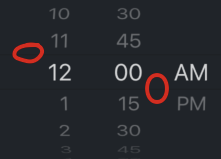
There are dark lines in iOS... How to fill it to light?
 zmnv
on 23 Apr 2020
zmnv
on 23 Apr 2020
Related issues
 FDiskas
·
3Comments
FDiskas
·
3Comments
 yesIamFaded
·
5Comments
yesIamFaded
·
5Comments
 otaviogaiao
·
5Comments
otaviogaiao
·
5Comments
 gabrieljablonski
·
5Comments
gabrieljablonski
·
5Comments
 gokulkulkarni1987
·
3Comments
gokulkulkarni1987
·
3Comments
Most helpful comment
For anyone perplexed as to why the suggested temporary isn't working... or why it isn't working in Expo...
We have date pickers inside of
Modalcomponents in a few cases (actually the only place we use a date picker). Despite following the workaround, the text would still be white in dark mode. It turns out the workaround ofdoes not affect
Modal's, I believe because theModalhas a separate view controller.Anyway, what does work is to override dark mode in
Info.plistwith theUIUserInterfaceStylekey (string) set toLight.